Your AI Agent Has Been Keeping Your API Key All This Time.

The two LangChain middleware layers that strip secrets, compress memory, and keep agents coherent across two-hour sessions
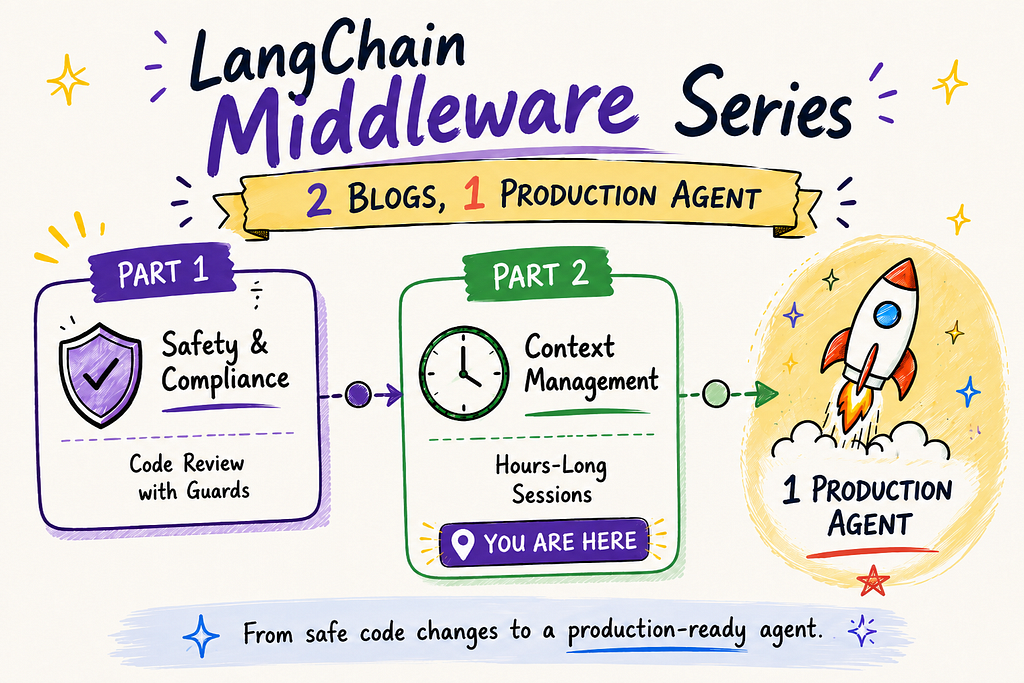
Last week, you gave your AI agent an API key.
The agent used it, completed the task, and moved on. You closed the tab.
What you did not do is tell it to forget.
That key is still there. Sitting in the conversation history. Every model call the agent makes from that point forward is carrying your secret as context automatically, silently, with no error and no warning. And the longer the agent runs, the more it accumulates. Tool outputs already acted on. Intermediate reasoning that has no bearing on the current task. Old file contents the model read three steps ago.
The model does not slow down because of this. It does not throw an error. It just gets worse quietly, in ways that look like model drift until you realise the model is pattern-matching against noise it should have discarded an hour ago.
By the end of this post, you will have a coding agent that can run for two hours, touch forty-five files, and arrive at the end without losing coherence using the same two techniques Anthropic built into Claude Code for exactly this problem. One compresses what the model no longer needs in full detail. The other removes what it should never have kept.
The model does not have memory. It has a notepad — and you keep adding to it.
Most people picture the AI agent as a thinking entity that remembers things, but this is the wrong idea. It explains why secrets leak.
What really happens is this: every time the agent interacts with the AI model, it sends the entire conversation history as text.
This includes your first message, the model’s first response, every tool call the agent made, and all the results it received everything combined into one long block of text, which is sent fresh with each call.
The model does not remember anything. Instead, the framework re-reads the conversation from the start each time.
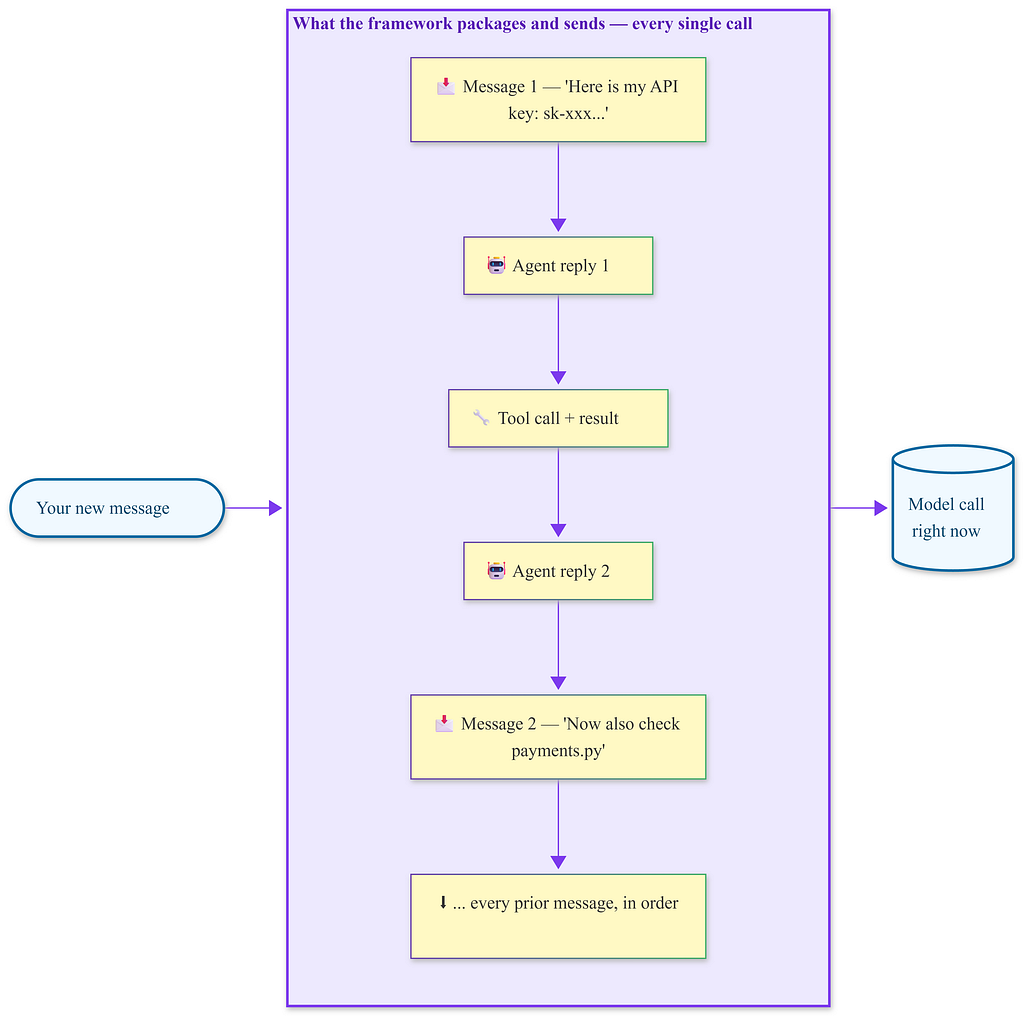
Every model call resends the full conversation history from the beginning. The API key you typed in the first message travels with each subsequent call silently, unless you explicitly stop it.
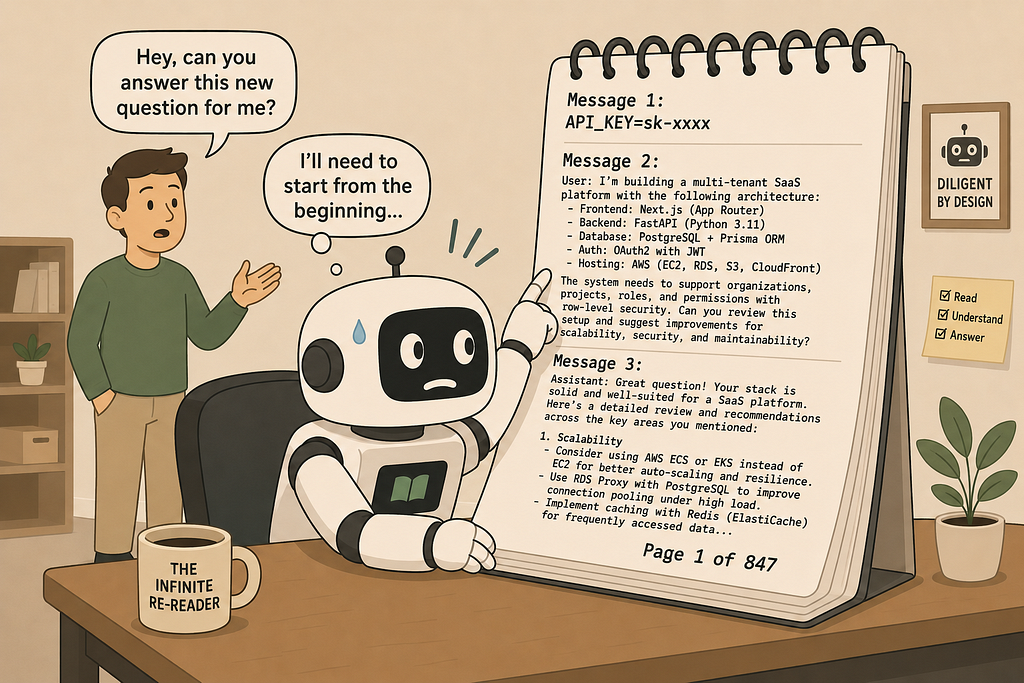
This is what a context window is — a notepad, not memory. And that notepad only has a limited number of pages. As the agent works, it keeps filling those pages, and eventually, it reaches its limit.
When the notepad fills up, the framework must start removing old pages.
The question is: which ones? And who decides? If no one has made a choice if you just deployed an agent without thinking about context management the framework makes its best guess, which is often wrong at the worst moment.
The model does not remember your API key; the notepad holding the conversation does, and it retains it until someone explicitly removes it.
The specific way agents break when sessions get long
Here’s how agents fail when sessions get long.
A developer gives their agent a real task, like refactoring a Python codebase to use a new API. This could involve twenty files or more.
The agent starts reading files, writing changes, and running tests. Everything goes smoothly for the first fifteen minutes.
Around the twentieth tool call, something subtle starts to go wrong.
The agent references a function it has already renamed. It imports a module it has already deleted. It writes a change it already made three files earlier.
The agent is not stupid ; the model driving it is the same as it was in the first call. What has changed is the notepad.
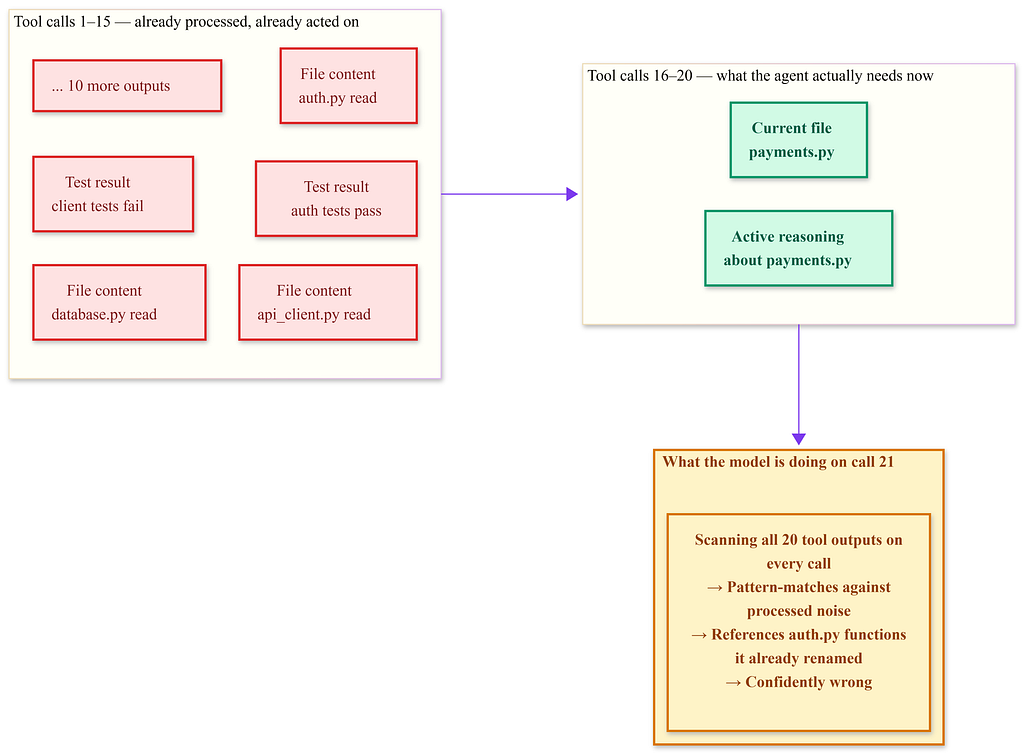
The red zone is noise, data the agent has already acted on, taking up space.The model has to scan all of it on every call. The green zone is what actually matters.
Nobody has configured which is which.
By the twentieth call, the notepad is filled with outputs from earlier calls: raw file contents, test results, and intermediate reasoning.
This processed material is still there, taking up space.
The model is now trying to recognize patterns against a cluttered background. The task was not too complex; the context management was mismanaged.
What PII middleware is, and why most agent builders skip it
PII stands for Personally Identifiable Information. API keys, card numbers, email addresses, phone numbers — anything that should not leave your system or show up in a model’s input unnecessarily.
PIIMiddleware is a layer that sits between your messages and the model. Before any text reaches the model, the middleware scans it. If it finds a credit card pattern, it replaces it: ****-****-****-1234. If it finds an email address you configured it to redact, the model never sees the address — it sees [REDACTED_EMAIL] instead.
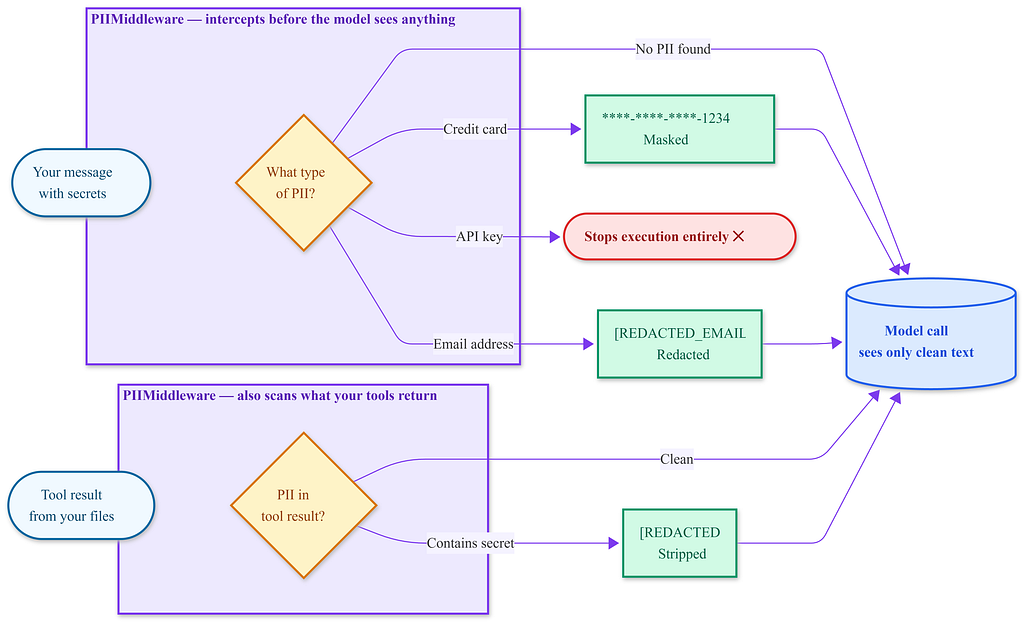
PII Middleware intercepts messages in both directions — what you send and what your tools return. The model only ever sees the cleaned version. The original text does not get through.
Most agent builders skip this step because the agent works without it. There are no errors or warnings. The card number can pass through to the model, which then processes your request just fine. You only find out it was there if you check your traces, and most people do not look at their traces.
from langchain.agents.middleware import PIIMiddleware
# The agent now never sends raw PII to the model
middleware=[
    PIIMiddleware(
        strategies={
            "credit_card": "mask",      # → ****-****-****-1234
            "email": "redact",          # → [REDACTED_EMAIL]
            "api_key": "block",         # stops execution entirely
        },
        apply_to=["user_messages", "tool_results"]
    ),
]
apply_to=[“user_messages”, “tool_results”] — this part matters. The model sees your messages. It also sees what your tools return. If a tool reads a file that contains a secret, that secret travels to the model too. Both directions need coverage.
Many tutorials fail to mention that PII Middleware is not just a security lock; it defines what the model needs to know versus what is in the text. Your agent does not need the actual card number to process a payment confirmation; it needs to know that the payment was confirmed.
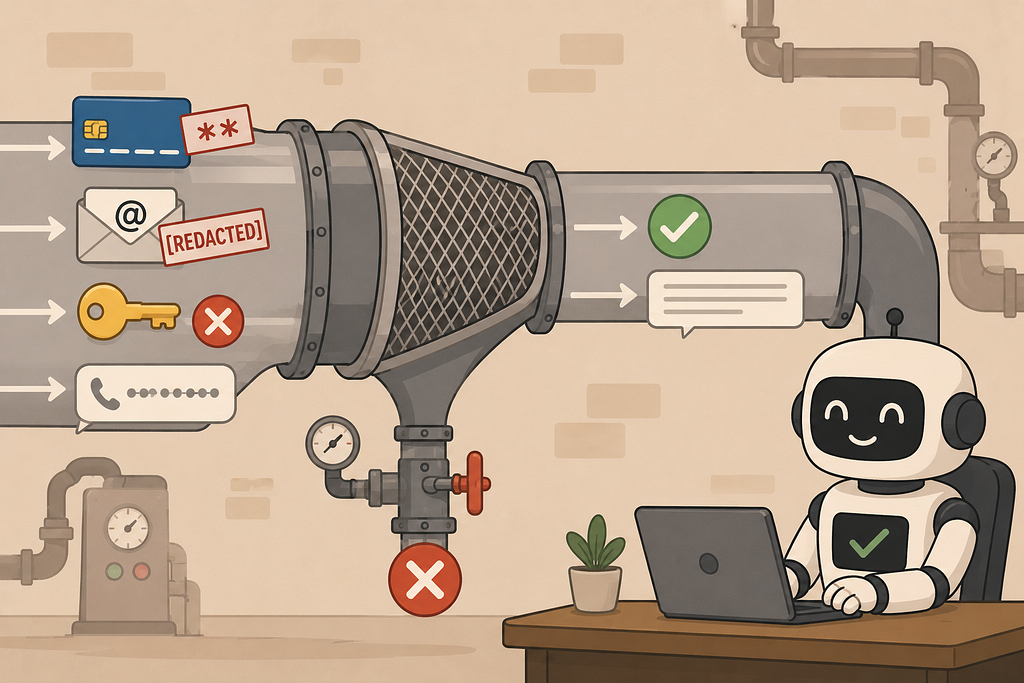
When the context window becomes the enemy of your secrets
Here is the interaction most people overlook
You add PII Middleware. Good. Now the agent runs for forty-five minutes. The context window fills up. The framework starts summarizing old messages to create space — and the summarization model is a second model call you did not explicitly set up. Does that call go through your PII Middleware? Only if you configured it correctly.
This is the specific failure that turns a well-intentioned setup into a risky one.
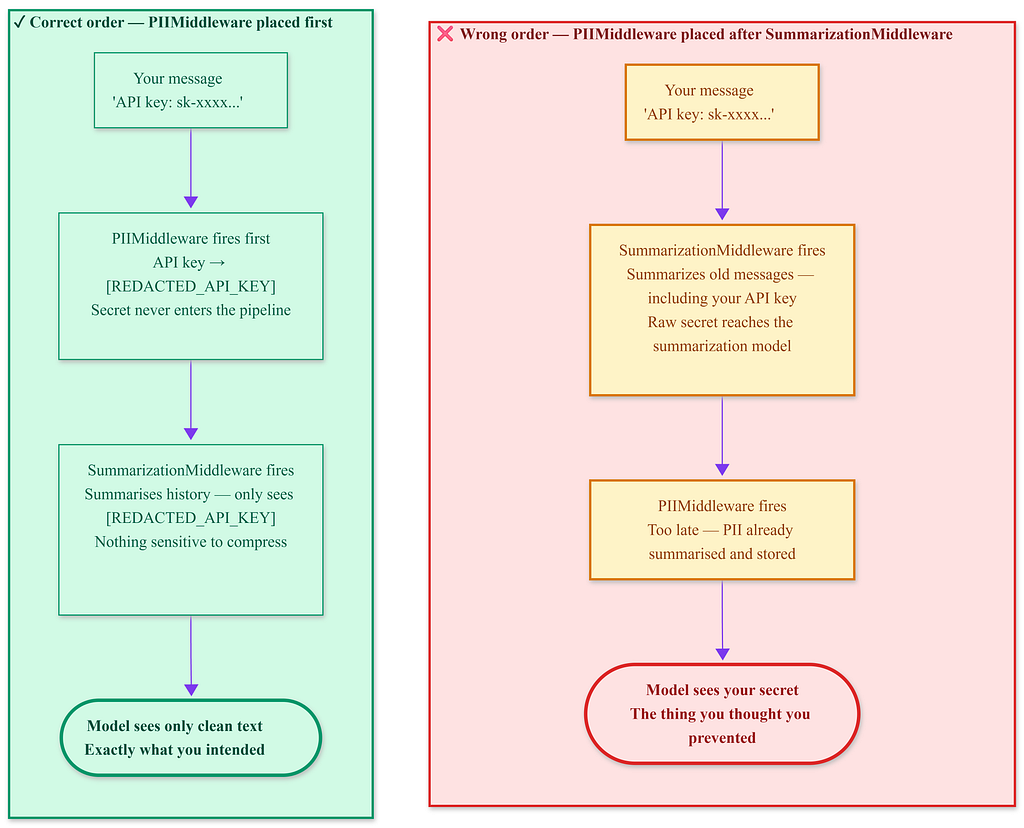
The middleware list processes from top to bottom. The order matters — placing the PII Middleware after the Summarization Middleware means the secret reaches the summarization model before redaction occurs. The damage happens inside a step you might not even know makes a model call.
The solution has two parts.
First, one middleware intelligently summarizes old conversation history — compressing it before the window fills, using a simpler model, and keeping the twenty most recent messages intact.
Second, another middleware removes tool outputs the agent has already acted on — this processed material takes up space without adding value.
These two middlewares together are what Claude Code uses internally to maintain coherent sessions over hours of work.
Anthropic published the underlying mechanism in a changelog entry for a parameter called clear_tool_uses_20250919 it removes completed tool use and result pairs from the message history before the next model call. The tool calls from two hours ago, already acted on, do not need to stay in context. They are noise.
SummarizationMiddleware — compressing history before it breaks the model
The weird thing about context overflow is that it does not announce itself. The model just starts forgetting — and the first symptom is usually a hallucinated tool call that references something it already handled three steps ago.
SummarizationMiddleware intercepts before that happens.
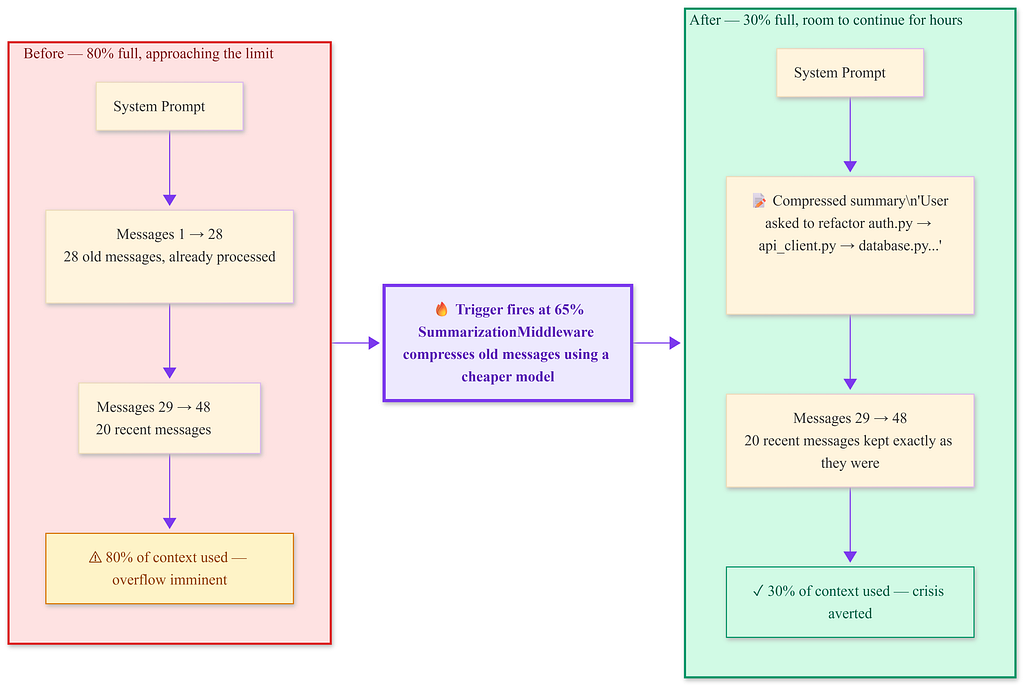
SummarizationMiddleware fires at 65% usage — early enough to act before overflow, late enough to not compress unnecessarily. Context drops from 80% to 30%. The 20 most recent messages are untouched.
SummarizationMiddleware(
    model="anthropic:claude-haiku-4-5-20251001",  # cheaper model — this fires multiple
                                                   # times per session; Sonnet adds up fast
    trigger=("fraction", 0.65),   # adapts automatically if you switch models
    keep=("messages", 20),
    trim_tokens_to_summarize=6000,
)
Walk through the decisions:
model=”anthropic:claude-haiku-4-5-20251001″ — this is the model doing the summarizing, not the main agent model. Using Sonnet or GPT-4 here would be expensive and wasteful. The summarization task is not complex. A cheaper model does it fine.
trigger=(“fraction”, 0.65) — triggers when the context is 65% full, not at a fixed token count. This matters because different models have different context window sizes. If you later switch your main agent to a model with a larger window, the trigger adapts automatically. A hardcoded token count would not.
keep=(“messages”, 20) — the 20 most recent messages never get summarized. They stay verbatim. This preserves the live working context — the active task, the last few tool results, the current reasoning chain.
trim_tokens_to_summarize=6000 — caps how much text gets fed to the summarization model per call. Without this, a very long conversation history could send thousands of tokens to the cheaper model and defeat the cost savings.
Common pitfall Placing SummarizationMiddleware after PIIMiddleware in your middleware list means the summarization model never sees raw PII — which is what you want. Placing it before means the summarization model processes the raw text first. The order diagram above is not abstract — it shows the exact failure that happens when you get this backwards.
When not to use it: If your agent’s task requires referring back to specific messages from early in the conversation — for example, a legal document review where exact phrasing from the original brief matters — compression will lose precision. In that case, use ContextEditingMiddleware alone and accept the higher token cost.
Interview checkpoint If someone asked you right now: “SummarizationMiddleware fires and produces a summary — but which model does the summarizing, and why should it be different from your main agent model?” — could you answer it without re-reading?
ContextEditingMiddleware — removes the material the agent has already processed
SummarizationMiddleware manages the conversation history by compressing old messages.
There is another issue: tool outputs.
When your agent calls a tool, like reading a file or searching the web, the result returns as text and gets added to the conversation history.
After twenty tool calls, you end up with twenty tool outputs in the context.
The agent has acted on all of them, and the reasoning based on those results is integrated into the following messages.
The raw outputs are just bulk tokens that the model has to scan through with each call, causing delays and confusion.
ContextEditingMiddleware with ClearToolUsesEdit removes these outputs.
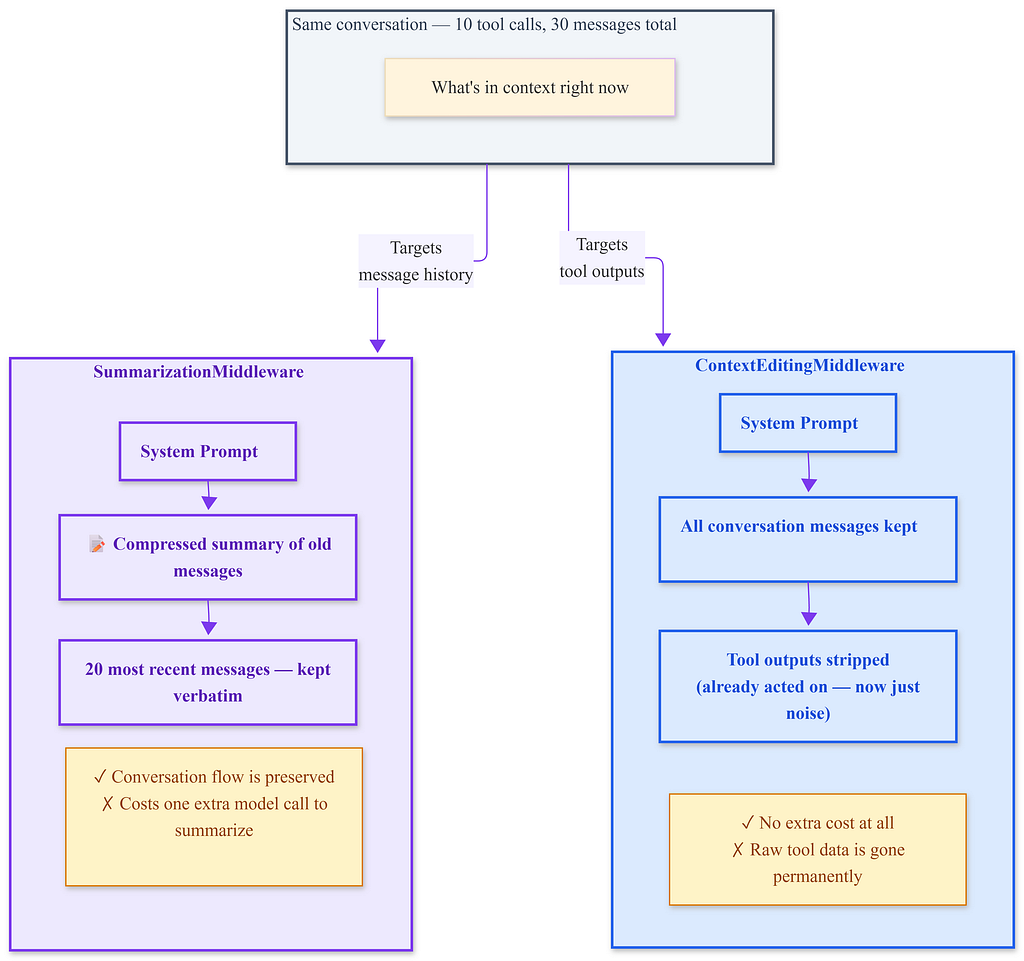
The same conversation addresses two different targets. They aren’t alternatives; they resolve different aspects of the same context problem. Using both is the best solution.
from langchain.agents.middleware.context_editing import ClearToolUsesEdit
ContextEditingMiddleware(
    edits=[
        ClearToolUsesEdit(
            token_threshold=("fraction", 0.5),  # fires earlier than Summarization
            min_messages_to_keep=8,              # never removes the 8 most recent tool pairs
        )
    ]
)
token_threshold=(“fraction”, 0.5) triggers when the context hits 50%, ahead of SummarizationMiddleware’s 65% trigger. Pruning tool outputs is more efficient since it doesn’t require an additional model call, so it runs first. If tool pruning reduces the context back below 50%, Summarization might never need to activate.
min_messages_to_keep=8 ensures that the 8 most recent tool call/result pairs remain untouched. The agent may still need them for immediate reasoning. Only older pairs that have already been processed get removed.
The key point to understand is this removes the raw tool output text, not the reasoning the agent has developed from it. The agent’s response messages, which incorporate what it learned from the tool, still exist. The source data is gone, but the knowledge derived from it remains.
When not to use it: If your agent needs to reference raw tool output for auditing purposes, like with a compliance agent that must show exactly what data it acted on, refrain from pruning tool outputs. Keep them. Accept the token cost or increase your context window budget.
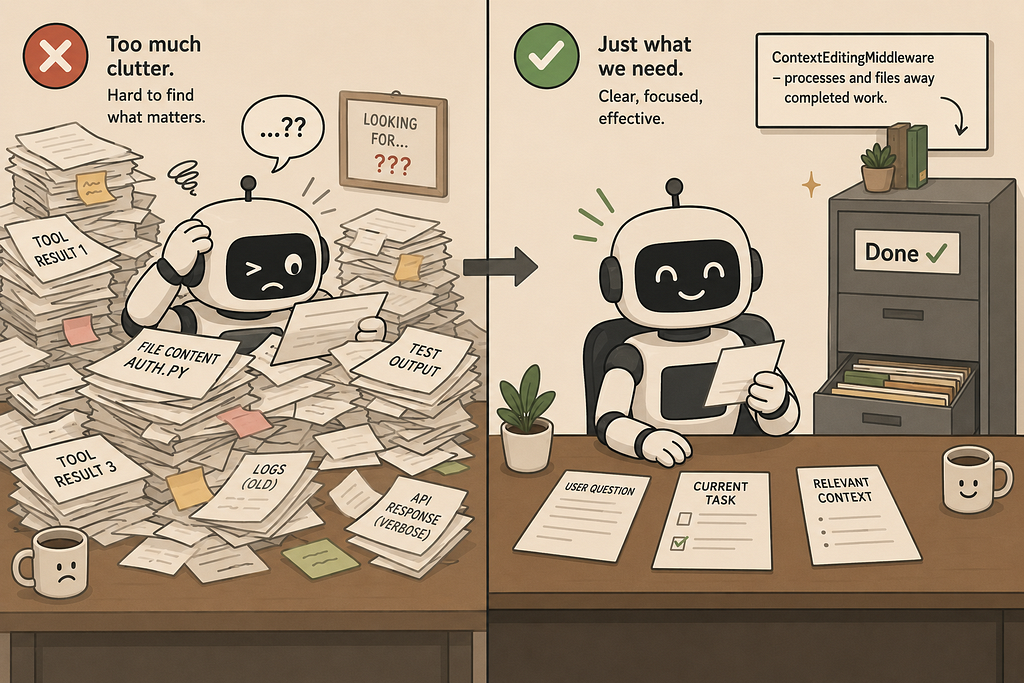
The session that never breaks, using both together
I spent time developing coding agents that typically failed around the forty-minute mark. The failure wasn’t dramatic. The agent would simply start making mistakes that seemed like model drift, confidently wrong, referencing prior state as if it were current.
The solution was as simple as changing two lines of configuration. It wasn’t a model upgrade or a prompt rewrite.
Here’s what a complete two-hour session looks like with both middlewares active:
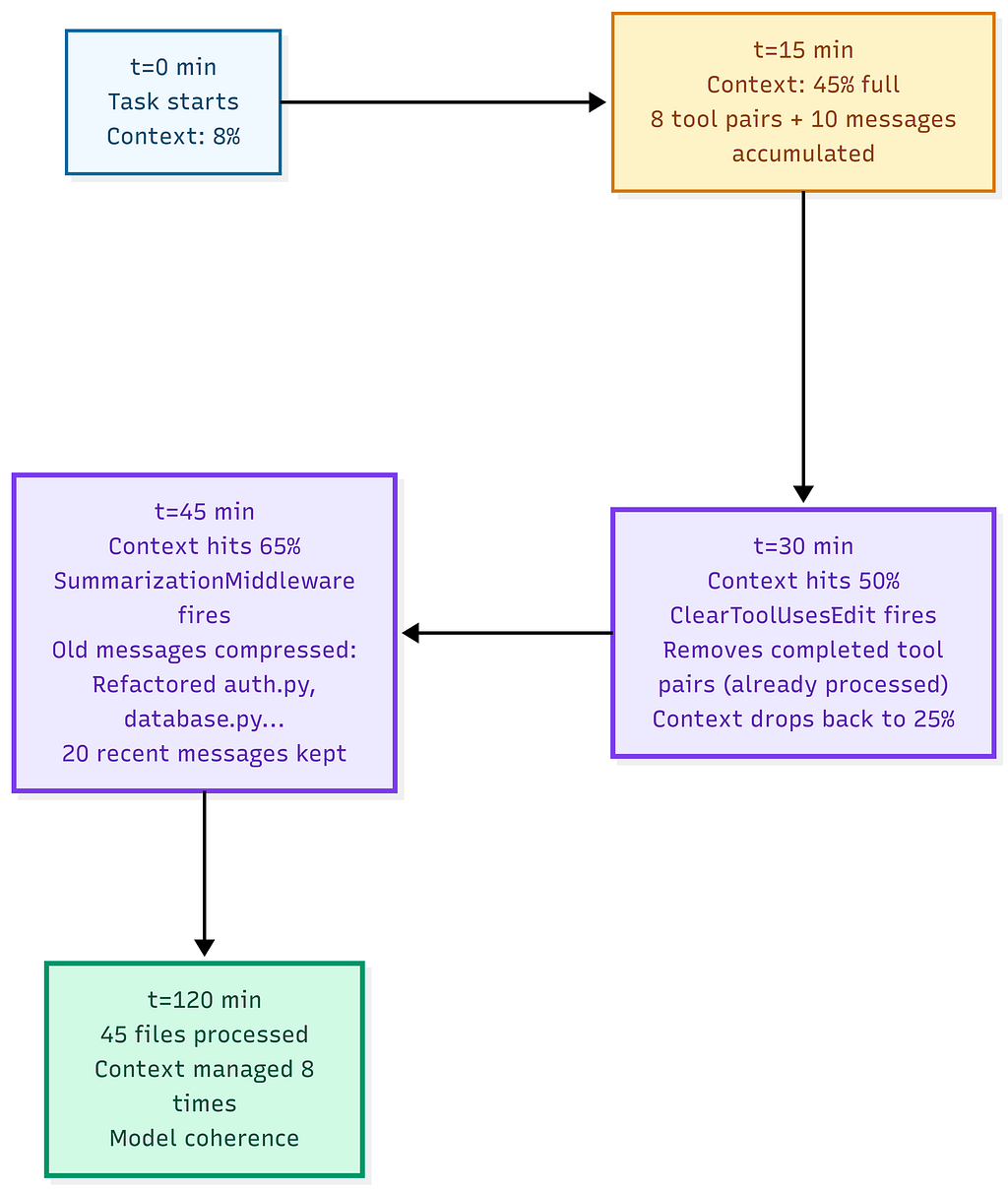
The timeline of a two-hour session shows that each middleware activates independently at its own threshold; no coordination is needed. The model never experiences context overflow. It just keeps working.
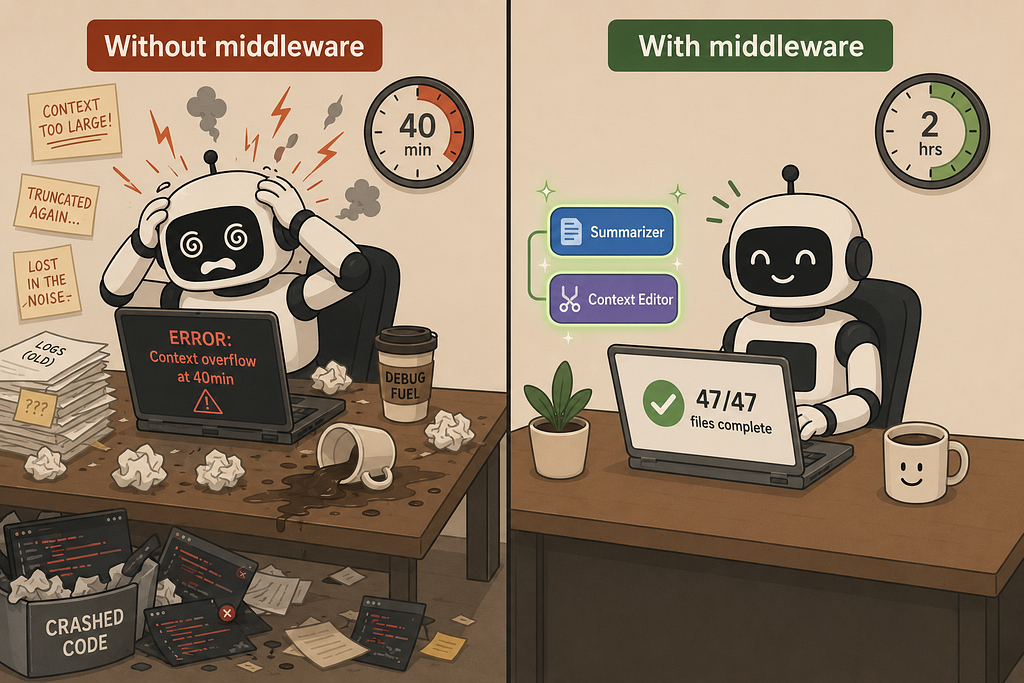
Without either middleware, the same task, the same model, and the same tools lead to context overflow in about forty minutes. The model begins hallucinating about files it had already accessed. The developer must restart and re-explain the task from the beginning if they even notice what happened.
Building a pair programmer that can work for hours
Here is the full stack for a coding agent that can run a real multi-file refactoring task “Convert all API calls in this codebase from requests to httpx with async support” across fifteen or more files without losing coherence.
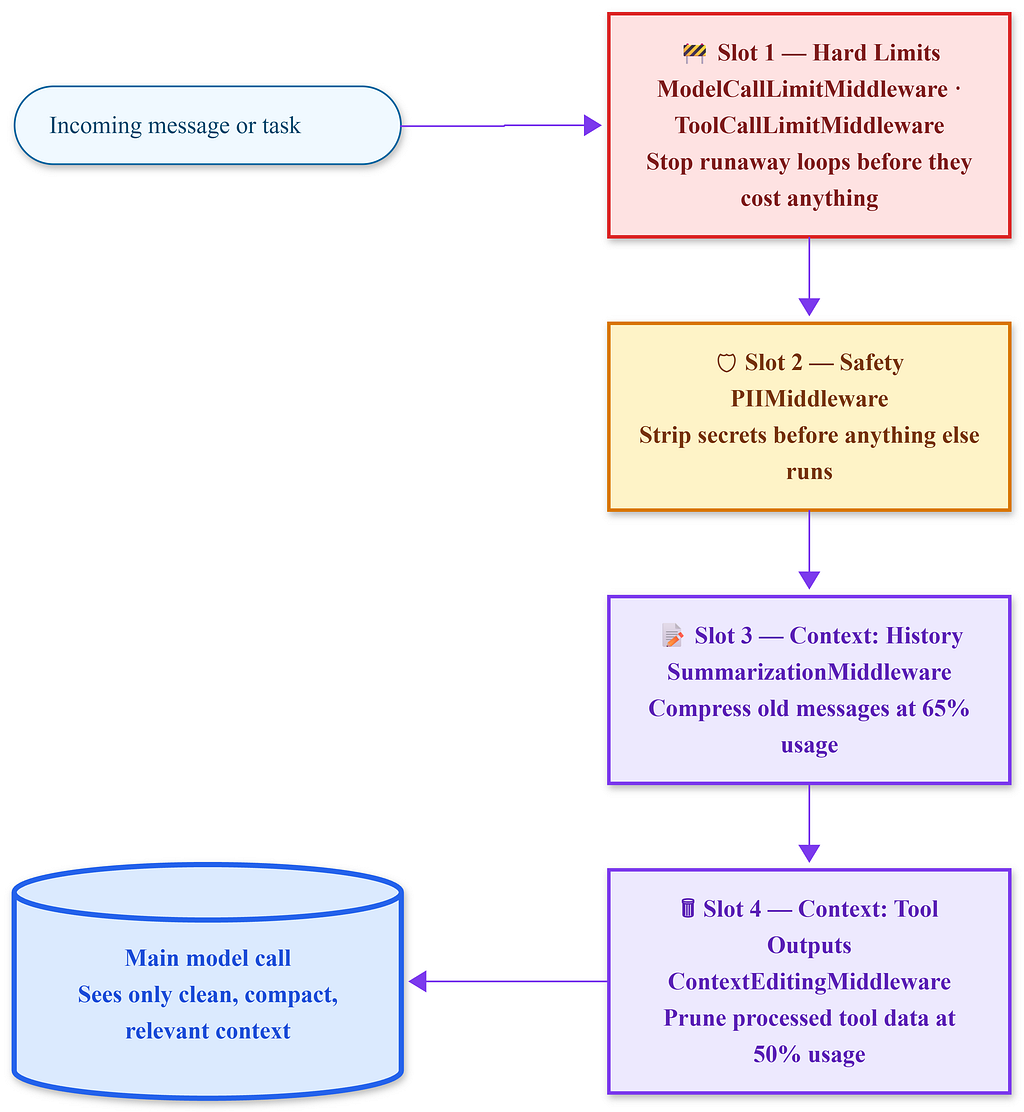
The four-slot middleware stack for this agent has crucial order. Limits come first because a runaway loop should be stopped before consuming tokens. Safety follows because redaction must happen before any other middleware processes the text. Context management acts last and responds to already-screened history.
from langchain.agents import create_agent
from langchain.agents.middleware import (
    PIIMiddleware,
    SummarizationMiddleware,
    ContextEditingMiddleware,
    ModelCallLimitMiddleware,
    ToolCallLimitMiddleware,
)
from langchain.agents.middleware.context_editing import ClearToolUsesEdit
agent = create_agent(
    model="anthropic:claude-sonnet-4-20250514",
    tools=[read_file, write_file, list_directory, run_tests, search_codebase],
    middleware=[
        # 1. Hard limits - outermost, always first
        ModelCallLimitMiddleware(max_calls=200, on_limit="return"),
        ToolCallLimitMiddleware(max_calls=400, on_limit="return"),
        # 2. Safety - before any content reaches the model
        PIIMiddleware(
            strategies={
                "api_key": "block",
                "credit_card": "mask",
                "email": "redact",
            },
            apply_to=["user_messages", "tool_results"]
        ),
        # 3. Compress conversation history when it grows
        SummarizationMiddleware(
            model="anthropic:claude-haiku-4-5-20251001",
            trigger=("fraction", 0.65),
            keep=("messages", 20),
            trim_tokens_to_summarize=6000,
        ),
        # 4. Prune completed tool outputs - fires before Summarization
        ContextEditingMiddleware(
            edits=[
                ClearToolUsesEdit(
                    token_threshold=("fraction", 0.5),
                    min_messages_to_keep=8,
                )
            ]
        ),
    ]
)
Each layer has a specific role. Limits cap total resource use. PIIMiddleware ensures no sensitive information reaches the model. SummarizationMiddleware manages conversation history when it becomes large. ContextEditingMiddleware deletes tool outputs that the agent has already processed. No layer is aware of the others. Each activates at its own trigger.
Production reality The middleware list is ordered top to bottom by how critical it is to fire before the model sees anything. Limits first an infinite loop should be caught before spending tokens on it. PIIMiddleware second redaction must happen before summarization, not after. Context management last, it acts on an already-screened message history.
At the end of this configuration, the agent can process forty-five files, track its own progress, and complete a task that would overwhelm a basic agent in forty minutes. It’s not because the model is better, but because the scaffolding is correct.
Interview checkpoint If PIIMiddleware is placed after SummarizationMiddleware in the list, what specific failure occurs that would not happen if the order were reversed? Answer before scrolling.
The session log you want to see
At the end of a two-hour run, the observable output should appear as follows:
Session complete.
Total model calls: 87
Total tool calls: 203
Context management events:
  - ClearToolUsesEdit fired: 6 times
  - SummarizationMiddleware fired: 3 times
Final context utilization: 34%
Task result: 47/47 files refactored. Tests passing.
The key number is that last one: 34%. After two hours and 200 tool calls, the context window is still two-thirds empty. The agent could keep going.
In contrast, a session without context management would yield the same task, same model, but the context hits 100% at around forty minutes. The framework either throws an error or silently drops messages in ways you didn’t intend. The agent breaks mid-task. You only discover the issue when it outputs something incoherent.
Middleware functions differently from a plugin system. It is a context engineering API.
What comes next
This agent can now operate for hours without losing coherence and without leaking sensitive data from your messages or its own tool results.
The remaining challenge is understanding what happens when the model itself fails. This includes issues like hitting a rate limit, experiencing an API timeout, or dealing with a provider outage at 2 a.m. while the agent is running.
In Part 3, the focus will be on building a self-healing agent that can seamlessly fall back across providers, manage forty tools from an MCP server without confusion about which one to call, and recover from failures automatically, without needing human intervention.
The same middleware list you created here continues. Two additional layers will be added on top. The complete stack is presented in Part 3, but the context management you just established is crucial for the rest to function properly.
If you found this helpful, check the link for Part 1 in the comments. Part 1 goes into detail about PIIMiddleware, its blocking strategies, the apply_to flags, and the specific failure mode that can cause PII to reach a summarization model even when you believe you have addressed it.
Your AI Agent Has Been Keeping Your API Key All This Time. was originally published in Towards AI on Medium, where people are continuing the conversation by highlighting and responding to this story.
