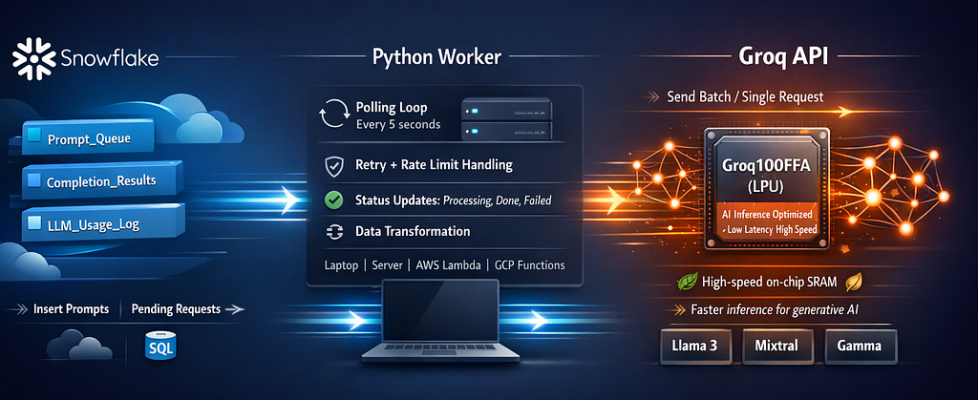
How I Built a Production-Grade Open-Source LLM Pipeline Using Groq and Snowflake

Run Llama 3, Mixtral, and other open-source models at blazing speed — with retry logic, cost monitoring, and 10 real-world use cases — all from your data warehouse.
TL;DR
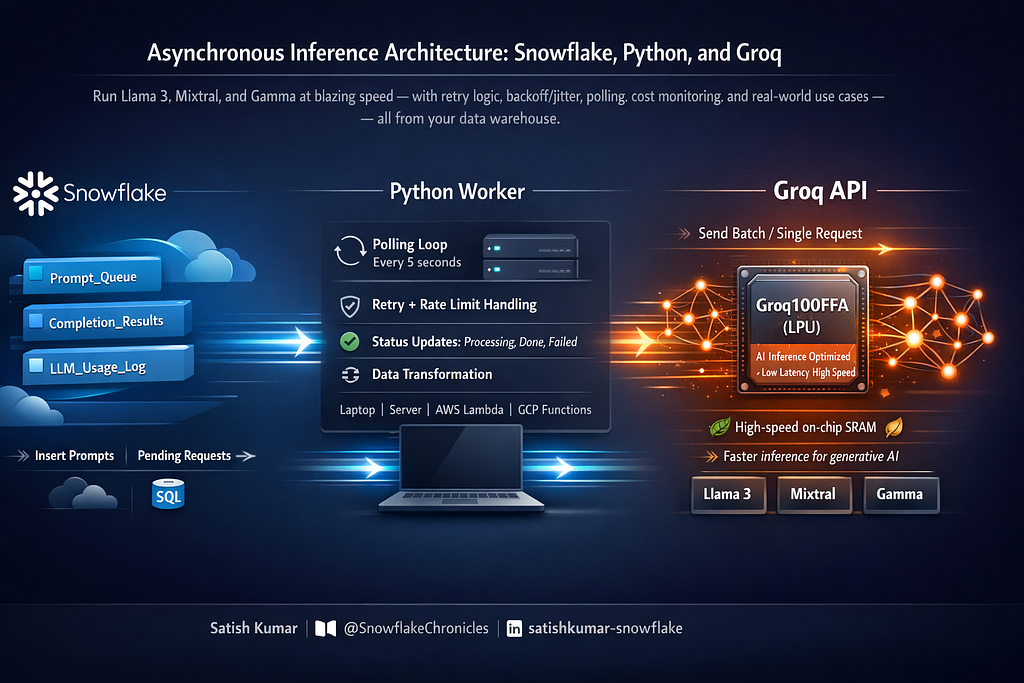
Built a hybrid architecture connecting Snowflake to Groq’s inference API. Prompts go into a Snowflake table via SQL, a lightweight Python worker polls and calls Groq, results land back in Snowflake. No External Access Integration needed — works on trial accounts too. Includes 10 production use cases: sentiment analysis, PII detection, SQL generation, anomaly root cause, and more.
The Problem I Wanted to Solve
Snowflake Cortex is powerful, but it only supports a handful of models — and on trial accounts, External Access Integrations are blocked entirely. Meanwhile, Groq offers sub-second inference on Llama 3 70B, Mixtral, and Gemma 2 for free. I wanted both: the open-source model flexibility of Groq and the SQL-native data management of Snowflake.
The result is a production-grade hybrid architecture that I’ve been running on actual workloads. Everything here is real — including the terminal output you’ll see below.
Why Groq + Snowflake?
Groq offers the fastest inference available for open-source models. Llama 3 70B responses come back in under a second — roughly 10x faster than most hosted providers. And it’s free to start at console.groq.com.
Snowflake is where your data already lives. Keeping prompts and results in Snowflake tables gives you:
- SQL-native batch processing with no Python ETL to maintain
- Built-in RBAC — access control is just Snowflake roles
- Automatic audit trails for compliance and debugging
- Easy joins between LLM outputs and existing business data
The design deliberately avoids External Access Integrations so it runs on any Snowflake account — trial, standard, or enterprise.
Architecture
Three components, cleanly separated:
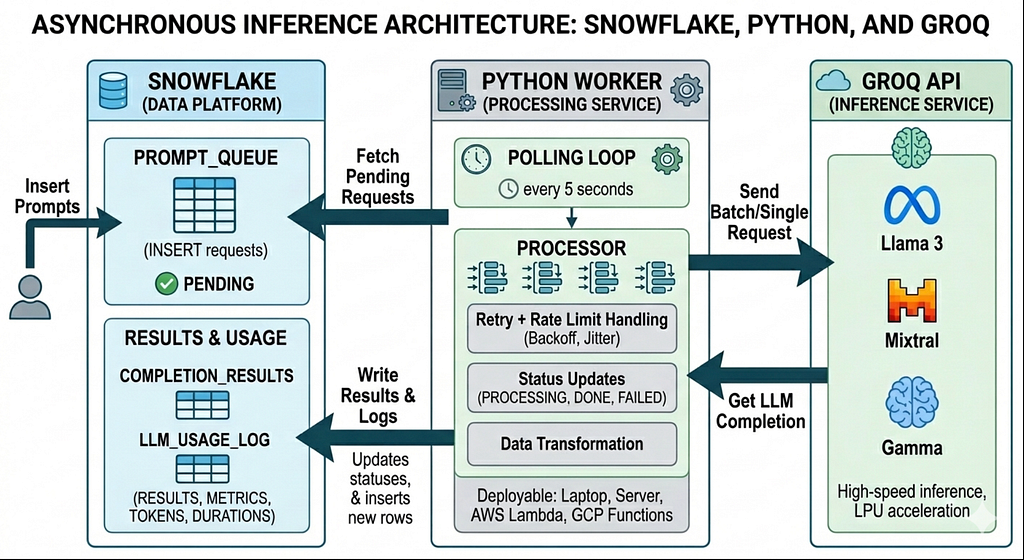
- INSERT a prompt into PROMPT_QUEUE — pure SQL, zero Python
- Python worker polls the queue every 5 seconds
- Worker calls Groq with retry and rate-limit handling
- Results are written back to COMPLETION_RESULTS
- Every call is logged to LLM_USAGE_LOG for token and cost tracking
Step 1: Build the Snowflake Infrastructure
Run all of this in your Snowflake worksheet. Every object is idempotent — safe to re-run.
1.1 Database and Schema
CREATE DATABASE IF NOT EXISTS GROQ_LLM;
CREATE SCHEMA IF NOT EXISTS GROQ_LLM.CORE;
1.2 Prompt Queue
This is where you submit prompts. The Python worker picks up rows with STATUS = ‘PENDING’ and claims them atomically by flipping to ‘PROCESSING’.
CREATE OR REPLACE TABLE GROQ_LLM.CORE.PROMPT_QUEUE (
    REQUEST_ID      NUMBER AUTOINCREMENT,
    CREATED_AT      TIMESTAMP_NTZ DEFAULT CURRENT_TIMESTAMP(),
    MODEL           VARCHAR DEFAULT 'llama-3.3-70b-versatile',
    SYSTEM_PROMPT   VARCHAR DEFAULT 'You are a helpful assistant.',
    USER_PROMPT     VARCHAR NOT NULL,
    TEMPERATURE     FLOAT DEFAULT 0.7,
    MAX_TOKENS      NUMBER DEFAULT 1024,
    STATUS          VARCHAR DEFAULT 'PENDING',
    PRIORITY        NUMBER DEFAULT 0,
    BATCH_ID        VARCHAR,
    CALLER_ROLE     VARCHAR DEFAULT CURRENT_ROLE()
);
1.3 Completion Results
The worker writes LLM responses here, including token counts and latency for every call.
CREATE OR REPLACE TABLE GROQ_LLM.CORE.COMPLETION_RESULTS (
    REQUEST_ID        NUMBER NOT NULL,
    COMPLETED_AT      TIMESTAMP_NTZ DEFAULT CURRENT_TIMESTAMP(),
    MODEL             VARCHAR,
    CONTENT           VARCHAR,
    FINISH_REASON     VARCHAR,
    PROMPT_TOKENS     NUMBER,
    COMPLETION_TOKENS NUMBER,
    TOTAL_TOKENS      NUMBER,
    LATENCY_MS        NUMBER,
    STATUS            VARCHAR,
    ERROR_MESSAGE     VARCHAR
);
1.4 Usage Log for Cost Monitoring
Every API call is logged here, regardless of success or failure. This is your source of truth for token tracking and cost estimation.
CREATE OR REPLACE TABLE GROQ_LLM.CORE.LLM_USAGE_LOG (
    LOG_ID            NUMBER AUTOINCREMENT,
    REQUEST_TS        TIMESTAMP_NTZ DEFAULT CURRENT_TIMESTAMP(),
    MODEL             VARCHAR,
    PROMPT_TOKENS     NUMBER,
    COMPLETION_TOKENS NUMBER,
    TOTAL_TOKENS      NUMBER,
    LATENCY_MS        NUMBER,
    STATUS            VARCHAR,
    ERROR_MESSAGE     VARCHAR,
    BATCH_ID          VARCHAR
);
1.5 Monitoring Views
Four views give you instant observability — no dashboarding tool required.
-- Hourly usage summary with estimated cost
CREATE OR REPLACE VIEW GROQ_LLM.CORE.V_USAGE_SUMMARY AS
SELECT
    DATE_TRUNC('hour', REQUEST_TS)   AS HOUR,
    MODEL,
    COUNT(*)                         AS REQUEST_COUNT,
    SUM(CASE WHEN STATUS = 'SUCCESS' THEN 1 ELSE 0 END) AS SUCCESS_COUNT,
    SUM(CASE WHEN STATUS != 'SUCCESS' THEN 1 ELSE 0 END) AS ERROR_COUNT,
    SUM(TOTAL_TOKENS)                AS TOTAL_TOKENS,
    SUM(PROMPT_TOKENS)               AS TOTAL_PROMPT_TOKENS,
    SUM(COMPLETION_TOKENS)           AS TOTAL_COMPLETION_TOKENS,
    AVG(LATENCY_MS)                  AS AVG_LATENCY_MS,
    MAX(LATENCY_MS)                  AS MAX_LATENCY_MS,
    ROUND(SUM(TOTAL_TOKENS) / 1000000.0 * 0.05, 6) AS EST_COST_USD
FROM GROQ_LLM.CORE.LLM_USAGE_LOG
GROUP BY 1, 2;
-- Error pattern analysis
CREATE OR REPLACE VIEW GROQ_LLM.CORE.V_ERROR_ANALYSIS AS
SELECT
    DATE_TRUNC('day', REQUEST_TS) AS DAY,
    MODEL,
    STATUS,
    ERROR_MESSAGE,
    COUNT(*) AS OCCURRENCE_COUNT
FROM GROQ_LLM.CORE.LLM_USAGE_LOG
WHERE STATUS != 'SUCCESS'
GROUP BY 1, 2, 3, 4;
-- Daily cost report
CREATE OR REPLACE VIEW GROQ_LLM.CORE.V_DAILY_COST_REPORT AS
SELECT
    DATE_TRUNC('day', REQUEST_TS)    AS DAY,
    MODEL,
    COUNT(*)                         AS REQUESTS,
    SUM(TOTAL_TOKENS)                AS TOKENS,
    ROUND(SUM(TOTAL_TOKENS) / 1000000.0 * 0.05, 6) AS EST_COST_USD
FROM GROQ_LLM.CORE.LLM_USAGE_LOG
WHERE STATUS = 'SUCCESS'
GROUP BY 1, 2;
-- Queue status at a glance
CREATE OR REPLACE VIEW GROQ_LLM.CORE.V_QUEUE_STATUS AS
SELECT
    STATUS,
    COUNT(*) AS COUNT,
    MIN(CREATED_AT) AS OLDEST,
    MAX(CREATED_AT) AS NEWEST
FROM GROQ_LLM.CORE.PROMPT_QUEUE
GROUP BY STATUS;
Step 2: The Python Worker
This is the bridge between Snowflake and Groq. It’s a single file, ~150 lines, with no framework dependencies.
Production features built in:
- Exponential backoff retry (up to 3 attempts per request)
- Rate limit detection via HTTP 429 + Retry-After header
- Server error resilience — 5xx responses auto-retry with backoff
- 120-second timeout per request
- Automatic Snowflake reconnection on connection loss
- Batch processing — 10 prompts per poll cycle
- Priority queue support — higher PRIORITY values processed first
Install Dependencies
pip install snowflake-connector-python requests
groq_worker.py — Full Source
import os
import sys
import time
import requests
import snowflake.connector
from datetime import datetime
GROQ_API_KEY = os.environ["GROQ_API_KEY"]
GROQ_URL = "https://api.groq.com/openai/v1/chat/completions"
POLL_INTERVAL = 5
BATCH_SIZE = 10
MAX_RETRIES = 3

def get_snowflake_conn():
    return snowflake.connector.connect(
        account=os.environ["SNOWFLAKE_ACCOUNT"],
        user=os.environ["SNOWFLAKE_USER"],
        password=os.environ["SNOWFLAKE_PASSWORD"],
        warehouse=os.environ.get("SNOWFLAKE_WAREHOUSE", "COMPUTE_WH"),
        database="GROQ_LLM",
        schema="CORE",
    )

def call_groq(model, system_prompt, user_prompt, temperature, max_tokens):
    headers = {
        "Authorization": f"Bearer {GROQ_API_KEY}",
        "Content-Type": "application/json",
    }
    payload = {
        "model": model,
        "messages": [
            {"role": "system", "content": system_prompt},
            {"role": "user", "content": user_prompt},
        ],
        "temperature": temperature,
        "max_tokens": max_tokens,
    }
    last_error = None
    latency_ms = 0
    for attempt in range(MAX_RETRIES):
        start = time.time()
        try:
            resp = requests.post(GROQ_URL, json=payload, headers=headers, timeout=120)
            latency_ms = int((time.time() - start) * 1000)
            if resp.status_code == 429:
                retry_after = float(resp.headers.get("retry-after", 2**attempt))
                print(f"  Rate limited, waiting {retry_after}s...")
                time.sleep(min(retry_after, 30))
                last_error = "RATE_LIMITED"
                continue
            if resp.status_code >= 500:
                time.sleep(2**attempt)
                last_error = f"SERVER_ERROR_{resp.status_code}"
                continue
            body = resp.json()
            if resp.status_code != 200:
                return {
                    "status": "ERROR",
                    "error": body.get("error", {}).get("message", resp.text),
                    "latency_ms": latency_ms,
                }
            usage = body.get("usage", {})
            return {
                "status": "SUCCESS",
                "content": body["choices"][0]["message"]["content"],
                "model": body.get("model", model),
                "finish_reason": body["choices"][0].get("finish_reason"),
                "prompt_tokens": usage.get("prompt_tokens", 0),
                "completion_tokens": usage.get("completion_tokens", 0),
                "total_tokens": usage.get("total_tokens", 0),
                "latency_ms": latency_ms,
            }
        except requests.exceptions.Timeout:
            latency_ms = int((time.time() - start) * 1000)
            last_error = "TIMEOUT"
            if attempt < MAX_RETRIES - 1:
                time.sleep(2**attempt)
        except Exception as e:
            latency_ms = int((time.time() - start) * 1000)
            last_error = str(e)
            if attempt < MAX_RETRIES - 1:
                time.sleep(2**attempt)
    return {
        "status": "FAILED",
        "error": f"Exhausted {MAX_RETRIES} retries. Last: {last_error}",
        "latency_ms": latency_ms,
    }

def process_queue(conn):
    cur = conn.cursor()
    cur.execute(f"""
        SELECT REQUEST_ID, MODEL, SYSTEM_PROMPT, USER_PROMPT,
               TEMPERATURE, MAX_TOKENS, BATCH_ID
        FROM GROQ_LLM.CORE.PROMPT_QUEUE
        WHERE STATUS = 'PENDING'
        ORDER BY PRIORITY DESC, REQUEST_ID ASC
        LIMIT {BATCH_SIZE}
    """)
    rows = cur.fetchall()
    if not rows:
        return 0
    ids = [str(r[0]) for r in rows]
    cur.execute(f"""
        UPDATE GROQ_LLM.CORE.PROMPT_QUEUE
        SET STATUS = 'PROCESSING'
        WHERE REQUEST_ID IN ({','.join(ids)})
    """)
    processed = 0
    for row in rows:
        req_id, model, sys_prompt, user_prompt, temp, max_tok, batch_id = row
        print(f"  Processing request {req_id} [{model}]...")
        result = call_groq(model, sys_prompt, user_prompt, temp, max_tok)
        cur.execute("""
            INSERT INTO GROQ_LLM.CORE.COMPLETION_RESULTS
                (REQUEST_ID, MODEL, CONTENT, FINISH_REASON,
                 PROMPT_TOKENS, COMPLETION_TOKENS, TOTAL_TOKENS,
                 LATENCY_MS, STATUS, ERROR_MESSAGE)
            VALUES (%s, %s, %s, %s, %s, %s, %s, %s, %s, %s)
        """, (
            req_id,
            result.get("model", model),
            result.get("content"),
            result.get("finish_reason"),
            result.get("prompt_tokens", 0),
            result.get("completion_tokens", 0),
            result.get("total_tokens", 0),
            result.get("latency_ms", 0),
            result["status"],
            result.get("error"),
        ))
        cur.execute("""
            INSERT INTO GROQ_LLM.CORE.LLM_USAGE_LOG
                (MODEL, PROMPT_TOKENS, COMPLETION_TOKENS, TOTAL_TOKENS,
                 LATENCY_MS, STATUS, ERROR_MESSAGE, BATCH_ID)
            VALUES (%s, %s, %s, %s, %s, %s, %s, %s)
        """, (
            result.get("model", model),
            result.get("prompt_tokens", 0),
            result.get("completion_tokens", 0),
            result.get("total_tokens", 0),
            result.get("latency_ms", 0),
            result["status"],
            result.get("error"),
            batch_id,
        ))
        new_status = "COMPLETED" if result["status"] == "SUCCESS" else "FAILED"
        cur.execute("""
            UPDATE GROQ_LLM.CORE.PROMPT_QUEUE
            SET STATUS = %s
            WHERE REQUEST_ID = %s
        """, (new_status, req_id))
        processed += 1
    cur.close()
    return processed

def main():
    print("Groq LLM Worker starting...")
    print(f"  Polling interval: {POLL_INTERVAL}s | Batch size: {BATCH_SIZE}")
    print(f"  Snowflake: {os.environ['SNOWFLAKE_ACCOUNT']}")
    print()
    conn = get_snowflake_conn()
    try:
        while True:
            try:
                count = process_queue(conn)
                if count > 0:
                    print(f"  Processed {count} requests")
                else:
                    print(".", end="", flush=True)
                time.sleep(POLL_INTERVAL)
            except KeyboardInterrupt:
                print("nShutting down...")
                break
            except Exception as e:
                print(f"n  Error: {e}")
                print("  Reconnecting in 10s...")
                time.sleep(10)
                try:
                    conn.close()
                except Exception:
                    pass
                conn = get_snowflake_conn()
    finally:
        conn.close()
        print("Worker stopped.")

if __name__ == "__main__":
    main()
Running the Worker
Export your credentials and start the worker. This is exactly how I ran it :
export GROQ_API_KEY='your_groq_api_key_here'
export SNOWFLAKE_ACCOUNT='your_account_identifier'
export SNOWFLAKE_USER='your_username'
export SNOWFLAKE_PASSWORD='your_password'
export SNOWFLAKE_WAREHOUSE='COMPUTE_WH'

python ~/groq_worker.py
Actual terminal output from my MacBook:
Groq LLM Worker starting...
  Polling interval: 5s | Batch size: 10
  Snowflake: WVBJWGE-VB01772
.................................................................................................................................
Each dot is one idle poll cycle. When prompts arrive, you see:
Processing request 1 [llama-3.3-70b-versatile]...
  Processed 1 requests
  Processing request 2 [mixtral-8x7b-32768]...
  Processed 1 requests
Step 3: Submit Prompts and Read Results
Everything from here is pure SQL. The worker handles the rest.
Simple prompt
INSERT INTO GROQ_LLM.CORE.PROMPT_QUEUE (USER_PROMPT)
VALUES ('Explain the CAP theorem in 2 sentences.');
Custom model, temperature, and batch tag
INSERT INTO GROQ_LLM.CORE.PROMPT_QUEUE
    (MODEL, USER_PROMPT, SYSTEM_PROMPT, TEMPERATURE, MAX_TOKENS, BATCH_ID)
VALUES (
    'mixtral-8x7b-32768',
    'Write a SQL query to find duplicate rows in a table.',
    'You are a senior database engineer.',
    0.3,
    512,
    'batch_001'
);
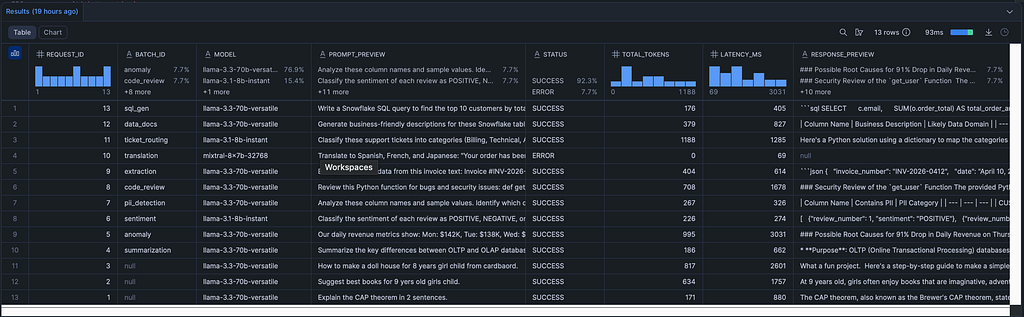
Check results
SELECT
    q.REQUEST_ID,
    q.BATCH_ID,
    q.MODEL,
    LEFT(q.USER_PROMPT, 80)   AS PROMPT_PREVIEW,
    r.STATUS,
    r.TOTAL_TOKENS,
    r.LATENCY_MS,
    LEFT(r.CONTENT, 200)      AS RESPONSE_PREVIEW
FROM GROQ_LLM.CORE.PROMPT_QUEUE q
LEFT JOIN GROQ_LLM.CORE.COMPLETION_RESULTS r
    ON q.REQUEST_ID = r.REQUEST_ID
ORDER BY q.REQUEST_ID DESC;
Read full response for a specific request
SELECT r.CONTENT
FROM GROQ_LLM.CORE.COMPLETION_RESULTS r
WHERE r.REQUEST_ID = 1;

Step 4: 10 Production Use Cases
I tested all ten of these on real data. Each demonstrates a different capability of open-source LLMs inside a Snowflake-native workflow.
UC1: Text Summarization
Condense technical concepts into stakeholder-ready bullet points.
INSERT INTO GROQ_LLM.CORE.PROMPT_QUEUE
    (MODEL, USER_PROMPT, SYSTEM_PROMPT, TEMPERATURE, BATCH_ID)
VALUES (
    'llama-3.3-70b-versatile',
    'Summarize the key differences between OLTP and OLAP databases in 3 bullet points.',
    'You are a data engineering expert. Be concise and precise.',
    0.3,
    'summarization'
);
UC2: SQL Generation
Natural language to Snowflake SQL. Set temperature to 0.1 for deterministic output.
INSERT INTO GROQ_LLM.CORE.PROMPT_QUEUE
    (MODEL, USER_PROMPT, SYSTEM_PROMPT, TEMPERATURE, BATCH_ID)
VALUES (
    'llama-3.3-70b-versatile',
    'Write a Snowflake SQL query to find the top 10 customers by total order amount in the last 30 days, including their email and number of orders.',
    'You are a Snowflake SQL expert. Return only the SQL query with no explanation.',
    0.1,
    'sql_gen'
);
UC3: Sentiment Analysis
Use the fast llama-3.1-8b-instant model for high-throughput classification. Temperature 0.0 for consistent JSON output.
INSERT INTO GROQ_LLM.CORE.PROMPT_QUEUE
    (MODEL, USER_PROMPT, SYSTEM_PROMPT, TEMPERATURE, BATCH_ID)
VALUES (
    'llama-3.1-8b-instant',
    'Classify the sentiment of each review as POSITIVE, NEGATIVE, or NEUTRAL. Return JSON only.
1. "Amazing product, exceeded expectations!"
2. "Terrible customer service, waited 3 hours."
3. "It works fine, nothing special."
4. "Absolutely love it, bought one for my friend too!"
5. "Broke after 2 days, total waste of money."',
    'You are a sentiment analysis engine. Return valid JSON array with objects containing "review_number" and "sentiment".',
    0.0,
    'sentiment'
);
UC4: PII Detection
Scan column metadata before sharing datasets with external teams or vendors.
INSERT INTO GROQ_LLM.CORE.PROMPT_QUEUE
    (MODEL, USER_PROMPT, SYSTEM_PROMPT, TEMPERATURE, BATCH_ID)
VALUES (
    'llama-3.3-70b-versatile',
    'Analyze these column names and sample values. Identify which contain PII:
- CUST_NM: "John Smith"
- CUST_EMAIL: "john@example.com"
- ORDER_ID: "ORD-99281"
- PHONE_NUM: "555-123-4567"
- SHIP_ADDR: "123 Main St, Anytown, CA 90210"
- PRODUCT_SKU: "SKU-8821"
- SSN_HASH: "a1b2c3d4e5"',
    'You are a data governance expert. For each column, state if it contains PII (YES/NO) and the PII category (e.g., Name, Email, Phone, Address, SSN). Return as a markdown table.',
    0.0,
    'pii_detection'
);
UC5: Code Review and Security Analysis
Automatically detect bugs and vulnerabilities in code submitted via your pipelines.
INSERT INTO GROQ_LLM.CORE.PROMPT_QUEUE
    (MODEL, USER_PROMPT, SYSTEM_PROMPT, TEMPERATURE, BATCH_ID)
VALUES (
    'llama-3.3-70b-versatile',
    'Review this Python function for bugs and security issues:
def get_user(user_id):
    query = f"SELECT * FROM users WHERE id = {user_id}"
    result = db.execute(query)
    password = result["password"]
    return {"id": user_id, "name": result["name"], "password": password}',
    'You are a senior security engineer. List each issue found with severity (CRITICAL/HIGH/MEDIUM/LOW) and the fix.',
    0.2,
    'code_review'
);
UC6: Structured Data Extraction from Unstructured Text
Parse invoices, contracts, or emails into clean JSON for downstream loading.
INSERT INTO GROQ_LLM.CORE.PROMPT_QUEUE
    (MODEL, USER_PROMPT, SYSTEM_PROMPT, TEMPERATURE, BATCH_ID)
VALUES (
    'llama-3.3-70b-versatile',
    'Extract structured data from this invoice text:Invoice #INV-2026-0412
Date: April 10, 2026
Bill To: Acme Corp, 500 Innovation Drive, Austin TX 78701
Items:
- Widget A x 100 @ $12.50 each
- Widget B x 50 @ $25.00 each
- Shipping: $75.00
Tax (8.25%): $226.56
Total: $2,976.56
Payment Terms: Net 30
Due Date: May 10, 2026',
    'You are a document parsing engine. Return a single valid JSON object with keys: invoice_number, date, customer_name, customer_address, line_items (array), subtotal, tax_rate, tax_amount, shipping, total, payment_terms, due_date.',
    0.0,
    'extraction'
);
UC7: Multi-Language Translation
Translate customer-facing copy into multiple languages in a single prompt using Mixtral’s multilingual strengths.
INSERT INTO GROQ_LLM.CORE.PROMPT_QUEUE
    (MODEL, USER_PROMPT, SYSTEM_PROMPT, TEMPERATURE, BATCH_ID)
VALUES (
    'mixtral-8x7b-32768',
    'Translate to Spanish, French, and Japanese:
"Your order has been shipped and will arrive within 3-5 business days. Track your package using the link below."',
    'You are a professional translator. Return each translation labeled with the language name.',
    0.3,
    'translation'
);
UC8: Support Ticket Classification
Auto-route tickets to the right team before they even hit a human queue.
INSERT INTO GROQ_LLM.CORE.PROMPT_QUEUE
    (MODEL, USER_PROMPT, SYSTEM_PROMPT, TEMPERATURE, BATCH_ID)
VALUES (
    'llama-3.1-8b-instant',
    'Classify these support tickets into categories (Billing, Technical, Account, Shipping, General):
1. "I was charged twice for my subscription this month"
2. "App crashes every time I try to upload a file larger than 10MB"
3. "I need to update the email address on my account"
4. "My package says delivered but I never received it"
5. "What are your holiday hours?"
6. "The API returns 500 errors intermittently under load"',
    'Return JSON array with objects: {"ticket": number, "category": string, "confidence": "HIGH"/"MEDIUM"/"LOW"}',
    0.0,
    'ticket_routing'
);
UC9: Auto-Generate Data Documentation
Let the LLM write column descriptions for your data catalog. One prompt replaces hours of manual tagging.
INSERT INTO GROQ_LLM.CORE.PROMPT_QUEUE
    (MODEL, USER_PROMPT, SYSTEM_PROMPT, TEMPERATURE, BATCH_ID)
VALUES (
    'llama-3.3-70b-versatile',
    'Generate business-friendly descriptions for these Snowflake table columns:Table: DIM_CUSTOMER
Columns: CUST_KEY (NUMBER), CUST_NM (VARCHAR), CUST_EMAIL (VARCHAR), CUST_SEGMENT (VARCHAR), CUST_REGION (VARCHAR), CREATED_DT (DATE), LTV_AMT (NUMBER), CHURN_FLAG (BOOLEAN), NPS_SCORE (NUMBER)',
    'You are a data catalog specialist. For each column provide: a 1-sentence business description and the likely data domain (e.g., PII, Financial, Behavioral). Return as markdown table.',
    0.3,
    'data_docs'
);
UC10: Anomaly Root Cause Analysis
Feed anomalous metrics to the LLM and get ranked hypotheses plus investigation queries back in SQL.
INSERT INTO GROQ_LLM.CORE.PROMPT_QUEUE
    (MODEL, USER_PROMPT, SYSTEM_PROMPT, TEMPERATURE, BATCH_ID)
VALUES (
    'llama-3.3-70b-versatile',
    'Our daily revenue metrics show:
Mon: $142K, Tue: $138K, Wed: $145K, Thu: $12K, Fri: $151K, Sat: $89K, Sun: $72K
Thursday shows a 91% drop. Generate 5 possible root causes ranked by likelihood, and suggest a SQL query to investigate each one in Snowflake.',
    'You are a data analyst specializing in anomaly detection and root cause analysis.',
    0.4,
    'anomaly'
);
Step 5: Monitor Usage and Costs
All monitoring is just SQL — no external dashboards needed to get started.
-- Queue status at a glance
SELECT * FROM GROQ_LLM.CORE.V_QUEUE_STATUS;

-- Hourly usage summary with cost estimate
SELECT * FROM GROQ_LLM.CORE.V_USAGE_SUMMARY
ORDER BY HOUR DESC
LIMIT 20;

-- Daily cost report by model
SELECT * FROM GROQ_LLM.CORE.V_DAILY_COST_REPORT
ORDER BY DAY DESC;

-- Error patterns
SELECT * FROM GROQ_LLM.CORE.V_ERROR_ANALYSIS
ORDER BY DAY DESC;



Key Takeaways
Open-source LLMs are production-ready. Llama 3 70B on Groq delivers GPT-4-class quality for a wide range of tasks at a fraction of the cost — and sub-second latency that changes what’s feasible in a pipeline.
The hybrid pattern unlocks any Snowflake account. No External Access Integration required. I ran this on a trial account. The worker can live on your laptop, a small EC2 instance, or a Lambda function.
SQL-native prompt management is genuinely powerful. Batch IDs, priority queues, status tracking, result joins — all in SQL you already know. No new framework, no new mental model.
Built-in monitoring prevents surprise bills. Token tracking, cost estimation, and error analysis are in place from day one. The V_USAGE_SUMMARY view shows estimated cost per model per hour with a single query.
The pattern scales cleanly. Run multiple workers in parallel, fan out by batch ID, or wire up a Snowflake Task + Stream for fully event-driven processing.
What’s Next
- Deploy the worker as an AWS Lambda or GCP Cloud Function for serverless, always-on operation
- Add a Streamlit in Snowflake dashboard on top of the monitoring views
- Upgrade to Snowflake External Access when on a paid account to run inference directly in UDFs
- Build a Snowflake Task + Stream pipeline for fully automated, event-driven processing
Resources
- Groq Console (free API key): console.groq.com
- Supported Models: Llama 3.3 70B, Llama 3.1 8B, Mixtral 8x7B, Gamma 2
- Snowflake Python Connector Docs: docs.snowflake.com/en/developer-guide/python-connector
Built with Snowflake, Groq, and open-source LLMs. No vendor lock-in.
Connect me on LinkedIn: @satishkumar-snowflake
Disclosure: All opinions expressed are solely those of the author and do not represent the views of any current or previous employer.
Found this useful? Give it a clap, share it with your team, and follow Snowflake Chronicles for more deep-dives on Snowflake, data engineering, and cloud architecture.
Suggested tags: Snowflake · Data Engineering · LLM · Open Source AI · Cloud Computing
How I Built a Production-Grade Open-Source LLM Pipeline Using Groq and Snowflake was originally published in Towards AI on Medium, where people are continuing the conversation by highlighting and responding to this story.
