Deploying IBM Bob Shell to Containers: A Production-Ready Guide

Containerizing IBM Bob: From Interactive to Automated
IBM Bob wasn’t built for containers — here’s how I deployed it anyway with multi-stage builds and non-interactive installation.
The Challenge
IBM Bob is an AI-powered, agentic development environment and coding partner designed to modernize legacy systems, build new applications, and improve software delivery workflows. While IBM Bob offers a comprehensive UI-based tool, it also provides Bob Shell, a terminal-based interface that brings the same context-aware and reasoning-driven capabilities to command-line and automation scenarios.
For my use case, I wanted to run Bob Shell inside a containerized Node.js service. The problem was that Bob Shell’s installation flow is interactive. It prompts for package manager selection and confirmation steps, which works well for human users but breaks inside a Docker build. A standard Dockerfile installation step would simply hang, waiting for input that never comes.
Goal
The goal was to expose Bob-powered capabilities through an API so the service could execute AI-assisted workflows inside a controlled runtime.
That meant solving four things at once:
- Automate installation without human input
- Keep the final image optimized and efficient
- Maintain a secure runtime model
- Inject credentials safely without baking secrets into image layers
I did not want a workaround that only functioned locally. I needed something reproducible, portable, and suitable for real deployment pipelines.
Solution
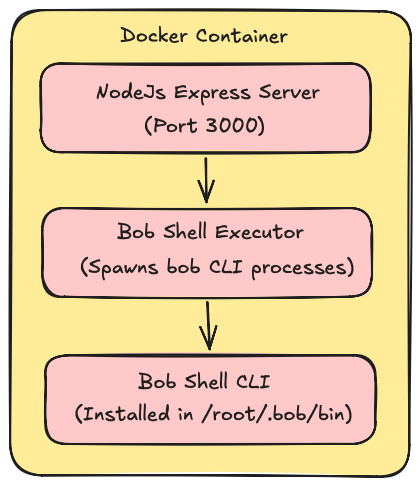
The containerized setup is built around three core components:
- Node.js Express Service — Handles API requests and orchestrates workflows.
- Bob Shell CLI — Executes AI-powered tasks within the container.
- Docker Multi-Stage Build — Optimizes image size and security.
1. I separated build-time and runtime concerns with a multi-stage build
Instead of installing everything into one large image, I used a builder stage to prepare the application dependencies and a final stage to run the service.
# Stage 1: Builder (temporary workspace)
FROM node:22-alpine AS builder
WORKDIR /app
COPY package*.json ./
RUN npm ci --only=production
COPY . .

# Stage 2: Production (final image)
FROM node:22-alpine

# System dependencies for Bob Shell
RUN apk add --no-cache git curl bash

# Security: non-root user
RUN addgroup -g 1001 -S nodejs &&
    adduser -S nodejs -u 1001

# Bob Shell PATH configuration
ENV PATH="/home/nodejs/.bob/bin:/root/.bob/bin:$PATH"

WORKDIR /app

# Copy only node_modules from builder
COPY --from=builder --chown=nodejs:nodejs /app/node_modules ./node_modules
COPY --chown=nodejs:nodejs . .

# Install Bob Shell as root (required)
RUN chmod +x scripts/install-bob-docker.sh &&
    bash scripts/install-bob-docker.sh

# Switch to non-root user
USER nodejs

EXPOSE 3000
CMD ["node", "server.js"]
This approach allowed me to discard temporary build artifacts and keep the final runtime image focused only on what the application actually needed.
2. I replaced the interactive installer with a Docker-friendly wrapper
Rather than trying to simulate terminal input during build, I wrote a wrapper script that handled installation in a deterministic, non-interactive way.
#!/bin/bash
# install-bob-docker.sh

# Auto-select npm (most reliable in Docker)
selected="npm"

# Validate Node.js 22.15+
node_version=$(node -v | sed 's/v//')
required_version="22.15.0"
min_version=$(printf '%sn%s' "${required_version}" "${node_version}" | sort -V | head -n1)

if [[ ${min_version} != "${required_version}" ]]; then
    echo "Error: Node.js ${required_version}+ required"
    exit 1
fi

# Fetch and install silently
version=$(curl -s https://s3.us-south.cloud-object-storage.appdomain.cloud/bob-shell/bobshell-version.txt)
dl_url="https://s3.us-south.cloud-object-storage.appdomain.cloud/bob-shell/bobshell-${version}.tgz"

npm install --reg=https://registry.npmjs.org/
    --progress=false
    --loglevel=error
    -g "${dl_url}" > /tmp/bobshell-install.log 2>&1

# Verify
if command -v bob >/dev/null 2>&1; then
    echo "✓ Bob Shell ${version} installed"
    exit 0
fi

echo "✗ Installation failed"
exit 1
This script solved the main blocker: it removed all interactive prompts and made installation predictable inside a Docker build context.
3. I kept the security boundary intact
Bob Shell needed installation privileges during image build, so I installed it as root. But I did not run the application as root. After installation, the container switches to a dedicated non-root user for runtime execution.
That gave me a safer deployment model without preventing the installation process from completing successfully.
4. I injected the API key at runtime, not at build time
I also wanted to avoid putting secrets into the image. To do that, I passed the Bob API key only when the process runs, and then injected it into the spawned Bob Shell process.
const { spawn } = require("child_process");

class BobShellExecutor {
  constructor(apiKey, shellPath = "bob") {
    this.apiKey = apiKey;
    this.shellPath = shellPath;
  }

  async executeCommand(prompt, workingDir = process.cwd(), options = {}) {
    return new Promise((resolve, reject) => {
      const args = ["-p", prompt, "--yolo"];

      const bobProcess = spawn(this.shellPath, args, {
        cwd: workingDir,
        env: {
          ...process.env,
          BOBSHELL_API_KEY: this.apiKey, // Inject per-process
        },
        stdio: ["pipe", "pipe", "pipe"],
      });

      let stdout = "";
      let stderr = "";

      bobProcess.stdout.on("data", (data) => (stdout += data.toString()));
      bobProcess.stderr.on("data", (data) => (stderr += data.toString()));

      bobProcess.on("close", (code) => {
        resolve({
          success: code === 0,
          exitCode: code,
          stdout,
          stderr,
        });
      });

      bobProcess.on("error", reject);
    });
  }
}

module.exports = BobShellExecutor;
Why this works: API key injected per-process (not baked into image), clean promise-based interface, captures all output.
This gave me a clean execution model:
- No secrets embedded in image layers
- No hardcoded credentials in code
- Process-level isolation for Bob Shell execution
5. I exposed Bob Shell through an API endpoint
To make the setup usable from applications and workflows, I integrated the executor into a simple Express route.
const bobExecutor = new BobShellExecutor(process.env.BOB_API_KEY);

app.post("/api/execute", async (req, res) => {
  const { prompt } = req.body;

  const result = await bobExecutor.executeCommand(prompt);

  res.json({
    success: result.success,
    output: result.stdout,
  });
});
That completed the containerized workflow: the API receives a request, the service invokes Bob Shell inside the container, and the result is returned in a structured response.
Result
This approach gave me a reliable pattern for running IBM Bob Shell in containers.
The key outcomes were:
- Bob Shell installs successfully during Docker builds without hanging on interactive prompts
- The final image is smaller and cleaner because the build uses a multi-stage structure
- Runtime security is improved by installing as root but running as a non-root user
- Secrets stay out of the image because the API key is injected only at runtime
- The service exposes Bob Shell capabilities through a reusable API layer
In short, I turned a tool designed for interactive terminal use into something that works reliably in automated, containerized environments.
Deployment Example
# Build
docker build -t bob-shell-service:latest .

# Run
docker run -d
  --name bob-shell-service
  -p 3000:3000
  -e BOB_API_KEY=your-key
  bob-shell-service:latest
FAQs
1. Why is Node.js 22.15+ required?
Bob Shell has specific dependencies that require Node.js 22.15 or higher
Workaround for older versions: If you’re stuck on an older Node version, consider using a separate container just for Bob Shell and communicate via API.
2. Can I use pnpm or yarn instead of npm?
Yes, but npm was the most predictable option in my container builds.
# For pnpm (recommended for monorepos)
pnpm add - global "${dl_url}"
# For yarn
yarn global add "${dl_url}"
3. How do I update Bob Shell in containers?
The safest option is to rebuild and redeploy the image.
# Pull latest version during build
docker build - no-cache -t bob-shell-service:latest .
# Deploy new version
docker stop bob-shell-service
docker rm bob-shell-service
docker run -d - name bob-shell-service bob-shell-service:latest
In-place updates inside a running container are possible, but they are not a good practice because they break immutability and make deployments harder to reproduce.
Final Thoughts:
IBM Bob Shell may not be designed first for containers, but it can be deployed cleanly if you treat installation, runtime security, and secret management as separate concerns.
- Multi-stage builds are non-negotiable for production containers 40% size reduction is worth the extra complexity.
- Interactive installers need wrappers — don’t fight the tool, wrap it.
- Security first — install as root, run as non-root.
- Per-process secrets — inject API keys via environment, not image layers
References:
Official documentation for Bob Shell
Deploying IBM Bob Shell to Containers: A Production-Ready Guide was originally published in Towards AI on Medium, where people are continuing the conversation by highlighting and responding to this story.
