
Claude Agent SDK Budgeting: How Developers Should Control Programmatic AI Agent Costs


A billing change is easy to treat as an accounting problem. For developers building with the Claude Agent SDK, it is really an architecture problem.
Anthropic now separates Agent SDK and claude -p usage on subscription plans into a monthly Agent SDK credit pool, separate from interactive Claude Code usage. That matters because the most expensive agent work is rarely the work a person starts and watches. It is the work that runs in CI, responds to GitHub events, loops through files, invokes tools, reads logs, retries after failures, and keeps going after the original developer has moved on.
If you are wiring Claude into GitHub Actions, scheduled maintenance jobs, internal developer tools, research agents, code review bots, or bug-fixing workflows, it changes the question. You need to know which work deserves programmatic agent credits, which work should stay interactive, and how to stop low-value loops.
The real risk is not that an agent costs money. The risk is that nobody can explain what the agent spent the money doing.
This guide is a practical playbook for developers, founders, AI platform teams, and engineering managers who want to use Claude Agent SDK workflows without turning every automation idea into an unpredictable spend experiment.
Why Claude Agent SDK Budgeting Is Different From Normal API Budgeting
Traditional LLM API cost control is usually built around one request and one response. You estimate prompt size, model choice, output length, retry count, and traffic volume. That model still matters, but agent workflows add more moving parts.
The Claude Agent SDK gives developers access to Claude Code-style capabilities as a library. It can read files, run commands, edit code, use hooks, call subagents, connect to MCP servers, manage sessions, and stream results from Python or TypeScript. In other words, one prompt can become a sequence of model calls and tool calls.
That is why programmatic agent budgeting needs a workflow view. A single automation may include repository orientation, file search, patch generation, test execution, retry, final summary, and audit logging. Each step may be useful. Each step also consumes context, output, CI minutes, and sometimes external tool resources.
The mistake is budgeting at the entry point only. A prompt like “review this pull request” looks small. The work behind it may include reading the diff, scanning nearby files, loading project instructions, spawning a specialized reviewer, running tests, summarizing findings, and posting output back to GitHub. Good budgeting starts by modeling the whole job.
The New Developer Decision: Interactive, Programmatic, or API-Direct?
Before you add an Agent SDK workflow, sort the task into one of three lanes.
Use interactive Claude Code for exploratory work
Interactive work is best when the developer is still deciding what the task means. Examples include debugging an unfamiliar error, exploring a new codebase, sketching a migration plan, or asking “what changed here?” A human is present, so the agent can ask questions, stop, and adjust direction.
Interactive work can feel less efficient, but it prevents many bad automated runs. A human can notice when the model is reading the wrong file, chasing the wrong assumption, or preparing a risky edit.
Use the Agent SDK for repeatable agent work
Programmatic Agent SDK workflows make sense when the task has a repeatable trigger, a bounded input, a measurable outcome, and a known stop condition. Examples include reviewing every pull request for a narrow class of issues, generating a daily repo summary, applying a standard migration pattern, updating docs after a tagged release, or creating a first-pass bug reproduction from an issue template.
The key phrase is “bounded input.” If the job starts with the whole repository, the whole issue tracker, and the whole internet, the cost profile is hard to predict. If it starts with a diff, a path allowlist, a known test command, and a turn limit, you can improve it.
Use the client API when you do not need an autonomous tool loop
Not every AI feature needs an agent. If your app only needs classification, extraction, summarization, rewriting, ranking, or a structured answer from known data, a direct API call is usually easier to budget and test. Use the Agent SDK when Claude needs to operate over files, commands, sessions, tools, and state.
Start With a Workflow Budget, Not a Token Guess
A useful workflow budget answers five questions before the agent runs:
- What is the business value of a successful run?
- What input is the agent allowed to inspect?
- Which tools are approved, blocked, or approval-gated?
- How many turns, retries, files, commands, and minutes are allowed?
- What evidence proves the run was worth keeping?
This is not bureaucracy. It is how you stop a useful agent from becoming a wandering process. If a pull request security review can inspect the diff, affected files, package manifests, and authentication modules, it has enough room to be useful. If it can read the entire monorepo and run any command, the budget is no longer tied to the task.
Think in levels. A small workflow might allow read-only file access, no shell commands, one model route, and a short final report. A medium workflow might allow tests, limited edits, and one retry. A high-risk workflow might require human approval before edits, package installs, deployments, database changes, or external network calls.
The Cost Levers Developers Actually Control
You cannot control every internal model decision. You can control the shape of the work. These are the levers that usually matter most.
Context scope
Agents spend heavily when they orient poorly. A vague prompt forces the agent to discover basic project facts through file search and repeated reads. Give the workflow a concise task brief, relevant paths, acceptance criteria, and known commands up front.
For CI workflows, prefer event-specific context. A pull request review should start from the diff and changed files. A documentation update should start from the release notes and docs path. A dependency audit should start from manifests, lockfiles, and changed packages.

Tool permissions
The Agent SDK supports permissions and tool configuration. Use them as cost controls as well as safety controls. Read-only workflows should not have edit tools. Analysis workflows should not have broad shell access. A code review workflow may need Read, Glob, and Grep, but not unrestricted Bash.
When tools are too broad, agents can spend credits collecting evidence the task never needed. Tool scope is budget scope.
Maximum turns and timeouts
Claude Code GitHub Actions documentation recommends using –max-turns, workflow timeouts, and concurrency controls to avoid runaway jobs. Those controls should not be afterthoughts. Put them in every unattended workflow.
A good starting policy is simple: cheap checks get fewer turns, expensive checks get explicit approval, and scheduled jobs get concurrency limits.
Output shape
Long narrative output can be useful during debugging, but it becomes expensive and noisy in automation. Ask for structured, compact output when the result feeds another system. A PR reviewer can return severity, file path, confidence, and next action. A daily report can return changed areas, risks, and links, not an essay about every commit.
Subagent use
Subagents can help isolate verbose work. They are useful when one part of the task needs to inspect many files or logs but the main workflow only needs a concise summary. They can also become expensive when every task spawns specialists by default. Treat subagents like background workers: define when they are worth it, what they can inspect, and what they must return.
A useful budget gate sits before execution, not after the invoice arrives.
A Practical Budget Gate for Agent SDK Workflows
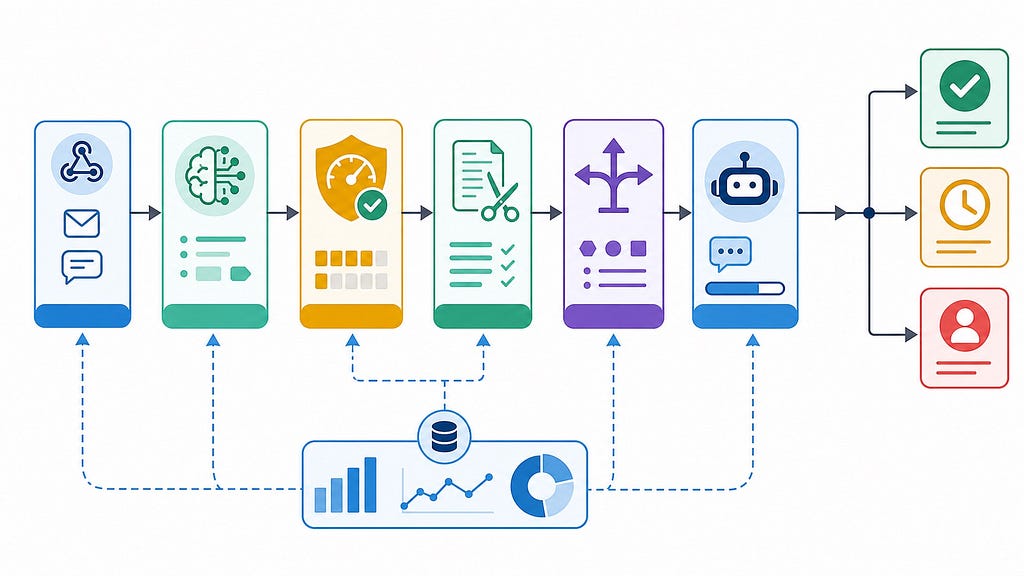
Every programmatic workflow should pass through a budget gate before it invokes the agent loop. The gate does not need to be complex at first. It needs to be explicit.
Here is a simple pattern:
- Classify the task type.
- Assign a workflow tier.
- Load allowed paths and tools for that tier.
- Set turn, runtime, and retry limits.
- Estimate whether the task should run now, queue, downgrade, or ask for approval.
- Emit telemetry before and after the run.
The point is making unattended work observable and interruptible.
const workflowPolicy = {
  pull_request_review: {
    tier: "medium",
    allowedTools: ["Read", "Glob", "Grep"],
    maxTurns: 6,
    maxRuntimeMinutes: 10,
    allowedPaths: ["src/**", "tests/**", "package.json"],
    requiresApproval: false
  },
  dependency_upgrade: {
    tier: "high",
    allowedTools: ["Read", "Edit", "Bash", "Grep"],
    maxTurns: 10,
    maxRuntimeMinutes: 20,
    allowedPaths: ["package.json", "package-lock.json", "src/**", "tests/**"],
    requiresApproval: true
  },
  daily_summary: {
    tier: "low",
    allowedTools: ["Read", "Grep"],
    maxTurns: 3,
    maxRuntimeMinutes: 5,
    allowedPaths: ["CHANGELOG.md", "docs/**"],
    requiresApproval: false
  }
};
This policy object is intentionally plain. Store it in code, YAML, or a small internal service. The important part is that budget decisions are versioned with the workflow.
How to Budget GitHub Actions Workflows
GitHub Actions is where programmatic agent costs can surprise teams fastest. A workflow can trigger on every pull request, comment, issue, schedule, or label change. It can also run in parallel across many repositories.
Start with trigger discipline. Do not run a full agent review on every small event if a lighter check would do. Use labels, path filters, branch filters, and manual comments to reserve expensive work for changes that justify it.
A sensible first setup might look like this:
- Run a lightweight read-only summary on every pull request.
- Run security or architecture review only when relevant files change.
- Run edit-capable workflows only after a maintainer comment or label.
- Cancel older runs when a new commit arrives on the same PR.
- Set workflow timeouts and –max-turns for every agent step.
Here is a simplified GitHub Actions shape that keeps those controls visible:
name: Claude PR Review
on:
  pull_request:
    types: [opened, synchronize]
    paths:
      - "src/**"
      - "tests/**"
concurrency:
  group: claude-review-${{ github.event.pull_request.number }}
  cancel-in-progress: true
jobs:
  review:
    runs-on: ubuntu-latest
    timeout-minutes: 12
    permissions:
      contents: read
      pull-requests: write
    steps:
      - uses: actions/checkout@v4
      - uses: anthropics/claude-code-action@v1
        with:
          anthropic_api_key: ${{ secrets.ANTHROPIC_API_KEY }}
          prompt: "Review this PR for correctness risks. Focus only on changed files and nearby tests."
          claude_args: "--max-turns 6 --allowedTools Read,Glob,Grep"
The exact arguments depend on your workflow, but the design principle is stable: narrow the trigger, narrow the tools, cap the turn count, and make the job cancelable.
Track Cost Per Useful Outcome
Do not measure Agent SDK spending only as monthly total. That number is too blunt. Measure cost per useful outcome.
For a PR review bot, useful outcomes might be accepted findings, prevented regressions, or reduced reviewer time. For a bug reproduction agent, the outcome might be a failing test or a minimal reproduction. For docs automation, it might be a merged update that passed review without major edits.
A workflow that costs more but prevents high-severity bugs may be worth keeping. A cheap workflow that posts noisy comments is not cheap. It is attention debt.
At minimum, log these fields for every unattended run:
- Workflow name, version, repository, branch, and trigger
- Task tier, allowed tools, model route, turn count, and runtime
- Files inspected, commands executed, and final status
- Human disposition: accepted, edited, ignored, reverted, or rerun
You do not need a perfect dashboard on day one. A JSONL log, CI artifact, or OpenTelemetry trace is enough to connect spend to behavior.
Teams should review automated agent usage like any other production workflow.
Build a Stop Policy Before You Need One
Every agent workflow needs a way to stop without pretending the job succeeded. This matters when credits are finite and workflows run without a person watching.
Use stop conditions that match the task:
- Stop if the agent reads outside the allowed path set.
- Stop if the same test fails twice with no new evidence.
- Stop if the workflow hits its turn budget.
- Stop if a command asks for network access in a no-network workflow.
- Stop if required context is missing or output validation keeps failing.
A clean stop is not a failure of the agent. It is a successful guardrail. The worst automation is the one that keeps spending because it cannot admit uncertainty.
Use Credits to Shape Behavior, Not Just Limit Spend
Programmatic credits give teams a natural forcing function: which AI agent work do we actually value enough to run unattended?
That question improves product design. It pushes teams to write better issue templates, smaller PRs, cleaner repository instructions, stronger tests, and narrower workflows.
For example, compare these two prompts:
Bad:
"Fix the flaky tests."
Better:
"Investigate flaky test failures in tests/payments.
Use only the last CI log, changed files, and nearby test fixtures.
Do not edit production code. Return a suspected cause,
one reproduction command, and the smallest next step."
The second prompt is not just cheaper. It defines scope, output shape, and boundaries. Good cost control often looks like good engineering.
A Rollout Plan for Teams
If you are introducing Agent SDK workflows across a team, start with one useful, bounded workflow and instrument it well.
- Inventory every programmatic Claude entry point: local scripts, GitHub Actions, scheduled jobs, internal tools, chatops commands, and prototype agents.
- Classify each workflow by cost risk, edit access, shell access, external tools, and whether it can post public comments.
- Add turn caps, timeouts, path filters, tool limits, and telemetry before expanding usage.
- Review accepted outcomes, ignored comments, reruns, timeouts, and cost-heavy jobs every month.
The goal is not to shame usage. The goal is to decide which workflows to keep, tune, pause, or graduate into a more formal internal platform.
Common Mistakes to Avoid
Mistake one: treating subscription credits as free capacity
If a workflow burns credits but produces ignored output, it is not free. It trains developers to ignore automation.
Mistake two: giving automation the same freedom as a human session
Interactive agents can be broad because a person is supervising. Programmatic agents need narrower boundaries because they run from triggers and schedules.
Mistake three: optimizing tokens before optimizing task shape
Shorter prompts help, but the larger savings usually come from better triggers, smaller context windows, fewer retries, narrower tools, and clearer stop conditions.
Mistake four: hiding agent spend inside CI
Claude Code GitHub Actions can also consume GitHub Actions minutes. If your review looks only at model usage, you may miss runner time, failed jobs, repeated comments, and reviewer attention.
The Bottom Line
Claude Agent SDK budgeting is not only about spending less. It is about spending on the right unattended work.
The teams that get the most value from programmatic agents will know which workflows deserve automation, give agents the right context, restrict dangerous tools, cap runaway loops, measure useful outcomes, and stop jobs cleanly when the evidence is not good enough.
That is the shift developers should make now: from “Can we automate this with an agent?” to “Can we define the task well enough that an agent can run it safely, measurably, and within budget?”
FAQ
What is Claude Agent SDK budgeting?
Claude Agent SDK budgeting is the practice of controlling programmatic Claude agent usage by workflow. It includes trigger rules, tool permissions, turn limits, runtime limits, telemetry, spend review, and useful-outcome measurement.
Is Agent SDK usage the same as interactive Claude Code usage?
No. Anthropic documentation says Agent SDK and claude -p usage on subscription plans now draws from a monthly Agent SDK credit, separate from interactive Claude Code usage. Developers should check the current Anthropic support and docs pages for plan-specific details.
When should developers use the Claude Agent SDK instead of direct API calls?
Use the Agent SDK when the workflow needs an autonomous tool loop: reading files, running commands, editing code, using sessions, invoking MCP tools, or coordinating subagents. Use direct API calls for simpler classification, extraction, summarization, or structured-output tasks.
How do I prevent Claude GitHub Actions from becoming expensive?
Use path filters, specific triggers, workflow timeouts, concurrency cancellation, narrow prompts, limited tool permissions, and –max-turns. Track which comments or changes humans actually accept so you can remove noisy workflows.
What metric matters most for programmatic agent cost?
Cost per useful outcome is more helpful than total spend alone. Measure whether the workflow produced accepted findings, merged fixes, useful summaries, reduced review time, or prevented production issues.
Should every agent workflow have a stop condition?
Yes. Unattended workflows should stop when they exceed turn limits, inspect the wrong scope, repeat a failed strategy, need missing context, or request tools that the workflow is not allowed to use.
Can subagents reduce cost?
Sometimes. Subagents can isolate verbose work and return concise summaries to the main session. They can also add cost if used automatically for simple tasks. Treat them as a deliberate workflow design choice.
Further Reading
- Claude Agent SDK overview
- Claude Code GitHub Actions documentation
- Claude Code cost management documentation
- Claude API rate limits and spend limits
Claude Agent SDK Budgeting: How Developers Should Control Programmatic AI Agent Costs was originally published in Towards AI on Medium, where people are continuing the conversation by highlighting and responding to this story.
