AI Agent Orchestration: How to Route, Call Tools, and Hand off in Customer Support

What is AI agent orchestration?
AI agent orchestration coordinates several specialized AI agents so they operate as one system working toward a single goal. Instead of asking one general-purpose model to handle everything, it gives each agent a narrow job and adds a control layer that decides which agent or tool takes each step.
In a customer support context, the orchestration layer is the part of the system that decides whether this message should be answered from the knowledge base, sent to a billing agent, looked up in an order tool, or escalated to a human. The agents are the specialists who do the work. The orchestrator decides who works.
The distinction matters because agents provide capability, while orchestration provides control. As Snowflake’s engineering team frames it, multi-agent systems differ from traditional AI pipelines: rather than a linear flow from input to output, agents operate iteratively and in parallel, revise plans, and act on partial information. Orchestration is what keeps that from becoming chaos.
Customer support orchestration architecture
In customer support, orchestration is usually not about making many agents debate each other. It is about selecting the next safe workflow:
- Answer from knowledge
- Call a tool
- Collect a missing field
- Route to a queue
- Hand off.
Router pattern
The router decides:
- Answer from knowledge
- Call order tool
- Route to billing
- Escalate the complaint
- Ask for clarification
The router should return a structured decision. It can be shaped as follows:
{
  “path”: “tool_lookup”,
  “intent”: “order_status”,
  “tool”: “get_order_status”,
  “requiresApproval”: false,
  “fallbackPath”: “handoff”,
  “reason”: “Customer asks for current delivery status and provided an order ID.”
}
This keeps orchestration debuggable. When the wrong path is chosen, you can inspect the decision instead of guessing why the model answered the way it did.
A good router also separates intent from action. A refund_request intent may still become clarify if the order ID is missing, handoff if the item is damaged, or answer if the customer only asks about the return window.
To see how this works in practice, we can look at the OpenAI Agents SDK.
OpenAI Agents SDK: how orchestration works in practice
The OpenAI Agents SDK, released in March 2025 as the production-ready successor to OpenAI’s experimental Swarm project, is the most direct way to implement the patterns described above using OpenAI models. It has accumulated over 26,900 GitHub stars and 10.3 million monthly downloads.
Its design philosophy is to provide the minimum set of primitives needed for agent development and let developers compose them without imposing heavy abstraction layers.
The four core primitives
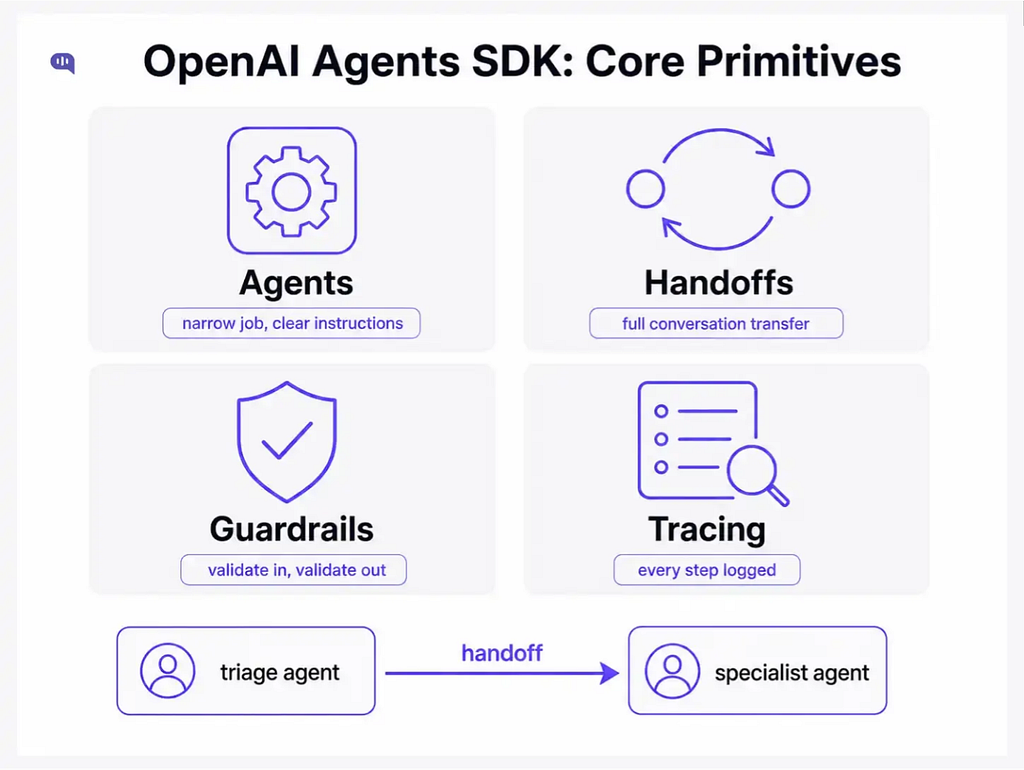
The SDK is built around four concepts:
- Agents — An agent is an LLM configured with instructions, tools, and optional runtime behavior such as handoffs, guardrails, and structured outputs. Each agent has a narrow job.
- Handoffs: A handoff transfers the entire conversation to a specialist agent. The receiving agent takes over the interaction with access to the complete conversation history. Unlike agent-as-tool (covered below), a handoff means the parent agent steps aside entirely.
- Guardrails — Input and output validation that runs on every agent turn. Guardrails can reject a message before it reaches the model, or block a response before it reaches the user.
- Tracing — Built-in observability that logs each step in the OpenAI dashboard, showing which agent handled which turn, which tools were called, and where handoffs occurred.
Agents can also be used as tools or for handoffs.
Agent-as-tool vs handoff
These two patterns solve different problems, and the distinction is worth understanding before you design your routing architecture.
https://medium.com/media/0f86aa9a6f63068a741142b706094ff2/href
Use agent-as-tool when the main agent should stay responsible for the final answer, and call a specialist as a helper. Use a handoff when the specialist should own the next responsibility, and the main agent should step aside.
How to build an agent for support triage?
The canonical support orchestration pattern in the SDK is a triage agent that classifies incoming messages and routes them to the appropriate specialist via handoff.
The handoffs are declared in the triage agent’s configuration upfront, not discovered dynamically at runtime.
from agents import Agent, handoff

billing_agent = Agent(name=”Billing agent”)
refund_agent  = Agent(name=”Refund agent”)

triage_agent = Agent(
    name=”Triage agent”,
    handoffs=[billing_agent, handoff(refund_agent)],
    instructions=(
        “Route billing questions to the billing agent. “
        “Route refund requests to the refund agent.”
    )
)
When a handoff occurs, the delegated agent receives the conversation history and takes over the conversation. The triage agent does not answer the user directly. It only decides who should.
The handoff() function also accepts an on_handoff callback, which fires as soon as the handoff is invoked. This is useful for kicking off a data fetch or logging a routing decision the moment the triage agent commits to a path, before the specialist agent even starts.
Some SDK limitations to factor in
The OpenAI Agents SDK is most effective when used with OpenAI models, especially via the Responses API, which is the recommended path for OpenAI-only applications. It can work with non-OpenAI providers through built-in provider integration points and third-party adapters such as LiteLLM. Still, some provider-specific capabilities, including tool calling, structured outputs, usage reporting, and routing behavior, should be validated before production use.
Runtime context is passed per run, so application-specific context still needs to be managed deliberately. However, the SDK includes built-in session memory to maintain conversation history across runs, with options such as:
- SQLite
- Redis
- SQLAlchemy
- MongoDB
- Dapr
- Encrypted sessions
- OpenAI Conversations API sessions
For production-grade state, teams still need to choose and operate the right backing store, but they do not have to build all persistence from scratch.
The SDK is not a graph-based orchestration framework. It supports manager-style agents and explicit handoffs, where one agent can transfer control to another. For workflows that require conditional edges, durable execution, complex branching, human-in-the-loop checkpoints, or long-running stateful flows, LangGraph is a better fit.
Whenever you create an AI agent workflow for production, you also need to understand if you should create multiple agents or not.
Should you use multiple AI agents?
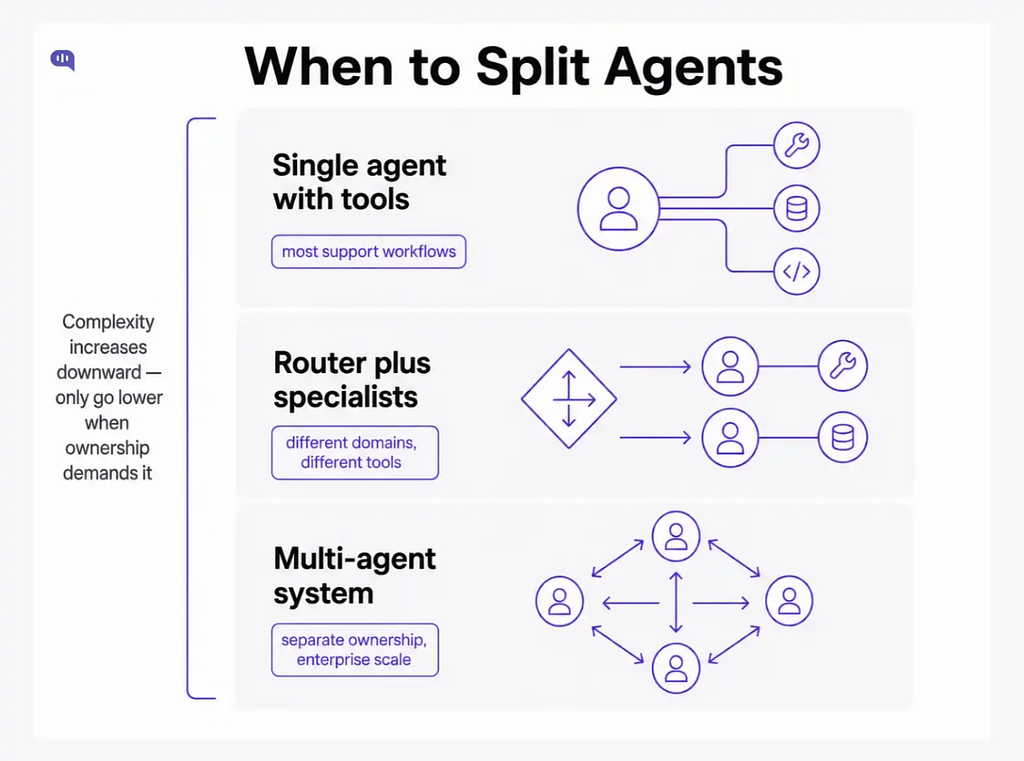
Most teams should start with one orchestrated agent. Use multiple agents only when ownership is genuinely different.
https://medium.com/media/5361e5c8c3141b9c5cb20c93a587dbec/href
Do not split agents because it sounds advanced. Split them when it makes permissions, prompts, tools, and evaluation clearer.
As OpenAI’s own orchestration guide notes: start with one agent whenever you can. Adding specialists only improves things when they materially improve capability isolation, policy isolation, prompt clarity, or trace legibility.
Now that you have a method to operationalize AI agents, let’s talk about which framework you should use.
Top 5 AI agent framework comparison
The right framework depends on what the workflow actually requires. Below is how the five main frameworks compare on the dimensions that matter for support orchestration.
https://medium.com/media/319c3e33a8a697decac9a8da07f8c449/href
A few data points on relative adoption:
- LangGraph leads in enterprise usage at 34.5 million monthly downloads.
- CrewAI has grown to over 44,500 GitHub stars and is the fastest path to a working multi-agent prototype, though it runs agents sequentially by default, which limits its use in high-throughput production deployments.
- AutoGen achieves higher reasoning accuracy on complex tasks but incurs significantly higher token costs than LangGraph due to its conversational overhead.
For most support orchestration, the choice comes down to two things: whether you need durable state across sessions (if yes, LangGraph), and whether your team is already invested in OpenAI’s API (if yes, start with the Agents SDK).
You do not need to pick one permanently. Many production teams use LangGraph for tool management and retrieval while using the Agents SDK for the agent layer.
One thing no framework gives you out of the box: the channel layer. Kommunicate provides support routing, human handoff, conversation history, and analytics that sit beneath any orchestration framework. Use the Kommunicate docs to connect orchestration to live support channels.
How to use tools?
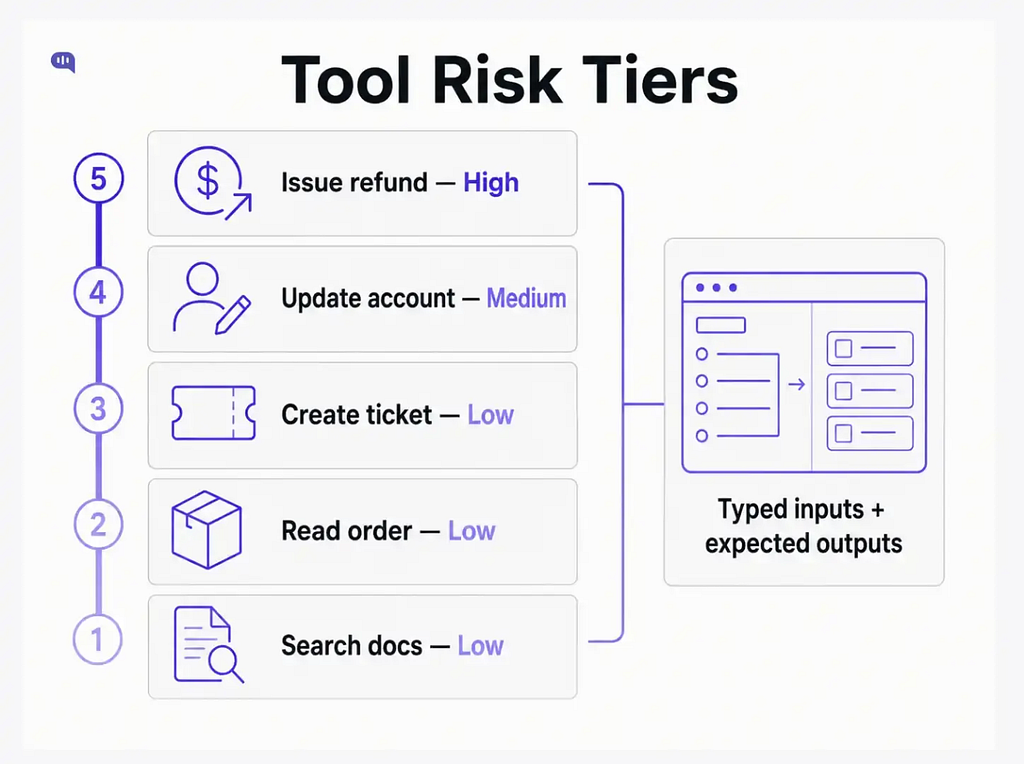
Tools should be scoped by risk level, and that scoping should be explicit before any tool is deployed.
https://medium.com/media/93400222978b62d6071c0e6987e732b0/href
Tool calls should have typed inputs and expected outputs.
{
  “tool”: “get_order_status”,
  “input”: {
    “orderId”: “A18291”
  },
  “expectedOutput”: {
    “status”: “string”,
    “estimatedDelivery”: “string”,
    “requiresHumanReview”: “boolean”
  }
}
The model can choose the tool. The backend should validate the tool input. To learn more about tool use, you can see our function-calling tutorial.
Manage approval gates and handoffs.
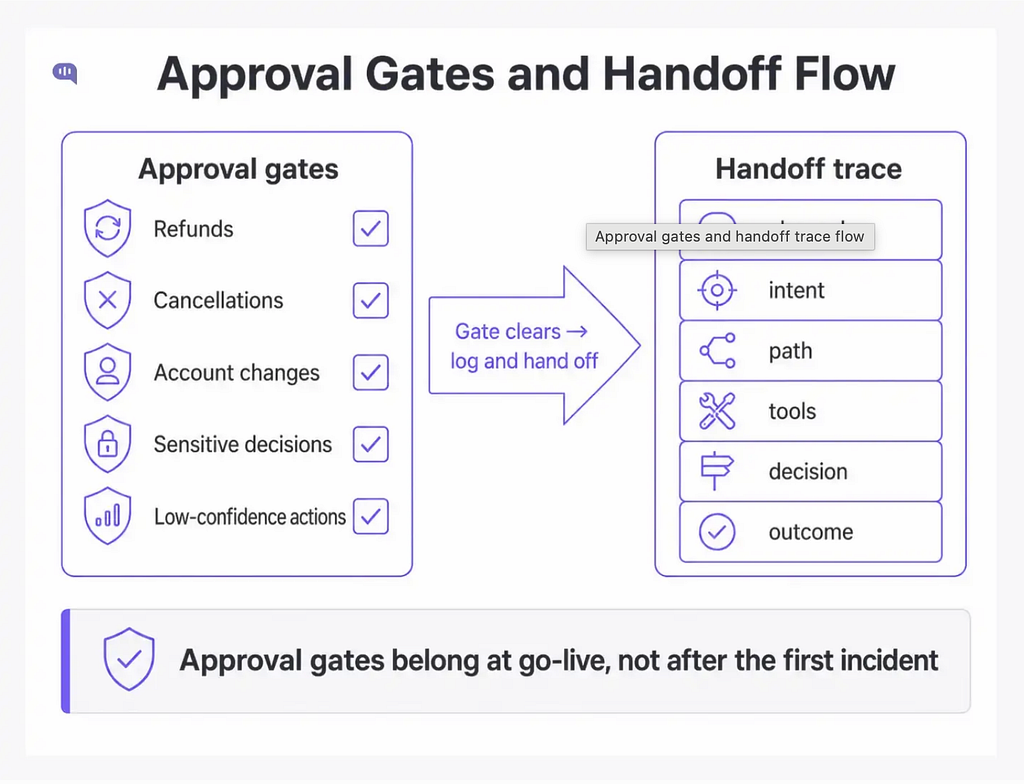
Approval gates
Approval gates are used for important tasks that significantly affect billing or the customer. In customer support, you should use approvals for:
- Refunds
- Cancellations
- Account changes
- Sensitive decisions
- Low-confidence actions
Approval gates are not a workaround for a weak agent. They are a design requirement for any action that affects money, identity, or the state of an account. Approval gates and audit logging should be in place before go-live, not after the first incident.
Handoff
Handoff is an orchestration outcome. It should include a summary and a reason. The summary gives the receiving human agent context without requiring them to read the full transcript. The reason explains why the AI could not or should not continue.
With each handoff, log each orchestration step:
- Incoming channel
- Detected intent
- Selected path
- Retrieved sources
- Tool calls
- Approval decisions
- Final action
- Handoff reason
- Outcome
Without this trace, orchestration becomes impossible to debug. A wrong answer might come from the router, the retrieval, the tool, the prompt, or the handoff rule.
A useful orchestration trace is compact but complete:
{
  “conversationId”: “conv_123”,
  “intent”: “order_status”,
  “selectedPath”: “tool_lookup”,
  “retrievedSources”: [“shipping_policy”],
  “toolsCalled”: [“get_order_status”],
  “approvalRequired”: false,
  “finalAction”: “answer”,
  “fallbackPath”: “handoff”,
  “reason”: “Order ID was present, and lookup succeeded.”
}
This trace gives support operations a practical debugging surface without exposing the full prompt or sensitive customer data.
For a practical rollout, follow these steps:
- Start with one orchestrated agent and a few tools.
- Add specialist agents only after the routing, logging, fallback, and handoff paths are stable.
This becomes more important as enterprise AI agents increase in volume. Gartner projects that 40% of enterprise applications will feature task-specific AI agents by the end of 2026, up from under 5% in 2025. Most of those deployments will start simple, but they need the above safeguards built in to function as intended.
Industry-specific AI orchestration patterns
Customer workflows should determine how much orchestration is actually needed.
https://medium.com/media/d2f2b5130aeb8e7474ddde4d2da8912b/href
- For BFSI, the orchestrator might route suspected fraud to a security path, loan questions to a policy path, and branch appointments to a scheduling path.
- For FinTech, failed payments, KYC, account lockouts, and chargebacks should have a separate tool and review rules.
- For healthcare, administrative scheduling can be automated more safely than clinical advice.
The orchestrator should log why it chose a path. That gives the team a way to debug routing issues, improve prompts, and identify missing knowledge.
Conclusion
Make orchestration explicit. Use structured decisions. Log every path.
Salesforce reports that 66% of service organizations are now running AI agents in 2026, up from 39% in 2025.
Most of that growth is happening in support workflows. And the support teams seeing the best results are doing it with AI agents that have the most observable orchestration patterns. Good orchestration makes AI less mysterious and supports more predictable outcomes.
If you want a customer support AI agent preconfigured with handoff and escalation rules, book a demo.
AI Agent Orchestration: How to Route, Call Tools, and Hand off in Customer Support was originally published in Towards AI on Medium, where people are continuing the conversation by highlighting and responding to this story.
