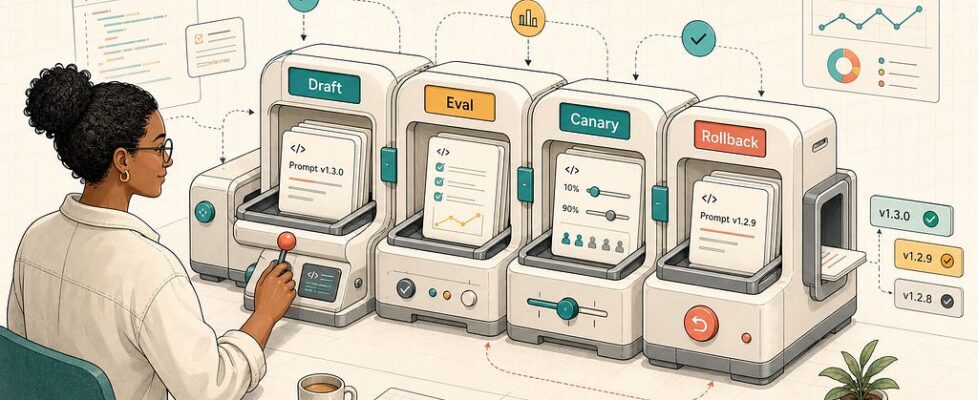
Prompt Release Workflow: How to Ship LLM Prompt Changes Without Breaking Production


A one-line prompt edit can look harmless in review and still change the behavior of an entire AI product. It can make a support bot over-answer, make a coding assistant ignore constraints, make a classifier drift toward a new label, or make a JSON-producing workflow quietly break downstream parsing.
That is why prompt changes need a release workflow, not just a clever prompt engineer.
In 2026, serious LLM teams are learning an uncomfortable lesson: prompts are no longer scraps of text pasted into an API call. They are production assets. They deserve versions, owners, review, test datasets, staged rollout, monitoring, and rollback. Recent developer discussions on Reddit, updated vendor documentation, and postmortems from AI tool teams all point in the same direction. The practical pain is not “how do we write a better prompt?” It is “how do we ship prompt changes without discovering the regression from users?”
This guide gives you a developer-focused workflow for doing that. It is not tied to one platform. You can implement it with LangSmith, Braintrust, PromptLayer, Langfuse, Phoenix, a Git-backed prompt registry, or a small internal service. The important part is the release shape.
Why Prompt Releases Break Differently Than Code Releases
Code changes usually fail in ways your tooling already understands. Tests fail. Types break. Deployments crash. Metrics spike. Prompt changes are stranger because the file still loads, the API still returns 200, and the output may still look fluent.
The failure is often semantic. The new prompt is slightly more confident. Or shorter. Or more cautious. Or it changes tool-call ordering. Or it passes the golden test set but fails on long conversations because the actual assembled context is different from the review sample.
That is why “we use Git” is not enough. Git tells you the text changed. It does not tell you whether production behavior changed. It does not know which model, tool schema, retrieval context, safety policy, temperature, or output parser was attached to that prompt at runtime.
The best mental model is this: a prompt release is a contract change between your application, your model, your data, and your users. Treat it like an API change with probabilistic behavior.
The Current Signal: Prompt Ops Is Becoming Real LLMOps
Search demand around prompt versioning, prompt management, eval-gated promotion, and prompt rollback has become much more practical. The top results are no longer only prompt-writing tutorials. They include platform docs, production evaluation guides, and developer threads asking how to manage prompt versions when something breaks.
LangSmith documents prompt versions, environments, and commit tags for managing prompt history. Anthropic’s evaluation tooling describes re-running prompt test suites after prompt updates. PromptLayer’s docs discuss triggering evaluations for new prompt versions, backtesting against production history, and connecting evals to CI. Braintrust has published guidance on prompt versioning and management that frames prompts as reproducible production artifacts. Meanwhile, a May 2026 InfoQ report on Claude Code quality complaints highlighted a painful lesson: narrow internal evals and non-identical public builds can miss regressions from product-layer and prompt changes.
The trend is clear. Teams are moving from prompt editing to prompt release engineering.

What a Prompt Release Workflow Should Control
A good workflow controls five things.
First, it controls identity. Every prompt that can affect production needs a stable version ID. That ID should appear in traces, logs, eval reports, error reports, and user-facing incidents. If a bad response happens, you should know exactly which prompt version produced it.
Second, it controls context. The prompt text alone is not the product behavior. The full runtime package includes model name, model settings, tool definitions, output schema, retrieval policy, memory policy, safety instructions, and post-processing rules. Store those together or at least bind them in a release manifest.
Third, it controls promotion. A prompt should not jump from a playground to production because one example looked better. It should move through draft, review, offline evaluation, staging, canary, and full rollout.
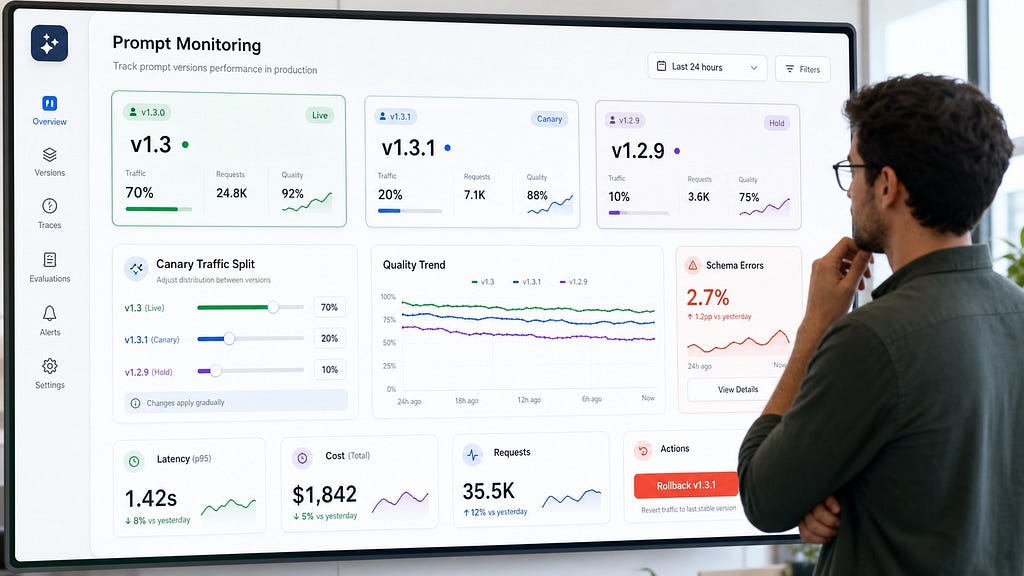
Fourth, it controls observation. After release, you need per-version metrics, not only app-level averages. If version 1.8 is getting 20 percent of traffic and has double the schema-error rate, the dashboard should make that obvious.
Fifth, it controls rollback. The rollback path should be boring. You should be able to restore the last known good prompt version without rebuilding the app, waiting for a full deploy, or guessing which runtime cache still has the old text.
The Seven-Stage Prompt Release Workflow
Here is the release workflow I recommend for production LLM applications.
1. Register the Prompt as a Versioned Artifact
Start with a registry. This can be a vendor prompt-management system, a Git directory, a database table, or a YAML-backed internal service. The storage choice matters less than the metadata discipline.
Each prompt version should include:
- A unique version ID, such as support_router:v1.6.0
- The prompt text or template
- Owner and reviewer
- Change reason
- Linked task, incident, or experiment
- Expected behavior change
- Model and parameters tested with the prompt
- Output schema or parser contract
- Required tools and retrieval sources
The change reason is not bureaucracy. It is the first line of defense against random prompt drift. If someone cannot explain the intended behavior change in plain language, the prompt is not ready for release.
2. Build a Golden Set From Real Failure Modes
A prompt test set should not be a museum of happy-path demos. It should include the situations that have hurt you before.
Pull examples from production traces, support escalations, user feedback, schema failures, abandoned sessions, high-cost requests, safety reviews, and confusing edge cases. Then label what “good” means for each example. Sometimes good means exact structured output. Sometimes it means refusing to answer. Sometimes it means asking a clarifying question. Sometimes it means choosing the right tool rather than producing final prose.
Keep the set small enough that developers will actually run it. A useful starter set might have 50 to 200 examples across major user intents and known failure classes. Add new cases whenever an incident happens. That is how the test suite becomes smarter over time.
3. Run Offline Evals Before Review
Offline evals are not perfect, but they are the cheapest place to catch obvious mistakes. Run the candidate prompt against the current production prompt on the same inputs. Compare outputs by task-specific criteria, not vague “quality.”
For structured workflows, use deterministic checks first. Did the JSON parse? Did it match the schema? Did required fields appear? Did the tool call use valid arguments? Did the classifier choose an allowed label?
For subjective workflows, use rubric-based human review or LLM-as-judge with a versioned rubric. Do not let the judge prompt float independently from the candidate prompt. If the evaluation rubric changes every week, your trend line becomes theater.
A simple evaluation manifest can look like this:
{
  "candidate_prompt": "support_router:v1.6.0",
  "baseline_prompt": "support_router:v1.5.2",
  "model": "production-default",
  "dataset": "support_router_golden:v4",
  "gates": {
    "schema_pass_rate": ">= 99.5%",
    "unsafe_tool_call_rate": "0%",
    "handoff_accuracy": ">= baseline - 1%",
    "p95_latency": "<= baseline + 10%"
  }
}
The point is not to worship numbers. The point is to make the release decision explicit before the release.
4. Review the Behavior Diff, Not Just the Text Diff
Code review tools are optimized for text diffs. Prompt review needs behavior diffs.
For each meaningful change, reviewers should see representative before-and-after outputs. Do not show 200 random examples. Show clustered failures, biggest regressions, highest-impact wins, and examples where the candidate disagrees with production.
The review should answer practical questions:
- What problem is this prompt trying to fix?
- Which user intents are affected?
- Which examples got better?
- Which examples got worse?
- Does the prompt rely on hidden assumptions about model behavior?
- Does it change output shape, refusal behavior, tool use, or tone?
- Can we roll it back without a code deploy?
This is where many teams find that the “better” prompt is only better for the one scenario that motivated the edit. It may improve billing questions while weakening account-recovery handling. It may reduce verbosity while removing necessary caveats. It may make answers more polite while making tool calls less precise.
5. Promote to Staging With Production-Like Context
Staging is useful only if it assembles prompts like production. If staging uses different retrieval indexes, different tool schemas, shorter conversation history, or synthetic-only examples, it can give you false confidence.
In staging, test the full prompt package: prompt template, runtime variables, retrieved context, tool definitions, model settings, safety layer, output parser, and downstream consumer. Prompt bugs often appear at the boundaries. The model output is valid, but the parser expects another field. The prompt asks for a tool that the runtime no longer exposes. The staging model follows an instruction that the production model ignores.
Use staging to verify integration, not just wording.
6. Canary the Prompt, Not the Whole App
A prompt canary routes a small percentage of eligible traffic to the candidate prompt while keeping the rest on the known-good version. Start small. For high-risk workflows, one percent may be enough. For low-risk summarization, you might start at five or ten percent.
Canary by user segment, intent, region, product tier, or workflow type. Avoid mixing everything together. If the prompt only affects refund conversations, measure refund conversations. If it only affects a code-generation subtask, measure that subtask.
During the canary, monitor both quality and operational metrics:
- Task completion
- Escalation rate
- Schema and parser errors
- Tool-call failure rate
- Refusal and clarification rate
- Latency and token cost
- User feedback and support contacts
- Safety and policy flags
The best canary dashboards show metrics by prompt version. An average across all traffic can hide the exact regression you are trying to catch.
7. Roll Forward, Roll Back, or Freeze
Every prompt release should end with a decision. Roll forward if the candidate beats the baseline and no guardrail metric regresses beyond the agreed threshold. Roll back if a hard gate fails. Freeze if the data is ambiguous and you need more traffic, more review, or a narrower release segment.
Rollback should flip a label or routing rule back to the previous version. It should not require editing the prompt again. It should not depend on an engineer remembering which text was live before the incident. It should not be blocked by a cache that keeps serving the bad version for hours.
After rollback, add the incident examples to the golden set. The failure should become a regression test.
Git, Prompt Platform, or Hybrid?
Developers often ask whether prompts should live in Git or a prompt management platform. The most practical answer is usually hybrid.
Put structural prompts in Git when they are tightly coupled to code. Tool definitions, output schemas, router prompts, compliance instructions, and prompts that affect downstream parsing should move through normal software review. These changes are code-adjacent, even if they are written in natural language.
Use a managed prompt registry when product, support, research, or operations teams need faster iteration under guardrails. The registry should still require versioning, permissions, evals, approval, and traceability. “Editable in the UI” cannot mean “mutable in production with no audit trail.”
The hybrid model works well when the application fetches a named prompt version at startup or request time, caches the last known good version, and records the resolved version ID in every trace. If the registry is down, the app should fail closed to the cached production version, not fetch a half-published draft.
How to Design Prompt Version Numbers
You do not need perfect semantic versioning, but you do need useful meaning.
Use major versions for behavior contracts that could break downstream consumers. Examples include output schema changes, tool-use policy changes, required context changes, and safety policy shifts.
Use minor versions for meaningful behavior improvements that should be evaluated and canaried. Examples include better routing rules, improved refusal wording, new examples, or changed task framing.
Use patch versions for low-risk edits that should still be traceable, such as typo fixes, clearer wording, or small formatting improvements. Even patch versions need logs. Small prompt changes can still produce large behavior changes.
The Metrics That Matter Most
A prompt release dashboard should not drown developers in model scores. It should make release decisions easier.
Track a small set of metrics by prompt version:
- Success rate for the task the prompt owns
- Hard failure rate, such as invalid JSON or failed tool calls
- Safety or policy violations
- Cost per successful task
- Latency at p50, p95, and p99
- Human escalation or correction rate
- Fallback and retry rate
For agentic workflows, also track step-level drift. A prompt might produce a good final answer while taking unnecessary tool calls, leaking cost, or creating brittle intermediate artifacts. Inspect traces, not just final messages.
A Small Implementation Pattern
Here is a lightweight way to start without buying a full platform.
Create a prompt manifest in your repository:
id: support_router
version: 1.6.0
owner: ai-platform
status: candidate
model: production-default
template: prompts/support_router/v1.6.0.md
schema: schemas/support_route.json
golden_set: evals/support_router_golden_v4.jsonl
rollback_to: 1.5.2
change_reason: "Improve account recovery routing without increasing billing misroutes."
Then make CI run three checks. First, render the prompt with representative variables so missing placeholders fail fast. Second, run deterministic contract tests for structure, schema, and allowed tool calls. Third, run a small golden-set comparison against the current production version.
At runtime, log the resolved prompt ID and version:
{
  "trace_id": "tr_9241",
  "workflow": "support_router",
  "prompt_version": "support_router:v1.6.0",
  "model": "production-default",
  "route": "account_recovery",
  "schema_valid": true,
  "latency_ms": 842
}
This simple pattern already gives you reproducibility, regression tests, and incident traceability. You can add a managed registry, evaluator UI, human review queue, and canary router later.
Common Mistakes to Avoid
The first mistake is editing prompts in place. If the production version changes without a new ID, you lose the ability to explain old traces.
The second mistake is evaluating only final answers. Many production failures happen in tool arguments, intermediate plans, retrieval choices, and parser boundaries.
The third mistake is relying only on LLM-as-judge scores. Judges are useful, but they need versioned rubrics, calibration examples, and deterministic checks around them.
The fourth mistake is using synthetic evals forever. Synthetic examples help early, but production traces reveal the weird user phrasing, missing context, and edge cases that actually break systems.
The fifth mistake is treating rollback as a human memory exercise. Rollback must be a tested mechanism, not a Slack thread.
The Practical Takeaway
Prompt engineering made teams faster. Prompt release engineering keeps them from breaking production at that speed.
The workflow is simple: version the prompt, bind it to the full runtime package, test it against real examples, review behavior diffs, stage it with production-like context, canary by version, monitor the right metrics, and keep rollback one boring action away.
If you are building LLM applications in 2026, this is no longer a nice-to-have. Models change. Retrieval changes. Product requirements change. Safety expectations change. The prompt is where many of those changes meet. Treat it like a release artifact, and your AI system becomes easier to debug, safer to improve, and much less dependent on hope.
FAQ
What is a prompt release workflow?
A prompt release workflow is a structured process for moving prompt changes from draft to production. It usually includes versioning, review, evaluation, staging, canary rollout, monitoring, and rollback.
Is prompt versioning the same as prompt management?
No. Prompt versioning tracks immutable prompt changes over time. Prompt management includes the broader operating system around prompts: ownership, access control, environments, evaluations, approvals, deployment, monitoring, and rollback.
Should prompts be stored in Git?
Prompts that are tightly coupled to code, tool schemas, or output parsers should usually live in Git or move through code review. Teams that need faster non-engineer iteration can use a managed prompt registry, but it still needs versioning, permissions, eval gates, and trace logs.
How do you test a prompt change before production?
Start with deterministic checks for schema, tool calls, and parser compatibility. Then compare the candidate prompt against the production prompt on a golden set built from real production examples. For subjective quality, use rubric-based human review or a versioned LLM judge.
What metrics should I monitor after releasing a prompt?
Track task success, invalid output rate, tool-call failure rate, safety flags, escalation rate, latency, token cost, retries, fallback rate, and user feedback by prompt version. Version-level metrics are more useful than broad application averages.
How should prompt rollback work?
Rollback should restore the last known good prompt version through a label flip, routing rule, or registry change. It should not require rewriting the prompt, redeploying the full application, or guessing which version was live before the issue.
What is the biggest prompt release mistake?
The biggest mistake is changing production prompts without immutable version IDs and traceability. If you cannot connect a bad output to the exact prompt package that produced it, debugging becomes guesswork.
Sources and Further Reading
- LangSmith documentation on managing prompts
- Anthropic documentation on prompt evaluation
- PromptLayer documentation on evaluations and prompt versions
- Braintrust guide to prompt versioning
- InfoQ report on Claude Code quality complaints and release lessons
- Test Before You Deploy: Governing Updates in the LLM Supply Chain
Prompt Release Workflow: How to Ship LLM Prompt Changes Without Breaking Production was originally published in Towards AI on Medium, where people are continuing the conversation by highlighting and responding to this story.
