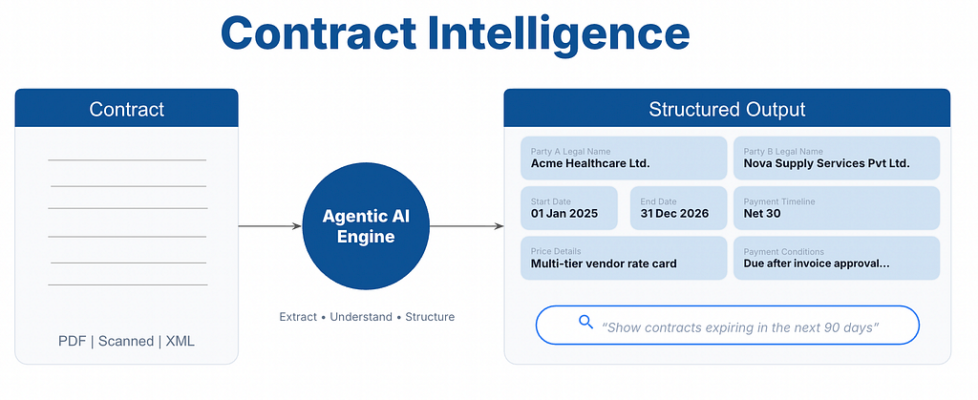
Build an AI Contract Intelligence System: OCR + Hybrid RAG + LangGraph to Extract Key Terms…

Build an AI Contract Intelligence System: OCR + Hybrid RAG + LangGraph to Extract Key Terms Automatically
A step-by-step guide to automating contract review with PaddleOCR, FAISS, BM25, and GPT-4o inside a LangGraph pipeline
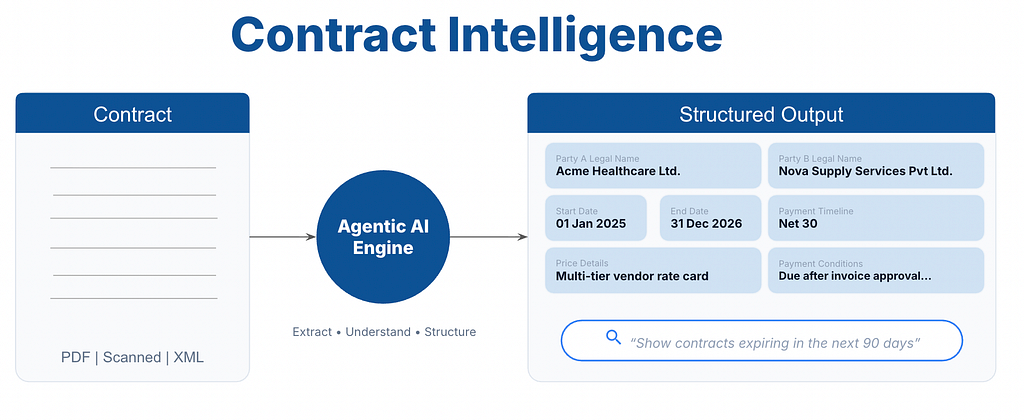
Non-members read here for free.
Complete Code Repo of the project can be found here. Don’t forget to star the repo!
Introduction
Contracts are everywhere, including vendor agreements, service orders, and government tenders. Manually reviewing them for critical fields like party names, dates, and pricing is tedious, error-prone, and slow. What if you could upload any contract, whether a PDF, image, or XML file, and get a structured Excel report of all key commercial terms in seconds?
In this tutorial, you’ll build a production-ready Contract Intelligence System that does exactly that. We’ll combine PaddleOCR, FAISS, BM25, Reciprocal Rank Fusion, and GPT-4o inside a LangGraph state machine to create a fully automated, end-to-end extraction pipeline.
The Problem
Every organization, regardless of size or industry, runs on contracts. A mid-sized company might manage hundreds of active vendor agreements, service orders, and procurement tenders at any given time. Large enterprises deal with tens of thousands.
Yet most of this commercially critical information sits locked inside unstructured documents: scanned PDFs, photographed pages, XML exports from procurement systems. To answer a simple question like “What are our payment terms with this vendor?” or “When does this contract expire?”, someone has to open the document, read through pages of legal boilerplate, and manually copy the answer into a spreadsheet.
This creates three compounding problems in the real world:
This creates three major problems:
- Missed deadlines and renewals because key clauses are buried deep in contracts.
- Financial leakage from inconsistent vendor pricing that goes unnoticed at scale.
- Compliance risks from manually tracking payment terms across contracts.
The core issue is that contract data is locked in documents, not in databases. Every question that should take one SQL query instead takes a human 20 minutes.
The Solution: An Agentic Contract Intelligence Pipeline
This project automates contract review end-to-end. You upload any contract (PDF, scanned image, or XML) and in seconds receive a structured Excel report with all key commercial terms extracted, confidence-scored, and page-referenced.
By the end of this tutorial, you will have built a scalable agentic AI system that combines PaddleOCR, FAISS, BM25, Reciprocal Rank Fusion, and GPT-4o inside a LangGraph state machine to create a fully automated, end-to-end extraction pipeline.
This helps:
- Procurement teams review contracts faster and speed up supplier onboarding.
- Finance teams detect pricing discrepancies across vendor contracts.
- Legal and compliance teams maintain auditable records with source references.
- Operations teams track renewals and contract deadlines automatically.

What You’ll Learn
By reading this article, you will understand:
– How to build a multi-stage LangGraph DAG for document processing
– How to apply image enhancement (denoising, CLAHE, deskewing) before OCR to improve accuracy
– How to implement a dual-strategy OCR system with PaddleOCR and a GPT-4V fallback
– How Hybrid RAG (FAISS + BM25 + Reciprocal Rank Fusion) outperforms either approach alone for document retrieval
– How to design multi-query RAG prompts that maximize recall across varied contract language
– How to handle multi-page rate card extraction with LLM-driven schema canonicalization
– How to build confidence-scored, auditable outputs suitable for enterprise use
What You’ll Build
By the end of this article, you’ll have a working application that:
– Accepts PDF, image (JPG/PNG/TIFF), and XML contract files
– Enhances document images with denoising, contrast adjustment, and deskewing
– Extracts text via PaddleOCR** with a GPT-4o vision fallback for sparse pages
– Builds a Hybrid FAISS + BM25 vector index with Reciprocal Rank Fusion
– Extracts 7 contract fields using multi-query RAG with confidence scoring
– Generates a color-coded Excel report with extracted fields, a rate card, and raw OCR text
– Displays results in a Streamlit UI with a detailed prompt log for full transparency
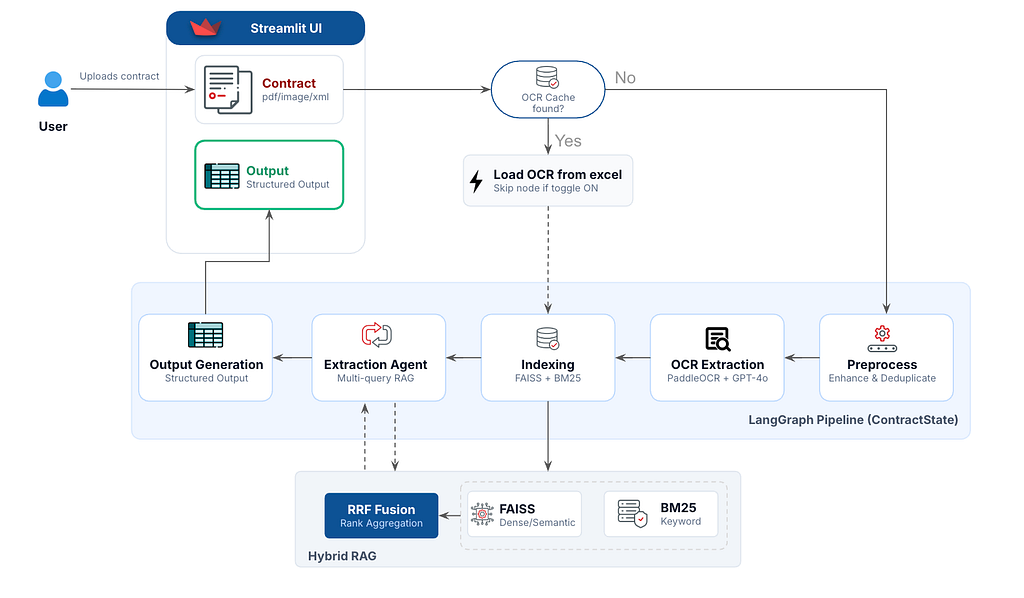
Here’s the complete pipeline at a glance:
Upload contract (PDF / Image / XML)
         │
         ▼
┌─────────────────────┐
│  1. Preprocessing   │  ← Rasterize, enhance, deduplicate pages
└─────────────────────┘
         │
         ▼
┌─────────────────────┐
│  2. OCR Extraction  │  ← PaddleOCR + GPT-4V fallback
└─────────────────────┘
         │
         ▼
┌─────────────────────┐
│  3. Indexing        │  ← Chunk → FAISS (dense) + BM25 (sparse)
└─────────────────────┘
         │
         ▼
┌─────────────────────┐
│  4. Extraction      │  ← Multi-query RAG → GPT-4o → JSON fields
└─────────────────────┘
         │
         ▼
┌─────────────────────┐
│  5. Excel Output    │  ← Color-coded 3-sheet workbook
└─────────────────────┘
Project Structure
Here is the project structure.
agentic-ai-usecases/medium/contract-intelligence/
├── app.py                    # Streamlit entry point
├── graph.py                  # LangGraph pipeline definition
├── config/
│   └── settings.py           # Centralized config (models, thresholds, paths)
├── models/
│   └── state.py              # ContractState TypedDict
├── nodes/
│   ├── preprocessing.py      # Image enhancement + deduplication
│   ├── ocr_extraction.py     # PaddleOCR + GPT-4V fallback
│   ├── indexing.py           # Chunk splitting + FAISS/BM25 indexing
│   ├── extraction_agent.py   # Multi-query RAG + GPT-4o extraction
│   └── excel_generation.py   # Multi-sheet Excel export
├── services/
│   ├── embeddings.py         # Singleton sentence-transformers
│   ├── vector_store.py       # HybridVectorStore (FAISS + BM25 + RRF)
│   └── llm.py                # LLMService with retry + token tracking
└── utils/
    ├── ocr_cache.py          # Smart OCR result caching
    ├── file_utils.py         # PDF → images, native text extraction
    └── progress.py           # Thread-safe progress queue for UI
Step 0: Environment Setup
Create and activate a Python virtual environment to isolate project dependencies.
macOS / Linux:
python -m venv venv
source venv/bin/activate
Windows:
python -m venv venv
venvScriptsactivate
Install all required libraries for OCR, retrieval, embeddings, LLM orchestration, and the Streamlit UI.
Install dependencies:
pip install -r requirements.txt
requirements.txt (key packages):
langgraph>=1.0.7              # Workflow orchestration
langchain>=0.2.0              # LLM application framework
langchain-community           # Community integrations
langchain-text-splitters      # Document chunking utilities
openai>=1.0.0                 # OpenAI API client
paddlepaddle                  # Paddle deep learning backend
paddleocr                     # OCR engine for PDFs/scanned docs
sentence-transformers         # Embedding generation
faiss-cpu                     # Vector similarity search
rank-bm25                     # Keyword-based retrieval
PyMuPDF                       # PDF parsing/rendering
opencv-python-headless        # Image preprocessing
Pillow                        # Image manipulation
imagehash                     # Duplicate image detection
openpyxl                      # Excel export generation
streamlit>=1.28.1             # Web application UI
python-dotenv                 # Environment variable management
numpy                         # Numerical operations
pandas                        # Structured data processing
Create a .env file to securely store your OpenAI credentials and model configuration.
OPENAI_API_KEY=sk-...
OPENAI_MODEL=gpt-4o-mini   # or gpt-4o for higher accuracy
Step 1: Defining the Pipeline State & Central Config
In LangGraph, everything flows through a shared state object. Before writing a single node, define what that state looks like. This is the single source of truth for the entire pipeline.
# models/state.py
from typing import TypedDict, Dict, List, Any
class ContractState(TypedDict, total=False):
    # ── Input ──────────────────────────────────────────────────────────────
    file_path: str
    file_type: str              # "pdf" | "image" | "xml"
    original_filename: str
    # ── Pre-processing ─────────────────────────────────────────────────────
    page_image_paths: List[str]           # enhanced page image paths
    deduplicated_page_indices: List[int]  # surviving page indices after dedup
    # ── OCR / Text ─────────────────────────────────────────────────────────
    raw_text_by_page: Dict[int, str]      # page_num → extracted text
    full_text: str                         # concatenated text (all pages)
    # ── Indexing ───────────────────────────────────────────────────────────
    chunks: List[str]
    chunk_metadata: List[Dict[str, Any]]
    session_faiss_ready: bool
    # ── Extraction ─────────────────────────────────────────────────────────
    extracted_fields: Dict[str, Dict[str, Any]]
    # ── Output ─────────────────────────────────────────────────────────────
    excel_output_path: str
    errors: List[str]
    # ── Meta ───────────────────────────────────────────────────────────────
    current_step: str
    processing_log: List[str]
    prompt_log: List[Dict[str, Any]]
Using TypedDict gives us type hints and IDE autocomplete while keeping state serializable. The total=False flag means all fields are optional: each node only writes what it produces.
Let’s now add all tunable parameters in one centralized config file:
# config/settings.py
OPENAI_MODEL      = os.getenv("OPENAI_MODEL", "gpt-4o-mini")
EMBEDDING_MODEL   = "sentence-transformers/all-MiniLM-L6-v2"
EMBEDDING_DIM     = 384
CHUNK_SIZE        = 600    # Small child chunks for retrieval precision
CHUNK_OVERLAP     = 100    # Context preservation across boundaries
TOP_K_RETRIEVAL   = 8      # Child chunks to retrieve per field
RRF_K             = 60     # Reciprocal rank fusion constant
HIGH_CONFIDENCE   = 0.80   # Green threshold
LOW_CONFIDENCE    = 0.50   # Red threshold
PDF_DPI           = 200    # PDF rasterization resolution
Step 2: Defining the LLM and Embedding Services
This module provides a reusable wrapper around the OpenAI API for text, vision, and structured JSON generation tasks. It handles prompt construction, image encoding, retry logic, token usage tracking, and robust JSON parsing to ensure reliable interaction with LLM-based extraction workflows.
# services/llm.py
import json
import re
import base64
import time
from typing import Optional, List, Tuple

from openai import OpenAI, RateLimitError, APIConnectionError, APIStatusError

from config.settings import OPENAI_API_KEY, OPENAI_MODEL

_RETRYABLE = (RateLimitError, APIConnectionError)
_MAX_RETRIES = 3
_RETRY_DELAY = 5  # seconds


class LLMService:
    def __init__(self, model: str = OPENAI_MODEL, api_key: str = OPENAI_API_KEY):
        self.model = model
        self.client = OpenAI(api_key=api_key)

    def _build_messages(self, prompt: str, images: Optional[List[str]] = None) -> list:
        if images:
            content: list = [{"type": "text", "text": prompt}]
            for img_path in images:
                with open(img_path, "rb") as f:
                    b64 = base64.b64encode(f.read()).decode("utf-8")
                content.append({
                    "type": "image_url",
                    "image_url": {"url": f"data:image/jpeg;base64,{b64}"},
                })
            return [{"role": "user", "content": content}]
        return [{"role": "user", "content": prompt}]

    def _make_api_call(self, messages: list) -> Tuple[str, int, int]:
        """Returns (content, input_tokens, output_tokens)."""
        call_type = "vision" if isinstance(messages[0]["content"], list) else "text"
        for attempt in range(1, _MAX_RETRIES + 1):
            try:
                print(f"[OpenAI] Calling {self.model} ({call_type})...", flush=True)
                response = self.client.chat.completions.create(
                    model=self.model,
                    messages=messages,
                )
                print(f"[OpenAI] Done ({self.model})", flush=True)
                content = response.choices[0].message.content or ""
                usage = response.usage
                in_tok = usage.prompt_tokens if usage else 0
                out_tok = usage.completion_tokens if usage else 0
                return content, in_tok, out_tok

            except _RETRYABLE as e:
                if attempt < _MAX_RETRIES:
                    wait = _RETRY_DELAY * attempt
                    print(f"[OpenAI] {type(e).__name__} — retrying in {wait}s (attempt {attempt}/{_MAX_RETRIES})", flush=True)
                    time.sleep(wait)
                else:
                    print(f"[OpenAI] Failed after {_MAX_RETRIES} attempts: {e}", flush=True)
                    raise

            except APIStatusError as e:
                print(f"[OpenAI] API error {e.status_code}: {e.message}", flush=True)
                raise

            except Exception as e:
                print(f"[OpenAI] Unexpected error: {e}", flush=True)
                raise

        return "", 0, 0

    def generate(self, prompt: str, images: Optional[List[str]] = None) -> str:
        messages = self._build_messages(prompt, images)
        content, _, _ = self._make_api_call(messages)
        return content

    def generate_tracked(self, prompt: str, images: Optional[List[str]] = None) -> Tuple[str, int, int]:
        """Returns (text, input_tokens, output_tokens)."""
        messages = self._build_messages(prompt, images)
        return self._make_api_call(messages)

    def generate_json(self, prompt: str, images: Optional[List[str]] = None) -> dict:
        full_prompt = (
            prompt
            + "nnIMPORTANT: Respond ONLY with valid JSON. "
            "No markdown code blocks, no explanation, just the JSON object."
        )
        messages = self._build_messages(full_prompt, images)
        content, _, _ = self._make_api_call(messages)
        return self._parse_json(content)

    def generate_json_tracked(
        self, prompt: str, images: Optional[List[str]] = None
    ) -> Tuple[dict, str, int, int]:
        """Returns (parsed_dict, raw_text, input_tokens, output_tokens)."""
        full_prompt = (
            prompt
            + "nnIMPORTANT: Respond ONLY with valid JSON. "
            "No markdown code blocks, no explanation, just the JSON object."
        )
        messages = self._build_messages(full_prompt, images)
        content, in_tok, out_tok = self._make_api_call(messages)
        return self._parse_json(content), content, in_tok, out_tok

    @staticmethod
    def _parse_json(text: str) -> dict:
        text = text.strip()
        for fence in ("```json", "```"):
            if text.startswith(fence):
                text = text[len(fence):]
        if text.endswith("```"):
            text = text[:-3]
        text = text.strip()
        try:
            return json.loads(text)
        except json.JSONDecodeError:
            match = re.search(r"{.*}", text, re.DOTALL)
            if match:
                try:
                    return json.loads(match.group())
                except json.JSONDecodeError:
                    pass
            return {}
Next we define our embedding service using Sentence Transformers to generate dense vector representations of contract text. The generated embeddings are normalized for efficient semantic similarity search and are used during document indexing and retrieval.
# services/embeddings.py
import numpy as np
from sentence_transformers import SentenceTransformer

from config.settings import EMBEDDING_MODEL


class EmbeddingService:
    _instance: "EmbeddingService | None" = None

    def __init__(self):
        self._model = SentenceTransformer(EMBEDDING_MODEL)

    @classmethod
    def get_instance(cls) -> "EmbeddingService":
        if cls._instance is None:
            cls._instance = cls()
        return cls._instance

    def encode(self, texts: list[str], batch_size: int = 32) -> np.ndarray:
        vecs = self._model.encode(
            texts,
            batch_size=batch_size,
            normalize_embeddings=True,
            show_progress_bar=False,
        )
        return vecs.astype(np.float32)

    def encode_single(self, text: str) -> np.ndarray:
        return self.encode([text])[0]
Step 3: Preprocessing: Image Enhancement and Deduplication
Let’s now build the pre-processing pipeline. Raw contract scans are often noisy, low-contrast, and slightly skewed. Before OCR runs, we enhance each page image in three stages.
3.1 Image Enhancement Pipeline
# nodes/preprocessing.py
import cv2
import numpy as np

# ── Image enhancement ────────────────────────────────────────────────────────

def _deskew(gray: np.ndarray) -> np.ndarray:
    """Estimate rotation from text block contours and correct it."""
    _, binary = cv2.threshold(gray, 0, 255, cv2.THRESH_BINARY_INV + cv2.THRESH_OTSU)
    contours, _ = cv2.findContours(binary, cv2.RETR_EXTERNAL, cv2.CHAIN_APPROX_SIMPLE)
    large = [c for c in contours if cv2.contourArea(c) > 200]
    if len(large) < 5:
        return gray
    all_pts = np.vstack([c.reshape(-1, 2) for c in large])
    rect = cv2.minAreaRect(all_pts)
    angle = rect[-1]
    if angle < -45:
        angle += 90
    if abs(angle) < 0.5:
        return gray  # already straight
    h, w = gray.shape
    M = cv2.getRotationMatrix2D((w // 2, h // 2), angle, 1.0)
    return cv2.warpAffine(gray, M, (w, h),
                          flags=cv2.INTER_CUBIC,
                          borderMode=cv2.BORDER_REPLICATE)

def enhance_image(path: str) -> None:
    """In-place: denoise → CLAHE contrast → deskew."""
    img = cv2.imread(path)
    gray = cv2.cvtColor(img, cv2.COLOR_BGR2GRAY)
    # Stage 1: Remove salt-and-pepper noise
    gray = cv2.fastNlMeansDenoising(gray, h=10)
    # Stage 2: Adaptive contrast enhancement (CLAHE)
    clahe = cv2.createCLAHE(clipLimit=2.0, tileGridSize=(8, 8))
    gray = clahe.apply(gray)
    # Stage 3: Correct rotation using text block contours
    gray = _deskew(gray)
    out = cv2.cvtColor(gray, cv2.COLOR_GRAY2BGR)
    cv2.imwrite(path, out)
The three enhancement stages work together:
Raw scan (noisy, low contrast, rotated)
         │
         ▼
fastNlMeansDenoising (h=10)
  → removes scanner noise, reduces speckles
         │
         ▼
CLAHE (clipLimit=2.0, tileGridSize=(8,8))
  → locally enhances contrast in text areas
         │
         ▼
deskew (via contour-based angle detection)
  → corrects scan rotation < 0.5° threshold ignored
         │
         ▼
Clean, high-contrast, straight image for OCR
Why CLAHE over simple histogram equalization?
Standard equalization stretches contrast globally, which can over-brighten already-light regions. CLAHE (Contrast Limited Adaptive Histogram Equalization) works on small tiles, so text on a faded stamp or a light header still gets enhanced without blowing out the clean areas.
3.2 Perceptual Hash Deduplication
Multi-page contracts often have repeated pages: duplicate header sheets, blank separators, carbon copies. Running OCR on all of them wastes time and pollutes the index with duplicate text.
# nodes/preprocessing.py


import imagehash
from PIL import Image

# ── Page deduplication (perceptual hash) ────────────────────────────────────
def _dedup_pages(paths: list[str], threshold: int = 6) -> list[int]:
    """Return indices of unique pages using perceptual hashing."""
    hashes = []
    kept = []
    for i, p in enumerate(paths):
        h = imagehash.phash(Image.open(p))
        # Keep page if its hash differs by more than `threshold` bits from all kept pages
        if all((h - prev) > threshold for prev in hashes):
            kept.append(i)
            hashes.append(h)
    return kept
Perceptual hashing (phash) converts each page image into a 64-bit fingerprint based on frequency components. Two images with a Hamming distance ≤ 6 are considered visually identical. This catches exact duplicates and near-duplicates (e.g., the same page with a different scan quality).
Example:
Page 1: hash=a3f2... ──► unique, keep  ✓
Page 2: hash=a3f2... ──► distance=0 ≤ 6, skip  ✗
Page 3: hash=8b14... ──► distance=18 > 6, keep  ✓
Page 4: hash=8b14... ──► distance=0 ≤ 6, skip  ✗
Page 5: hash=c701... ──► distance=24 > 6, keep  ✓
We also add a generic XML Parser and the final note which calls all these functions sequencially.
# nodes/preprocessing.py

# ── XML parser (generic) ─────────────────────────────────────────────────────

def _xml_to_text(xml_path: str) -> str:
    tree = ET.parse(xml_path)
    root = tree.getroot()

    def _recurse(elem: ET.Element, indent: int = 0) -> List[str]:
        tag = elem.tag.split("}")[-1] if "}" in elem.tag else elem.tag
        text = (elem.text or "").strip()
        lines: List[str] = []
        prefix = "  " * indent
        if text:
            lines.append(f"{prefix}{tag}: {text}")
        else:
            lines.append(f"{prefix}{tag}:")
        for attr_k, attr_v in elem.attrib.items():
            lines.append(f"{prefix}  @{attr_k}: {attr_v}")
        for child in elem:
            lines.extend(_recurse(child, indent + 1))
        tail = (elem.tail or "").strip()
        if tail:
            lines.append(f"{prefix}{tail}")
        return lines

    return "n".join(_recurse(root))


# ── Node ─────────────────────────────────────────────────────────────────────

def preprocess_node(state: ContractState) -> dict:
    log = list(state.get("processing_log", []))
    file_type = state["file_type"]

    # XML: no image pipeline needed
    if file_type == "xml":
        text = _xml_to_text(state["file_path"])
        log.append(f"XML parsed → {len(text)} chars")
        return {
            **state,
            "page_image_paths": [],
            "deduplicated_page_indices": [],
            "raw_text_by_page": {0: text},
            "full_text": text,
            "processing_log": log,
            "current_step": "ocr_extraction",
        }

    # PDF or image → rasterise
    tmp = make_temp_dir()
    if file_type == "pdf":
        raw_paths = pdf_to_images(state["file_path"], tmp)
    else:
        dest = os.path.join(tmp, "page_0000.png")
        shutil.copy(state["file_path"], dest)
        raw_paths = [dest]

    # Enhance
    for p in raw_paths:
        enhance_image(p)

    # Deduplicate
    kept_indices = _dedup_pages(raw_paths)
    kept_paths = [raw_paths[i] for i in kept_indices]

    log.append(
        f"Pre-processing: {len(raw_paths)} pages, "
        f"{len(kept_paths)} kept after dedup"
    )
    return {
        **state,
        "page_image_paths": kept_paths,
        "deduplicated_page_indices": kept_indices,
        "processing_log": log,
        "current_step": "ocr_extraction",
    }
Step 4: OCR Extraction: Dual-Strategy Text Extraction
OCR is the riskiest step. A single missed table or form field can lead to an extraction failure downstream. This node uses a two-model strategy to maximize coverage.
# nodes/ocr_extraction.py
from typing import Dict

from paddleocr import PaddleOCR

from models.state import ContractState
from services.llm import LLMService
from utils.file_utils import extract_native_pdf_text
from utils import progress

# Lazy-initialised singleton so the model loads once per process
_ocr_engine: PaddleOCR | None = None


def _get_ocr() -> PaddleOCR:
    global _ocr_engine
    if _ocr_engine is None:
        # PP-OCRv4 mobile models are ~4x faster than v5 server on CPU.
        # All rotation/orientation detection disabled — no autorotation.
        _ocr_engine = PaddleOCR(
            use_doc_orientation_classify=False,
            use_doc_unwarping=False,
            use_textline_orientation=False,
            text_detection_model_name="PP-OCRv4_mobile_det",
            text_recognition_model_name="PP-OCRv4_mobile_rec",
        )
    return _ocr_engine


def _ocr_image(path: str) -> str:
    """PaddleOCR 3.x uses predict() which returns a generator of result dicts."""
    ocr = _get_ocr()
    try:
        # 3.x API: predict() yields result dicts per image
        results = list(ocr.predict(path))
        if not results:
            return ""
        res = results[0]
        # Result is a dict-like object; rec_texts holds the text lines
        if isinstance(res, dict):
            texts = res.get("rec_texts") or []
            return "n".join(str(t) for t in texts if t)
        # Fallback: some versions return objects with attributes
        if hasattr(res, "rec_texts"):
            return "n".join(str(t) for t in res.rec_texts if t)
        return ""
    except AttributeError:
        # Graceful fallback to 2.x API if somehow an older engine is used
        result = ocr.ocr(path, cls=True)  # type: ignore[attr-defined]
        if not result or result[0] is None:
            return ""
        return "n".join(line[1][0] for line in result[0] if line and len(line) >= 2)
The decision tree for each page:
For each page image:
         │
         ▼
PaddleOCR (PP-OCRv4 mobile)
         │
         ├── len(text) ≥ 80 chars ──► Use PaddleOCR result ✓
         │
         └── len(text) < 80 chars (sparse page)
                  │
                  ▼
         GPT-4o Vision model
                  │
                  ├── len(vision) > len(paddle) ──► Use vision result ✓
                  │
                  └── else ──► Keep PaddleOCR result

+ PDF native text layer merge
           (use whichever layer has more chars per page)
Why the 80-character threshold?
Sparse pages include tables with few words per cell, forms with mainly blank fields, stamps, and signature blocks. PaddleOCR performs well on dense text but struggles with heavily structured layouts. GPT-4o Vision, given the full image, can reconstruct table structure using pipe separators.
The vision extraction prompt is deliberately specific:
#nodes/ocr_extraction.py
def _vision_extract(llm: LLMService, image_path: str) -> str:
    prompt = (
        "You are a contract document reader. "
        "Extract ALL visible text from this contract page exactly as it appears. "
        "Preserve table structure using pipe | separators. "
        "Include headers, dates, prices, party names, and all clause text. "
        "Do not summarise or omit anything."
    )
    return llm.generate(prompt, images=[image_path])
Now we stitch together the ocr-extraction pipeline
#nodes/ocr_extraction.py

def _report(page_num: int, total: int, status: str) -> None:
    msg = f"[OCR] Page {page_num + 1}/{total}: {status}"
    print(msg, flush=True)
    progress.post(msg)


def ocr_extraction_node(state: ContractState) -> dict:
    log = list(state.get("processing_log", []))

    # XML / pre-filled text: skip OCR
    if state.get("full_text") or state["file_type"] == "xml":
        log.append("OCR skipped – text already available")
        return {**state, "processing_log": log, "current_step": "indexing"}

    llm = LLMService()
    raw_text_by_page: Dict[int, str] = {}

    total_pages = len(state.get("page_image_paths", []))
    for page_num, img_path in enumerate(state.get("page_image_paths", [])):
        _report(page_num, total_pages, "OCR…")
        paddle_text = _ocr_image(img_path)

        # Use vision model for sparse pages (tables, forms, stamps)
        if len(paddle_text.strip()) < 80:
            _report(page_num, total_pages, "sparse — running vision model…")
            try:
                vision_text = _vision_extract(llm, img_path)
                page_text = vision_text if len(vision_text) > len(paddle_text) else paddle_text
            except Exception:
                page_text = paddle_text
        else:
            page_text = paddle_text

        _report(page_num, total_pages, f"done ({len(page_text)} chars)")
        raw_text_by_page[page_num] = page_text

    # Merge with native PDF text layer when richer
    if state["file_type"] == "pdf":
        try:
            native = extract_native_pdf_text(state["file_path"])
            for pg, nat_text in native.items():
                existing = raw_text_by_page.get(pg, "")
                if len(nat_text.strip()) > len(existing.strip()):
                    raw_text_by_page[pg] = nat_text
        except Exception:
            pass

    full_text = "nn".join(
        f"--- Page {pg + 1} ---n{txt}"
        for pg, txt in sorted(raw_text_by_page.items())
    )

    log.append(f"OCR complete: {len(raw_text_by_page)} pages → {len(full_text)} chars")
    return {
        **state,
        "raw_text_by_page": raw_text_by_page,
        "full_text": full_text,
        "processing_log": log,
        "current_step": "indexing",
    }
Step 5: Indexing: Building the Hybrid Search Index
With clean text per page, we now build a searchable knowledge base using a parent-child chunking strategy.
5.1 Chunking Strategy
# nodes/indexing.py
from typing import List, Dict, Any

from langchain_text_splitters import RecursiveCharacterTextSplitter

from models.state import ContractState
from services.vector_store import HybridVectorStore
from config.settings import CHUNK_SIZE, CHUNK_OVERLAP

# Reset per document — no cross-document persistence.
_session_store: HybridVectorStore | None = None


def get_session_store() -> HybridVectorStore:
    return _session_store  # type: ignore[return-value]


def _find_page(chunk: str, raw_text_by_page: Dict[int, str]) -> int:
    """Best-effort page number for a chunk (0-indexed)."""
    needle = chunk[:60].strip()
    for pg, pg_text in raw_text_by_page.items():
        if needle in pg_text:
            return pg
    return 0


def indexing_node(state: ContractState) -> dict:
    global _session_store
    log = list(state.get("processing_log", []))

    text = state.get("full_text", "")
    raw_text_by_page = state.get("raw_text_by_page", {})
    source_name = state.get("original_filename", "contract")

    splitter = RecursiveCharacterTextSplitter(
        chunk_size=CHUNK_SIZE,
        chunk_overlap=CHUNK_OVERLAP,
        separators=["nn", "n", ". ", "; ", ", ", " "],
    )
    chunks: List[str] = splitter.split_text(text)

    metadata: List[Dict[str, Any]] = []
    for i, chunk in enumerate(chunks):
        pg = _find_page(chunk, raw_text_by_page)
        metadata.append({
            "chunk_id": i,
            "page": pg,
            "source": source_name,
            # Full page text stored here — used as parent context during extraction
            "page_text": raw_text_by_page.get(pg, chunk),
        })

    _session_store = HybridVectorStore()
    _session_store.add_documents(chunks, metadata)

    log.append(f"Indexed {len(chunks)} chunks into session FAISS+BM25")
    return {
        **state,
        "chunks": chunks,
        "chunk_metadata": metadata,
        "session_faiss_ready": True,
        "processing_log": log,
        "current_step": "extraction",
    }
The key insight here is the parent-child retrieval pattern:
Full document text
         │
         ▼
Split into small child chunks (600 chars, 100 overlap)
  → precise retrieval targets
         │
Each chunk stores its full parent page in metadata
  → rich context window for the LLM
         │
         ▼
At extraction time:
  Retrieve small chunks (accurate matching)
         │
         ▼
  Expand to full parent pages (complete context)
Small chunks match queries precisely. But giving the LLM a 600-character snippet often loses surrounding context critical for understanding. By storing and later expanding to full pages, we get the best of both worlds.
5.2 The Hybrid Vector Store (FAISS + BM25 + RRF)
The HybridVectorStore is the heart of the retrieval system. It combines two fundamentally different search approaches:
# services/vector_store.py
from typing import List, Dict, Any

import faiss
import numpy as np
from rank_bm25 import BM25Okapi

from config.settings import EMBEDDING_DIM, TOP_K_RETRIEVAL, RRF_K
from services.embeddings import EmbeddingService


class HybridVectorStore:
    """FAISS (dense) + BM25 (sparse) with Reciprocal Rank Fusion."""

    def __init__(self):
        self._emb = EmbeddingService.get_instance()
        self._index = faiss.IndexFlatIP(EMBEDDING_DIM)
        self.chunks: List[str] = []
        self.metadata: List[Dict[str, Any]] = []
        self._bm25: BM25Okapi | None = None

    # ── Public API ──────────────────────────────────────────────────────────

    def add_documents(self, chunks: List[str], metadata: List[Dict[str, Any]]) -> None:
        if not chunks:
            return
        vecs = self._emb.encode(chunks)
        self._index.add(vecs)
        self.chunks.extend(chunks)
        self.metadata.extend(metadata)
        self._rebuild_bm25()

    def hybrid_search(self, query: str, k: int = TOP_K_RETRIEVAL) -> List[Dict[str, Any]]:
        if not self.chunks:
            return []

        k = min(k, len(self.chunks))

        # --- Dense search ---
        q_vec = self._emb.encode_single(query).reshape(1, -1)
        _, faiss_idxs = self._index.search(q_vec, k)
        faiss_ranks: Dict[int, int] = {
            int(idx): rank
            for rank, idx in enumerate(faiss_idxs[0])
            if idx >= 0
        }

        # --- Sparse search (BM25) ---
        bm25_scores = self._bm25.get_scores(query.lower().split())
        bm25_top = np.argsort(bm25_scores)[::-1][:k]
        bm25_ranks: Dict[int, int] = {int(idx): rank for rank, idx in enumerate(bm25_top)}

        # --- RRF fusion ---
        all_idxs = set(faiss_ranks) | set(bm25_ranks)
        rrf: Dict[int, float] = {}
        for idx in all_idxs:
            score = 0.0
            if idx in faiss_ranks:
                score += 1.0 / (RRF_K + faiss_ranks[idx])
            if idx in bm25_ranks:
                score += 1.0 / (RRF_K + bm25_ranks[idx])
            rrf[idx] = score

        sorted_idxs = sorted(rrf, key=lambda x: rrf[x], reverse=True)[:k]
        return [
            {
                "chunk": self.chunks[i],
                "metadata": self.metadata[i],
                "score": rrf[i],
                "faiss_rank": faiss_ranks.get(i),
                "bm25_rank": bm25_ranks.get(i),
            }
            for i in sorted_idxs
        ]

    def reset(self) -> None:
        self._index = faiss.IndexFlatIP(EMBEDDING_DIM)
        self.chunks = []
        self.metadata = []
        self._bm25 = None

    def _rebuild_bm25(self) -> None:
        tokenized = [c.lower().split() for c in self.chunks]
        self._bm25 = BM25Okapi(tokenized)
Here’s why using both modalities matters:
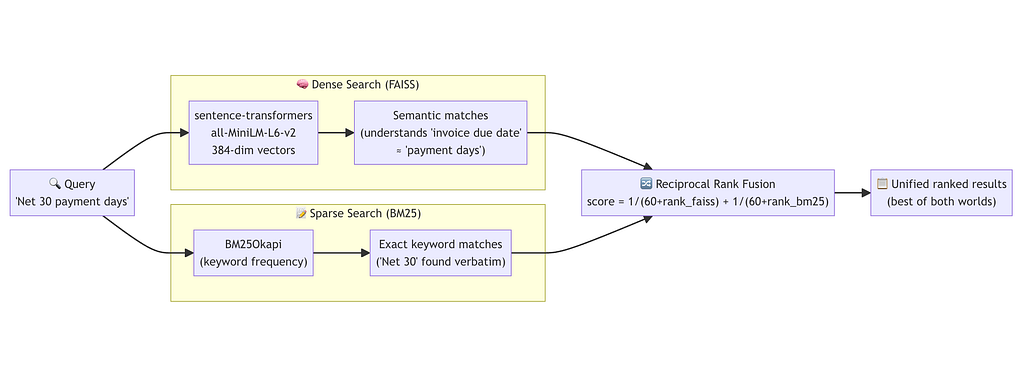
RRF in practice:
The formula 1/(k + rank) converts arbitrary ranks into comparable scores. With k=60, the top result from either system contributes 1/61 ≈ 0.016.
A chunk ranked 1st by FAISS and 3rd by BM25 scores 1/61 + 1/63 ≈ 0.032, beating a chunk only retrieved by one system. This elegantly handles the case where a contract uses unusual terminology (BM25 struggles) or copy-paste boilerplate (FAISS over-matches).
Step 6: Extraction Agent: Multi-Query RAG with GPT-4o
This is where the intelligence lives. For each of 7 contract fields, the extraction agent runs multiple targeted queries, retrieves the most relevant pages, and asks GPT-4o to extract the value.
6.1 The 7 Configurable Fields
# config/settings.py
EXTRACT_FIELDS = [
    "party_a_legal_name",    # Commissioning/buying entity
    "party_b_legal_name",    # Fulfilling/supplying entity
    "start_date",            # Contract commencement date
    "end_date",              # Contract termination date
    "payment_timeline",      # Net payment period (e.g., "Net 30")
    "payment_conditions",    # Full narrative of payment triggers/rules
    "price_details",         # Dynamic rate card (multi-page, multi-column)
]
6.2 Multi-Query Retrieval
Each field uses 4 query variations to maximize recall. A single query for “start date” might miss a contract that writes “Commencement:” or “Effective from:”. Using multiple angles catches all variants:
# nodes/extraction_agent.py
FIELD_QUERIES: Dict[str, List[str]] = {
    "party_a_legal_name": [
        "party initiating issuing commissioning contract name",
        "contracting authority entity procuring services",
        "issued by letterhead header organization name",
        "client buyer purchaser government agency department",
    ],
    "party_b_legal_name": [
        "party providing fulfilling goods services name",
        "vendor contractor manufacturer service provider legal name",
        "signed by fulfilling party company registration name",
        "seller supplier respondent awarded contractor",
    ],
    "start_date": [
        "contract start date commencement effective date",
        "agreement begins from date contract period start",
        "effective from date of contract",
    ],
    "end_date": [
        "contract end date expiry termination date",
        "agreement expires valid until contract period end",
        "contract completion date",
    ],
    "price_details": [
        "rate card price list pricing table fees charges",
        "unit price amount cost per item service rate",
        "pricing schedule tariff commercial rates",
        "fee structure price per unit volume pricing",
    ],
    "payment_timeline": [
        "payment terms net days due net 30 net 60 payment schedule",
        "invoice settlement period days due payment deadline",
        "payment due within days of invoice",
    ],
    "payment_conditions": [
        "payment conditions triggers acceptance criteria invoice rules",
        "payment upon delivery acceptance milestone conditions",
        "invoice approval payment release conditions terms",
    ],
}
The multi-query retrieval flow: (This is repeated for each field)
For field "party_a_legal_name":
         │
         ▼
Run 4 queries × hybrid_search(k=6 per query)
  ├── "party initiating issuing commissioning contract name"
  ├── "contracting authority entity procuring services"
  ├── "issued by letterhead header organization name"
  └── "client buyer purchaser government agency department"
         │
         ▼
Deduplicate chunks (by first 80 chars)
Sort by RRF score → top-k unique chunks
         │
         ▼
[SPECIAL] Page 0 anchoring for party fields:
  Cover/letterhead page always included regardless of score
  (party names often only appear there)
         │
         ▼
Expand child chunks → full parent pages
  (only pages scoring ≥ 50% of top page score kept)
         │
         ▼
Send page context to GPT-4o for extraction
6.3 Page 0 Anchoring for Party Names
Party names in government contracts often appear only in the letterhead or cover page header, not in the body clauses. If a scoring threshold filters out the cover page because the interior clauses score higher, the party name is missed.
# nodes/extraction_agent.py
PAGE_0_ANCHOR_FIELDS = {"party_a_legal_name", "party_b_legal_name"}
def _retrieve_top_chunks(field: str, store: HybridVectorStore) -> List[Dict]:
    # ... standard multi-query retrieval ...
    # Always anchor page 0 for party fields
    if field in PAGE_0_ANCHOR_FIELDS:
        page_0_chunks = store.hybrid_search(
            "contract issued by party name letterhead", k=4
        )
        for r in page_0_chunks:
            if r["metadata"].get("page", 999) == 0:  # cover page
                key = r["chunk"][:80]
                if key not in seen:
                    seen.add(key)
                    results.append(r)
    return results[:k_cap]
6.4 Parent Context Expansion with Score Filtering
Before sending context to the LLM, child chunks are expanded to their full parent pages. Low-scoring pages are filtered out to keep the prompt focused:
# nodes/extraction_agent.py
def _build_parent_context(chunks: List[Dict]) -> Tuple[str, List[int]]:
    """Expand child chunks to full pages. Only keep pages scoring ≥ 50% of top."""
    page_best_score: Dict[int, float] = {}
    page_texts: Dict[int, str] = {}
for r in chunks:
        pg = r["metadata"].get("page", 0)
        score = r.get("score", 0.0)
        if score > page_best_score.get(pg, -1.0):
            page_best_score[pg] = score
        if pg not in page_texts:
            page_texts[pg] = r["metadata"].get("page_text") or r["chunk"]
    top_score = max(page_best_score.values())
    threshold = top_score * 0.5
    relevant_pages = {pg for pg, sc in page_best_score.items() if sc >= threshold}
    context = "nn".join(
        f"[Full page {pg + 1}]n{text}"
        for pg, text in sorted(relevant_pages)
    )
    return context, sorted(pg + 1 for pg in relevant_pages)
6.5 The Extraction Prompt
Each field has a precisely crafted extraction prompt that tells GPT-4o exactly what to look for and how to return it:
# nodes/extraction_agent.py
prompt = f"""{FIELD_PROMPTS[field]}Contract pages:
{context}
Return JSON:
{{
  "value": "<extracted value or null>",
  "confidence": <0.0–1.0>,
  "page_ref": <page number or null>,
  "raw_text": "<short verbatim snippet>"
}}
If not found: {{"value": null, "confidence": 0.0, "page_ref": null, "raw_text": ""}}"""
For example, the payment_timeline prompt is laser-focused:
Extract only the payment timeline: the specific net payment period or day count.
Look for values like 'Net 30', 'Net 60', '45 days', '30 days from invoice date'.
Return the shortest unambiguous value (e.g. 'Net 30', '60 days').
Return null if no explicit day count or net term is stated.
This is distinct from payment_conditions, which captures the full narrative:
Extract the full narrative of payment conditions: everything beyond the simple day count.
This includes: triggers for payment (e.g. delivery, acceptance, milestone completion),
invoice submission rules, acceptance criteria, approval workflows, early payment discounts,
and late payment penalties.
Separating these two prevents the LLM from conflating a 400-word payment clause with the simple “Net 30” answer.
Step 7: Price Detail Extraction: The Hardest Field
Rate cards are the most complex field. They span multiple pages, have varying column names across pages (“Item Number” on page 3, “SKU” on page 7), and contain dozens of rows. A single LLM call with all pages would overflow the context and confuse column schemas.
The solution: per-page extraction followed by schema canonicalization.
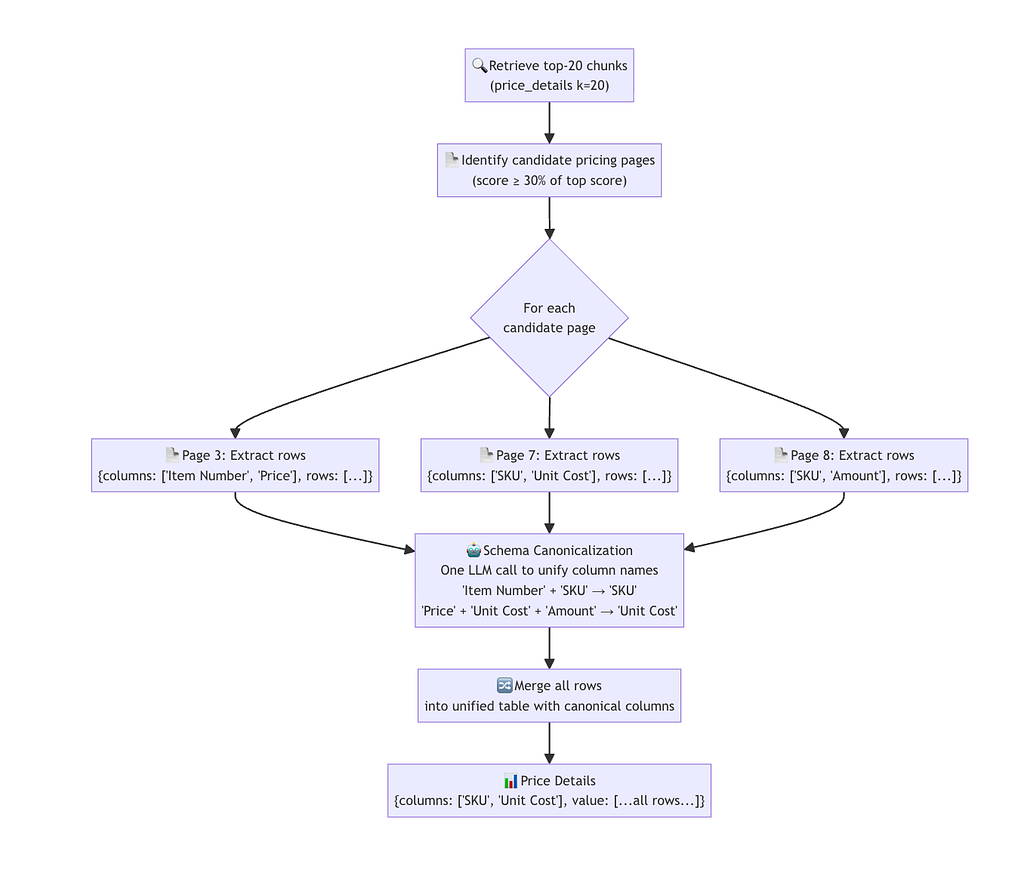
# nodes/extraction_agent.py
def _canonicalize_columns(page_schemas, llm):
    prompt = f"""These column headers were extracted from different pages of the same pricing document.
Some columns are the same concept named differently across pages
(e.g. "Item Numbers", "Item Number", "SKU").Page schemas with one sample row each:
{json.dumps(page_schemas, indent=2)}
Return a flat JSON object mapping every column name variant to its canonical name.
- Group columns that represent the same concept into one canonical name
- Use the most descriptive and clearest name as the canonical
- Map every column that appears in the input
Return JSON: {{"<variant>": "<canonical>", ...}}"""
    return llm.generate_json_tracked(prompt)
This gives you something like:
{
  "Item Number": "SKU",
  "Item Numbers": "SKU",
  "SKU": "SKU",
  "Price": "Unit Cost",
  "Unit Cost": "Unit Cost",
  "Amount": "Unit Cost"
}
All rows from all pages are then re-keyed using this mapping and merged into a single unified table.
Step 8: OCR Caching: Skip Re-Processing
Running OCR on a 50-page contract takes 5–10 minutes. If you’re tuning extraction prompts or re-running to fix an issue, you don’t want to wait for OCR every time.
The caching system detects a previous Excel report for the same document and lets the user skip straight to the extraction phase:
# utils/ocr_cache.py
def find_cached_ocr(original_filename: str) -> Optional[Path]:
    """Return the most-recent Excel with matching stem that has a Raw OCR Text sheet."""
    stem = Path(original_filename).stem.lower()
    candidates = sorted(OUTPUT_DIR.glob("*.xlsx"),
                        key=lambda p: p.stat().st_mtime, reverse=True)
    for xlsx in candidates:
        # Match stem: "contract_abc_extracted_20260523_..." → "contract_abc"
        xlsx_stem = xlsx.stem.lower()
        original_part = xlsx_stem.split("_extracted_")[0] if "_extracted_" in xlsx_stem else xlsx_stem
        if original_part != stem:
            continue
        wb = openpyxl.load_workbook(str(xlsx), read_only=True, data_only=True)
        if "Raw OCR Text" in wb.sheetnames:
            wb.close()
            return xlsx
    return None
The flow with caching enabled:
Upload file
    │
    ▼
find_cached_ocr() ── no match ──► run full pipeline (OCR included)
    │
    ▼ match found
Show toggle: "⚡ Skip OCR - reuse existing Excel" (default ON)
    │
    ▼ user clicks "Process Contract"
load_ocr_from_excel() ──► pre-fill raw_text_by_page in state
    │
    ▼
ocr_extraction_node sees full_text is set ──► skips OCR entirely
    │
    ▼
Continues to indexing → field extraction → Excel output
Step 9: Excel Output: Color-Coded 3-Sheet Workbook
We save the final output and raw logs as part of the excel file. It can also be connected to databases.
Confidence color coding:
- 🟢 ≥ 80%: High confidence (green)
- 🟡 50–79%: Medium confidence (yellow)
- 🔴 < 50%: Low confidence or not found (red)
Confidence scoring helps us decide, which attribute needs HITL (Human in the Loop) review.
#nodes/excel_generation.py
import json
from datetime import datetime
from pathlib import Path
from typing import Any, Dict, List

import openpyxl
from openpyxl.styles import Alignment, Font, PatternFill
from openpyxl.utils import get_column_letter

from config.settings import (
    FIELD_DISPLAY_NAMES,
    HIGH_CONFIDENCE,
    LOW_CONFIDENCE,
    OUTPUT_DIR,
)
from models.state import ContractState

# ── Colour palette ────────────────────────────────────────────────────────────
_GREEN = PatternFill(start_color="C6EFCE", end_color="C6EFCE", fill_type="solid")
_YELLOW = PatternFill(start_color="FFEB9C", end_color="FFEB9C", fill_type="solid")
_RED = PatternFill(start_color="FFC7CE", end_color="FFC7CE", fill_type="solid")
_BLUE_HDR = PatternFill(start_color="4472C4", end_color="4472C4", fill_type="solid")
_LIGHT_BLUE = PatternFill(start_color="BDD7EE", end_color="BDD7EE", fill_type="solid")
_WHITE_FONT = Font(bold=True, color="FFFFFF")
_BOLD = Font(bold=True)
_WRAP = Alignment(wrap_text=True, vertical="top")
_CENTER = Alignment(horizontal="center", vertical="center")


def _conf_fill(conf: float) -> PatternFill:
    if conf >= HIGH_CONFIDENCE:
        return _GREEN
    if conf >= LOW_CONFIDENCE:
        return _YELLOW
    return _RED


def _autosize(ws, max_width: int = 80) -> None:
    for col in ws.columns:
        width = max(len(str(c.value or "")) for c in col)
        ws.column_dimensions[get_column_letter(col[0].column)].width = min(width + 2, max_width)


def _header_row(ws, headers: List[str], row: int = 1) -> None:
    for col, h in enumerate(headers, 1):
        c = ws.cell(row=row, column=col, value=h)
        c.fill = _BLUE_HDR
        c.font = _WHITE_FONT
        c.alignment = _CENTER


# ── Sheet 1: Extracted Fields ─────────────────────────────────────────────────

def _sheet_fields(wb: openpyxl.Workbook, fields: Dict) -> None:
    ws = wb.active
    ws.title = "Extracted Fields"

    _header_row(ws, ["Field", "Extracted Value", "Confidence", "Page Ref"])
    row = 2

    for key, display in FIELD_DISPLAY_NAMES.items():
        if key == "price_details":
            continue  # handled on Sheet 2

        fd = fields.get(key, {})
        value = fd.get("value")
        conf = float(fd.get("confidence", 0.0))
        page_ref = fd.get("page_ref", "")

        ws.cell(row=row, column=1, value=display).font = _BOLD
        vc = ws.cell(row=row, column=2, value=str(value) if value is not None else "NOT FOUND")
        vc.alignment = _WRAP
        vc.fill = _conf_fill(conf) if value is not None else _RED
        ws.cell(row=row, column=3, value=f"{conf:.0%}").fill = _conf_fill(conf)
        ws.cell(row=row, column=4, value=str(page_ref) if page_ref else "—")
        row += 1

    _autosize(ws)


# ── Sheet 2: Rate Card ────────────────────────────────────────────────────────

def _sheet_rate_card(wb: openpyxl.Workbook, fields: Dict) -> None:
    ws = wb.create_sheet("Rate Card")
    fd = fields.get("price_details", {})
    conf = float(fd.get("confidence", 0.0))
    page_ref = fd.get("page_ref", "")
    items: Any = fd.get("value", [])

    ws.cell(row=1, column=1, value="Confidence").font = _BOLD
    ws.cell(row=1, column=2, value=f"{conf:.0%}").fill = _conf_fill(conf)
    ws.cell(row=1, column=3, value="Page Reference").font = _BOLD
    ws.cell(row=1, column=4, value=str(page_ref) if page_ref else "—")

    if not isinstance(items, list) or not items:
        ws.cell(row=3, column=1, value="No rate card data extracted.").font = Font(italic=True)
        return

    # Dynamic headers from union of all item keys
    all_keys: List[str] = []
    seen_keys: set = set()
    for item in items:
        for k in item.keys():
            if k not in seen_keys:
                all_keys.append(k)
                seen_keys.add(k)

    _header_row(ws, [k.replace("_", " ").title() for k in all_keys], row=3)
    for r, item in enumerate(items, 4):
        for col, k in enumerate(all_keys, 1):
            ws.cell(row=r, column=col, value=str(item.get(k, ""))).alignment = _WRAP

    _autosize(ws)


# ── Sheet 3: Raw OCR Text ─────────────────────────────────────────────────────

def _sheet_raw_text(wb: openpyxl.Workbook, raw_text_by_page: Dict) -> None:
    ws = wb.create_sheet("Raw OCR Text")
    _header_row(ws, ["Page", "Extracted Text"])

    for row, (pg_num, text) in enumerate(sorted(raw_text_by_page.items()), 2):
        ws.cell(row=row, column=1, value=f"Page {pg_num + 1}").font = _BOLD
        ws.cell(row=row, column=2, value=text).alignment = _WRAP

    ws.column_dimensions["A"].width = 10
    ws.column_dimensions["B"].width = 120


# ── Node ─────────────────────────────────────────────────────────────────────

def excel_generation_node(state: ContractState) -> dict:
    log = list(state.get("processing_log", []))
    fields = state.get("extracted_fields", {})
    raw_text = state.get("raw_text_by_page", {})

    wb = openpyxl.Workbook()
    _sheet_fields(wb, fields)
    _sheet_rate_card(wb, fields)
    _sheet_raw_text(wb, raw_text)

    ts = datetime.now().strftime("%Y%m%d_%H%M%S")
    stem = Path(state.get("original_filename", "contract")).stem
    filename = f"{stem}_extracted_{ts}.xlsx"
    out_path = OUTPUT_DIR / filename
    wb.save(str(out_path))

    log.append(f"Excel saved: {filename}")
    return {
        **state,
        "excel_output_path": str(out_path),
        "processing_log": log,
        "current_step": "done",
    }
The file naming convention includes a timestamp for traceability:
contract_name_extracted_20260523_165458.xlsx
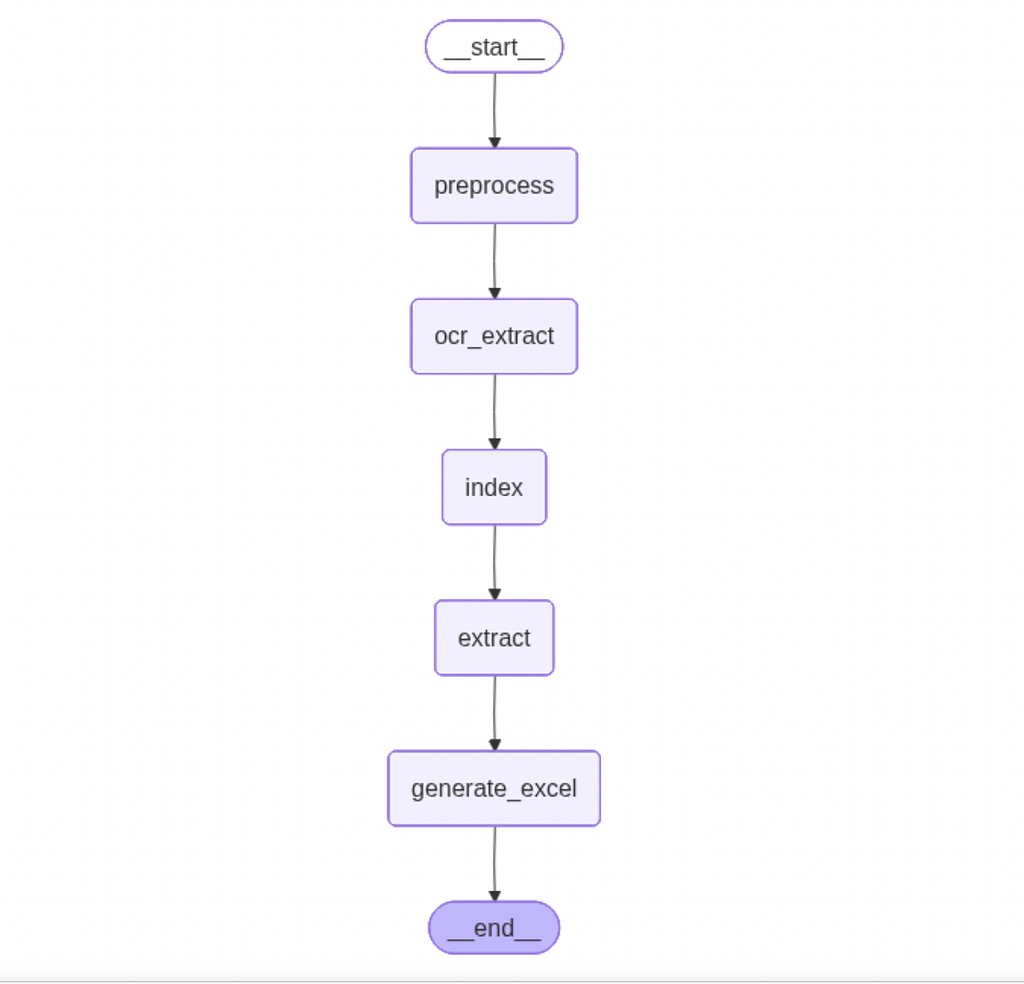
Step 10: Build the Graph
We now define the LangGraph workflow that orchestrates the entire contract intelligence pipeline, from preprocessing and OCR extraction to retrieval, AI-based field extraction, and final Excel generation.
#graph.py
from langgraph.graph import StateGraph, END
from models.state import ContractState
from nodes.preprocessing import preprocess_node
from nodes.ocr_extraction import ocr_extraction_node
from nodes.indexing import indexing_node
from nodes.extraction_agent import extraction_agent_node
from nodes.excel_generation import excel_generation_node

def build_graph():
    g = StateGraph(ContractState)
    g.add_node("preprocess", preprocess_node)
    g.add_node("ocr_extract", ocr_extraction_node)
    g.add_node("index", indexing_node)
    g.add_node("extract", extraction_agent_node)
    g.add_node("generate_excel", excel_generation_node)
    g.set_entry_point("preprocess")
    g.add_edge("preprocess", "ocr_extract")
    g.add_edge("ocr_extract", "index")
    g.add_edge("index", "extract")
    g.add_edge("extract", "generate_excel")
    g.add_edge("generate_excel", END)
    return g.compile()

# Singleton – imported by app.py
contract_graph = build_graph()

def save_graph_visualization(path: str = "graph_workflow.png") -> None:
    png_bytes = contract_graph.get_graph().draw_mermaid_png()
    with open(path, "wb") as f:
        f.write(png_bytes)
    print(f"Graph saved to {path}")

if __name__ == "__main__":
    save_graph_visualization()
Step 11: Streamlit UI: Full Transparency with Prompt Logging
Launch the Streamlit application locally.
Run the app:
cd medium/contract-intelligence
streamlit run app.py
The UI renders results in five tabs, with the Prompt Log tab providing full extraction transparency for debugging and audit:
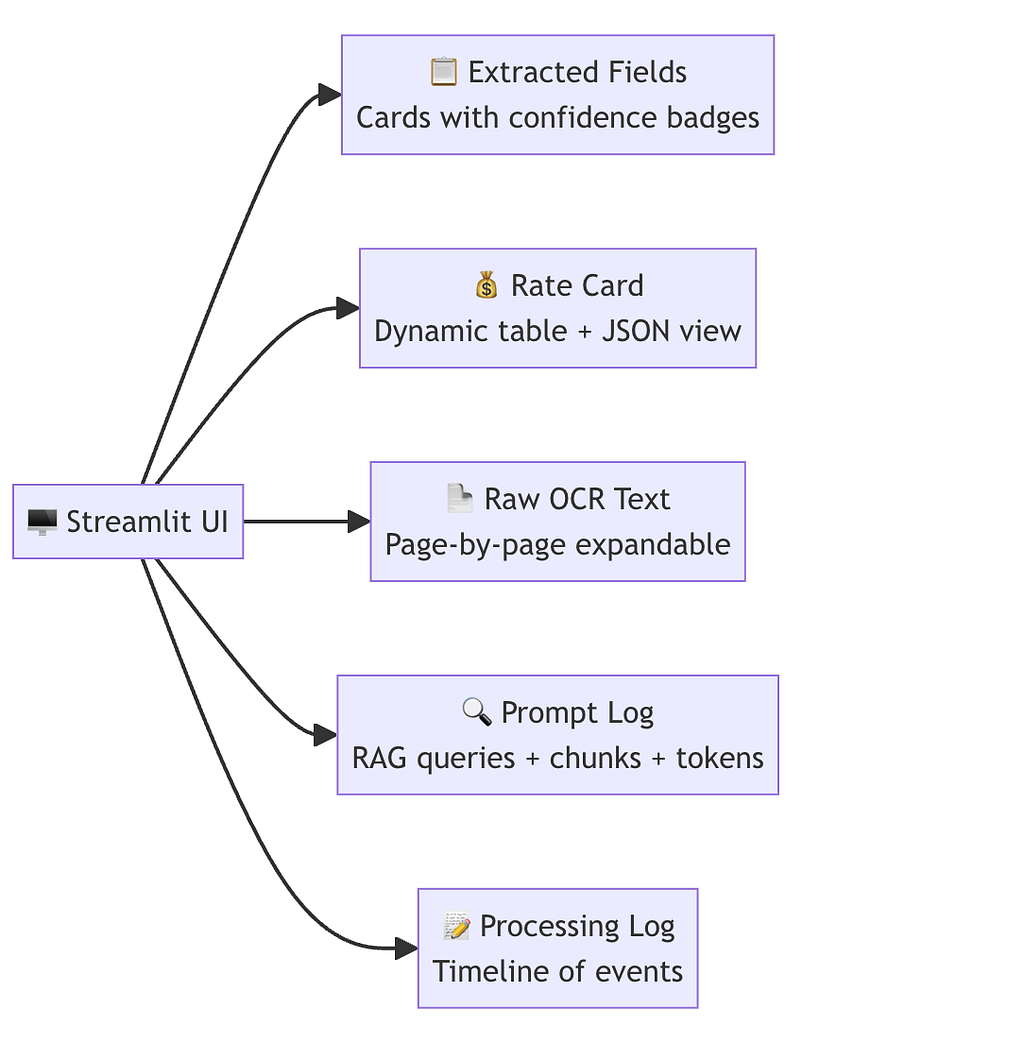
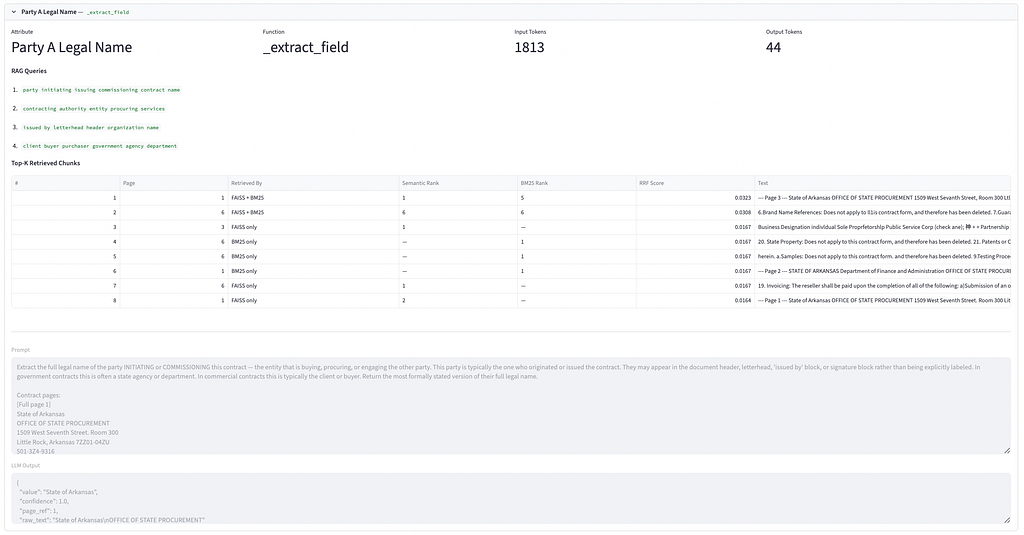
The Prompt Log tab shows, for each extracted field:
- All RAG queries executed
- Top-K chunks with their FAISS rank, BM25 rank, and RRF score
- The full prompt sent to GPT-4o
- The raw LLM output
- Token counts (input + output) for cost tracking
- For price_details: every per-page call plus the canonicalization call
This level of transparency is valuable in enterprise settings where extraction decisions need to be auditable.
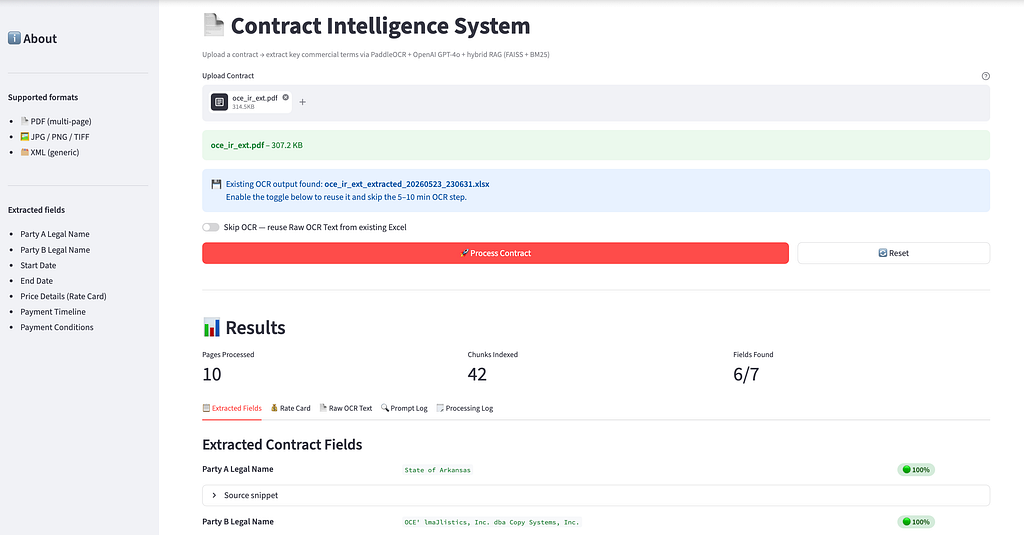
Let me now put a few screenshots from streamlit UI
## Streamlit UI : Extracted Fields Tab
## Streamlit UI : GIF for Contract Intelligence

Step 12: Sample Run
We now run our solution on a publically available contact file taken from Sample Contract.
This is a really world scanned contract having 10 pages having wide varitey of complexity like tables, hand-written characters etc.
Let’s now look at the outputs:
Tab 1: Extracted Fields
We extract the fields Party A Legal Name, Party B Legal Name, Start Data, End Date, Payment Timeline, Payment Conditions from the contract. We also extract pricing or Rate Card, but it’s schema is very dynamic hence we display it sepearately.
Below is a output from a sample contract.
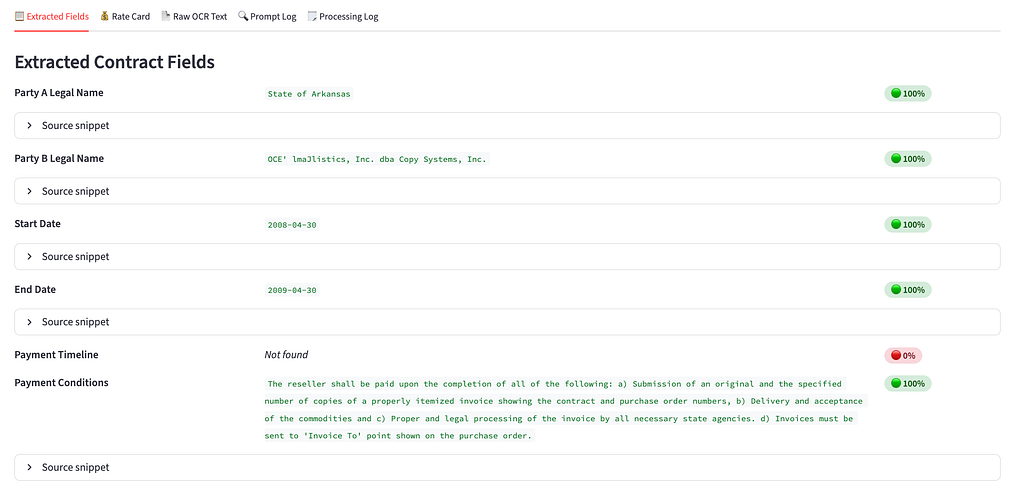
Important to note here is that, we also have Source snippet which is helpful in auditing and governance.
Confidence color coding:
- 🟢 ≥ 80%: High confidence (green)
- 🟡 50–79%: Medium confidence (yellow)
- 🔴 < 50%: Low confidence or not found (red)
Confidence scoring helps us decide, which attribute needs HITL (Human in the Loop) review.
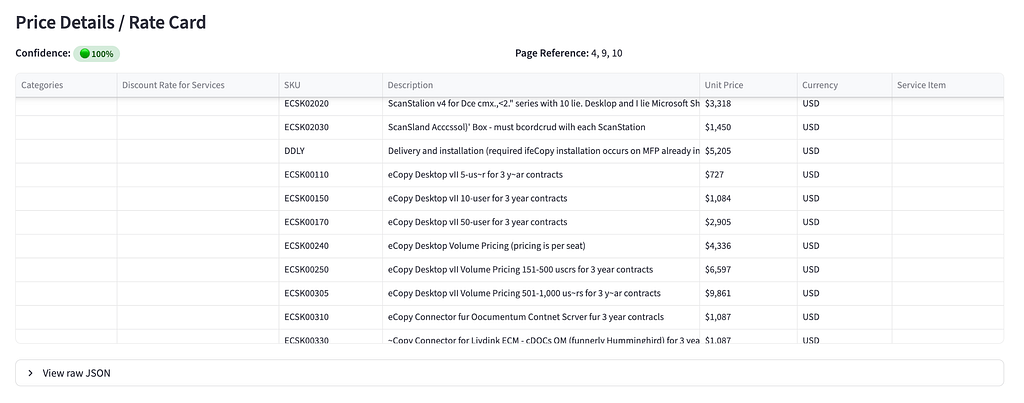
Tab2 2: Rate Card
Dynamic columns assembled from all pricing pages after canonicalization. Empty if no rate card exists.
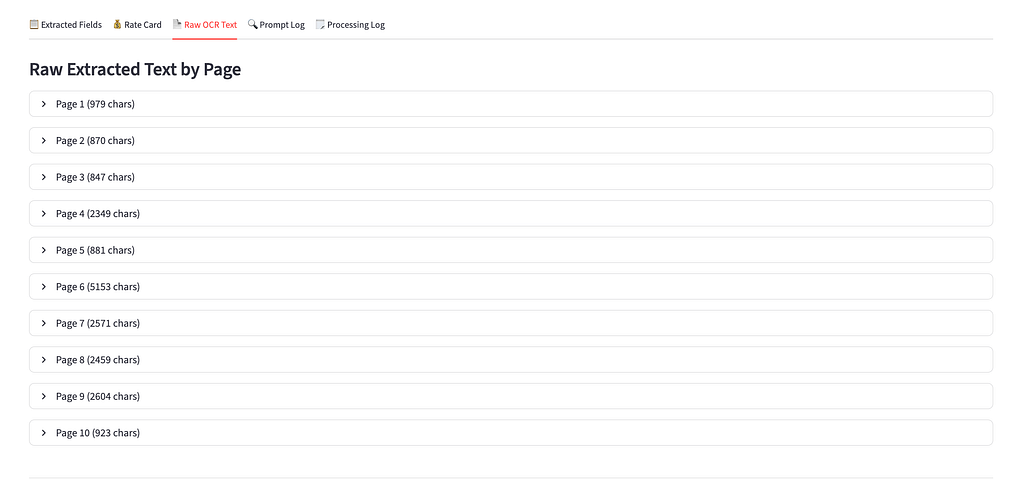
Tab 3: Raw OCR Text
Full page-by-page OCR output, useful for auditing extractions and debugging missed fields.
Tab 4: Prompt Logs
We log the top k chunks and the exact input prompt and output for each LLM API call for monitoring and evaluation.

Quick idea on the total token consumption for all the LLM API calls put together:
- Total Input Tokens: ~17k
- Total Output Tokens: ~4k
- Total Cost for one contract (with gpt-4o-mini model): ~0.005$
- Total Cost for one contract (with gpt-4o model): ~0.1$
Even with gpt-4o model, we are significantly cost efficient, faster and structured than manual validation.
Complete code can be accessed here.
Architecture Summary
Here’s the complete system architecture end-to-end:
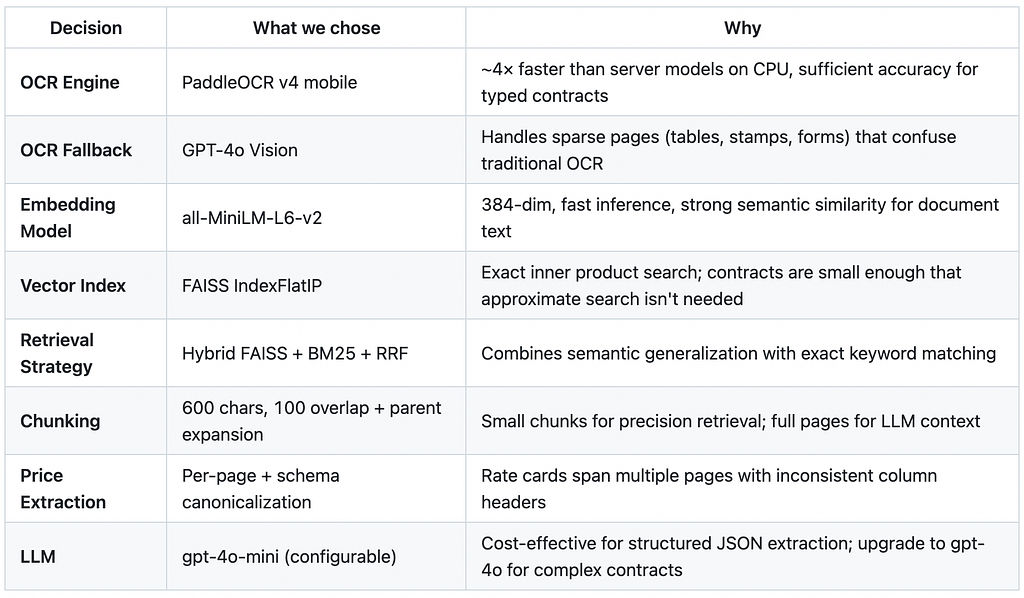
Key Design Decisions
The following design decisions were made to balance extraction accuracy, processing speed, scalability, and cost-effectiveness for real-world contract analysis workflows.
Future Enhancements
The current system is production-ready for single-document extraction, with several opportunities to evolve it into a more scalable and intelligent contract analysis platform. Future improvements can focus on scalability, extraction accuracy, and portfolio-level analytics.
- Add more extraction fields, validation checks, and parallel batch processing for large contract portfolios.
- Improve performance using persistent vector databases, legal-domain embeddings, GPU-accelerated OCR, and contract-specific prompts.
- Extend the platform with analytics dashboards, anomaly detection, contract version comparison, multilingual support, and human-in-the-loop review workflows.
- Latency optimization by making the parallel LLM API calls in the extraction agent.
Conclusion
This project demonstrates how modern OCR, embedding models, and Agentic AI based based extraction pipelines can be combined to build an efficient contract intelligence system. By integrating document parsing, semantic retrieval, and structured field extraction into a modular workflow, the system is able to process complex contracts with minimal manual effort while generating structured outputs suitable for downstream analysis.
The architecture is designed to be scalable, extensible, and production-ready, allowing future enhancements such as validation workflows, batch processing, analytics dashboards, multilingual support, and human-in-the-loop review systems. Overall, the project provides a strong foundation for automating contract analysis and reducing the time and effort traditionally required for manual document review.
References:
Thank you for reading the article.
AgenticAI is complex and chaotic but getting started doesn’t have to be. I focus on making that first step simpler for you. Follow along for regular updates and more such articles.
Feel free to connect on Linkedin if you’re on a similar path.
And if you’re still curious, there’s more to explore.
- Build Agentic RAG using LangGraph
- Practical Guide to Using ChromaDB for RAG and Semantic Search
- Reading Images with GPT-4o: The Future of Visual Understanding with AI
- Agentic AI Project: Build Mini Perplexity AI Chatbot : Step by Step Guide [Code Included]
- Agentic AI: Build ReAct Agent using LangGraph
- Agentic AI Project: Build a multi-agent system with LangGraph and OpenAI API
- Building an AI Agent with Model Context Protocol (MCP): A Complete Guide
- TOON vs JSON: A Comprehensive Performance Comparison
- Building an Intelligent Resume Transformation Agent Powered by LangGraph and gpt-4o-mini
- Agentic AI Project: Build a Customer Service Chatbot for a Clinic
- Vectorless RAG: How I Built a RAG System Without Embeddings, Databases, or Vector Similarity
- Agentic AI Project: Build AI Agents to chat with YouTube Videos
Build an AI Contract Intelligence System: OCR + Hybrid RAG + LangGraph to Extract Key Terms… was originally published in Towards AI on Medium, where people are continuing the conversation by highlighting and responding to this story.
