We Shipped Our A2A Agents to Azure. Here’s Exactly What Broke First.

A2A Protocol, Part 3: ACA for Speed, AKS for Scale, and the Production Mistakes We Made So You Don’t Have To
Parts 1 and 2 covered why we built with A2A and how we built it. This is the part where we actually shipped it — and learned that “works on my machine” and “runs in production” are very different sentences.

Let me tell you about the Tuesday afternoon everything worked perfectly on localhost and completely fell apart the moment we deployed it.
The A2A server was containerized. The client was containerized. Keycloak was running. APIM was configured. We spun up the Container App, curled the Agent Card endpoint, got a clean 200, and thought we were done.
Then we sent the first real task.
The client connected. The SSE stream opened. The server started working. And then — nothing. The client sat there, open connection, no events. For forty-five seconds. Until we killed it.
The agent was processing correctly. The events were being emitted correctly. They just weren’t reaching the client.
One annotation. That was the entire problem. One missing annotation on the Nginx ingress controller, and every SSE stream was silently buffered until the connection closed. The client got all the events at once, at the end, which for A2A is functionally the same as getting none of them.
That fix took twelve minutes to apply. Finding it took four hours.
This article is written so that particular four hours doesn’t happen to you.
Where We Are in the Story
Quick recap if you’re joining from search:
Part 1: We had one agentic workflow, got a second customer, and nearly copy-pasted the entire stack. A month of research led us to A2A — an open protocol that lets agents built on different frameworks discover each other, delegate tasks, and return typed results over HTTP. The architecture: one set of shared agents, one lightweight orchestrator per customer.
Part 2: We built it. The A2A server, the OAuth2 middleware, the hybrid routing client. Two validation cases. Two bugs found. Code that works on localhost.
Part 3 (this one): We deployed it to Azure. Two paths — Azure Container Apps for speed, Azure Kubernetes Service for scale. APIM in front of both. Dapr for mTLS between agents in the cluster. What broke, what we fixed, and the production checklist we now run before every agent goes live.
The same container image runs on both paths. Only the deployment target changes. That’s not a marketing claim — that’s what the abstraction from Part 2 buys you in practice.
The Full Architecture
Before any commands, here’s what we’re building toward:
Internet / Other Agents
         │
         ▼
┌────────────────────────┐
│      Azure APIM        │  ← A2A Agent API (native import from Agent Card)
│                        │    Rate limiting, JWT validation,
│                        │    Bearer token passthrough to backend
└──────────┬─────────────┘
           │
     ┌─────┴──────────────────────────────────┐
     │                                        │
     ▼                                        ▼
┌───────────────┐                  ┌──────────────────────┐
│  Path A: ACA  │                  │    Path B: AKS        │
│               │                  │                       │
│  Container    │                  │  Pod + Service        │
│  App Env      │                  │  Nginx Ingress        │
│  (managed K8s)│                  │  Dapr sidecar (mTLS)  │
└───────┬───────┘                  └──────────┬────────────┘
        │                                     │
        └──────────────┬──────────────────────┘
                       │
               ┌───────▼────────┐
               │   A2A Server   │
               │  (your image)  │
               └───────┬────────┘
                       │
               ┌───────▼────────┐
               │    Keycloak    │
               │  (OAuth2 IdP)  │
               └────────────────┘
One image. Two deployment targets. APIM in front of both. Keycloak behind both. The agents don’t know which path they’re running on — and they don’t need to.
Step 0: Containerize the A2A Server
This Dockerfile is identical for both ACA and AKS. Build it once. Deploy it everywhere.
# Dockerfile
FROM python:3.12-slim
WORKDIR /app
# Dependencies first - Docker layer caching keeps rebuilds fast
COPY requirements.txt .
RUN pip install --no-cache-dir -r requirements.txt
# Application code
COPY server/ ./server/
# Non-root user - AKS security policies require this.
# If you skip it, your pod admission will fail on hardened clusters.
RUN adduser --disabled-password --gecos "" appuser
USER appuser
EXPOSE 8001
# One worker for async apps - uvicorn handles concurrency via the event loop.
# Do not add --workers > 1 without shared task store (Redis) -
# multiple workers with InMemoryTaskStore means tasks are invisible across workers.
CMD ["uvicorn", "server.main:create_app",
     "--factory",
     "--host", "0.0.0.0",
     "--port", "8001",
     "--workers", "1"]
# Build and push to Azure Container Registry
az acr build
  --registry <your-acr-name>
  --image a2a-agent:latest
  --file Dockerfile .
The –workers 1 note is not a performance concern — it’s a correctness concern. If you run multiple workers with InMemoryTaskStore, each worker has its own isolated in-memory store. A task created by Worker 1 is invisible to Worker 2. Status updates route to the wrong worker. SSE streams disconnect. This is silent data loss. Keep it at 1 worker until you’ve replaced InMemoryTaskStore with Redis.
Path A: Azure Container Apps
ACA is where we started. If your team doesn’t run Kubernetes today, this is the right first deployment target.
What ACA gives you that matters for A2A:
Scale-to-zero is native — agents that aren’t receiving tasks don’t consume compute. For a multi-customer setup where Customer A’s orchestrator is only active during business hours, this translates directly to cost. Our bill dropped 40% compared to the always-on staging environment we were using for testing.
Built-in HTTPS termination means no certificate management. Your A2A agents get a valid TLS endpoint out of the box. The Agent Card URL is immediately shareable.
Managed identity integration means no client secrets in environment variables. We’ll cover this below — it’s not optional.
Deploy the Environment
RESOURCE_GROUP="rg-a2a-agents"
LOCATION="eastus"
ACR_NAME="<your-acr-name>"
ENVIRONMENT="env-a2a"
APP_NAME="a2a-agent-server"
IMAGE="${ACR_NAME}.azurecr.io/a2a-agent:latest"

# Resource group
az group create
  --name $RESOURCE_GROUP
  --location $LOCATION
# Container Apps environment
az containerapp env create
  --name $ENVIRONMENT
  --resource-group $RESOURCE_GROUP
  --location $LOCATION
# Deploy the A2A server
az containerapp create
  --name $APP_NAME
  --resource-group $RESOURCE_GROUP
  --environment $ENVIRONMENT
  --image $IMAGE
  --registry-server "${ACR_NAME}.azurecr.io"
  --registry-identity system
  --target-port 8001
  --ingress external
  --min-replicas 0
  --max-replicas 10
  --cpu 0.5
  --memory 1.0Gi
  --env-vars
      KEYCLOAK_URL="https://<your-keycloak-url>"
      KEYCLOAK_REALM="agent-realm"
      KEYCLOAK_AUDIENCE="a2a-server"
      REQUIRED_ROLE="agent-access"
On –min-replicas 0 vs –min-replicas 1: Scale-to-zero means the first cold-start request after idle takes 3–8 seconds. For A2A agents accepting async tasks, this is fine — the client opens the SSE stream and waits. For synchronous, latency-sensitive workflows where a human is waiting for a response, set –min-replicas 1. The cost difference is about $15/month for a 0.5 CPU instance running 24/7. Make the call based on your latency requirements, not on principle.
Verify the Agent Card
APP_URL=$(az containerapp show
  --name $APP_NAME
  --resource-group $RESOURCE_GROUP
  --query "properties.configuration.ingress.fqdn"
  --output tsv)

echo "Agent Card URL: https://${APP_URL}/.well-known/agent.json"
# This should return your full Agent Card JSON
curl https://${APP_URL}/.well-known/agent.json | jq .
If this returns your Agent Card, the server is up, TLS is working, and the public discovery endpoint is accessible. Wire this URL into APIM next.
Pull Secrets from Key Vault — Not Environment Variables
This is the step most tutorials skip. Don’t put Keycloak client secrets in environment variables. They show up in logs, in az containerapp show output, and in anyone who has read access to the resource.
# Assign managed identity to the Container App
az containerapp identity assign
  --name $APP_NAME
  --resource-group $RESOURCE_GROUP
  --system-assigned

# Get the principal ID
PRINCIPAL_ID=$(az containerapp show
  --name $APP_NAME
  --resource-group $RESOURCE_GROUP
  --query "identity.principalId"
  --output tsv)
# Grant Key Vault secret read access
az keyvault set-policy
  --name <your-keyvault-name>
  --object-id $PRINCIPAL_ID
  --secret-permissions get list
In your Python code, replace hardcoded secrets with:
# server/secrets.py
from azure.identity import ManagedIdentityCredential
from azure.keyvault.secrets import SecretClient
import os

VAULT_URL = os.getenv("AZURE_KEYVAULT_URL")
def get_secret(name: str) -> str:
    """
    Fetches a secret from Key Vault using the Container App's managed identity.
    No credentials required - Azure handles the auth automatically.
    Call this at startup, not on every request.
    """
    credential = ManagedIdentityCredential()
    client = SecretClient(vault_url=VAULT_URL, credential=credential)
    return client.get_secret(name).value
Cache the result at startup. Key Vault has rate limits, and calling it on every token validation will get you throttled under load.
Path B: Azure Kubernetes Service
We moved to AKS three weeks after the initial ACA deployment. Not because ACA was failing — it wasn’t — but because we added three more agents and needed Dapr’s mTLS mesh between them without managing certificates manually.
If you’re already running AKS, start here. If you’re not, start with ACA and migrate when you need what AKS offers.
The Kubernetes Manifests
# k8s/namespace.yaml
apiVersion: v1
kind: Namespace
metadata:
  name: a2a-agents
  labels:
    dapr.io/enabled: "true"  # Enable Dapr for the entire namespace
# k8s/deployment.yaml
apiVersion: apps/v1
kind: Deployment
metadata:
  name: a2a-agent-server
  namespace: a2a-agents
spec:
  replicas: 2
  selector:
    matchLabels:
      app: a2a-agent-server
  template:
    metadata:
      labels:
        app: a2a-agent-server
      annotations:
        # Dapr sidecar injection — one annotation, automatic mTLS
        dapr.io/enabled: "true"
        dapr.io/app-id: "a2a-agent-server"
        dapr.io/app-port: "8001"
        dapr.io/enable-api-logging: "true"
    spec:
      serviceAccountName: a2a-agent-sa
      containers:
        - name: a2a-agent
          image: <your-acr>.azurecr.io/a2a-agent:latest
          ports:
            - containerPort: 8001
          env:
            - name: KEYCLOAK_URL
              value: "https://<your-keycloak-url>"
            - name: KEYCLOAK_REALM
              value: "agent-realm"
            - name: KEYCLOAK_AUDIENCE
              value: "a2a-server"
            - name: REQUIRED_ROLE
              value: "agent-access"
            - name: A2A_CLIENT_SECRET
              valueFrom:
                secretKeyRef:
                  name: a2a-agent-secrets
                  key: keycloak-client-secret
          resources:
            requests:
              cpu: "250m"
              memory: "512Mi"
            limits:
              cpu: "1000m"
              memory: "1Gi"
          # Health probes use the Agent Card endpoint.
          # It requires no auth, has no side effects, and
          # if it returns 200, the server is A2A-compliant and ready.
          # Two birds, one probe.
          readinessProbe:
            httpGet:
              path: /.well-known/agent.json
              port: 8001
            initialDelaySeconds: 5
            periodSeconds: 10
          livenessProbe:
            httpGet:
              path: /.well-known/agent.json
              port: 8001
            initialDelaySeconds: 15
            periodSeconds: 20
# k8s/service.yaml
apiVersion: v1
kind: Service
metadata:
  name: a2a-agent-server
  namespace: a2a-agents
spec:
  selector:
    app: a2a-agent-server
  ports:
    - protocol: TCP
      port: 80
      targetPort: 8001
  type: ClusterIP   # Internal only — APIM is the public entry point
Now the ingress — and the annotation that cost us four hours:
# k8s/ingress.yaml
apiVersion: networking.k8s.io/v1
kind: Ingress
metadata:
  name: a2a-agent-ingress
  namespace: a2a-agents
  annotations:
    nginx.ingress.kubernetes.io/backend-protocol: "HTTP"
    nginx.ingress.kubernetes.io/proxy-read-timeout: "300"
    nginx.ingress.kubernetes.io/proxy-send-timeout: "300"
  # ── This annotation is not optional. ──────────────────────────────────
      # Without it, Nginx buffers the SSE stream and the client receives
      # all events at once when the connection closes - which for a
      # long-running agent task might be 30, 60, or 120 seconds later.
      # The A2A client sees nothing until the very end, then everything at once.
      # It looks exactly like the server isn't streaming.
      # This took four hours to diagnose. You're welcome.
      nginx.ingress.kubernetes.io/proxy-buffering: "off"
      # ──────────────────────────────────────────────────────────────────────
  spec:
    ingressClassName: nginx
    rules:
      - host: a2a-agent.<your-domain>
        http:
          paths:
            - path: /
              pathType: Prefix
              backend:
                service:
                  name: a2a-agent-server
                  port:
                    number: 80
Autoscaling
# k8s/hpa.yaml
apiVersion: autoscaling/v2
kind: HorizontalPodAutoscaler
metadata:
  name: a2a-agent-hpa
  namespace: a2a-agents
spec:
  scaleTargetRef:
    apiVersion: apps/v1
    kind: Deployment
    name: a2a-agent-server
  minReplicas: 2
  maxReplicas: 20
  metrics:
    - type: Resource
      resource:
        name: cpu
        target:
          type: Utilization
          averageUtilization: 60
    - type: Resource
      resource:
        name: memory
        target:
          type: Utilization
          averageUtilization: 70
minReplicas: 2 is intentional. AKS doesn’t have the same cold-start characteristics as ACA scale-to-zero. Two replicas give you zero-downtime pod restarts during rolling deployments and no latency spike when the first task arrives.
Deploy to AKS
# Authenticate
az aks get-credentials
  --resource-group <your-rg>
  --name <your-aks-cluster>

# Create the secret (never commit this - use a secrets manager in CI/CD)
kubectl create secret generic a2a-agent-secrets
  --namespace a2a-agents
  --from-literal=keycloak-client-secret=<your-client-secret>
# Apply everything
kubectl apply -f k8s/namespace.yaml
kubectl apply -f k8s/deployment.yaml
kubectl apply -f k8s/service.yaml
kubectl apply -f k8s/ingress.yaml
kubectl apply -f k8s/hpa.yaml
# Verify: each pod should show 2/2 (app + Dapr sidecar)
kubectl get pods -n a2a-agents
# NAME                                 READY   STATUS    RESTARTS
# a2a-agent-server-6d8f9b-xxx          2/2     Running   0
# a2a-agent-server-6d8f9b-yyy          2/2     Running   0
Dapr mTLS Between Agents — One Annotation, Automatic Certificates
This is the reason we moved from ACA to AKS. When you have five agents in the same cluster, managing mTLS certificates manually is a full-time job. Dapr eliminates that entirely.
# k8s/dapr-config.yaml
apiVersion: dapr.io/v1alpha1
kind: Configuration
metadata:
  name: a2a-dapr-config
  namespace: a2a-agents
spec:
  mtls:
    enabled: true
    workloadCertTTL: "24h"
    allowedClockSkew: "15m"
  accessControl:
    defaultAction: deny        # Deny all inter-agent calls by default
    trustDomain: "cluster.local"
    policies:
      - appId: a2a-client      # Only the orchestrator client can call agents
        defaultAction: allow
        namespace: a2a-agents
kubectl apply -f k8s/dapr-config.yaml
Once this is applied: every call between Dapr-enabled pods in the cluster is automatically mTLS. No code changes. No certificate rotation tasks. No custom middleware. Dapr handles the transport layer. Your OAuth2 Bearer token handles the application layer. Both active simultaneously, independently.
The A2A protocol spec recommends mTLS for agent-to-agent communication. Dapr is how you implement that recommendation without it becoming a second job.
Azure APIM: The Gateway Both Paths Share
APIM now has native A2A Agent API import — it reads your Agent Card directly and configures the API automatically. This is new as of the 2025 updates and it’s genuinely useful.
Import via Portal
- Go to your APIM instance → APIs → + Add API
- Select the A2A Agent tile
- Enter your Agent Card URL:
- ACA: https://<app>.azurecontainerapps.io/.well-known/agent.json
- AKS: https://a2a-agent.<your-domain>/.well-known/agent.json
4. APIM reads the Agent Card and pre-configures the API name, description, skills, and endpoint
The import takes about thirty seconds and gets 90% of the APIM configuration right. The remaining 10% is the policy — which you configure manually.
Import via CLI
az apim api import
  --resource-group <your-rg>
  --service-name <your-apim>
  --api-id a2a-orchestrator-agent
  --path /agents/orchestrator
  --specification-format OpenApi
  --display-name "Orchestrator Agent"
  --specification-url "https://<your-agent-url>/.well-known/agent.json"
The APIM Policy
This policy does two things that matter: validates the JWT at the gateway (before compute is consumed), and passes the token through to the agent (which validates it independently). Two validation points. Defense in depth.
<!-- apim-policy.xml — applied at API level -->
<policies>
  <inbound>
    <base />
<!-- Rate limiting - keyed by token hash, not IP (agents may share IPs) -->
    <rate-limit-by-key
      calls="100"
      renewal-period="60"
      counter-key="@(context.Request.Headers
        .GetValueOrDefault("Authorization","")
        .GetHashCode().ToString())"
      increment-condition="@(context.Response.StatusCode != 429)" />
    <!-- JWT validation at the gateway edge.
         Bad tokens die here - before the agent process touches them.
         The agent still validates independently (see auth.py from Part 2). -->
    <validate-jwt
      header-name="Authorization"
      failed-validation-httpcode="401"
      failed-validation-error-message="Invalid or missing token"
      require-scheme="Bearer">
      <openid-config-url>
        https://<your-keycloak-url>/realms/agent-realm/.well-known/openid-configuration
      </openid-config-url>
      <audiences>
        <audience>a2a-server</audience>
      </audiences>
      <required-claims>
        <claim name="realm_access" match="any">
          <value>{"roles":["agent-access"]}</value>
        </claim>
      </required-claims>
    </validate-jwt>
    <!-- Forward to backend with Authorization header intact -->
    <set-backend-service base-url="https://<your-agent-url>" />
  </inbound>
  <backend>
    <base />
  </backend>
  <outbound>
    <base />
    <!-- Strip internal headers before returning to caller -->
    <set-header name="X-Powered-By" exists-action="delete" />
  </outbound>
  <on-error>
    <base />
  </on-error>
</policies>
Why validate at APIM and at the agent? APIM validation protects compute — bad tokens don’t reach your agent process. Agent validation protects against internal traffic that bypasses APIM (other pods in the cluster, direct ingress access during incident response, test traffic hitting staging directly). Never rely on a single validation point for anything that matters.
ACA vs AKS: The Honest Comparison
Here’s the question we actually asked ourselves when making this call, framed as a decision table:
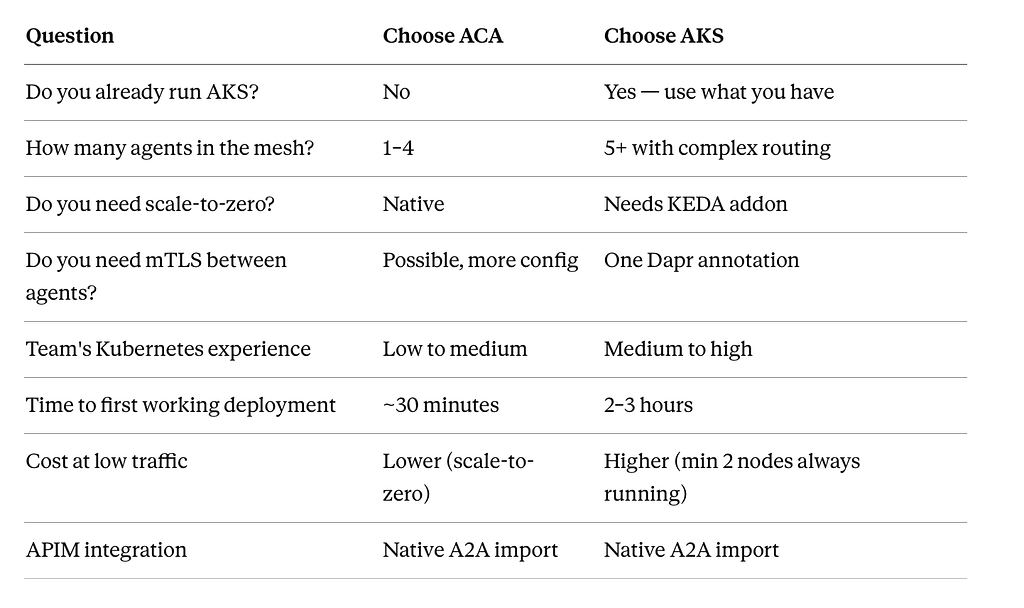
We started on ACA. We moved to AKS at agent #4. If we were starting today knowing we’d end up at five agents, we’d go directly to AKS. If we were genuinely uncertain about scale, we’d start on ACA and migrate — the container image doesn’t change.
The Five Things That Actually Broke
I keep the production incident log. Here are the five failures from our first month, what caused them, and what we changed.
1. SSE buffering on Nginx (four hours) Cause: missing proxy-buffering: off annotation on the ingress. Symptom: tasks appeared to hang; the client received all events at connection close. Fix: the annotation in the ingress manifest above. Prevention: include it in every ingress manifest template. It costs nothing and prevents the symptom entirely.
2. Task zombies on executor exceptions (found in Part 2, reappeared in prod) Cause: a dependency our pipeline called threw an exception we hadn’t anticipated. The except block caught it, but a secondary exception inside the exceptblock prevented the failed event from being emitted. Symptom: tasks stuck in working state, SSE streams open indefinitely. Fix: nested try-finally to guarantee terminal event emission regardless of what fails.
# Hardened version of the error path in executor.py
try:
    output = await self.pipeline.run(task_input=task_input, context=ctx)
    # ... emit artifact and completed events
except Exception as exc:
    try:
        await event_queue.enqueue_event(
            TaskStatusUpdateEvent(
                taskId=task_id,
                status=TaskStatus(state=TaskState.failed, message={"error": str(exc)}),
                final=True,
            )
        )
    except Exception:
        pass  # If we can't even emit failed, the connection timeout will clean it up
3. JWKS cache returning stale keys after Keycloak rotation Cause: Keycloak rotated its signing keys (scheduled, automatic). Our JWKS cache had no TTL. Tokens signed with the new key failed validation with “key not found.” Symptom: all task requests returned 401 for ~20 minutes. Fix: add TTL to the JWKS cache and force a refresh on kidmismatch.
# server/auth.py — hardened JWKS cache
import time
_jwks_cache: dict = {}
_jwks_cache_ts: float = 0.0
JWKS_TTL_SECONDS = 3600  # Refresh every hour
async def _get_jwks(force_refresh: bool = False) -> dict:
    global _jwks_cache, _jwks_cache_ts
    age = time.time() - _jwks_cache_ts
    if not _jwks_cache or age > JWKS_TTL_SECONDS or force_refresh:
        async with httpx.AsyncClient() as client:
            resp = await client.get(JWKS_URL)
            resp.raise_for_status()
            _jwks_cache = resp.json()
            _jwks_cache_ts = time.time()
    return _jwks_cache
async def validate_token(token: str) -> dict:
    jwks = await _get_jwks()
    header = jwt.get_unverified_header(token)
    key = next((k for k in jwks["keys"] if k["kid"] == header["kid"]), None)
    if not key:
        # Key not found - may be post-rotation. Force refresh and retry once.
        jwks = await _get_jwks(force_refresh=True)
        key = next((k for k in jwks["keys"] if k["kid"] == header["kid"]), None)
    if not key:
        raise ValueError("Signing key not found - token may be from an unknown issuer")
    # ... rest of validation unchanged
4. Multiple uvicorn workers with InMemoryTaskStore Cause: we bumped –workers to 4 to handle load. Each worker had an isolated in-memory store. Symptom: SSE streams would connect, get a working event, then go silent. Half the status updates were going to a different worker’s store. Fix: set –workers 1 until Redis is in place. We’ve since added Redis — that’s in the next article.
5. Cold start latency on the first customer task of the day Cause: –min-replicas 0 on ACA. Scale-to-zero is great for cost. The 6-second cold start is invisible when the client is another agent sending async tasks. It’s very visible when Customer A’s morning report is triggered by a UI action and a human is watching. Fix: –min-replicas 1 for Customer-facing orchestrators. Scale-to-zero stays for internal shared agents that only receive delegation from other agents.
The Multi-Agent Picture
When you add agents, APIM routes to each one by path. The orchestrator reads Agent Cards through APIM and routes tasks. The shared agents never talk to each other directly — everything goes through the orchestrator.
APIM
 ├── /agents/orchestrator  →  Orchestrator Agent
 ├── /agents/anomaly       →  Anomaly Detection Agent
 ├── /agents/contracts     →  Contract Lookup Agent
 └── /agents/escalation    →  Escalation Drafting Agent
This is the architecture from Part 1 — the thing we sketched on a whiteboard three months ago — now running in production. The orchestrator fetches Agent Cards from APIM, uses the hybrid router from Part 2 to decide which agent gets a task, and delegates through the same APIM gateway that external clients use.
Each shared agent is deployed once. Customer A and Customer B’s orchestrators point at the same agent URLs. When we onboarded Customer C, we deployed one new orchestrator container. The shared agents didn’t redeploy. Didn’t retest. Didn’t change.
That’s the thing we were trying to build in Part 1. This is what it looks like when it’s running.
The Production Readiness Checklist
We run this before every agent goes live. Not as theater — as the thing that catches the issues we found the hard way.
Container
- [ ] Non-root user in Dockerfile (USER appuser)
- [ ] No secrets in environment variables — Key Vault (ACA) or Kubernetes Secrets (AKS)
- [ ] –workers 1 unless Redis task store is in place
- [ ] Health probes on /.well-known/agent.json (readiness + liveness)
A2A Server
- [ ] InMemoryTaskStore replaced with Redis for multi-replica deployments
- [ ] JWKS cache has TTL + force-refresh on kid mismatch
- [ ] Every execute() path emits a terminal event — use try-finally, not just try-except
- [ ] cancel() is a real implementation, not a stub
- [ ] SSE connection timeout configured — open connections without activity should close
Networking
- [ ] APIM in front of every agent — no direct public exposure of agent URLs
- [ ] proxy-buffering: off on every Nginx ingress that carries SSE traffic
- [ ] Agent Card endpoint publicly accessible (/.well-known/agent.json)
- [ ] All other endpoints auth-gated at middleware level
- [ ] Rate limiting at APIM layer
Auth
- [ ] JWT validated at APIM and at the agent independently
- [ ] Keycloak key rotation handled — JWKS TTL + refresh on mismatch
- [ ] Client secrets in Key Vault or Kubernetes Secrets — never in code or env vars
- [ ] Token TTL ≤ 15 minutes, client handles refresh automatically
- [ ] Dapr mTLS enabled for AKS intra-cluster agent communication
Observability
- [ ] Task lifecycle events logged: submitted, working, completed, failed
- [ ] Open SSE connection count monitored — spike indicates buffering or zombie tasks
- [ ] APIM request logs forwarded to Azure Monitor
- [ ] Alerts on: sustained task failure rate, auth rejection rate, cold start latency
The Deployment That Actually Changed Something
I want to be specific about the outcome, because it’s easy for these articles to end with “and then it worked great” without saying what “great” actually means.
Three months ago: two customers, one workflow, a conversation about copy-pasting the entire stack.
Today: four customers, one set of shared agents, four lightweight orchestrators. The shared agents have had zero customer-specific changes since the initial deployment. The time to onboard a new customer went from two weeks (estimated, based on the copy-paste path we almost took) to two days (actual, measured).
The two days is mostly environment setup and orchestrator configuration. The shared agent layer touches nothing.
The month of A2A research, the two weeks of implementation, the four hours lost to an Nginx annotation — the math on that works out, and then some.
What’s Next
Three articles in. Here’s what this series has covered:
- Part 1: What A2A is, why we chose it, and what the spec doesn’t give you
- Part 2: The server, the client, the auth middleware, two routing modes, two validation cases
- Part 3: ACA, AKS, APIM, Dapr, the five things that broke, the checklist that prevents them
What isn’t in this series and probably should be:
Redis-backed task store — the fix for the multi-worker problem. A task store that survives pod restarts, works across replicas, and lets you query task history. I’ll cover the implementation separately.
Agent versioning — what happens when a shared agent needs to change without breaking the orchestrators that depend on it. We solved this with versioned Agent Cards and backward-compatible skill IDs. Worth its own article.
Terraform for all of this — the ACA environment, the AKS cluster, the APIM instance, the Keycloak realm, the Key Vault policies. Everything above can be fully provisioned from code. That’s the article I want to write next.
If any of those are the specific thing you’re stuck on, drop it in the comments. The next article goes where the questions are.
If you made it this far: thank you. These articles take time to write and they take time to read. I hope the specificity — the actual bugs, the actual fixes, the actual annotation that cost four hours — is worth that time.
Follow for the next one. Part 4 is going to be about Terraform — and the one infrastructure decision in Part 3 that we’d do differently if we started today.
A clap helps others find this. A comment makes the next article better. Both are appreciated.
We Shipped Our A2A Agents to Azure. Here’s Exactly What Broke First. was originally published in Towards AI on Medium, where people are continuing the conversation by highlighting and responding to this story.
