Version-Controlling Your Agents: Deployment, Rollback, and Safe Promotion Patterns

This article was written by Matteo Rossi.
Most production agents are one careless edit away from an outage no one can cleanly undo.
It usually starts on a quiet Friday afternoon, with one last task before the weekend: a small tweak to the system prompt of the AI agent that serves the app’s customers. Marketing wants the tone adjusted, and it is nothing complicated, done many times before. But this time, the change collides with a tool that was renamed last sprint, and the order workflow that’s run for months quietly begins to fail. Within minutes, 200 users are hitting the broken flow, and the alarms are going off.
The cause is easy to spot, but the problems are with the fix. The developer who shipped the change minutes ago opens the database console, tries to remember what the prompt said before, pastes something close, and crosses his fingers, because there’s no previous version to diff against and no staging environment where this could have been caught. If your agent can break production, and it will, you need a different approach: one that applies the same code discipline you already use to build the agent itself.
Agents Are Not “Just Config”
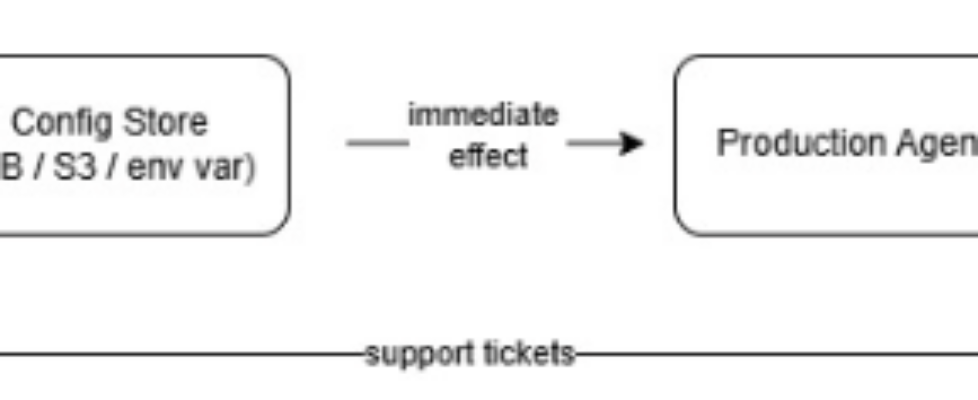
The first AI agent most teams build starts with a system prompt stored in a text file. At best, it’s saved in an environment variable or a database field. The prompt’s lifecycle and deployment are dead simple: You edit the string and save it. That’s the whole “CI/CD.”
This works well at first, but week after week, the agent evolves. What started as a paragraph of instructions soon becomes a complex artifact:
- The system prompt (lines that should be clear yet concise to avoid consuming too many tokens)
- The definition of tools and their schemas
- The selected model and its parameters (temperature, top-p, and maximum number of tokens)
- Retrieval configuration for RAG applications (top-k, score thresholds, index names, etc.)
- Guardrails and safety filters
- Memory configurations and context window
The lifecycle of this object doesn’t evolve along with its complexity: whoever maintains it just keeps updating fields in a database or pushing a modified file into an S3 bucket.

This works great while the agent is an internal prototype with a few users. Things go wrong once it’s used in workflows involving real users, financial transactions, orders, analyses or anything with a specific purpose and an SLA.
Three Failure Modes Without Versioning
- No Isolation: Every Change is a Production Change
Without a staging environment, any change to the configuration is effectively a live deployment. There’s no way to test how that small, innocent change to the prompt actually behaves against real user inputs and real tool responses.
Let’s look at a few examples:
- A typo in a tool’s name can cause silent failures or make features unavailable, because the agent can no longer call the tool behind that functionality.
- A temperature change from 0.3 to 0.7 can increase hallucinations in certain corner cases.
- Removing a reference to an existing tool can trigger fallback behaviors that have never been tested
Each of these stays invisible during code review, no matter how trivial the change looks, it’s “just a configuration.”
There’s also another factor to consider: the risk of a configuration change is proportional to the traffic that the agent serves. It’s not so much the size of the change that matters, but its impact.
2. No Rollback: When It Breaks, You Patch Forward
When a release goes wrong, you reach for a simple but effective operation: redeploying the previous version of the artifact, a classic rollback operation. That works perfectly when the code is versioned, and you can accurately track every change in the release.
In the case above, rolling back an agent means opening the database, finding the configuration document/record, remembering what was written there before, rewriting it, and hoping you got it right, without any guarantee that the result is correct.
For a very simple prompt, this takes a few minutes, and the result is acceptable overall. For an agent with a complex prompt, dozens of MCP tool definitions, and retrieval and configuration parameters, manual reconstruction gets complicated and error-prone fast. MTTR (Mean Time To Recovery) is hard to predict in advance because it depends on the developer’s memory rather than on a tested, reliable procedure.
3. No Observability on What Changed
There’s another class of error, more insidious and harder to detect. Suppose your agent doesn’t suddenly stop working, but slowly degrades, quietly eroding the quality of the product. Customer satisfaction drifts down, and you need to tie that decline to a specific change. Coming back to the original problem: what changed?
- What changed between Wednesday (when it was working correctly) and Friday (when the first signs of degradation appeared)?
- Who changed the response temperature, and why?
- Which version of the tool’s schema was active during this period?
It’s difficult, if not impossible, to debug what you can’t observe.
Agents as Versioned Deployable Artifacts
You need a solution, and this time it’s nothing new. The solution is to apply existing deployment patterns to agent configuration. In practice, that means the Agent-as-Code pattern.
The pattern is based on a few fundamental elements:
- Immutable snapshots
- Controlled promotions between environments
- Instant rollback
- LLM version pinning
Immutable Snapshot
An agent version is simply a complete package of everything the agent needs to function. Whenever one of these components changes, you generate a new version. Never modify the previous one because it’s your rollback target. For example:
{
  "_id": "ops-agent-v7",
  "agentId": "ops-agent",
  "version": 7,
  "status": "canary",
  "config": {
  "systemPrompt": "You are an operations assistant. When asked about incidents, always check current status before referencing historical data…",
  "model": "claude-haiku-4–5–20251001",
  "temperature": 0.3,
  "tools": ["getSystemMetrics", "getRecentIncidents", "searchRunbooks", "createIncident"],
  "retrievalConfig": {
  "index": "runbook_vectors",
  "topK": 5,
  "scoreThreshold": 0.78
  },
  "guardrails": {
  "maxToolCalls": 5,
  "blockedTopics": ["salary", "personal-data"]
  }
  },
  "changelog": "Added createIncident tool, raised scoreThreshold from 0.72 to 0.78",
  "createdBy": "matteoroxis",
  "createdAt": "2026–05–23T10:30:00Z",
  "promotedAt": null
}
Each field captures something that could affect the agent’s behavior. Note that every version also has a changelog and an author. JSON is used here because it’s easy to compare and automate, but it could just as easily be a YAML or MD file.
Staged Promotion
Before reaching production, the new configuration version passes through a staging or pre-production environment, where it’s tested by automated procedures (or manual ones where necessary).
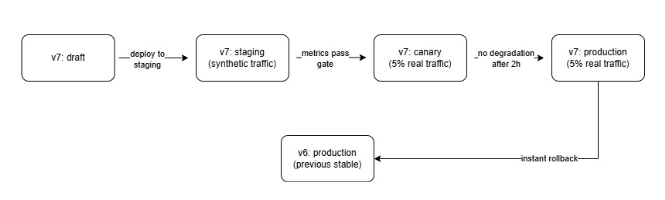
- The staging environment receives synthetic queries, scripted test cases or anonymized replays of production traffic. The agent responds, and the results are evaluated against expected outputs without affecting real users. If the test passes, the artifact moves on to the next step.
- A canary release routes a small percentage of real traffic to the new version. You can monitor key metrics like response latency, user satisfaction, and MCP tool error rates, comparing them against the current production baselines. If any of them degrade or behave unexpectedly, the release is blocked.
- Full production is reached only once all gates have passed, and the previous version stays available the whole time if needed.
Automated Gates
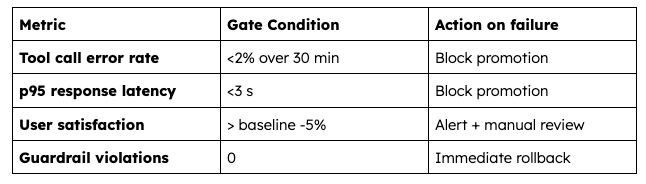
The promotions above can be automated, and so can the checks that gate them. For example, it is possible to imagine a few promotion gates:
Pin the Model Version
Look closely at the example config above, and you’ll see the model is pinned as “model”: “claude-haiku-4–5–20251001”. That’s not an oversight, but it’s a precise instruction given to the agent about which model to use, quite different from a floating alias like claude-haiku-4–5 or latest.
LLM providers update models frequently, sometimes multiple times per month, and with every update, something shifts: how it follows instructions, the JSON it emits, sometimes just the way it reads context.
A floating alias means your agent might run one model on Monday and a substantially different one on Wednesday, after a provider update you never noticed. The same configuration can produce different outputs depending on when it runs, which makes reproducibility impossible.
To solve this, pin the model snapshot. The agent always uses the same, immutable version of the model, which makes the agent itself a true immutable artifact. When you want to update the model, you create a new version of the config and run it through all the necessary promotions and gates before releasing it to production. It’s one more layer of safety and stability in the agent’s lifecycle.
When “Just Ship It” Still Works
As usual, there are scenarios where none of this is strictly necessary. The steps above add overhead and cognitive load that isn’t justified when:
- The agent is an internal tool with a few users who can report issues directly, without any real impact
- The agent is completely stateless, makes no tool calls, and only does informational Q&A
- You’re still in the research phase and modify the agent daily to find the best combination of parameters and tool calls
As discussed earlier, the real decision criterion is the impact of a potential issue, not the size of the team. A single developer running an agent that processes payments absolutely needs this methodology because the activity involves live payments, and any failure causes direct financial loss.
From YOLO to Versioned Agents: Five Steps
It is possible to outline the five steps to take an agent from YOLO mode to a versioned agent suitable for enterprise workloads.
- Snapshot your current agent. Capture all the configuration in a JSON document or config file: the prompt, the tools, the model, every parameter. This is version 1.0, and your first rollback target.
- Define your version schema. Decide which fields, in combination, make up a version. If changing one of them could alter the agent’s behavior, you release a new version and create a new bundle.
- Pin the LLM version. Always specify the model snapshot, and every time you change it, create a new version of the config.
- Introduce staging traffic. Anonymously log the last few weeks of traffic and use it to test the new version in silent mode. Compare its outputs against the previous version’s and verify unexpected deviations.
- Set one automated gate. Define the metrics that tell you whether the output is good, pick the most meaningful one, and block the release if the new version fails it. As you get comfortable with the approach, add more metrics for increasingly automated, safer releases.
Wrap It Up
Production incidents happen, but they’re usually quick to resolve when you know exactly what to do and, more importantly, how to do it. A clear deployment strategy protects you against post-release issues, and good pre-release preparation protects you even more. These have long been the foundation of release management, and they apply just as well to AI agents that carry configuration across six or more interacting dimensions that have to be managed programmatically and versioned.
The next time a Friday afternoon change breaks the order workflow, you won’t be staring at a database console trying to remember what the prompt said last week. You’ll run one command: redeploy version x.
AI agents are real, and they increasingly run in production, handling financial transactions and high volumes of users. Now they’re as important as the core business services they often enrich, and they deserve to be treated and managed accordingly. Don’t throw away everything learned and built so far; agents have their own “Agent-as-Code” formula too.
Version-Controlling Your Agents: Deployment, Rollback, and Safe Promotion Patterns was originally published in Towards AI on Medium, where people are continuing the conversation by highlighting and responding to this story.
