The MCP 2026–07–28 Spec Just Dropped — Here’s How to Build a Production-Ready MCP Server with…

The MCP 2026–07–28 Spec Just Dropped — Here’s How to Build a Production-Ready MCP Server with Express.js
The largest revision of the Model Context Protocol since launch is here. Sessions are dead. Stateless HTTP is in. Here’s a hands-on guide to building an MCP server that’s ready for the new world — using the Express.js stack you already know.
If you’ve been building AI-powered applications in 2026, you’ve felt the gravitational pull of the Model Context Protocol. What started as Anthropic’s open-source experiment in late 2024 has become the de facto standard for connecting AI models to external tools, data, and services. The numbers speak for themselves — 97 million monthly SDK downloads, 13,000+ servers on GitHub, and native support from Claude, ChatGPT, Cursor, VS Code Copilot, and virtually every major AI platform.
But here’s what makes right now a pivotal moment: the MCP 2026-07-28 release candidate — the largest revision of the protocol since launch — just landed. And it changes everything about how you architect MCP servers.
The headline? MCP is now stateless at the protocol layer. The initialize/initialized handshake is gone. The Mcp-Session-Id header is gone. Sticky sessions and shared session stores are gone. Your MCP server can now sit behind a plain round-robin load balancer, and any instance can handle any request.
If you’re an Express.js developer, this is your moment. The new spec essentially turns MCP servers into something that behaves remarkably like the REST APIs you’ve been building for years. Let me show you how to build one — properly.
What Changed in 2026–07–28 and Why You Should Care
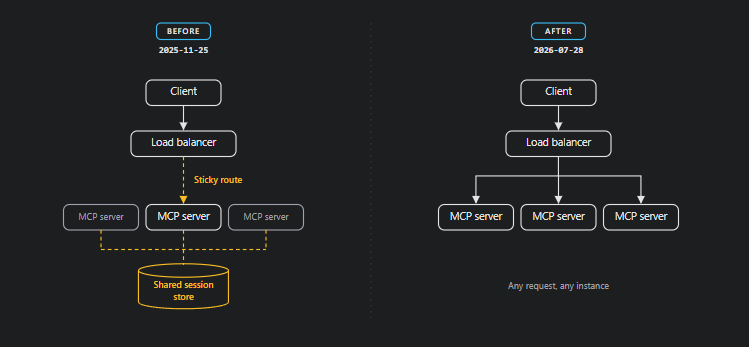
Before we write any code, let’s understand the architectural shift. If you’ve touched MCP before, you’ll remember the pain: establishing sessions, maintaining sticky routes, dealing with SSE streams, and sharing session state across instances. The old flow looked like this:
Client → initialize handshake → get Mcp-Session-Id → pin to one server instance
       → every subsequent request carries that session ID
       → need sticky sessions + shared session store for horizontal scaling
The new flow:
Client → POST /mcp with self-contained request
       → any server instance handles it
       → done
Six Specification Enhancement Proposals (SEPs) worked together to achieve this. Here’s what matters to you as a developer:
1. The handshake is dead. No more initialize/initialized exchange. Protocol version, client info, and capabilities now travel in _meta on every request. A new server/discover method lets clients fetch server capabilities on demand.
2. Sessions are gone. Mcp-Session-Id is removed entirely. Any request can land on any server instance. If your application needs state across calls, you use the explicit handle pattern — mint a handle (like a basket_id or session_token) from a tool and have the model pass it back as an argument in later calls. The model is actually great at this.
3. New routing headers. Requests now carry Mcp-Method and Mcp-Name headers, so load balancers and API gateways can route without inspecting the body. The server rejects requests where headers and body disagree.
4. Built-in caching. List and resource results now carry ttlMs and cacheScope, modeled on HTTP Cache-Control. No more holding SSE streams open just to detect when a tool list changes.
5. Distributed tracing. W3C Trace Context propagation in _meta is now spec’d, so a trace that starts in the host application follows tool calls across your entire infrastructure.
6. Extensions are first-class. MCP Apps (server-rendered UIs in sandboxed iframes) and the Tasks extension (for long-running async operations) ship as official extensions with their own lifecycle.
The practical takeaway? Building an MCP server now feels like building any other HTTP microservice. And if your tool of choice is Express.js, you’re going to feel right at home.
Project Architecture
Before we jump into code, let’s talk about how a well-structured MCP server project should look. Most tutorials dump everything into a single index.ts. That’s fine for a demo. It’s not fine for production.
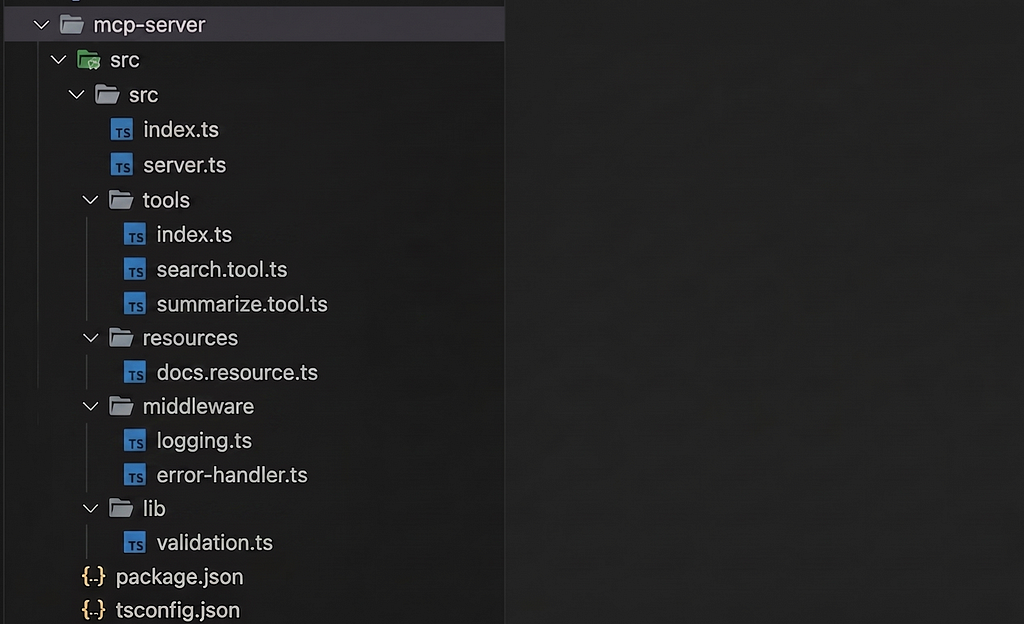
Here’s the project structure we’re building:
mcp-server/
├── src/
│   ├── index.ts              # Express app bootstrap + HTTP layer
│   ├── server.ts             # MCP server setup + tool/resource registration
│   ├── tools/
│   │   ├── index.ts          # Tool registry (barrel export)
│   │   ├── search.tool.ts    # Individual tool definition
│   │   └── summarize.tool.ts # Individual tool definition
│   ├── resources/
│   │   └── docs.resource.ts  # Resource definitions
│   ├── middleware/
│   │   ├── logging.ts        # Request logging
│   │   └── error-handler.ts  # Centralized error handling
│   └── lib/
│       └── validation.ts     # Shared validation utilities
├── tsconfig.json
├── package.json
└── .env
Each tool lives in its own file. The MCP server logic is decoupled from the HTTP transport layer. Middleware handles cross-cutting concerns. This is the same separation-of-concerns philosophy you’d apply to any Express API — and that’s exactly the point.
Step 1: Project Setup
Initialize the project and install dependencies:
mkdir mcp-express-server && cd mcp-express-server
npm init -y
Install production dependencies:
npm install @modelcontextprotocol/sdk @modelcontextprotocol/express zod express dotenv
Install dev dependencies:
npm install -D typescript @types/node @types/express
A few things to note here. The @modelcontextprotocol/sdk package is the official TypeScript SDK. The @modelcontextprotocol/express package is the official Express middleware adapter — it’s intentionally thin and handles Host header validation and DNS rebinding protection out of the box. zod handles runtime input validation for tool parameters — the SDK uses Zod schemas natively, giving you automatic type checking and descriptive error messages.
Configure TypeScript. This is where most people get tripped up:
// tsconfig.json
{
  "compilerOptions": {
    "target": "ES2022",
    "module": "Node16",
    "moduleResolution": "Node16",
    "outDir": "./build",
    "rootDir": "./src",
    "strict": true,
    "esModuleInterop": true,
    "skipLibCheck": true,
    "forceConsistentCasingInFileNames": true,
    "declaration": true,
    "declarationMap": true,
    "sourceMap": true
  },
  "include": ["src/**/*"],
  "exclude": ["node_modules", "build"]
}
The critical settings are “module”: “Node16” and “moduleResolution”: “Node16”. The MCP SDK is ESM-only. Using CommonJS or NodeNext without the right resolution strategy will produce cryptic import failures. Also, make sure your package.json includes:
{
  "type": "module",
  "scripts": {
    "build": "tsc",
    "start": "node build/index.js",
    "dev": "tsc --watch & node --watch build/index.js"
  }
}
Step 2: Define Your Tools
Tools are the core primitive. They’re functions the model can invoke — it reads the name, description, and JSON Schema to decide when and how to call them. Let’s define two tools with clean separation.
// src/tools/search.tool.ts
import { z } from "zod";
import type { McpServer } from "@modelcontextprotocol/sdk/server/mcp.js";

export const searchToolSchema = {
  query: z.string().min(1).describe("The search query string"),
  maxResults: z
    .number()
    .int()
    .min(1)
    .max(20)
    .default(5)
    .describe("Maximum number of results to return"),
};
export function registerSearchTool(server: McpServer): void {
  server.tool(
    "search_documents",
    "Search internal documents by keyword. Returns matching titles, snippets, and relevance scores.",
    searchToolSchema,
    async ({ query, maxResults }) => {
      // Replace with your actual search logic - Elasticsearch, Postgres full-text, etc.
      const results = await performSearch(query, maxResults);
      return {
        content: [
          {
            type: "text" as const,
            text: JSON.stringify(results, null, 2),
          },
        ],
      };
    }
  );
}
async function performSearch(
  query: string,
  maxResults: number
): Promise<Array<{ title: string; snippet: string; score: number }>> {
  // Your search implementation here
  return [
    {
      title: `Result for "${query}"`,
      snippet: "This is where your actual search logic would return real data.",
      score: 0.95,
    },
  ];
}
// src/tools/summarize.tool.ts
import { z } from "zod";
import type { McpServer } from "@modelcontextprotocol/sdk/server/mcp.js";

export const summarizeToolSchema = {
  documentId: z.string().uuid().describe("The UUID of the document to summarize"),
  style: z
    .enum(["brief", "detailed", "bullet-points"])
    .default("brief")
    .describe("The summarization style"),
};
export function registerSummarizeTool(server: McpServer): void {
  server.tool(
    "summarize_document",
    "Generate a summary of a document given its ID. Supports brief, detailed, or bullet-point styles.",
    summarizeToolSchema,
    async ({ documentId, style }) => {
      const summary = await generateSummary(documentId, style);
      return {
        content: [
          {
            type: "text" as const,
            text: summary,
          },
        ],
      };
    }
  );
}
async function generateSummary(
  documentId: string,
  style: string
): Promise<string> {
  // Your summarization logic here
  return `Summary (${style}) of document ${documentId}: ...`;
}
Notice how each tool is self-contained — schema, registration function, and business logic in one file. The schema uses tight constraints (min, max, uuid, enum) rather than loose definitions. This matters: Claude’s tool-calling quality drops measurably when schemas are fuzzy. The tighter your constraints, the fewer malformed calls you’ll get.
Create a barrel export:
// src/tools/index.ts
export { registerSearchTool } from "./search.tool.js";
export { registerSummarizeTool } from "./summarize.tool.js";
Step 3: Set Up the MCP Server
This is where we wire tools and resources into the MCP server instance — decoupled from the HTTP layer:
// src/server.ts
import { McpServer } from "@modelcontextprotocol/sdk/server/mcp.js";
import { registerSearchTool, registerSummarizeTool } from "./tools/index.js";

export function createMcpServer(): McpServer {
  const server = new McpServer({
    name: "my-doc-server",
    version: "1.0.0",
  });

  // Register all tools
  registerSearchTool(server);
  registerSummarizeTool(server);


  // Register resources (read-only data the model can fetch)
  server.resource(
    "server-status",
    "status://server",
    "Current server health and uptime information",
    async () => ({
      contents: [
        {
          uri: "status://server",
          text: JSON.stringify({
            status: "healthy",
            uptime: process.uptime(),
            timestamp: new Date().toISOString(),
          }),
        },
      ],
    })
  );

  return server;
}
Step 4: Wire Up Express with Stateless HTTP Transport
Here’s the heart of it — the Express app that serves MCP over the new stateless HTTP transport:
// src/index.ts
import express from "express";
import { StreamableHTTPServerTransport } from "@modelcontextprotocol/sdk/server/streamableHttp.js";
import { createMcpServer } from "./server.js";
import { loggingMiddleware } from "./middleware/logging.js";
import { errorHandler } from "./middleware/error-handler.js";
import dotenv from "dotenv";

dotenv.config();

const PORT = parseInt(process.env.PORT ?? "3000", 10);
const app = express();

// Parse JSON bodies (required for JSON-RPC payloads)
app.use(express.json());

// Custom logging middleware
app.use(loggingMiddleware);

// Health check endpoint (for load balancers, k8s probes)
app.get("/health", (_req, res) => {
  res.json({ status: "ok", timestamp: new Date().toISOString() });
});

// MCP endpoint — stateless, no session ID generator
app.post("/mcp", async (req, res) => {
  try {

// Create a fresh server + transport per request (stateless model)
    const server = createMcpServer();
     const transport = new StreamableHTTPServerTransport({
      sessionIdGenerator: undefined, // Stateless: no sessions
    });

 // Clean up transport when the response closes
    res.on("close", () => {
      transport.close();
    });

// Connect and handle
    await server.connect(transport);
    await transport.handleRequest(req, res, req.body);
  } catch (error) {
    console.error("[MCP] Request handling failed:", error);
    if (!res.headersSent) {
      res.status(500).json({
        jsonrpc: "2.0",
        error: { code: -32603, message: "Internal server error" },
        id: null,
      });
    }
  }
});

// GET endpoint for SSE stream (optional — for clients that need it)
app.get("/mcp", async (req, res) => {
  res.writeHead(405).end(
    JSON.stringify({
      jsonrpc: "2.0",
      error: {
        code: -32000,
        message: "SSE streams not supported — use POST for stateless requests",
      },
      id: null,
    })
  );
});

// Centralized error handler
app.use(errorHandler);

// Graceful startup
app.listen(PORT, () => {
  console.error(`[MCP] Server listening on http://localhost:${PORT}/mcp`);
  console.error(`[MCP] Health check at http://localhost:${PORT}/health`);
});

// Graceful shutdown
const shutdown = async (signal: string) => {
  console.error(`[MCP] Received ${signal}, shutting down gracefully...`);
  process.exit(0);
};

process.on("SIGINT", () => shutdown("SIGINT"));
process.on("SIGTERM", () => shutdown("SIGTERM"));
A few architectural decisions worth calling out:
Fresh server per request. In the stateless model, each request creates its own McpServer and StreamableHTTPServerTransport instance. This guarantees zero leaked state between requests and makes your server trivially horizontally scalable. The overhead is negligible — McpServer construction is cheap.
sessionIdGenerator: undefined. This is the key flag that tells the transport to operate statelessly. No session is created, no session ID is returned.
JSON-RPC error format. When things fail, we return errors in the JSON-RPC 2.0 format that MCP clients expect — not a raw Express error page.
console.error everywhere. If you were using the stdio transport, console.log would corrupt the JSON-RPC stream (stdout is the protocol channel). Using console.error is a healthy habit even over HTTP — it keeps your logging on stderr where it belongs.
Step 5: Production Middleware
The middleware layer is where professional Express servers diverge from tutorials:
// src/middleware/logging.ts
import type { Request, Response, NextFunction } from "express";

export function loggingMiddleware(
  req: Request,
  res: Response,
  next: NextFunction
): void {
  const start = Date.now();
  res.on("finish", () => {
    const duration = Date.now() - start;
    const mcpMethod = req.headers["mcp-method"] ?? "unknown";
    const mcpName = req.headers["mcp-name"] ?? "";
    console.error(
      `[MCP] ${req.method} ${req.path} | ` +
      `mcp-method=${mcpMethod} mcp-name=${mcpName} | ` +
      `status=${res.statusCode} | ${duration}ms`
    );
  });
  next();
}
// src/middleware/error-handler.ts
import type { Request, Response, NextFunction } from "express";

export function errorHandler(
  err: Error,
  _req: Request,
  res: Response,
  _next: NextFunction
): void {
  console.error("[MCP] Unhandled error:", err);
  if (!res.headersSent) {
    res.status(500).json({
      jsonrpc: "2.0",
      error: {
        code: -32603,
        message:
          process.env.NODE_ENV === "production"
            ? "Internal server error"
            : err.message,
      },
      id: null,
    });
  }
}
Notice how the logging middleware reads the new Mcp-Method and Mcp-Name headers. In the 2026-07-28 spec, these are required on every request. Your logs will show exactly which MCP operation hit which tool — without parsing the JSON-RPC body.
Step 6: Test with the MCP Inspector
The official MCP Inspector is the fastest way to validate your server:
npm run build
npm start

# In another terminal:
npx @modelcontextprotocol/inspector --url http://localhost:3000/mcp
Open the Inspector UI at port 6274. You’ll see your tools listed with their schemas. Fire tools/call requests, inspect the raw JSON-RPC traffic, and verify error handling before you ever connect to Claude.
The Explicit Handle Pattern: State Without Sessions
The question everyone asks about stateless MCP: “What if I need state across multiple tool calls?”
The answer is the explicit handle pattern. Instead of relying on protocol-level sessions, your tool mints a handle and the model threads it through subsequent calls:
server.tool(
  "create_analysis",
  "Start a new document analysis. Returns an analysis_id to use with other tools.",
  { documentId: z.string().uuid() },
  async ({ documentId }) => {
    const analysisId = crypto.randomUUID();
    // Store in Redis, Postgres, or in-memory cache
    await cache.set(analysisId, { documentId, status: "in_progress", steps: [] });

return {
      content: [{
        type: "text" as const,
        text: `Analysis started. Use analysis_id "${analysisId}" with get_analysis_status or add_analysis_step.`,
      }],
    };
  }
);

server.tool(
  "get_analysis_status",
  "Check the status of a running analysis.",
  { analysisId: z.string().uuid() },
  async ({ analysisId }) => {
    const analysis = await cache.get(analysisId);
    if (!analysis) {
      return {
        content: [{ type: "text" as const, text: "Analysis not found." }],
        isError: true,
      };
    }
    return {
      content: [{ type: "text" as const, text: JSON.stringify(analysis) }],
    };
  }
);
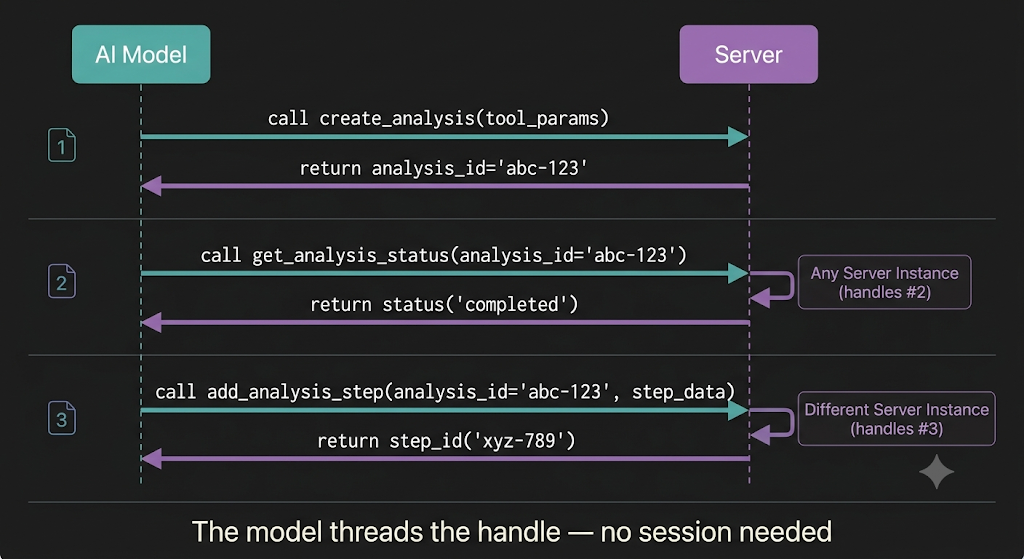
The model passes analysisId from one tool to the next, naturally — the same way it handles any multi-step workflow. The MCP spec authors noted that this pattern is often more powerful than session state because the model can reason about the handles, compose them across tools, and hand them off between steps in ways that hidden session metadata never allowed.
Deployment: From Laptop to Production
Because your server is now a stateless HTTP service, deployment looks identical to any Express API:
Docker:
FROM node:22-alpine AS build
WORKDIR /app
COPY package*.json ./
RUN npm ci
COPY . .
RUN npm run build

FROM node:22-alpine
WORKDIR /app
COPY --from=build /app/build ./build
COPY --from=build /app/node_modules ./node_modules
COPY package*.json ./
ENV NODE_ENV=production
EXPOSE 3000
CMD ["node", "build/index.js"]
Load Balancing. The old spec needed sticky sessions. The new spec doesn’t. Put Nginx, a cloud LB, or Kubernetes Ingress in front with plain round-robin and you’re done. Route on the Mcp-Method header if you want to send heavy tool calls to a beefier pool.
Claude Desktop config (for local development):
{
  "mcpServers": {
    "my-doc-server": {
      "url": "http://localhost:3000/mcp"
    }
  }
}
For remote deployments, point the URL to your production endpoint. The stateless model means Claude can reconnect to any instance at any time without re-establishing a session.
What’s Coming Next
The final 2026-07-28 specification ships on July 28, 2026. The release candidate is open for SDK maintainers and implementers to validate changes against real workloads. Three things on the roadmap deserve your attention:
MCP Apps let servers ship interactive HTML interfaces inside sandboxed iframes — directly in the chat experience. If you’re a React developer, this is where your frontend skills converge with MCP backend work.
The Tasks extension enables long-running async operations. A server can respond to tools/call with a task handle, and the client polls with tasks/get and tasks/cancel. Think: data pipeline jobs, batch processing, anything that takes longer than a request-response cycle.
The MCP Registry is being built as an npm-style discovery service for MCP servers. Instead of manually configuring server URLs, clients will search, install, and verify servers through a centralized index.
Key Takeaways
The MCP 2026-07-28 spec is more than an incremental update — it’s a philosophical shift that aligns MCP servers with how we’ve been building HTTP services for decades. For Express.js developers, the barriers to entry have essentially evaporated:
You already know how to build stateless HTTP services. Now those services can be consumed by every major AI platform on the planet. The tooling is mature, the ecosystem is enormous, and the timing — with the spec finalizing in two weeks — is perfect.
The model isn’t calling your REST API. The model is calling your tools. But architecturally? It’s the same game. Build it clean, make it stateless, keep your tools tight, and deploy it the way you deploy everything else.
The age of custom LLM integrations is over. MCP is the wire protocol. And if you’re reading this, you already know how to build on it.
If you found this useful, follow me for more deep dives on AI infrastructure, systems architecture, and building production-grade tools with TypeScript and Express. I write about the intersection of software engineering and the agentic AI stack.
The MCP 2026–07–28 release candidate is available now in the draft specification. The final spec ships July 28, 2026.
The MCP 2026–07–28 Spec Just Dropped — Here’s How to Build a Production-Ready MCP Server with… was originally published in Towards AI on Medium, where people are continuing the conversation by highlighting and responding to this story.
