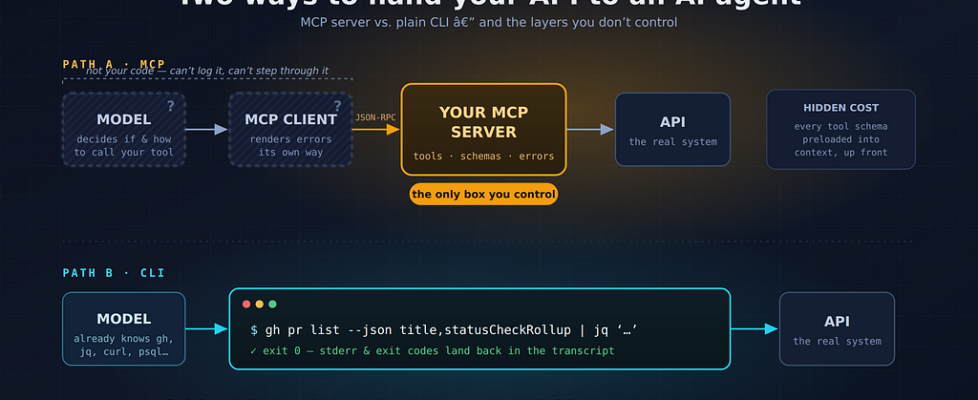
The Layer You Don’t Control: Rethinking MCP Servers vs. Plain CLI Tools

Why the hardest part of building an MCP server is everything that happens outside of it — and when a boring command-line tool is the better answer.
The Model Context Protocol (MCP) arrived with a compelling pitch: a universal standard for connecting AI models to tools and data. Write one server, and any MCP-compatible client — Claude Desktop, Cursor, VS Code, and a growing list of others — can use it. It’s often described as “USB-C for AI applications.”
I’ve built and debugged enough MCP servers now to believe the pitch is real, but incomplete. There’s a structural problem baked into the architecture that nobody warns you about, and it changes the calculus of when you should build an MCP server at all — versus doing something far less glamorous: giving the agent a plain old CLI tool.
First, let’s place MCP correctly in the stack
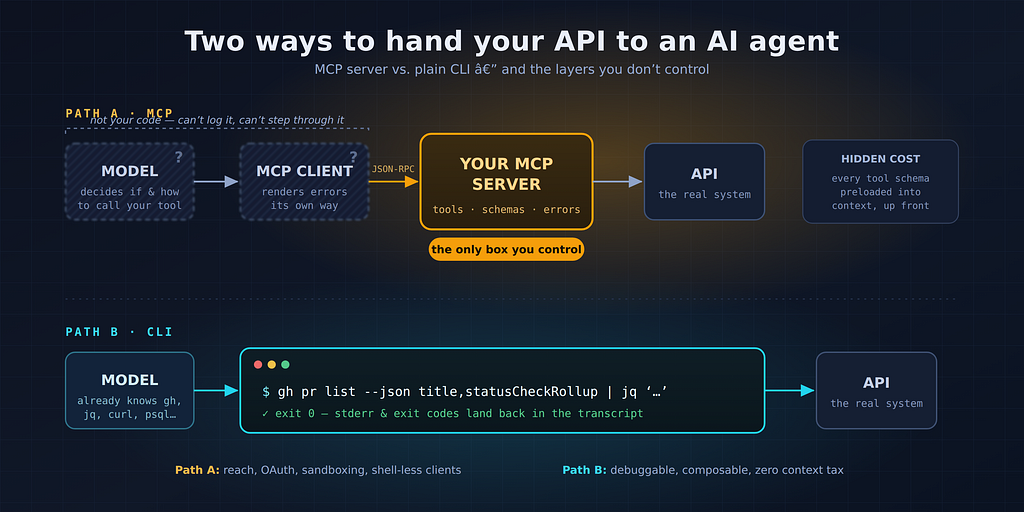
A lot of confusion about MCP comes from not being precise about where it sits. The architecture has three parts:
- The host / client — the application the user actually runs, which embeds the model. Claude Desktop, Cursor, an IDE plugin. The MCP client lives here.
- The MCP server — the thing you write. It exposes tools, resources, and prompts over the protocol.
- The underlying system — the real API, database, or filesystem your server wraps.
So your server is a translation layer: it sits between the client (and the model inside it) on one side, and your actual API or data source on the other.
Here’s the uncomfortable part: you only control the middle box. You don’t control the client, you don’t control the model, and you don’t control how the two of them decide to use — or ignore — your server.
The debugging problem: three black boxes, one of which is yours
When a traditional API integration fails, you own both ends. You can log the request, log the response, step through the code, and reproduce the failure deterministically.
When an MCP integration fails, the failure can live in places you cannot see:
- The model didn’t call your tool. Why? You’ll never get a stack trace for a decision. Maybe your tool description was ambiguous. Maybe another server’s tool looked more relevant. Maybe the model just… didn’t. Your only lever is rewriting the tool’s name, description, and schema — essentially prompt engineering by proxy — and re-testing empirically.
- The model called your tool with strange arguments. Your schema said date: string (ISO 8601); the model sent “next Tuesday”. You can validate and reject, but you can’t fix the caller.
- The client mangled something. Different clients implement the spec with different levels of completeness. A server that works perfectly in one host can misbehave in another — different handling of long tool results, images, notifications, or protocol versions. You get bug reports for environments you can’t reproduce.
- The error disappeared. Your server returned a careful, structured error message. What did the user see? Whatever the client decided to render — sometimes nothing at all, just a model that shrugs and hallucinates around the failure.
Tools like MCP Inspector help you verify that your box behaves correctly in isolation. But the emergent behavior — model + client + your server together — can only be tested end-to-end, one host app at a time, non-deterministically. That’s a genuinely hard operational position to be in.
The quiet alternative: just give the agent a CLI
Meanwhile, agentic coding tools like Claude Code, Codex CLI, and others demonstrated something almost embarrassing in its simplicity: if the agent has a shell, it can use any command-line tool ever written. No protocol, no server, no schema.
Why does this work so well?
1. The model already knows the tool. Models have read millions of lines of documentation, Stack Overflow answers, and shell scripts involving git, gh, curl, jq, psql, aws. You don’t need to teach the model your interface through a 200-word description field — the training data did it for you. And for a custom tool, mytool –help is self-documenting, fetched on demand rather than preloaded.
2. Context cost is pay-as-you-go. Every MCP tool definition you expose gets injected into the model’s context up front. Connect a few busy servers and you can burn tens of thousands of tokens on tool schemas before the conversation starts — degrading both cost and the model’s focus. A CLI costs roughly zero tokens until the moment the agent runs –help.
3. Debugging is symmetric. When the agent runs a command and it fails, the exit code and stderr come straight back into the conversation — visible to the model and to you, in the transcript. Better yet, you can reproduce the failure yourself by copy-pasting the exact command into your own terminal. Determinism is back.
4. Composability is free. Forty years of Unix philosophy: gh pr list –json number,title | jq ‘.[] | select(…)’. With MCP, every filter, sort, and join either becomes another tool you must define or another round-trip through the model’s context.
A concrete comparison: GitHub
This is the cleanest apples-to-apples example, because GitHub offers both a popular MCP server and a mature CLI (gh).
Task: “Find my open PRs that are failing CI and summarize why.”
Via the GitHub MCP server: The client loads dozens of tool definitions into context. The model calls list_pull_requests, receives a large JSON blob into context, calls a checks-related tool per PR (several more round trips, several more blobs), then reasons over all of it. If one call fails — token scope, rate limit, oversized response truncated by the client — the failure mode depends on the client, and you may just see the model quietly give partial results.
Via the CLI:
gh pr list --author "@me" --state open
  --json number,title,statusCheckRollup
  | jq '[.[] | select(.statusCheckRollup[]?.conclusion == "FAILURE")]'
One command. The filtering happened outside the context window, in jq, and only the failing PRs come back. If it errors, the agent reads stderr (“HTTP 403: token missing repo scope”) and can often fix its own mistake — or you can, by running the same line.
For an agent operating in a terminal, the CLI path is faster, cheaper, more transparent, and easier to debug. This isn’t a niche opinion anymore; a growing chorus of practitioners building serious agent systems have converged on “give it bash and good CLIs” as the default.
So is MCP a mistake? No — it solves a different problem
If the comparison above were the whole story, MCP wouldn’t exist. But notice what the CLI approach quietly assumed: a shell. Full filesystem access. The ability to execute arbitrary commands. A user who’s comfortable when things get technical.
MCP earns its complexity exactly where those assumptions break:
- No shell available. Claude Desktop for a non-technical user, a mobile app, a web-embedded assistant. There is no terminal to run gh in. MCP is how these environments get tools at all.
- Security and sandboxing. “The agent can run arbitrary bash” is a terrifying sentence in many enterprises. An MCP server exposes exactly five tools with exactly these schemas, nothing more. It’s a narrow, auditable waist. A CLI-with-shell is an infinitely wide one.
- Remote services and auth. MCP’s remote transport with OAuth flows means a user can click “Connect” to their CRM without installing anything or pasting API keys into environment variables. Try explaining export GITHUB_TOKEN=… to your sales team.
- Richer primitives. MCP isn’t only tools. Resources, prompts, sampling, and elicitation enable interactions a CLI simply has no vocabulary for — like a server asking the client’s model to summarize something mid-operation.
- Distribution. One server, many clients. A vendor shipping an integration to every MCP host at once cannot replicate that with “install our CLI and configure your agent’s system prompt.”
A decision rule that actually works
After enough time on both sides, here’s the heuristic I’d offer:
If your agent runs where a shell exists and your users are developers — prefer CLI tools. Wrap your service in a good CLI with –help, –json output, and honest exit codes. You’ll get better debuggability, lower token costs, and the model’s training-data familiarity for free. (Bonus: humans get a useful tool too.)
If your agent runs where a shell doesn’t exist, or shouldn’t — build the MCP server. Consumer clients, locked-down enterprise environments, remote OAuth-gated services, non-developer users. Here MCP isn’t overhead; it’s the only bridge.
If you build the MCP server anyway, design for the control you don’t have. Fewer tools with sharper descriptions beat many overlapping ones. Return errors written for a model to read and act on, not a human. Keep responses small — filter server-side. Test in every client you claim to support, because the spec is a floor, not a guarantee.
The ambiguity you feel when working with MCP isn’t your imagination, and it isn’t a bug that a future spec version will fully fix. It’s the inherent cost of putting a probabilistic model and a third-party client between your code and its caller. Sometimes that cost buys you reach, safety, and users you couldn’t otherwise serve — pay it gladly. And sometimes the honest answer is that the best “protocol” for an AI agent was sitting in /usr/bin all along.
Thanks for reading. If you’ve hit MCP debugging stories worse than mine, I’d love to hear them in the responses.
The Layer You Don’t Control: Rethinking MCP Servers vs. Plain CLI Tools was originally published in Towards AI on Medium, where people are continuing the conversation by highlighting and responding to this story.
