Semantic Caching for LLMs: TTLs, Confidence, and Cache Safety

Table of Contents
- Semantic Caching for LLMs: TTLs, Confidence, and Cache Safety
- Why Semantic Caching for LLMs Requires Production Hardening
- Cache TTL in Semantic Caching: Preventing Stale LLM Responses
- MLOps Project Structure for Semantic Caching with FastAPI and Redis
- How to Implement Cache TTL Validation in Python and Redis
- Confidence Scoring in Semantic Caching: Beyond Similarity for LLMs
- Implementing Confidence Scoring for LLM Cache Optimization (Code Walkthrough)
- Query Normalization and Deduplication for Efficient Semantic Caching
- Preventing Cache Poisoning in Semantic Caching for LLM Systems
- End-to-End Semantic Cache Hardening: TTL, Confidence, and Safety Demos
- Semantic Caching Limitations: Trade-Offs in LLM Optimization Systems
- Summary
Semantic Caching for LLMs: TTLs, Confidence, and Cache Safety
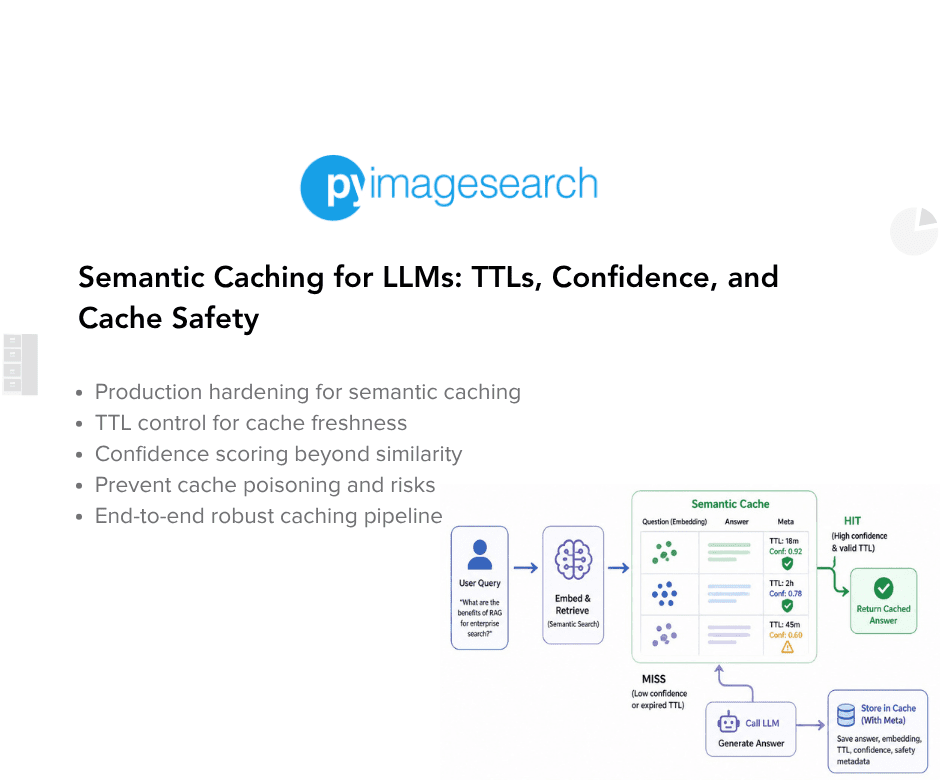
In this lesson, you will learn how to harden a semantic cache for LLMs, one of the most important LLMOps patterns for reducing redundant inference costs, and move from a working semantic caching prototype to a system that can survive real-world usage with TTL validation, confidence scoring, deduplication, and cache poisoning prevention.
This lesson is the last in a 2-part series on Semantic Caching for LLMs:
- Semantic Caching for LLMs: FastAPI, Redis, and Embeddings
- Semantic Caching for LLMs: TTLs, Confidence, and Cache Safety (this tutorial)
To learn how to harden a semantic cache for LLMs and make it safe, reliable, and production-ready, just keep reading.

Why Semantic Caching for LLMs Requires Production Hardening
In Lesson 1, we built a semantic cache that works end-to-end. It correctly avoids redundant LLM calls, reuses responses for identical queries, and even handles paraphrased inputs via semantic similarity. For many tutorials, that would be the end of the story.
In real systems, however, working is only the starting point.
A semantic cache that works under ideal conditions can still fail in subtle and dangerous ways when exposed to real users, long-running processes, and evolving information. These failures do not usually appear as crashes or explicit errors. Instead, they show up as silent correctness issues, degraded user trust, and unpredictable behavior over time.
What Lesson 1 Solved — and What It Didn’t
Lesson 1 focused on the correctness of flow:
- Requests move through exact match → semantic match → LLM fallback (generation)
- Cached responses are reused when appropriate
- The system is observable and debuggable
- Nothing is hidden behind abstractions
What it intentionally did not address was long-term safety.
We did not ask:
- How old is this cached response, and should we still trust it?
- What happens if the LLM returns an error or partial output?
- What if the cache slowly fills with duplicates?
- What if similarity is high but the answer is no longer valid?
Those questions only matter once the system runs for days or weeks, not minutes.
Real-World Failure Modes in Semantic Caching
Semantic caching introduces failure modes that rarely exist in traditional exact-match caches.
For example:
- A cached answer with very high similarity may still be stale
- An error response may be accidentally cached and reused
- Slight variations of the same query may create duplicate entries
- Old but similar answers may appear correct while being subtly wrong
None of these issues breaks the system outright. Instead, they quietly degrade correctness and user trust over time.
These are the hardest bugs to detect because the system continues to respond quickly and confidently.
Why “It Works” Does Not Mean “It’s Safe”
A semantic cache sits directly in the decision path of an LLM system. When it makes a mistake, that mistake is amplified through reuse.
If an unsafe response enters the cache:
- It can be served repeatedly
- It can outlive the conditions that made it valid
- It can be returned with high confidence
This is why semantic caching requires more discipline, not less, than direct LLM calls.
In this lesson, we will take the working system from Lesson 1 and begin hardening it. We will introduce explicit safeguards for staleness, confidence, duplication, and safety — without changing the core architecture.
The goal is not to make the system perfect, but to make its failures controlled, visible, and predictable.
That is the difference between a demo and a system you can trust.
Cache TTL in Semantic Caching: Preventing Stale LLM Responses
Once a semantic cache is deployed and begins reusing LLM responses, a new question immediately arises:
How long should a cached response be trusted?
Unlike traditional caches that store deterministic outputs, semantic caches store model-generated answers. These answers are only valid within a certain window of time and context. Without explicit controls, a semantic cache can continue serving responses that are technically valid but practically wrong.
This section explains why cached LLM responses become stale, how TTLs help, and what it means for a cache entry to be unsafe.
Why Cached LLM Responses Become Stale
LLM responses are not timeless.
They are influenced by:
- evolving APIs and libraries
- changing business logic or documentation
- updated prompts or system behavior
- newly introduced edge cases
A cached answer that was correct an hour ago may no longer reflect the current state of the world.
Semantic caching amplifies this risk because:
- responses are reused aggressively
- high similarity can mask outdated content
- cached answers are returned with confidence
Without staleness controls, the cache slowly becomes a museum of old truths.
TTL as a Safety Mechanism
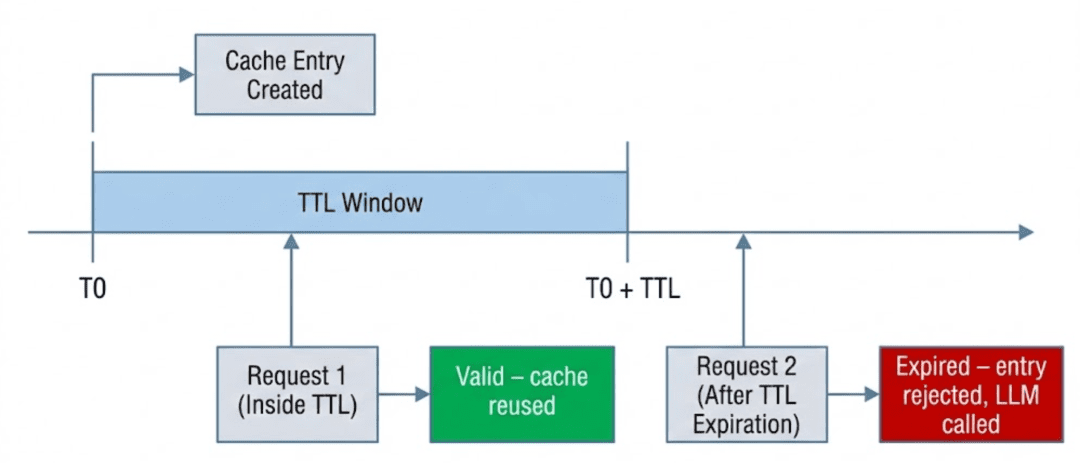
A time-to-live (TTL) specifies how long a cache entry remains valid.
Once the TTL expires:
- the entry is treated as unsafe
- it should no longer be reused
- a fresh LLM response must be generated
TTL does not guarantee correctness, but it limits the blast radius of staleness.
In semantic caching, TTL is not an optimization. It is a correctness safeguard.
Application-Level TTL vs Redis: EXPIRE
There are 2 common ways to implement TTLs when using Redis:
Redis EXPIRE
- Redis automatically deletes keys after a fixed duration
- Expired entries are removed entirely
- The application has no visibility into expired data
Application-Level TTL (Used Here)
- Entries remain stored in Redis
- Expiration is checked at read time by the application
- The application decides whether an entry is safe to reuse
In this system, TTL is enforced at the application layer rather than using Redis TTL via the native EXPIRE command, a deliberate choice that prioritizes observability over automation.
This choice allows us to:
- inspect expired entries during debugging
- apply custom expiration logic
- combine TTL with other safety signals (such as confidence)
We trade automatic deletion for control and observability.
When a Cache Entry Becomes Unsafe
In this system, a cache entry is considered unsafe when any of the following are true:
- its TTL has expired
- its content is malformed or erroneous
- its confidence score falls below an acceptable threshold
TTL is the first and most basic of these checks.
If an entry fails the TTL check, semantic similarity is irrelevant.
Reusing it would prioritize speed over correctness.
Designing TTLs for LLM Workloads
There is no universal “correct” TTL for LLM responses.
Instead, TTLs should be chosen based on:
- how fast the underlying information changes
- how costly incorrect answers are
- how frequently similar queries appear
Short TTLs:
- reduce staleness risk
- increase LLM calls
Long TTLs:
- improve cache hit rate
- increase risk of outdated responses
In Lesson 1, we used a conservative default TTL to keep behavior predictable. In this lesson, we will focus on how TTLs are enforced rather than on tuning them for a specific domain.
TTL design is a policy decision. TTL enforcement is a correctness requirement.
Would you like immediate access to 3,457 images curated and labeled with hand gestures to train, explore, and experiment with … for free? Head over to Roboflow and get a free account to grab these hand gesture images.
Need Help Configuring Your Development Environment?
All that said, are you:
- Short on time?
- Learning on your employer’s administratively locked system?
- Wanting to skip the hassle of fighting with the command line, package managers, and virtual environments?
- Ready to run the code immediately on your Windows, macOS, or Linux system?
Then join PyImageSearch University today!
Gain access to Jupyter Notebooks for this tutorial and other PyImageSearch guides pre-configured to run on Google Colab’s ecosystem right in your web browser! No installation required.
And best of all, these Jupyter Notebooks will run on Windows, macOS, and Linux!
MLOps Project Structure for Semantic Caching with FastAPI and Redis
Before diving into individual components, let’s take a moment to understand how the project is organized.
A clear directory structure is especially important in LLM-backed systems, where responsibilities span API orchestration, caching, embeddings, model calls, and observability. In this project, each concern is isolated into its own module so the request flow remains easy to trace and reason about.
After downloading the source code from the “Downloads” section, your directory structure should look like this:
.
├── app
│   ├── api
│   │   ├── __init__.py
│   │   └── ask.py
│   ├── cache
│   │   ├── __init__.py
│   │   ├── poisoning.py
│   │   ├── schemas.py
│   │   ├── semantic_cache.py
│   │   └── ttl.py
│   ├── config
│   │   ├── __init__.py
│   │   └── settings.py
│   ├── embeddings
│   │   ├── __init__.py
│   │   └── embedder.py
│   ├── llm
│   │   ├── __init__.py
│   │   └── ollama_client.py
│   ├── main.py
│   └── observability
│       └── metrics.py
├── complete-codebase.txt
├── docker-compose.yml
├── Dockerfile
├── README.md
└── requirements.txt
Let’s break this down at a high level.
The app/ Package
The app/ directory contains all runtime application code. Nothing outside this folder is imported at runtime.
This keeps the service self-contained and makes it easy to reason about deployment and dependencies.
app/main.py: Application Entry Point
This file defines the FastAPI application and registers all routers.
It contains no business logic — only service wiring. Every request to the system enters through this file.
app/api/: API Layer
The api/ package defines HTTP-facing endpoints.
ask.py: Implements the/askendpoint and acts as the orchestration layer for the entire semantic caching pipeline.
The API layer is responsible for:
- validating input
- enforcing cache ordering
- coordinating cache, embeddings, and LLM calls
- returning structured debug information
It does not implement caching or similarity logic directly.
app/cache/: Caching Logic
This package contains all cache-related functionality.
semantic_cache.py: Core semantic cache implementation (exact match, semantic match, Redis storage, similarity search).schemas.py: Defines the cache entry schema used for Redis storage.ttl.py: Application-level TTL configuration and expiration checks.poisoning.py: Safety checks to prevent invalid or error responses from being reused.
By isolating caching logic here, the API layer stays clean and reusable.
app/embeddings/: Embedding Generation
embedder.py: Handles embedding generation via Ollama’s embedding endpoint.
This module has a single responsibility: converting text into semantic vectors.
It does not cache, rank, or validate embeddings.
app/llm/: LLM Client
ollama_client.py: Wraps calls to the Ollama text-generation endpoint.
Isolating LLM interaction allows the rest of the system to remain model-agnostic.
app/observability/: Metrics
metrics.py: Implements simple in-memory counters for cache hits, misses, and LLM calls.
These metrics are intentionally lightweight and meant for learning and debugging, not production monitoring.
Configuration and Infrastructure
Outside the app/ directory:
config/settings.py: Centralizes environment-based configuration (Redis host, TTLs, model names).Dockerfileanddocker-compose.yml: Define a reproducible runtime environment for the API and Redis.requirements.txt: Lists all Python dependencies required to run the service.
How to Implement Cache TTL Validation in Python and Redis
In the previous section, we discussed why cached LLM responses become stale and why TTLs are necessary. In this section, we move from concept to code and look at how TTL validation is enforced in practice.
The key idea is simple but important:
Cache entries are not deleted automatically. They are validated at read time.
This design choice keeps cache behavior explicit, observable, and safe.
The Default TTL Configuration
TTL configuration is centralized in a single helper function:
File: app/cache/ttl.py
def default_ttl():
    return settings.CACHE_TTL_SECONDS
Rather than hardcoding a value, the TTL is loaded from configuration. This allows different environments to use different TTLs without changing the code.
At this stage, the specific TTL value is not important. What matters is that:
- every cache entry receives a TTL at creation time
- TTL is treated as metadata, not as a Redis feature
Checking Whether an Entry Has Expired
TTL enforcement happens through a dedicated validation function:
def is_expired(entry):
    try:
        created_at = int(entry["created_at"])
        ttl = int(entry["ttl"])
        now = int(time.time())
        return now > (created_at + ttl)
    except (KeyError, ValueError, TypeError):
        return True
This function answers 1 question:
Is this cache entry still safe to reuse?
If the current time exceeds created_at + ttl, the entry is considered expired and must not be reused.
Fail-Safe Expiration Behavior
Notice the exception handling at the end of is_expired().
If the entry:
- is missing required fields
- contains malformed values
- cannot be parsed safely
…it is treated as expired by default.
This is a deliberate fail-safe design.
When dealing with cached LLM responses, silently trusting malformed data is more dangerous than recomputing a response. If the system is unsure, it expires the entry and falls back to the LLM.
Correctness always wins over reuse.
Best-Effort Cleanup During Cache Reads
TTL validation does more than reject expired entries — it also performs opportunistic cleanup during cache searches.
Inside the semantic cache search logic:
- expired entries are detected
- expired keys are removed from Redis
- the cache continues scanning remaining entries
This cleanup happens:
- without background workers
- without scheduled jobs
- without blocking the request
This is not a full garbage collector. It is a best-effort hygiene mechanism that keeps the cache from accumulating junk over time.
Why We Validate on Read, Not Delete on Write
At this point, a natural question arises:
Why not just use Redis EXPIRE and let Redis delete entries automatically?
There are 3 reasons this system validates TTLs on read instead:
- Visibility: Expired entries remain inspectable during debugging.
- Control: The application decides what “expired” means, not Redis.
- Composability: TTL checks can be combined with confidence scoring, poisoning detection, and other safety signals.
By validating at read time, TTL becomes part of the decision-making pipeline rather than an invisible background mechanism.
Confidence Scoring in Semantic Caching: Beyond Similarity for LLMs
Up to this point, semantic caching decisions have relied heavily on semantic similarity. If a cached response is similar enough to a new query, it feels reasonable to reuse it.
In practice, this assumption breaks down.
High similarity answers an important question — “Is this response about the same thing?” — but it does not answer an equally important one:
“Is this response still safe to reuse right now?”
Confidence scoring exists to bridge that gap.
Why High Similarity Can Still Be Wrong
Semantic similarity measures closeness in meaning, not correctness over time.
Consider a cached response that:
- has very high embedding similarity to the current query
- was generated hours or days ago
- refers to information that has since changed
From a vector perspective, the response still appears “correct.”
From a system perspective, it may no longer be trustworthy.
This problem is subtle because:
- similarity scores remain high
- responses look fluent and confident
- failures are silent rather than catastrophic
Without an additional signal, the cache has no way to distinguish relevant but stale from relevant and safe.
Combining Semantic Similarity with Freshness
Confidence scoring introduces a second dimension: freshness.
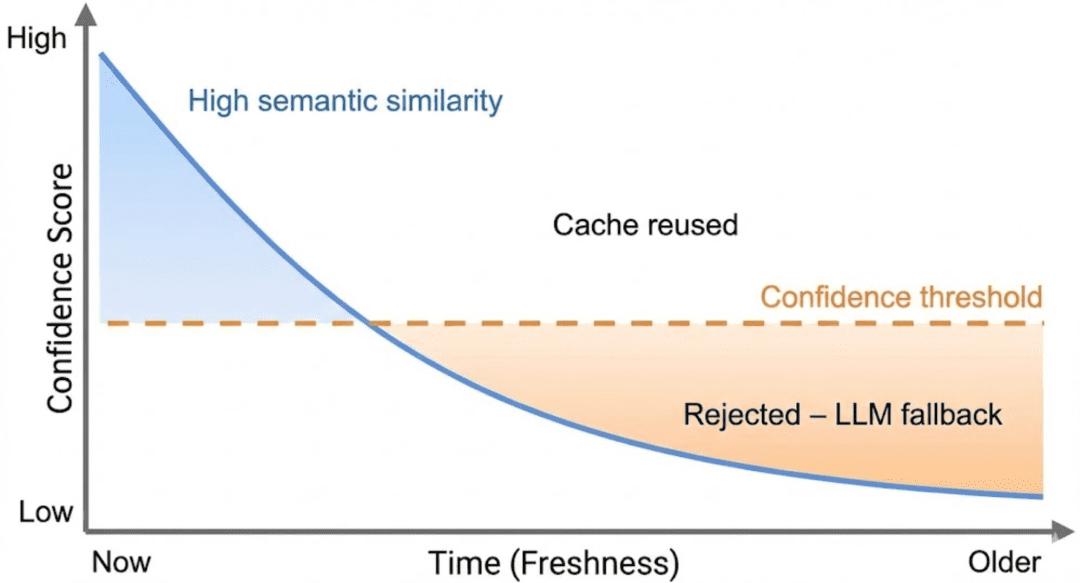
Rather than deciding reuse based on similarity alone, the cache evaluates a combined signal that reflects:
- how semantically close the response is
- how recently the response was generated
At a high level, confidence answers the question:
“How comfortable are we reusing this response right now?”
Fresh responses with high similarity score high confidence.
Old responses, even with high similarity, gradually lose confidence as they age.
This ensures that time acts as a natural decay mechanism.
Understanding the Confidence Score (High-Level)
In this system, confidence is a weighted combination of:
- semantic similarity
- freshness relative to TTL
You do not need to think about exact formulas at this stage. What matters is the behavior:
- Confidence starts high when an entry is created
- Confidence decreases as the entry ages
- Confidence is capped by semantic similarity
- Expired entries always fail confidence checks
Confidence is not a probability. It is a reuse heuristic designed to favor correctness over speed.
How Confidence Affects Cache Reuse Decisions
Confidence scoring acts as a gatekeeper in the cache pipeline.
Even if:
- the entry is not expired
- the semantic similarity is above threshold
…the cache will reject reuse if confidence falls below an acceptable level.
When this happens:
- the cache treats the entry as unsafe
- the request falls back to the LLM
- a fresh response is generated and stored
This behavior ensures that the cache degrades gracefully.
As uncertainty increases, the system automatically shifts work back to the LLM rather than returning questionable results.
Why Confidence Belongs in the Cache (Not the LLM)
It’s tempting to push this logic downstream and let the LLM “fix” stale responses.
That approach fails for two reasons:
- the LLM has no context about cache age
- the LLM cannot distinguish reused content from fresh inference
Confidence must be enforced before reuse, not after generation.
By embedding confidence checks directly into the cache, we ensure that reuse decisions are explicit, explainable, and controllable.
Implementing Confidence Scoring for LLM Cache Optimization (Code Walkthrough)
In the previous section, we introduced confidence scoring as a conceptual safeguard: a way to prevent semantically similar but stale responses from being reused.
In this section, we make that idea concrete by implementing it.
We will walk through where confidence is computed, where it is enforced, and what happens when a cached entry is rejected.
Where Confidence Is Computed
Confidence is computed inside the semantic cache, alongside similarity scoring.
def compute_confidence(similarity: float, created_at: int, ttl: int) -> float:
    age = time.time() - created_at

    if ttl <= 0:
        freshness = 1.0
    else:
        freshness = max(0.0, 1.0 - (age / ttl))

    confidence = (0.7 * similarity) + (0.3 * freshness)
    return round(confidence, 3)
This function combines 2 signals:
- Semantic similarity: how close the meanings are
- Freshness: how recent the response is relative to its TTL
The exact weights are not important here. What matters is the behavior:
- Fresh, similar responses score high confidence
- Old responses lose confidence over time
- Expired entries collapse to low confidence
Confidence is therefore bounded, decaying, and explicitly defined.
Why Confidence Is Computed in the Cache
Notice that confidence is computed inside the cache layer, not in the API.
This ensures:
- all reuse decisions are centralized
- confidence logic is applied consistently
- the API remains an orchestration layer, not a policy engine
The API does not need to understand how confidence is computed — only whether it is acceptable.
Where Confidence Is Enforced
Confidence enforcement happens in the request pipeline in ask.py.
elif cached.get("confidence", 0.0) < 0.7:
    miss_reason = "low_confidence"
This check occurs after:
- exact or semantic matching
- TTL validation
- poisoning checks
And before a cached response is returned.
If confidence is below the threshold:
- the cache entry is rejected
- the request is treated as a cache miss
- the pipeline falls back to the LLM
This ensures that reuse happens only when confidence meets an acceptable threshold.
Why Rejection Is Safer Than Reuse
When confidence is low, the system has 2 choices:
- reuse a response it does not fully trust
- generate a fresh response
This implementation always chooses the second option.
The cost of an extra LLM call is predictable.
The cost of serving an incorrect response is not.
By rejecting low-confidence entries, the cache degrades gracefully instead of failing silently.
What Happens After Rejection
Once a cached entry is rejected:
- the request proceeds to the LLM
- a new response is generated
- the new response is stored with a fresh timestamp and TTL
Over time, this naturally refreshes the cache without requiring explicit invalidation logic.
Making Rejections Observable
Confidence-based rejections are not hidden.
They are surfaced via:
miss_reason = "low_confidence"- debug metadata returned to the client
- cache miss metrics
This makes it possible to understand why the cache did not reuse a response — a critical property when tuning thresholds later.
Query Normalization and Deduplication for Efficient Semantic Caching
At this point, our semantic cache is safe against stale and low-confidence responses. However, there is another failure mode that appears once the system runs for longer periods of time:
The cache slowly fills with duplicate entries representing the same query.
This problem does not break correctness, but it can silently degrade cache quality and efficiency.
Why Duplicate Cache Entries Are a Problem
In natural language systems, users rarely type queries the same way twice.
Consider the following inputs:
- What is semantic caching?
- What is semantic caching
- What is semantic caching?
From a human perspective, these queries are identical.
From a naïve cache’s perspective, they are completely different strings.
If we store each variation separately:
- cache size grows unnecessarily
- similarity scans become slower
- cache hit rate decreases
- identical LLM work is repeated
This is not a semantic problem — it is a normalization problem.
Normalizing Queries Before Caching
To prevent this, the cache normalizes queries before storing them.
def _hash_query(query: str) -> str:
    normalized = " ".join(query.lower().split())
    return hashlib.sha256(normalized.encode()).hexdigest()
This function performs 3 important steps:
- Lowercasing: Ensures case-insensitive matching
- Whitespace normalization: Collapses extra spaces and removes leading/trailing whitespace
- Hashing: Produces a fixed-length identifier for fast comparison
The result is a stable representation of the query’s structure, not its formatting.
Deduplication at Store Time
Deduplication happens when a new cache entry is about to be written.
query_hash = self._hash_query(query)

for key in self.r.smembers(f"{self.namespace}:keys"):
    data = self.r.hgetall(key)
    if data and data.get("query_hash") == query_hash:
        return
Before storing a new entry, the cache checks whether an entry with the same normalized hash already exists in the cache.
If it does:
- the new entry is not stored
- the cache avoids creating a duplicate
- storage space and future scans are preserved
This approach ensures that identical queries map to a single cache entry, regardless of how they were formatted.
Why Deduplication Happens in the Cache Layer
Deduplication is enforced inside the cache rather than in the API layer.
This design ensures:
- all cache writes are normalized consistently
- deduplication logic lives next to storage logic
- API code remains simple and declarative
The API does not need to care how deduplication works — only that the cache remains clean.
Why Hash-Based Deduplication Works Well Here
Using a hash instead of raw strings provides several advantages:
- fixed-length comparisons
- efficient storage
- no dependency on query length
- practical collision resistance
For this system, SHA-256 is more than sufficient. The goal is stability and simplicity, not cryptographic security.
What Deduplication Does Not Solve
It’s important to understand the limits of this approach.
Hash-based deduplication:
- prevents exact duplicates after normalization
- does not merge semantically similar queries
- does not replace semantic caching
In other words:
- deduplication keeps the cache clean
- semantic similarity keeps the cache useful
They solve different problems and complement each other.
Preventing Cache Poisoning in Semantic Caching for LLM Systems
So far, we’ve protected the semantic cache against staleness, low confidence, and duplicate entries. There is one more failure mode that can silently undermine the entire system if left unchecked:
Cache poisoning — storing responses that should never be reused.
Cache poisoning does not usually crash the system. Instead, it causes the cache to confidently serve bad answers repeatedly, amplifying a single failure into many incorrect responses.
What Cache Poisoning Looks Like in LLM Systems
In the context of LLM-backed systems, cache poisoning typically happens when:
- the LLM returns an error message
- the response is empty or incomplete
- the output is malformed due to a timeout or partial generation
If these responses are cached, every future “hit” returns the same failure instantly — fast, but incorrect.
This is especially dangerous because:
- the cache appears to be working
- responses are returned quickly
- the system looks healthy from the outside
Poisoning Prevention Strategy
Rather than trying to detect every possible bad response, this system uses a simple, conservative heuristic:
If a response looks unsafe, do not cache it.
This keeps the logic easy to reason about and avoids false positives.
Detecting Poisoned Entries
Poisoning detection is implemented in a dedicated helper function.
def is_poisoned(entry):
    resp = entry.get("response", "")
    if not resp or resp.startswith("[LLM Error]"):
        return True
    return False
This function flags an entry as poisoned if:
- the response is empty, or
- the response is an explicit LLM error
These conditions are intentionally strict. When in doubt, the entry is treated as unsafe.
Where Poisoning Is Enforced
Poisoning checks are applied before any cached response is reused in ask.py.
elif is_poisoned(cached):
    miss_reason = "poisoned"
If a cached entry is poisoned:
- it is rejected immediately
- the request is treated as a cache miss
- the pipeline falls back to the LLM
This ensures that invalid responses are never reused, even if they have high similarity or appear fresh.
Why Poisoned Entries Are Rejected, Not Repaired
The cache does not attempt to “fix” poisoned entries.
Trying to repair cached LLM output introduces:
- ambiguity
- hidden transformations
- unpredictable behavior
Instead, the system takes the safest possible action:
- reject the entry
- generate a fresh response
- overwrite with a clean result
This keeps the cache behavior explicit and predictable.
Making Poisoning Visible
Just like low-confidence rejections, poisoning is not silent.
The reason is surfaced via:
miss_reason = "poisoned"- debug metadata returned to the client
- cache miss metrics
This makes it possible to distinguish between:
- semantic misses
- safety rejections
- forced fallbacks
Visibility is a critical part of safety.
What This Approach Does Not Cover
This poisoning strategy is intentionally simple.
It does not attempt to:
- analyze response quality
- validate structured output
- detect hallucinations
- score semantic correctness
Those checks are domain-specific and belong outside the cache.
The cache’s responsibility is narrow:
Do not reuse responses that are obviously unsafe.
End-to-End Semantic Cache Hardening: TTL, Confidence, and Safety Demos
In Lesson 1, we verified that semantic caching works.
In this lesson, we harden that system by watching each safety mechanism activate in practice.
The goal of these demos is not performance testing.
The goal is behavioral verification.
Each demo isolates one hardening feature and makes its effect visible through the response payload.
Demo Case 1: TTL Expiration Forces a Cache Miss
Start by sending a query and populating the cache:
curl -X POST http://localhost:8000/ask
  -H "Content-Type: application/json"
  -d '{"query": "Explain semantic caching for LLMs"}'
This first request falls back to the LLM and stores a new cache entry.
After waiting longer than the configured TTL, send the same request again:
sleep 61
curl -X POST http://localhost:8000/ask
  -H "Content-Type: application/json"
  -d '{"query": "Explain semantic caching for LLMs"}'
Expected Behavior
- Exact-match lookup finds an entry
- TTL validation fails
- Entry is rejected
- LLM is called again
Example response
{
  "from_cache": false,
  "debug": {
    "hit": false,
    "miss_reason": "no_match"
  }
}
This confirms that stale responses are not reused.
Demo Case 2: Semantic Reuse When Confidence Remains High
Now consider a cached response that is still within TTL and retains sufficient confidence.
Send a semantically similar query:
curl -X POST http://localhost:8000/ask
  -H "Content-Type: application/json"
  -d '{"query": "How does semantic caching reduce LLM calls?"}'
Expected Behavior
- Semantic similarity match found
- Confidence computed
- Confidence above threshold
- Cached response reused
Example response
{
  "from_cache": true,
  "debug": {
    "hit": true,
    "cache_path": "semantic_match",
    "confidence": 0.81
  }
}
This demonstrates that semantic reuse is allowed when both relevance and freshness remain acceptable.
Demo Case 3: Failed LLM Responses Are Never Cached
A safe semantic cache must ensure that failed LLM responses are never reused. This demo demonstrates write-time cache poisoning prevention.
This system enforces that rule at write time.
if not response.startswith("[LLM Error]"):
    cache.store(...)
Only valid responses are ever written to Redis.
How We Demonstrate This
We do not shut down Ollama or the embedding service.
Network failures abort the request before caching logic runs and are not suitable demos.
Instead, we simulate an LLM failure.
Step 1: Temporarily Simulate an LLM Error
In generate_llm_response():
if "simulate_error" in prompt.lower():
    return "[LLM Error] Simulated failure"
Step 2: Send a Query
curl -X POST http://localhost:8000/ask
  -H "Content-Type: application/json"
  -d '{"query": "Simulate error in semantic caching"}'
Expected Behavior
from_cache = false- Cache miss
- Error response returned
Step 3: Send the Same Query Again
Expected Result
- Cache miss again
- LLM called again
- No cached response reused
Why the Miss Reason Is no_match
- Failed responses are never stored
- No cache entry exists to reject or evaluate
- Cache poisoning checks apply only to existing entries
This is intentional and correct.
Demo Case 4: Deduplication Under Query Variations
Send a query with unusual spacing:
curl -X POST http://localhost:8000/ask
  -H "Content-Type: application/json"
  -d '{"query": "   What   is   semantic   caching?   "}'
Then send the normalized version:
curl -X POST http://localhost:8000/ask
  -H "Content-Type: application/json"
  -d '{"query": "What is semantic caching?"}'
Expected Behavior
- Both queries map to the same normalized hash
- Only one cache entry exists
- Exact-match reuse occurs
Example response
{
  "from_cache": true,
  "debug": {
    "hit": true,
    "cache_path": "exact_match"
  }
}
This confirms deduplication is working correctly.
Demo Case 5: Observing Metrics After Hardening
After running several demos, inspect the metrics endpoint:
curl http://localhost:8000/internal/metrics
Example response
{
  "hits": 3,
  "misses": 4,
  "llm_calls": 4,
  "_note": "In-memory metrics. Reset on restart. Not production-ready."
}
Metrics help you verify that:
- safety rejections increase misses
- LLM calls rise when reuse is unsafe
- the system degrades gracefully
What These Demos Prove
Across these scenarios, we verified that:
- Stale entries are rejected
- Low-confidence reuse is prevented
- Poisoned responses are never cached
- Duplicate entries are avoided
- Cache behavior is observable and explainable
The cache no longer optimizes for speed alone.
It optimizes for safe reuse.
Semantic Caching Limitations: Trade-Offs in LLM Optimization Systems
By this point, we’ve built a semantic cache that is not only functional, but also hardened against common failure modes: staleness, low confidence, poisoning, duplication, and silent reuse.
However, no system design is complete without clearly stating what it does not attempt to solve.
This section makes those boundaries explicit.
Why This Cache Still Uses O(N) Scans
All semantic lookups in this implementation perform a linear scan over cached entries.
That means:
- every semantic search compares the query embedding against all stored embeddings
- time complexity grows linearly with cache size
This is not an oversight.
It is a deliberate design choice made for:
- teaching clarity
- transparency
- small-to-medium cache sizes
By avoiding ANN indexes or vector databases, every decision remains visible and debuggable. You can trace exactly why a match was selected or rejected.
For educational systems and low-volume services, this trade-off is acceptable — and often desirable.
What We Intentionally Did Not Implement
To keep the system focused and understandable, several production features were intentionally left out:
- Approximate nearest neighbor (ANN) indexing
- Redis Vector Search or RediSearch
- Background garbage collection workers
- Distributed locks for thundering herd prevention
- Request coalescing or single-flight patterns
- Multi-process or persistent metrics
- Cache warming strategies
Each of these adds complexity that would obscure the core ideas being taught.
This cache is designed to explain semantic caching, not to compete with specialized retrieval infrastructure.
When This Design Is “Good Enough”
This architecture works well when:
- cache size is modest (hundreds to low thousands of entries)
- traffic is low to moderate
- correctness and explainability matter more than raw throughput
- you are experimenting with semantic reuse behavior
- you want to understand cache dynamics before scaling
Typical examples include:
- internal tools
- developer-facing APIs
- research prototypes
- educational systems
- early-stage LLM applications
In these contexts, the simplicity of the design is a strength, not a weakness.
When You Need a Vector Database or ANN Index
As usage grows, linear scans eventually become the bottleneck.
You should consider a dedicated vector search solution when:
- cache size grows into tens or hundreds of thousands of entries
- latency requirements become strict
- multiple workers or services share the same cache
- semantic search dominates request time
At that point, technologies such as the following:
- FAISS (Facebook AI Similarity Search)
- Milvus
- Pinecone
- Redis Vector Search
become appropriate.
Importantly, the hardening concepts from this lesson still apply. TTLs, confidence scoring, poisoning prevention, and observability remain relevant even when the storage backend changes.
The Core Trade-Off, Revisited
This lesson deliberately favors:
- clarity over cleverness
- explicit decisions over hidden automation
- safety over aggressive reuse
That makes it an ideal foundation, not a final destination.
What’s next? We recommend PyImageSearch University.
86+ total classes • 115+ hours hours of on-demand code walkthrough videos • Last updated: May 2026
★★★★★ 4.84 (128 Ratings) • 16,000+ Students Enrolled
I strongly believe that if you had the right teacher you could master computer vision and deep learning.
Do you think learning computer vision and deep learning has to be time-consuming, overwhelming, and complicated? Or has to involve complex mathematics and equations? Or requires a degree in computer science?
That’s not the case.
All you need to master computer vision and deep learning is for someone to explain things to you in simple, intuitive terms. And that’s exactly what I do. My mission is to change education and how complex Artificial Intelligence topics are taught.
If you’re serious about learning computer vision, your next stop should be PyImageSearch University, the most comprehensive computer vision, deep learning, and OpenCV course online today. Here you’ll learn how to successfully and confidently apply computer vision to your work, research, and projects. Join me in computer vision mastery.
Inside PyImageSearch University you’ll find:
- ✓ 86+ courses on essential computer vision, deep learning, and OpenCV topics
- ✓ 86 Certificates of Completion
- ✓ 115+ hours hours of on-demand video
- ✓ Brand new courses released regularly, ensuring you can keep up with state-of-the-art techniques
- ✓ Pre-configured Jupyter Notebooks in Google Colab
- ✓ Run all code examples in your web browser — works on Windows, macOS, and Linux (no dev environment configuration required!)
- ✓ Access to centralized code repos for all 540+ tutorials on PyImageSearch
- ✓ Easy one-click downloads for code, datasets, pre-trained models, etc.
- ✓ Access on mobile, laptop, desktop, etc.
Summary
In this lesson, we took a working semantic cache and made it safe, bounded, and explainable.
Rather than focusing on improving cache hit rates at all costs, we introduced guardrails to ensure cached LLM responses are reused only when they are trustworthy.
We added application-level TTL validation to prevent stale responses from persisting indefinitely, combined semantic similarity with freshness through confidence scoring, and enforced explicit rejection paths for low-confidence and expired entries.
We also addressed subtle but dangerous failure modes that appear in real systems over time. Query normalization and deduplication prevent silent cache bloat, and poisoning checks ensure that error responses are never reused.
Observability signals make every cache decision inspectable rather than implicit. Together, these changes transform the cache from a performance optimization into a reliability component.
Finally, we made the system’s limitations explicit. This design favors clarity, correctness, and debuggability over raw scalability. It deliberately avoids ANN indexes, vector databases, and distributed coordination, making it suitable for small-to-medium systems and educational use cases.
As workloads grow, the same hardening principles apply even when the underlying storage or retrieval strategy changes.
With this lesson, semantic caching is no longer just fast. It is defensive, explainable, and production-aware.
Citation Information
Singh, V. “Semantic Caching for LLMs: TTLs, Confidence, and Cache Safety,” PyImageSearch, S. Huot, A. Sharma, and P. Thakur, eds., 2026, https://pyimg.co/ahr3p
@incollection{Singh_2026_semantic-caching-llms-ttls-confidence-cache-safety,
  author = {Vikram Singh},
  title = {{Semantic Caching for LLMs: TTLs, Confidence, and Cache Safety}},
  booktitle = {PyImageSearch},
  editor = {Susan Huot and Aditya Sharma and Piyush Thakur},
  year = {2026},
  url = {https://pyimg.co/ahr3p},
}
To download the source code to this post (and be notified when future tutorials are published here on PyImageSearch), simply enter your email address in the form below!

Download the Source Code and FREE 17-page Resource Guide
Enter your email address below to get a .zip of the code and a FREE 17-page Resource Guide on Computer Vision, OpenCV, and Deep Learning. Inside you’ll find my hand-picked tutorials, books, courses, and libraries to help you master CV and DL!
The post Semantic Caching for LLMs: TTLs, Confidence, and Cache Safety appeared first on PyImageSearch.
