Inside SAP Joule Studio: Building and Guardrailing the Agent

Nobody writes about the actual development realities of SAP Joule, which is exactly why I started this series.
Now, we’ve reached the final layer. With Actions working and Skills successfully returning results, it is incredibly tempting to believe the difficult work is finished. You have wrestled with OAuth, mapped your endpoints, and watched the green checkmarks light up in SAP Build.
In reality, the hardest part is just beginning.
The moment you hand the steering wheel over to the Agent, the problem shifts entirely. It is no longer a question of connectivity; it is a question of trust.
Can the model reliably decide which Skill to execute? Will it interpret raw ERP outputs without corrupting the context? And most critically — can it avoid fabricating business data the second an API drops?
These aren’t academic edge cases. In consumer tech, a hallucinated response is an inconvenience. In an enterprise system, it is a compliance violation waiting to happen. Here is how I moved this implementation past the “cool demo” phase and forced the agent to play by enterprise rules.
This is Part 4 of a comprehensive series on building enterprise AI agents.
- Part 1: The Undocumented Journey of Connecting External REST APIs
- Part 2: Setting up SAP Build, secure network channels, and destinations
- Part 3: Inside SAP Joule Studio: Building Skills to consume Actions
- Part 4: Inside SAP Joule Studio: Building and Guardrailing the Agent (You are Here!)

The first lesson I learned was surprisingly simple:
The less freedom you give the Agent, the better it performs.
Instead of creating a general-purpose assistant, create a specialist.
The difference in behavior is substantial.
A generic agent attempts to answer everything. A specialized agent understands exactly what information it can access and what actions it can perform.
For this implementation, the agent was positioned as a domain expert rather than a universal assistant. Its responsibility was limited to interacting with the available Skills and presenting the resulting information to users.
This narrower scope dramatically improved reliability.
Defining Agent Expertise
When creating an Agent in Joule Studio, one of the first configuration options is Expertise.
This field appears simple, but it significantly influences behavior.
Consider these two examples:
Generic: Business Assistant
Specific: Compliance Monitoring Specialist
The second version gives the model a much clearer understanding of its role.
Throughout testing, specialized expertise definitions consistently produced more focused and predictable responses.
The same principle applies across domains.
Instead of:
- Customer Assistant
- Operations Assistant
- Business Helper
Use:
- Customer Success Analyst
- License Compliance Specialist
- Inventory Monitoring Agent
- Risk Assessment Assistant
The more clearly defined the role, the more consistently the Agent behaves.
Preventing Hallucinations
One of the biggest risks when connecting AI systems to business workflows is fabricated information.
The challenge becomes particularly noticeable when a Skill fails.
Imagine the following scenario:
User asks:
Show all critical alerts.
The Skill fails because the API is temporarily unavailable.
Without proper instructions, the model may attempt to “help” by generating an answer anyway.
In consumer AI applications this might be inconvenient.
In enterprise systems it can be dangerous.
The solution is explicit operational guidance.
The core instructions I used looked something like:
STRICT RULES
- Only use information returned by Skills.
- Never invent IDs, names, scores, or counts.
- If data is unavailable, say so.
- Always execute a Skill before answering business questions.
- If a Skill fails, report the failure honestly.
These instructions may appear obvious to humans.
They are surprisingly important for agents.
In testing, response quality improved significantly once strict behavioral boundaries were introduced.
The goal was not to make the model smarter.
The goal was to make it more trustworthy.

Teaching the Agent Business Formats
Enterprise systems rarely use human-friendly identifiers. Most business applications rely on structured formats.
Examples include:
CUST_12345, ALERT_001, PROD_002, CASE_8473
Users rarely type identifiers this way.
Instead, they say:
Show customer 12345 or Acknowledge alert 3
The challenge is bridging that gap.
One approach is to implement conversion logic in the backend.
Another is to teach the Agent how identifiers should be interpreted.
I found the second approach worked surprisingly well.
For example:
ID RULES
Customer IDs use format: CUST_XXXXX (If user says customer 12345, convert to CUST_12345.)
Similarly:
Alert IDs use format: ALERT_XXX (If user says alert 3, convert to ALERT_003.)
Small instructions like these eliminated a large number of failed requests.
This reinforced an interesting observation.
Much of enterprise AI engineering is not about prompting.
It is about reducing ambiguity.
Testing the Entire Workflow
After configuring Skills and Agent instructions, it was finally possible to test the complete system.
Rather than testing individual capabilities one at a time, I intentionally used complex requests.
For example:
I need a complete compliance review.
Show the portfolio overview.
Then show details for customer CUST_11111.
List all critical alerts.
Identify over-consuming customers.
Acknowledge ALERT_003 and ALERT_006.
Finally list all available products.
Requests like this are valuable because they exercise multiple layers simultaneously.
A successful response demonstrates:
Intent recognition -> Skill selection -> API connectivity -> Response mapping -> Multi-step orchestration
If any component fails, the weakness becomes immediately visible.
Testing only simple scenarios often creates a false sense of confidence.
Production users rarely ask one perfect question at a time.
They ask compound questions that span multiple business operations.
The testing process should reflect that reality.
The Gotchas That Consumed Most of the Project
Looking back, the majority of development time was not spent building functionality.
It was spent understanding platform behavior.
The backend API was relatively straightforward.
The business logic was straightforward.
Even the Agent configuration itself was relatively straightforward.
The difficult part was identifying the undocumented assumptions hidden throughout the integration process.
Some of these issues appeared only once.
Others surfaced repeatedly.
The following table became my personal troubleshooting guide.
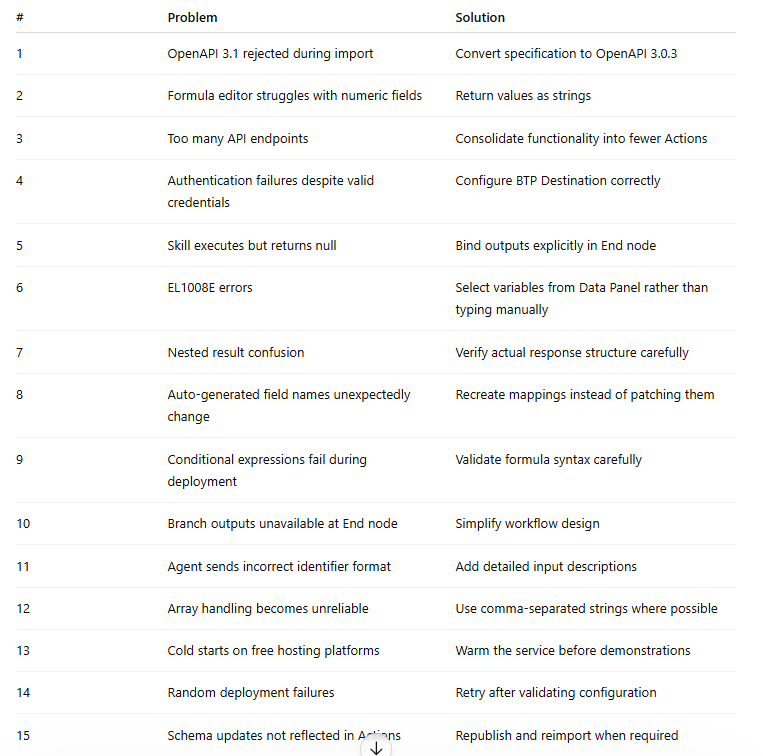
What makes these issues challenging is not their complexity.
Most are actually simple once understood.
The challenge is discovering them in the first place.
Documentation rarely mentions them, and error messages often point in the wrong direction.
As a result, developers can spend hours investigating symptoms while the actual cause exists somewhere else entirely.
What This Project Changed About My View of Enterprise AI
Before this project, I viewed AI agents primarily as a language model problem: choose a capable model, write good instructions, connect a few APIs, and everything should work.
The reality was very different.
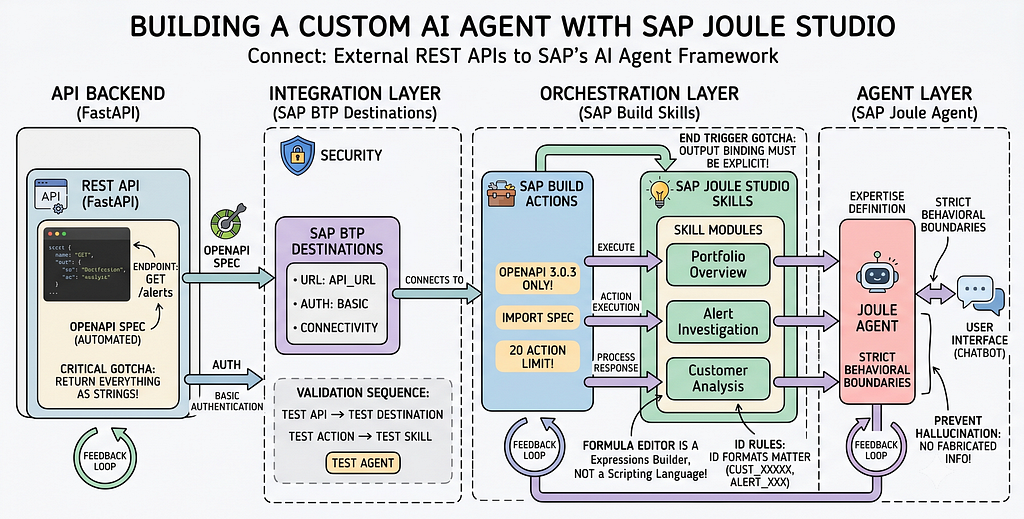
The language model turned out to be one of the easiest parts. Most of the engineering effort went into system integration — API contracts, authentication, data formats, workflow orchestration, error handling, and defining clear boundaries between components.
What surprised me most was how similar these challenges were to traditional enterprise software and distributed systems. The model sits at the center of the experience, but the surrounding architecture determines whether the solution is reliable and useful.
Rather than replacing established engineering principles, AI makes them even more important. Clear interfaces, strong contracts, observability, and reliability remain essential.
Final Thoughts
Building a custom AI Agent within SAP Joule Studio took significantly longer than expected. Not because the core model lacked capability, but because making non-deterministic systems behave predictably inside a deterministic enterprise environment requires meticulous engineering.
Once the hidden platform assumptions became clear, development accelerated and reusable patterns emerged.
But the biggest takeaway from this project wasn’t the agent itself. It was the realization that much of “AI engineering” is a misnomer. Behind every successful AI interaction sits a massive, unforgiving foundation of API contracts, authentication layers, structured formats, and explicit guardrails.
The language model might be the shiny new engine, but without the surrounding enterprise architecture, you’re just idling in the driveway. The model gets the spotlight; the architecture makes it work.
Inside SAP Joule Studio: Building and Guardrailing the Agent was originally published in Towards AI on Medium, where people are continuing the conversation by highlighting and responding to this story.
