
I Added 50 Tools to My AI Agent, and It Got Dumber.

I built ToolGate, an MCP proxy that uses semantic search to filter AI agent tools. It reduces context bloat by 60%+ while maintaining 85%+ precision on synthetic benchmarks. Open source and ready to try.

The Problem: When More Tools = Less Intelligence
I build (and help teams build) agentic AI systems, and they all use many tools. Each agent has access to different tool sets through MCP servers.
By the time I hit 6+ MCP servers with 50+ tools per agent, my agents got worse.
Tasks that used to work smoothly started failing. Agents would:
– Use the wrong tools for simple tasks
– Miss obvious tools that were right in front of it
– Take longer to respond
– Sometimes just… give up
The Root Cause: Context Window Bloat
Every time an LLM sees a `tools/list` request, it receives the full catalog of available tools. With 50 tools, that’s:
– 50 tool names
– 50 descriptions (averaging 100–200 chars)
– 50 JSON schemas (with parameters, types, requirements)
Let me show you what a single tool looks like in context:
json
{
"name": "read_file",
"description": "Read the contents of a file from the filesystem. Supports text and binary files. Can read specific line ranges or entire file.",
"inputSchema": {
"type": "object",
"properties": {
"path": {
"type": "string",
"description": "Path to the file"
},
"encoding": {
"type": "string",
"description": "File encoding (default: utf-8)"
}
},
"required": ["path"]
}
}
That’s ~350 tokens for ONE tool. Multiply by 50 tools = ~17,500 tokens just for the tool catalog.
On every single request.
Most of these tools won’t be relevant to the current task/query. The more tools you add, the harder it is for the LLM to pick the right one.
The Research Backing
I’m not the only one who noticed this. A recent paper by Sadani and Kumar, “Tool Attention: Optimizing LLM Tool Usage through Attention Score Analysis” (arXiv:2604.21816), directly motivated this build. Their key finding shows LLM attention scores over the tool catalog are heavily skewed. Relevant tools capture disproportionate attention, while irrelevant tools create noise that degrades selection accuracy. As the catalog size grows, that noise compounds. The practical implication they surface is that retrieval-augmented tool selection, filtering the catalog before it hits the context window, should recover much of that lost precision.
That finding is the direct motivation for ToolGate: apply the same retrieval logic to tools that RAG applies to documents.
More broadly, research on tool-using language models shows issues in a few areas.
Tool interference: LLMs struggle with tool selection accuracy as catalog size increases
Context dilution: Irrelevant tools in the context reduce task completion rates
Retrieval augmentation: Semantic search over tools significantly improves performance
This is the same concept as using RAG for knowledge.
The Solution: ToolGate
ToolGate is an MCP proxy that sits between your AI agent and your MCP servers. It:
1. **Indexes all tools** using semantic embeddings (sentence-transformers)
2. **Filters on every request** using FAISS similarity search
3. **Returns only relevant tools** (top-K based on query)
4. **Applies smart rules** (always-include, session continuity, etc.)
Architecture
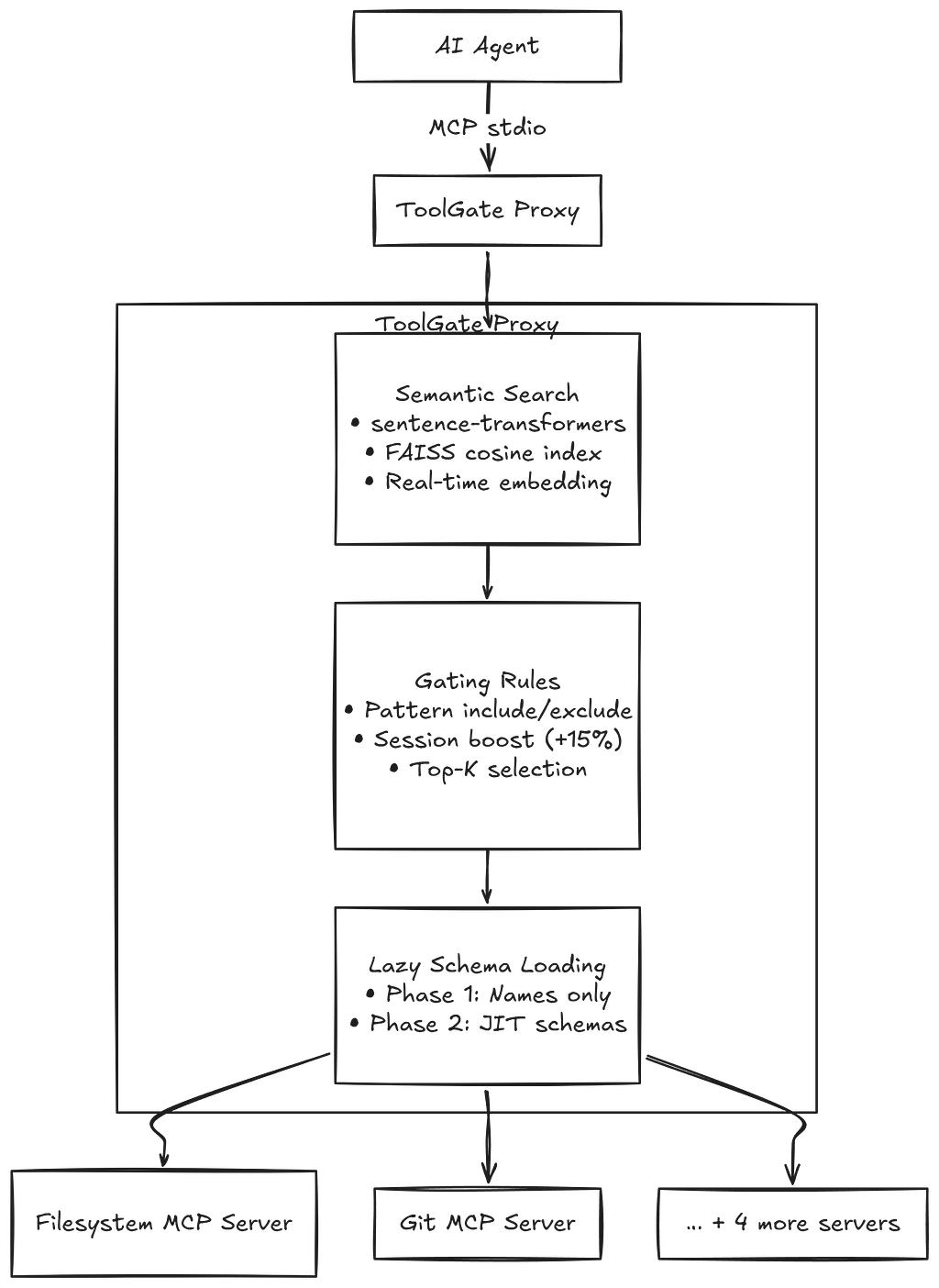
How It Works
1. Index Build (on startup): On startup, ToolGate connects to all upstream MCP servers and fetches the complete tool catalog. Each tool’s name and description are concatenated and embedded into a 384-dimensional vector using sentence-transformers. These vectors are then added to a FAISS flat cosine index for fast similarity search.
2. Query Processing (on each listTools): When a listTools When a request comes in, ToolGate extracts the user’s query from the last message and embeds it in the same 384-dimensional vector space. FAISS returns the top-K most similar tools (default K=10). Gating rules are then applied on top: force-include patterns ensure critical tools always appear (e.g., git_* for git-related queries), recently used tools get a +0.15 similarity boost for session continuity, and force-exclude patterns filter out anything dangerous.
3. Response (two-phase lazy loading): ToolGate returns results in two phases. During listToolsthe agent receives only tool names and truncated descriptions (200 chars max). Enough to make a selection without burning tokens on full schemas. When the agent actually calls a tool, ToolGate fetches the complete schema just-in-time from the upstream server. This means the agent only pays the full token cost for tools it actually uses.
Results from the Synthetic Benchmark
I built a synthetic benchmark with 50 realistic tools and 20 diverse queries. The catalog and queries are artificial, designed to stress-test semantic matching across tool categories. Here’s what ToolGate achieves against that benchmark.
Precision@10 — 85%
Token Reduction – 65%
Query Latency — <50ms
Precision@10: Finding the Right Tools
Precision@10 measures: “Of the top 10 tools returned, how many are actually relevant?”
Test queries against the synthetic catalog:
– “Read a config file” → returns `read_file`, `parse_json`, `parse_yaml`
– “Show git status” → returns `git_status`, `git_log`, `git_diff`
– “Make HTTP request” → returns `http_get`, `http_post`, `parse_json`
85%+ precision means the right tools are consistently in the top 10, at least against these synthetic scenarios.
Latency: Fast Enough to Not Matter
Index build: ~2 seconds (50 tools, cold start)
Query embedding: ~10ms
FAISS search: ~1ms
Total overhead: <50ms per request
Negligible compared to the LLM’s response time of 1-3 seconds.
Implementation Deep Dive
Semantic Embeddings
ToolGate uses `sentence-transformers/all-MiniLM-L6-v2`. It is a 22MB model that runs on a CPU.
Each tool embedding looks like this.
text = f"{tool.name}: {tool.description}"
embedding = model.encode(text) # → [384] vector
Query embedding is identical.
query = "read a file from disk"
query_embedding = model.encode(query) # → [384] vector
FAISS Similarity Search
FAISS (Facebook AI Similarity Search) provides fast vector search. ToolGate uses it like this.
# Build index (cosine similarity)
index = faiss.IndexFlatIP(384) # Inner product
vectors = normalize(embeddings) # L2 normalize for cosine
index.add(vectors)

# Search
query_vec = normalize(query_embedding)
distances, indices = index.search(query_vec, k=10)

# Returns top-10 most similar tools in <1ms
Session Continuity
ToolGate tracks recently used tools (last 5 turns) and boosts their similarity score.
if tool_name in recent_tools:
score += 0.15 # 15% boost
This creates “sticky” tools. If you just used `git_commit`, it’s more likely to appear again for related tasks.
Gating Rules
Depending on your MCP servers and your agent, you may need to add some gating rules to your ToolGate. For instance, most agents need the ‘read_file’ tool, and you can force ToolGate to always return that as an option. Likewise, you may not want any of your agents to execute destructive SQL statements (such as DROP TABLE), but your MCP exposes them. You can override semantic search with patterns.
gating:
always_include:
- "git_*" # Always include git tools
- "read_file" # Critical tool
always_exclude:
- "delete_*" # Dangerous operations
- "drop_table" # No thanks
This combines semantic search with explicit control.
Using ToolGate
Installation
pip install toolgate
Configuration
Create `config.yaml`.
upstream_servers:
- name: filesystem
command: npx
args: ["-y", "@modelcontextprotocol/server-filesystem", "/allowed/path"]
- name: git
command: npx
args: ["-y", "@modelcontextprotocol/server-git", " - repository", "/repo"]
gating:
top_k: 10
session_boost: 0.15
always_include: ["git_*"]
metrics:
enabled: true
db_path: "~/.toolgate/metrics.db"
Running
# Start the proxy
toolgate serve - config config.yaml
What the Benchmarks Suggest
I haven’t run ToolGate in production long enough to have real numbers.
These are design hypotheses grounded in the synthetic benchmark results and the Sadani/Kumar findings.
What I Expect to Hold Up
File operation clustering should work well in practice. When you ask to “read config.yaml”, the semantic search should return `read_file`, `parse_yaml`, `list_directory` as a cluster. The benchmark results suggest the embeddings have enough signal to group related tools correctly.
Session continuity should reduce re-retrieval churn. The 15% boost for recently used tools is deliberately small. If you `git_status`, then ask to “commit the changes”, `git_commit` should naturally rank high anyway. The boost is a backstop, not the primary mechanism.
The fail-safe fallback matters more than it sounds. If embedding fails (network issue, OOM, etc.), ToolGate falls back to returning all tools. The agent degrades gracefully rather than breaking. That’s a design priority, not an afterthought.
Open Questions
The synthetic benchmark is a controlled environment. Real tool catalogs have messier descriptions, more semantic overlap between tools, and queries that aren’t as cleanly scoped as “show git status.” Here’s what I actually need to find out.
1. How does precision hold at K=10 with messier real catalogs? 85% on synthetic is encouraging. Real-world catalogs may have more redundant descriptions that confuse the retrieval.
2. Multi-intent queries. Some tasks need tools from multiple categories (“read this file AND post the result to Slack”). Right now, ToolGate embeds the query as a single vector. I expect this to be a weak spot.
3. Description quality sensitivity. The benchmark tools have clean, informative descriptions. Poorly described tools may not embed well and could get systematically missed.
The plan is to run this on my OpenClaw instance for a few weeks and revisit these questions with real data.
Future Work
1. Multi-query embedding: Query decomposition for multi-intent tasks.
2. LLM-based query rewriting: Expand “grab that config” to “read configuration file” before embedding.
3. Tool usage analytics: Track which tools actually get called to identify retrieval blind spots.
4. Cross-server deduplication: Multiple servers might provide `read_file`. ToolGate should handle that.
The Bigger Picture
ToolGate is a small piece of a larger puzzle: making AI agents actually work at scale.
The Model Context Protocol is designed to be a universal interface for AI tools. But as the ecosystem grows (100+ MCP servers, 1000+ tools), we need tool management infrastructure:
Discovery: Finding the right tools (ToolGate)
Composition: Chaining tools together
Orchestration: Multi-step tool workflows
Safety: Preventing dangerous tool combinations
Monitoring: Understanding what agents are doing
ToolGate addresses discovery. The rest is a separate problem.
“But Doesn’t X Already Do This?”
Fair question. Several tools occupy this space, and ToolGate isn’t the first to apply semantic search to tool selection. Here’s the landscape:
Portkey mcp-tool-filter — The closest open-source equivalent. Embedding-based filtering, sub-10ms for 1000+ tools. But it’s a library you integrate into your code, not a standalone proxy. No lazy schema loading, no session continuity, no gating rules. You need to modify your agent code to use it.
LiteLLM semantic tool filter — Built into LiteLLM’s proxy as a first-class feature. Works well if you’re already routing all your LLM calls through LiteLLM. If you’re not, you can’t use it.
Claude Code’s Tool Search — Claude Code already does this natively to keep MCP context low. Great if you’re in Claude Code. Not extractable or usable elsewhere.
AWS AgentCore Gateway — Enterprise managed service with “Semantic Tool Selection” as a feature. Also handles auth, protocol translation, credential management, and scaling. But it’s a black box, AWS-only, and priced for enterprise.
However, none of these provides everything that ToolGate does.
Standalone MCP proxy — drop-in, no code changes to your agent or tool servers.
Lazy two-phase schema loading — names only in discovery, full schemas JIT at call time.
Session continuity — recently-used tools get a relevance boost.
Transparent scoring — you see every filtering decision, every similarity score.
Zero cloud dependency — runs locally on CPU, no API keys needed.
The fact that AWS built a semantic tool selection into a managed service validates the problem. ToolGate is the open, self-hosted, explainable version for developers who want to understand and control what’s happening between their agent and their tools.
Try It Yourself
ToolGate is open source and lives as a module in my ProtoGensis monorepo. (This is where I keep all my early builds that aren’t really meant for prime time. It’s like a little test kitchen that my OpenClaw and I work in.)
# Clone
git clone https://github.com/ccrngd1/ProtoGensis

# Install
cd ProtoGensis
pip install -e ".[dev]"

# Run benchmark
pytest tests/ -v
python benchmark/run.py

# Expected results:
# Precision@10 >= 80%
# Token reduction >= 60%
# 40+ tests passing
The benchmark uses synthetic data (50 tools, 20 queries). You can also test with your real MCP servers:
toolgate serve -config your-config.yaml
Conclusion
AI agents are only as good as their tools. But more tools do not equal a better agent.
ToolGate applies retrieval-augmented generation to tool selection. The synthetic benchmark results are solid. The theoretical motivation from Sadani and Kumar is sound. Whether it holds up in production is the next question.
If you’re building with MCP, give it a try. I’d be curious whether the precision numbers hold in real-world tool catalogs.
Links:
GitHub: ccrngd1/ProtoGensis
About
Nicholaus Lawson is a Solution Architect with a background in software engineering and AIML. He has worked across many verticals, including Industrial Automation, Health Care, Financial Services, and Software companies, from start-ups to large enterprises.
This article and any opinions expressed by Nicholaus are his own and not a reflection of his current, past, or future employers or any of his colleagues or affiliates.
Feel free to connect with Nicholaus via LinkedIn at https://www.linkedin.com/in/nicholaus-lawson/
I Added 50 Tools to My AI Agent, and It Got Dumber. was originally published in Towards AI on Medium, where people are continuing the conversation by highlighting and responding to this story.
