How AI Writes SQL for You — and When Not to Trust It

ChatGPT, Copilot, and Gemini can write SQL fast. Sometimes it’s brilliant. Sometimes it’s subtly wrong in ways that will ruin your numbers. Here’s how to tell the difference.
SQL is the language of data. If you work anywhere near a database, you’re writing it — or you wish you could write it faster. And if you’ve tried asking ChatGPT, GitHub Copilot, or Gemini to write SQL for you, you’ve probably had that moment: wow, that actually worked.
But you’ve probably also had the other moment. The query runs without errors, looks reasonable, and produces numbers that are just slightly off. Not obviously wrong — just wrong enough to make your analyst send a confused Slack message three days later.
In this article, I’m going to walk through exactly where AI SQL generation shines, the four most common ways it goes wrong, and a set of practical techniques for getting better results with less review time.
Where AI genuinely helps with SQL
Let’s start with the good news, because there’s a lot of it. AI tools are legitimately useful for SQL in several common situations.
Simple aggregations and filters
For straightforward queries — count rows, sum a column, filter by date, group by a dimension — AI is almost always correct and much faster than typing it yourself. This is the bread and butter of analytics SQL, and it’s where AI saves the most time in practice.
Prompt:
Write a SQL query that returns total revenue by country for orders placed in the last 30 days. The orders table has columns: order_id, customer_id, country, amount_usd, created_at.
AI output — correct and clean:
SELECT
    country,
    SUM(amount_usd)  AS total_revenue_usd,
    COUNT(order_id)  AS order_count
FROM
    orders
WHERE
    created_at >= CURRENT_DATE - INTERVAL '30 days'
GROUP BY
    country
ORDER BY
    total_revenue_usd DESC;
Why this works well:
The prompt gave AI everything it needed: table name, column names, the metric to compute, and the filter condition. When you’re this specific, AI rarely gets simple aggregations wrong.
Boilerplate you write a hundred times
Date spine generation, calendar tables, basic slowly-changing dimension patterns — these are highly repetitive and well-represented in training data. AI handles them well, and generating them by hand is tedious. Let AI do it.
Translating logic into SQL syntax
Sometimes you know exactly what you want to compute but can’t remember the exact window function syntax. “Write a query that calculates a 7-day rolling average of daily signups” is a perfect AI prompt — you’re supplying the logic, AI is supplying the syntax.
The four ways AI gets SQL wrong
Now for the part that will save you real pain. These are the four failure patterns I see most often — and they all share one trait: the query runs without errors.
- Joining on the wrong column and silently multiplying rows
This is the most dangerous SQL mistake, and AI makes it regularly on multi-table schemas it hasn’t seen. When a join key isn’t unique on both sides, you get row multiplication — your counts inflate, your sums double-count, and nothing errors out.
AI generated — wrong
-- orders can have
-- multiple line items
SELECT
  c.customer_name,
  SUM(o.amount_usd)
FROM customers c
JOIN orders o
  ON c.customer_id
   = o.customer_id
JOIN order_items i
  ON o.order_id
   = i.order_id
GROUP BY c.customer_name;
Fixed — correct
-- Aggregate items first,
-- then join to customers
WITH order_totals AS (
  SELECT
    customer_id,
    SUM(amount_usd)
      AS total
  FROM orders
  GROUP BY customer_id
)
SELECT
  c.customer_name,
  ot.total
FROM customers c
JOIN order_totals ot
  ON c.customer_id
   = ot.customer_id;
How to catch this
Before running any multi-join query with an aggregation, run a quick SELECT COUNT(*) on each join key in isolation and verify uniqueness. If order_items has multiple rows per order_id, any SUM on the orders side will multiply. Always aggregate before joining, or use subqueries/CTEs to pre-aggregate.
2. Window functions with the wrong frame
Window functions are powerful and syntactically fiddly. AI knows the syntax but frequently gets the frame clause wrong — especially for running totals, rolling averages, and “previous row” comparisons.
AI generated — wrong frame
-- Rolling 7-day avg
-- but frame is wrong
SELECT
  event_date,
  daily_signups,
  AVG(daily_signups)
    OVER (
      ORDER BY event_date
    ) AS rolling_avg
FROM signups;
Fixed — correct frame
-- Explicit 7-row frame
-- including current row
SELECT
  event_date,
  daily_signups,
  AVG(daily_signups)
    OVER (
      ORDER BY event_date
      ROWS BETWEEN
        6 PRECEDING AND
        CURRENT ROW
    ) AS rolling_7d_avg
FROM signups
How to catch this
Without an explicit ROWS BETWEEN or RANGE BETWEEN clause, the default frame behaviour varies by database. In most systems the default is RANGE BETWEEN UNBOUNDED PRECEDING AND CURRENT ROW — which is a cumulative average, not a rolling one. Always specify your frame explicitly and test with a small dataset where you can verify the output by hand.
3. NULL handling that silently drops or includes rows
NULLs are SQL’s most reliable source of silent bugs. AI often forgets to account for them, especially in WHERE clauses, CASE statements, and aggregations that should or shouldn’t include NULL rows.
AI generated — NULLs slip through
-- Returns rows where
-- status is NOT 'cancelled'
-- but NULL rows vanish
SELECT *
FROM orders
WHERE status
  != 'cancelled';
Fixed — NULLs handled
-- Explicitly include rows
-- where status is NULL
SELECT *
FROM orders
WHERE status != 'cancelled'
   OR status IS NULL;
How to catch this
In SQL, NULL != ‘cancelled’ evaluates to NULL, not TRUE. Any row where status IS NULL will be silently excluded from a WHERE status != ‘x’ filter. After running any AI-generated query with a WHERE clause, run a separate SELECT COUNT(*) WHERE [column] IS NULL to see how many rows you might be dropping.
4. Dialect mismatches — valid SQL in the wrong database
SQL is not one language — it’s a family of dialects. BigQuery, Snowflake, PostgreSQL, and DuckDB all have different syntax for dates, string functions, and array operations. AI defaults to a generic SQL dialect and often gets the specifics wrong for your actual database.
Generic SQL — fails in BigQuery
-- Works in PostgreSQL,
-- errors in BigQuery
WHERE created_at >=
  NOW() - INTERVAL
  '30 days'
BigQuery-specific — correct
-- BigQuery uses
-- INTERVAL value unit
WHERE created_at >=
  TIMESTAMP_SUB(
    CURRENT_TIMESTAMP(),
    INTERVAL 30 DAY
  )
How to catch this
Always tell the AI which database you’re using in your prompt. “Write a BigQuery SQL query…” or “…for PostgreSQL” dramatically reduces dialect errors. This is the single easiest fix and most people forget to do it.
Which AI tool is best for SQL?
I’ve tested all three main options across common data engineering SQL tasks. Here’s my honest take:
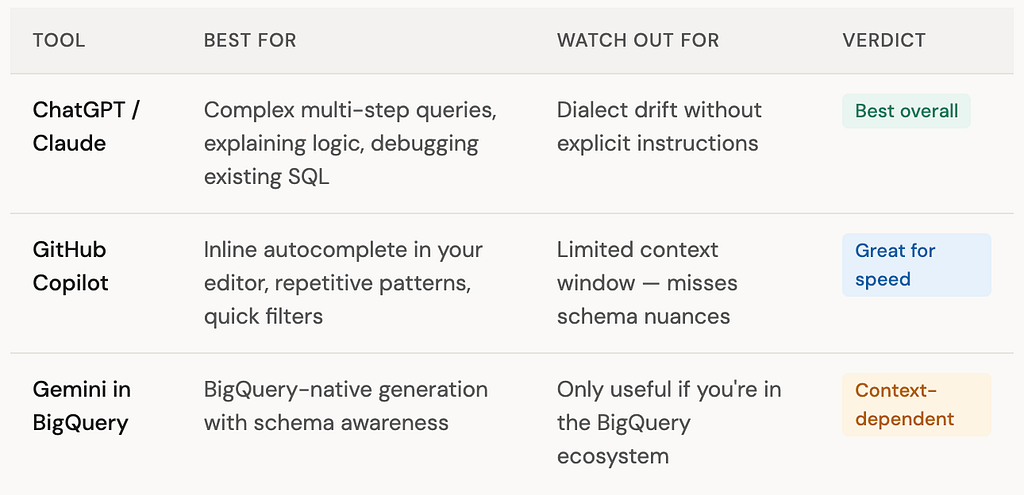
The practical answer: use ChatGPT or Claude for anything complex, Copilot for quick inline generation, and the native tool if your warehouse offers one. They all improve when you give them more context upfront.
A prompt template that actually works
The difference between mediocre and reliable AI SQL output usually comes down to how much context you provide. Here’s the template I use:
SQL prompt template — copy and fill in
I’m using [BigQuery / PostgreSQL / Snowflake / DuckDB]. I have the following tables: — [table_name]: [column1 (type), column2 (type), …] — [table_name]: [column1 (type), column2 (type), …] Write a SQL query that [describes exactly what you want to compute]. Important: — [key_column] is not unique in [table_name] — be careful with joins — Handle NULLs in [nullable_column] by treating them as [zero / excluded / included] — The result should have one row per [grain]
Pro tip
The single most impactful line in that template is the join warning: “[column] is not unique in [table] — be careful with joins.” Explicitly flagging non-unique keys cuts fanout join errors by a large margin in my experience.
Also, always define your grain — “one row per customer per day” is far clearer than “group by customer and date.” When the AI knows the expected grain, it’s much less likely to accidentally double-count.
“The engineers getting the most out of AI SQL tools aren’t the ones who trust it most — they’re the ones who know exactly where to look when it’s wrong.”
Your SQL review checklist
Before running any AI-generated SQL on real data
✓ Check every join key for uniqueness — run SELECT COUNT(*) vs COUNT(DISTINCT key) on each joined table
✓ Count NULLs in any column used in a WHERE filter — verify the NULL handling matches your intent
✓ For window functions, confirm the frame clause is explicit and test against a small known dataset
✓ Verify date/time functions match your actual database dialect
✓ Sanity-check row counts at each CTE or subquery step — unexpected jumps mean a fanout join
✓ For aggregations, manually compute the expected result on 2–3 rows before trusting the full output
The bottom line
AI SQL generation is genuinely useful — it’s already saving real time on repetitive queries, boilerplate patterns, and syntax lookups. But it works best when you treat it as a fast first draft, not a finished product.
The four mistakes above — fanout joins, wrong window frames, NULL blindspots, and dialect drift — are all catchable in under five minutes if you know to look for them. That’s the real skill: not writing SQL from scratch, but knowing exactly where AI goes wrong and reviewing those spots every time.
In the next article we’ll look at dbt — the tool that brought software engineering practices to SQL — and how AI is making it even easier to get started.
Key takeaways
- AI writes simple aggregations, filters, and repetitive SQL patterns reliably and fast.
- The four failure modes to always check: fanout joins, window frame errors, NULL blindspots, and dialect mismatches.
- Always tell the AI which database you’re targeting — dialect errors drop dramatically.
- Flag non-unique join keys explicitly in your prompt. It’s the single biggest quality improvement.
- Define your expected grain (“one row per customer per day”) — it forces the model to think about the result shape before writing the query.
- AI is a fast first drafter. You’re the reviewer. Reviewing well is the skill worth building.
Found this useful? Follow for weekly articles on data engineering and AI — practical, hands-on, no hype.
How AI Writes SQL for You — and When Not to Trust It was originally published in Towards AI on Medium, where people are continuing the conversation by highlighting and responding to this story.
