
Fixing “Tool Amnesia” in Model Context Protocol Ecosystems

A Java Gateway Router pattern for reducing prompt bloat, preventing parameter hallucination, and preserving tool context.

Picture this: You’ve just discovered the Model Context Protocol (MCP), and you’re hooked. You build a couple of custom Java tools, link them up via your mcp.json file, and watch Claude or Cursor execute them flawlessly. It feels like magic.
So, you do what any good engineer does – you scale it. You add a few more custom tools for internal APIs, and then you install a handful of popular, off-the-shelf MCP extensions for GitHub, Jira, and Slack to supercharge your workspace.
Suddenly, your AI environment is packed with dozens of tool descriptions and complex JSON schema definitions. You run a test query, and… crash.
The LLM completely hallucinates a parameter name, mixes up two different arguments, or completely forgets that your tool even exists. Welcome to Tool Amnesia.
Here is why this happens across both off-the-shelf IDE extensions and custom backends, and how you can fix it using smart architectural guardrails.
The Root Cause: Attention Dilution & Token Bloat
LLMs don’t natively understand what an MCP server is; they just read text. When an MCP client (like Cursor, VS Code, or Claude Desktop) boots up, it reads every single active tool name, argument schema, and description text, and injects it straight into the LLM’s system prompt.
If you scale up your setup, you quickly run into two major flavors of this problem:
The Custom Server Struggle: Context Drift
When developing custom tools, it’s easy to let parameter schemas drift. If Tool A expects repositoryId and Tool B expects repo_name, a confused LLM dealing with a crowded system prompt will often split the difference and pass repoId – instantly throwing an IllegalArgumentException on your Java backend.
The IDE Extension Explosion: Marketplace Bloat
This isn’t just a custom code issue; it’s an ecosystem-wide challenge. Popular public MCP servers are incredibly dense because they are built to handle every possible use case out of the box. For example, the official GitHub MCP server exposes over 90 separate tools.
Plug just three or four standard extensions into your global IDE configuration, and you are forcing the AI to process 150+ tools before you even type a single line of code. The token overhead is massive, stretching the LLM’s attention mechanism to its breaking point. In fact, coding platforms like Cursor enforce strict ceilings (often around 40 – 50 active tools) because pushing past it causes the underlying LLM’s tool-selection accuracy to plummet.
Solution A: The Java Gateway Router (For Custom Backends)
Instead of exposing 30 granular micro-tools directly to the LLM, compress your interface. Expose just one highly robust wrapper tool to the LLM, and let your Java server handle the routing deterministically.
// Instead of dozens of individual @McpTool annotations, use a Gateway Tool
@McpTool(description = "Executes core repository operations like fetch, commit, or rollback")
public String executeRepoAction(
    @McpParam(description = "The specific action intent (e.g., 'fetch', 'commit')") String intent,
    @McpParam(description = "Key-value pairs of required parameters") Map<String, Object> arguments
) {
    // Let Java do what it does best: ultra-fast, type-safe routing
    return switch (intent.toLowerCase()) {
        case "fetch" -> repositoryService.handleFetch(arguments);
        case "commit" -> repositoryService.handleCommit(arguments);
        default -> "Error: Unsupported action intent.";
    };
}
Defensive Parameter Normalization: Inside your Java service, you can easily catch common LLM parameter hallucinations using clean fallback maps:
public String handleFetch(Map<String, Object> arguments) {
    // Intercept variations caused by context drift
    String repoId = (String) arguments.getOrDefault("repositoryId",
                    arguments.getOrDefault("repository_id",
                    arguments.getOrDefault("repo_id", null)));

    if (repoId == null || repoId.isBlank()) {
        return "Error: Missing required parameter 'repositoryId'. Please explicitly provide it.";
    }
    return repositoryService.fetchData(repoId);
}
If the LLM misses the mark slightly, your code bridges the gap. If it misses it entirely, the structured error string guides the LLM to self-correct and retry automatically without crashing the application runtime.
Solution B: Schema Compressors & Proxies (For Marketplace Extensions)
If you are drowning in third-party tools within your IDE, you can apply the exact same gateway philosophy using a Proxy Compiler or open-source schema compressor (like Atlassian’s mcp-compressor).
These utilities sit between your IDE and your heavy marketplace configuration files. They intercept the sprawling 90+ tool configurations and expose just two universal tools to the LLM: list_available_tools() and invoke_tool(name, arguments). This slashes token overhead by up to 95%, keeping the LLM lightning-fast and focused, while dynamically fetching the exact schemas it needs only when it needs them.
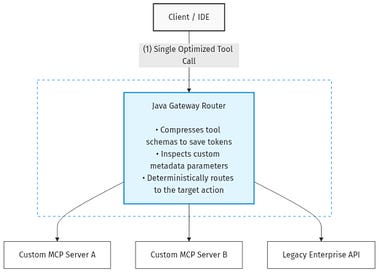
An overview of the runtime execution: How the Java Gateway acts as a traffic controller between the IDE and underlying MCP servers.
Wrap Up
Scaling an AI assistant isn’t about loading it down with as many tools as possible. The secret to building production-ready AI workflows is knowing when to take structural control back from the LLM.
Whether you are implementing a Gateway Router in your Java backend or leveraging Schema Proxies in your IDE configuration, shielding the LLM from configuration bloat is the single best way to ensure your AI agents stay sharp, accurate, and resilient.
Fixing “Tool Amnesia” in Model Context Protocol Ecosystems was originally published in Towards AI on Medium, where people are continuing the conversation by highlighting and responding to this story.
