Cost-effective multilingual audio transcription at scale with Parakeet-TDT and AWS Batch

Many organizations are archiving large media libraries, analyzing contact center recordings, preparing training data for AI, or processing on-demand video for subtitles. When data volumes grow significantly, managed automatic speech recognition (ASR) service costs can quickly become the primary constraint on scalability.
To address this cost-scalability challenge, we use the NVIDIA Parakeet-TDT-0.6B-v3 model, deployed through AWS Batch on GPU-accelerated instances. Parakeet-TDT’s Token-and-Duration Transducer architecture simultaneously predicts text tokens and their duration to intelligently skip silence and redundant processing. This helps achieve inference speeds orders of magnitude faster than real-time. By paying only for brief bursts of compute rather than the full length of your audio, you can transcribe at scale for fractions of a cent per hour of audio based on the benchmarks described in this post.
In this post, we walk through building a scalable, event-driven transcription pipeline that automatically processes audio files uploaded to Amazon Simple Storage Service (Amazon S3), and show you how to use Amazon EC2 Spot Instances and buffered streaming inference to further reduce costs.
Model capabilities
Parakeet-TDT-0.6B-v3, released in August 2025, is an open-source multilingual ASR model that delivers high accuracy across 25 European languages with automatic language detection and flexible licensing under CC-BY-4.0. According to NVIDIA’s published metrics, the model maintains a 6.34% word error rate (WER) in clean conditions and 11.66% WER at 0 dB SNR, and supports audio up to three hours using local attention mode.
The 25 supported languages include Bulgarian, Croatian, Czech, Danish, Dutch, English, Estonian, Finnish, French, German, Greek, Hungarian, Italian, Latvian, Lithuanian, Maltese, Polish, Portuguese, Romanian, Slovak, Slovenian, Spanish, Swedish, Russian, and Ukrainian. This can help alleviate the need for separate models or language-specific configuration when serving international European economies.For deployment on AWS, the model requires GPU-enabled instances with a minimum of 4 GB VRAM, though 8 GB provides better performance. G6 instances (NVIDIA L4 GPUs) provide the best cost-to-performance ratio for inference workloads based on our tests. The model also performs well on G5 (A10G), G4dn (T4), and for maximum throughput, P5 (H100) or P4 (A100) instances.
Solution architecture
The process begins when you upload an audio file to an S3 bucket. This triggers an Amazon EventBridge rule that submits a job to AWS Batch. AWS Batch provisions GPU-accelerated compute resources, and the provisioned instances pull our container image with a pre-cached model from Amazon Elastic Container Registry (Amazon ECR). The inference script downloads and processes the file, then uploads the timestamped JSON transcript to an output S3 bucket. The architecture scales to zero when idle, so costs are incurred only during active compute.
For a deep dive into the general architectural components, refer to our previous post, Whisper audio transcription powered by AWS Batch and AWS Inferentia.
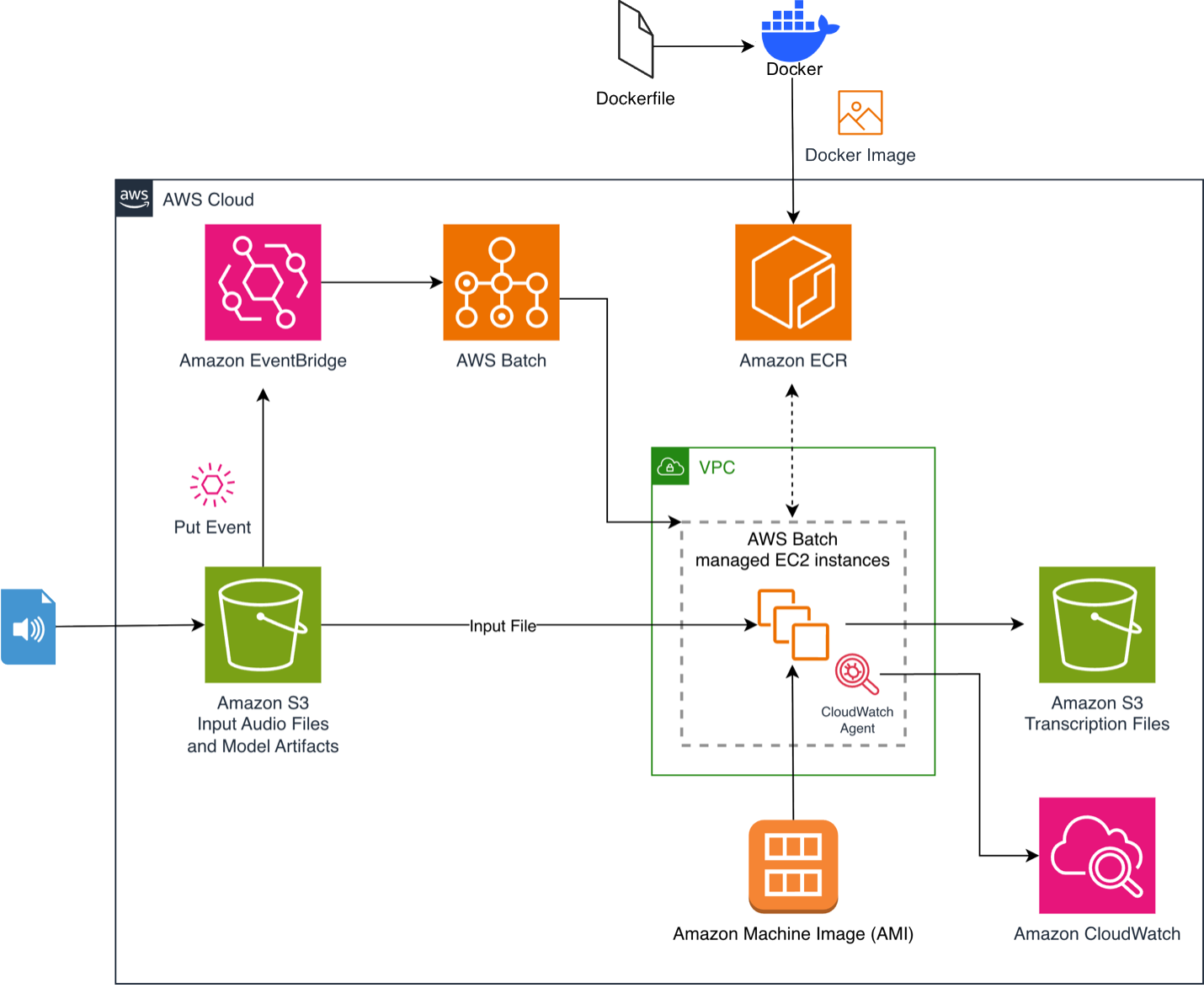 Figure 1. Event-driven audio transcription pipeline with Amazon EventBridge and AWS Batch
Prerequisites
- Create an AWS account if you don’t already have one and sign in. Create a user using AWS IAM Identity Center with full administrator permissions as described in Add users.
- Install the AWS Command Line Interface (AWS CLI) on your local development machine and create a profile for the admin user as described in Set up the AWS CLI.
- Install Docker on your local machine.
- Clone the GitHub repository to your local machine.
Building the container image
The repository includes a Docker file that builds a streamlined container image optimized for inference performance. The image uses Amazon Linux 2023 as a base, installs Python 3.12, and pre-caches the Parakeet-TDT-0.6B-v3 model during the build to alleviate download latency at runtime:
Pushing to Amazon ECR
The repository includes an updateImage.sh script that handles environment detection (CodeBuild or EC2), builds the container image, creates an ECR repository if needed, enables vulnerability scanning, and pushes the image. Run it with:./updateImage.sh
Deploying the solution
The solution uses an AWS CloudFormation template (deployment.yaml) to provision the infrastructure. The buildArch.sh script automates the deployment by detecting your AWS Region, collecting VPC, subnet, and security group information, and deploying the CloudFormation stack:
./buildArch.shUnder the hood, this runs:
The CloudFormation template creates the AWS Batch compute environment with G6 and G5 GPU instances, a job queue, a job definition referencing your ECR image, input and output S3 buckets with EventBridge notifications enabled. It also creates an EventBridge rule that triggers a Batch job on S3 upload, an Amazon CloudWatch agent configuration for GPU/CPU/memory monitoring, and IAM roles with least-privilege policies. AWS Batch allows selection of Amazon Linux 2023 GPU images by specifying ImageType: ECS_AL2023_NVIDIA in the compute environment configuration.
Alternatively, you can deploy directly from the AWS CloudFormation console using the launch link provided in the repository README.
Configuring Spot instances
Amazon EC2 Spot Instances can help further reduce the costs, by running your workloads on unused EC2 capacity at a discount of up to 90% depending on your instance type. To enable Spot Instances, we modify the compute environment in deployment.yaml:
You can enable this by setting –parameter-overrides UseSpotInstances=Yes when running aws cloudformation deploy. The SPOT_PRICE_CAPACITY_OPTIMIZED allocation strategy selects Spot Instance pools that are both the least likely to be interrupted and have the lowest possible price. Diversifying instance types (G6 xlarge, G6 2xlarge, G5 xlarge) can improve Spot availability. Setting MinvCpus: 0 makes sure the environment scales to zero when idle, so you avoid incurring costs between workloads. Since ASR jobs are stateless and idempotent, they are well-suited for Spot. If an instance is reclaimed, AWS Batch automatically retries the job (configured with up to 2 retry attempts in the job definition).
Managing memory for long audio
The Parakeet-TDT model’s memory consumption scales linearly with audio duration. The Fast Conformer encoder must generate and store feature representations for the full audio signal, creating a direct dependency where doubling audio length roughly doubles VRAM usage. According to the model card, with full attention the model can process up to 24 minutes given 80GB of VRAM.
NVIDIA addresses this with a local attention mode that supports up to 3 hours of audio on an 80 GB A100:
Buffered streaming inference
For audio that exceeds 3 hours, or to process long audio cost-effectively on standard hardware like a g6.xlarge, we use buffered streaming inference. Adapted from NVIDIA NeMo’s streaming inference example, this technique processes audio in overlapping chunks rather than loading the full context into memory.
We configure 20-second chunks with 5-second left context and 3-second right context to maintain transcription quality at chunk boundaries (note that the accuracy may degrade when changing these parameters, so experiment to find the optimal configuration. Decreasing the chunk_secs increases processing time):
Processing audio at fixed chunk sizes decouples VRAM usage from total audio length, allowing a single g6.xlarge instance to process a 10-hour file with the same memory footprint as a 10-minute one.
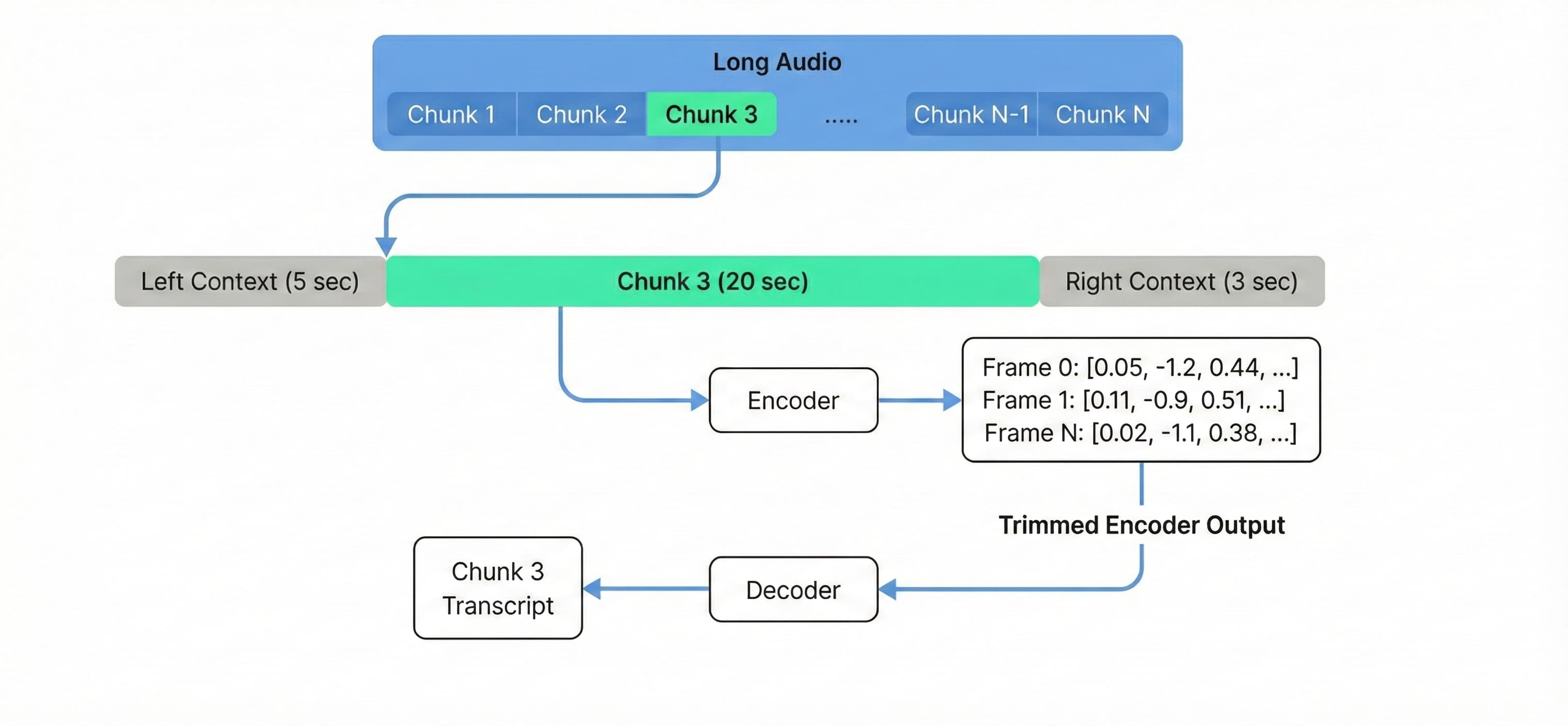
Figure 2. Buffered streaming inference processes audio in overlapping chunks with constant memory usage.
To deploy with buffered streaming enabled, set the EnableStreaming=Yes parameter.
Testing and monitoring
To validate the solution at scale, we ran an experiment with 1,000 identical 50-minute audio files from a NASA preflight crew news conference, distributed across 100 g6.xlarge instances processing 10 files each.
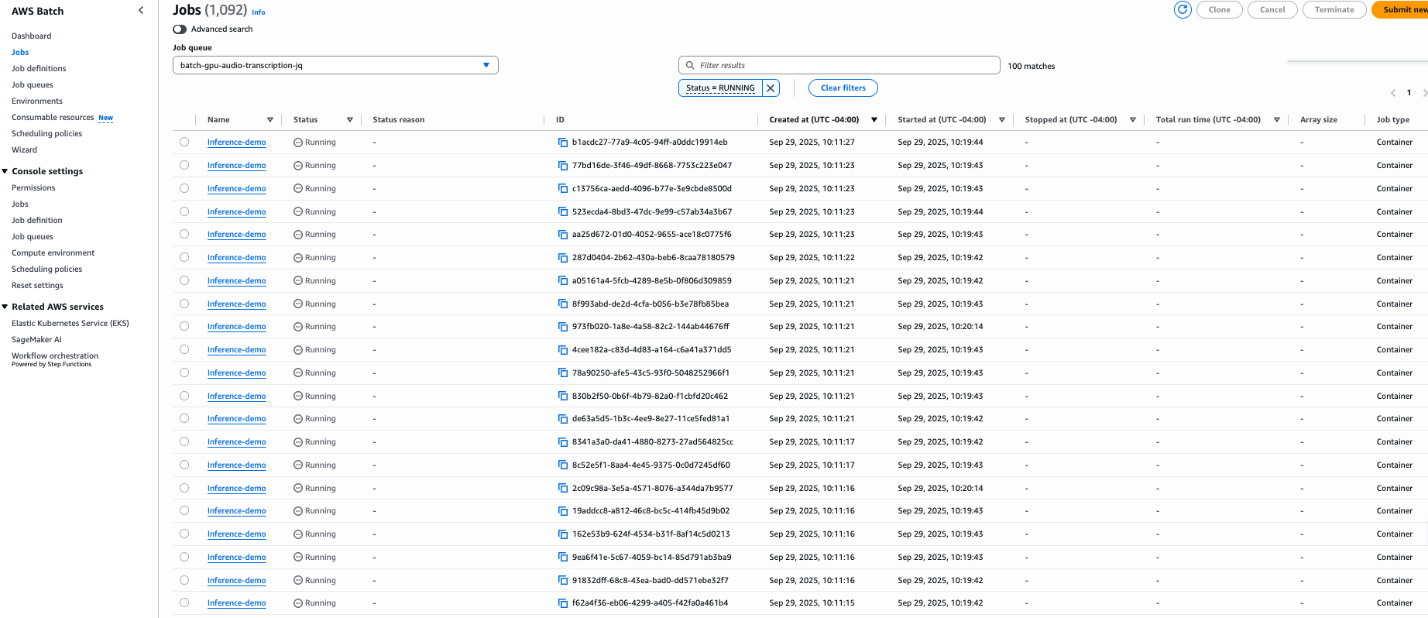 Figure 3. Batch jobs running concurrently on 100 g6.xlarge instances.
The deployment includes an Amazon CloudWatch agent configuration that collects GPU utilization, power draw, VRAM usage, CPU utilization, memory consumption, and disk usage at 10-second intervals. These metrics appear under the CWAgent namespace, enabling you to build dashboards for real-time monitoring.
Performance and cost analysis
To validate the efficiency of the architecture, we benchmarked the system using multiple longform audio files.
The Parakeet-TDT-0.6B-v3 model achieved a raw inference speed of 0.24 seconds per minute of audio. However, a complete pipeline also includes overhead for loading the model into memory, loading audio, preprocessing the input and post-processing the output. Because of this overhead, the optimal cost optimization happens for long-form audio to maximize the processing time.
Benchmark results (g6.xlarge):
- Audio Duration: 3 hours 25 minutes (205 minutes)
- Total Job Duration: 100 sec
- Effective Processing Speed: 0.49 seconds per minute of audio
- Cost breakdown
Based on pricing in the us-east-1 Region for the g6.xlarge instance, we can estimate the cost per minute of audio processing.
| Pricing Model | Hourly Cost (g6.xlarge)* | Cost per Minute of Audio |
|---|---|---|
| On-Demand | ~$0.805 | **$0.00011** |
| Spot Instances | ~$0.374 | **$0.00005** |
*Prices are estimates based on us-east-1 rates at the time of writing. Spot prices vary by Availability Zone and are subject to change.
This comparison highlights the economic advantage of the self-hosted approach for high-volume workloads, delivering value for large scale transcriptions compared to managed API services.
Cleanup
To avoid incurring future charges, delete the resources created by this solution:
- Empty all S3 buckets (input, output, and logs).
- Delete the CloudFormation stack:
aws cloudformation delete-stack --stack-name batch-gpu-audio-transcription
- Optionally, remove the ECR repository and container images.
For detailed cleanup instructions, refer to the cleanup section of the repository README.
Conclusion
In this post, we demonstrated how to build an audio transcription pipeline that processes audio at scale for fractions of a cent per hour. By combining NVIDIA’s Parakeet-TDT-0.6B-v3 model with AWS Batch and EC2 Spot Instances, you can transcribe across 25 European languages with automatic language detection and help reduce costs compared to alternative solutions. The buffered streaming inference technique extends this capability to audio of varying length on standard hardware, and the event-driven architecture scales automatically from zero to handle variable workloads.
To get started, explore the sample code in the GitHub repository.
