Claude Code vs. Codex vs. Cursor: The AI Coding Agent Showdown Engineers Are Talking About

Three tools. Three philosophies. One codebase. Here’s what engineers actually need to know.
Claude Code vs. Codex vs. Cursor: The AI Coding Agent Showdown Engineers Are Talking About
The terminal, the IDE, and the cloud. Three tools. One codebase. Which one wins?
There’s a quiet war happening in developer tooling right now, and unlike most hype cycles, this one actually matters. Engineers aren’t just talking about AI assistants that autocomplete a line here or there — they’re talking about agents: tools that read your entire codebase, plan a multi-step change, run your tests, and ship a pull request, all while you grab a coffee.
Three products are leading this conversation in 2026: Claude Code (Anthropic), OpenAI Codex, and Cursor. They’re not interchangeable. They’re not even the same category of tool. And choosing the wrong one for your workflow can cost you hours every week.
Let’s break them down properly.
The Big Picture: Three Tools, Three Philosophies
Before diving into feature comparisons, you need to understand what each tool actually is, because marketing language has blurred these lines considerably.
- Claude Code is a terminal-native agent. It lives in your command line and reasons over your entire codebase.
- Cursor is an AI-powered IDE — a fork of VS Code with deep agentic features baked into the editing experience.
- OpenAI Codex is a cross-surface autonomous agent — it operates across cloud, IDE, browser, and CLI, with a focus on long-running background tasks.
The AI coding tool market has effectively split into three categories: inline copilots, terminal-based agents, and autonomous background workers. Each of these three products dominates a different category.
Claude Code: The Deep Thinker
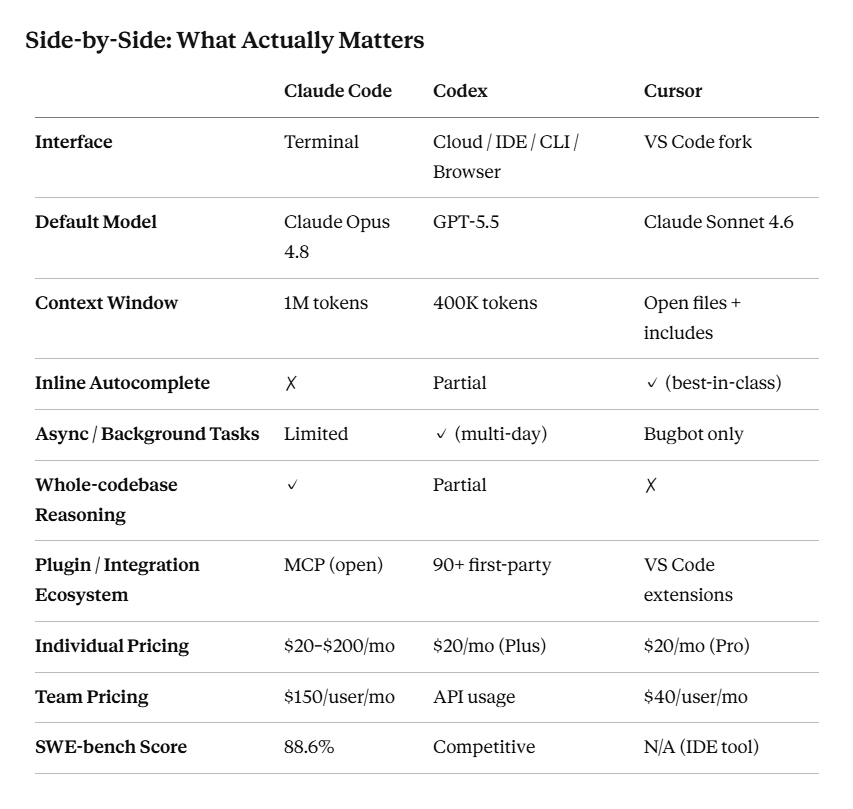
Claude Code is Anthropic’s official command-line coding agent. It runs on Claude Opus 4.8 (released May 2026), which scores 88.6% on SWE-bench Verified — the gold standard benchmark for software engineering tasks. That number isn’t marketing fluff. It means when you hand Claude Code a real, messy, multi-file bug, it finds and fixes it at a rate that consistently outpaces alternatives on complex reasoning tasks.
What makes it different:
The 1M token context window is the headline feature, and it genuinely changes what’s possible. You can feed Claude Code your entire monorepo — not just the file you have open, but the whole thing — and it will reason across all of it before making a single edit. It also supports a “recursive context protocol” where it can spawn sub-agents to explore different parts of the codebase simultaneously, then synthesize their findings. Neither Cursor nor Codex offers this natively.
Claude Code also integrates with MCP (Model Context Protocol), meaning you can hook it up to external tools, databases, and services and have it act on them as part of a coding workflow.
The tradeoffs:
Claude Code has no inline autocomplete. There’s no tab-to-complete, no ghost text appearing as you type. It’s built for the developer who thinks in tasks, not keystrokes. If you’re a terminal-comfortable engineer working on architectural changes, refactors across dozens of files, or debugging something that spans your backend, frontend, and tests simultaneously — this is the tool that was built for you.
Token costs can climb on long sessions. The Max plan at $20/month covers most developers reasonably well, but heavy use requires discipline around caching.
Best for: Senior engineers, tech leads, architects doing complex multi-file reasoning and codebase-wide refactoring.
OpenAI Codex: The Async Powerhouse
The name “Codex” was resurrected in 2025 for OpenAI’s new agent stack, and the 2026 version is a fundamentally different product from the legacy code model. As of mid-2026, it boasts over 4 million weekly active users and defaults to GPT-5.5 with a 400K-token context window.
What makes it different:
The headline feature is multi-day automations. You describe a task, Codex spins up a sandboxed cloud environment, writes code, runs tests, and delivers results for your review — potentially hours or even a day later. You can queue five tasks, walk away, and come back to five pull requests ready for review. The hit rate isn’t perfect, but for routine work — generating test coverage, updating documentation, running dependency checks — it’s high enough to be genuinely useful.
Codex also has the broadest integration surface: 90+ first-party plugins covering Atlassian, GitLab, and the full Microsoft Suite. It runs consistently across cloud, IDE (via VS Code extension), browser, and CLI. If your team lives in the OpenAI ecosystem and uses these SaaS tools heavily, the plugin coverage alone can justify the choice.
For greenfield work — scaffolding an API, building a landing page from scratch — Codex tends to move faster than Claude Code. It’s optimized for throughput. For “debug why this migration fails intermittently in CI,” Claude Code still edges it on reasoning depth.
The tradeoffs:
Multi-day jobs run on OpenAI’s infrastructure, not yours. That means less control over the filesystem during execution. Plugin coverage is broad but uneven — not every integration supports write actions. And like any monoculture, you’re tied to OpenAI’s stack; switching providers means leaving the product ecosystem entirely.
Best for: Teams that prototype frequently, need parallel background task execution, or are already standardized on OpenAI tooling.
Cursor: The IDE Reimagined
Cursor is a fork of VS Code with AI so deeply embedded that it no longer feels like a bolt-on. The 3.3 release in 2026 added durable canvases (persistent multi-step plans that survive session restarts) and Bugbot, an in-editor agent that triages and autonomously fixes bugs in the background. Cursor reports roughly 78% self-resolution on Bugbot’s own fixes — which, if it holds in your codebase, is remarkable.
Its default model is Claude Sonnet 4.6, with Claude Opus 4.8 and GPT-5.5 available on higher tiers. This is worth noting: even Cursor’s IDE experience runs on Claude under the hood for most users.
What makes it different:
Cursor wins on developer experience and accessibility. The learning curve is nearly zero if you already use VS Code. You get best-in-class inline autocomplete, Cmd+K to rewrite any selection in natural language, side-by-side diff review, and an agent mode that operates within your open files without you having to leave the editor.
For teams, it offers shared rules, prompts, and rulesets synced across developers — which matters enormously when you’re trying to enforce consistent AI behavior at an organization level.
The tradeoffs:
Context is limited to open files plus anything you explicitly include. This is the fundamental ceiling: Cursor is excellent within the scope of what you’re actively working on, but it struggles with changes that require understanding your entire system architecture. For large-scale refactors, it can make speculative edits — changes that look locally correct but miss global context.
Best for: Developers writing new features who want fast completions, teams that need shared AI configuration, and anyone who isn’t comfortable with a terminal-first workflow.
Token Efficiency: A Hidden Cost Factor
One benchmark that doesn’t make headlines but matters in practice: token efficiency. In real-world tests, a task that consumed 188K tokens in Cursor’s agent mode was completed by Claude Code in 33K tokens. Codex is even more efficient for batch workloads. This matters less for individual developers on flat-rate plans, but at team scale, it can significantly affect API costs.
The Workflow Most High-Velocity Teams Actually Use
The honest answer is that most strong engineering teams aren’t choosing one tool — they’re using all three in sequence:
- Cursor for daily feature work, writing new code, and fast inline editing.
- Claude Code when a task requires architectural reasoning or changes spanning the whole codebase.
- Codex for automating the follow-on work: generating test suites, updating docs, running lint, sending PRs.
This three-phase workflow leverages each tool’s core strength without forcing any tool into a role it wasn’t designed for. The tools are complementary, not competing.
So, Who Should Use What?
Choose Claude Code if you’re a senior engineer or tech lead who regularly works on complex, multi-file problems. You’re comfortable in the terminal, you care about reasoning quality over completion speed, and you want the highest benchmark scores on real software engineering tasks.
Choose Codex if your team does a lot of parallel task execution, you’re already in the OpenAI ecosystem, or you need long-running automations that can work overnight without supervision. The async model is genuinely underrated.
Choose Cursor if you want to stay in a familiar IDE, you prioritize fast inline completions during active coding, and your team needs shared AI configuration. It’s the lowest-friction path to AI-assisted development for most developers.
The Bottom Line
We’re no longer in the era of AI that suggests your next variable name. These are agents — they plan, execute, and iterate. The question isn’t “does AI help with coding?” It’s “which kind of AI agency fits my workflow?”
Claude Code thinks deeply. Codex works autonomously in the background. Cursor meets you where you already are.
Pick the one that matches how you actually work. Or better yet — use all three for what each does best.
Claude Opus 4.8 benchmarks sourced from LLM-Stats and Anthropic documentation. Cursor 3.3 feature details from Cursor release notes. Codex feature and user data from OpenAI announcements. Pricing current as of June 2026.
Claude Code vs. Codex vs. Cursor: The AI Coding Agent Showdown Engineers Are Talking About was originally published in Towards AI on Medium, where people are continuing the conversation by highlighting and responding to this story.
