Building a Production-Inspired CSV to PostgreSQL ETL Pipeline with Python

Learn how to build a scalable ETL workflow using Python, Pandas, PostgreSQL, staging tables, bulk loading, and data engineering best practices.
Data is rarely born clean and ready for analysis.
Organizations continuously generate data through operational systems, customer transactions, IoT devices, APIs, and third-party platforms. Before that data can power dashboards, analytics, or machine learning models, it must first be collected, cleaned, transformed, and stored reliably.
This is where data engineering comes in.
To strengthen my understanding of ETL development and database integration, I built a production-inspired CSV-to-PostgreSQL ETL pipeline using Python, Pandas, and PostgreSQL.
The project began as a simple CSV ingestion script but evolved into a more scalable solution that incorporates staging tables, bulk loading, logging, environment variables, and transaction management.
The Business Problem
Imagine a retail company that receives daily sales reports as CSV files.
A sample input file might look like:
order_id,customer_name,product,quantity,price,order_date
1,John,Laptop,1,1200,2025-01-01
2,Mary,Mouse,2,25,2025-01-02
3,John,Keyboard,1,50,2025-01-03
4,,Monitor,1,300,2025-01-04
5,Peter,Laptop,1,1200,
Notice that the dataset contains:
- Missing customer names
- Missing dates
- Potential duplicate records
These issues must be addressed before loading the data into a database.
Designing the ETL Architecture
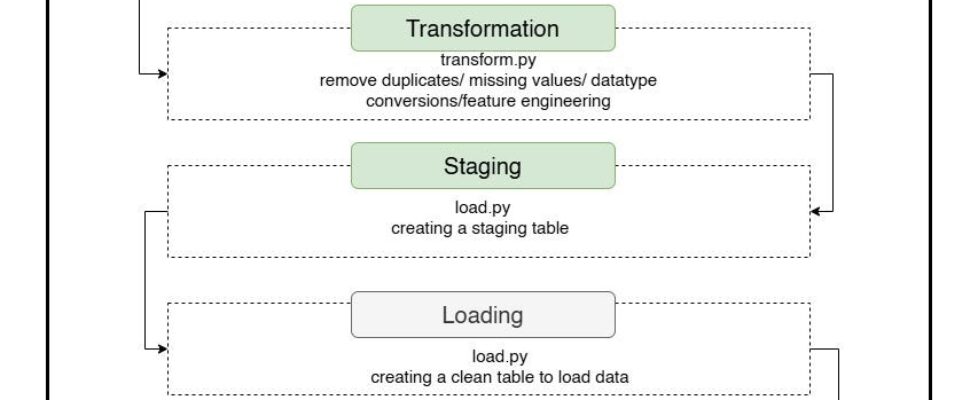
The final architecture shown below follows a common data engineering pattern.
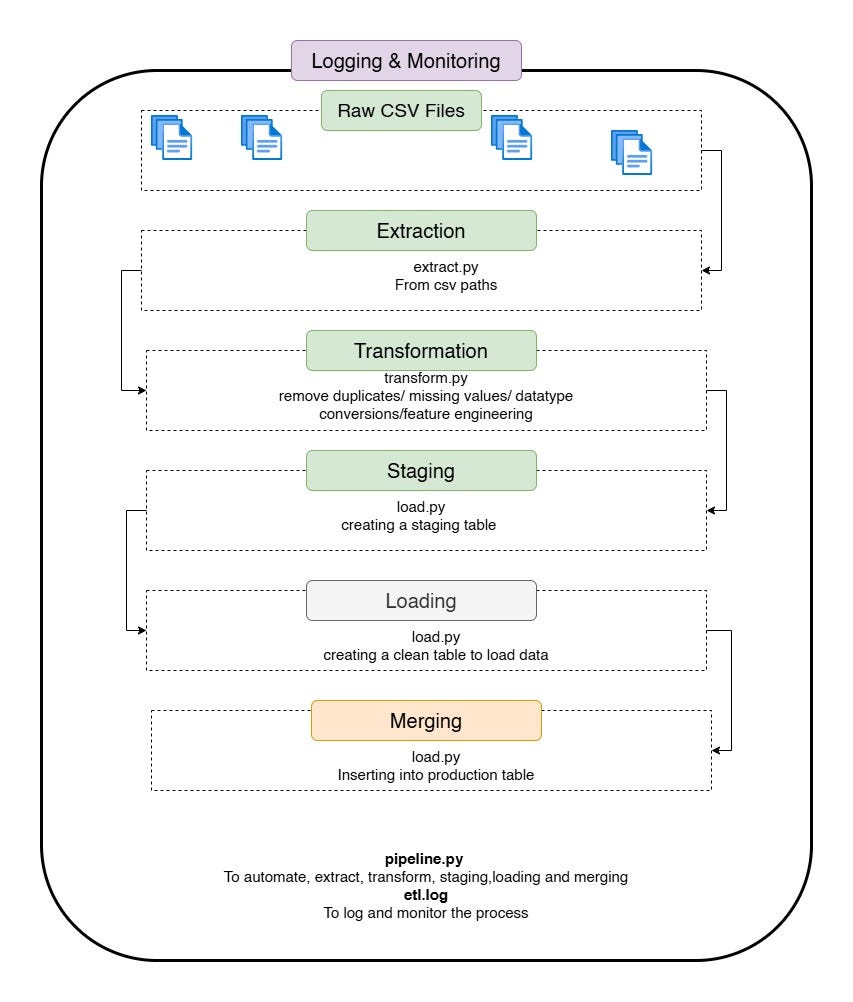
Rather than loading directly into the production table, data first passes through a staging layer where validation and deduplication can occur safely.
Step 1: Extracting Data
The extraction layer is intentionally simple.
import pandas as pd
def extract(csv_path):
    return pd.read_csv(csv_path)
The goal of extraction is to ingest the source data exactly as it exists without applying business rules.
Keeping extraction lightweight makes the pipeline easier to maintain and debug.
Step 2: Cleaning and Transforming Data
The transformation stage is where data quality issues are addressed.
First, duplicate records are removed.
df = df.drop_duplicates()
Rows with missing customer names are excluded.
df = df.dropna(subset=["customer_name"])
Missing order dates are populated with a default value.
df["order_date"] = df["order_date"].fillna("2025-01-01")
The column is then converted into a proper datetime type.
df["order_date"] = pd.to_datetime(df["order_date"])
Finally, a new business metric is created.
df["total_amount"] = df["quantity"] * df["price"]
This transformation converts raw operational data into information that can be used for reporting and analysis.
Initial Loading Strategy
My first implementation loaded records one row at a time.
for _, row in df.iterrows():
    cur.execute(
        """
        INSERT INTO sales (
            order_id,
            customer_name,
            product,
            quantity,
            price,
            total_amount,
            order_date
        )
        VALUES (%s,%s,%s,%s,%s,%s,%s)
        """,
        (
            row["order_id"],
            row["customer_name"],
            row["product"],
            row["quantity"],
            row["price"],
            row["total_amount"],
            row["order_date"]
        )
    )
This approach works well for small datasets.
However, performance deteriorates quickly as data volume grows because each row requires an individual database transaction.
Scaling the Pipeline with PostgreSQL COPY
To improve performance, I replaced row-by-row inserts with PostgreSQL’s high-performance COPY command.
First, the DataFrame is converted into an in-memory CSV buffer.
from io import StringIO
buffer = StringIO()
df.to_csv(
    buffer,
    index=False,
    header=False
)
buffer.seek(0)
The data is then loaded into PostgreSQL in a single operation.
cur.copy_expert(
    """
    COPY sales_staging (
        order_id,
        customer_name,
        product,
        quantity,
        price,
        total_amount,
        order_date
    )
    FROM STDIN WITH CSV
    """,
    buffer
)
This approach is dramatically faster and is commonly used in production ETL pipelines.
Why I Introduced a Staging Table
One challenge emerged after switching to COPY.
My original implementation supported duplicate handling through:
ON CONFLICT (order_id)
DO NOTHING;
However, COPY does not support conflict handling directly.
To solve this problem, I introduced a staging table.
CREATE TABLE sales_staging (
    order_id INT,
    customer_name VARCHAR(100),
    product VARCHAR(100),
    quantity INT,
    price NUMERIC(10,2),
    total_amount NUMERIC(10,2),
    order_date DATE
);
Data is first loaded into the staging table before being merged into the production table.
INSERT INTO sales
SELECT *
FROM sales_staging
ON CONFLICT (order_id)
DO NOTHING;
This pattern combines the speed of bulk loading with the reliability of duplicate protection.
Securing Database Credentials
Hardcoding credentials inside source code is rarely a good idea.
Instead of this:
password = "password"
I moved the configuration into a .env file.
DB_HOST=localhost
DB_PORT=5432
DB_NAME=sales_db
DB_USER=postgres
DB_PASSWORD=my_password
The application loads these values at runtime.
from dotenv import load_dotenv
import os
load_dotenv()
password = os.getenv("DB_PASSWORD")
This makes the application more secure and easier to deploy across environments.
Adding Logging
Production systems require visibility.
To monitor pipeline execution, I added logging.
import logging
logging.basicConfig(
    filename="logs/etl.log",
    level=logging.INFO,
    format="%(asctime)s - %(levelname)s - %(message)s"
)
During execution, the pipeline records important milestones.
logging.info("Extraction Started")
logging.info("Transformation Completed")
logging.info("Loading Started")
logging.info("Pipeline Completed")
These logs simplify troubleshooting and provide operational transparency.
Implementing Transaction Management
Database operations should be atomic.
If a load fails midway through execution, partial records should not remain in the database.
To address this, I implemented rollback support.
try:
    conn.commit()
except Exception as e:
    conn.rollback()
    raise
This ensures that either the entire load succeeds or no changes are written at all.
Lessons Learned
This project reinforced several key data engineering principles:
Build for Scale
A solution that works for 100 rows may not work for 10 million rows.
Separate Concerns
Keeping extraction, transformation, and loading logic in separate modules improves maintainability.
Prioritize Reliability
Logging, transactions, and error handling are just as important as business logic.
Use Proven Patterns
Staging tables and bulk-loading strategies are widely adopted because they solve real operational challenges.
Final Thoughts
What started as a simple CSV ingestion script evolved into a practical data engineering project that mirrors many of the patterns used in production environments.
By incorporating bulk loading, staging tables, environment-based configuration, logging, and transactional database operations, the project moved beyond a beginner exercise and became a valuable learning experience in designing scalable ETL workflows.
For aspiring data engineers, projects like this provide an excellent opportunity to bridge the gap between Python scripting and real-world data platform development.
The technologies may evolve, but the underlying principles remain the same: build reliable pipelines, ensure data quality, optimize performance, and design for scale.
Explore the Full Project
This article covers the architecture and key implementation decisions behind the ETL pipeline. If you’d like to see the complete codebase, setup instructions, and project documentation, you can find the repository here:
GitHub: https://github.com/DECTEN0/csv-postgres-etl
If you’re learning data engineering, ETL development, or PostgreSQL, feel free to fork the project and build on top of it with tools such as Airflow, Docker, Spark, or cloud-based data platforms.
Building a Production-Inspired CSV to PostgreSQL ETL Pipeline with Python was originally published in Towards AI on Medium, where people are continuing the conversation by highlighting and responding to this story.
