Azure Key Vault vs AWS Secrets Manager: Managed Identity, IRSA, and Cloud-Native Secret Management

How Azure Managed Identity, AWS IAM Roles, IRSA, EKS Pod Identity, and cloud-native secret services compare — and where HashiCorp Vault still fits.
TL;DR: Cloud providers solved Secret Zero by making workload identity a first-class platform primitive. Azure does it through Managed Identity and Entra ID. AWS does it through IAM roles, IRSA, and the newer EKS Pod Identity. Neither replaces HashiCorp Vault for dynamic credentials or multi-cloud use cases — but for teams living fully inside one cloud, they remove an entire category of credential risk without operational overhead.
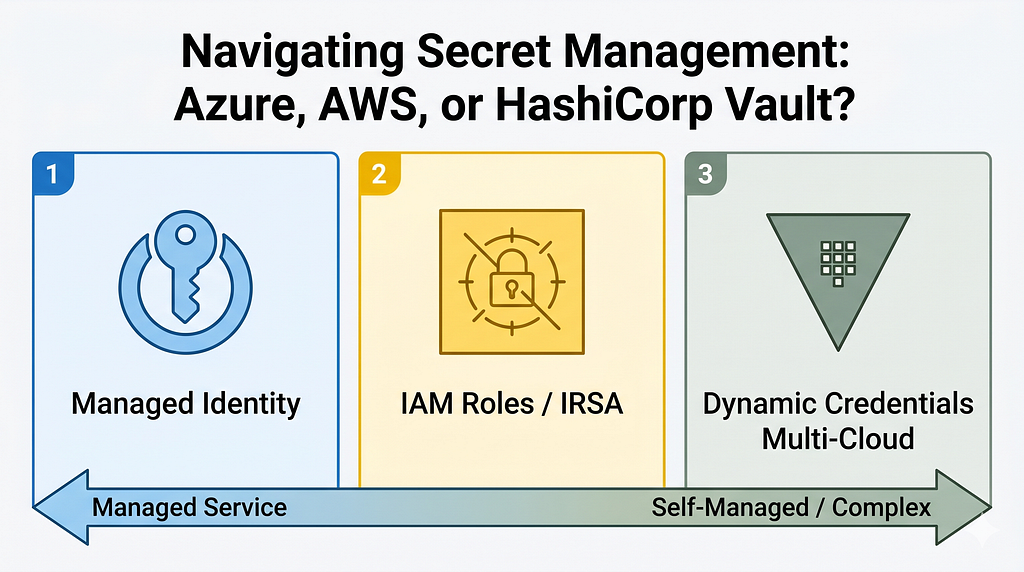
In Part 2, the central idea was clear: applications should authenticate using identities, not long-lived credentials. Cloud providers reached the same conclusion and embedded it directly into their platforms.
This article covers:
- What the Secret Zero problem is and why it matters
- Azure Key Vault and how Managed Identity solves credential bootstrapping
- AWS Secrets Manager and IAM-native secret retrieval
- EKS IRSA and EKS Pod Identity — and why the newer one matters
- Rotation patterns and the Lambda contract
- Private networking and network isolation
- Practical tradeoffs versus Vault
The Secret Zero Problem
Before diving into solutions, let’s define the core problem this entire space is solving.
Secret Zero is the bootstrapping paradox: to retrieve a secret from a secret store, an application needs some initial credential. But that initial credential is itself a secret. How do you securely deliver the first secret without already having a secret manager?
Traditional answer: bake credentials into config files, environment variables, or source code. This creates:
- Credential sprawl — copies of secrets scattered across servers, CI pipelines, and developer machines
- Manual rotation — changing a password means finding every place it’s stored
- Audit gaps — no reliable record of what accessed what and when
- Blast radius — one leaked credential can compromise many systems
The cloud-native answer: replace the initial credential with a platform-attested workload identity. The cloud platform itself vouches for the workload, eliminating the need to distribute any bootstrap credential at all.
The Cloud-Native Shift
Traditional architecture:
Application --> Stored Password --> Database
Modern cloud architecture:
Application --> Workload Identity --> Secret Manager --> Database
The workload proves its identity through the platform. The secret manager determines authorization based on that identity. This removes an entire class of credential sprawl.
Azure Key Vault
Azure Key Vault is Microsoft’s managed service for secrets, keys, and certificates.
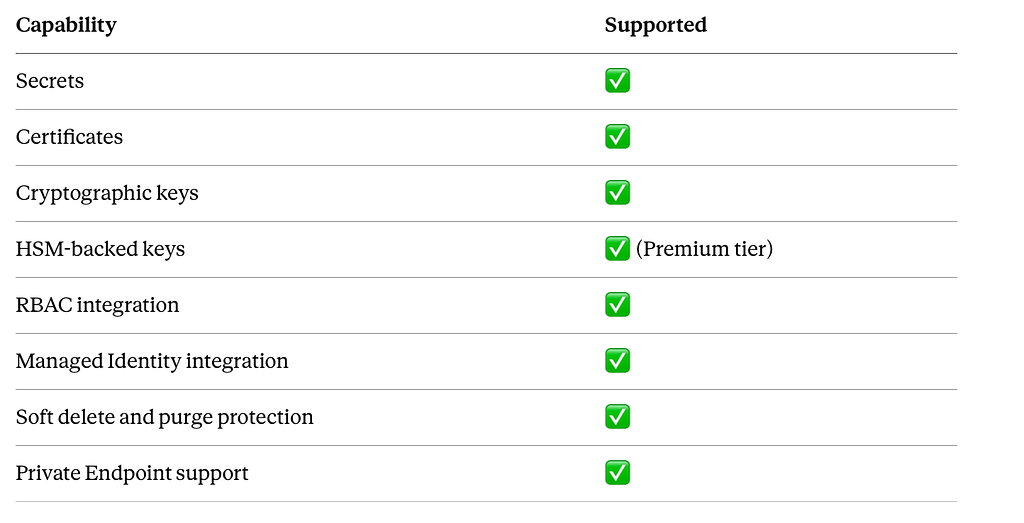
Architect note: Key Vault operates at the Vault level, not the secret level. Each vault has its own access plane. For isolation between teams or environments, use separate vaults — not just separate secrets within the same vault.
Azure manages availability, replication, backups, and operational maintenance. That low overhead makes Key Vault the natural default for Azure-first organizations.
Key Vault Architecture
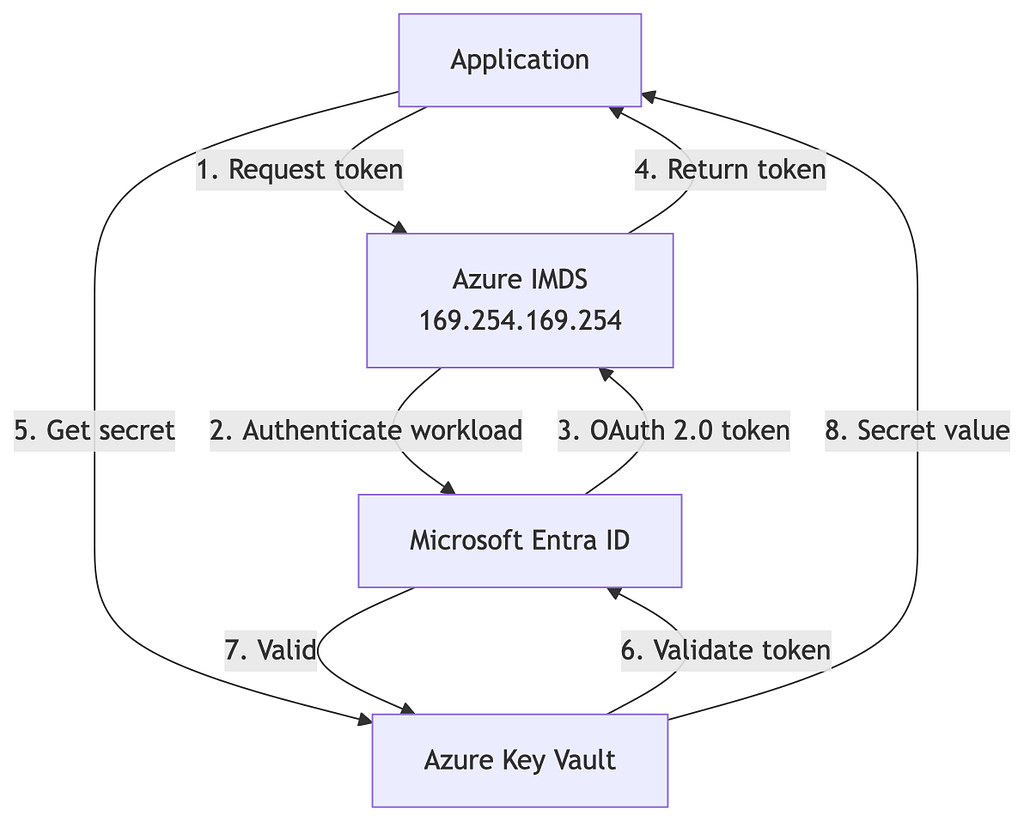
Notice what is missing: a stored password. The application never holds a long-lived credential to authenticate to Key Vault.
Managed Identity in Practice
Managed Identity is Azure’s answer to Secret Zero.
Without Managed Identity:
Application → Client Secret → Azure Resource
The client secret needs to be stored somewhere, rotated manually, and distributed securely. The problem recurses.
With Managed Identity:
Application → Platform-Attested Identity → Azure Resource
No credential to store. No rotation to manage. No distribution problem.
How the Token Flow Actually Works
The Azure Instance Metadata Service (IMDS) is the local endpoint that makes this possible. It runs at a link-local address accessible only from within the Azure compute environment:
GET http://169.254.169.254/metadata/identity/oauth2/token
    ?api-version=2018-02-01
    &resource=https://vault.azure.net
The platform responds with a short-lived OAuth 2.0 token scoped to the requested resource. The application uses that token to call Key Vault. No secrets were exchanged to obtain it — the platform vouched for the workload by virtue of where it’s running.
Full Managed Identity Sequence
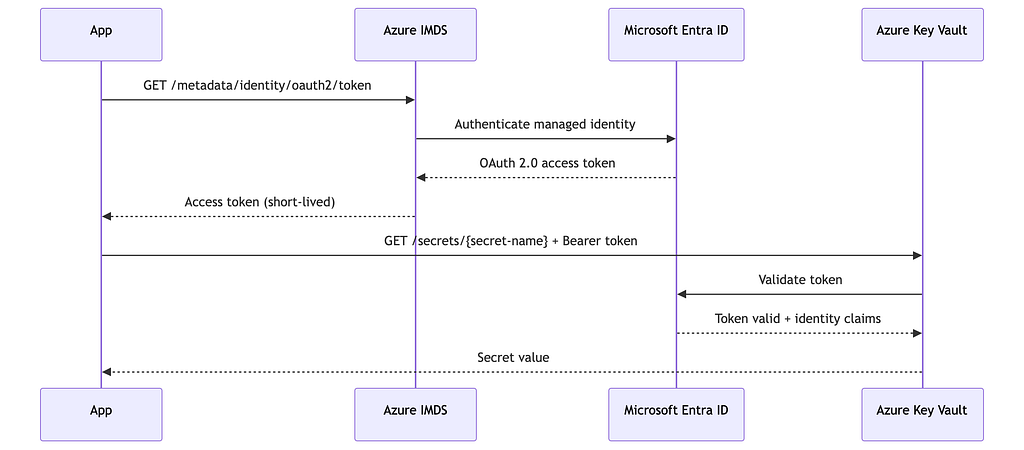
Every access is identity-driven and fully auditable in Azure Monitor.
System-Assigned vs. User-Assigned: A Real Architecture Decision
This is not a footnote. Get this wrong and you’ll be refactoring IAM bindings when your workload count grows.
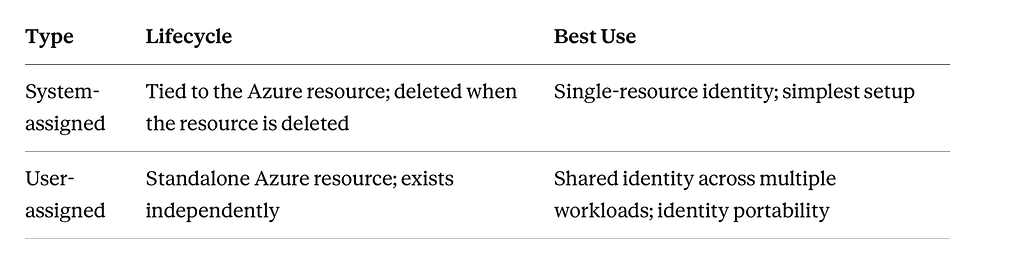
Rule of thumb:
- Start with system-assigned for greenfield single-workload deployments.
- Move to user-assigned when a fleet of compute instances needs the same identity, or when you need to pre-assign permissions before the compute resource exists.
Key Vault Authorization and Networking
RBAC vs. Access Policies
Key Vault originally used its own access policy model. Modern deployments should use Azure RBAC instead — it integrates with the same identity plane governing the rest of your Azure resources.
Useful built-in roles:
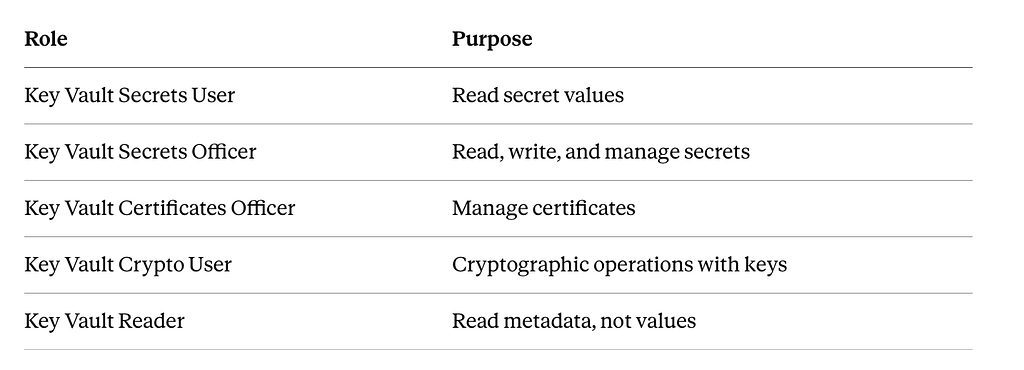
Security principle: Grant Key Vault Secrets User to workloads. Reserve officer-level roles for human operators. Never assign Key Vault Administrator to a workload identity.
Private Endpoints and Network Isolation
Production Key Vault deployments should not be accessible over the public internet.

The Private DNS Zone is important. Without it, DNS will resolve your vault’s public hostname to the private endpoint IP only inside the VNet. Configure privatelink.vaultcore.azure.net as the private DNS zone and link it to your VNet.
After enabling Private Endpoint, set the Key Vault network firewall to deny public access to enforce network isolation.
Soft Delete and Purge Protection
Enable both. Always.
- Soft delete retains deleted secrets, keys, and certificates for a configurable retention period (7–90 days). Deleted items can be recovered during this window.
- Purge protection prevents permanent deletion (purge) during the soft-delete retention period — even by administrators.
Why it matters for compliance: Many regulatory frameworks require that cryptographic key material cannot be permanently deleted without a defined process. Purge protection enforces this at the platform level.
Operational reality: Without these controls, a misconfigured IaC pipeline, a runbook error, or a compromised admin account can destroy secrets permanently. Recovery becomes an incident.
AKS Workload Identity
For Kubernetes workloads on AKS, the pattern extends Managed Identity into the pod level using OIDC federation.
Prerequisites:
- AKS cluster must have the OIDC Issuer feature enabled (–enable-oidc-issuer)
- The Azure Workload Identity mutating admission webhook must be installed (available as a managed AKS add-on)
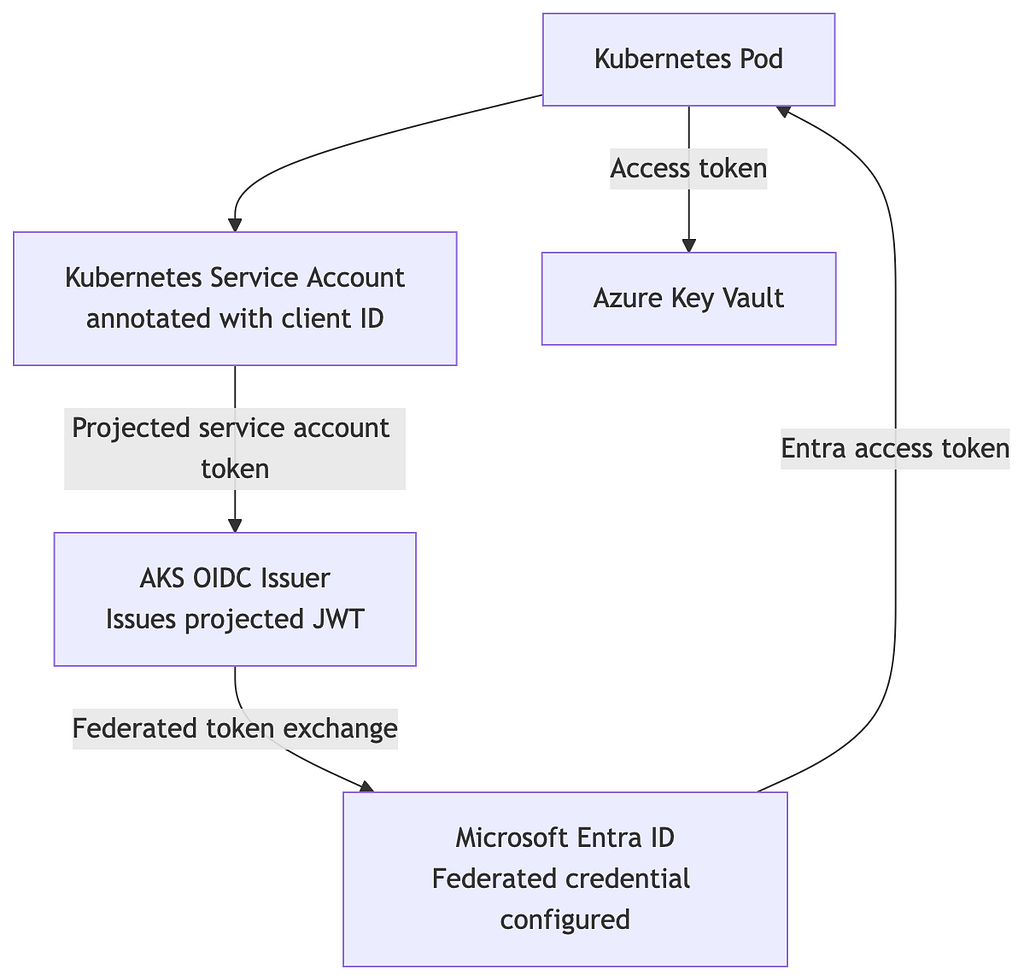
The pod receives a Kubernetes-issued JWT as a projected volume. The webhook intercepts pod creation and injects the environment variables your SDK needs to perform the token exchange automatically.
The pod never holds an Azure client secret. It holds a Kubernetes-issued JWT that Entra ID trusts through the federated credential configuration.
AWS Secrets Manager
AWS Secrets Manager is Amazon’s managed service for secret storage, retrieval, and rotation.
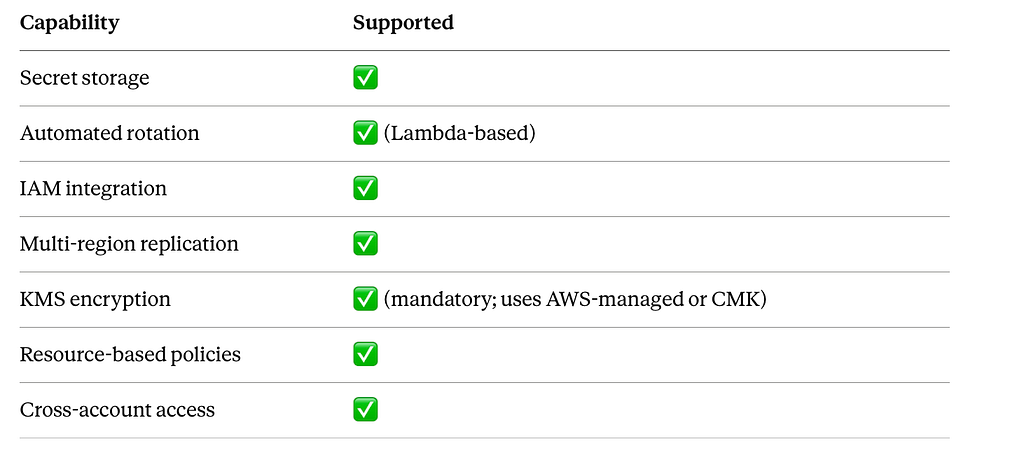
Cost note: Secrets Manager charges approximately $0.40 per secret per month, plus $0.05 per 10,000 API calls. For applications with hundreds of secrets or very high call volumes, this adds up. This is a meaningful factor in the Parameter Store vs. Secrets Manager decision covered later.
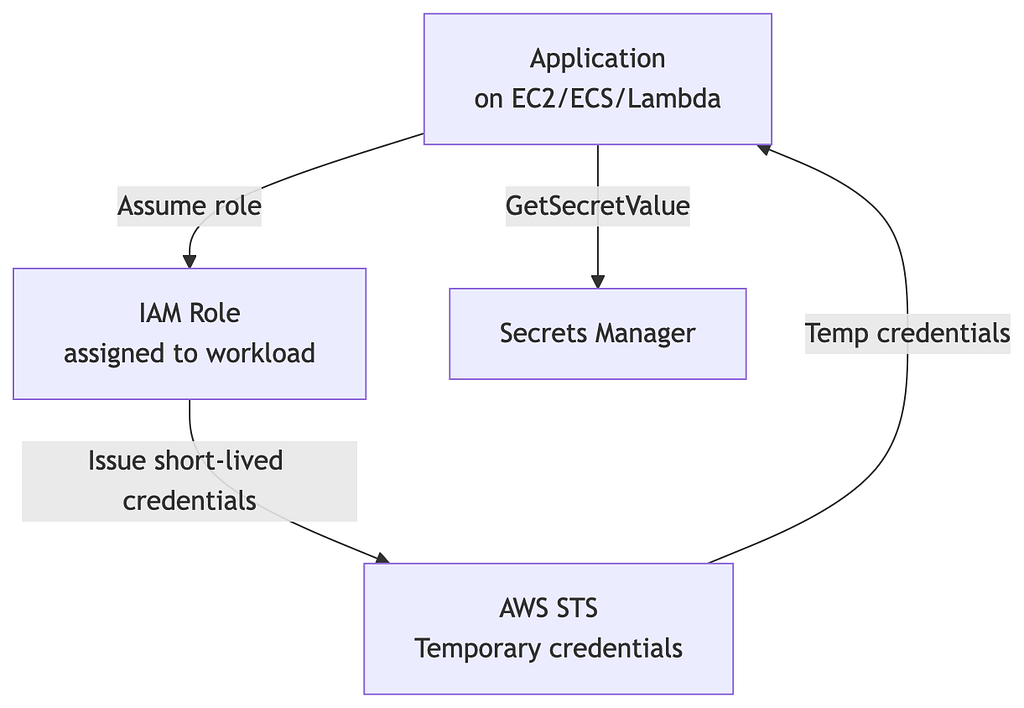
Architecture
IAM Roles and Secret Zero on AWS
The AWS answer to Secret Zero is the IAM role.
Without IAM roles:
Application → Long-lived Access Key → AWS Service
Access keys are permanent. They leak in Git history, CI logs, and Docker image layers. When they leak, the rotation and revocation process is manual and painful.
With IAM roles:
Application → IAM Role → AWS STS → Temporary Credentials → AWS Service
The credentials are short-lived (default 1 hour, configurable up to 12 hours for role sessions). When they expire, they become useless. No manual revocation needed.
Retrieval Flow
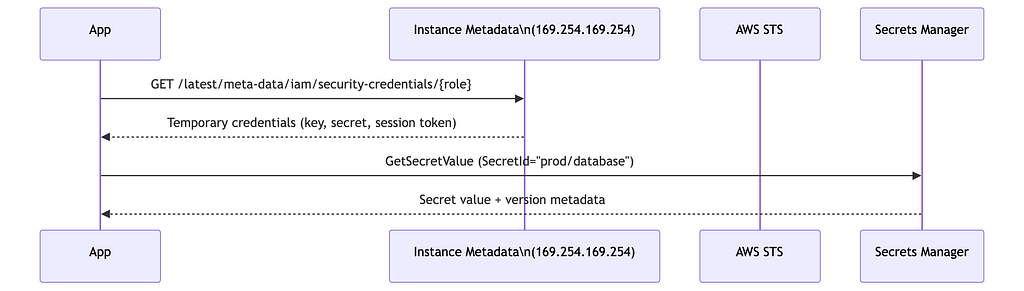
AWS SDK note: In practice, you rarely call the metadata service directly. AWS SDKs handle credential resolution automatically through the default credential provider chain. A simple boto3 call looks like:
import boto3
import json
client = boto3.client("secretsmanager", region_name="us-east-1")
response = client.get_secret_value(SecretId="prod/database")
# SecretString contains the value; parse if JSON
secret = json.loads(response["SecretString"])
db_password = secret["password"]
The application never holds a permanent AWS access key.
EKS IRSA and EKS Pod Identity
For Kubernetes workloads on EKS, AWS provides two mechanisms. Understanding both matters — one is the established standard; the other is the simpler replacement.
IRSA (IAM Roles for Service Accounts)
IRSA uses OIDC federation to map a Kubernetes service account to an IAM role. It has been the standard approach since 2019.
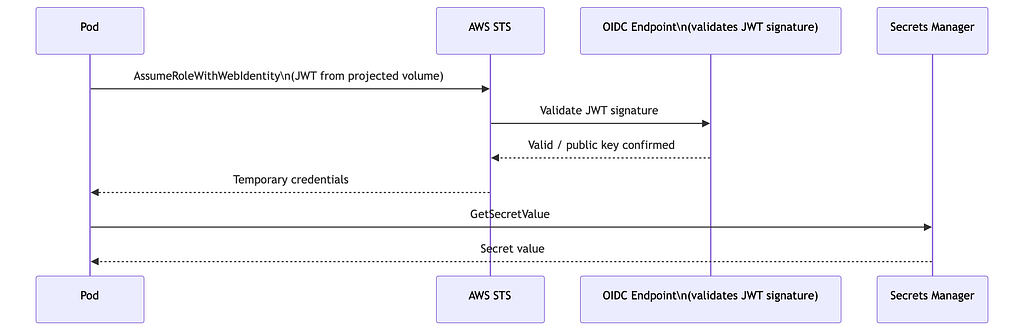
How it works: EKS projects a service account JWT into the pod. When the pod calls AWS STS’s AssumeRoleWithWebIdentity, STS validates the JWT against the cluster’s OIDC endpoint. If valid and the trust policy matches, STS returns temporary credentials.
Architecture correction: The OIDC provider does not “return” anything to the pod. It is a validation endpoint that STS calls. The pod presents its JWT to STS; STS checks the OIDC endpoint to verify the JWT signature; STS issues credentials. The pod never communicates directly with the OIDC provider.
IRSA setup requires:
- An OIDC Identity Provider associated with the EKS cluster
- An IAM role with a trust policy referencing the OIDC issuer and the service account
- A Kubernetes service account annotated with the IAM role ARN
yaml
apiVersion: v1
kind: ServiceAccount
metadata:
  name: reporting-app
  namespace: apps
  annotations:
    eks.amazonaws.com/role-arn: arn:aws:iam::123456789012:role/reporting-app-role
EKS Pod Identity (2023) — The Simpler Path
AWS introduced EKS Pod Identity in November 2023. It simplifies the IRSA model significantly.
What changed:
- No OIDC configuration required at the account level
- No trust policy editing needed for each role
- The association is configured through EKS directly, not through IAM role trust policies
- Uses a new EKS Pod Identity Agent (DaemonSet) on each node
Pod Identity setup:
# Create a Pod Identity association
aws eks create-pod-identity-association
  --cluster-name my-cluster
  --namespace apps
  --service-account reporting-app
  --role-arn arn:aws:iam::123456789012:role/reporting-app-role
No annotation on the service account. No OIDC issuer setup. The EKS control plane handles the token exchange.
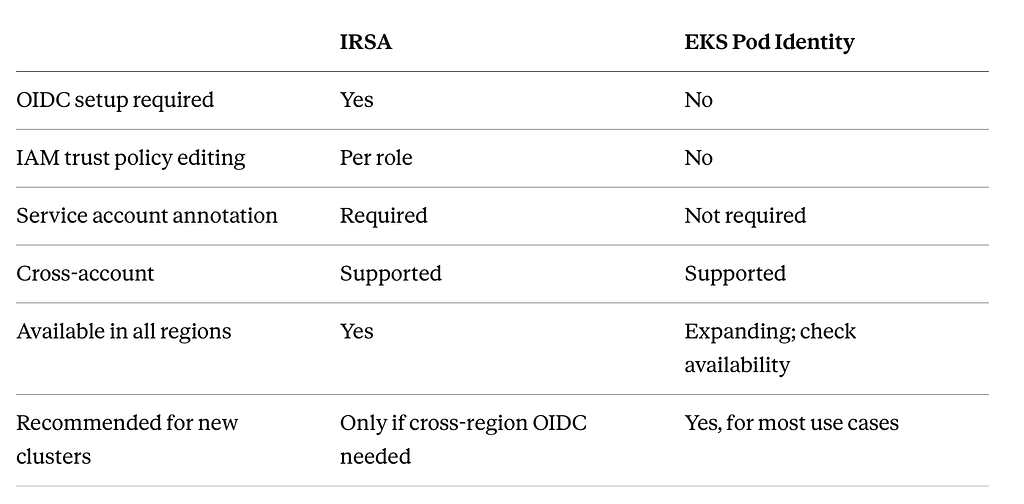
Architect recommendation: For new EKS clusters, evaluate Pod Identity first. IRSA is mature and well-documented, but Pod Identity reduces the configuration surface area and removes a common source of misconfiguration.
Rotation in AWS Secrets Manager
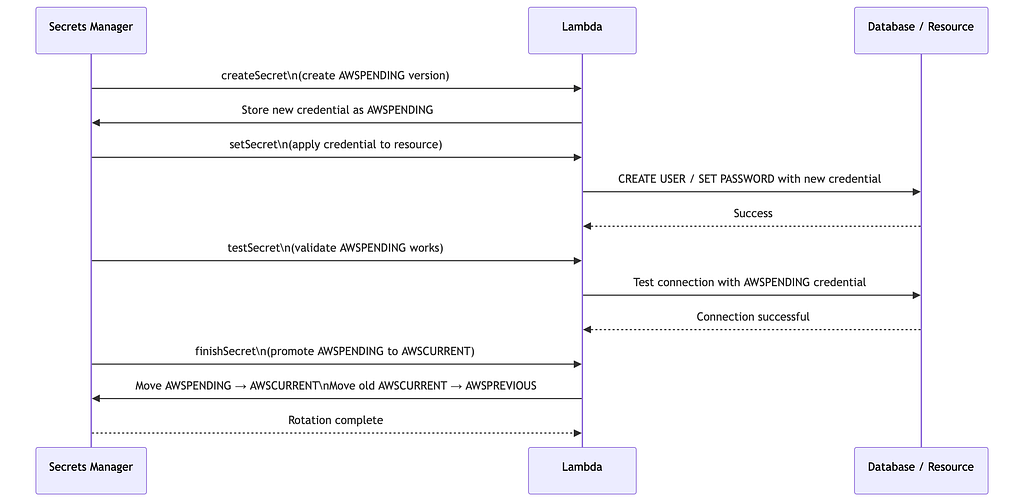
Automated rotation is one of Secrets Manager’s strongest capabilities. It is implemented through a Lambda function that follows a four-step contract.
The Version Staging Model
Before looking at the Lambda steps, understand how Secrets Manager handles version transitions.
Secrets Manager maintains version labels:
- AWSCURRENT — the active version in use
- AWSPENDING — the newly created version undergoing rotation
- AWSPREVIOUS — the last known-good version (kept for rollback)
A rotation cycle moves a secret from AWSPENDING to AWSCURRENT only after the new credential has been validated against the actual resource. This prevents a bad rotation from immediately breaking production.
Rotation Flow with Version Staging
Lambda Rotation Steps — What Each One Does
1. createSecret  — Generate new credential value; store as AWSPENDING
2. setSecret     — Apply the new credential to the actual resource (database, API, etc.)
3. testSecret    — Verify the AWSPENDING credential actually works against the resource
4. finishSecret  — Promote AWSPENDING to AWSCURRENT; demote old AWSCURRENT to AWSPREVIOUS
The testSecret step is where many teams make mistakes — skipping validation means a failed rotation only gets caught when production starts returning auth errors. Build real connection tests into this step.
Rollback tip: If rotation fails, the AWSPREVIOUS label retains the last good secret. Applications should be written to retry with the previous version on auth failure during the rotation window. AWS documents this dual-version retrieval pattern in their rotation guides.
AWS Parameter Store vs. Secrets Manager
This question comes up in every AWS architecture review. The services overlap but serve different roles.
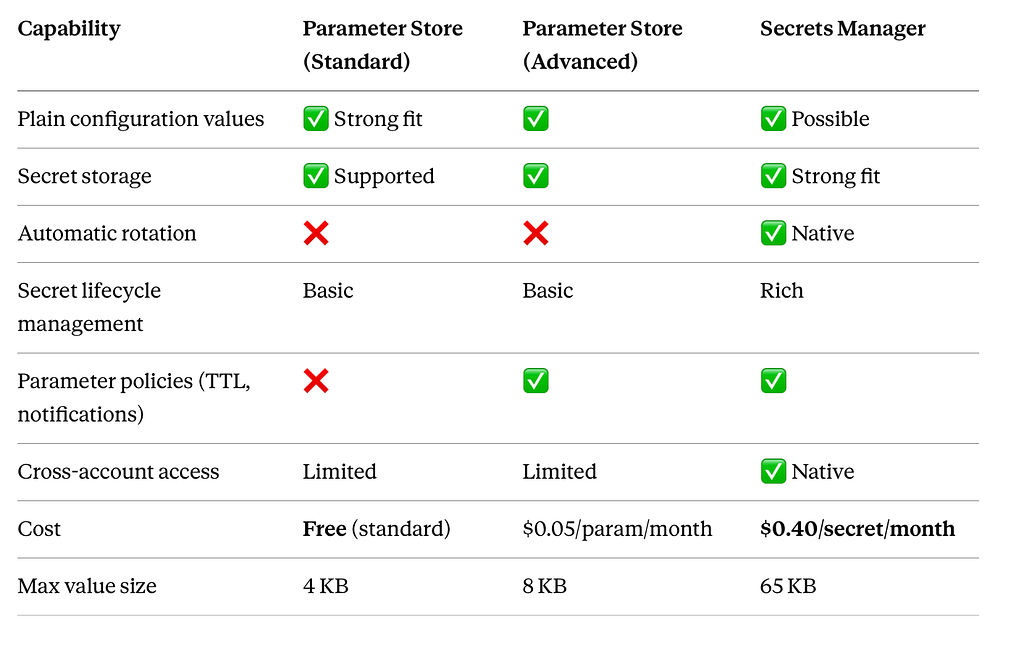
Practical decision rule:
- Parameter Store (Standard): Non-sensitive configuration, feature flags, environment-specific settings. Free, fast, simple.
- Parameter Store (Advanced): Config values needing TTL enforcement or CloudWatch notifications on parameter expiry.
- Secrets Manager: Database credentials, API keys, anything needing automated rotation or a richer lifecycle. The cost is justified when rotation saves you from manual processes and breach risk.
Common pattern: Use Parameter Store for application configuration (endpoints, feature flags, log levels) and Secrets Manager for credentials. Reference both through the same AWS SDK; the access pattern is nearly identical.
Versions, Rollback, and Cross-Account Access
Versioning and Rollback
Both Azure Key Vault and AWS Secrets Manager maintain version history.
- Key Vault stores each update as a new version and retains the full history. You can retrieve any version by its version identifier. Soft delete and purge protection extend this to deleted secrets.
- Secrets Manager maintains labeled versions (AWSCURRENT, AWSPREVIOUS, AWSPENDING). You can retrieve by label or by explicit version ID.
Operational discipline: During a rotation incident, having a clear rollback procedure matters. Know in advance how your application retrieves the previous version and test it in staging before you need it in production at 2 AM.
Cross-Account Patterns in AWS
Larger AWS organizations centralize secrets in a dedicated Secrets account and grant access from workload accounts via resource-based policies and cross-account role assumptions.

Important implementation detail: If the secret is encrypted with a customer-managed KMS key (CMK), the workload account also needs kms:Decrypt permission on that key, and the KMS key policy must grant cross-account access. A common misconfiguration is granting Secrets Manager access but forgetting the KMS key policy — the result is a cryptic access denied on decryption.
Vault vs. Azure Key Vault vs. AWS Secrets Manager
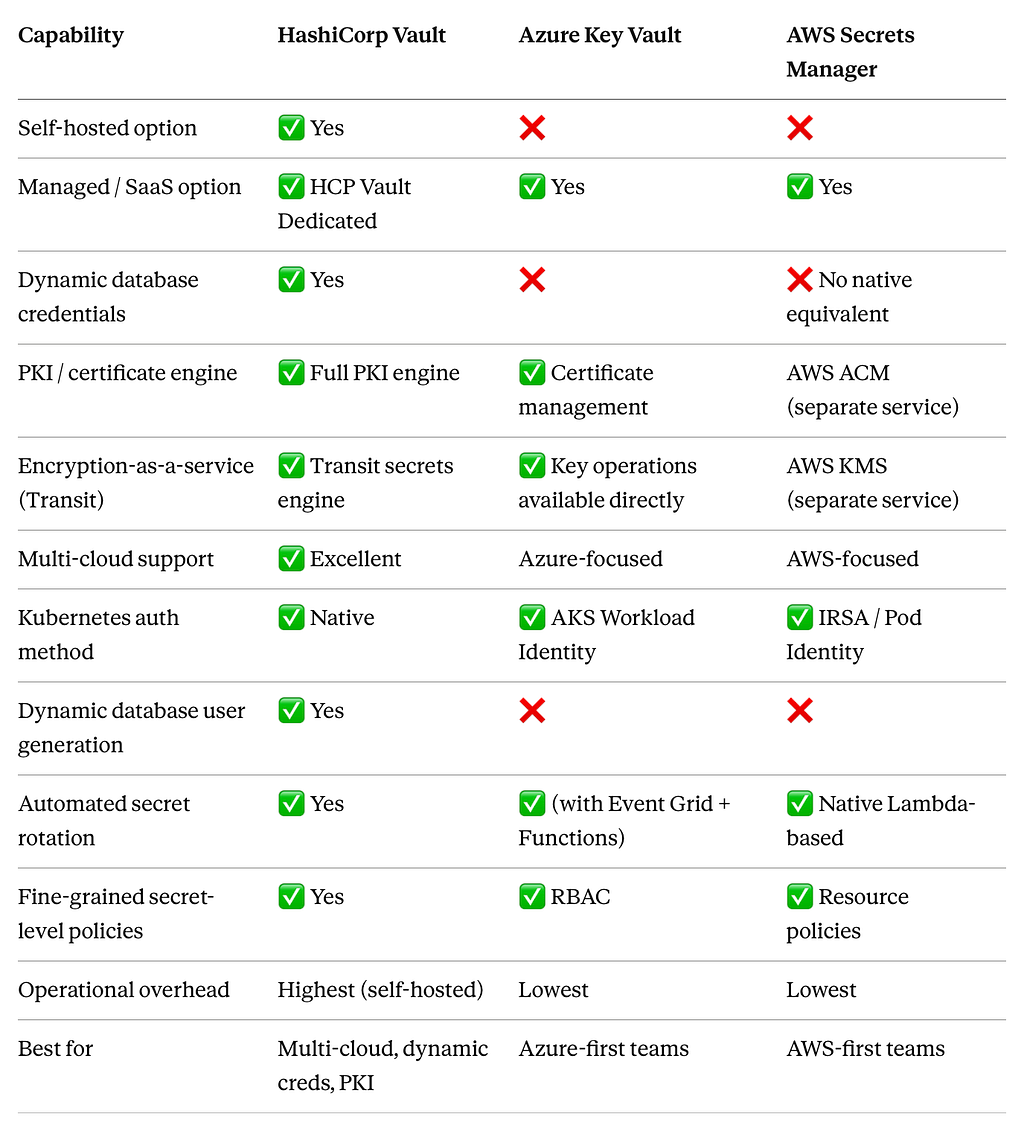
Clarification on transit encryption: Azure Key Vault does support cryptographic operations (encrypt, decrypt, sign, verify, wrap/unwrap) directly through its key API — it is not purely “partial.” However, it is not a general-purpose encryption proxy like Vault’s Transit engine, which can encrypt arbitrary payloads for applications that don’t manage keys. For Azure-native workloads, Key Vault’s key operations cover most needs. For application-layer encryption patterns where the secret manager acts as the encryption oracle, Vault’s Transit engine remains uniquely capable.
Choosing the Right Tool
Choose HashiCorp Vault when
- You run multi-cloud or hybrid infrastructure and need a single secrets plane
- You need dynamic credentials — database users, cloud IAM credentials, or PKI certificates that are generated on demand and expire automatically
- You need a full PKI engine — issuing, renewing, and revoking TLS certificates at scale
- You need fine-grained secret access policies beyond what cloud-native RBAC provides
- You have existing Vault investment and operational expertise
Choose Azure Key Vault when
- Your workloads are primarily on Azure
- You want minimal operational overhead — no infrastructure to run
- You need tight Entra ID integration for identity and access
- Your Kubernetes workloads run on AKS and you want native Workload Identity
- You need HSM-backed key protection without managing HSM hardware
Choose AWS Secrets Manager when
- Your workloads are primarily on AWS
- You need native automated rotation through Lambda
- You run on EKS and want IRSA or Pod Identity for secretless credential access
- You want strong IAM policy integration and centralized secrets governance
- You are building Lambda functions or ECS tasks that need seamless secret retrieval
A Note on Running Multiple Tools
These tools are not mutually exclusive. A common enterprise pattern:
- Vault for dynamic database credentials and PKI across multiple clouds
- AWS Secrets Manager for AWS-specific secrets with native rotation
- External Secrets Operator (covered in Part 4) to sync from Vault or Secrets Manager into Kubernetes Secrets
The identity mechanisms are also composable. A workload can authenticate to Vault using its IRSA credentials, retrieve a dynamic database credential, and use Secrets Manager for other application secrets — all without storing a single long-lived credential.
What’s Next
Part 4 focuses on the question most Kubernetes teams ask next: if Kubernetes already has built-in Secrets, why bring in Vault, Key Vault, or Secrets Manager at all?
That leads into External Secrets Operator, the Secrets Store CSI Driver, Vault Agent, RBAC pitfalls, and the critical distinction between storing a secret and managing its lifecycle — a difference that matters enormously when a credential leaks at 2 AM.
Key Takeaways
- Secret Zero is the bootstrapping problem. Platform-attested workload identity — Managed Identity on Azure, IAM roles on AWS — is the correct solution.
- Managed Identity (Azure) and IAM roles (AWS) eliminate the need to distribute or store credentials for workloads to authenticate.
- IRSA works well and is mature. EKS Pod Identity is simpler for new clusters — evaluate it first.
- Soft delete and purge protection in Azure Key Vault are not optional for production. Enable them at vault creation.
- Rotation in Secrets Manager follows a four-step Lambda contract. The testSecret step is where most implementations fail silently — build real validation into it.
- Parameter Store (free, standard tier) is appropriate for configuration. Secrets Manager ($0.40/secret/month) is appropriate for credentials with rotation requirements.
- Vault is not a competitor to cloud-native tools for workloads living entirely in one cloud. It is the right answer for dynamic credentials, PKI at scale, and multi-cloud deployments.
Found this useful? The series continues with Part 4: Kubernetes Secrets, External Secrets Operator, and the CSI Driver.
Stay Connected
If this helped you think more clearly about secrets management, the best thing you can do is share it with someone building on the same problems.
Follow TheProdSDE for more content on platform engineering, cloud architecture, and production systems:
- 🔗 LinkedIn: linkedin.com/in/TheProdSDE
- 🐦 X (Twitter): x.com/TheProdSDE
- ▶️ YouTube: youtube.com/@TheProdSDE
- ✍️ Medium: medium.com/@TheProdSDE
Every article, video, and thread in this space is aimed at one thing: helping engineers build production systems that don’t break quietly.
@TheProdSDE
Azure Key Vault vs AWS Secrets Manager: Managed Identity, IRSA, and Cloud-Native Secret Management was originally published in Towards AI on Medium, where people are continuing the conversation by highlighting and responding to this story.
