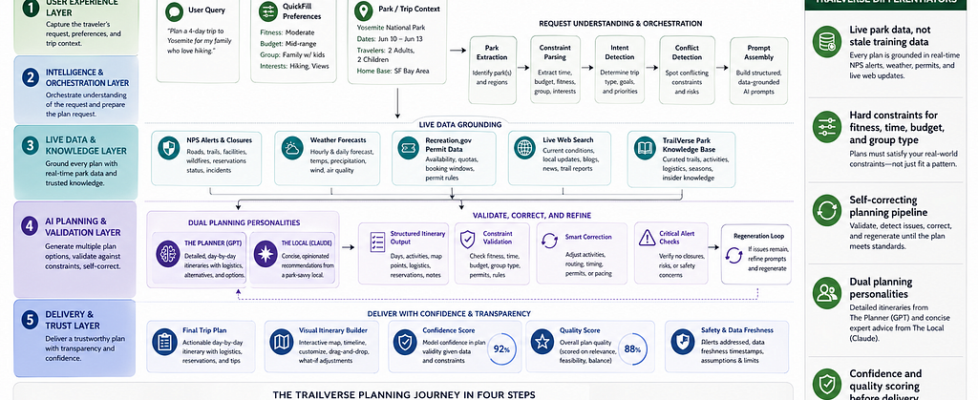
AI Trip Planning Isn’t a Text Generation Problem

Ask ChatGPT to plan a 5-day Yellowstone trip, and you’ll get something that reads beautifully and falls apart on contact with reality. A January drive up the Beartooth Highway (buried under ten feet of snow). A campsite at a campground that closed three years ago. Fourteen hours of hiking on day one, with a toddler in your group.
The output sounds helpful. It would also ruin your trip.
This is the fundamental problem with AI travel planning. Most apps treat it as text generation — throw a prompt at an LLM, render the response, call it a product. But an itinerary isn’t creative writing. It’s constraint satisfaction. A great trip plan isn’t one that sounds good. It’s one that still works when you show up at the trailhead at 6:30 AM.
That realization shaped how I built TrailVerse. This is the engineering story of how I went from a basic chat wrapper to a pipeline that parses your constraints, validates them against live data, detects contradictions in what you’re asking for, scores its own output, and regenerates when it isn’t confident enough — all before you see a single word.
Why Most Travel AI Fails
Most AI travel apps share the same three failures:
No live data. LLMs are trained on static snapshots. They don’t know the Going-to-the-Sun Road opened late this year, or that Yosemite just rolled out new timed-entry permits.
No constraint awareness. A beginner hiker with kids and a fit solo backpacker get roughly the same itinerary with different adjectives. Fitness level, group composition, and budget are treated as flavor text, not requirements.
No self-validation. The AI generates once. If the output violates physics, ignores a safety closure, or contradicts the user’s own stated preferences, nobody catches it.
TrailVerse was built to solve all three — not with a better prompt, but with a pipeline.
The Shift: Pipeline, Not Prompt
The biggest mental shift was moving from “AI as text generator” to “AI as one stage in a planning system.” The LLM is important, but it’s the middle of the stack, not the whole thing.
The full pipeline has five layers:
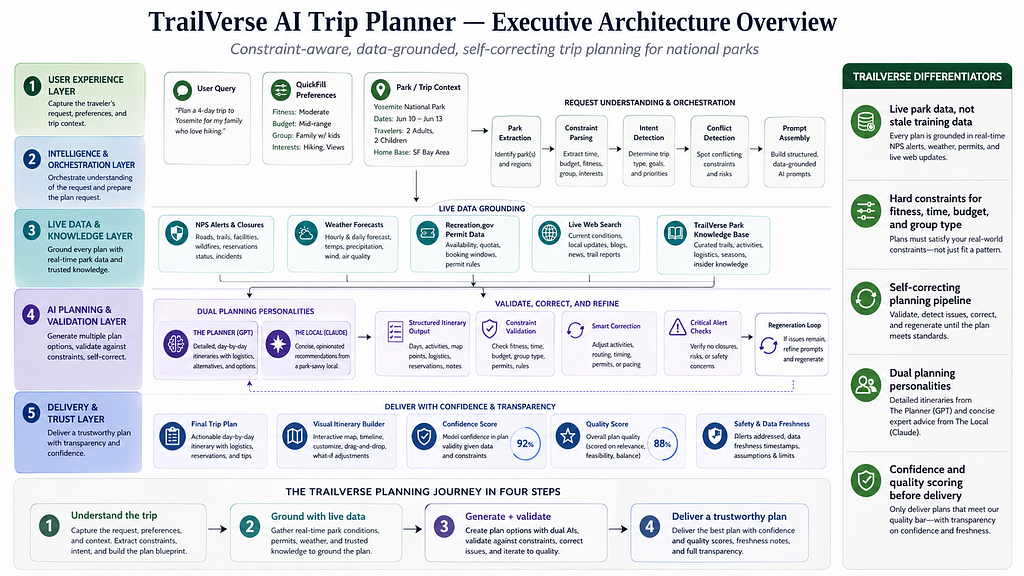
The LLM provides creativity and knowledge. Everything around it provides reliability.
Layer 1: Understanding What the User Actually Needs
Before I ever call the model, I parse the user’s input into structured constraints: dates, group size, fitness level, accommodation preference, interests, kids present, and budget.
Then I do something most travel AI skips — I detect contradictions.
Users regularly ask for contradictory things. “I want an easy but adventurous trip.” “I want a relaxing trip, but I want to see everything.” “I’m a beginner, but I want to do Angels Landing.” The naive response is to quietly merge the contradiction into a mediocre compromise. LLMs love doing this — they’re people-pleasers.
Instead, I force the model to address the conflict explicitly:
if has_signal(msg, EASY_TERMS) and has_signal(msg, ADVENTURE_TERMS):
    inject_instruction("""
    The user wants both 'easy/relaxing' AND 'adventurous/thrilling'.
    These pull in opposite directions.
    You MUST present TWO distinct plans:
      Option A — Easy + Scenic
      Option B — Adventure-Forward
    Do NOT blend them into a generic middle-ground plan.
    """)
I also detect implicit archetypes from language. A user who mentions “sunrise” and “golden hour” gets a photographer plan — viewpoints, specific light windows. A user who mentions “kids” and “stroller” gets a family plan — max four stops per day, no pre-dawn starts, ranger programs flagged. A user who says “summit” and “scramble” gets the hardest trails with bail-out points identified.
For logged-in users, I also inject a USER CONTEXT block: their favorite parks, their last 10 visited parks with dates, and their first name. If you’ve already been to Yellowstone in June 2024 and ask, “Where should I go next?”, the AI won’t suggest Yellowstone. If your favorites lean desert, recommendations weight that way. The context never overrides explicit constraints — it just makes the defaults smarter.
Archetypes shape tone and priorities. Hard constraints still win. A photographer with beginner fitness gets easy viewpoints, not a strenuous sunrise summit.
Layer 2: Grounding in Live Data
The most important thing separating this from a generic travel chatbot is live data. When you ask about Glacier, the AI isn’t guessing from 2023 training data — it’s working with information gathered in the last few minutes:
- NPS alerts and closures — trail closures, road closures, fire updates, hazard warnings
- Permit requirements — the parks with timed-entry, booking URLs, lead times
- 3-day weather forecast — from OpenWeatherMap, at the park’s actual coordinates
- Live web search — cascading across multiple providers (Brave, Serper, Tavily), with category-specific strategies (past-day freshness for wildfires, past-week for trail conditions, no freshness filter for restaurants)
When a user mentions multiple parks (“10 days, Yellowstone + Grand Teton + Glacier”), the pipeline fans out — NPS, weather, and web search all run in parallel for each park, with results labeled and injected as separate data blocks so closures from one park don’t bleed into recommendations for another.
I also integrate directly with the Recreation Information Database (RIDB) — the API behind Recreation.gov — for permits and timed-entry tickets. The challenge is that NPS uses short codes like yose, and RIDB uses numeric facility IDs. I bridge them with fuzzy name matching, stripping suffixes like “National Park” to find the right RIDB record. The AI then surfaces deep links to the actual booking page: not “you need a permit,” but “book your Half Dome permit here: [recreation.gov link].”
All of this gets assembled into a “LIVE DATA” block that’s injected into the system prompt, framed explicitly:
This is AUTHORITATIVE real-time data. This OVERRIDES your training data where they conflict.
And crucially — when data is missing, I tell the user. If the NPS API is down, the AI doesn’t silently fall back to training data and pretend it’s current. It says: “I don’t have real-time data for this park right now. Check nps.gov before you go.”
Confident hallucinations kill trust faster than any other failure mode. An AI that says “I’m not sure” is more useful than one that confidently lies.
Layer 3: Two Voices, One Brain
I run two AI personalities with genuinely different response styles:
The Local, powered by Claude, is the insider friend. Opinionated, casual, direct. When you ask “Zion vs Bryce?”, it picks one and tells you why. It tells you what to skip: “Old Faithful is worth 20 minutes, not 2 hours.” Responses are 150–300 words. No headers, no sections. Just talk.
The Planner, powered by GPT, is the detail-obsessed architect. Time-blocked itineraries, specific start times, driving distances, parking tips, reservation deadlines, gear lists. “6:30 AM — Arrive at trailhead (parking fills by 8 AM).” Every planning response includes a mandatory [ITINERARY_JSON] block that powers my visual builder.
Same data, same validation, same pipeline. Different communication style.
Layer 4: The Post-Generation Pipeline
This is where most AI products stop. I’m just getting started.
Structured output extraction. I parse the [ITINERARY_JSON] block out of the response — days, stops, coordinates, durations, difficulty, alternatives. If the block is missing or got truncated at the token limit, I make a second lightweight AI call dedicated solely to extracting structure from the text.
Constraint validation. Did the AI actually respect the user’s constraints? The common violations, in rough order of frequency:
- User asked for 3 days, AI generated 5
- Strenuous trail included for a beginner
- Accommodation mismatch (user wants camping, AI suggested a lodge)
- Schedule overflow — 16 hours of activity in one day
- Time overlaps between stops
- More than four stops in a day for a family with kids
Smart replacement, not just deletion. When a stop violates a constraint, I don’t delete it — I swap it for an alternative. Every stop in my itinerary format includes an alternatives array populated by the LLM:
def replace_violating_stop(stop, constraints, used_stops):
    for alt in stop.alternatives:
        if not satisfies(alt, constraints):
            continue
        if alt.name in used_stops:
            continue
        if haversine(alt.coords, stop.coords) > 30:  # miles
            continue
        return alt
    return None  # fall through to regeneration
If a beginner got Angels Landing, I swap in Emerald Pools — easy, shaded, waterfall payoff, same general area of the park. If no alternative passes the checks, the stop is removed and the plan is flagged for regeneration, because an empty day is worse than a slightly imperfect one.
Confidence scoring. After correction, I compute how much I had to change:
High confidence   (0.9+) — 0–2 corrections, <25% of stops affected
Medium confidence (0.6)  — 3+ corrections or 25–50% of stops changed
Low confidence    (0.3)  — 5+ corrections or >50% of stops removed
Low-confidence plans are surfaced to the user: “This plan needed significant changes. Consider adjusting your preferences or ask me to regenerate.”
The regeneration loop. If corrections were too aggressive — if I removed or swapped so many stops that the plan is unrecognizable — I don’t serve it. I regenerate, with an explicit failure feedback block:
REGENERATION NOTICE — This is your SECOND attempt.
Previous plan violated:
  - Angels Landing included but user fitness is 'beginner'
  - Day 1 had 14 hours of activity (max is 10)
Follow the USER CONSTRAINTS block EXACTLY.
Fill the gap near [37.27, -112.95] with a constraint-compliant activity.
If the new plan scores better than the corrected original, I serve it. If not, I fall back.
Critical alert validation. One last check: did the AI actually mention active closures? I fuzzy-match alert text against the response. If an active closure wasn’t surfaced, I append a warning block. This catches a surprisingly common LLM behavior — ignoring inconvenient facts in the system prompt because the model “knows” the trail is usually open.
The whole pipeline runs while the response streams. As the AI generates tokens, they push to the browser via Server-Sent Events — same feel as watching someone type. Source badges (“NPS Data,” “Weather,” “Web Search”) appear as data is fetched, so users see their plan being grounded in real information, not generated from memory. Validation and scoring runs after streaming completes; the visual itinerary builder populates once the full response is available.
Layer 5: Plan Scoring
Confidence tells me how much I fixed. But a plan can pass all corrections and still be mediocre — three days of trails with no food, no viewpoints, three hours of backtracking. So beyond confidence, every plan gets a quality score across five dimensions:
- Compliance (25%) — what percentage of stops actually pass the constraint checks
- Interest Match (25%) — what percentage of stops match the user’s declared interests, using a synonym map (e.g. “photography” matches “viewpoint,” “sunrise,” “overlook”)
- Diversity (20%) — Shannon entropy of stop types. A plan with only trails scores lower than one mixing trails, viewpoints, restaurants, and visitor centers
- Pacing (15%) — days with fewer than 2 or more than 5 stops get penalized
- Geo-efficiency (15%) — lat/lon backtracking detection. If stop C is closer to stop A than stop B, you’re doubling back
The weighted score produces a simple label — Excellent, Good, Fair, or Needs Improvement — and that label is the signal that decides whether I serve a plan or regenerate it.
What I Learned Building This
Five things surprised me.
LLMs don’t follow instructions reliably, no matter how firm the prompt. You can write the most detailed system prompt in the world, and the AI will still occasionally include a strenuous trail for a beginner, merge contradictory constraints, or invent a trail that doesn’t exist. The post-generation pipeline exists because generation itself can’t be trusted. Validate everything.
Constraint satisfaction isn’t an LLM strength. LLMs are pattern matchers, not solvers. Telling an AI “max difficulty: easy” and seeing a strenuous hike anyway isn’t a prompt bug — it’s a structural limitation. Move constraint checking out of the model. Let the LLM generate creative content (trail choices, descriptions, insider tips) and let deterministic code enforce the rules.
Structured output is harder than it sounds. Getting reliable JSON from an LLM sounds trivial. It isn’t. Token limits truncate the block. The model wraps it in markdown fences. It adds trailing commas. It swaps double quotes for single quotes. I ended up with multi-layered extraction: regex first, JSON-like structure detection second, dedicated extraction AI call as a fallback.
Test the full pipeline, not just the prompt. This one was humbling. I spent weeks perfecting The Local and The Planner’s system prompts — 22,000+ characters each, decision-authority rules, persona instructions, conflict-handling strategies. Then I ran end-to-end tests and discovered the AI was ignoring all of it. Not because the LLM was being difficult, but because my route handler was never loading those prompts.
The bug was a single line:
let enhancedSystemPrompt = systemPrompt
  || 'You are a helpful travel assistant.'
When the frontend didn’t send a custom system prompt (which was most of the time), the fallback was a generic one-liner with zero rules, zero persona, zero constraint awareness. My carefully crafted prompts sat in their service files, completely unused. I built a 12-check enforcement suite — comparison queries, conflict scenarios, multi-park requests — and went from 1/12 passing to 12/12 after the fix. “It reads well in the service file” is not the same as “it’s running in production.”
Cache invalidation will eventually crash you, and the symptom won’t tell you where. My backend ran on a memory-constrained host with caches everywhere — NPS responses, park metadata, AI personalization, WebSocket connections, HTTP response bodies — all using plain JavaScript Map objects with lazy TTL checks. Expired entries only got deleted when someone happened to read them. Entries written but never read again lived forever.
The Maps grew unbounded. The server hit memory limits, crashed, restarted, rebuilt the caches, and crashed again. The symptom was completely misleading: the frontend reported intermittent CORS errors. A crashed Node process sends no headers at all — including no CORS headers — so the browser blamed it on a CORS policy violation instead of a server crash. I spent days chasing CORS configs before the real problem clicked.
The fix was switching every cache to NodeCache with maxKeys and checkperiod — hard memory ceilings, periodic eviction sweeps. But the bigger lesson was about debugging itself: when a system fails in production, the symptom you observe is rarely the cause.
Build the Pipeline, Not Just the Prompt
The core insight that kept coming back: AI trip planning isn’t a text generation problem. It’s an engineering problem that happens to use text generation as one component.
The model provides creativity and knowledge. The pipeline provides reliability and trust. One without the other gives you something that reads well but falls apart — or something technically correct but lifeless.
Good AI products in 2026 aren’t going to be defined by which model you picked. They’ll be defined by what you do before and after the model call.
AI Trip Planning Isn’t a Text Generation Problem was originally published in Towards AI on Medium, where people are continuing the conversation by highlighting and responding to this story.
