AI Coding Agents Guide: A Map of the Four Workflow Types

AI coding agents can read your code, reason about changes, and act on your behalf. To choose the right one, it helps to understand the four common workflow types: integrated development environment (IDE), terminal, pull request (PR), and cloud.
In this tutorial, you’ll:
- Identify the four common agent interaction modes
- Understand what makes each workflow distinct
- Recognize which mode fits common development scenarios
- Weigh the risks and tradeoffs of each workflow
Before exploring the four workflow types, it’s worth looking at what makes a coding tool agentic in the first place.
Take the Quiz: Test your knowledge with our interactive “AI Coding Agents Guide: A Map of the Four Workflow Types” quiz. You’ll receive a score upon completion to help you track your learning progress:
Interactive Quiz
AI Coding Agents Guide: A Map of the Four Workflow Types
Check your understanding of how AI coding agents fit into your workflow through four interaction modes: IDE, terminal, pull request, and cloud.
Get Your Cheat Sheet: Click here to download your free AI coding agents cheat sheet and keep the four workflow types at your fingertips when choosing the right agent for the job.
Understanding AI Coding Agents
While standard chatbots provide one-off answers, coding agents are designed for autonomy, operating through a continuous execution loop to solve complex tasks. This loop typically follows four distinct steps:
- Read: They read relevant files from your codebase to form their context.
- Reason: They determine the logical steps needed to achieve your goal.
- Act: They execute those steps by editing files, running terminal commands, or using external tools.
- Evaluate: They check the results of their actions to see if more work is needed.
This loop repeats until the task is completed or the agent hands control back to you. Unlike simple predictive text or one-off prompts, agents bridge the gap between suggestion and execution by autonomously navigating the development workflow.
The core agent loop will generally stay the same, but where an agent runs will shape how you interact with it:
- In an editor, it works alongside you.
- In a terminal, you guide it step by step.
- In pull requests, it reviews changes asynchronously.
- In the cloud, it works in a managed environment and reports back later.
These environments define four primary agent types, each enabling a distinct workflow: IDE agents, terminal agents, PR agents, and cloud agents.
Exploring the Four Workflow Types
The four workflow types describe interaction modes and don’t always map cleanly to product categories. The same tool often spans multiple workflows. For example, Claude Code runs in your terminal, in your editor, and in the cloud with Claude Code on the web. It can also review pull requests with Code Review.
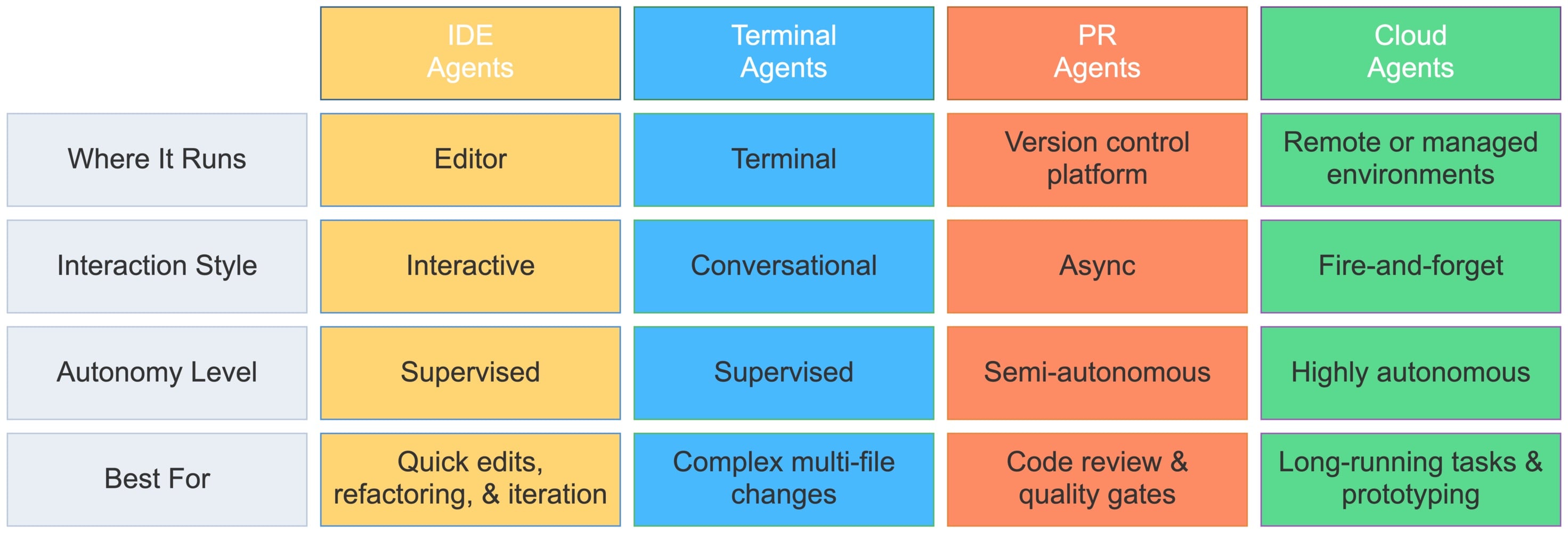
The goal is to match the workflow to the task. The diagram below summarizes the four types at a glance:
Read the full article at https://realpython.com/ai-coding-agents-guide/ »
[ Improve Your Python With 🐍 Python Tricks 💌 – Get a short & sweet Python Trick delivered to your inbox every couple of days. >> Click here to learn more and see examples ]
