Agentic AI in Action — Part 24 – Building a Fraud Ops Escalation Agent with Snowflake CoWork

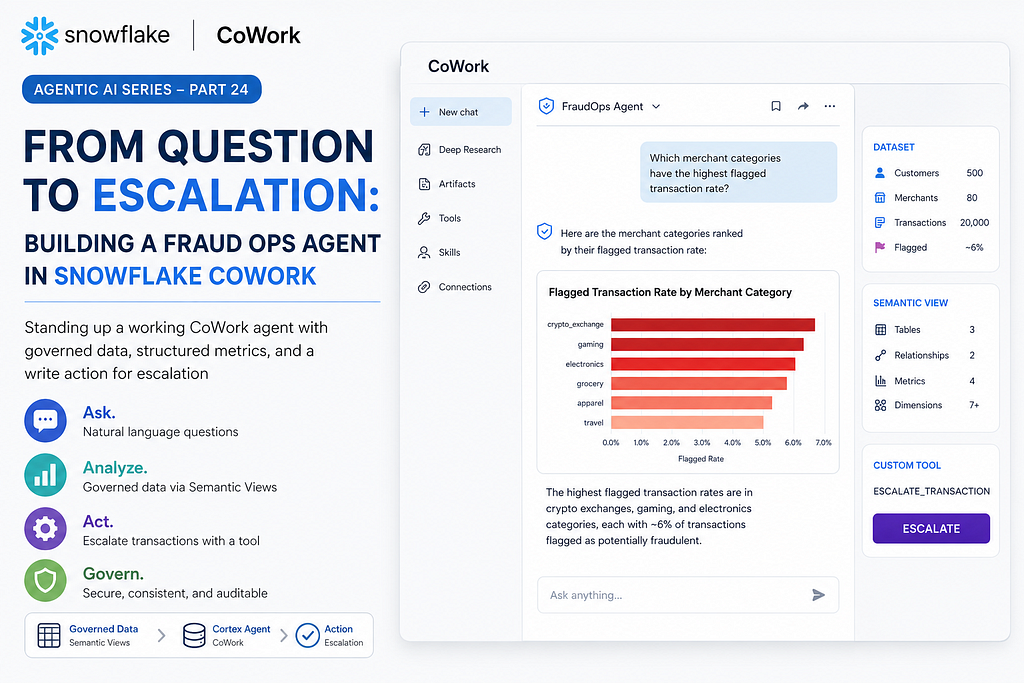
From Question to Escalation: Building a Fraud Ops Agent with Snowflake CoWork
Standing up a working CoWork agent with governed data, structured metrics, and a write action for escalation.
At Summit 2026, Snowflake rebranded Snowflake Intelligence as Snowflake CoWork and significantly expanded its capabilities. While it retains the conversational interface and Cortex Agent foundation, CoWork is positioned as a personal work agent for every knowledge worker. New capabilities include Deep Research for multi-step investigations, Artifacts for persistent and shareable outputs, MCP connectors that let the agent interact with enterprise tools such as Slack, Google Workspace, and Salesforce, and User Skills that allow reusable multi-step workflows to be captured and shared.
Part 23 of the Agentic AI series went deep on Semantic Views as the layer that keeps an agent’s metrics consistent instead of drifting across handwritten SQL. This time we put one to work. We will stand up a small fraud ops dataset, wire that Semantic View into a CoWork agent, give the agent a tool that can actually do something beyond answering questions. By the end, a natural language question will have turned into a governed escalation record.
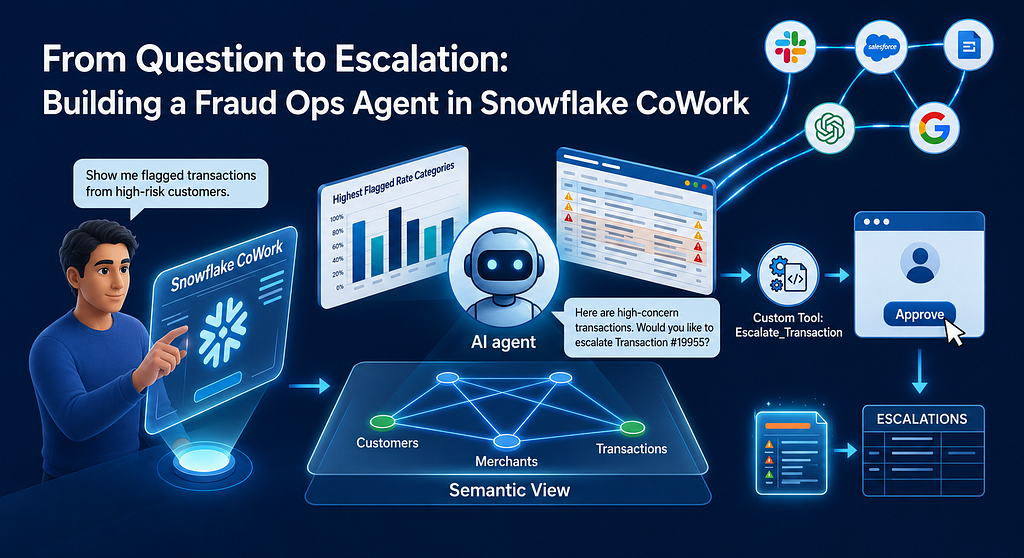
The blog contains the complete SQL walkthrough plus UI screenshots woven in to show what CoWork actually looks and feels like compared to Snowflake Intelligence. By the end you will have a working agent you can open in CoWork and ask real questions of.
The dataset
A fraud ops team needs three things to investigate a flagged transaction. The transaction itself, the merchant it ran against, and the customer’s recent history. We will build all three as plain tables and load synthetic data.

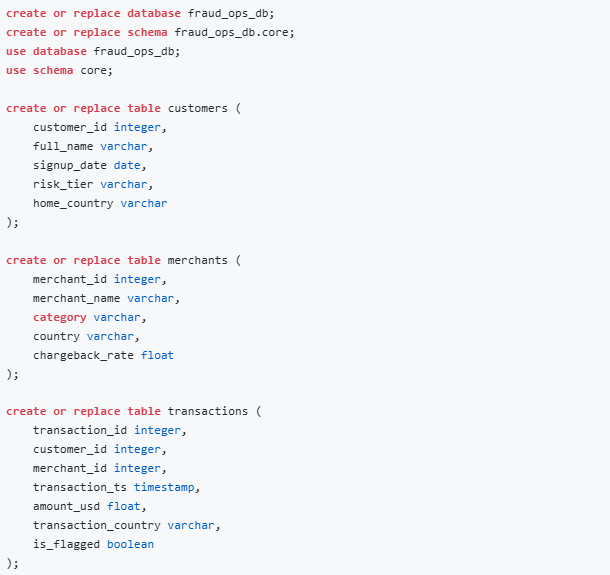
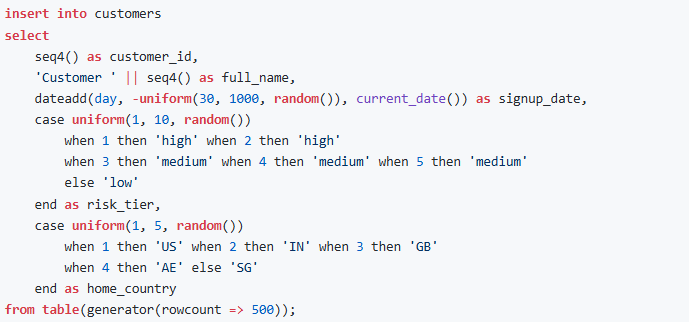
We will load it with synthetic rows. A small generator is enough for this to feel real without needing an external file.
Customers: 500 customers spread across five countries, each assigned a risk tier weighted so roughly twenty percent are high risk, thirty percent medium, and the rest low, creating a realistic distribution for a consumer fintech portfolio.
Merchants: 80 merchants across six categories including crypto exchange, which sits alongside groceries and electronics to give the flagged rate analysis something interesting to surface. Each merchant carries a randomly assigned chargeback rate between 0 and 25 percent, simulating the spectrum from low risk grocery stores to volatile high-chargeback operators.
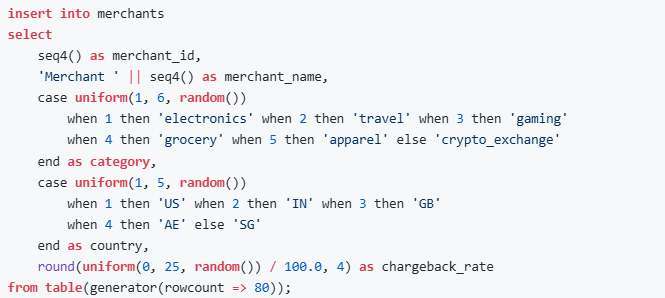
Transactions: 20,000 transactions spanning the last two months, with amounts ranging from five dollars to twenty-five hundred. The transaction country is randomized independently of the customer’s home country, which creates cross-border transaction patterns that a fraud model would typically flag as signals worth investigating.
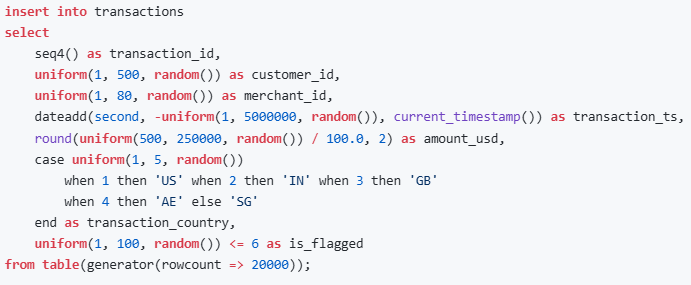
Notice the last column. About six percent of transactions come in flagged, which gives the agent something worth investigating instead of a uniformly boring table.
The Semantic View:
A Cortex Analyst tool needs a Semantic View to understand what “flagged transaction rate” or “high risk merchant” actually means against these tables. Same idea as Part 23, just pointed at a new dataset. The full DDL is in the companion script and here is what it defines.
There are three logical tables with primary keys and synonyms so CoWork resolves “clients” and “vendors” to the right table without guessing. Two explicit relationships wiring the join paths from transactions to customers and merchants, so the agent never has to infer how the tables connect. Facts capture the row-level measures before aggregation: amount_usd, is_flagged, and chargeback_rate. Dimensions provide the categorical slicing context: risk_tier, category, transaction_country, and a few others. Metrics are where the business logic lands: total_volume, flagged_count, and total_count as base aggregations, and flagged_rate as a derived metric that divides flagged_count by total_count, following the pattern for a typical ratio metric.
Run a quick sanity check.

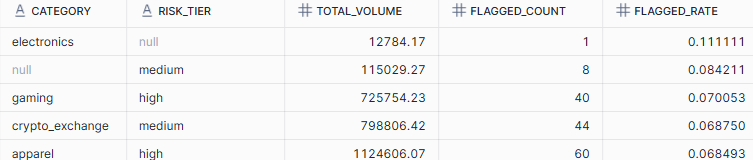
(Note: The null values in category and risk_tier are expected. The synthetic data uses uniform(1, 80, random()) for merchant IDs and uniform(1, 500, random()) for customer IDs in the transactions table, which occasionally generates IDs that do not exist in the merchants or customers lookup tables. Those unmatched rows surface as nulls in the joined output. In a production dataset with referential integrity enforced this would never happen).
Closing the Loop with a Write Action
Answering questions is half the point. The other half is acting on the answer. We will give the agent a stored procedure that can escalate a transaction, something a real fraud analyst would otherwise do by hand in a case management tool.
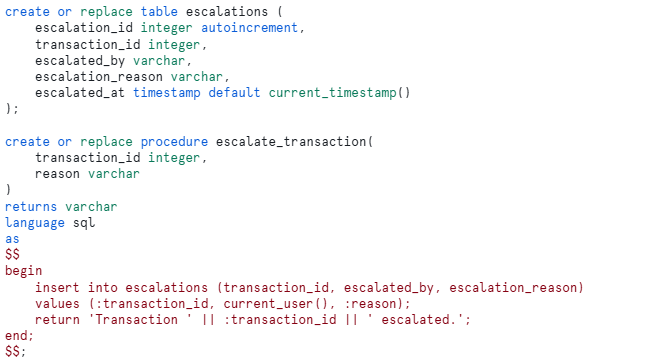
This is a simplified version for easy reproducibility. A production version would route to a case management system through an MCP connector, but the pattern of giving the agent a write action, not just a read path, is the part worth demonstrating.
Building the Agent
We will now build the agent. The steps below mirror the exact sequence in Snowsight, so it is easy to follow along and replicate.
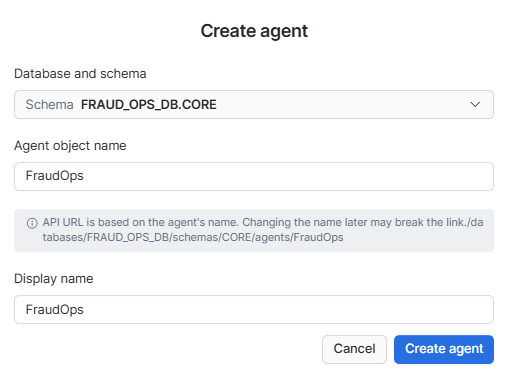
Step 1- Create the Agent: In Snowsight, go to AI & ML > Agents and click Create agent. Name it FraudOps.
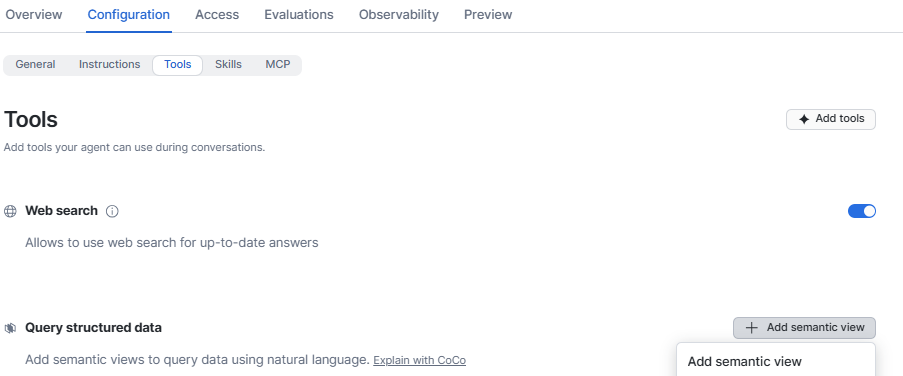
Step 2 — Add Semantic View: Open the Agent. Navigate to Configuration ->Tools and Choose the Add semantic view option
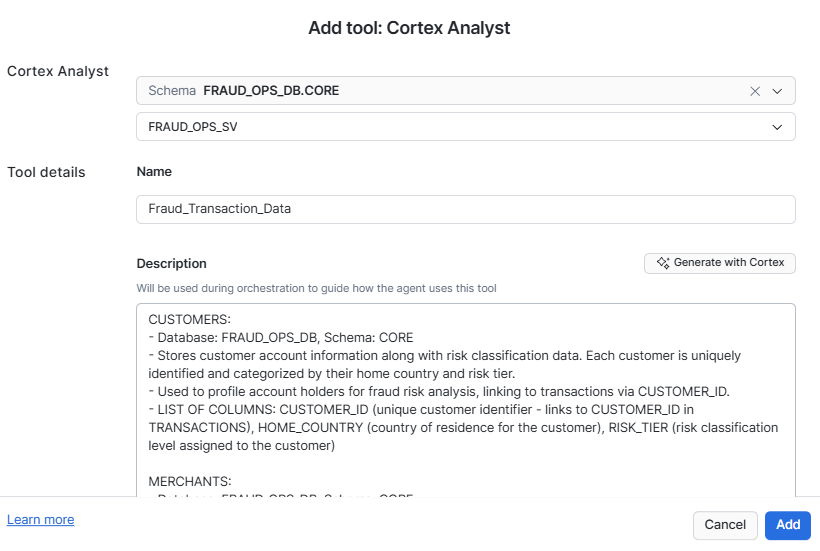
Step 3 — Define Cortex Analyst: The previous step will open the Cortex Analyst window. Choose the database and pick the semantic view. Name the tool as “Fraud_Transaction_Data”.You could either enter a description manually or let Cortex generate one.
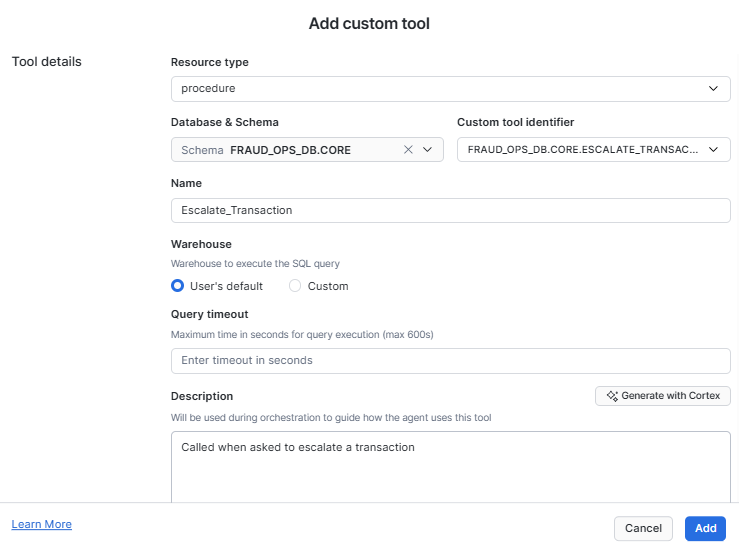
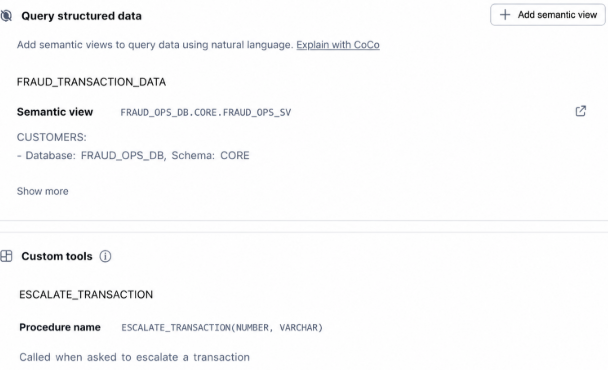
Step 4 — Define the stored procedure as a custom tool: Navigate to Configuration -> Tools and scroll to the Custom tools section. Add our escaltion stored procedure, as a custom tool as shown below. Let’s call this “Escalate_Transaction”
Step 5 — Verify that the semantic view and the custom tool are defined.Now that we have configured the semantic view and a custon tool, navigate to the Agent and check the Tools section to confirm.
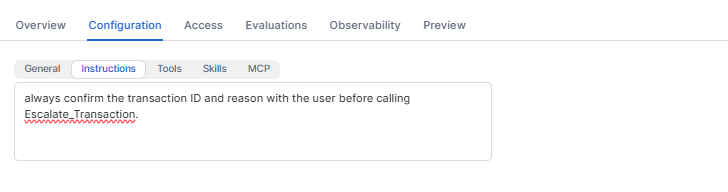
Step 6 — Provide Orchestration Instructions: Under orchestration instructions, add a line so the agent does not escalate silently. “always confirm the transaction ID and reason with the user before calling Escalate_Transaction”. This is where you build human in the loop into the agent by design. The agent will surface the decision, draft the reason, and wait for your approval before it escalates anything.
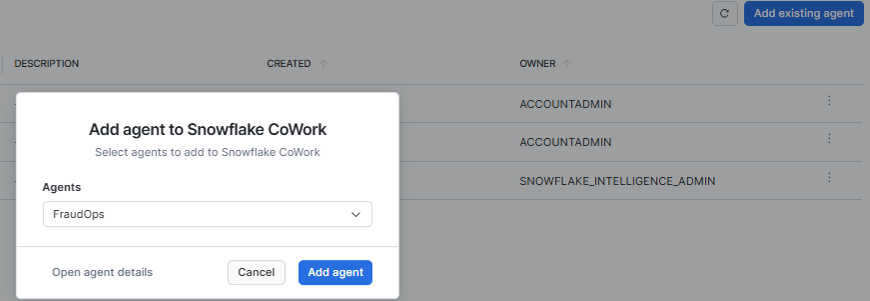
Step 7 — Add Agent to Cowork: Navigate to AI & ML ->Agents and choose the Snowflake CoWork tab

Now add the FraudOps agent to CoWork.
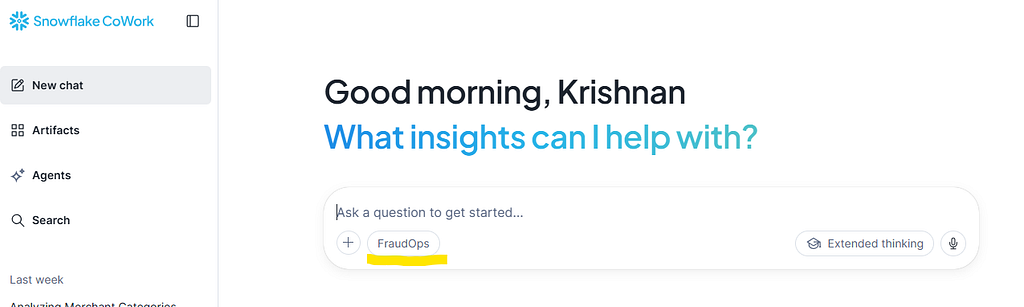
Step 8 — Verify and Choose the Agent in CoWork: Navigate to AI & ML -> Snowflake CoWork. This will open CoWork in a new tab. Now choose the FraudOps Agent.
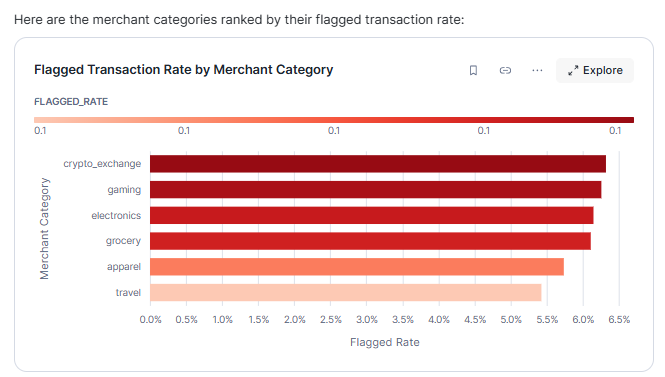
Step 9— Ask a question: Let us start with a simple question. “Which merchant categories have the highest flagged transaction rate?”
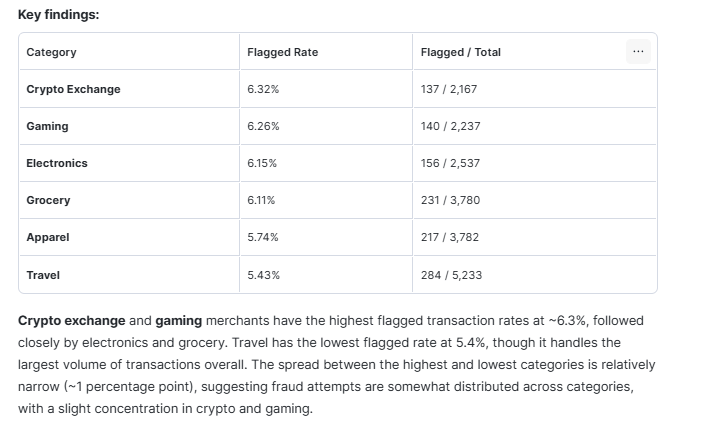
CoWork displays a chart, followed by a Key Findings section that contains tabular representation along with an explanation of findings.
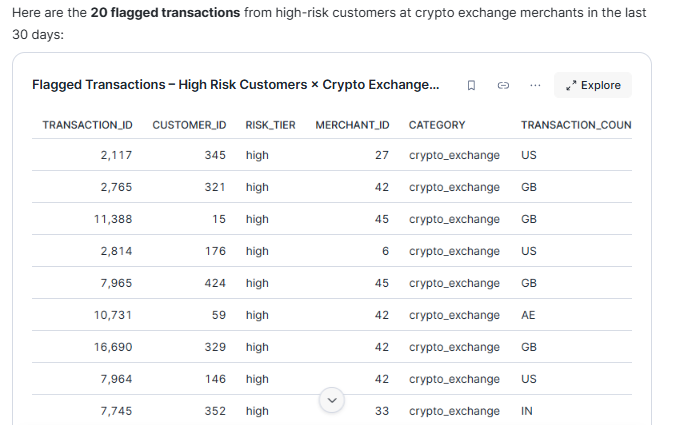
We will ask another question. “Show me flagged transactions from high risk customers against crypto exchange merchants in the last 30 days.”
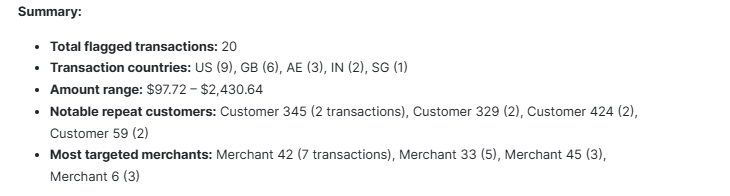
This is the kind of compound filter that would normally take a few minutes to write by hand. The Semantic View’s relationships mean the agent can join across customers, merchants, and transactions without being told how those tables connect. The response presents a detailed tabular breakdown followed by a summarized analysis, making it easy to interpret the results without additional manual effort.
Step 10 — Escalate a Transaction and Verify:
Let us close the loop with an action. We will ask CoWork a question regarding high chargeback rates and escalate one such transaction.
“List the top 10 flagged transactions by amount from high risk customers, with the merchant category and chargeback rate”.
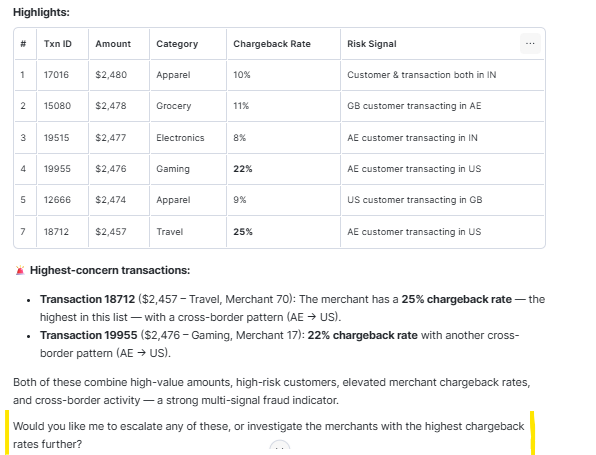
Notice what happened here. Without being asked about escalation at all, CoWork surfaces the highest-concern transactions with chargeback rates and cross-border signals highlighted, and closes with “Would you like me to escalate any of these, or investigate the merchants with the highest chargeback rates further?” The agent is not just answering the question. It is reasoning about what a fraud analyst would logically want to do next and offering it proactively. That is the orchestration instruction and the tool descriptions doing their job, and not a pre-scripted response.
Let us now go ahead and escalate one such transaction.
“Escalate Transaction 19955 as it has a very high chargeback rate”
Because of the orchestration instruction, the agent comes back with a confirmation step before it calls the procedure. This is human in the loop in practice, not a checkbox on a slide but a real approval gate built into the agent’s reasoning, where the decision stays with you and the agent handles the execution.
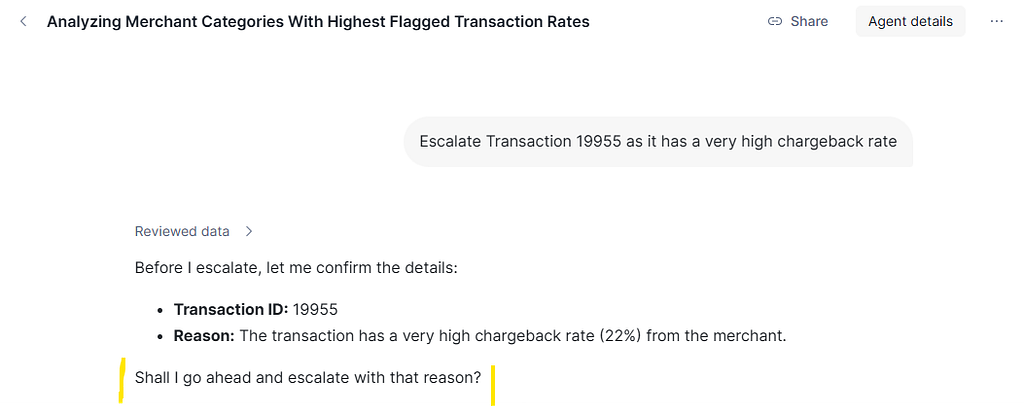
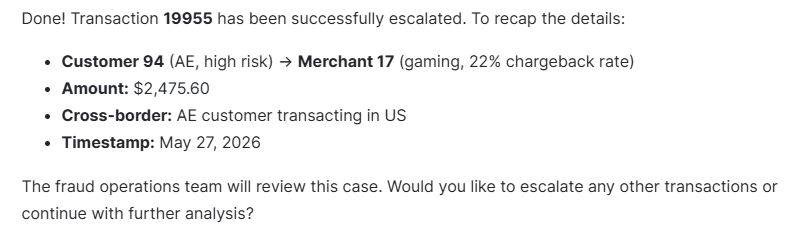
Confirm, and it writes a row to the escalations table.
We will now run a query and verify that the write landed.
SELECT * FROM ESCALATIONS;
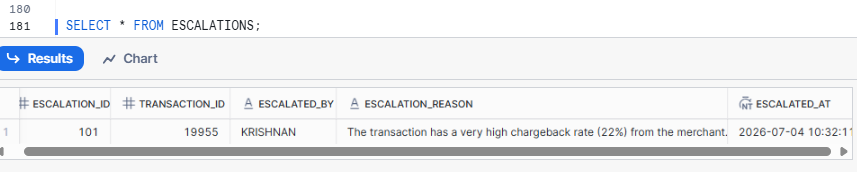
Your username will be in the escalated_by column, the transaction ID, escalation time and the reason the agent drafted alongside it. That is the full loop closed, with a natural language question that crossed three tables, a ranked result that surfaced the right transaction, and a governed write action that left an audit trail.
In a real deployment, the escalations table becomes the source of record for downstream workflows. A manager’s daily review report would query it to track high frequency escalation patterns. Such patterns against a particular merchant or customer segment would surface as a risk signal in their own right, and perhaps triggering a merchant review process. What started as a single natural language question now has a traceable, queryable audit trail that the rest of the organisation can act on.
From Question to Escalation
The agent here had two tools. A Semantic View backed Cortex Analyst tool for understanding the data, and a custom procedure for acting on it. That is the entire shape of a useful CoWork agent. The questions get answered through the Semantic View. The action lands through the procedure. The orchestration instruction keeps a human in the loop before anything is written.
The Semantic View and the procedure above are both fairly simple. What decides whether the agent reaches for them at the right moment is the description text written into the agent configuration. This is the main signal the orchestrator has about when a tool applies. The proactive escalation offer you saw in the previous step came entirely from precise tool descriptions, not from any special logic in the SQL. Spend the extra ten minutes writing those descriptions well and the agent reasons predictably, surfaces the right signals, and knows when to act. That investment in plain language pays more dividends than anything else in the configuration.
Beyond Fraud Ops. The Pattern Applies Everywhere.
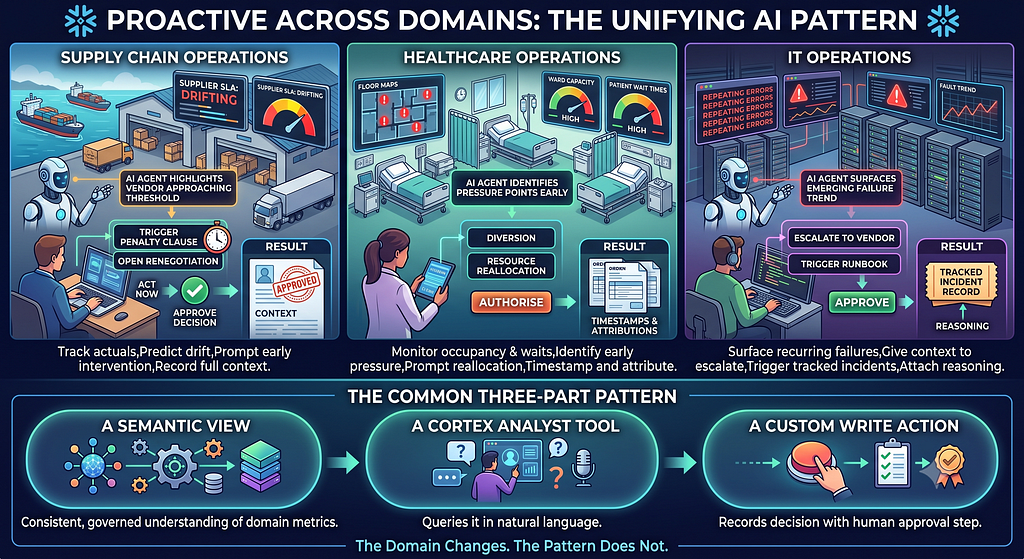
The loop this agent closes, surface the right signal, reason about it, prompt a human for approval, write a governed action, is not specific to fraud. It is a pattern that applies anywhere an organization needs to move from data insight to a recorded decision without losing the human in the middle.
Customer service: Support interactions carry frustration signals that are easy to miss at volume. Sentiment trends, unresolved ticket age, and repeated contacts on the same issue surface the customers most likely to escalate publicly or churn. The agent prompts a supervisor to personally reach out before it gets there, and once approved, logs the intervention against the customer record with the approving agent’s name and reason attached.
Supply chain: Supplier delivery performance drifts before it breaches. Tracking actuals against contracted SLAs in real time means the agent surfaces vendors approaching threshold and prompts a procurement lead to trigger a penalty clause or open a renegotiation at the right moment, not after the fact. The approved decision lands on the supplier record with full context.
Healthcare operations: Bed occupancy and patient wait times tell a story before a ward hits capacity. The agent identifies the pressure points early and prompts a duty manager to authorise a diversion or resource reallocation while there is still time to act, with every approval timestamped and attributed.
IT operations: Recurring failures in a service tier rarely announce themselves as a pattern until it is too late. The agent surfaces the trend early, gives an on-call engineer the context to escalate to a vendor or trigger a runbook, and once confirmed, creates a tracked incident record with the full reasoning attached.
The common thread across all of these is the same three-part structure used in this post. A Semantic View that gives the agent a consistent, governed understanding of the domain metrics. A Cortex Analyst tool that queries it in natural language. A custom write action that records the decision with a human approval step baked in. Pick any domain where data signals drive decisions and the same three-part structure applies.
This is CoWork at its best, a governed intelligent workspace where the agent does not just retrieve data but reasons about it, connects the dots across tools, prompts you for the next action, and escalates with your approval.
The code for this blog can be accessed here.
I share hands-on, implementation-focused perspectives on Generative & Agentic AI, LLMs, Snowflake and Cortex AI, translating advanced capabilities into practical, real-world analytics use cases. Do follow me on LinkedIn and Medium for more such insights.
Agentic AI in Action — Part 24 – Building a Fraud Ops Escalation Agent with Snowflake CoWork was originally published in Towards AI on Medium, where people are continuing the conversation by highlighting and responding to this story.
