
Claude Tag Slack Workflow: How Teams Can Delegate AI Work Without Losing Control

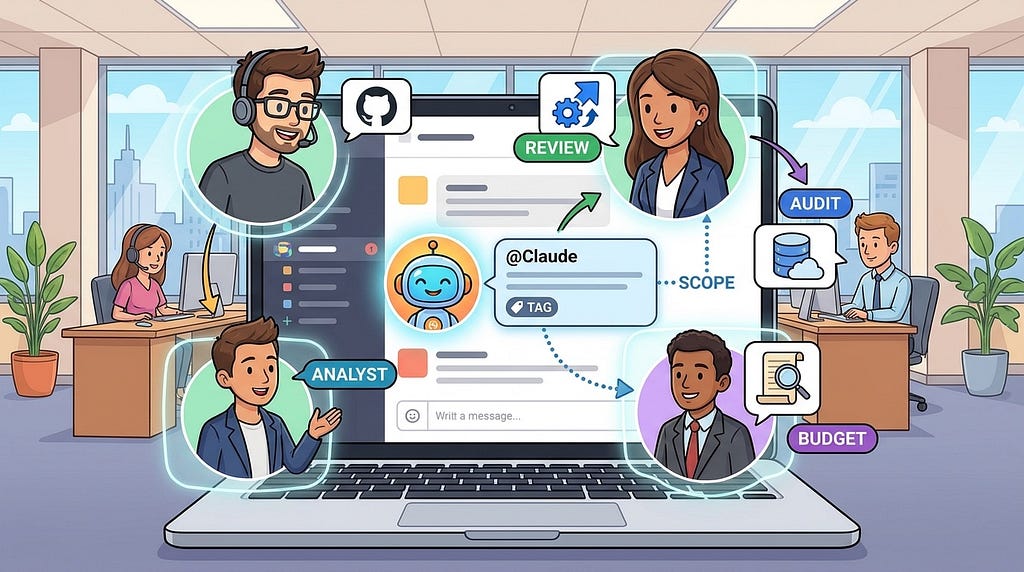
An AI teammate inside Slack sounds simple until it can read channels, open pull requests, query dashboards, remember context, and follow up later. The hard part is not tagging an assistant into a thread. The hard part is deciding what it should know, what it may touch, who reviews the output, and when it must stop.
Claude Tag is interesting because it moves coding and operational AI work from a private chat box into the place where teams already make decisions: Slack. That creates a useful workflow shift for developers, AI automation builders, and technical founders. It also creates new risks around vague requests, excessive permissions, stale context, surprise costs, and unclear ownership.
This guide explains how to think about a Claude Tag Slack workflow in a practical, neutral way. The goal is not to praise a product. The goal is to help builders design safer team AI delegation patterns that can apply to Claude Tag, Claude Code in Slack, and similar collaborative AI agent systems.
What Claude Tag Changes About AI Workflows
Most AI coding assistants start as one-person tools. A developer opens an IDE, terminal, browser agent, or chat window and asks for help. The work may be powerful, but it is usually private until the user copies results back to the team.
Claude Tag changes that pattern by making the AI agent a channel participant. A teammate can mention @Claude in a Slack channel or thread, ask for a task, and let the work happen asynchronously. According to Anthropic’s documentation, channel tasks run in a hosted sandbox, can use admin-configured connections, and post progress back into the thread. The agent can be provisioned with its own identity and service accounts rather than acting as a random human user.
That matters because team AI work is not only about model quality. It is about workflow shape. A shared AI agent can:
- Use the conversation that created the task as context.
- Make progress visible in a thread instead of hiding it in a private prompt session.
- Connect work across tools such as repositories, issue trackers, docs, monitoring, and data systems.
- Let multiple people steer or review the same task.
- Build channel-specific context over time when memory is enabled and appropriately scoped.
When a Slack AI Agent Is Actually Useful
A Claude Tag workflow works best when the task benefits from shared context and visible collaboration. It is weaker when the request is private, poorly scoped, or too risky to delegate without human review.
Good early use cases include:
- Bug investigation: Ask the agent to summarize a thread, inspect logs, compare a deployment, and suggest a likely cause.
- Small code changes: Have it open a pull request for a well-defined fix with tests and a clear reviewer.
- Incident support: Ask it to gather dashboards, recent deploys, issue links, and known mitigation steps.
- Documentation cleanup: Turn a long decision thread into a short engineering note or runbook draft.
- Ticket hygiene: Convert a Slack discussion into a structured issue with owner, priority, acceptance criteria, and references.
- Data questions: Run approved read-only queries and explain the result in the original thread.
The safest first workflow is one where the AI agent gathers evidence, drafts a change, and asks a human to approve the final action.
The Core Architecture: Channel, Identity, Sandbox, Proxy, Tools
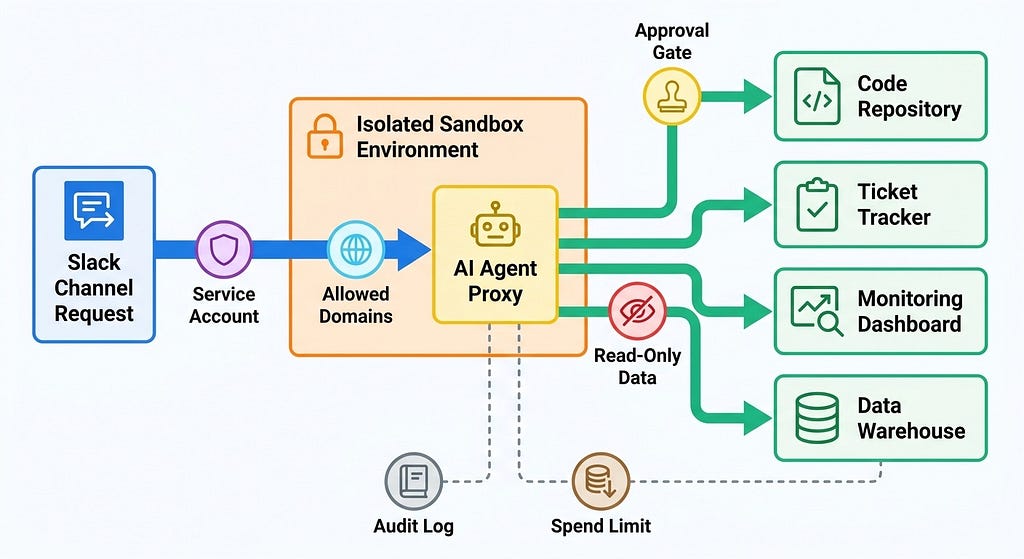
For developers, the most important idea is that a Slack AI agent should not be treated like a human with a password. It needs an architecture that separates conversation, execution, credentials, and auditability.
A practical Claude Tag-style workflow has five layers.
1. The Slack Channel as the Task Surface
The channel is where the request begins. It provides local context: the bug report, customer complaint, release discussion, metric screenshot, or debate that led to the task. This is useful because the agent does not need the user to restate every detail.
But the channel should not become a permission boundary by accident. Admins and team leads need to decide which channels can invoke the agent, what type of work each channel can request, and who can add it to sensitive spaces.
2. Agent Identity Instead of Human Impersonation
A team AI agent needs its own identity. In Claude Tag’s model, channel work can be attributed to service accounts, such as a Claude GitHub App account for pull requests. This makes audit trails clearer than letting an AI action appear as if it came from a specific employee.
3. An Ephemeral Sandbox for Work
The execution environment matters. Anthropic’s docs describe Claude Tag channel tasks as running in hosted sandboxes that are created for sessions and discarded after inactivity. This is a useful pattern for any builder designing AI teammate workflows. The agent should have a place to inspect files, run code, and draft output without living permanently inside your internal network.
A sandbox is not a complete safety solution, but it reduces the blast radius of bad commands, dependency mistakes, and messy working state.
4. A Proxy or Gateway for External Requests
The agent eventually needs to call external tools. That is where many workflows become risky. A safer pattern is to route outbound requests through a proxy or gateway that checks destinations, injects credentials only when allowed, blocks unknown hosts, and records what happened.
Claude Tag documentation describes an Agent Proxy concept for channel work. The broader lesson is simple: do not hand raw secrets to the model or put them loosely in the runtime. Put access checks at the boundary.
5. Connected Tools With Narrow Permissions
Repositories, Jira, Linear, Notion, Google Drive, Snowflake, Datadog, Sentry, Stripe, and internal APIs all require different scopes. Start with read-only access where possible. Add write access only after the workflow has clear review rules and audit logs.
A Practical Workflow for Delegating Tasks in Slack
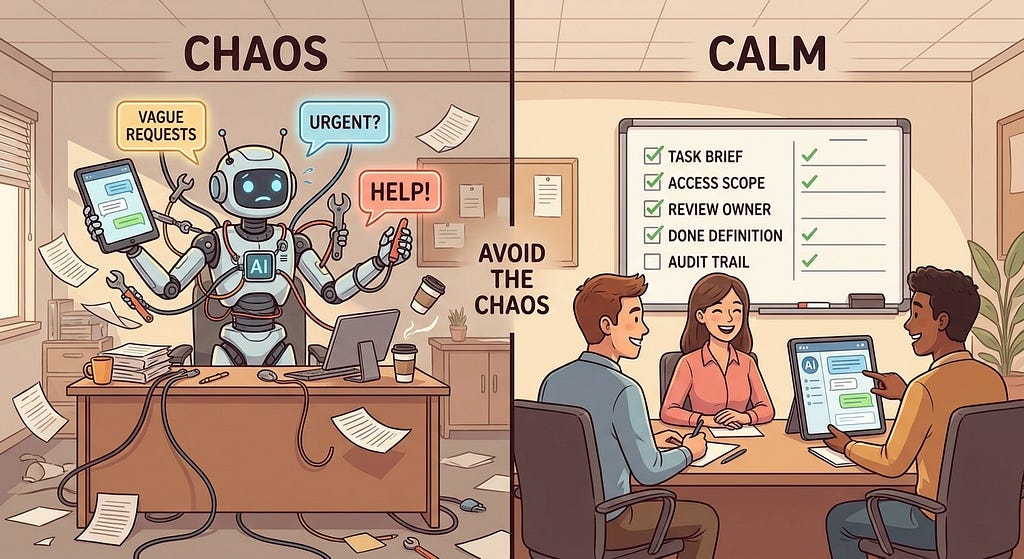
The biggest mistake teams make with AI agents is treating them like magic interns. A better model is to treat them like junior teammates who are fast, tireless, and sometimes wrong. They need a clear brief, permitted tools, review criteria, and a done definition.
Use this workflow for most Slack-based AI tasks.
Step 1: Write a Task Brief, Not a Prompt
A task brief is more structured than a casual prompt. It gives the agent enough context to act, while reducing ambiguity for reviewers.
@Claude please investigate the checkout latency spike discussed above.
Goal: identify the most likely cause and suggest a safe fix.
Scope: read logs, compare the last two deploys, inspect checkout service code.
Do not: change production config, merge code, or contact customers.
Output: post a short finding summary and open a draft PR only if the fix is low risk.
Review owner: Maya.
Done when: the thread has evidence links, a proposed fix, and a rollback note.
This kind of request does three things. It tells the agent what success looks like. It tells humans what the agent is allowed to do. It creates a reviewable record in the same place the work started.
Step 2: Classify the Risk Level
Not every task needs the same guardrails. Before giving a Slack AI agent broad access, define risk levels.
- Low risk: Summaries, docs, read-only analysis, issue drafts, test suggestions.
- Medium risk: Draft pull requests, non-production config suggestions, internal report generation.
- High risk: Production changes, billing changes, customer messaging, permission changes, destructive database operations.
Low-risk tasks can often run with simple review. Medium-risk tasks should produce drafts and require human approval. High-risk tasks should usually be broken into evidence gathering, plan review, and separate human execution.
Step 3: Route the Task to the Right Channel Identity
One shared AI identity for the entire company is too broad. A better pattern is to scope identities by channel, team, or workflow. For example:
- #support-triage: read support tickets, search docs, draft replies, no sending without approval.
- #platform-incidents: read monitoring, logs, deploy history, incidents, and runbooks; no production writes.
- #frontend-eng: read selected repositories, open draft pull requests, run tests, comment on issues.
- #sales-ops: read CRM reports and docs; no customer data exports outside approved systems.
This keeps memory, permissions, and expectations aligned with the work context. It also reduces the chance that an agent in one channel accidentally uses context from another team.
Step 4: Make Progress Visible
A Slack AI workflow should not disappear for an hour and return with a wall of text. It should show a checklist, intermediate findings, blockers, and the final output. This helps humans steer before the agent goes too far in the wrong direction.
Step 5: Require Human Review at the Edge
The edge is where a task crosses from analysis into action. Opening a draft PR may be acceptable. Merging it is different. Drafting a customer reply may be acceptable. Sending it is different. Querying a warehouse may be acceptable. Exporting rows is different.
Make those edges explicit. If the action changes production state, sends information externally, changes permissions, spends money, or modifies customer data, require approval.
Security and Governance Mistakes to Avoid
Claude Tag-style workflows can fail even when the model performs well. Most failures come from ordinary product design mistakes: too much access, no owner, hidden state, and unclear expectations.
Mistake 1: Giving the Agent Broad Tool Access Too Early
Teams often want the agent to connect to everything because that makes demos look impressive. Resist that urge. Start with a few read-only tools and expand after the team has learned how people actually use the workflow.
A good rollout path is:
- Slack context plus documentation search.
- Read-only issue tracker and repository access.
- Draft pull requests in selected repositories.
- Read-only monitoring and incident data.
- Limited write actions with approval gates.
Mistake 2: Treating Channel Memory as Always Correct
Memory is useful, but old context can become wrong. A team may change naming conventions, retire a service, replace a vendor, or reverse a decision. If the agent uses stale channel memory without checking current sources, it can sound confident and still be wrong.
For important tasks, ask the agent to cite current evidence. A good instruction is: “Use channel memory for background, but verify decisions against current docs, tickets, or code before acting.”
Mistake 3: No Spend Limit or Cost Visibility
Asynchronous agents can run longer than expected. Claude Tag documentation mentions organization and channel-level spend controls. Whether using Claude Tag or another system, teams need budgets, alerts, and visible usage patterns.
Track cost by workflow, not only by total tokens. The useful question is not “How much did the agent cost?” It is “How much did accepted work cost compared with the time saved or risk reduced?”
Mistake 4: Letting Vague Requests Become Real Work
“Can you fix this?” is not a safe task. “Investigate this error, identify the cause, and open a draft PR only if the change is under 30 lines and covered by tests” is much better.
If the request is vague, the agent should ask a clarifying question or produce a plan before acting.
Mistake 5: Skipping Audit Logs
Audit logs are not only for compliance. They are how teams debug agent behavior. When something goes wrong, you need to know who requested the task, what thread it came from, which tools were called, what data was accessed, what output was created, and who approved the final action.
How to Write Better Slack Requests for AI Agents
Great Slack AI workflows depend on boring clarity. The more powerful the agent, the more important the request format becomes.
Use this lightweight pattern:
Goal: what outcome do we want?
Context: what thread, incident, ticket, repo, or customer case matters?
Allowed tools: what may the agent read or use?
Forbidden actions: what must it not do?
Output: what should it produce?
Review owner: who signs off?
Done definition: when should the task stop?
For coding tasks, add these fields:
- Repository and branch: avoid guessing.
- Test command: tell the agent how to validate the change.
- Files to avoid: protect migrations, secrets, generated files, and risky config.
- PR expectations: require summary, screenshots when relevant, test output, and known risks.
For data tasks, add:
- Data source: warehouse, dashboard, spreadsheet, or internal API.
- Query limits: date range, rows, columns, and aggregation rules.
- Privacy rule: no raw personal data in Slack unless explicitly approved.
- Confidence rule: explain assumptions and unknowns.
A Simple Rollout Plan for Teams
If you are introducing a Slack AI agent to a team, avoid a big-bang rollout. Start with one channel, one workflow, and one success metric.
Phase 1: Read-Only Assistant
Let the agent summarize threads, search approved docs, draft tickets, and answer internal process questions. Measure whether people use the summaries and whether they reduce repeated questions.
Phase 2: Drafting Work
Add draft pull requests, runbook updates, incident summaries, and report drafts. Require human review before anything is merged, sent, or published. Measure acceptance rate and review burden.
Phase 3: Controlled Tool Use
Add selected APIs, monitoring tools, and issue trackers. Use service accounts, allowed hosts, spend limits, and clear channel scopes. Measure task completion time, errors caught during review, and incidents avoided.
Phase 4: Routine and Scheduled Work
Only after the team trusts the workflow should you add recurring tasks. Examples include weekly stale-ticket cleanup, daily incident summary drafts, dependency update checks, and release readiness reports. Keep routines visible and easy to pause.
Metrics That Tell You Whether the Workflow Is Working
Do not judge a team AI workflow by how impressive the demo looks. Judge it by whether it creates accepted, reviewable, low-risk work.
Useful metrics include:
- Task acceptance rate: how often humans use the output without major rewrites.
- Review correction rate: how often reviewers catch incorrect assumptions or risky actions.
- Time to first useful draft: how long before the team gets something actionable.
- Human interruption rate: how often the agent asks for help because the task was unclear.
- Cost per accepted task: token and tool cost divided by accepted outputs.
- Permission exceptions: blocked requests, denied hosts, and access attempts outside scope.
- Audit completeness: whether every meaningful action can be traced back to a requester and thread.
Where Claude Tag Fits Compared With Other AI Coding Workflows
Claude Tag is not a replacement for every AI coding interface. It fits a specific collaboration layer.
A terminal or IDE agent is still better for private implementation loops. A cloud coding agent is useful for background repository tasks. A ticket workflow works well for planned backlog work. A Slack AI agent is strongest when the task emerges from conversation and benefits from shared visibility.
Related Workflow Ideas
This topic fits a broader cluster on production AI agent control: agent governance, evals, sandboxing, context engines, coding-agent review, and cost per accepted workflow. The useful connecting idea is simple: give agents useful work, but make scope, evidence, approval, and audit trails visible.
Final Takeaway
Claude Tag points toward a future where AI agents are not trapped in private chat windows. They can sit inside team workflows, follow Slack context, run asynchronous tasks, and connect to real tools. That is useful, but it raises the bar for workflow design.
The practical lesson is clear: do not start by asking, “What can the agent do?” Start by asking, “What should this channel identity be allowed to do, how will humans review it, and how will we know if it helped?”
If you get those answers right, a Slack AI agent can become a useful teammate for investigation, drafting, coordination, and controlled automation. If you skip them, it becomes another noisy bot with too much context and not enough accountability.
FAQ
What is Claude Tag?
Claude Tag is Anthropic’s Slack-based team workflow for tagging Claude into channels and threads. It lets teams delegate tasks, keep progress visible in Slack, and connect the agent to approved tools under admin-configured access.
How is Claude Tag different from Claude Code?
Claude Code is focused on agentic coding work across environments such as terminal, IDE, web, and related workflows. Claude Tag brings a collaborative version of AI delegation into Slack, where channel context, shared visibility, service-account identity, and team review become central.
Is Claude Tag safe for production engineering work?
It can support production engineering workflows if access is scoped carefully and risky actions require human review. Start with read-only investigation, summaries, draft pull requests, and evidence gathering before allowing any write-heavy or production-impacting work.
What should teams delegate to a Slack AI agent first?
Start with low-risk tasks such as summarizing long threads, drafting tickets, searching approved docs, investigating logs, preparing incident notes, and opening draft pull requests for small fixes. Avoid broad production changes during the first rollout.
How do you prevent a Slack AI agent from accessing too much data?
Use channel-scoped identities, service accounts, read-only permissions, allowed-host rules, separate access bundles, audit logs, and approval gates. Do not reuse a broad human admin account for agent work.
What makes a good Claude Tag request?
A good request includes the goal, context, allowed tools, forbidden actions, desired output, review owner, and done definition. The clearer the task brief, the easier it is for both the agent and the human reviewer to stay aligned.
Should AI agent pull requests be auto-merged?
Usually no. AI-generated pull requests should pass tests and receive human review, especially when they touch customer data, billing, authentication, infrastructure, or production behavior.
Claude Tag Slack Workflow: How Teams Can Delegate AI Work Without Losing Control was originally published in Towards AI on Medium, where people are continuing the conversation by highlighting and responding to this story.
