Gemini API Key Security: How Developers Should Lock Down AI Credentials Before They Break…

Gemini API Key Security: How Developers Should Lock Down AI Credentials Before They Break Production
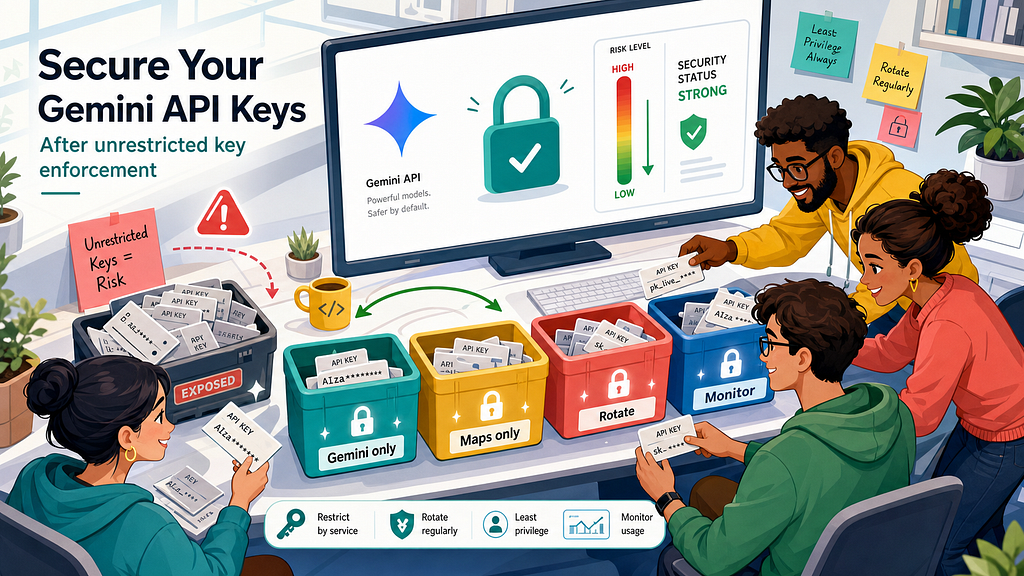
Google’s Gemini API key change looks small on the surface: unrestricted standard keys stop working, restricted keys keep working, and new auth keys are the safer path forward. But for developers, this is not just a checkbox in Cloud Console. It is a warning that AI credentials now carry a much larger blast radius than older “public” API keys ever did.
If you have copied a key into a prototype, left a Maps key in a web app, shared one key across services, or trusted a billing alert to save you, this is the moment to audit your setup.
The practical question is not “how do I pass Google’s deadline?” It is: “Can a leaked credential call an expensive AI endpoint, bypass my app, and create a bill or outage before anyone notices?”
This guide answers that from a developer’s view: what changed, why old key habits are risky, how to audit existing keys, how to rotate without downtime, and how to design safer Gemini API access.
What Changed With Gemini API Keys
Google’s current Gemini API key documentation says the Gemini API is moving from standard API keys toward authorization keys. Standard API keys associate requests with a Cloud project for quota and billing. Auth keys are bound to a Google Cloud service account and are restricted to the Generative Language API by default.
The important enforcement point is simple: as of June 19, 2026, the Gemini API rejects requests from unrestricted standard keys. Standard keys with explicit restrictions continue to work for now. Google’s docs also state that standard keys must be migrated to auth keys before September 2026 to avoid service interruption.
That gives teams two jobs. First, make sure no active Gemini workflow depends on an unrestricted standard key. Second, plan the migration to auth keys instead of treating a restricted standard key as final.
Google also posted an AI Developers Forum announcement telling users to restrict existing keys or generate new restricted keys in AI Studio. The hard part is everything around it: old projects, legacy keys, shared API keys, client-side apps, build secrets, deployments, and monitoring.
Why This Became Urgent for Developers
The risk is not theoretical. Recent developer discussions around Gemini key abuse describe cases where old Google API keys, sometimes originally created for Maps or other client-side use, became useful to attackers once a project had Gemini access enabled. The painful pattern is familiar: a key is scraped, the attacker calls the AI endpoint directly, and app-level rate limits do not help because traffic never touches the developer’s app.
That is the shift developers need to understand. A frontend key for a map widget used to feel low-risk because it was expected to be visible and constrained by the service it was meant to call. An AI inference endpoint is different. It can be expensive, high-volume, and attractive to abuse. A credential that can call it should be treated like a production secret, even if the same key format once felt harmless.
The security lesson is not “never use Gemini.” It is “do not let old key habits control a new AI cost surface.”
The bigger your AI usage becomes, the more this matters. A small prototype can turn into a real customer workflow. A hackathon key can end up in a production repository. A shared project can accumulate keys nobody owns. An old Cloud project can have APIs enabled for experiments, then quietly become part of a paid AI path.
The Search Gap: What Existing Advice Often Misses
Most top-ranking advice explains individual pieces: restrict a key, store it in Secret Manager, avoid checking it into Git, use environment variables, and set billing alerts. That is useful, but incomplete for live apps.
The missing playbook is operational. Developers need to know how to find every key, tell which ones can touch Gemini, separate keys that were wrongly shared, rotate without breaking deployments, and monitor usage by credential. They also need a migration path that works across local development, CI, serverless deployments, mobile apps, and old Cloud projects.
Reddit and forum discussions show the real questions people are asking:
- How do I know which key is actually being abused?
- What happens if my key is shared with Maps, Firebase, and Gemini?
- Are billing alerts enough to prevent a runaway AI bill?
- Should I restrict a key, rotate it, or create a new project?
- How do I move from a client-side key to a backend proxy?
Those are the questions this article focuses on.
Start With a Full Key Inventory
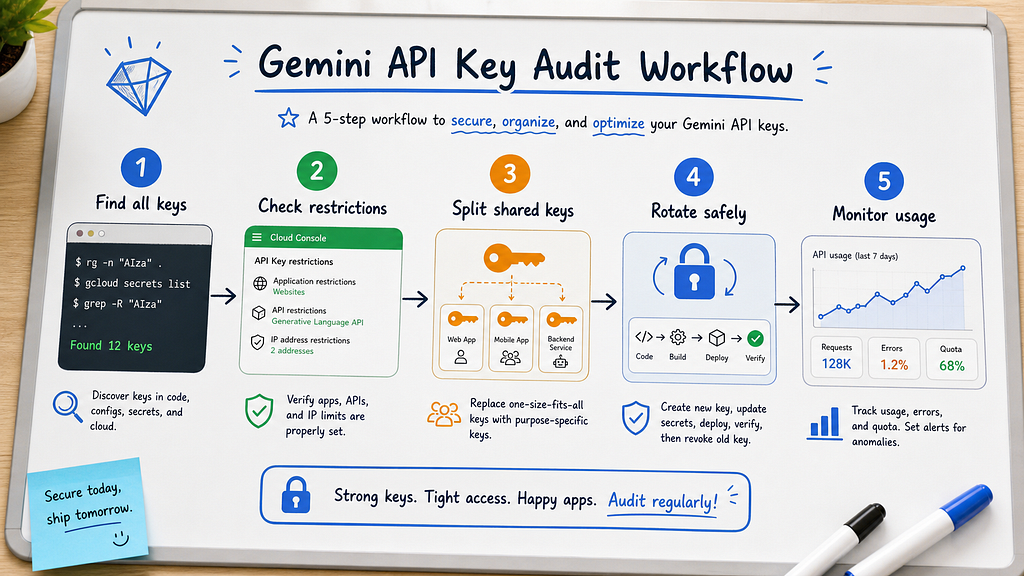
Before changing anything, build a complete inventory. Do not rely only on the key you remember using in your current codebase. The dangerous key is often the forgotten one: a default AI Studio key, a legacy Maps key, a Firebase-created key, a staging key copied into production, or a key left in an old project.
At minimum, collect the following for each key:
- Cloud project ID and owner
- Key display name and unique ID
- Created date and last known usage
- API restrictions, if any
- Application restrictions, such as HTTP referrers, IPs, Android apps, or iOS apps
- Where the key is stored or deployed
- Whether Gemini or the Generative Language API is enabled in the project
- Whether the key is standard or auth-key based
If you manage one project, the Cloud Console credentials page may be enough. If you manage an organization, use Cloud Asset Inventory or gcloud so you are not clicking through dozens of projects by hand.
gcloud services api-keys list --project="YOUR_PROJECT_ID"
For organization-level discovery, Google’s key security blog points to Cloud Asset Inventory and filtering for API key resources. Your audit must cover old and automatically generated keys, not just the key in your newest app.
A useful key audit follows the production workflow, not just the credentials page.
Classify Keys by Risk, Not by Name
Key names are often misleading. “Maps Browser Key” does not mean the key can only call Maps. “Do Not Delete” usually means nobody remembers what it does.
Classify keys by what they can do:
- Unrestricted standard keys: highest priority. These should not remain in any Gemini-enabled project.
- Shared restricted keys: risky because one credential does too many jobs. Split them.
- Client-side keys: assume extractability. They should not be able to call expensive server-side AI endpoints directly.
- Server-only standard keys: restrict now, then schedule auth-key migration.
- Auth keys: safer default for Gemini, but still require secret storage, monitoring, and rotation discipline.
The goal is least privilege. One key should have one job, one owner, one storage path, and one expected usage profile. If a key exists “just in case,” it is already suspicious.
Restrict Existing Gemini Keys the Right Way
If a standard key is used only for Gemini, restrict it to the Gemini API in AI Studio or Cloud Console. AI Studio can show keys marked as unrestricted and lets you restrict them to Gemini only. You need the right IAM permission, such as API Keys Admin or Editor, to update restrictions.
If a key is shared with other APIs, do not simply add Gemini to the list and move on. That preserves the bad design. Create a separate Gemini key, update the Gemini app path, and restrict the old shared key to the non-AI APIs it actually needs.
A good rule is this: if you cannot describe a key’s purpose in one sentence, split it.
For example, replace one shared key for Maps, Firebase, AI Studio, staging, and local demos with separate browser-restricted, server-only, local development, and CI keys with documented owners.
Do not forget application restrictions. API restrictions answer “what services can this key call?” Application restrictions answer “where can this key be used from?” You usually need both. For server workloads, IP restrictions may help if egress is stable. For web keys, HTTP referrer restrictions are useful but should not be treated as a complete defense for high-cost AI calls. For mobile, use the platform-specific package or bundle restrictions where appropriate.
Rotate Without Breaking Production
Emergency deletion feels clean, but it can create downtime if the key is still active in a deployment. For planned migration, use a boring rotation process.
- Create the replacement key with the correct restrictions first.
- Store it in the right secret manager or deployment environment.
- Deploy the app using the new key.
- Verify real Gemini calls work in production.
- Watch metrics for both old and new credentials.
- Disable the old key.
- Delete or revoke it after the rollback window closes.
This process is slow enough to avoid surprises and fast enough to remove risk. It also gives you clean evidence if anything fails: you know when the new key went live, when traffic moved, and when the old key stopped receiving requests.
In CI/CD, treat key rotation like any other release. Use a change ticket, a deployment log, and a rollback plan. In small teams, a short pull-request checklist is enough. The mistake is making console changes with no record, then reconstructing the timeline during an incident.
Move Client Apps Behind a Backend Proxy
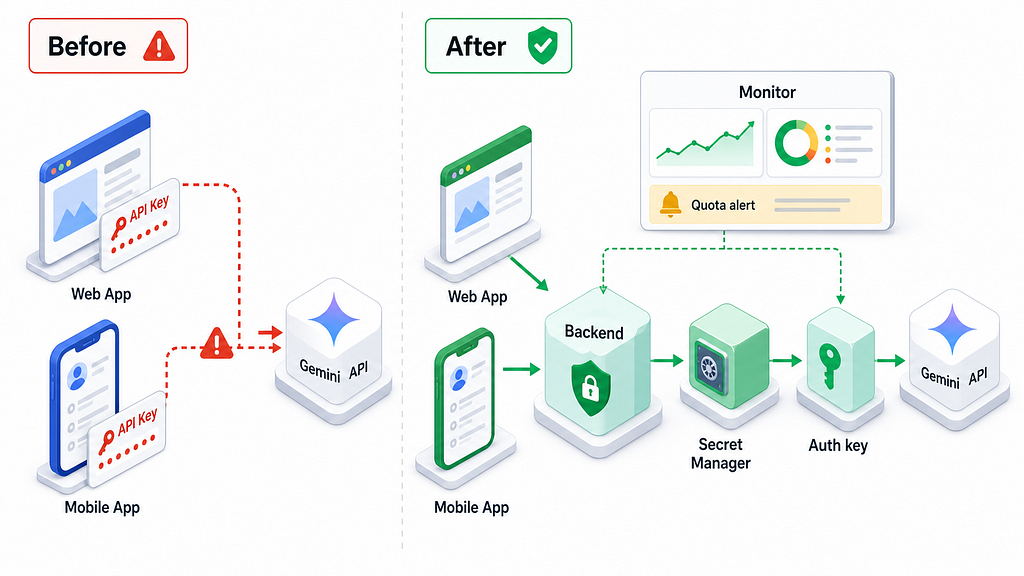
For production web and mobile apps, the safest default is not to call Gemini directly from the client with a long-lived key. Put a backend in the middle. The backend owns the credential, validates user requests, applies rate limits, logs usage, and calls Gemini on behalf of the app.
This does not have to be heavy. A small Cloud Run service, serverless function, or existing API route can do the job. The backend proxy should handle four things:
- Authentication: confirm which user or system is making the request.
- Authorization: decide whether that caller can use this AI feature.
- Budgeting: enforce per-user, per-tenant, or per-feature limits before calling Gemini.
- Logging: record model, endpoint, token usage, latency, errors, and caller identity.
A minimal Node-style proxy pattern looks like this:
app.post("/api/ai/summarize", requireUser, async (req, res) => {
  const user = req.user;
await enforceDailyAiBudget(user.id, "summarize");
  const prompt = buildSummarizationPrompt(req.body.text);
  const result = await gemini.models.generateContent({
    model: "gemini-3.5-flash",
    contents: prompt
  });
  await logAiUsage({
    userId: user.id,
    feature: "summarize",
    model: "gemini-3.5-flash",
    status: "success"
  });
  res.json({ summary: result.text });
});
The point is control. Once calls go through your backend, you can stop abuse before the AI provider sees the request. If the key lives in the client, attackers can bypass your controls and call the API directly.
The safer production pattern moves Gemini access behind owned backend controls.
Migrate to Auth Keys Before It Becomes an Outage
Restricting standard keys is the immediate fix, but Google’s docs make the longer direction clear: Gemini is moving toward auth keys. New keys created in AI Studio are auth keys by default. These are bound to a service account and give Google a stronger identity boundary for requests.
Plan the migration in layers:
- For new Gemini work, start with auth keys instead of creating new standard keys.
- For production services, migrate one app or feature at a time.
- For legacy jobs, identify the owner before touching credentials.
- For third-party tools, check whether they support auth keys and how they store them.
- For local development, use separate development credentials with clear quotas and expiration expectations.
Do not wait until the September cutoff window to discover that a library, deployment system, or vendor integration expects an old key shape. Credential migrations fail in boring places: environment variable names, secret sync, stale serverless revisions, and notebooks.
Monitoring: Billing Alerts Are Not Enough
Billing alerts are useful, but they are not hard caps. They can lag. They can notify the wrong person. They can fire after the damage has already started. Treat them as one layer, not your control plane.
You want usage monitoring closer to the request path. Google’s key security guidance points to Cloud Monitoring’s serviceruntime.googleapis.com/api/request_count metric and the credential_id label for key-level investigation. That matters because during an incident, “Gemini usage spiked” is less useful than “this specific credential started making abnormal calls.”
Set alerts for unusual growth, not only absolute spend. A small project going from 20 calls per hour to 20,000 calls per hour should page someone even if the billing number has not caught up yet.
Useful alerts include:
- Requests per credential above expected baseline
- New Gemini usage from a key that should not call Gemini
- Sudden use of expensive endpoints or models
- Traffic from unexpected regions or infrastructure
- Error spikes after a key restriction or rotation
For multi-tenant products, add your own app-level metering too. Provider metrics tell you what the key did. Your own logs tell you which customer, feature, or background job caused it.
Incident Response Checklist for a Suspected Leak
If you suspect a Gemini key has leaked, move quickly but keep evidence. You need to contain the issue and preserve enough context to understand what happened.
- Create and deploy a replacement key if the app is still live.
- Disable the compromised key once the replacement is confirmed.
- Check Cloud Monitoring by credential ID.
- Export relevant logs, request counts, timestamps, and billing views.
- Search source control, CI logs, environment files, issue trackers, and shared docs for the leaked value.
- Review which APIs the key could call at the time of abuse.
- Add restrictions to surviving keys in the same project.
- Open a billing or support case with a precise timeline and evidence package if unauthorized charges occurred.
Do not stop at the one leaked key. Incidents often reveal a system problem: too many people can create keys, keys are not named clearly, old projects are not reviewed, or AI usage is not monitored by credential.
A Practical Gemini Key Policy for Teams
If your team uses Gemini in production, write a short policy. It does not need to be a long governance document. It should be specific enough that a developer can follow it during a normal sprint.
A good policy says:
- Gemini credentials must be owned by a named service or team.
- No production Gemini key may be stored in client-side code.
- Every key must have API restrictions and, where practical, application restrictions.
- Shared keys across unrelated APIs are not allowed.
- New Gemini integrations should use auth keys.
- Secrets must live in an approved secret manager or deployment secret store.
- Credential usage must be monitored by key or service identity.
- Rotation must be tested before deleting old credentials.
This policy will save more time than it costs. It gives developers a default path, gives reviewers something concrete to check, and gives incident responders a known baseline.
Final Takeaway
The Gemini API key enforcement is not just another platform notice. It is a useful forcing function. AI features are now important enough, expensive enough, and automated enough that old credential habits can become production risks.
If you do only one thing today, find every key in every Gemini-enabled project and classify it by what it can call. Then restrict, split, rotate, migrate, and monitor. Teams that handle this well will build a healthier AI credential model for every tool they adopt next.
FAQ
What is the main Gemini API key change developers should know?
The Gemini API now rejects unrestricted standard keys, while explicitly restricted standard keys continue to work temporarily. Google is also moving Gemini usage toward authorization keys, so developers should plan a migration instead of only applying a quick restriction.
Should I use a Gemini API key directly in a web or mobile app?
For production, avoid putting long-lived Gemini credentials directly in client apps. Use a backend proxy that stores the key securely, authenticates users, applies rate limits, and logs usage before calling Gemini.
Are billing alerts enough to stop Gemini API abuse?
No. Billing alerts are useful, but they are not real-time hard caps. Add request-level monitoring by credential, model, endpoint, and feature so you can detect abnormal usage before billing catches up.
What should I do if one key is shared across Gemini and other Google APIs?
Split it. Create a dedicated Gemini key or auth key for Gemini usage, then restrict the old key to the non-AI APIs it still needs. Shared keys make incidents harder to investigate and increase the blast radius of a leak.
What is the safest path for new Gemini integrations?
Start with an auth key, store it in a secret manager, call Gemini from a backend service, monitor usage by credential or service, and document the owner and rotation process from day one.
How often should teams audit Gemini API keys?
Audit keys whenever a new AI feature ships, when a Cloud project enables Gemini, before major releases, and on a recurring schedule such as monthly or quarterly. Fast-moving AI projects accumulate forgotten credentials quickly.
Gemini API Key Security: How Developers Should Lock Down AI Credentials Before They Break… was originally published in Towards AI on Medium, where people are continuing the conversation by highlighting and responding to this story.
