Claude Code Now Works While You’re Away — How to Run It Async

Stop babysitting the spinner. Start delegating to a fleet.
The 2026 build of Claude Code stopped needing you in the chair. You kick off the work, close the laptop, and it keeps going. This isn’t “AI that helps you code.” It’s AI that works while you’re away.
The 2.1 release made Claude Code organized named sessions, skills, subagents but you were still the bottleneck, watching the spinner. Not anymore. A 40-file refactor runs while you’re in standup. A reviewer model checks the plan before a single line changes. A routine triages your overnight pull requests at 8 a.m. before you’re awake. You approve a migration from your phone on the train home.
Claude Code crossed roughly $1 billion in annualized revenue within about six months of broad availability one of the steepest climbs any developer tool has logged. The features below are why. Here’s the exact setup, command by command, walked through one working day.
The 60-Second Map
Skim this, then read the day below. Every row is something you trigger and then leave running.
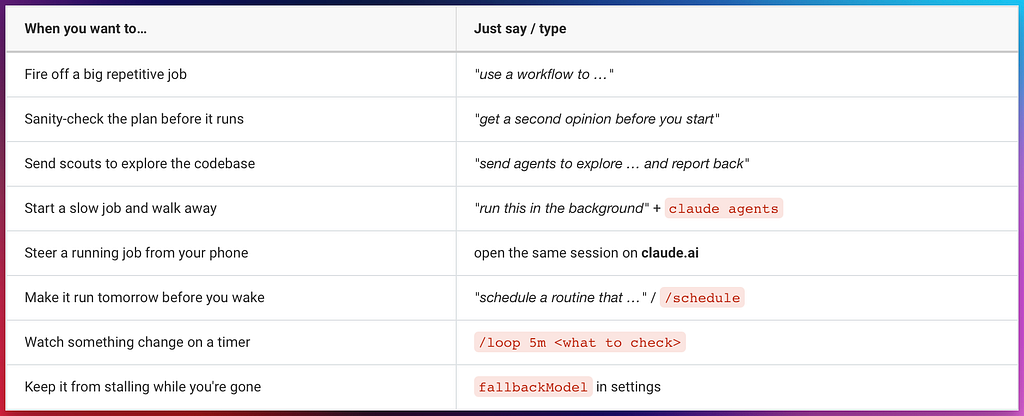
The rest of this article shows you how each one works in practice.
9:00 a.m. — Hand off the 40-file job and walk away
You open a ticket: migrate every file off the old logging library onto the new one. Forty files. The old way, you’d watch Claude grind through them one at a time, approving as it went.
Instead, you say two words and leave:
use a workflow to update all 40 files from the old logger to the new one
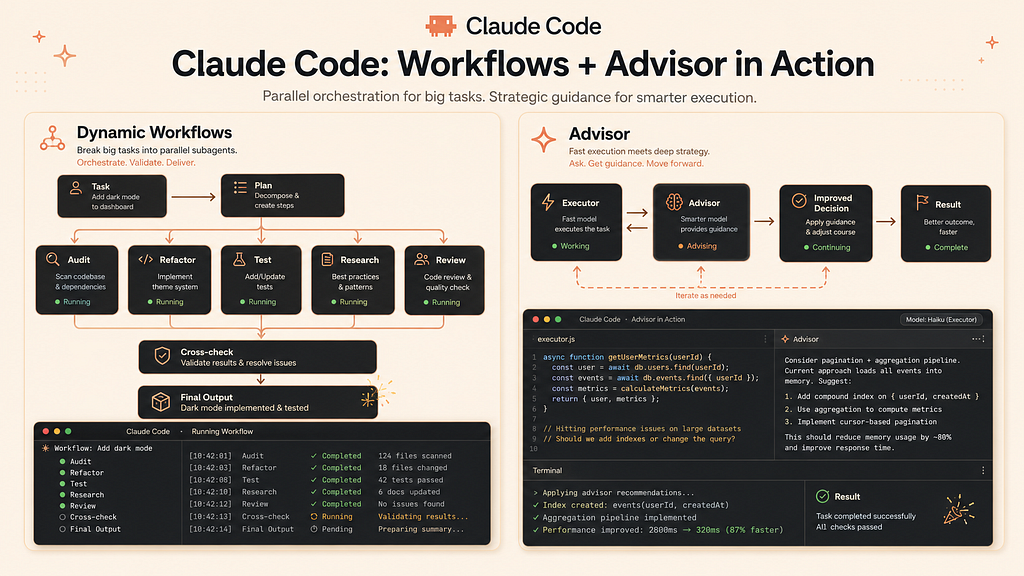
That phrase — “use a workflow” — is the on-switch. You don’t write any orchestration code. Claude writes a small program that splits the job across many AI agents running in parallel, each taking a slice, and runs it for you.
This is real machinery, not a marketing word. A lead agent plans the job and spawns a set of subagents three to five in Anthropic’s published research example each working in parallel with its own context. In their internal evals, that multi-agent setup outperformed a single agent by a wide margin (at the cost of burning a lot more compute — more on that later).
Watch progress anytime:
/workflows
Pro Tip: Workflows aren’t just for edits. “Go through the entire codebase and find bugs, use a workflow and double-check each one” fans out a swarm of finders, then sends independent skeptic agents to try to disprove each finding. What survives is what’s real. The built-in skeptic step is why a workflow beats a single pass.
Takeaway: When a job has many independent pieces, don’t do it serially. Say “use a workflow” and walk away.
Before it runs: get a senior engineer to check the plan
You wouldn’t merge a risky payment refactor without a second pair of eyes. Same here. Before the workflow burns an hour of compute on the wrong approach, get it reviewed:
before you start, get a second opinion on this approach
This calls the advisor — a separate, stronger reviewer model that automatically receives a copy of everything Claude just did: every step, every result. Because it sees the full picture, it catches a wrong turn before the work runs, not after.
Point it at a top-tier model in your ~/.claude/settings.json:
{
  "advisorModel": "claude-fable-5"
}
The catch: it only helps when it’s actually invoked. The two highest-value moments are before committing to a plan and right before declaring a task done. Ask for it explicitly at both.
Takeaway: A second opinion before a long async job is the cheapest insurance you’ll buy all day.
While it works: send scouts, keep coding
The workflow is running. You don’t sit and watch it. You start the next thing — understanding a gnarly auth flow in a part of the repo you’ve never touched.
Reading that yourself would blow up your context window. So you send helpers instead:
send a few agents to explore how auth works in this repo and report back
Each subagent has its own separate memory. It can read thirty files, then report back just the conclusion — not the mess. Your main conversation stays clean and focused.
For anything genuinely slow a full test-and-fix pass, a big migration — kick it to the background and close the lid:
run this in the background and let me know when it's done
Check on every background and remote job from your terminal:
claude agents
Takeaway: Reading is delegation. Send scouts for exploration; send background jobs for anything over a few minutes. Your attention is the scarce resource — spend it on the next problem, not the spinner.
Lunch: approve the risky step from your phone
You’re away from your desk. The migration you started hits a point where it needs a human “yes” before it touches production.
You don’t need to be at your machine. Open the same session on claude.ai — browser or phone — and steer it from there. A footer pill shows Remote Control is active.
You read the diff on your phone, reply “yes, continue,” and the job rolls on. You never opened your laptop.
Before you rely on this, confirm the security gates are green:
/doctor
Remote Control routes a running local session through claude.ai, so it ships with explicit security checks. /doctor shows you they’re all green (and f auto-fixes most issues if they aren’t). As of 2.1.166, messages relayed from other sessions can no longer act with your full authority — a sensible default you don’t have to configure.
Takeaway: The “human in the loop” no longer means “human at the keyboard.” Approve from wherever you are.
Set it to run tomorrow, before you wake
The most “while you’re away” feature of all: work that happens on a schedule, with you nowhere near it.
schedule a routine that triages new PRs every morning at 8am and summarizes them
A routine is a background session on a timer (a cron job, in classic terms). It runs whether or not you’re online. You wake up, and the overnight pull requests are already triaged and summarized in your inbox.
Manage routines directly with:
/schedule
Takeaway: Anything you do at the same time every day — PR triage, dependency checks, a morning standup digest — should be a routine, not a habit you have to remember.
Watch the deploy without watching the deploy
Sometimes you don’t want a one-shot job — you want to poll the same thing until it changes. That’s /loop:
/loop 5m check if the production deploy is finished and tell me when it's live
It re-runs that exact prompt every five minutes and pings you the moment the deploy goes live. You stop refreshing the dashboard. Omit the interval and Claude paces the checks itself.
The difference vs. a routine: a routine is a recurring cloud job that survives across sessions; /loop lives in your current session and is perfect for “watch this one thing until it’s done.”
Takeaway: Replace every “let me check on that again in a bit” with a /loop.
The safety net for work you didn’t watch
Here’s the honest tension. The more Claude does while you’re away, the more you’re trusting work you didn’t watch happen. So the undo tools matter more than ever:
/branch     # fork the session to try a different approach without losing this one
/rewind     # undo recent code or chat changes
/recap      # summary of where you left off when you come back
/branch (formerly /fork) is the conversation version of a git branch try a risky path in a fork while your safe baseline stays untouched. When you return to a session that ran for an hour without you, /recap rebuilds your mental model in one command.
The Secret: Treat async jobs the way you treat a git branch. /branch before anything risky, so the version you trust is always one command away.
Takeaway: Async power and good undo are the same feature. Lean on /branch and /rewind exactly because you weren’t watching.
One config change so it never stalls while you’re gone
The whole point is that the job finishes while you’re away. The thing that ruins that: your primary model gets overloaded at 2 a.m. and the job just… stops.
Fix it once. Add up to three backup models in ~/.claude/settings.json:
{
  "fallbackModel": ["claude-sonnet-4-7", "claude-haiku-4-5-20251001"]
}
Now if the primary is busy, work falls through to the next model instead of stalling (shipped in 2.1.166). Two more recent fixes that quietly make long unattended jobs safer: as of 2.1.161, one failed command no longer cancels the sibling commands running alongside it, and claude mcp commands no longer print your secrets to the log.
Takeaway: Set fallbackModel once. It’s the difference between waking up to finished work and waking up to a job that died at 2 a.m.
The catch nobody puts in the demo
Two things the highlight reel leaves out. Both matter more the more you offload.
1. Workflows are expensive. That “outperformed a single agent by a wide margin” result from Anthropic came at the cost of burning many times the compute and tokens of a single pass. A swarm of agents is a swarm of API calls. For a sprawling job — 40 files, a whole-repo bug hunt — it’s worth it. For a two-file change, “use a workflow” is a money fire. Check /cost and match the tool to the size of the job.
2. Invisible work has an invisible failure mode. When you watch Claude work, you catch the wrong turn live. When the swarm fans out across your repo overnight and you read the result in the morning, you lose that. And the dangerous failure isn’t a crash — a crash announces itself. It’s the result that comes back clean: tests pass, diff looks tidy, and one slice was subtly, plausibly wrong, folded into the merge as if it were complete. You can see that it works. You can’t see that it’s wrong until you look closely.
So the rule for everything in this article: delegate the work, never delegate the verification. Use the advisor before. Read the diff after. Keep /rewind one keystroke away. The async fleet is a force multiplier on a developer who still reviews — and a force multiplier on mistakes for one who doesn’t.
Bottom Line
Claude Code 2.1 made the AI a teammate at your side. The 2026 build moves it off your side entirely — into a fleet that runs while you’re in a meeting, asleep, or on the train.
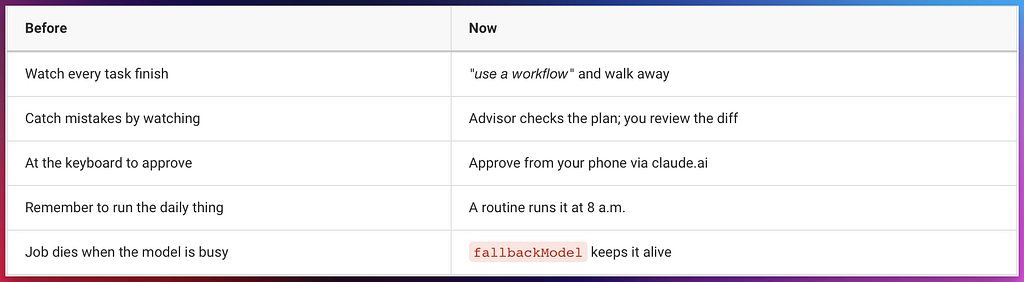
The shift isn’t that Claude got smarter. It’s that Claude stopped needing you in the room.
Start here today
Pick the one job you do most often that has many independent pieces — a migration, a repo-wide cleanup, a bug sweep. Run it once with “use a workflow,” and get a second opinion first:
get a second opinion, then use a workflow to <your big repetitive job>
Then close the laptop and go do something else. Come back, read the diff, and decide if you trust it. That single loop — delegate, leave, return, verify, is the whole new way of working.
What’s the first job you’d hand to a fleet and walk away from? Drop it in the comments, I’m collecting the best async workflows developers are actually running.
Claude Code Now Works While You’re Away — How to Run It Async was originally published in Towards AI on Medium, where people are continuing the conversation by highlighting and responding to this story.
