
I Caught My LLM Agent Lying Mid-Tool-Call


The test was simple. I typed into the CLI: “do you have telma?”
Telma is a common blood pressure medication — Telmisartan. Half the pharmacy owners in India have it on their shelves. The bot should search the product catalog, check availability, return what it finds.
Instead, the bot answered immediately. Confidently. Before the API had returned anything.
It hallucinated.
Not in the way LLMs usually hallucinate — fabricating facts about the world. This was different. The bot was fabricating facts about our own database. Telling a pharmacist we stocked a product without actually checking. In a B2B ordering system, that’s not a demo glitch. That’s a broken order.
That one CLI test retired two agent modes from our codebase.
What We Were Building
I’m an AI Developer intern at Ardour Analytics, and one of my main projects is FundlyMart’s WhatsApp B2B pharmacy bot — a conversational commerce system that lets Indian pharmacy retailers search medicines, build a cart, and place orders through natural Hinglish conversation on WhatsApp.
This isn’t a weekend chatbot. Real pharmacists. Real inventory. Real orders and real money on the line. The bot connects to FundlyMart’s backend APIs for everything — product search, cart management, order placement. Every rupee amount, every product ID, every order confirmation has to be exactly right.
The stack: Node.js 20, TypeScript, Fastify, Vercel AI SDK, Redis for sessions, MongoDB for chat history, deployed on AWS ECS Fargate. Channel-agnostic — runs on WhatsApp (via Fyno), Telegram, and a local CLI I use for testing.
That CLI is where I caught the bug.
How the Agent Evolved
The bot didn’t start with an LLM. It started with keywords.
Off mode. Pure regex and keyword matching. Fast, free, brittle. Works fine for “cart”, “checkout”, “order status”. Falls apart the moment a pharmacist types “bhai telma 40 hai kya?” — a completely natural way to ask about availability in Hindi-inflected English that no keyword matcher is going to catch cleanly.
Shadow mode. The LLM runs in parallel with the keyword matcher, but its output goes nowhere — it only logs divergences. Pure observability. You see exactly how often the LLM would have classified an intent differently, which edge cases it handles better, which ones it gets wrong. Zero user impact. This is how you build confidence before you commit.
Intent-only mode. The LLM classifies intent and extracts entities. Deterministic flow handlers take over from there. The LLM is a smart router — it doesn’t own the response. Underrated architecture. Genuinely good for early production.
Tools mode. Full multi-step tool-calling. The agent calls tools, waits for results, reasons over them, calls more tools if needed, then composes a response. This is where things get interesting — and where they can break in ways tutorials don’t cover.
Then there were two more modes we tried. actions and full. They’re gone now.
The Modes We Retired
actions mode worked like this: the agent would analyze the user’s message, select a response template, and then execute the corresponding action.
Read that again.
The agent was choosing what to say before it knew what the action returned.
In full mode, the same flaw existed at a deeper level. The agent was pattern-matching on what it expected the result to be — not on what the result actually was.
For fully deterministic flows — “view cart” where you always know what you’re rendering — this can work. But for anything involving a real API call? You’re flying blind. You’ve just built a very expensive keyword matcher that fails more confidently.
Which is exactly what happened with telma.
The bot had decided it was going to tell me it found the product. Then it went to check. The API hadn’t returned. The response went out anyway. Confident. Wrong.
We retired both modes on May 27, 2026. They now throw a Zod validation error at startup if you try to set them. The graveyard is documented, not hidden — both as a warning to future contributors and as a record of why the current architecture exists.
The Architecture That Actually Worked
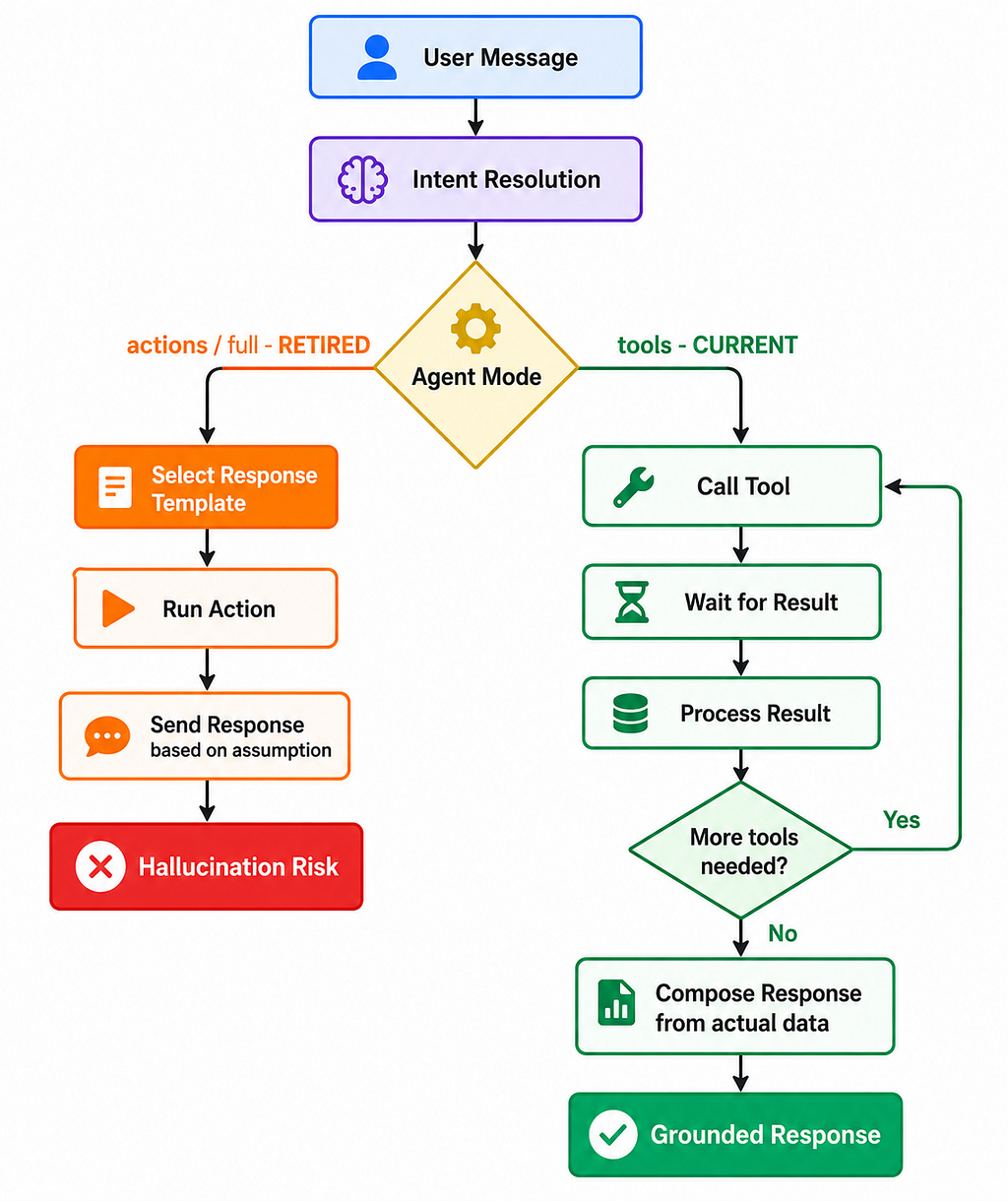
When I moved fully to the tool-call loop, accuracy jumped from ~70% to nearly 100% on tool execution and response correctness. Not because the model got smarter. Because it was finally working with information instead of assumptions.
The correct loop is deceptively simple:
User message
  → Intent resolution
  → Agent calls tool
  → Agent waits for result
  → Agent processes result
  → Agent decides: call another tool, or respond?
  → Response composed FROM tool results
The step that was missing before: wait for result, then respond. That’s it. That’s the whole fix. But the architectural consequences of getting it wrong are significant.
The Vercel AI SDK’s generateText with tools handles this cleanly:
<script src=”https://gist.github.com/vasuag09/e2cddb8d3fe745e7264a6a847998ad8b.js“></script>
maxSteps controls how many tool-call-and-response cycles the agent can run. The model calls a tool, gets the result, decides what to do next. It only produces a final text response when it’s satisfied with what it knows. No template-first. No speculation.
The Safety Guarantees We Had to Build
Switching to a proper tool-call loop solved the timing bug. But tool-calling architectures introduce their own failure modes. Here’s what we hardened:
Anti-hallucination in the system prompt. Every rupee amount, every brand name, every order ID must come from a tool result in the current turn — not from training data, not from conversational memory. If the tool hasn’t returned it, the agent doesn’t say it.
Deterministic render for lists. When the agent searches for products and results come back, the list doesn’t render from the LLM’s prose. It goes through a template. Why? Because we caught the model summarizing MRP as selling price in early testing. Small number difference. Significant business consequence. The agent decides which tools to call and what to say around the data — the data itself renders through code.
Soft fallback. If the agent hits an error — tool timeout, budget exceeded, behavior drift — the engine silently hands off to the deterministic flow path. The user never sees an error. This is the most important guarantee we have. The agent failing gracefully is identical to the legacy system working correctly. The floor was already built.
Hard budgets.
<script src=”https://gist.github.com/vasuag09/f65d4d9f8d4d195c4ca3850356594db1.js“></script>
The agent cannot loop indefinitely. It cannot make unlimited API calls. Every turn has a 10-second wall clock limit. These are env vars — adjustable without a redeploy.
Kill switches on everything.
LLM_AGENT_MODE=tools          # off | shadow | intent_only | tools
TOOL_AGENT_SHADOW_MODE=false  # run agent in parallel but don't use output
TOOL_AGENT_CANARY_PHONES=     # empty = 100% rollout; add phones to test at 1%
One env change and a restart takes you from a full tool-calling agent back to pure keyword matching. No code change. No deployment. I’d build this first on any new project.
What I’d Tell Myself at the Start
Stay in shadow mode longer than feels comfortable. The divergence logs will show you intent patterns your keyword matcher misses, edge cases you didn’t design for, and confidence thresholds that need tuning — all with zero user impact. You will be tempted to move faster. Resist it.
If the response is selected before the tool runs, you haven’t built an agent. You’ve built a template picker with extra steps. The entire point of tool calling is grounding the response in real data. If the response comes before the data, you’re not grounding anything — you’re just adding latency to a guess.
Design the soft fallback first, not last. Your legacy deterministic path is your safety net. The agent is the upgrade layer, not the replacement. Build the floor before you build the ceiling.
Prompt caching is worth the discipline. Keep the base system prompt stable. Per-turn values — available tool codes, session state — go on the schema wire, not inlined into the prompt as text. Cache hit rates stay high. At scale, this matters.
The telma test wasn’t a spectacular failure. It was a mundane one — the kind you only catch because you’re actually testing, not just running the demo. The agent answered before the API returned. One sentence. Confidently wrong.
That mundane failure shaped every architectural decision that came after it.
Most tutorials show you tool calling working. They don’t show you what breaks when you get the order of operations wrong, or what you need to build to make sure the failure modes stay quiet when they do happen in production.
Build the safety guarantees before you need them. Because when you need them, you won’t have time.
Tags: Artificial Intelligence · LLM · Agentic AI · Software Engineering · Machine Learning
I Caught My LLM Agent Lying Mid-Tool-Call was originally published in Towards AI on Medium, where people are continuing the conversation by highlighting and responding to this story.
