10 Core AI Workflows to Automate 60% of Execution

Before you dive in: AI workflows aren’t plug-and-play, they need thoughtful prompts, clean inputs, and human review gates. Think of each workflow as a junior collaborator, not a vending machine. The 60% figure represents execution automation, not decision-making. Strategy, judgment, and relationships still live with your team.
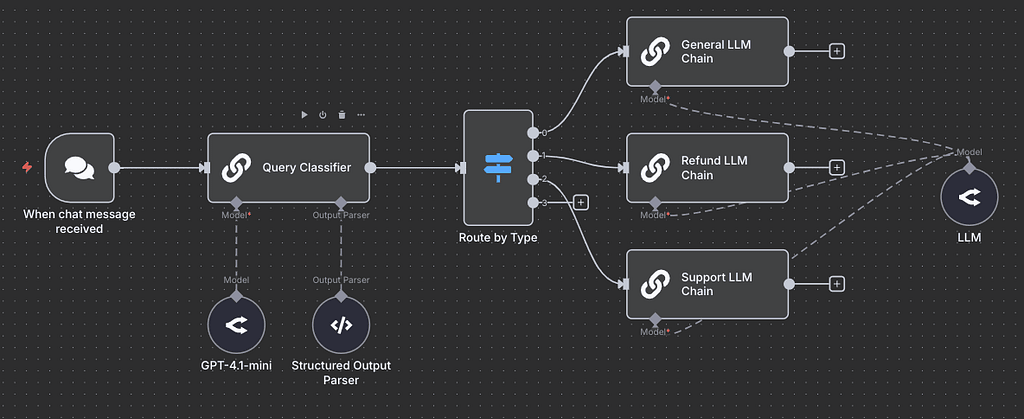
AI workflows change that equation entirely. By connecting the right tools in the right sequence, you can build autonomous pipelines that handle the work between decisions — freeing your team to do the work only humans can do.
This guide breaks down the 10 core AI workflows that, when implemented together, typically automate 50–65% of recurring execution tasks in marketing, operations, content, and customer-facing teams.
1. Content Repurposing Engine
Best for: Marketing teams | ⚡ Saves 8–12 hours per content piece
A single long-form piece — a podcast episode, webinar, or pillar blog — contains enough raw material for 20–30 derivative assets. Most teams leave 90% of that value on the table because repurposing is tedious, not hard.
This workflow ingests a transcript or document and automatically produces:
- A summary blog post
- An email newsletter
- 5–10 social media posts per platform
- A slide outline
- A short-form video script
All in one pipeline run.
How it works: Transcript → AI chunker → parallel Claude/GPT-4 calls per asset type → format post-processing → CMS or Notion draft. One human review gate before publish.
Tools: Claude API, Make / n8n, Notion, Descript, Buffer
2. Research & Synthesis Pipeline
Best for: Strategy & content teams | ⚡ Saves 10–15 hours per research brief
Competitive research, market analysis, and industry intelligence traditionally require a dedicated analyst 2–3 days per report. An AI research pipeline compresses that to under an hour while increasing source breadth.
The workflow collects URLs, PDFs, and search results, passes them through an extraction layer, then synthesizes findings into a structured report — complete with key themes, data points, and source citations — ready for human editorial polish.
How it works: Define research brief → Perplexity/web search → URL scraper → AI summarizer per source → synthesis call → formatted Markdown report → Notion or Google Docs push.
Tools: Perplexity API, Claude, Firecrawl, n8n, Google Docs
3. Inbox Triage & Draft Replies
Best for: All teams | ⚡ Saves 6–10 hours per person per week
The average knowledge worker spends 28% of their workweek reading and responding to email. That number is an opportunity, not a fact of life. An AI inbox workflow reads, categorizes, prioritizes, and drafts replies — so you only approve and send.
High-volume customer success, partnerships, and sales teams typically see the biggest ROI here. The workflow handles templated replies automatically, escalates complex threads, and drafts personalized responses for your review on everything else.
How it works: Gmail/Outlook trigger → AI classifier (category + priority + sentiment) → routing logic → draft generation with CRM context → human approval → auto-send or 1-click send.
Tools: Gmail API, Claude, HubSpot, Zapier, Superhuman
4. Data-to-Narrative Reporting
Best for: Analytics & ops teams | ⚡ Saves 4–6 hours per report cycle
Most business reports are created by pulling numbers from a dashboard, pasting them into a slide, and writing a sentence about each chart. AI can do all three faster — and with more consistent framing and language.
This workflow connects your analytics stack to an AI layer that interprets trends, flags anomalies, generates written commentary, and formats the output into a stakeholder-ready report or slide deck — on a daily or weekly automated schedule.
How it works: Data warehouse/GA4/Looker pull → CSV/JSON → AI analyst call → structured narrative generation → templated PPT/Google Slides push → scheduled Slack or email delivery.
Tools: BigQuery, OpenAI / Claude, Google Slides API, Slack, Zapier
5. Meeting Intelligence System
Best for: All teams | ⚡ Saves 2–3 hours per meeting day
Meetings generate decisions, action items, and context that immediately start decaying in people’s memories. An AI meeting intelligence system captures everything and turns it into searchable, actionable outputs — automatically.
The workflow records and transcribes meetings, extracts decisions and action items with ownership and deadlines, generates a structured summary, creates tasks in your project management tool, and archives the full context for future reference.
How it works: Zoom/Google Meet → Fireflies/Otter transcript → AI extraction prompt → action items with assignees → auto-tasks in Linear/Asana → summary Slack post → Notion archive.
Tools: Fireflies.ai, Claude, Linear / Asana, Slack, Notion
Pro Tip: Workflows 1–5 are your foundation layer. Implement them first before moving to the more complex sales, ops, and HR workflows below. Most teams save 20+ hours per week just from these five.
6. Lead Qualification & Personalized Outreach
Best for: Sales teams | ⚡ Saves 3–5 hours per SDR per day
Sales development reps spend the majority of their day on research and outreach that could be systematically automated. AI can research a company, score a lead against your ICP, draft a highly personalized first touch, and sequence follow-ups — before an SDR even opens their laptop.
This workflow enriches leads from your CRM, researches the prospect and company via web search, scores fit, then generates multi-touch email sequences that actually sound personal — because they’re grounded in real context.
How it works: New CRM lead → enrichment (Clay/Apollo) → web research → ICP scoring → AI personalization call → sequence draft → SDR review → send via Outreach/Lemlist.
Tools: Clay, Apollo, Claude, Outreach, Salesforce
7. Knowledge Base Auto-Updating
Best for: Product & CS teams | ⚡ Saves 5–8 hours per release cycle
Internal wikis and help centers suffer from the same fate: they’re well-intentioned and chronically outdated. Every product change, policy update, or process shift should trigger a documentation review — but no one has time. AI makes this continuous.
The workflow monitors product changelogs, Slack announcements, and Jira releases, then identifies affected documentation, drafts updates, and flags them for approval. New support tickets also feed back to identify documentation gaps automatically.
How it works: Trigger (Jira release / Slack announcement) → affected doc identification → AI draft update → diff view for human review → Confluence/Notion publish → support ticket gap analysis loop.
Tools: Confluence, Jira, Claude API, Slack, Zendesk
8. QA & Copy Review Loop
Best for: Content & legal teams | ⚡ Cuts review cycle by 50–70%
Every team has style guides, brand voice rules, legal disclaimers, and compliance requirements that content must pass through before publishing. Manual review is slow, inconsistent, and a bottleneck in every content pipeline. AI QA fixes that.
This workflow runs every draft through a multi-dimensional review before a human editor ever opens the file:
- Brand voice scoring
- Grammar and clarity checks
- Legal/compliance flag detection
- SEO optimization review
- Accessibility checks
How it works: Draft submitted (Notion/Google Docs) → AI review with custom rubric → scored feedback report → auto-fix suggestions → back to author or escalate to editor → publish approval.
Tools: Claude API, Google Docs API, Grammarly API, Make, Slack
9. Social Listening & Response Prioritization
Best for: Community & brand teams | ⚡ Saves 4–6 hours per community manager weekly
Brand mentions, competitor activity, customer sentiment, and industry conversations happen 24/7. Community managers can only react to what they see. AI social listening operates continuously, categorizes signals, and surfaces the moments that actually matter — with draft responses ready.
The workflow monitors keywords and handles across platforms, classifies sentiment and urgency, routes to the right team member, and drafts on-brand responses for one-click approval. High-risk mentions (negative viral threads, PR risks) trigger immediate alerts.
How it works: Brandwatch/Mention stream → AI classifier (sentiment, urgency, category) → routing logic → response draft generation → community manager approval queue → post from dashboard.
Tools: Brandwatch, Claude, Sprout Social, Slack Alerts, Make
10. Employee Onboarding & Training Automation
Best for: HR & ops teams | ⚡ Saves 15–20 hours per new hire onboarded
Onboarding a new hire is a high-stakes, repeatable process that most organizations still run manually through a mix of emails, calendar invites, and tribal knowledge. AI can orchestrate the entire first-30-days experience — from document generation to Q&A support.
This workflow auto-generates personalized onboarding plans based on role and team, creates welcome messages and tool access requests, serves as a 24/7 AI assistant for new hire questions, and tracks completion of key milestones with manager nudges.
How it works: New hire in HRIS → role-specific plan generation → Slack welcome bot → AI Q&A assistant (RAG over internal docs) → task completion tracking → 30/60/90-day check-in prompts to manager.
Tools: Workday / BambooHR, Claude + RAG, Slack Bot, Notion, Zapier
How to Implement AI Workflows (Without Breaking Things)
Start With One High-Pain Workflow
Don’t try to automate everything simultaneously. Pick the workflow where the time cost is most visible and the output is easiest to verify. Inbox triage and meeting intelligence are low-risk, high-reward starting points for most teams.
Design Human Review Gates
Every workflow should have at least one point where a human reviews before consequential output is sent or published. AI quality is high, but errors in automation scale fast. The goal is approval loops, not hands-off pipelines — at least until you’ve built trust in each workflow’s reliability.
Build Feedback Loops
When a human edits an AI draft, that edit is signal. The most durable AI workflows capture feedback and feed it back into prompts, few-shot examples, or fine-tuning. Workflows that learn compound in value over time.
Measure What Matters
Track hours reclaimed, not just hours automated. The real metric is what your team does with the time they get back. If reclaimed hours go into lower-value work, the workflow hasn’t added value — it’s just moved the bottleneck.
The question isn’t whether AI can automate parts of your team’s execution, it’s which parts you tackle first. Start with one workflow, measure the time reclaimed, then reinvest that capacity into the next one.
10 Core AI Workflows to Automate 60% of Execution was originally published in Towards AI on Medium, where people are continuing the conversation by highlighting and responding to this story.
