
How to Debug and Train Neural Networks Effectively

Inspired by Andrej Karpathy’s CS231n Standford lectures.

Step 1: Run a Quick Sanity Check Before Doing Anything
Initial Sanity Checks on Loss Before full training begins, you should verify your initial setup:
- Check the initial loss: With regularization disabled, ensure your initial loss matches theoretical expectations. For example, if you are using a softmax classifier on a dataset with 10 classes, you should expect an initial loss of approximately 2.3 (which is −log(1/10)).
- Check the regularization: If you crank up the regularization strength, the loss should correspondingly increase because of the added penalty term
Step 2: Try to “Memorize” a Tiny Set of Examples First
Before training on your full dataset, take just 20 examples and try to get your network to perfectly memorize them. The goal is for the loss to drop to zero and accuracy to hit 100%.
This might sound like the opposite of good machine learning — and normally it is. But right now, you are not trying to build a smart model. You are checking that your code can actually learn anything at all.
If your network cannot overfit 20 simple examples, there is a fundamental flaw somewhere. Do not move on to the full dataset until this test passes. Think of it like checking your car engine before a long road trip.

Step 3: Find the Right “Speed” for Learning
The learning rate is the single most important setting in your training process. It controls how big a step the network takes each time it updates itself. Getting it wrong is one of the most common reasons training fails.
Too slow (something like 0.000001): the loss barely moves. Your network is taking tiny, timid steps and will take forever to learn anything meaningful.
Too fast (something like 1,000,000): the loss explodes. You will likely see “NaN” errors — which stands for “Not a Number” — because the network is taking steps so large it flies completely off track.
Just right: the loss decreases steadily and predictably over time. Start somewhere in the middle and use trial and error to close in on the right value. A rough rule of thumb is to start around 0.001 and adjust from there.

Step 4. Hyperparameter Optimization Strategy
When tweaking hyperparameters like learning rates and regularization, follow a structured approach:
- Coarse-to-Fine Search: Start by running many models for just a few epochs to get a quick sense of which hyperparameter ranges work well, then narrow your focus and run longer training phases on the promising ranges.
- Sample in Log Space: Hyperparameters like the learning rate and regularization act multiplicatively on your network’s dynamics. Therefore, you should sample them in log space (e.g., between 10−3 and 10−6) rather than using a uniform distribution
Step 5: Keep Watching While the Network Trains
Once training is running, do not just walk away. Your training curves are constantly telling you something. Here is what to look for.
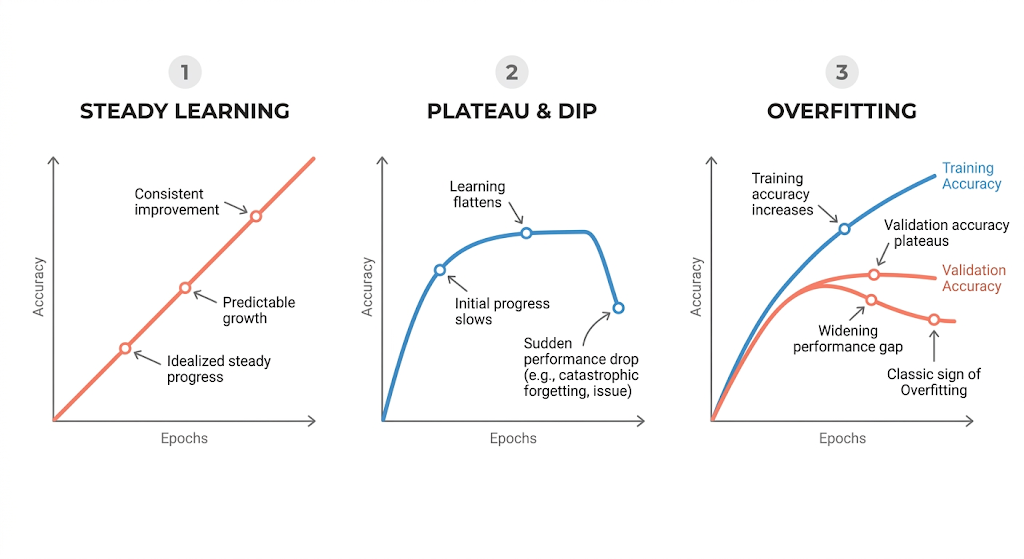
The loss curve looks like a perfectly straight line. This usually means your learning rate is too low. Real learning tends to curve downward as the easy wins get made early and progress slows. A dead-straight line often means barely any learning is happening at all.
The loss is flat for a long time, then suddenly drops. This is a sign that your starting weights were poorly set. The gradients — the signals that tell the network which direction to improve — were barely flowing at the start. The network was essentially stuck until things randomly aligned.
Training accuracy is great, but validation accuracy is not. This is overfitting, and it is one of the most common problems in machine learning. Your network has memorized the training examples instead of learning patterns that generalize to new data. The fix is usually to increase regularization, get more data, or simplify your model.
The update-to-weight ratio is way off. A useful rule of thumb: the size of each update to the network’s settings should be about one-thousandth (0.001) the size of the settings themselves. If the ratio is much higher, your learning rate is too large. If it is much lower, your learning rate is too small.
The Short Version
Check that your initial numbers make sense → overfit a tiny batch to confirm your code works → find a learning rate that is neither too fast nor too slow → search for good settings by going from rough to precise → watch your training curves and treat them as warning signs.
If any single step fails, stop and debug before moving on. The whole point of babysitting is to catch problems early — when they are still cheap to fix.
Hope this made neural network training a little less confusing.
Follow for more hands-on AI content.
Want to learn Pytorch from Scratch ? Check it out this Link
-Yoki
How to Debug and Train Neural Networks Effectively was originally published in Towards AI on Medium, where people are continuing the conversation by highlighting and responding to this story.
