
Agent-guided workflows to accelerate model customization in Amazon SageMaker AI

Every organization has access to the same foundation models. The real competitive advantage comes from customizing them with your proprietary data and domain expertise. But getting there is complex, even for experienced teams. It requires mastering fine-tuning techniques like Supervised Fine-Tuning (SFT), Direct Preference Optimization (DPO), and Reinforcement Learning Verifiable Rewards (RLVR), navigating fragmented APIs and model-specific data formats, designing rigorous evaluations, and managing months-long experiment cycles.
Amazon SageMaker AI now offers an agentic experience that changes this. Developers describe their use case using natural language, and the AI coding agent streamlines the entire journey, from use case definition and data preparation through technique selection, evaluation, and deployment. Purpose-built agent skills deliver specialized expertise on fine-tuning applied to your specific use case, data transformation to required formats, quality evaluation using LLM-as-a-Judge metrics, and flexible deployment to Amazon Bedrock or SageMaker AI endpoints. Agent skills for model customization not only boost productivity but also decrease token usage. All generated code is fully editable, producing reusable artifacts that integrate seamlessly into existing workflows.
What makes this experience truly powerful is agent Skills for model customization. They are pre-built, modular instruction sets that encode deep AWS and data science expertise across the entire customization lifecycle. When you describe your use case, the AI coding agent activates the relevant skills, guiding it through data preparation and validation, technique selection, hyperparameter configuration, model evaluation, and deployment. Skills provide specialized knowledge about SageMaker AI APIs, ML workflows, best practices, and common patterns, enabling your coding agent to provide more accurate, SageMaker AI-specific guidance, generating ready-to-run notebooks at each step. Skills are fully customizable, so you can modify them to match your team’s workflows, governance standards, and tooling preferences, enabling reproducible organizational best practices, a common challenge with general-purpose coding assistants.
Amazon Kiro in SageMaker AI Studio JupyterLab
JupyterLab in SageMaker AI includes an integrated agentic development environment support through ACP. By default, Kiro, Amazon’s AI software development agent, is pre-configured in the chat panel, providing AI-powered code completion, debugging assistance, and interactive coding support directly within your JupyterLab environment. When you use coding agents in SageMaker AI JupyterLab, the space automatically loads relevant SageMaker AI model customization Skills into your agent’s context.
Additionally, you can configure other Agent Communication Protocol (ACP) compatible coding agents of your choice, such as Claude Code, giving you flexibility to work with the tools that best fit your workflow. ACP-compatible agents can benefit from the same SageMaker AI Skills integration when used within SageMaker AI JupyterLab. While this example shows the integration with JupyterLab, you can also use remote access to your own IDE outside of JupyterLab.
Prerequisites
Before starting this tutorial, you must have the following prerequisites:
- An AWS account
- The ability to access or create a SageMaker AI domain. If you don’t have a SageMaker AI domain, you can create one using the quick setup or manual setup options
- An AWS IAM role with the required permissions
- An Amazon Simple Storage Service (Amazon S3) bucket
- Access to or can create a SageMakerAI Studio JupyterLab compute space. There is no minimum instance type requirement to use the new features.
- As of this publication, SageMaker AI Distribution image version 4.1 or higher is required on your SageMakerAI Studio JupyterLab.
- Verify or Attach AmazonSageMakerFullAccess managed policy to your domain’s execution role. Attach the additional inline policy for Lambda, S3 and Bedrock access to the same execution role
- Your SageMakerAI Studio execution role’s trust policy must allow these three services to assume the role: sagemaker.amazonaws.com, lambda.amazonaws.com, bedrock.amazonaws.com.
Skills overview
The SageMaker AI agent skills are built conforming with the Agent Skills open format. The agent-guided model customization workflows are powered by nine modular skills that cover the full customization lifecycle:
| Skill Name | Phase | Description |
| Use Case Specification | Configuration | Structured discovery to define business problem, users, and success criteria |
| Planning | Discovery | Generates a dynamic, multi-step customization plan tailored to your use case |
| Fine-tuning Setup | Configuration, Training | Selects base model from SageMaker AI Hub and recommends technique (SFT, DPO, or RLVR) |
| Dataset Evaluation | Evaluation, Training | Validates dataset format and schema before training |
| Dataset Transformation | Data Engineering | Converts between ML data formats (OpenAI chat, SageMaker AI, Hugging Face, Amazon Nova) |
| Fine-tuning | Training | Generates training notebooks for SageMaker AI serverless fine-tuning |
| Model Evaluation | Evaluation | Configures LLM-as-Judge evaluation with built-in and custom metrics |
| Model Deployment | Deployment | Determines deployment pathway (SageMaker AI endpoint or Bedrock) and generates code |
The coding agent (Kiro, Claude Code, Cursor, etc.) provides the conversational interface while the SageMaker AI Skills orchestrate the workflow. When you interact with your coding agent, it activates the relevant skills. This allows you to call SageMaker AI APIs, access S3 data sources, and interact with model registries through AWS-provided MCP servers. Jupyter notebooks are generated for you that execute each step of the process into existing ML pipelines.
Supported Fine-Tuning Techniques
The model customization skills currently support three fine-tuning techniques and recommend the right one during the planning phase based on your use case.
| Technique | Description | Best For |
| SFT (Supervised Fine-Tuning) | Trains on input/output pairs | Task-specific behavior: instruction following, format compliance, domain-adapted responses |
| DPO (Direct Preference Optimization) | Trains on preferred vs. rejected outputs | Aligning tone, style, and subjective preferences to match human judgement |
| RLVR (Reinforcement Learning with Verifiable Rewards) | Trains using code-based reward functions | Tasks where correctness can be programmatically verified |
Solution implementation
For this solution, you’ll fine-tune a small language model (SLM) on the FreedomIntelligence/medical-o1-reasoning-SFT dataset to build a clinical reasoning model that walks through medical cases step-by-step before providing a diagnosis. This demonstrates how fine-tuning can specialize a general-purpose model for domain-specific reasoning tasks. If you’d like to try a different use case, SageMaker AI provides a library of sample datasets across techniques like SFT, DPO, and RLVR that you can use as a starting point.
Getting started
- Open or Create a SageMaker AI Space with JupyterLab
- Navigate to SageMaker AI Studio
- Go to Spaces in the left navigation panel or click “Customize with agent” from the model hub
- Either:
- Click Create Space and select JupyterLab as your application
- Open an existing Space that includes JupyterLab
In this post, we’ll start with using Kiro and switch to Claude Code as our coding agent. To keep using Kiro, move to the Planning Phase section, or move to the next section to see how to use Claude Code in JupyterLab.
Start Using Kiro in the Chat Panel:
Kiro requires authentication before you can use it. The chat panel will guide you through the authentication process.
- In JupyterLab, open the chat panel by clicking the chat icon in the right sidebar

- Type @ to see your available agents
- Select @Kiro from the agent dropdown. Start asking questions or requesting code assistance.
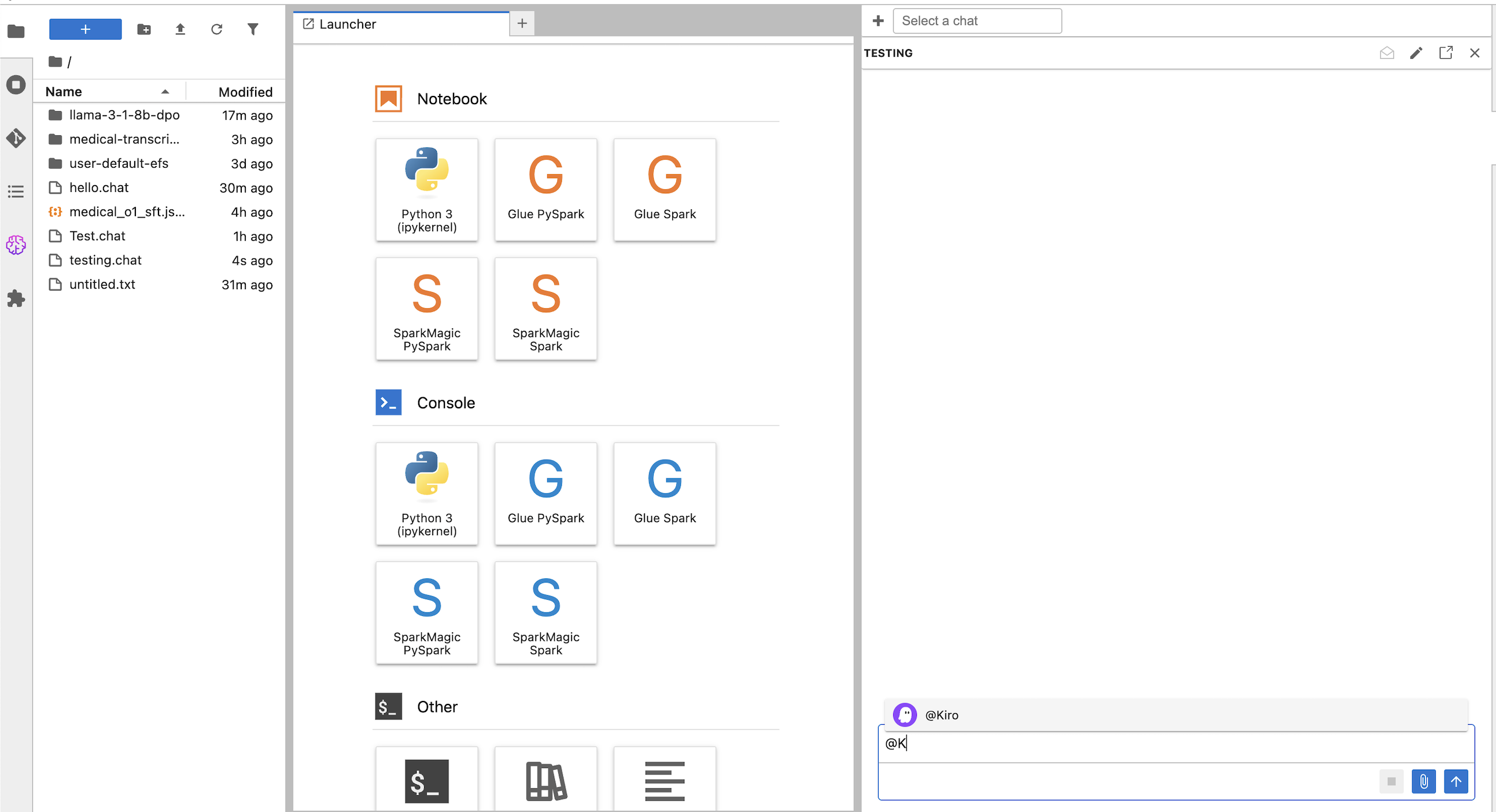
The first time you use Kiro in a space, it will ask you to login. To login, follow the instructions provided by the chat, or follow here:
- In JupyterLab, open a new terminal: File > New > Terminal
- Run the following command
kiro-cli login --use-device-flow
Select one of the 3 login options in the terminal:
- Use for Free with Builder ID
- Use for Free with Google or GitHub
- Use with Pro license
- Enter a prompt: “I want to customize a model”
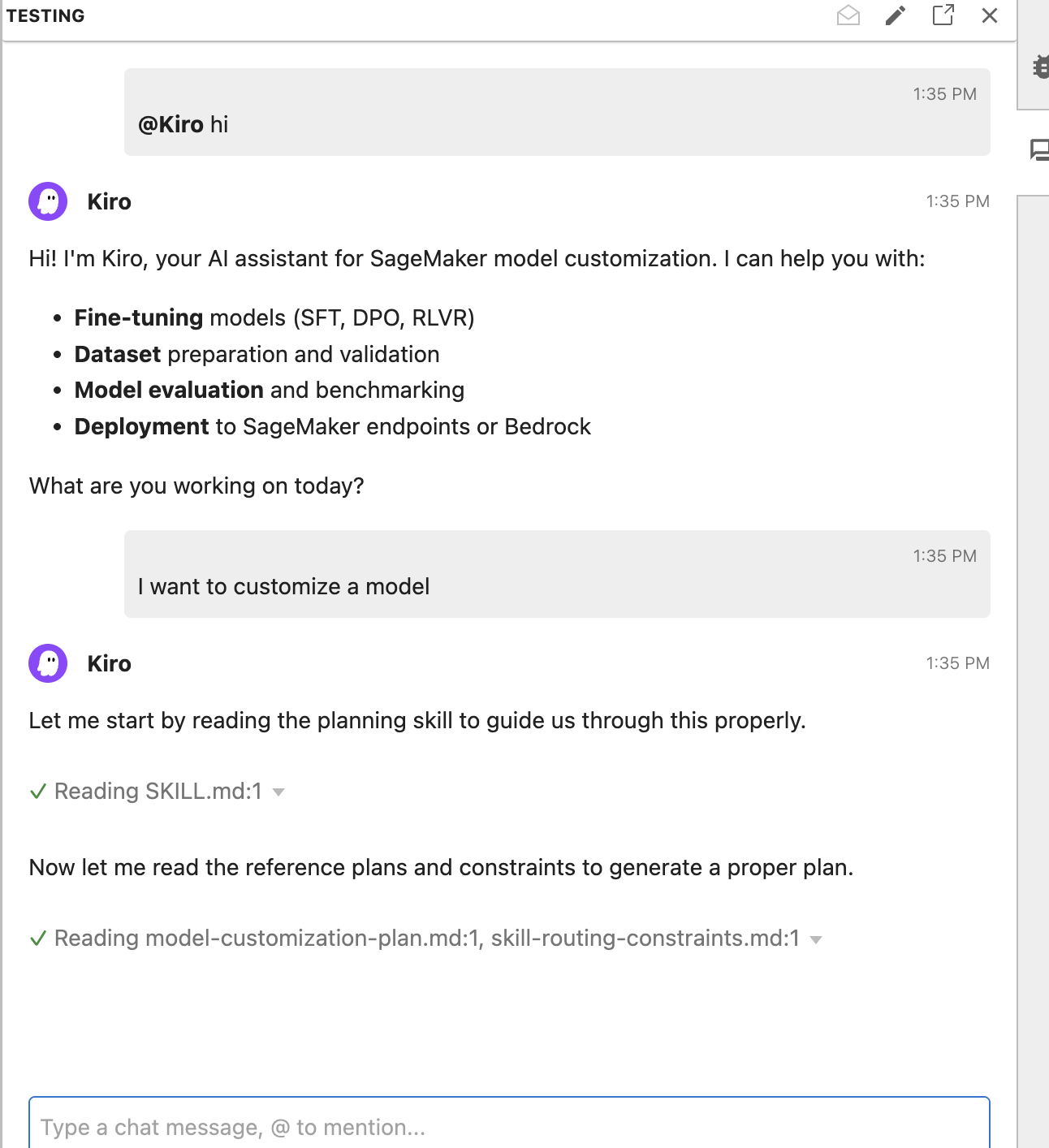
Configuring Claude Code in JupyterLab
SageMaker AI Studio supports implementing additional coding agents using Agent Control Protocol (ACP). Example agents that support ACP include:
- Claude (via claude-agent-acp)
- OpenCode (via opencode CLI >= 1.0.0)
- Gemini (via gemini CLI >= 0.34.0)
- Codex (via codex-acp)
View the JupyterLab user guide for more information on installation steps.
To use Claude Code:
- Install the CLI tool in your SageMaker AI Studio JupyterLab terminal:
npm install -g @zed-industries/claude-agent-acp - Restart the space by running the command
restart-jupyter-serveror by restarting the space via the Studio UI. Please note, this will result in any unsaved work or in memory state (like active kernels) being lost. - Authenticate with the agent following its specific authentication process
- Select the agent from the persona dropdown in the JupyterLab chat panel (@Claude)
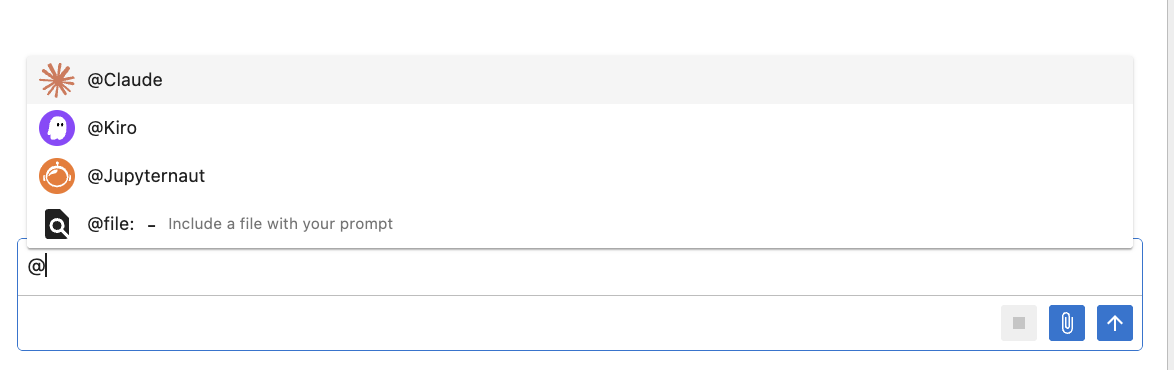
Claude Code can be used with most Anthropic subscriptions including configuring Claude Code with Amazon Bedrock on Amazon SageMaker AI Studio. To configure Claude Code to use Claude through Amazon Bedrock follow the prerequisites in the Claude code guide, enabling Bedrock model access and providing your execution role access to bedrock:InvokeModel and bedrock:InvokeModelWithResponseStream. Then, create the following file to configure Claude Code to use Bedrock.
Planning phase
Upon receiving the user prompt, the coding agent doesn’t immediately begin executing tasks. It enters a planning phase where it identifies and activates the skills necessary to complete the job. In the process, the agent generates a workflow which users can review and modify. From the initial prompt, the agent recognizes two relevant skill domains and activates both the planning skill for structuring the overall workflow and the finetuning-setup skill for configuring the training job. Before generating any code, the agent asks targeted questions about dataset readiness and use case details to inform its technique and evaluation metrics recommendations.
Fine-tune in SageMaker AI
With multiple model families and fine-tuning techniques available, choosing the right approach for your specific use case can be challenging. The agent analyzes your dataset structure and task requirements to provide tailored model and technique recommendations, helping you avoid costly trial-and-error cycles. SageMaker AI supports serverless customization across Amazon Nova, GPT-OSS, Llama, Qwen, and DeepSeek family of models. For this use case, we chose Qwen3-0.6B because it is cost-effective to train and deploy while being sufficient for domain-specific tasks like medical reasoning.
- In the chat panel, prompt the agent: “I want to fine-tune a model for clinical reasoning that walks through medical cases step-by-step before providing a diagnosis.”
- Confirm the plan and answer the agent’s follow-up questions. The agent generates a training notebook that will use a SageMaker AI serverless training job with training and validation metrics tracked through integrated SageMakerAI MLflow Apps.
- Open the notebook, verify the code and run the notebook cells to submit the training job.
- Monitor the job within your SageMaker AI Studio.
The model’s loss will show a steady decrease during training, showing it successfully learned to provide step-by-step clinical reasoning before reaching diagnoses. For a deeper look at the full metric set and per-step breakdowns, we can view more in the MLflow app.
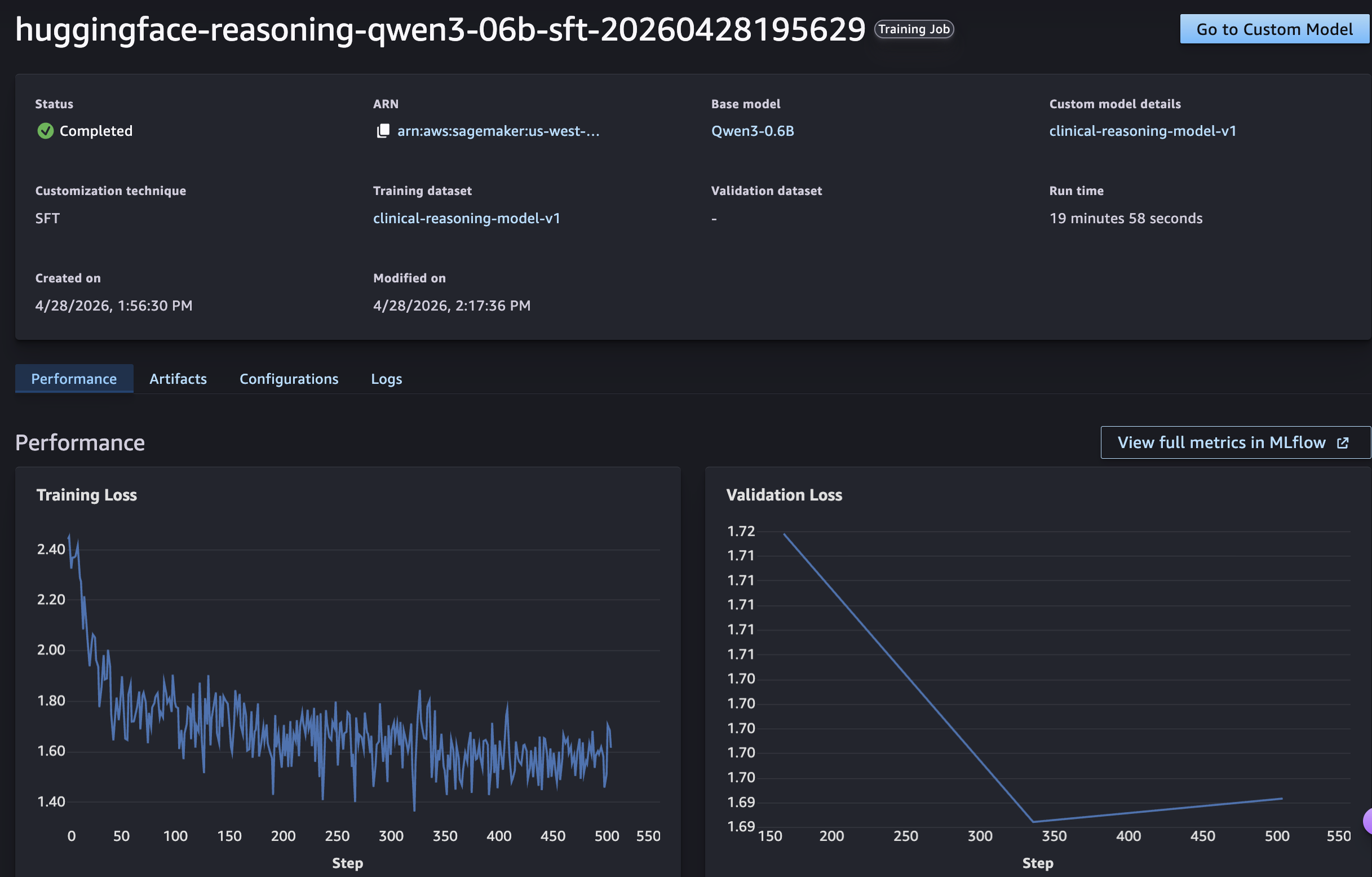
Evaluation
Once training completes, we need to measure how well the fine-tuned model performs compared to the base model. The agent recommends an evaluation approach based on our use case, or we can specify the metrics we care about, such as accuracy on held-out medical reasoning questions or reward score improvement over the base model. It then generates a notebook in SageMaker AI Studio JupyterLab that runs the evaluation against an evaluation dataset and reports the results, so we can validate the model’s performance. Evaluation results are also distributed to MLflow for comparisons before moving to deployment.
Deployment
With evaluation complete, the final step is deploying the fine-tuned model for inference. The agent walks us through deployment options across SageMaker AI and Bedrock through Bedrock Custom Model Import, depending on our latency, scaling, and integration requirements. It then generates a notebook in JupyterLab that provisions the endpoint and runs a sample inference request, so we can validate whether the deployed model is ready to serve predictions.
Customize skills
The skills included with SageMaker AI cover common fine-tuning workflows, but you can also customize existing skills or author new ones to match your organization’s standards and tooling. For example, you might extend the model-evaluation skill to include domain-specific metrics or add a new skill for a custom deployment target. Skills are defined in simple markdown files in the ~/.kiro/skills directory, making them easy to author, version-control, and share across your organization.
Conclusion
In this post, we walked through the model customization lifecycle using SageMaker AI agent skills. Starting from a single natural language prompt, the agent planned the workflow, configured and ran a SFT fine-tuning job on Qwen3-0.6B, evaluated the results with metrics tailored to our use case, and deployed the fine-tuned model. The agentic model customization experience in Amazon SageMaker AI is available today. You can get started in minutes. Simply launch a JupyterLab space in SageMaker Studio with Kiro and Agent Skills pre-configured, or bring the same Skills into your preferred IDE from GitHub. Describe your use case in natural language, and let the agent guide you from data preparation through evaluation and deployment.
What once required months of specialized ML work and deep knowledge can now be completed in days. The expertise is encoded. The workflow is guided. And the code is yours. Get started today by visiting the GitHub repository for the SageMaker AI agent skills plugin and step-by-step guide. Review the documentation to see how SageMaker AI serverless model customization with agent skills can accelerate your path from idea to production models.
