Complete Angular Component Integration in Conversational AI Interfaces

A Guide to Generative UI with Hashbrown
Part 2 · Generative UI in Angular
What you’ll learn: How a real enterprise Angular team maps their existing design system to a Hashbrown component registry, wires it to NgRx stores, handles per-role component exposure, and arrives at a production-ready generative UI.
The Starting Point
Imagine a mid-size financial services company which run a large Angular 19 application: a unified dashboard for relationship managers to track client portfolios, trade history, risk exposure, and compliance alerts.
Now imagine you are asked to add a chat box in the corner as an MVP approach, that calls an OpenAI (we call it Eliza #iykyk) endpoint and renders the response as markdown text. It shipped in three weeks. The business loved the demo.
Then the pilot users started using it.
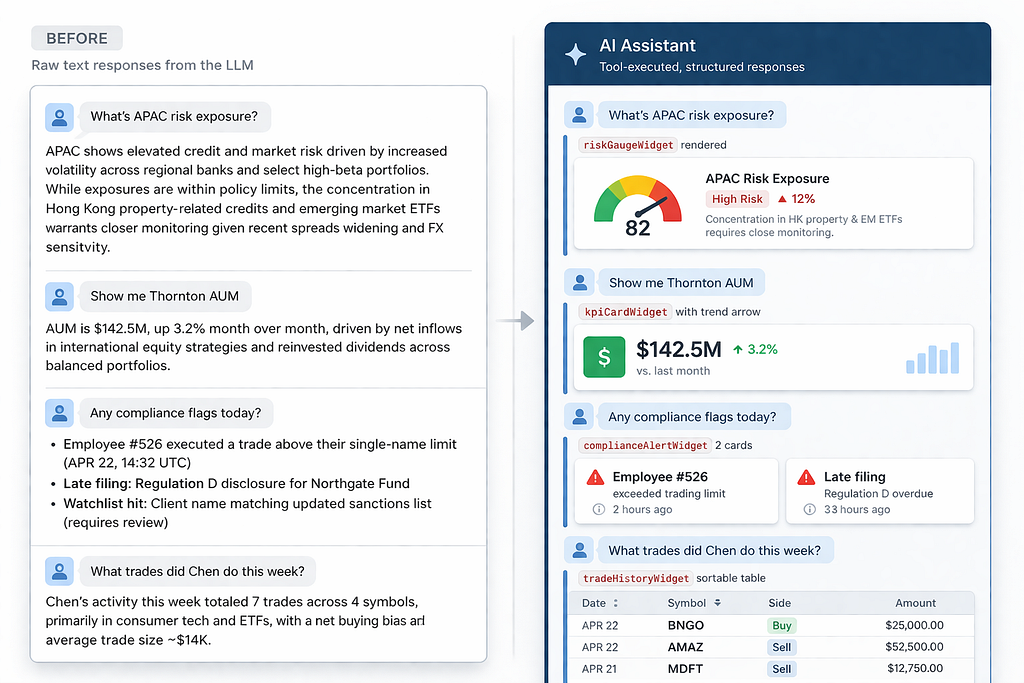
The complaints were immediate. Asking “What’s APAC’s current risk exposure?” returned three paragraphs of text describing numbers that were already visualized in a risk gauge component ten seconds away by clicking “Risk” in the nav. The AI made the app feel slower, not smarter. Usage dropped after the first week.
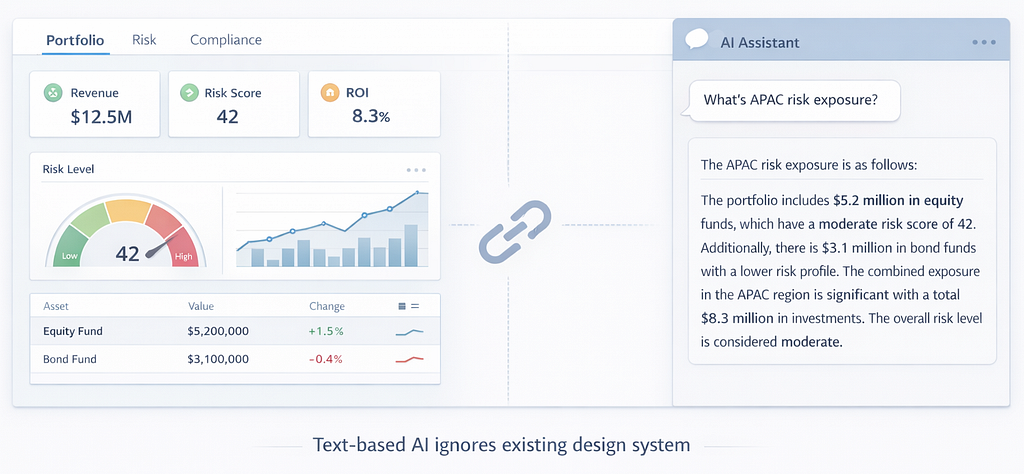
The team had a library of multiple design system components. The AI didn’t ignore it, our architecture didn’t bind any relationship bridge between every single one.
This is the article about fixing that. The story is composite and drawn from the pattern that most enterprise Angular teams hit when they first wire AI to their apps, the code is real and every pattern here is directly applicable.
This is an extension to the base discussion which was covered in the Part 1:
Generative UI in Angular: Rendering AI-Chosen Components in Chat
Step 0: Audit Your Component Library
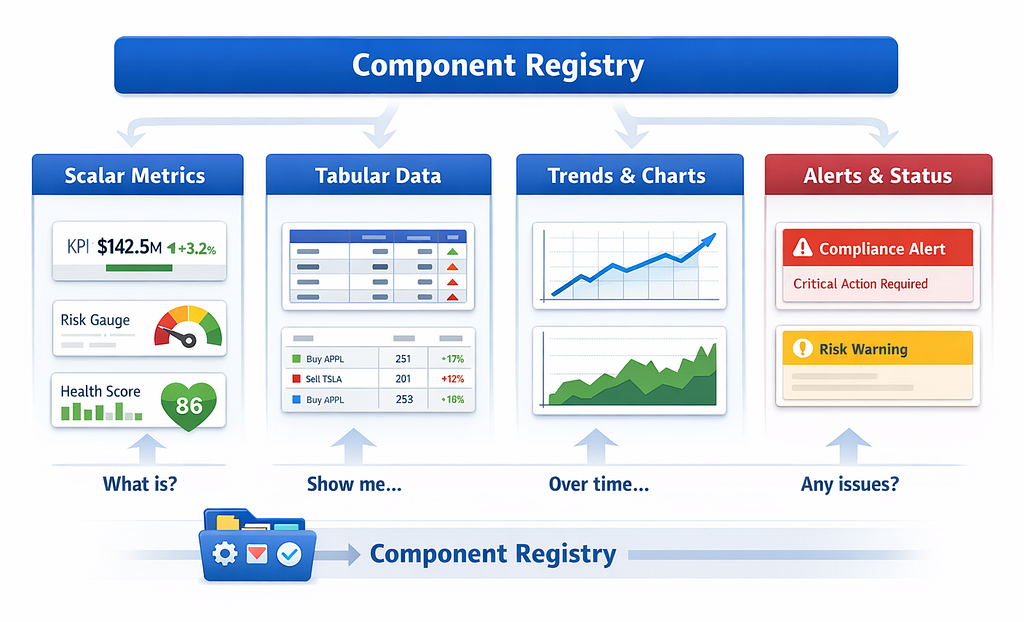
Before writing a line of Hashbrown code, the most valuable thing you can do is categorise your existing components by response type. Ask the question: if the AI could answer in any format, when would a human naturally reach for this component?
Below table would help to get a glipse:
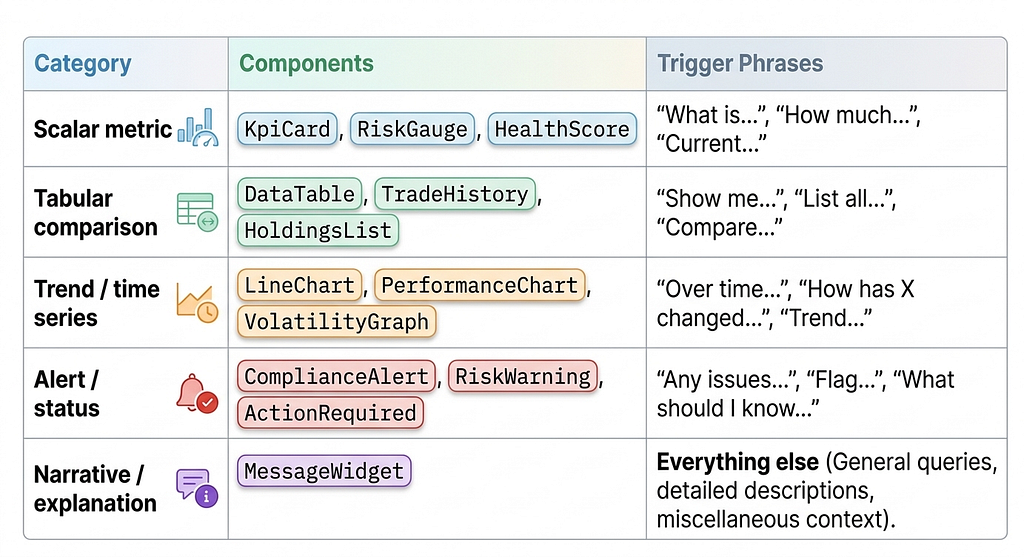
This audit is your component registry roadmap. You do not need to expose all components at once, though start with the ten that answer 80% of likely questions. Trying to expose everything simultaneously makes prompt engineering unmanageable and increases schema token overhead unnecessarily.
Step 1: The Smart Wrapper Pattern at Scale
Make sure the design system components were classic dumb components: they accepted data as @Input() properties and emitted events. They had no Angular DI, no router awareness, no store access.
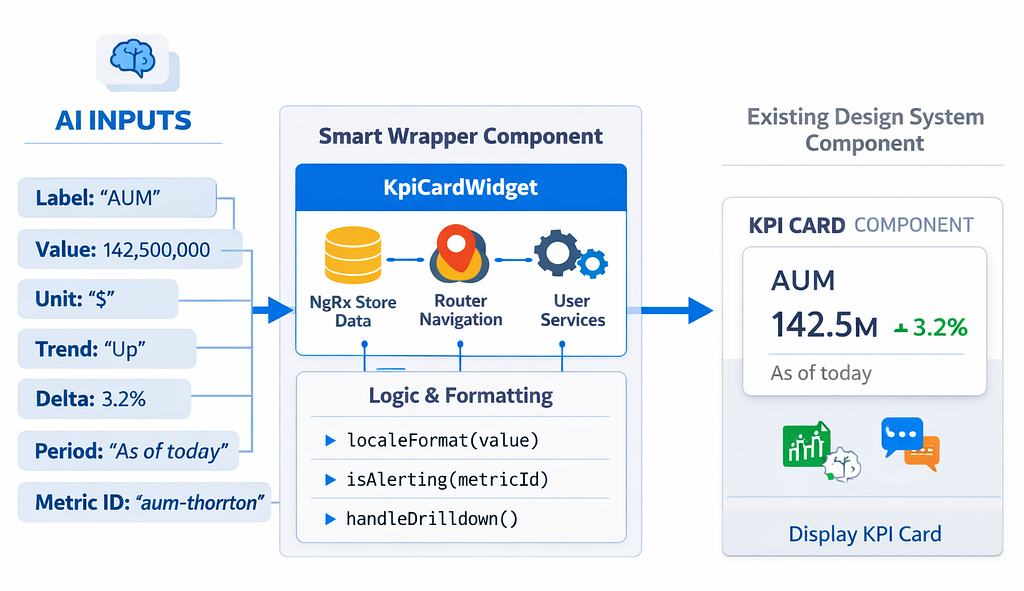
The generative UI layer needs smart wrappers that:
- Accept typed input() signals the LLM can populate
- Resolve anything requiring DI (stores, services, router)
- Delegate all rendering to the existing dumb component
Let’s takeKpiCardWidgetas an example which is the most-used component in the registry:
https://medium.com/media/f47ee9ec0605f5c29dba65fd5a081f17/href
Notice: the LLM supplies label, value, unit, trend, delta, period, and metricId. Everything else like alert state from the store, locale-formatted value, drilldown routing is handled by the wrapper using Angular DI. The LLM has no access to any of those concerns.
Step 2: The Full Component Registry
https://medium.com/media/754a61971f853159eff22eb022d2ebce/href
Step 3: Role-Based Component Exposure
Not all relationship managers have the same data access. Senior RMs see compliance alerts; junior RMs do not. Portfolio managers see full risk gauges; sales staff see simplified KPI cards only.
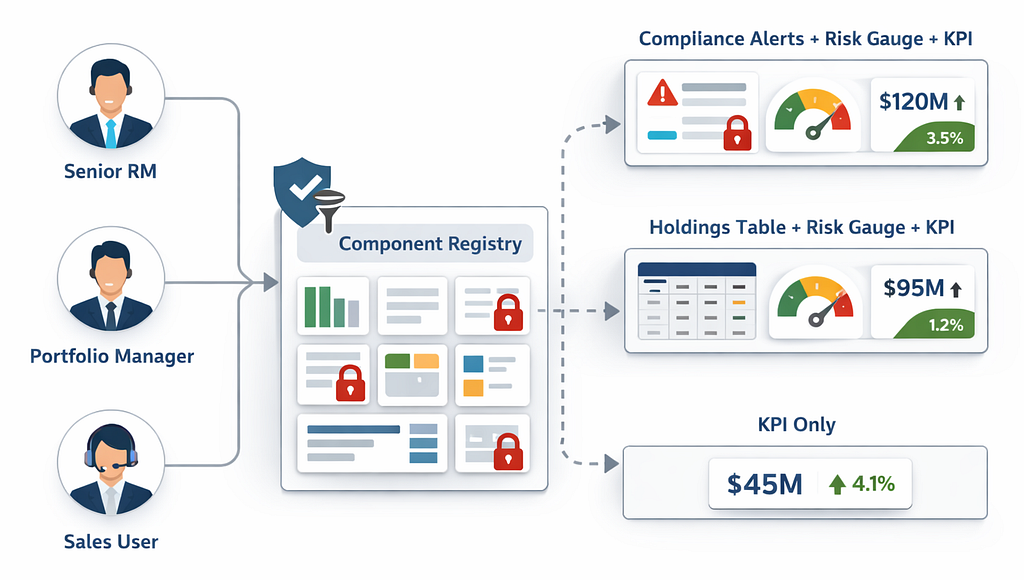
Hashbrown’s components array is just an array, we need to implement role-based filter at runtime:
https://medium.com/media/5ad9f7e29e56af71384d5047cb5b4e49/href
This pattern ensures the model never even knows about complianceAlertWidget unless the authenticated user has the compliance role. The model cannot select a component it has not been told about.
Step 4: Wiring Tools to Existing Services
The AI tools are thin Angular service wrappers and if your existing NextJS APIs are mature enough then mostly no new backend endpoints required.
https://medium.com/media/9279f8ff7c01c53faa9e378c9359e58b/href
The getSelectedClient tool is worth noting. Because Hashbrown runs tools client-side, it can read directly from your NgRx or Signal store which gives the AI access to transient UI state (which client is currently selected, which tab is active, what’s been loaded) without any network call. This is something no server-side tool framework can replicate.
Step 5: The Few-Shot System Prompt
Few-shot prompting in the prompt“ tagged template would enhance the user experience consistently and the system would be able to render kpiCardWidget instead of messageWidget for metric questions.
https://medium.com/media/c84409b021ffbfb83510d5ac1da0cc71/href
The negative example pattern is valuable for smaller, cost-optimized models that allows them to understand what not to do alongside what it should do.
Step 6: Conversation Thread Persistence
Thread persistence across multiple browser sessions especially when a client conversation should resume where it left off last. Hashbrown’s Threads feature (v0.4+) handles this:
https://medium.com/media/6b9efeb9146df469c4caa96a8efc3d00/href
Add messages source while defining the uiChatResource utility and make sure to persist the char responses against a unique id. Below is the addition to chat-assistance component.
https://medium.com/media/b0bd3033124bef3ab6426d8b5aa3a443/href
The Results
After the above implementation you will observe a complete shift on the experience.
Conclusion
Building a production-ready Generative UI in Angular isn’t about the biggest model; it’s about the best integration. By following the above stepped roadmap, you will achieve:
- Security: Via role-based component exposure.
- Performance: By leveraging client-side tool execution and existing NgRx state.
- Consistency: By mapping your existing Design System to the LLM’s output.
As you move toward production, remember: start with the 20% of components that solve 80% of your user’s friction.
Happy coding!
Complete Angular Component Integration in Conversational AI Interfaces was originally published in Towards AI on Medium, where people are continuing the conversation by highlighting and responding to this story.
