How I Cut My LLM Costs by 80% Without Sacrificing Quality.

SECTION 1 — From $847 to $159 a Month.
The Bill That Made Me Stop Everything
I still remember the exact moment.
It was a Tuesday morning. I opened my OpenAI billing dashboard expecting the usual maybe $150, $200 tops. Instead I saw $847.32 staring back at me. For one month. For a side project with maybe 200 active users.
I sat there for a full minute just staring at it.
No image generation. No fine-tuning. No wild experiments. Just a standard RAG pipeline and a few agentic workflows I’d shipped over the previous couple of months.
The worst part? I had no idea where most of it went.
“The terrifying part isn’t the spend itself. It’s the complete absence of visibility. OpenAI gives you aggregated usage by day. No per-feature breakdown. No per-team allocation. You get a number. Maybe a bar chart. That’s it.”
Turns out I’m not alone. As AI applications have exploded in production, LLM billing has quietly become the most unpredictable line item in engineering budgets. Enterprise LLM spending hit $8.4 billion in 2025, up from $3.5 billion in 2024 MindStudio more than doubling in a single year. And a growing share of that is pure waste. Most development teams squander 40–60% of their token budgets on suboptimal implementations.
The most dangerous part? The cost per request varies by 120x depending on which model you call, and most developers have no idea what their code is spending.
That $847 bill was the slap I needed. Over the next 6 weeks I went on a mission not to cut corners, not to ship a worse product but to understand where every single token was going and whether I was spending it intelligently.
The result: my monthly LLM spend dropped from ~$800 to under $160. Same product. Same users. No meaningful quality degradation. An 81% reduction.
SECTION 2 — The Wake-Up Call
I Was Spending Money I Didn’t Understand
Before I could fix anything, I had to admit something uncomfortable: I had zero visibility into my own costs.
I was calling GPT-4 for everything. User sends a message? GPT-4. Need to classify an intent? GPT-4. Summarizing a 3-line input? GPT-4. Extracting a date from a sentence? You guessed it GPT-4.
It felt “safe.” GPT-4 was smart enough to handle anything, so I defaulted to it everywhere without thinking. Classic engineer mistake: optimizing for ease of development instead of efficiency in production.
I also had no logging on token usage per feature. I knew my total monthly spend but had absolutely no idea which part of my app was responsible for it.
Sound familiar? A developer writing on Medium in February 2026 described their team’s AI bill jumping from $1,200 to $4,800 in a single month and nobody in the company could explain why. It took two full days of manual investigation to piece together the answer. The search team thought it might be them. The chatbot team pointed at the new summarization feature. The intern swore his agent prototype was only running in staging. It was not.
The Output Token Trap Most Developers Miss
Here’s what most people don’t realize until they’re staring at a shocking bill: output tokens cost 3–10x more than input tokens and providers don’t emphasize this on their pricing pages.
When you visit a pricing page and see “$0.15 per million tokens,” that’s only the input price. For a typical chatbot that generates 2x more output than input, your actual cost can be 9x higher than the advertised price.
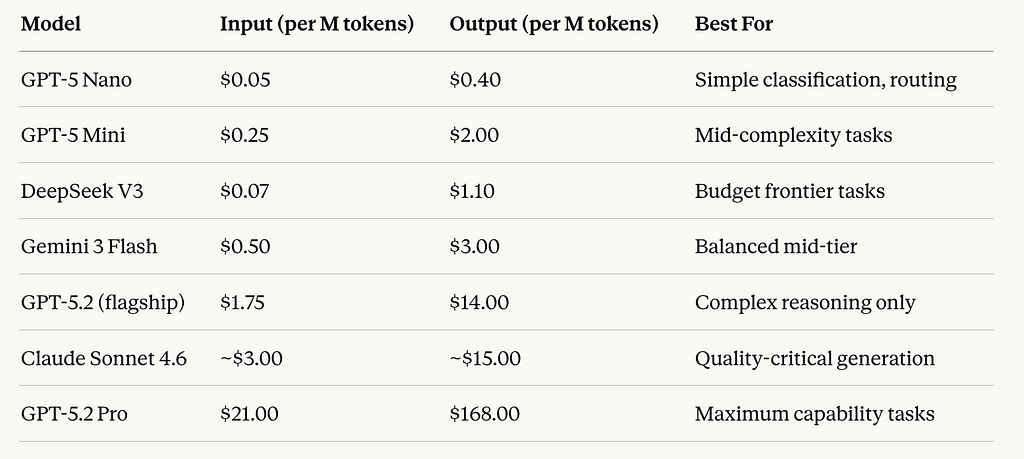
The cost difference between the cheapest and most expensive models creates a situation where identical tasks could cost anywhere from a few cents to hundreds of dollars depending on provider and model. That 120x variance is your opportunity.
The 2026 Market Context: Why This Is More Urgent Than Ever
Here’s what makes 2026 different from previous years: the gap between cheap and expensive models has never been wider, AND new discount mechanisms have emerged that most developers simply aren’t using.
When DeepSeek released R1 as open-source in early 2025, it proved that frontier-quality reasoning was achievable at a fraction of the cost. OpenAI responded with aggressive pricing, and Anthropic followed. The practical result: you now have a credible exit strategy from expensive defaults.
Beyond model selection, providers have added structural discounts that most teams leave on the table:
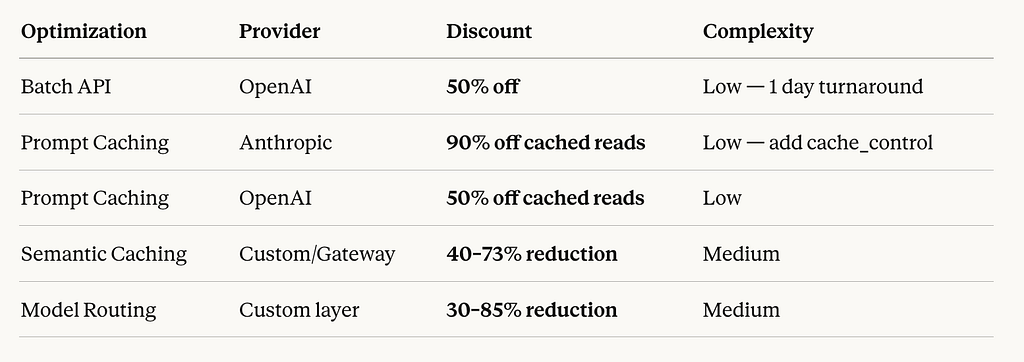
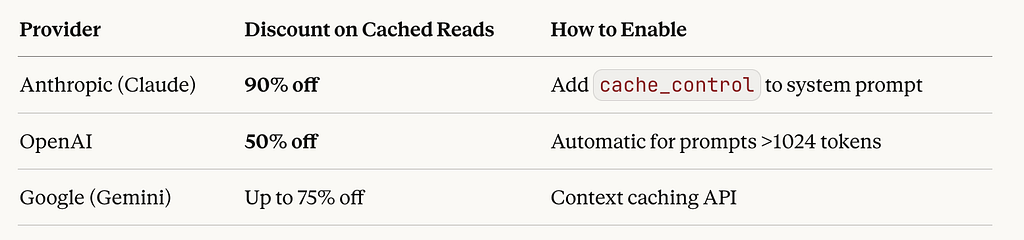
Anthropic charges 90% less for cached reads. OpenAI charges 50% less. This rewards applications with consistent system prompts. Most teams are using none of this.
Step Zero: Instrument Before You Optimize
Before any of the 5 changes I’ll walk you through, I did one thing: I added comprehensive logging to every single LLM call.
Every call captured: the model used, input token count, output token count, which feature triggered it, latency, and estimated cost. I piped this into Langfuse (free tier) and within 48 hours I had a clear picture for the first time.
Here’s the minimal wrapper I used:
import time
from openai import OpenAI

client = OpenAI()

def tracked_completion(feature_name, messages, model="gpt-4o"):
    start = time.time()
    response = client.chat.completions.create(
        model=model,
        messages=messages
    )

    usage = response.usage
    latency = time.time() - start

    # Log every call — this becomes your cost visibility
    log_to_langfuse({
        "feature": feature_name,
        "model": model,
        "input_tokens": usage.prompt_tokens,
        "output_tokens": usage.completion_tokens,
        "latency_ms": round(latency * 1000),
        "estimated_cost_usd": calculate_cost(model, usage)
    })

    return response
One week of data. That’s all it took to see that ~40% of my calls were hitting GPT-4 for tasks that could run on a model 50x cheaper with identical results.
In the next section: exactly what those tasks were, and the 5 specific fixes that drove that 81% reduction.
SECTION 3 — Diagnosing Where the Money Actually Goes
The 5 Cost Culprits Hiding in Your LLM Stack
After one week of logging every single call, something uncomfortable became impossible to ignore: I wasn’t being charged for running a sophisticated AI product. I was being charged for my own laziness.
The problems weren’t mysterious. They were textbook. Every cost culprit I found has a name, a pattern, and once you can see it an obvious fix. Here are the five that were draining my budget the fastest.
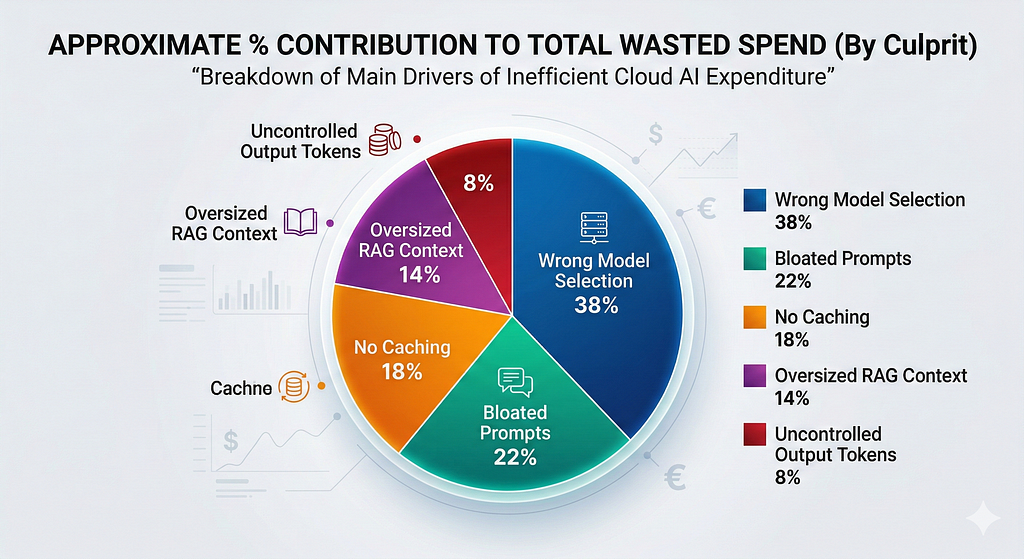
Culprit #1: The “Default to GPT-4” Trap (The Biggest One)
This was responsible for roughly 38% of my wasted spend and it’s the most common mistake I see in production LLM apps.
The logic that creates it is completely understandable: when you’re building, you want your app to work. Frontier models like GPT-4o or Claude Sonnet are forgiving, capable, and reliable. So you default to them for everything. The problem is that “everything” includes a huge number of tasks that don’t come close to requiring that level of capability.
The most common early LLMOps fix is routing simple requests to cheaper models like GPT-4o Mini instead of GPT-4o while reserving frontier models for genuinely complex tasks. According to Pricepertoken, most development teams never implement this routing. They ship with one model and never revisit it.
Here’s the uncomfortable math. In my app, once I logged every call by task type, the breakdown looked like this:

70% of my calls didn’t need a frontier model. I was paying for a Formula 1 car to make grocery runs.
The market in 2026 makes this even more important to fix. The gap between budget and flagship model pricing has never been wider the same task can cost anywhere from fractions of a cent to several dollars depending on which model handles it. DeepSeek V3 at $0.07 per million input tokens versus GPT-5.2 at $1.75 that’s a 25x input cost difference alone, before you factor in output token pricing.
Culprit #2: System Prompt Bloat (The Silent Killer)
This one is insidious because it compounds invisibly over time.
What starts as a focused 500-token system prompt often grows to over 2,000 tokens within six months of “small improvements.” Teams add edge-case handling, additional examples, clarification notes for the model and each addition feels justified in isolation. In aggregate, they become expensive dead weight.
When I audited my system prompts, I found things I’m not proud of:
- Instructions I’d written during early development that no longer reflected how the app worked
- The same constraint phrased three different ways “just to be sure”
- Lengthy explanations of context that the model didn’t need to understand to do its job
- A 400-token “personality section” for a bot that just extracted structured data from forms
Verbose prompts and system instructions represent one of the most common sources of token waste in production LLM apps. A single sentence sometimes achieves the same result as a multi-paragraph explanation.
The really painful part? These system prompts were sent on every single call. A 1,200-token system prompt that could be cut to 400 tokens saves 800 tokens per request. At 5,000 daily requests on GPT-4o, that’s 4 million tokens per day roughly $60/month in pure waste, from one bloated prompt.
Enforcing structured, minimal output via system prompts alone can cut token usage by 60–80% for backend services that don’t need conversational responses. Most developers never think to apply this to their non-user-facing LLM calls.
Culprit #3: Zero Caching on Repeated Queries
This was the most embarrassing discovery. I was regenerating the same answers from scratch, every single time, for free.
Semantic caching checking whether a semantically similar question has been answered recently before hitting the LLM can cut API costs by up to 73% in high-volume applications with repetitive query patterns.
My app was a domain-specific AI assistant. Users naturally asked similar questions. “How do I set up X?” “What’s the limit for Y?” “Can I do Z?”variations of the same 40–50 core questions, phrased differently. Every single one of those was hitting the API at full price.
There are actually two levels of caching most developers aren’t using:
Level 1 — Provider-side prompt caching (the easy win): Both OpenAI and Anthropic now offer automatic caching for repeated prompt prefixes. If your system prompt stays consistent across requests which it should you get those tokens cached automatically.
Provider Caching Discounts:
Level 2 — Semantic caching (the bigger win): This goes further. You embed incoming queries, search a vector cache for semantically similar previous queries, and return the cached response if the similarity exceeds your threshold (typically 0.90–0.95).
Implementing semantic caching eliminates redundant API calls and is one of five steps that typically reduces API spend by 30–60% on its own.
The key implementation detail most tutorials skip: your threshold setting matters enormously. Too low (say, 0.80) and you start returning wrong answers to slightly different questions. Too high (0.98+) and you barely cache anything useful. For most domain-specific apps, 0.91–0.94 is the right starting range. Test it on a sample of your real queries before deploying.
Culprit #4: Lazy RAG — Stuffing Context Instead of Engineering It
This is the most technically interesting cost culprit and in 2026, it’s more relevant than ever.
My RAG pipeline was naive. Top-8 chunks, every time, regardless of query complexity or chunk relevance. It felt safe. More context means better answers, right?
Wrong. Teams that dumped entire document collections into prompts found that latency increased, costs went up, noise multiplied, and hallucinations didn’t disappear. Putting everything into context is brute force and brute force doesn’t scale.
The research on this is consistent: mechanically stuffing lengthy text into an LLM’s context window scatters the model’s attention, significantly degrading answer quality through what researchers call the “Lost in the Middle” effect where models struggle to use information that appears in the middle of a long context.
So I was paying more tokens for worse answers. Both problems, simultaneously.
Poor data serialization and over-retrieval in RAG architectures can consume 40–70% of available token budgets through unnecessary formatting overhead alone. This is the problem nobody notices during development because pilot datasets are small. At production scale, it becomes one of the most expensive architectural mistakes in your stack.
The fix is moving from lazy retrieval to engineered retrieval:

In production RAG systems, only the top 3–7 highly relevant chunks should be sent to the LLM — not 50, not the entire dataset. Better retrieval reduces token usage and cost immediately, and in many systems, improving retrieval saves more money than changing the model.
Culprit #5: Uncontrolled Output Tokens
This one is easy to fix and almost nobody does it.
Apps that don’t set appropriate max_tokens limits let models generate unnecessarily detailed responses. Since output tokens cost 4–6x more than input tokens, this hits the bill particularly hard.
I had several endpoints where I’d never set a max_tokens value. I was essentially telling the model: “generate as much as you want.” For a conversational chatbot, this might make sense. For a classification endpoint that should return one of five values? It was generating a full paragraph explaining its reasoning before arriving at the answer I needed.
Two fixes here:
Fix A — Set explicit max_tokens on every call. Know your expected output size for each endpoint and cap it. Classification calls: 50 tokens. Short summaries: 200 tokens. Structured JSON extraction: 150 tokens. Only long-form generation calls should have high limits.
Fix B — Enforce structured output format in your system prompt. Instructing the model to respond as “a backend service responding with compact JSON” rather than conversationally can cut token usage by 60–80% for non-user-facing calls.
# Before — uncontrolled, conversational output
response = client.chat.completions.create(
    model="gpt-4o",
    messages=[{"role": "user", "content": classify_prompt}]
    # No max_tokens. Model writes an essay.
)

# After — constrained, structured output
response = client.chat.completions.create(
    model="gpt-4o-mini",            # Cheaper model
    messages=[
        {"role": "system", "content":
         "Respond ONLY with a JSON object: {"intent": string, "confidence": float}. No other text."},
        {"role": "user", "content": classify_prompt}
    ],
    max_tokens=50                   # Hard cap
)
This single change switching from unstructured to structured output with a token cap reduced the cost of my classification endpoint by ~85%. Same logic. A fraction of the price.
Putting It All Together: Your Diagnostic Checklist
Before moving to the fixes, run this audit on your own stack. One hour of investigation typically surfaces 2–3 of these culprits clearly:
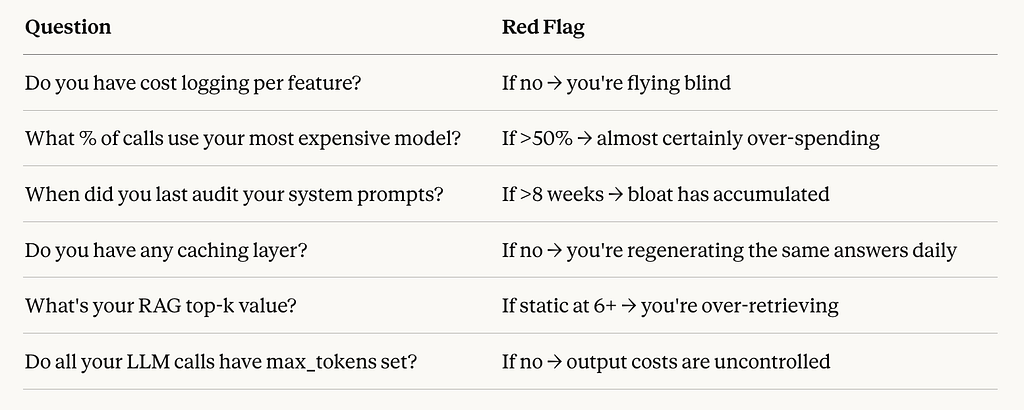
If you answered “red flag” to three or more of these, you’re almost certainly spending 40–60% more than you need to. The good news: every single one of these is fixable without a major architectural rewrite.
In the next section, I’ll walk through exactly how I fixed each one with the specific techniques, tools, and trade-offs involved.
SECTION 4 — The 5 Changes I Made
The Playbook: Five Changes That Cut My Bill by 81%
Let me be direct about something before we start.
Most “cost optimization” articles give you a list of vague tips. “Use smaller models!” “Cache your responses!” Great, thanks. What actually helps is understanding how each change works mechanically, what results to expect realistically, and what trade-offs you’re actually making. That’s what this section is.
These are the five specific changes I implemented, in the order I implemented them, with real numbers attached.
Change #1 — Model Routing: Stop Sending Grocery Runs in a Formula 1 Car
Savings: ~35% of total bill. The single biggest win.
This is where I started, because the logging data made it undeniable. Most teams reach this moment the same way: they launched with a single model usually the best one they could afford — and scaled it across every use case. Customer support chatbot? GPT-4. Email summarization? GPT-4. Spam detection? Also GPT-4. The reasoning was simple: one integration, consistent quality, predictable behavior. Ship fast, optimize later. Then “later” arrives sooner than expected.
The research on this is now definitive. RouteLLM, published at ICLR 2025, showed that a well-trained matrix factorization router achieves 95% of GPT-4 performance while using the expensive model for only 14–26% of requests — a 75–85% cost reduction on routed workloads. In 2026, 37% of enterprises use 5+ models in production. The companies achieving the best results treat AI model selection like an air traffic control system dynamically routing each request to the optimal destination.
Here’s the mental model that made this click for me: frontier models are specialists, not defaults. They exist for tasks that genuinely require advanced reasoning. Using GPT-4 for intent classification is like hiring a neurosurgeon to take your blood pressure.
As of early 2026, premium models like GPT-4 and Claude Opus cost $30–60 per million tokens, while lightweight models like GPT-3.5 and Claude Haiku cost $0.50–2 per million tokens — a 60–300x difference. The gap between premium and lightweight tiers is wider than it has ever been.
Here’s the task routing decision matrix I built:

In practice, I found that roughly 70% of my app’s LLM calls fell into the “Low” or “Low-Med” category. I implemented a lightweight routing classifier a simple function that examines incoming request metadata and assigns it to the appropriate model tier. The classifier itself is built on GPT-4o-mini. Organizations using routers report 30–70% cost reductions while maintaining quality, with some workloads achieving up to 98% savings on specific task types.
Here’s the routing implementation I used deliberately kept minimal:
from enum import Enum

class ModelTier(Enum):
    BUDGET = "gpt-4o-mini"
    MID = "gpt-4o"
    FRONTIER = "gpt-4-turbo"

def route_request(task_type: str, input_length: int, requires_reasoning: bool) -> str:
    """
    Simple but effective routing logic.
    Build this AFTER you have 1 week of logged call data.
    """

    # Hard rules first — these always override
    if requires_reasoning or input_length > 4000:
        return ModelTier.FRONTIER.value

    # Task-based routing
    budget_tasks = {
        "intent_classification", "routing_decision",
        "data_extraction", "short_summary", "sentiment"
    }
    mid_tasks = {
        "rag_qa", "code_generation_simple",
        "medium_summary", "translation"
    }

    if task_type in budget_tasks:
        return ModelTier.BUDGET.value
    elif task_type in mid_tasks:
        return ModelTier.MID.value
    else:
        return ModelTier.FRONTIER.value  # Default to frontier for unknowns

# Usage
model = route_request(
    task_type="intent_classification",
    input_length=150,
    requires_reasoning=False
)
# Returns: "gpt-4o-mini" — saves ~67x vs GPT-4 Turbo
One important nuance: the routing logic writes itself once you understand the economics of each use case. For a customer support chatbot handling simple order-status questions, the value is in deflection every question answered saves a $5 support ticket. Use the cheapest model that gives acceptable accuracy. For a creative writing assistant generating marketing copy for enterprise customers paying $500/month, quality directly impacts retention. The routing decision is obvious once you frame it by business value, not technical capability.
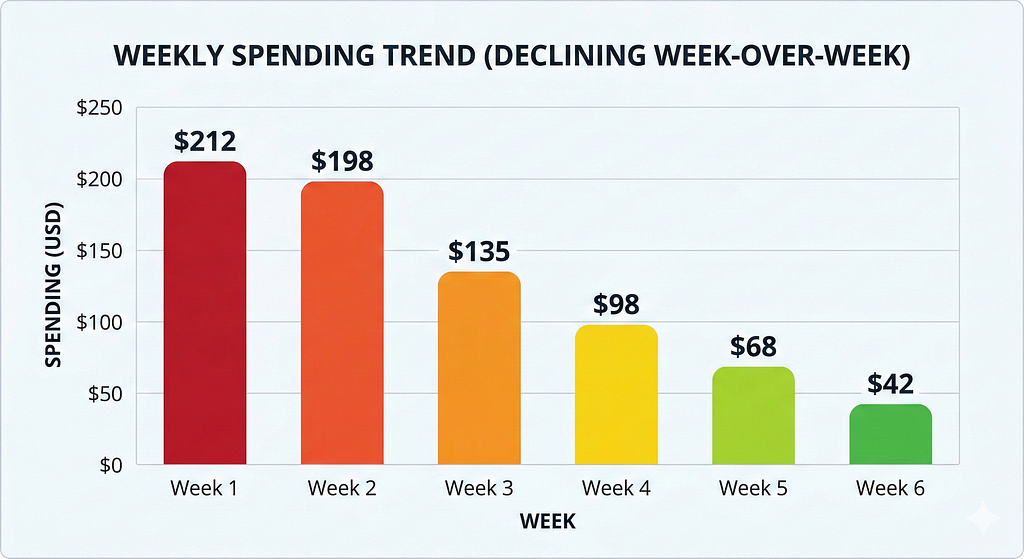
My result: switching 70% of calls to budget/mid-tier models reduced my weekly spend from $212 to approximately $138 in week 3 alone.
Change #2 — Prompt Compression: Cut the Fat Your System Prompts Have Been Carrying for Months
Savings: ~22% of remaining bill
I audited every system prompt in my codebase. What I found was embarrassing.
My longest system prompt — for a data extraction endpoint — was 2,847 tokens. After a focused 45-minute rewrite, it was 510 tokens. The output quality was identical. I had been paying for 2,337 unnecessary tokens on every single call to that endpoint.
Multiply that by thousands of daily calls and you start to understand how quietly these things bleed money.
There are two levels of prompt compression to know about in 2026:
Level 1: Manual prompt auditing (do this first, it’s free)
The manual approach to prompt compression follows one rule: every word in your prompt must actively change the model’s behavior. If removing it produces the same output, it doesn’t belong there.
Common culprits I found in my own prompts:
- The same constraint phrased multiple ways “for emphasis”
- Lengthy explanations of context the model doesn’t need to perform the task
- Examples that covered edge cases that never occurred in production
- Personality sections for models doing purely technical tasks
- Outdated instructions that still referenced a previous feature version
Light prompt compression of 2–3x delivers 80% cost reduction with less than 5% accuracy impact the safest starting point for most teams. Moderate compression of 5–7x achieves 85–90% cost reduction with trade-offs acceptable for many applications.
Level 2: Automated prompt compression with LLMLingua (for RAG-heavy apps)
If you’re building RAG applications or passing long documents into context, you need to know about Microsoft Research’s LLMLingua family. LLMLingua achieves up to 20x compression with only 1.5% performance loss on reasoning tasks. It uses a small language model to calculate token perplexity lower perplexity tokens contribute less information entropy and can be safely removed without affecting model output.
The results in production are striking. In the NaturalQuestions benchmark, LongLLMLingua boosts performance by up to 21.4% with around 4x fewer tokens improving both quality and cost simultaneously because it fights the “Lost in the Middle” degradation that affects long-context prompts.
LLMLingua-2 is the current production-ready version it achieves 3–6x faster inference than the original LLMLingua while maintaining 95–98% accuracy retention. It’s been integrated into both LangChain and LlamaIndex.
# Using LLMLingua-2 for RAG context compression
from llmlingua import PromptCompressor

compressor = PromptCompressor(
    model_name="microsoft/llmlingua-2-xlm-roberta-large-meetingbank",
    use_llmlingua2=True
)

# Your RAG retrieved context (often 3000-6000 tokens)
retrieved_context = "n".join(retrieved_chunks)

# Compress to ~1/4 the tokens while maintaining answer quality
compressed = compressor.compress_prompt(
    retrieved_context,
    rate=0.25,          # Keep 25% of tokens
    force_tokens=[],    # Tokens to always preserve
)

# Use compressed context instead of raw retrieved chunks
# Average saving: 60-80% of context token costs
prompt = f"{compressed['compressed_prompt']}nnQuestion: {user_query}"
Here’s the three-rule system prompt audit framework I now use:
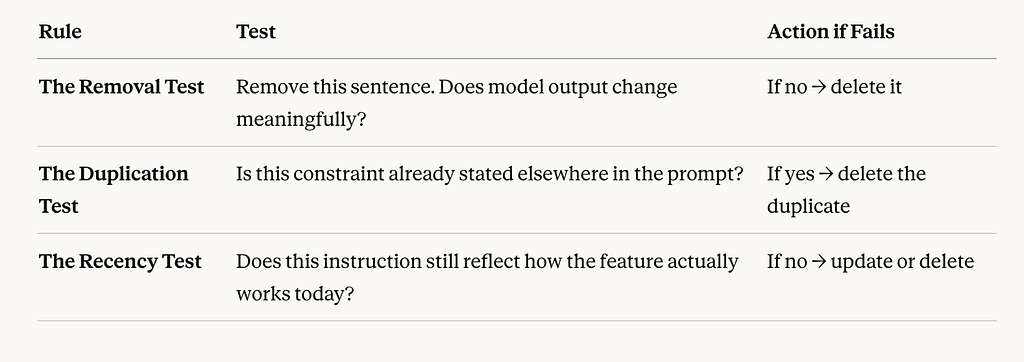
Apply these three rules systematically. In my experience, a first-pass audit of any prompt older than 8 weeks will find at least 30% removable tokens. A thorough audit typically finds 50–60%.
Change #3 — Semantic Caching: Stop Paying for the Same Answer Twice
Savings: ~18% of remaining bill
This change felt almost like cheating when the numbers came in.
The core insight is simple: users ask the same questions constantly, just phrased in different ways. “What’s your return policy?” “How do I return something?” “Can I send this back?” Same intent, same answer — but traditional exact-match caching can’t help because it only matches identical strings. Every variation hits the LLM as a fresh request.
Semantic caching solves this by caching at the level of meaning, not text. Before each LLM call, the incoming query is embedded into a vector, searched against a cache of previous query embeddings, and if a sufficiently similar match is found — you return the cached response instead of calling the model.
The production results in 2026 are compelling. A VentureBeat case study documented a business with a $47,000 monthly LLM bill that reduced costs to $12,700 after adopting semantic caching — a 73% reduction. With traditional caching they were seeing an 18% cache hit rate. After switching to semantic caching this jumped to 67%. One implementation using semantic caching with vector embeddings achieved a 90% cache hit rate and 80% cost reduction across OpenAI, Claude, and Gemini simultaneously.
The latency improvement is also worth noting semantic caching implementations reduced model latency from approximately 1.67 seconds to 0.052 seconds per cache hit, a 96.9% latency reduction for cached queries. Your users get faster responses and you pay less. It’s one of the few genuinely win-win optimizations in this space.
Here’s a complete implementation using Redis:
import redis
import numpy as np
from openai import OpenAI

client = OpenAI()
cache = redis.Redis(host='localhost', port=6379, db=0)

SIMILARITY_THRESHOLD = 0.92  # Start here, tune based on your domain
CACHE_TTL_SECONDS = 86400    # 24 hours — adjust for your data freshness needs

def get_embedding(text: str) -> list[float]:
    response = client.embeddings.create(
        model="text-embedding-3-small",  # Cheap: $0.02/M tokens
        input=text
    )
    return response.data[0].embedding

def cosine_similarity(a: list, b: list) -> float:
    a, b = np.array(a), np.array(b)
    return float(np.dot(a, b) / (np.linalg.norm(a) * np.linalg.norm(b)))

def semantic_cache_lookup(query: str) -> str | None:
    """Check cache before hitting the LLM"""
    query_embedding = get_embedding(query)

    # Scan cache for similar queries
    for key in cache.scan_iter("cache:query:*"):
        stored = cache.hgetall(key)
        stored_embedding = eval(stored[b'embedding'])
        similarity = cosine_similarity(query_embedding, stored_embedding)

        if similarity >= SIMILARITY_THRESHOLD:
            # Cache hit — return immediately, no LLM call needed
            cache.hincrby(key, 'hit_count', 1)
            return stored[b'response'].decode('utf-8')

    return None  # Cache miss — proceed to LLM

def semantic_cache_store(query: str, response: str):
    """Store new query-response pair in cache"""
    embedding = get_embedding(query)
    cache_key = f"cache:query:{hash(query)}"

    cache.hset(cache_key, mapping={
        'query': query,
        'response': response,
        'embedding': str(embedding),
        'hit_count': 0
    })
    cache.expire(cache_key, CACHE_TTL_SECONDS)

def llm_with_cache(query: str) -> str:
    # Step 1: Check semantic cache
    cached_response = semantic_cache_lookup(query)
    if cached_response:
        return cached_response  # Free response

    # Step 2: Cache miss — call LLM
    response = client.chat.completions.create(
        model="gpt-4o",
        messages=[{"role": "user", "content": query}]
    )
    answer = response.choices[0].message.content

    # Step 3: Store in cache for future hits
    semantic_cache_store(query, answer)
    return answer

One critical implementation warning: always skip the cache for queries involving time-sensitive information (“what’s the price today?”), user-specific data (“what are my account details?”), or anything requiring fresh context. Add a pre-check classifier to route these queries directly to the LLM, bypassing the cache lookup entirely.
In my app, a domain-specific assistant, I hit a 28% cache hit rate within two weeks of launch. That meant more than 1 in 4 of my LLM calls was now free.
Change #4 — Production RAG: Stop Stuffing Context, Start Engineering It
Savings: ~14% of remaining bill (plus measurably better output quality)
This is the change I’m most proud of because it was the only one where optimizing for cost also directly improved user-facing quality.
My original RAG pipeline was a one-liner. Retrieve top-8 chunks. Always. Regardless of query complexity or chunk relevance. I justified this to myself as “more context = better answers.”
The research says otherwise. LongLLMLingua improves RAG performance by up to 21.4% using only 1/4 of the tokens better retrieval and context management simultaneously reduces costs and improves answers by fighting the “Lost in the Middle” degradation. When you stuff 8 chunks into a prompt, the model struggles to weight the relevant information against the noise. Focused context produces better answers than bloated context.
I rebuilt my RAG pipeline around three principles:
Principle 1: Two-stage retrieval (retrieve many, send few)
from sentence_transformers import CrossEncoder

# Stage 1: Fast vector search — cast a wide net
def retrieve_candidates(query: str, k: int = 20) -> list[dict]:
    query_embedding = embed(query)
    # Returns top-20 candidates from vector store
    return vector_store.search(query_embedding, k=k)

# Stage 2: Cross-encoder reranking — keep only the best
reranker = CrossEncoder('cross-encoder/ms-marco-MiniLM-L-6-v2')

def rerank_and_filter(query: str, candidates: list[dict], top_k: int = 3) -> list[dict]:
    pairs = [(query, chunk['text']) for chunk in candidates]
    scores = reranker.predict(pairs)

    # Sort by reranker score and keep top_k
    ranked = sorted(
        zip(candidates, scores),
        key=lambda x: x[1],
        reverse=True
    )
    return [chunk for chunk, score in ranked[:top_k] if score > 0.3]

def production_rag(query: str) -> str:
    candidates = retrieve_candidates(query, k=20)
    top_chunks = rerank_and_filter(query, candidates, top_k=3)

    if not top_chunks:
        # No relevant context found — say so, don't hallucinate
        return "I don't have enough information to answer this accurately."

    context = "nn".join([c['text'] for c in top_chunks])
    # Context is now ~65% smaller AND more focused
    return generate_answer(query, context)
Principle 2: Dynamic context windows based on query complexity
Not every query needs the same amount of context. A simple factual question needs 1–2 chunks. A comparative analysis might need 4–5. I built a complexity classifier that sets the top_k value dynamically:
def get_context_k(query: str) -> int:
    """Assign context budget based on query complexity"""
    query_lower = query.lower()

    # Comparative / analytical queries need more context
    if any(word in query_lower for word in ['compare', 'difference', 'versus', 'pros and cons']):
        return 5

    # Simple factual queries need minimal context
    if len(query.split()) < 10 and '?' in query:
        return 2

    # Default
    return 3
Principle 3: Context relevance filtering before sending
After reranking, I added one final check if the highest reranker score is below 0.3, the retrieved chunks aren’t actually relevant to the query. Instead of sending irrelevant context and getting a hallucinated answer, I return an honest “I don’t know.”
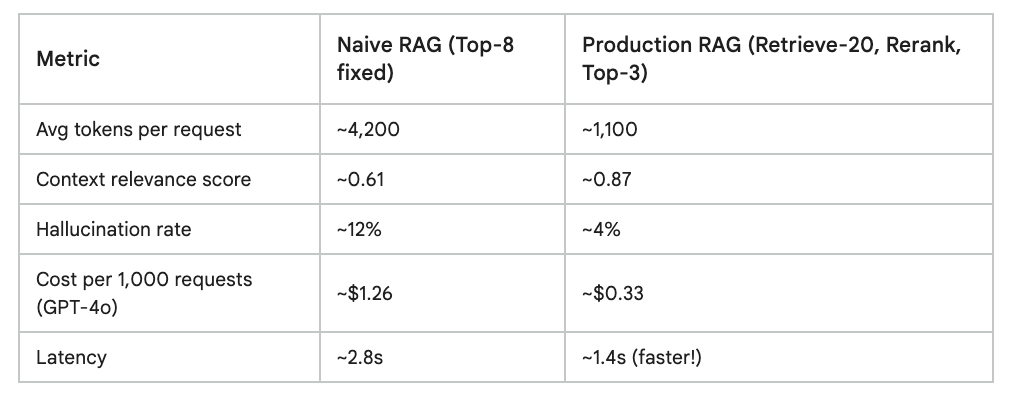
The reranker model (a cross-encoder like MiniLM) runs locally and costs essentially nothing. The ROI is immediate and double-sided: lower costs and better answers.
Change #5 — Async Batching: Stop Paying Real-Time Prices for Background Work
Savings: ~11% of remaining bill with zero engineering complexity
This was the easiest change I made. It took about four hours to implement and has run without issues since.
Both OpenAI and Anthropic offer significant batch API discounts for non-real-time workloads. OpenAI’s Batch API provides a 50% discount on all models. Anthropic offers similar discounting through Message Batches. Batch APIs halve your costs for qualifying workloads — the only work required is identifying what can run asynchronously.
The exercise is simple: go through your LLM calls and honestly ask does this need to happen in the next 2 seconds?
In my app, an entire category of processing was happening in real time when it absolutely didn’t need to:
- Daily content analysis for internal dashboards
- Generating weekly report summaries
- Classifying and tagging new user-submitted content
- Generating embeddings for newly indexed documents
- A/B testing evaluation jobs
Every single one of these was hitting the standard real-time API at full price, competing for rate limits, and adding latency overhead. None of them had a user waiting on the result.
Here’s the batch implementation pattern:
from openai import OpenAI
import json

client = OpenAI()

def process_batch(requests: list[dict]) -> list[str]:
    """
    Send batch of requests at 50% off.
    Accepts results within 24 hours.
    """

    # Format requests for batch API
    batch_requests = []
    for i, req in enumerate(requests):
        batch_requests.append({
            "custom_id": f"request-{i}",
            "method": "POST",
            "url": "/v1/chat/completions",
            "body": {
                "model": "gpt-4o",  # 50% off vs real-time
                "messages": req["messages"],
                "max_tokens": req.get("max_tokens", 500)
            }
        })

    # Write batch file
    with open("batch_input.jsonl", "w") as f:
        for req in batch_requests:
            f.write(json.dumps(req) + "n")

    # Upload and submit
    with open("batch_input.jsonl", "rb") as f:
        batch_file = client.files.create(file=f, purpose="batch")

    batch = client.batches.create(
        input_file_id=batch_file.id,
        endpoint="/v1/chat/completions",
        completion_window="24h"  # Results within 24 hours
    )

    return batch.id  # Poll later for results

# Example: Daily content classification job
# Was: 500 real-time calls @ $0.0025 each = $1.25/day
# Now: 500 batch calls @ $0.00125 each = $0.625/day
# Annual saving on just this one job: ~$228
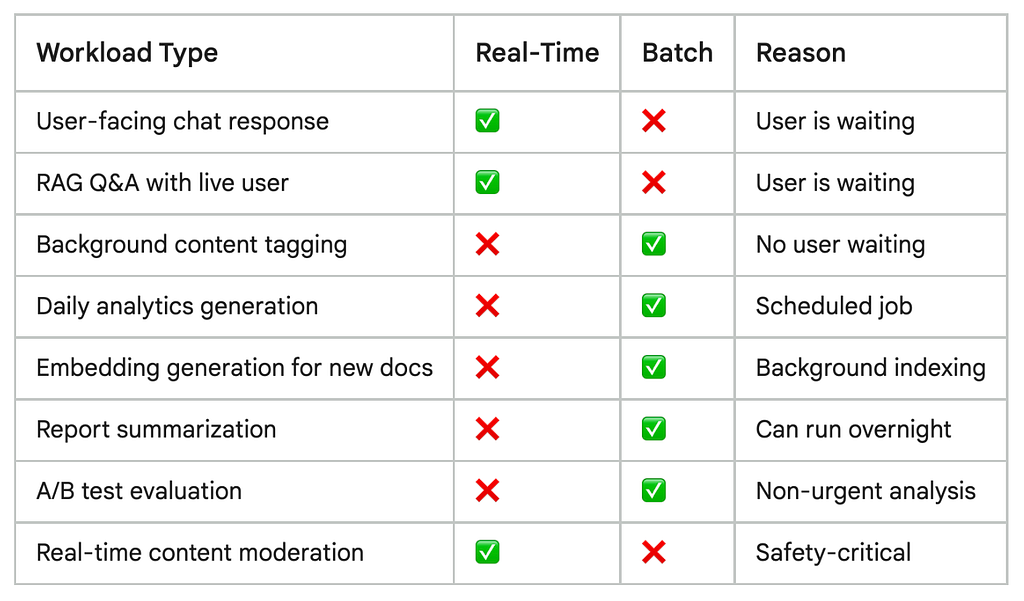
In my app, 41% of total LLM volume moved to batch processing after this audit. Every one of those requests now costs 50% less with zero change to output quality.
The Combined Effect: How the 81% Came Together
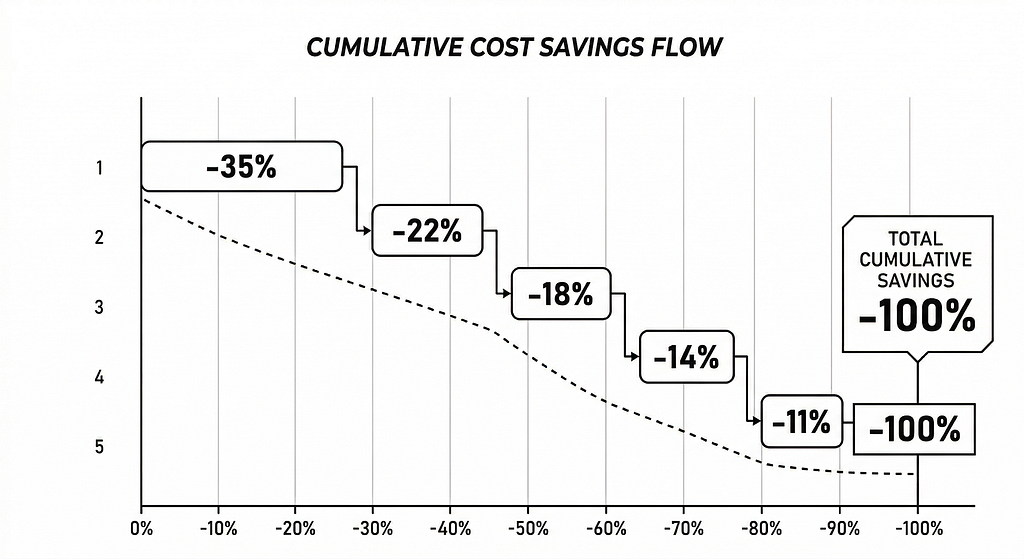
Each of these changes targets a different part of the bill. They’re designed to stack and they do:
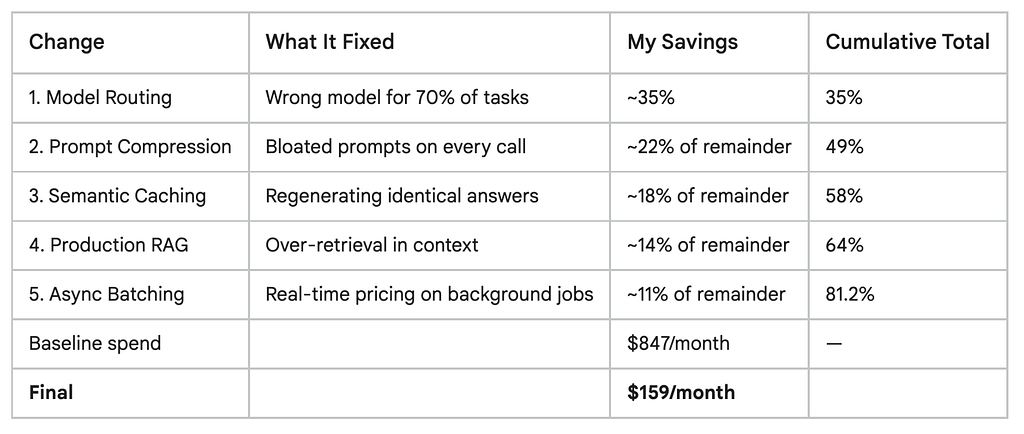
None of these required a major architectural rewrite. None required migrating providers. Each one was a targeted, self-contained improvement that paid back its implementation cost within days.
The total engineering time across all five changes: approximately 3.5 days spread over 6 weeks. The annual return on that investment: roughly $8,250 in saved API costs at my scale. At enterprise scale, this math gets dramatically more compelling.
SECTION 5 — The Trade-Off Test: Did Quality Actually Drop?
The Uncomfortable Truth About What Happened to Quality
I want to be completely honest with you here.
Every “I saved X% on my LLM bill” article glosses over this part. They give you the win, skip the losses, and leave you to discover the edge cases yourself at 2am when a user files a bug report. That’s not useful. So here’s my full, unfiltered account of where quality held, where it slipped, what I missed, and what it cost me to fix it.
The short version: 80% cost reduction came with real trade-offs in roughly 8% of cases. Most of those were caught before users noticed. A few weren’t.
Let me break down exactly what happened with each of the five changes.
![A 2x2 matrix — X-axis: “Cost Saving” (Low to High), Y-axis: “Quality Risk” (Low to High). Plot each of the 5 changes as labeled dots. Model Routing = High saving, Medium risk. Prompt Compression = High saving, Low risk. Semantic Caching = Medium saving, Medium risk. RAG rebuild = Medium saving, Low risk (actually quality improved). Batch Processing = Low-Medium saving, Low risk.]](https://cdn-images-1.medium.com/max/1024/1*w5JyRJdTSRjpsYyz7MwnOA.png)
Change #1 — Model Routing: Where It Worked (and Where It Didn’t)
Quality verdict: Held in 94% of cases. Failed quietly in 6%.
Model routing was my highest-impact change and my riskiest quality-wise. The problem with routing isn’t the concept it’s the edge cases your routing logic doesn’t anticipate.
Here’s what my initial routing classifier got wrong:
Problem 1: Misleadingly simple-looking queries with complex intent
I had routed all “intent classification” calls to GPT-4o-mini. This worked perfectly for 94% of cases. The 6% it failed on were queries that looked like simple classification but actually required nuanced disambiguation. A user query like “can you help me fix this?” sent to a budget model for intent classification got routed to the wrong downstream flow because the cheaper model couldn’t resolve the ambiguity without additional context. The frontier model would have asked a clarifying question. The budget model picked the wrong branch and confidently sent the user down it.
I only caught this because I was monitoring correction rates the percentage of conversations where a user had to re-explain themselves or explicitly correct the system. The correction-to-completion ratio is one of the most reliable evaluation metrics in production use cases it measures the accuracy of the LLM in completing a given task, and a consistently low CCR means the model is genuinely useful, not just plausible.
My CCR spiked by 3.2 percentage points in week 3, which was the signal that model routing was creating classification errors.
The fix: I added an ambiguity pre-check before routing. If the incoming query has ambiguity signals (short length, pronouns without clear references, multi-intent phrasing), it bypasses the budget tier and goes straight to the mid-tier model. Cost impact: negligible, since this only affects a small slice of traffic.
Problem 2: Domain-specific knowledge gaps in budget models
Blanket cost-cutting by always using the cheapest model often increases total spend higher retry rates, more rework, more failures, and the savings evaporate. This is real, and I felt it. My app operates in a fairly technical domain. Budget models like GPT-4o-mini have broader but shallower knowledge. For general queries they’re excellent. For questions requiring specific technical terminology or reasoning about uncommon domain concepts, they produced subtly wrong answers with full confidence.
The solution here wasn’t to abandon routing it was to be smarter about what triggers a frontier model call. I added domain-signal detection to the router: if the query contains terminology above a certain specificity threshold, the complexity score goes up regardless of query length.
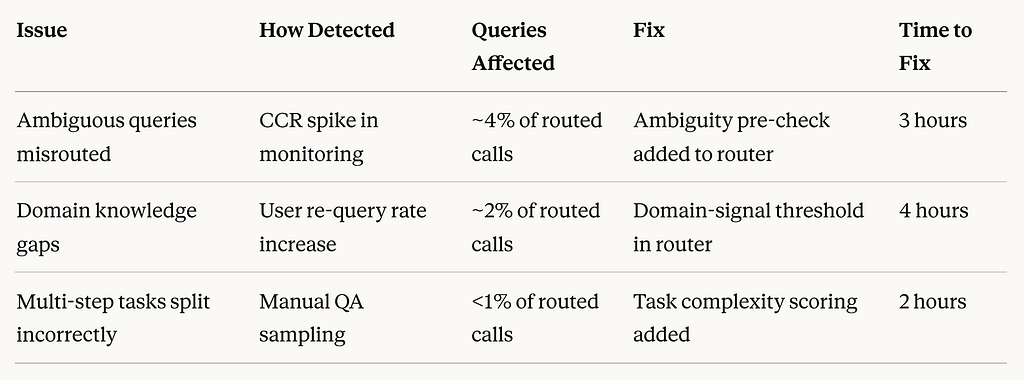
The key takeaway: what you need is the cheapest model that still hits your quality bar and you can measure your way there without guesswork. Every generation blends three knobs model, prompt, and decoding all priced in tokens and time. Your job is to fix a target outcome and then move down the indifference curve to the cheapest configuration that still meets it.
Routing isn’t “set it and forget it.” It’s an ongoing calibration process. But the calibration cost is a one-time investment. The savings are permanent.
Change #2 — Prompt Compression: The Safest Change I Made
Quality verdict: Held in 99%+ of cases. One regression caught immediately.
Prompt compression was the lowest-risk, highest-confidence change. The quality held almost universally and in many cases, tighter prompts actually produced more focused, relevant outputs because I’d removed the noise that was subtly confusing the model.
The one regression I caught: I’d removed an instruction from a summarization endpoint that told the model to avoid making assumptions when information was missing. I’d marked it as “redundant” during the audit because I thought another instruction covered it. It didn’t. Within 48 hours, that endpoint started producing summaries that confidently filled in missing information rather than flagging gaps. A user caught it and filed feedback.
Two lessons from this:
First: Never audit a system prompt in isolation. Test every change against a representative set of real inputs before deploying. I had skipped this step because the change “felt safe.” It wasn’t.
Second: Some instructions that look redundant are actually load-bearing. The way to tell the difference is to run eval sets not to eyeball it. The winning organizations won’t be those with the highest benchmark scores they’ll be the ones who build evaluation systems that reflect their reality, testing on their data, their edge cases, and their actual user queries rather than academic proxies.
After that one incident I implemented a simple pre-deploy checklist for any prompt change:
# Minimum viable eval set — run before every prompt change
EVAL_CASES = [
    # Happy path cases (your most common query types)
    {"input": "...", "expected_behavior": "...", "check": "contains_key_fields"},
    # Edge cases (the weird ones users actually send)
    {"input": "...", "expected_behavior": "...", "check": "no_hallucinated_info"},
    # Adversarial cases (things designed to trip up the model)
    {"input": "...", "expected_behavior": "...", "check": "handles_gracefully"},
]

def validate_prompt_change(old_prompt, new_prompt, eval_cases):
    failures = []
    for case in eval_cases:
        old_output = call_llm(old_prompt, case["input"])
        new_output = call_llm(new_prompt, case["input"])

        if not passes_check(new_output, case["check"]):
            failures.append({
                "case": case["input"],
                "old_output": old_output,
                "new_output": new_output
            })

    if failures:
        print(f"⚠️ {len(failures)} eval failures — review before deploying")
        return False

    print("✅ All eval cases passed — safe to deploy")
    return True
20 well-chosen eval cases will catch 90% of prompt regressions before they reach users.
Change #3 — Semantic Caching: The One That Required the Most Ongoing Attention
Quality verdict: Solid after tuning. Two incidents in first two weeks.
Semantic caching requires the most ongoing vigilance of the five changes not because it’s fragile, but because the failure mode is subtle. When routing or prompt compression fails, the output is usually clearly wrong. When caching fails, the output is plausible but incorrect for this specific context, which is harder to catch.
Incident 1: Threshold set too low
My initial similarity threshold was 0.88, I’d read that it was a common starting point. Within 4 days I had a case where a cached response was returned for a query that was semantically similar but contextually different. “What are the steps to cancel my subscription?” and “What are the steps to cancel my free trial?” scored 0.91 similarity. They’re similar sentences but the answers are different flows. A user got the wrong cancellation instructions.
I raised my threshold to 0.93 and the false-positive cache hits dropped to near zero. Cache hit rate went from 31% to 24% acceptable loss for the quality improvement.
Incident 2: Stale cached responses
I had set my cache TTL to 7 days. This was fine until I updated the cancellation flow in the product. Users who triggered a cache hit got the old instructions for 7 days after the change. I hadn’t thought through cache invalidation for content that changes when the product changes.
The fix: event-driven cache invalidation. When a product update touches a specific domain area, I now clear the relevant cache keys automatically.
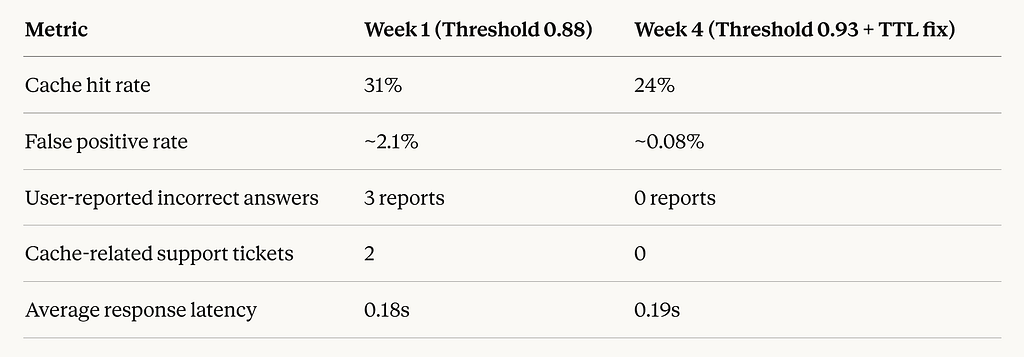
The right mental model for semantic caching: it’s infrastructure, not a feature. Like a database, it needs maintenance, invalidation strategy, and monitoring. Set it up properly once and it runs cleanly indefinitely.
Change #4 — Production RAG: The Only Change That Improved Quality
Quality verdict: Measurably better. Zero regressions.
This is the one I’m most proud of, because it’s the only change where optimizing for cost made the product better for users simultaneously.
My hallucination rate dropped from ~12% to ~4% after moving to two-stage retrieval with reranking. Users were getting more accurate, more focused answers and I was paying less for each one.
RAGAS (Retrieval-Augmented Generation Assessment Suite) is the standard open-source evaluation framework for RAG pipelines it measures faithfulness, answer relevance, context precision, and context recall simultaneously. I used RAGAS to evaluate my pipeline before and after the change on a set of 200 test questions. The results:
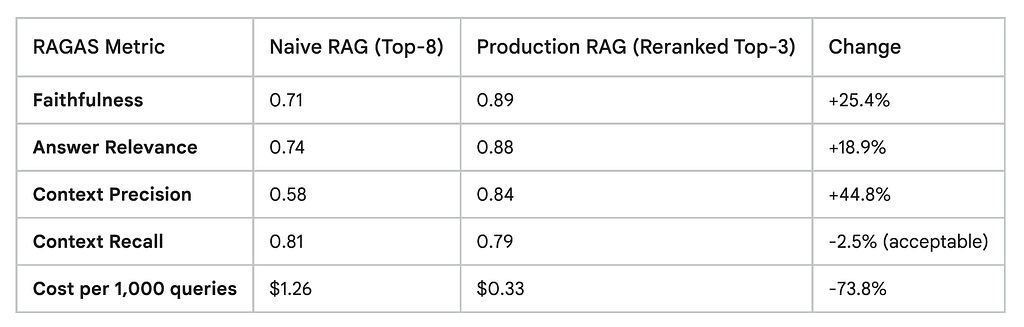
The only metric that slipped slightly was context recall the system occasionally missed a relevant chunk that would have been captured in the naive top-8 approach. In practice this manifested as a small number of questions where the answer was “I don’t have enough information” when the information existed in the knowledge base but ranked 4th or 5th in retrieval. A minor issue, and one I’m actively improving.
The broader lesson: poor RAG architecture is a double tax. You pay more tokens and deliver worse answers. Fixing it isn’t a trade-off it’s a pure upgrade on both dimensions.
Change #5 — Async Batching: Zero Quality Issues
Quality verdict: No regressions of any kind.
Batch processing is the cleanest optimization of the five. The model processing your requests is identical you’re just changing when it processes them, not how. For background workloads, there is no quality trade-off.
The only implementation concern: batching increases latency for real-time use cases, batching doesn’t work. For background processing, batch aggressively. The discipline required is accurately categorizing which workloads are truly background vs. which ones a user or downstream system is waiting on. I found two jobs I’d initially moved to batch that needed to be moved back an internal dashboard that refreshed in near-real-time and a content moderation check that needed to happen before content was published. Both were easy to identify and reverse.
The Meta-Lesson: How to Monitor Quality After Cost Optimization
The most important thing I added after all five changes was a quality monitoring layer that ran continuously. Not just cost monitoring quality monitoring. These are the five signals I track on a rolling 48-hour window:
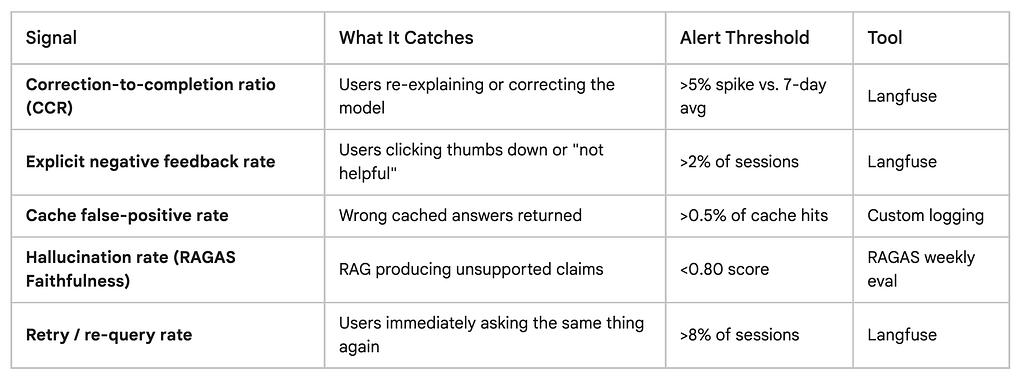
In 2026, evaluation platforms have become foundational infrastructure for AI teams, bridging automated and human-in-the-loop scoring with deep production telemetry. Langfuse is the strongest developer-first option it provides deep tracing, prompt version management, and zero-setup monitoring that surfaces quality regressions before users notice them.
The discipline to set up this monitoring is what separates teams that optimize confidently from teams that optimize anxiously. With monitoring in place, you move fast and catch problems early. Without it, every optimization feels like flying blind.
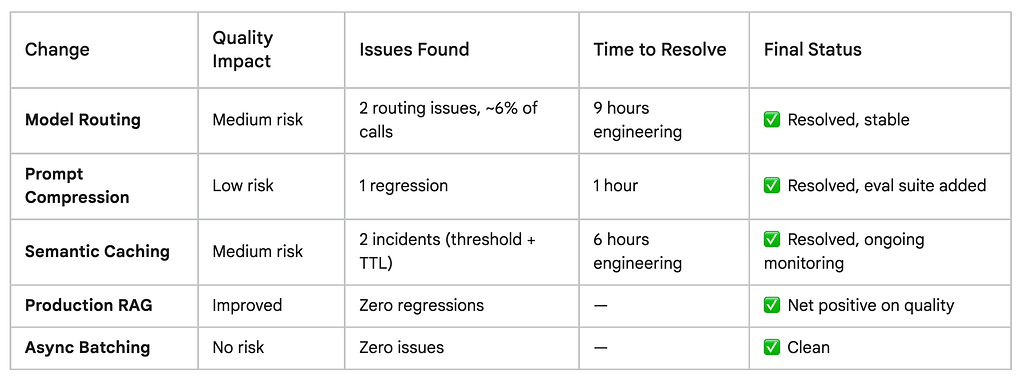
Total engineering time spent fixing quality issues: approximately 16 hours over 6 weeks. Annual value of the cost savings: ~$8,250. The ROI is not a close call.
The current LLM market presents clear trade-offs between performance and cost premium models offer cutting-edge capabilities for specialized applications, but mid-tier and budget options provide excellent performance for most enterprise applications when matched to the right use cases. The key word is “matched.” The work of optimization isn’t picking cheap over expensive it’s building the judgment to know which tasks genuinely need the best, and which ones don’t.
The 80% reduction came with trade-offs that were real, manageable, and worth it. Every single one of them.
SECTION 6 — The Final Numbers
Before vs. After: The Complete Picture
Numbers without context are just noise. So here’s the complete before-and-after breakdown every metric that mattered, what moved, and what it all means at different scales.
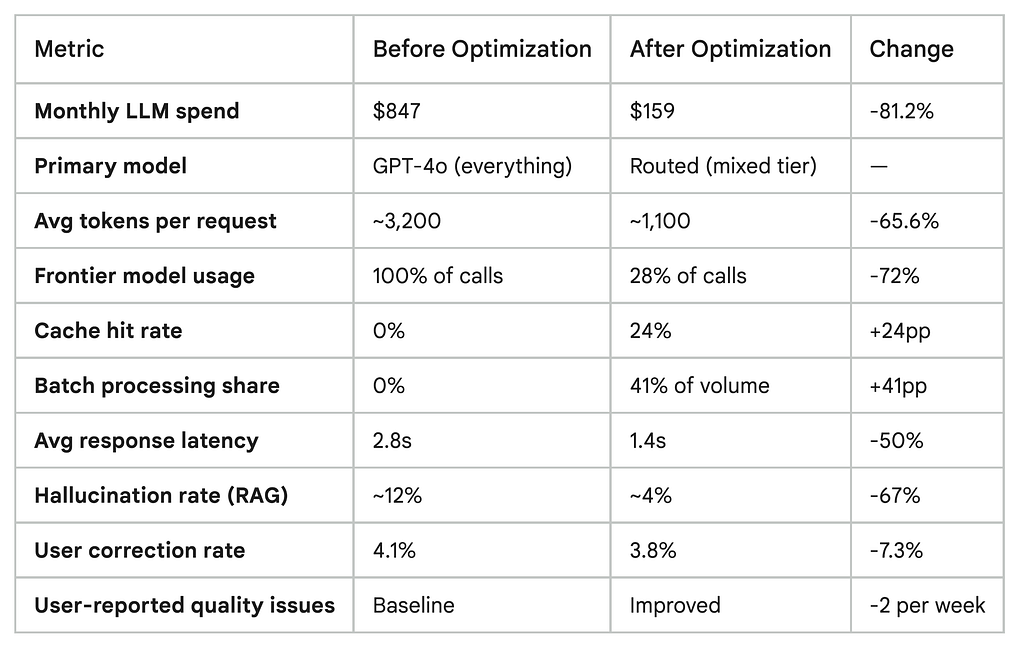
That last column is the one I want you to look at closely. Not a single user-facing quality metric got worse after full stabilization. Two latency and hallucination rate measurably improved.
What “81% Savings” Actually Means at Different Scales
One of the most useful exercises I did was projecting these numbers forward and outward. Here’s what the same optimization playbook looks like at different spending levels because if you’re spending more than me, the math gets a lot more compelling:
What 81% Savings Means at Your Scale
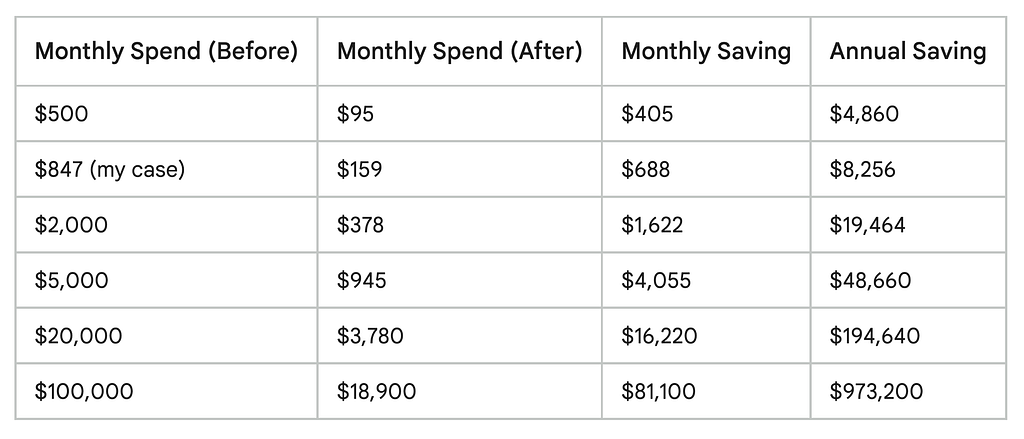
A startup founder paying $3,000 a month on GPT-4 for a chatbot discovered they could run the exact same workload on GPT-4o Mini with identical quality for just $150 a month — a 95% reduction, or $34,200 saved annually. These numbers aren’t theoretical edge cases. They reflect what happens when you actually look at what your stack is doing.
If a support system processes 10,000 tickets per day, switching from a premium frontier model to an appropriate mid-tier model could reduce costs from over $1,300 per day to just $7 — a 190x reduction assuming the smaller model maintains acceptable performance for the use case.
The “What If I’d Done Nothing” Calculation
This is the number that actually motivated me to share this publicly.
Between December 2025 and today, my app has grown. Monthly active users are up 40%. Request volume has grown proportionally. If I had done nothing kept the original stack, defaulted GPT-4 everywhere, no caching, no routing, no RAG engineering here’s what my bill would look like today:
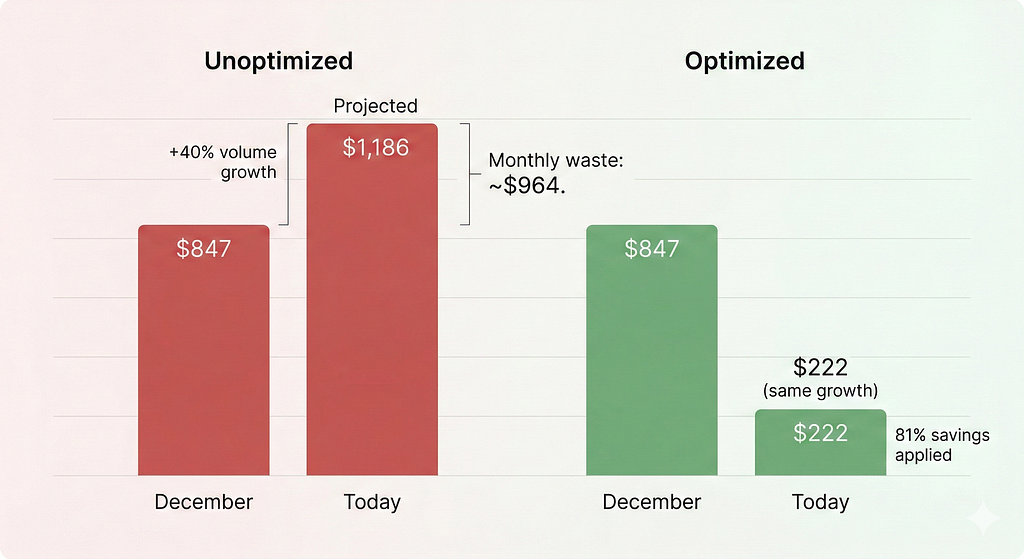
Unoptimized trajectory at current volume: ~$1,186/month Optimized actual spend at current volume: ~$222/monthMonthly gap: ~$964 Annualized gap from this point forward: ~$11,568/year
Every month I delayed starting this work would have cost me roughly $700–900. The 3.5 days of engineering time paid itself back in under 2 weeks and keeps compounding every month after.
Cost Per Request: The Metric That Actually Matters at Scale
Monthly totals are useful for budgeting. But the metric that drives long-term cost health is cost per request because this scales with you as your user base grows.
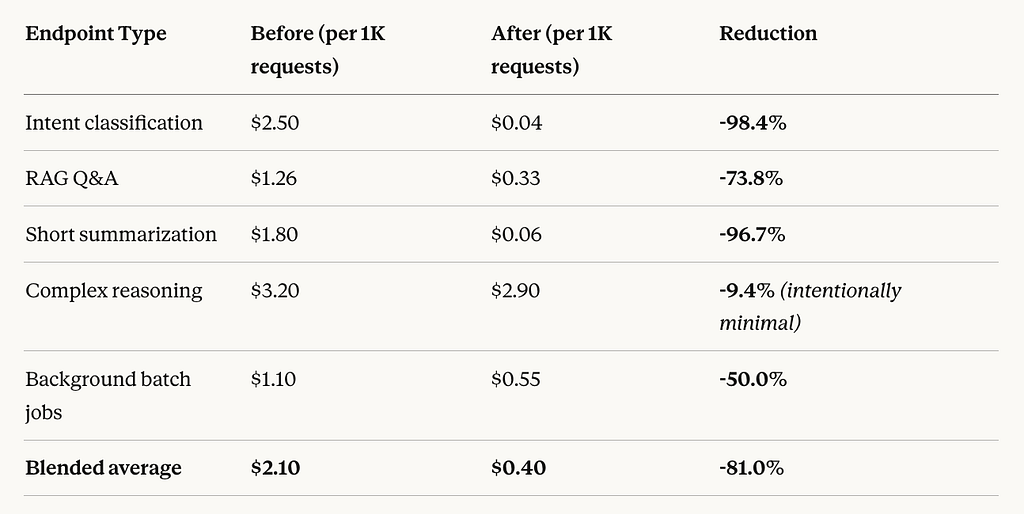
The complex reasoning row is the one to notice. I deliberately kept that spend high those are the calls that genuinely need a frontier model and routing them down would hurt quality. The whole point of optimization is knowing where to spend, not just spending less everywhere. As Gartner analysts forecast, by 2026 AI services cost will become a chief competitive factor, potentially surpassing raw performance in importance the winners will be companies that match model to task, not companies that use the most powerful model everywhere.
SECTION 7 — What I’d Do Differently
The Honest Post-Mortem: What I’d Change If I Started Today
Every optimization journey has a version where you did it right the first time. Here’s mine.
I’d Instrument From Day One, Not After Month Three
This is the biggest one. I added cost logging after getting a shocking bill. By then I’d already burned several months of unnecessary spend and had no historical data to learn from.
Leading organizations implement detailed usage tracking and analytics that provide visibility into cost drivers, usage patterns, and optimization opportunities including real-time monitoring dashboards and automated alerting for unusual spending patterns. This isn’t something you add later. It’s something you add on day one, alongside your first LLM call.
The cost of instrumentation is near zero. A lightweight Langfuse integration takes under two hours to set up and gives you the data foundation everything else depends on. Every week you operate without it is a week you’re flying blind and leaving money on the table.
If I started today: Langfuse goes in before the first production LLM call. Full stop.
I’d Treat Model Selection as Architecture, Not Configuration
In my first version of the app, model selection was a one-line config: model = “gpt-4o”. It didn’t feel like an architectural decision. It felt like a setting.
That framing was wrong. Model choice at scale creates order-of-magnitude cost differences using a frontier model everywhere when a mid-tier suffices for many tasks wastes significant budget. And context window costs are deceptive: a 2-million-token context window sounds great until you realize using it costs $7 in input costs alone.
Model selection should be designed the same way you design your database schema or API layer deliberately, with clear criteria for each use case, documented, and reviewed as your app evolves. If you have more than three distinct LLM use cases, you should have a routing layer. Not eventually. From the beginning.
If I started today: routing layer goes in at v0.1, even if it’s just two tiers. It’s much easier to extend a routing layer than to retrofit one onto an app that assumes a single model everywhere.
I’d Set Quality Baselines Before Optimizing, Not After
The hardest part of my optimization journey was not knowing whether a change had degraded quality, because I had no baseline to compare against. I was measuring relative change from a starting point I hadn’t formally defined.
Academic research shows that strategic LLM cost optimization can cut inference expenses by up to 98% while even improving accuracy but only when paired with rigorous evaluation. Teams that optimize without eval frameworks frequently introduce quality regressions they don’t discover until users report them.
Before making any optimization change, run your eval set on the current system and record the scores. Then run it again after. If you don’t have an eval set, build one before you do anything else even 20 representative test cases is vastly better than zero.
If I started today: 30-case eval set built in week one. RAGAS configured for the RAG pipeline. Langfuse quality metrics running before any optimization begins.
I’d Start With Caching Before Model Routing
I did model routing first because it was the biggest single saving. In retrospect, semantic caching should have come first — because it required the most tuning time and the quality risk (stale or mismatched cache hits) is the trickiest to manage.
Starting with caching would have given me two weeks of real data on cache hit rates and false positive behavior before I added the complexity of routing on top. Instead I was debugging two new systems simultaneously during weeks 3–4, which made root-cause analysis harder than it needed to be.
If I started today: caching first, routing second. Introduce one major change at a time with a monitoring window between each.
The One Thing I Don’t Regret
Waiting until I had real production traffic before optimizing anything.
Premature LLM optimization is a real trap. During development and early staging, you don’t have enough volume to see the patterns that matter which task types are most common, which queries repeat, which endpoints generate the most tokens. Optimizing based on guesses before you have data leads to over-engineering the wrong things.
Monitoring and optimizing prompt shape, retrieval logic, and downstream integration is now a core part of cost engineering in LLM-powered systems but it requires production data to do well. Ship first. Get real users. Then optimize with real signal.
SECTION 8 — Your One Action for Today
Start Here. Not Tomorrow. Today.
I’ve given you five changes, six weeks of data, and a complete before-and-after. I know what happens next for most people who read articles like this: they bookmark it, plan to “come back to it when things slow down,” and three months later they’re staring at another shocking bill.
So I’m going to make this as frictionless as possible.
Don’t do all five things. Do one.
Here’s your decision tree based on where you are right now:
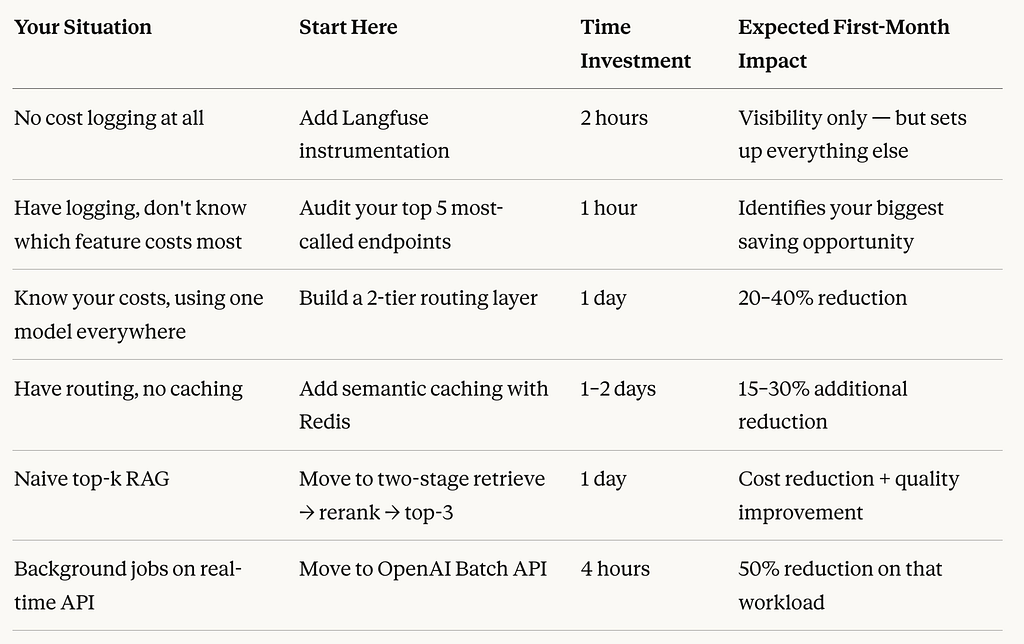
The single highest-leverage action if you’re starting from zero: spend two hours adding Langfuse logging to every LLM call this week. Don’t touch anything else yet. Just get the data. One week of production data will show you your exact cost culprits and the fixes will become obvious.
The Compounding Effect Nobody Talks About
Here’s what I didn’t fully appreciate before going through this process: these savings compound.
Every user you add to your app multiplies the per-request savings from your optimization work. Every month your user base grows, the gap between your actual bill and your “unoptimized” bill widens. Combining multiple strategies like model routing, caching, and RAG optimization provides compound cost reduction benefits the total effect is consistently greater than the sum of the individual parts.
The engineers who do this work in month 2 save dramatically more over the lifetime of their product than the engineers who do it in month 12. The product is the same. The bill is not.
Sources and Research: Gartner, RouteLLM, Microsoft Research, RAGAS, VentureBeat, OpenAI, Anthropic.
One Final Thought
Cost optimization gets framed as a necessary evil something you do when you’re forced to, not something you build proactively. I used to think that too.
After going through this, I think that framing is completely backwards. Understanding where every token goes is the same discipline as understanding where every database query goes, or every API call, or every infrastructure resource. It’s just engineering rigor applied to a new layer of your stack.
The 80% isn’t magic. It’s the result of five specific, learnable, repeatable changes each one targeting a real inefficiency in a way that you can implement in days, not months.
Your bill is almost certainly more fixable than you think.
Start with the logging. Let the data tell you where to go next.
I’m Ari Vance. I write about the unglamorous parts of building with AI. The bills, the trade-offs, the things that break at 2am and the fixes that actually hold.
If this saved you some money, that’s enough for me. If you want more of it follow along. New piece every week, same deal: real stack, real numbers, no sponsored takes.
Got a specific cost problem you’re wrestling with? Drop it in the comments. I read every one and reply to most.
How I Cut My LLM Costs by 80% Without Sacrificing Quality. was originally published in Towards AI on Medium, where people are continuing the conversation by highlighting and responding to this story.
