5 Things Broke When I Shipped a RAG + MCP Agent to Production.

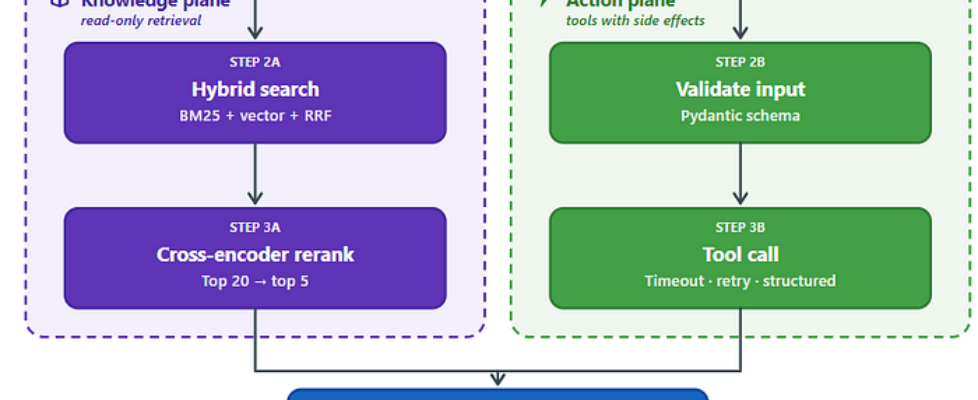
Author(s): Sudip P. Originally published on Towards AI. 5 Things Broke When I Shipped a RAG + MCP Agent to Production. Diagram-1: RAG vs MCP agent architecture: a small LLM router classifies each user query as either a Knowledge request (hybrid search → cross-encoder rerank) or an Action request (validate input → tool call). Both paths converge at a single frontier model for synthesis, then pass through eval and logging before returning a response. Read this article for free: link TL;DR (because you’re busy) Demos lie. Production finds your dumb mistakes. Vector‑only search is a trap. Hybrid + rerank or go home. MCP tools will return null and ruin your night. Validate. Timeout. Return structured errors. Keyword routers die on real users. Use a small LLM as router. Cache stuff. Build the eval harness on day zero. No evals, no clue. 6:14 a.m. and I want to quit 6:14 a.m. Slack explodes. On-call guy asks our shiny new agent why a pipeline job stalled. Agent replies, all calm and confident like a junior consultant who just read a blog: “This job is covered under the Tier-2 SLA with a 4-hour response window.” The real SLA is 30 minutes. The job had been dead for 90. I open the trace. Someone already filed a PagerDuty ticket. Title: “agent gave wrong SLA again”. The “again” part is what really stung. Quick context (if you missed my last post): RAG gets knowledge from a static index. MCP lets the model call live tools. On my laptop, with two test queries, it felt like magic. In prod, with 80 users pasting real Slack threads, it felt like a liability. Here’s what broke. Here’s what I did. Some of it worked. The whole mess (how it should work) Diagram 2 — A production agent pipeline drawn as a single-board layout. User queries enter through edge connector J1, get classified by the U1 router, and check the U2 cache. On a miss, two parallel rails fire: the RAG pipeline (normalize, hybrid search, rerank) builds context, while the MCP tools (validate, timeout/retry, structured result) handle side-effecting calls. Both feed into U9, the frontier model, which synthesizes the answer. From there, copper traces loop the output through observability and the eval harness before delivering it to J2. Every stage is independent, measurable, and replaceable, just like real PCB components. A small LLM router decides whether the user query needs knowledge (RAG) or a live action (MCP). The RAG pipeline uses hybrid search (BM25 + vector) plus a cross‑encoder reranker to find relevant chunks. MCP tools validate inputs, enforce timeouts and retries, and return structured {ok, error, detail} responses. Both paths feed into a frontier model for synthesis, then through an eval and logging layer before the final response. Every box here exists because something broke without it. If you want the calm, demo-version of this same architecture before any of it broke, the original write-up walks through it end-to-end. Breakage #1: Retrieval gave me the wrong SLA What failed: The model didn’t hallucinate. The retriever just handed it the wrong chunk. “Tier-1 SLA for streaming” and “Tier-2 SLA for batch” are really close in vector space. To a human at 3 a.m., they are completely different. Why: Vector similarity is not relevance. Embeddings smooth over the exact words you actually care about. Fix: Two things, both required. First, hybrid search: BM25 (keyword) plus vector, combined with reciprocal rank fusion. BM25 catches literal terms like “Tier-1” and “streaming” that embeddings blur together. Second, rerank the top 20 candidates with a cross-encoder. Cross-encoders look at the query and chunk together. They catch the “semantically close but factually wrong” cases. Here’s the code I wish I’d started with. Not perfect, but you get the idea. # Not real code, but you get the ideadef retrieve(query, k=5): candidates = hybrid_search(query, k=20) # BM25 + vector reranked = rerank_model.rerank(query, candidates, top_n=k) return reranked How to detectLog the chunk IDs for every answer. When users complain, you need to see instantly if retrieval failed or synthesis failed. Add a “retrieval precision” metric to your eval set. For each golden query, did the right chunk show up in top 5? Breakage #2: MCP tool returned null and the model said “all good” What failed: The MCP tool called the job status API. The API timed out and returned null. The model saw null, interpreted it as “no issues”, and cheerfully told the user everything was fine. The job was actually dead for 90 minutes. Why: No validation on the tool output. No distinction between null (no data) and {“status”: “ok”}. The model treated both as success. Fix: Wrap every tool call in a structured result. Validate inputs. Enforce timeouts. Return an explicit ok flag. Never let a raw null reach the model. def get_job_status(job_id): try: validate(job_id) data = call_api(job_id, timeout=5.0) return {“ok”: True, “data”: data} except TimeoutError: return {“ok”: False, “error”: “upstream_timeout”} except Exception as e: return {“ok”: False, “error”: “upstream_failure”, “detail”: str(e)} When the tool returns {“ok”: false, “error”: “upstream_timeout”}, the model can say “I couldn’t reach the job system – please retry.” That is the answer you want at 3 a.m. How to detect: Emit a metric per tool call. Label it with tool name, ok/error, and error category. Alert on error rate. The first tool to drift is never the one you expect. What actually happens when a tool fails (vs what you think happens) Diagram 3 — The silent API timeout that turns null into “success” – why your agent needs explicit null checks and timeout handling, not just error handling. That second path ruined my week. Breakage #3: Keyword router didn’t survive first contact with users What failed.My demo router was 12 lines of if statements.if “job” in query: do this. elif “sla” in query: do that. I knew it was bad. I shipped it anyway. Real users don’t type “what is the SLA for job 1234”. They type “hey is the prod thing borked again lol” and paste a […]
