The Smallest Thing in PyTorch Opens Half the GPU Stack

We are living in a time when AI systems are introduced with the kind of language people used to reserve for moon missions.
Agents that browse.
Agents that code.
Agents that research.
Agents that apparently do everything except file your taxes and explain your life choices to your parents ( Maybe by the time this blog gets published, there will be a micro-SaaS for that too )
The words keep getting bigger.
But last week, while debugging something small, I got stuck on one of the tiniest lines in the whole PyTorch stack:
device = torch.device("cuda")
I have typed that line so many times it barely feels like typing anymore. It just appears. Like git status when something feels wrong but you do not yet know what kind of wrong it is.
And that line feels like action.
It feels like the moment your program reaches out and shakes hands with the GPU. Fans spinning. Drivers waking up. Some sacred silicon ritual successfully completed.
But this time I wanted to slow down and actually understand what that line really means.
Not just at the Python level. I wanted to know what PyTorch is really doing underneath, what this tiny object actually stores, how it gets carried through tensors, and how that eventually connects to CUDA, dispatch, and the GPU doing real work.
Because sometimes one small line is the doorway into half the stack.
And this turned out to be one of those lines!!
Two numbers
Let me open the source. This is c10/core/Device.h, sitting in the PyTorch repo,
class Device final {
 private:
  DeviceType type_;
  DeviceIndex index_ = -1;
};DeviceType is an int16_t, and DeviceIndex is also an int16_t.
Together, they take just four bytes.
For context, a single float32 weight in your model is also four bytes. One number out of the billions you might be training. And the object that tells PyTorch where every one of those numbers belongs is the same size as one of them. That stayed with me for a while.
This is also a good place to clear up something that trips a lot of people.
torch.device(“cuda”) is description. It is PyTorch’s way of representing a destination, and that is all it is doing at this point.
.to(“cuda”) is the actual move. That is where a tensor or module gets transferred, allocated, or converted, and where real costs like data movement and synchronization begin to matter.
They often get mentally bundled together, but they are different moments in the stack.
PyTorch only needs two tiny facts here, what kind of place this is, and which exact one. CPU or CUDA is the first part. The index is the second. So torch.device(“cuda:0”) means “CUDA backend, GPU number 0.” For CPU, there usually is no device number to specify, so PyTorch keeps the index at -1, which is basically its way of saying “no explicit index here.”
That is the whole coordinate system.Just four bytes to describe where your tensor belongs.
The enum, which is secretly the entire hardware war
Once PyTorch has the device name, it maps it to an actual device type through a lookup that looks roughly like this:
"cpu" → DeviceType::CPU
"cuda" → DeviceType::CUDA
"hip" → DeviceType::HIP
"xla" → DeviceType::XLA
"mps" → DeviceType::MPS
"meta" → DeviceType::Meta
"vulkan" → DeviceType::Vulkan
"fpga" → DeviceType::FPGA
"privateuseone" → DeviceType::PrivateUse1
This is not just a boring backend list. It is a frozen snapshot of which hardware ecosystems became important enough that PyTorch had to acknowledge them.
CUDA is there because obviously. HIP shows up because AMD was never going to leave the whole conversation to NVIDIA. XLA is what happens when TPU and compiler-style execution becomes serious enough to matter.
MPS appears when Apple silicon changes the local ML conversation and running models on a laptop stops sounding like a joke. And PrivateUse1 is one of those wonderfully pragmatic engineering ideas where PyTorch is basically saying: if your hardware is real and you want support, here is a slot, go make it work. At some point, every hardware ambition wants its own integer. That might be the most software thing imaginable.
The validation that disappears in production
Before this tiny object settles into the rest of the system, PyTorch still does a validation step. It checks sensible things, like whether the index is below minus one or whether CPU devices are claiming weird indices.
But these checks are wrapped in debug-only assertions. In production builds, they compile away completely.
That’s such a small detail, but I love what it reveals. A four-byte struct sounds trivial until you remember how often it gets created, copied, inspected, and threaded through the system. At that scale, even small overhead starts to matter.
This is one of those very PyTorch things.
The object is tiny and the system around it is not. So even tiny costs get treated seriously.
How the passport gets stamped on every tensor
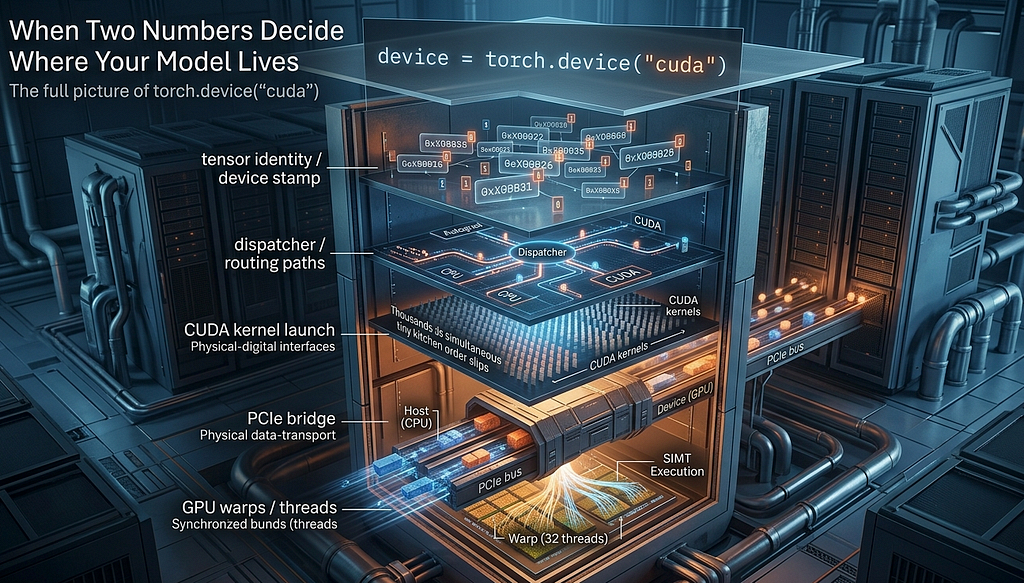
This is where the tiny device object stops being just a cute implementation detail and starts participating in the rest of the stack. The Device object does not stay in one place. It gets embedded into TensorOptions, which then becomes part of TensorImpl, which is part of every tensor you create.
Every tensor carries device identity with it from the moment it exists. That is where this tiny object stops being cute and starts being important. Because once a tensor has device identity, the rest of the runtime no longer has to guess where it belongs.
The real job of the object is not to do the heavy lifting. It is to make the heavy lifting legible.
This is also why device mismatch errors feel so immediate. You might have seen this before:
RuntimeError: Expected all tensors to be on the same device,
but found at least two devices, cuda:0 and cpu!
That is not some vague runtime confusion. Internally, PyTorch has enough device identity attached to those tensors to know they do not belong in the same place. A tensor carries its stamp and the runtime checks the stamp.
If you show up at the CUDA border holding a CPU passport, the conversation ends right there.
The Dispatcher
So your tensor is born, it carries its device stamp, and now you call something like:
torch.mul(x, y)
The call leaves the Python layer and enters a central routing system written in C++ called the Dispatcher.
Its job is to look at the tensors involved and decide exactly which piece of code should run.
Every tensor carries what is called a Dispatch Key Set alongside its device identity. Think of it as a detailed ID card that tells the system everything it needs to know.
Is this a CUDA tensor or a CPU tensor?
Does it have requires_grad=True?
Is it sparse or dense?
The Dispatcher reads those ID cards and consults an internal lookup table to figure out the right path. And here is where it gets interesting.
The Dispatcher does not just ask, CPU or GPU? It has to handle multiple concerns at once, and it does that through priority ordering.
Say you call torch.mul on a CUDA tensor that also has autograd enabled.
Autograd is the part of PyTorch that automatically tracks tensor operations and computes gradients for training neural networks. It builds the computation graph during the forward pass and uses it during backward() to calculate gradients.
So the Dispatcher sees both a CUDA key and an Autograd key on that tensor.Autograd outranks CUDA in priority. That means the Dispatcher first passes the call to the Autograd handler. The Autograd handler records the operation into the computational graph for backprop later, and then hands control back. Only after that does the Dispatcher route the actual computation to the CUDA backend.
This whole sequence happens in microseconds at the C++ level.
we never write,
if gpu:
 …
elif autograd:
 …
PyTorch handles it for you. And the reason it can do that cleanly is that the tensor already carries the identity information it needs.
Once the Dispatcher chooses CUDA
Once the Dispatcher routes work to the CUDA backend, we leave the CPU world entirely.
There are two concepts worth keeping clear here.
The Host is the CPU and system RAM, where your Python script and PyTorch’s C++ backend run.
The Device is the GPU and its dedicated memory, VRAM, where the actual parallel computation happens.
When you write Python, you are really piloting a C++ program on the Host. That C++ program talks to the Device through something called the CUDA Runtime API.
The actual unit of work sent to the GPU is called a kernel.
It is a small function written to run on the GPU specifically. When an operation is dispatched to CUDA, PyTorch effectively tells the GPU something like: here are the inputs, here is the operation, write the result there. PyTorch ships with thousands of these kernels already written and optimized. You have probably never written one yourself, and you do not need to.
A simple way to think about a kernel is this: it is like a kitchen order slip in a massive restaurant. You do not cook the food yourself. You hand over a tiny instruction like “make 10,000 omelettes,” and the whole kitchen starts working on that task in parallel.
That is what a kernel feels like to me. A small instruction, handed to a much bigger machine.
The slow bridge between the CPU and GPU
And this is where the software story meets the hardware bottleneck everyone eventually runs into.
The GPU is fast, but your data has to reach it first.
The connection between the CPU and GPU is called the PCIe bus, short for Peripheral Component Interconnect Express.
You can think of it like a bridge between two places:
the CPU side, where your Python code and most of your regular program logic live
the GPU side, where the heavy parallel math happens
Inside the GPU, data can move incredibly fast, but moving data from the CPU to the GPU is much slower. So even if the GPU is extremely powerful, it cannot start working until the data crosses that bridge.
That is why repeatedly doing this hurts performance:
x = x.to("cuda")
especially if you keep moving data back to the CPU and then to the GPU again. Always move your data to the GPU once, do as much work there as you can, and only move it back when you really need to. Otherwise, the GPU spends too much time waiting for data instead of doing the math you actually wanted it to do. The four-byte device object is cheap. The movement it eventually helps authorize is not.
How the GPU actually works in groups
Once the kernel reaches the GPU, the real parallel work begins.
A CPU usually handles a small number of things very carefully, one after another while a GPU is built differently. It is designed to do the same kind of operation on many pieces of data at the same time. That is why GPUs are so good at things like tensor math.
Inside the GPU, work is not handled one thread at a time in isolation.
Threads are grouped into bundles of 32, and each bundle is called a Warp.
The important part is this:
all 32 threads inside a Warp try to move together.
If the instruction is “add these values,” all 32 threads do that together.
If the instruction is “multiply these values,” all 32 threads do that together.
This model is called SIMT, which stands for Single Instruction, Multiple Threads.
But here is where things get tricky. What if the instruction is not the same for everyone?
For example, imagine the code has an if…else condition.
Now suppose: 16 threads need to follow the if branch, the other 16 need to follow the else branch
The GPU cannot make half the Warp do one thing and the other half do something else at the exact same moment. Instead, it has to do the work in two rounds:
first one group runs while the other waits, then the second group runs while the first waits and this is called Warp Divergence. And once that happens, some of the parallel advantage gets lost, because not all 32 threads are moving together anymore.
That is why branch-heavy GPU code can become slower than expected.
The good news is that PyTorch’s built-in CUDA kernels are heavily optimized, so you usually do not have to worry about this in everyday model training. But if you ever write custom CUDA code, or you notice a GPU operation behaving strangely, Warp Divergence is one of the first things worth checking.
Also one more thing, which personally helped me to finetune my pipeline, PyTorch also does something important here, it usually does not wait for the GPU to finish immediately. GPU work is often queued asynchronously, while the CPU moves on to the next line of Python. That is great for performance, but it can fool your benchmarking. I learned this the hard way while timing a fine-tuning run — the numbers looked amazing at first, until I realized I was mostly measuring how fast work was being submitted, not how long it actually took to finish.
That is why calls like torch.cuda.synchronize() matter when you want real timing.
The full picture
torch.device("cuda")
        ↓
Python binding crosses into C++
        ↓
"cuda" becomes DeviceType::CUDA
(and an optional index if explicitly provided)
        ↓
validate in debug builds, invisible in production
        ↓
c10::Device { type_, index_ }   four bytes
        ↓
stored in TensorOptions / TensorImpl
every tensor you create carries this stamp
        ↓
Dispatcher reads the Dispatch Key Set
routes through Autograd if needed, then to CUDA backend
        ↓
CUDA kernel is launched
data crosses the PCIe bus from Host to Device
        ↓
GPU executes in Warps of 32 threads, SIMT lockstep
        ↓
result stays in VRAM
CPU does not wait unless synchronization is needed
I mean it started with two numbers and then all of that happens. I think what stayed with me is how quickly a tiny, boring-looking line opens into half the stack.
You start with torch.device(“cuda”), and a little later you are talking about dispatch, kernels, PCIe, warps, and synchronization.
That’s a good reminder of what strong systems work usually looks like. The outside feels powerful. The inside is often just careful engineering, one small piece at a time.
And honestly, that makes the whole thing easier to respect.
The Smallest Thing in PyTorch Opens Half the GPU Stack was originally published in Towards AI on Medium, where people are continuing the conversation by highlighting and responding to this story.
