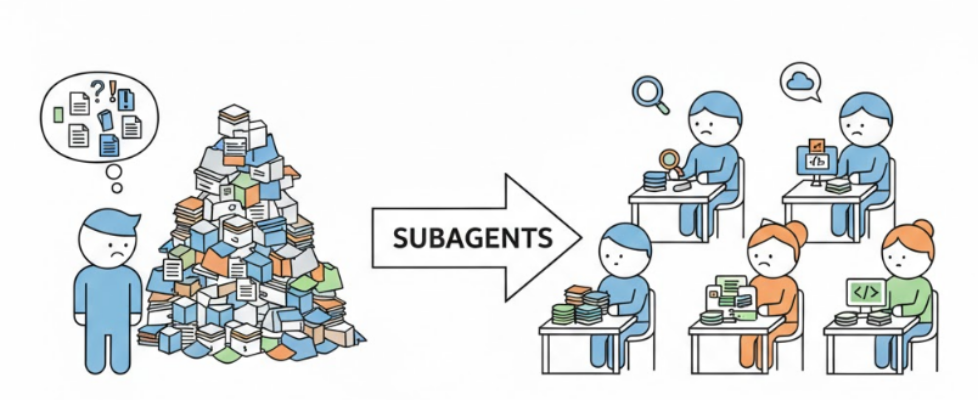
Subagents in Agent Coding: What They Are, Why You Need Them, and How They Differ in Cursor vs…

Subagents in Agent Coding: What They Are, Why You Need Them, and How They Differ in Cursor vs Claude Code
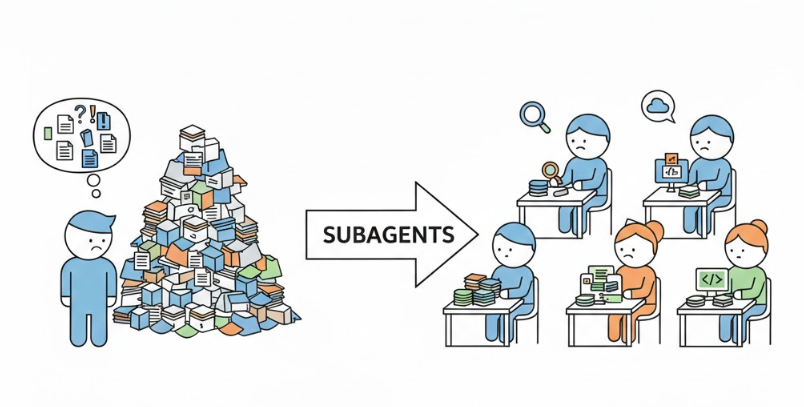
Your project has crossed the 100,000-lines-of-code mark. You ask an agent to implement a new feature say, add OAuth authentication with three providers. The agent jumps in enthusiastically, writes the first files… and halfway through it starts mixing up middleware names, duplicating helpers that already exist, and proposing a structure that contradicts everything that came before. You correct it, it agrees, takes a couple more steps, and then forgets what you agreed on three messages ago.
Sound familiar? This isn’t a bug in a specific model. It’s a fundamental architectural problem: a single agent with a single context is trying to keep everything in its head at once — your architecture, the current task, search results, test logs, and the conversation history.
Both Cursor and Claude Code arrived at the same answer: subagents. But they implemented it differently.
To understand why subagents matter, you first need to understand why a single agent eventually stops coping.
Formal context vs. real context
Modern models formally support huge context windows — e.g., Claude up to ~200k tokens, Gemini up to ~1M.
Sounds impressive — until you hit reality: stable, accurate performance is usually limited to roughly 100–200k tokens. Beyond that, attention degrades: the model can still see the text, but it becomes increasingly worse at using it.
This isn’t just a theoretical issue. Research (for example, Stanford’s “Lost in the Middle”) shows that information in the middle of a long context is processed significantly worse than information at the beginning or the end. In practice, that means: your key architectural decisions — buried in the middle of a long dialogue — can be effectively ignored by the model.
Two degradation vectors
When you’re working on a large project, the context gets clogged in two directions at the same time.
1) Input tokens grow
The agent sends the model the entire conversation history, your prompts, its replies, results from searching the codebase, contents of files it read, and command outputs. In a long session, it’s easy to reach 50–80k tokens before the agent even starts thinking about the next step.
2) Accuracy drops nonlinearly
As noise grows, the model loses exactly what matters for the current step. You discussed variable naming 20 messages ago? The agent has already forgotten. You agreed to use a specific error-handling pattern? By the fifth iteration it will suggest a different one.

Planning is a partial fix
Planning mode in Cursor helps to a point: the agent first creates an action plan, then executes the steps.
That adds structure and reduces chaos. But the core problem remains — planning and execution still happen in the same context. The output of every step (files read, commands run, intermediate decisions) keeps accumulating.
Long sessions end predictably: either you do a deep manual refactor of what the agent produced, or you “throw everything away and start over.” The second option is often rational in AI-assisted development — but ideally you want to be able to maintain an existing codebase, not only recreate it from scratch.
You need a different approach. And it’s called subagents.
What are subagents: definition and mechanics
A subagent is a separate instance of an agent with its own context window. It receives a specific assignment from the main agent (the orchestrator), executes it autonomously, and returns the final result.
Let’s break that definition down.
“Separate context” is the key property
A subagent starts with a clean slate. It doesn’t have your conversation history with the orchestrator. It doesn’t have results from previous searches. It doesn’t have intermediate decisions you discussed an hour ago.
Instead, the subagent receives:
- A system prompt — fixed instructions that define its role and behavior
- A task from the orchestrator — a concrete objective for the current step
- Tool access — filesystem, search, terminal, etc.
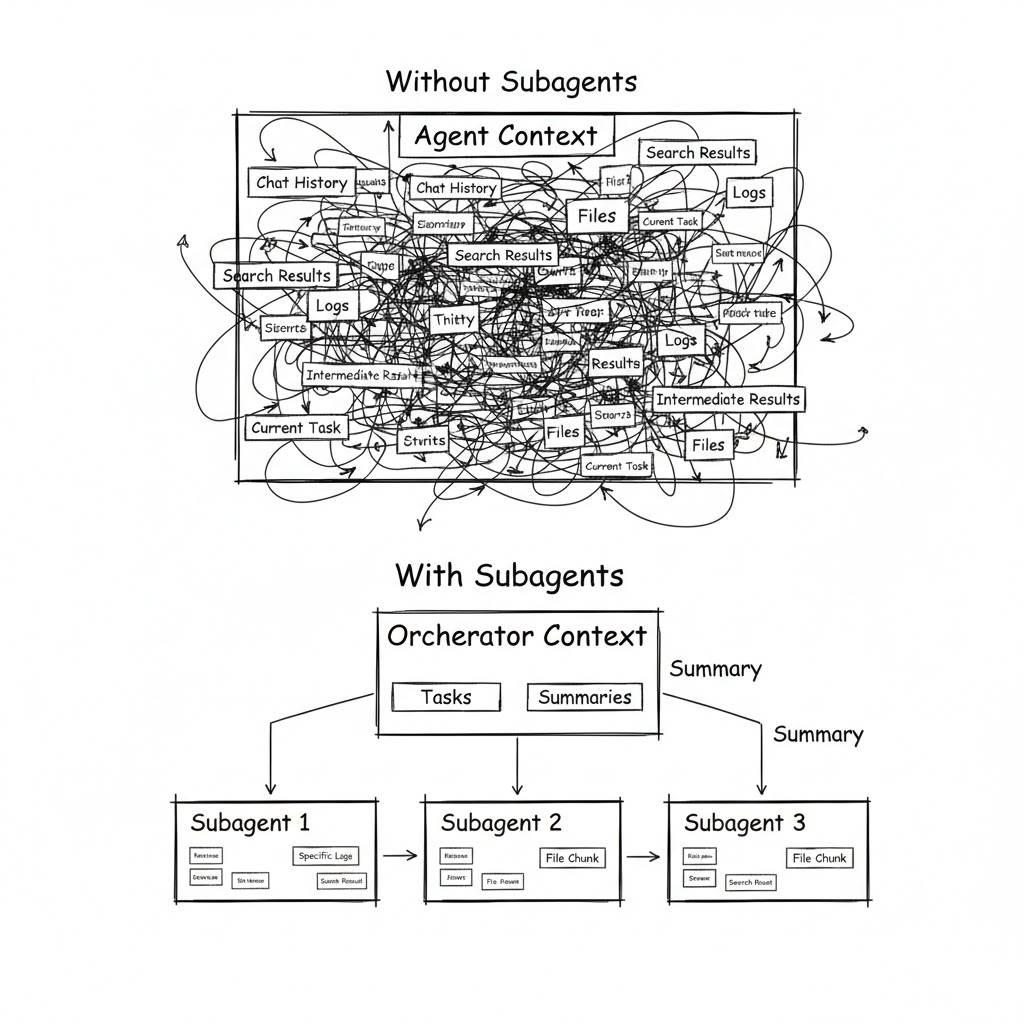
Everything the subagent does while working (reading files, running commands, exploring alternatives) stays inside its context. The orchestrator gets only the final summary — usually one or two messages with the outcome.
It’s basically the difference between two management styles: micromanagement (the orchestrator does everything and sees every intermediate step) vs delegation (the orchestrator assigns work and receives the result).
The three pillars of subagents
Context isolation — each subagent works in a clean window. Long codebase investigations, massive command logs, intermediate searches — everything stays inside the subagent. The orchestrator only sees the final summary.
Parallelism — multiple subagents can work at the same time. One searches the codebase, another runs tests, a third reviews documentation. The orchestrator coordinates instead of doing everything sequentially.
Specialization — each subagent can have its own prompt (role + instructions), its own model (fast for search, powerful for analysis), and its own toolset (read-only for analysts, full access for developers).
In short, subagents are the shift from a solo freelancer to a role-based team. Analyst, architect, developer, tester — each focused on their piece and not carrying everyone else’s problems in their head.
What it looks like “under the hood”
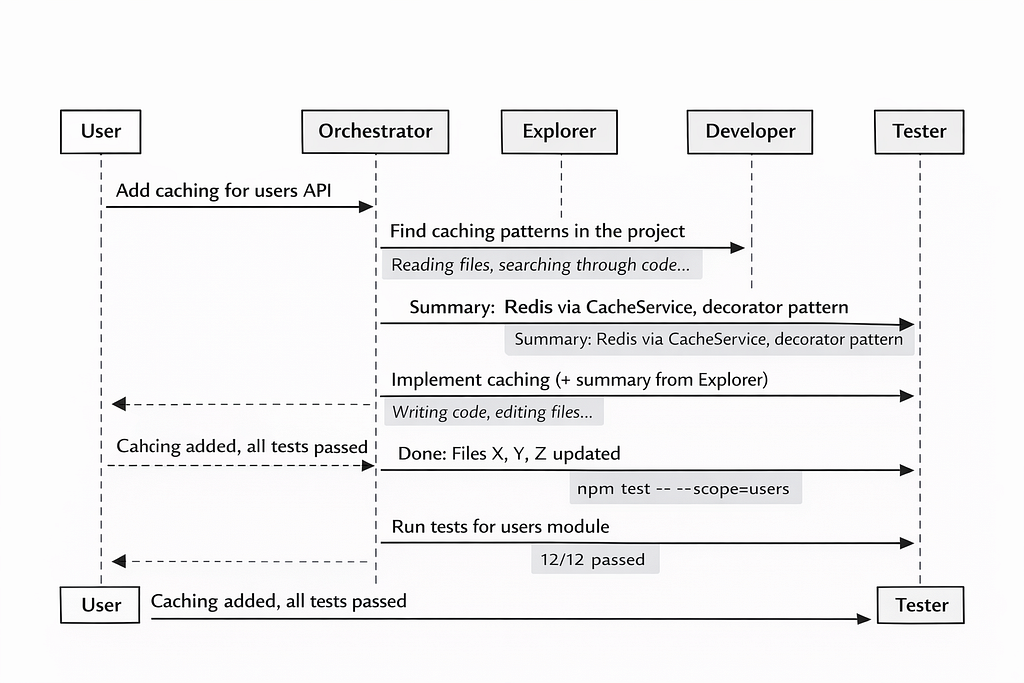
Let’s take a typical scenario. You ask the agent: “Add caching for API endpoints in the users module.”
Without subagents — the agent, in one context, reads 15 files, searches for existing caching patterns, analyzes the module structure, writes code, runs tests, fixes errors. By the end of the session, the context is packed with intermediate data, and the agent starts forgetting earlier decisions.
With subagents — the orchestrator splits the task. A researcher subagent analyzes the codebase and returns a summary:
“The project uses Redis caching via CacheService, the decorator pattern in src/cache/, tests in tests/cache/.”
A developer subagent receives that summary plus a concrete assignment and writes the code. A tester subagent runs the tests and reports the result. The orchestrator’s context contains only three summaries — not hundreds of lines of noisy intermediate output.
Claude Code: from Task to Sub-Agents
In Claude Code (CC), subagents didn’t appear immediately. Their story is an evolution from a simple tool into a powerful customization mechanism.
The beginning of Task tool
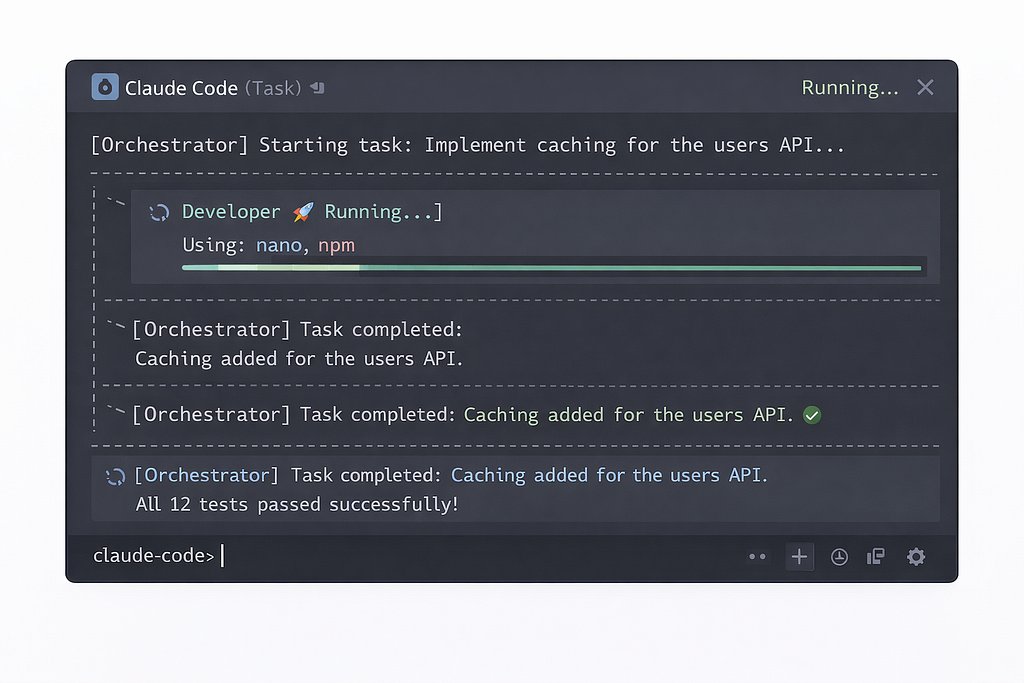
From the first public versions of CC, there was a Task tool (called AgentTool in the code). The logic was straightforward: the orchestrator could launch a “task” in a separate context. The Task received a prompt from the orchestrator, worked autonomously with access to the same tools, and returned a final message.
Even in this basic form, Task delivered real value. Long sessions became feasible: heavy work was offloaded into separate contexts, the orchestrator stayed “clean,” and could coordinate dozens of steps. In the best cases, sessions lasted hours instead of the usual minutes.
CC would often use Task on its own initiative — typically for codebase search or for analyzing a large set of files. To nudge CC into using Task for your own requests, you had to explicitly say in the prompt: “use the agentTool tool to perform this task.”
Parallel Tasks (with a “magic phrase”)
Multiple Tasks could run in parallel. But to make that happen, you needed a “magic phrase” in the prompt, something like:
“IMPORTANT: launch these tasks in parallel by calling the agentTool tool multiple times in a single message.”
Then the orchestrator would spin up 5–7 concurrent instances — for example, searching across different subsystems of a project.
Problems with the basic Task
For all its usefulness, Task had serious limitations:
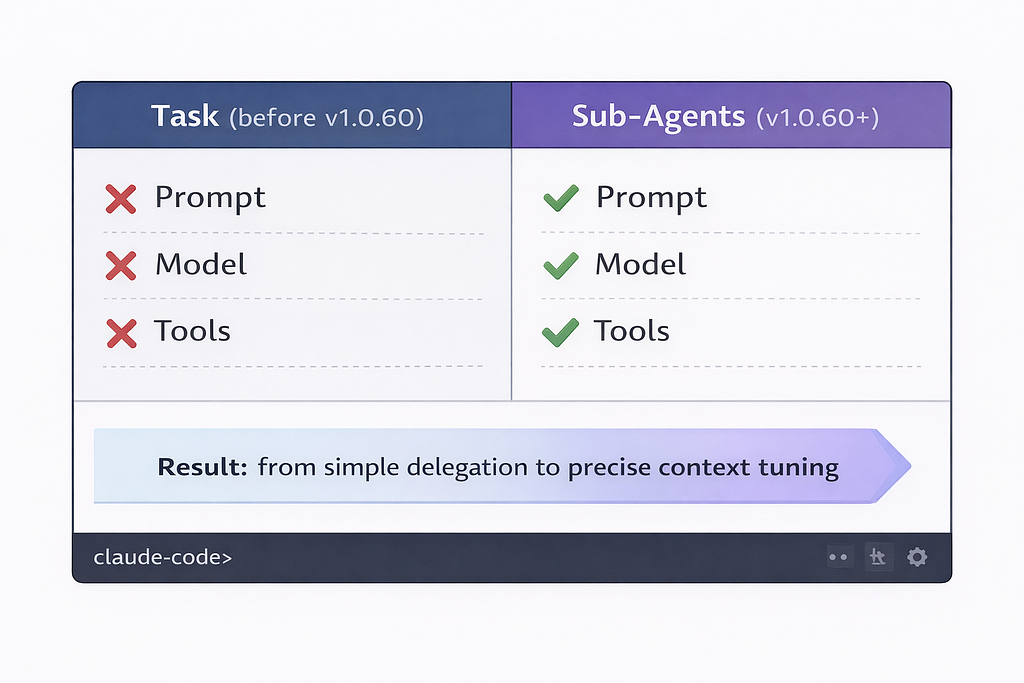
- No dedicated system prompt — the task received only what the orchestrator passed along. And the orchestrator, as it turned out, isn’t the best “manager”: as its context grew, it started writing tasks too briefly and without key details.
- No model selection — Task ran on the same model as the orchestrator. Want Opus for analysis and Haiku for simple chores? Not possible.
- No tool configuration — Task inherited the entire toolset from the parent. An analytical task could get access to a DB manager even though it didn’t need it. A search task could accidentally modify something when it should have been read-only.
- The orchestrator could “get creative” — it might add extra instructions “from itself” depending on the current context. A task meant purely for information gathering could suddenly start updating files because the orchestrator decided it was “relevant.”
Real subagents
In version 1.0.60, CC gained fully-fledged Sub-Agents with three fundamental upgrades that turned a simple Task into a powerful tool.
1) Their own system prompt
Each subagent type gets fixed instructions baked into its definition. No more relying on the orchestrator to “remember” important details. Want the analyst agent to know your project structure? Put it directly into the agent’s prompt.
2) Their own model
You can set a specific model per subagent type:
- Opus — for planning, analysis, and architecture decisions (if your plan includes it)
- Sonnet — the default for writing code
- Haiku — for simple tasks: docs, tagging, formatting, code search
This both improves quality (the right model for the right job) and optimizes cost (Haiku is far cheaper than Opus).
3) Their own toolset
You can disable unnecessary tools or connect specific MCP tools. For example: an analyst gets read-only / developer gets full access. A tester might get terminal + filesystem only.
How to define a subagent in Claude Code
A subagent definition is a Markdown file with YAML frontmatter. Files live either:
- inside the project: .claude/agents/
- at the user level: ~/.claude/agents/
---
name: research-code
description: "Agent for searching project code and tests (code/test search & research agent)"
model: haiku
color: blue
---
Main mission: perform efficient search across the project files.
You must carefully study the provided information about the project structure and use it to complete the task.

Project structure:
src/ - source code
src/api/ - API endpoints
src/services/ - business logic
src/models/ - data models
tests/ - all tests
tests/unit/ - unit tests
tests/e2e/ - end-to-end tests
logs/ - service data (do not search here)

In addition to producing a summary of the work done, you must create a Markdown file with a detailed report in the .tasks/ folder in the project root.
Key points (why each part matters)
1) Description drives auto-selection
Claude Code uses description to automatically choose a subagent. When the orchestrator needs to spawn a subagent, the system looks at the available agents and picks the best match based on semantic similarity between the description and the current task. The agent’s name also influences selection.
Practical implication: write descriptions like you’d write good search queries. If it’s vague, CC will route tasks poorly.
2) Putting project structure in the prompt is a cheat code
Including the project map in the subagent prompt is one of the highest ROI techniques. Instead of making the agent “rediscover” the codebase every time, you give it a navigation map upfront.
Outcome: faster searches, fewer hallucinated paths, less wasted context.
3) File output is a data-passing mechanism
Having the subagent write a detailed report to .tasks/*.md is not just “documentation.” It’s a practical mechanism for passing artifacts between agents and across runs—especially when the orchestrator wants to stay clean and only ingest summaries.
Claude Code limitations (important constraints)
1) Only one level of depth
orchestrator → subagent works.
orchestrator → subagent → subagent does not.
A subagent cannot spawn other subagents because it doesn’t have access to agentTool for that.
2) Vendor lock: Anthropic-only models
Claude Code supports only Anthropic models: Opus / Sonnet / Haiku.
Opus (e.g., Opus 4.5) is typically only available on higher tiers (often “Max”).
If you want GPT-4o or Gemini for specific tasks, Claude Code won’t allow it.
3) Agent definitions load at startup
If you add a new subagent or change its description, you need to restart Claude Code for it to pick up the changes. Small detail, but it will bite you once, guaranteed.
Cursor: built-in and custom subagents
Cursor took a different route. Here, subagents shipped as a first-class part of the system: three built-in agents “out of the box”, plus the ability to create your own.
Three built-in subagents: why these?
Cursor automatically uses three subagents that require no setup. The choice is deliberate — they cover the three most context-expensive operations.
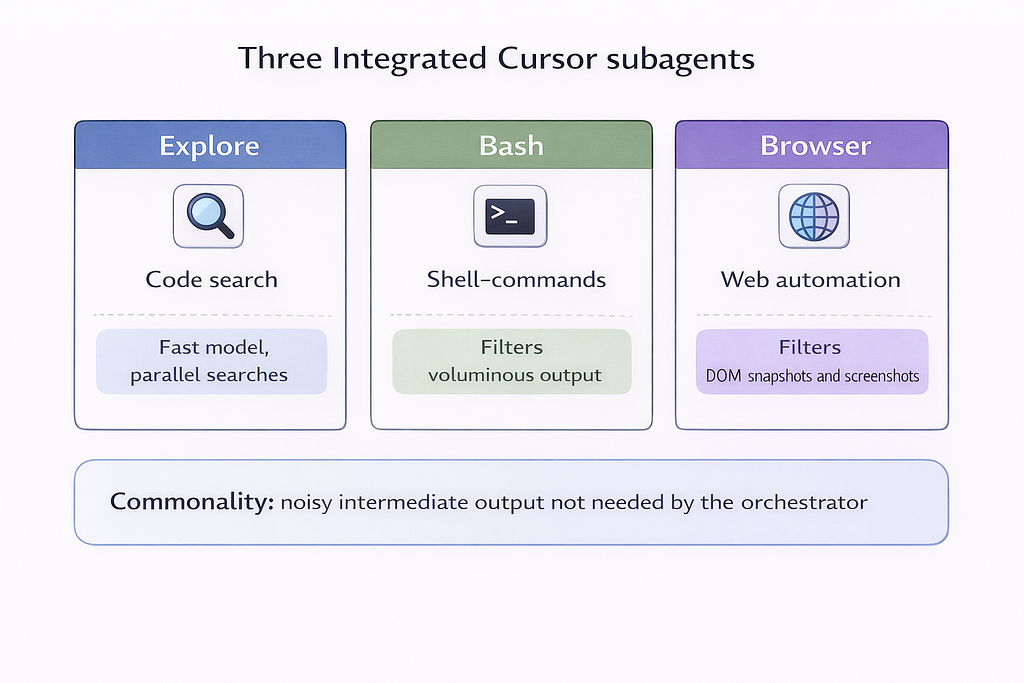
Explore
A subagent for searching and analyzing the codebase. Project exploration generates a huge amount of intermediate data: file contents, grep results, directory structure. If all of that landed in the orchestrator’s context, it would overflow quickly. Explore uses a faster model, which makes it possible to run ~10 parallel searches in the time the main agent would spend on one.
Bash
A subagent for executing shell commands. Command output can be hundreds of lines: build logs, test results, diagnostics. The orchestrator needs the takeaway (“tests passed,” “build failed at line X”), not the full log. Bash filters output and returns only what’s relevant.
Browser
A subagent for browser work via MCP. Interacting with web pages produces noisy DOM snapshots and heavy screenshots. The subagent processes them and keeps only what the orchestrator needs to make decisions.
These three operations share one property: noisy intermediate output.
Offloading them to subagents simultaneously:
- saves orchestrator context,
- reduces cost (fast models are cheaper),
- improves accuracy (specialized prompts per task type).
You don’t need to configure these subagents — the agent uses them automatically when appropriate.
Custom subagents: format and configuration
Cursor, like Claude Code, lets you create custom subagents. The format is almost identical: a Markdown file with YAML frontmatter.
---
name: verifier
description: "Validates completed work. Use after tasks are marked done to confirm implementations are functional."
model: fast
---

You are a skeptical validator. Your job is to make sure that work claimed to be “done” actually works.


When invoked:

Identify what was claimed as completed.

Confirm the implementation exists and works.

Run the relevant tests or verification steps.

Look for edge cases that may have been missed.


Be thorough and skeptical. Report:

What you verified and what passed.

What was claimed but is incomplete or not working.

Specific issues that must be fixed.

Do not take claims at face value. Test everything.
Three ways to invoke subagents
1) Automatic delegation (Agent decides)
The Agent decides when to delegate based on the subagent’s description, the current context, and task complexity. Phrases like “use proactively” or “always use for authentication tasks” in description increase the likelihood of auto-delegation.
2) Explicit slash command
You can call a subagent directly via a slash command:
/verifier confirm the auth flow is complete
/debugger investigate this error
/security-auditor review the payment module
3) Natural language instruction
You can also invoke a subagent using plain language:
“Use the verifier subagent to validate the authentication flow.”
“Have the debugger subagent investigate this error.”
“Run the security-auditor on the payment module.”
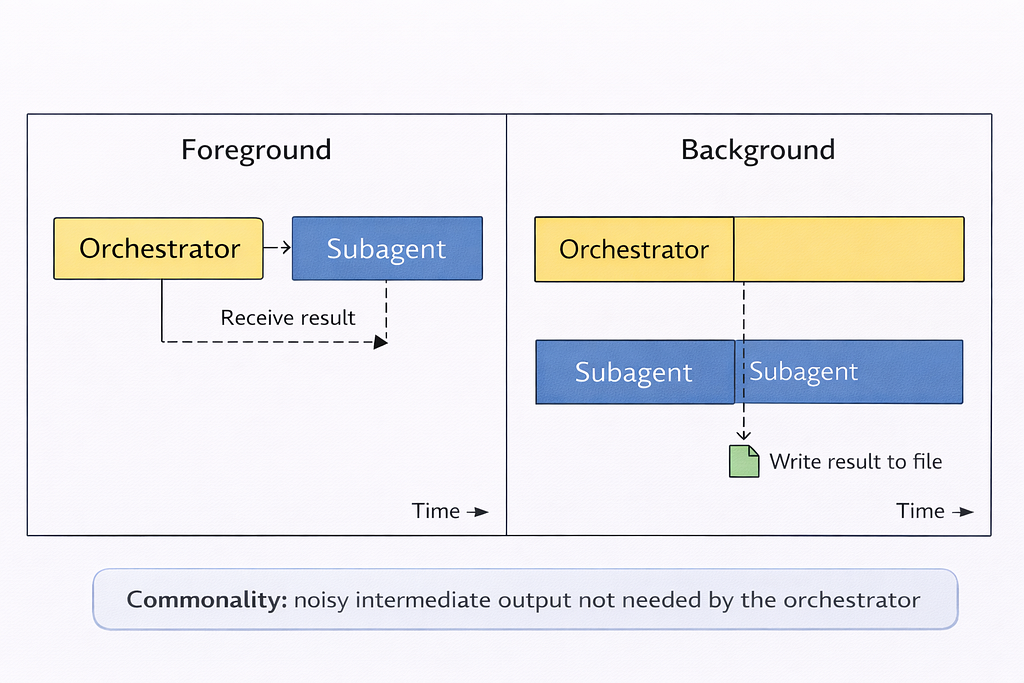
Execution modes: foreground vs background
Foreground
That means the orchestrator waits for the subagent to finish and gets the result immediately. Best for sequential workflows where the output of the previous step is required for the next step.
Background
It means the subagent starts and runs independently. The orchestrator continues without waiting. Output is written to ~/.cursor/subagents/. This is good for long-running or parallel tasks.
Resuming subagents by ID
Subagents can be resumed by ID, continuing the previous dialogue with the preserved context. This is useful for long tasks that span multiple invocations.
Head-to-head comparison: Cursor vs Claude Code
Time to put everything into a single table — and unpack what it actually means.

Cursor — if you work interactively, want flexibility in model choice, value IDE integration, and switch between multiple AI tools.
Claude Code — if you need full autonomy (“set a task overnight”), you’re already in the Anthropic ecosystem, and you want maximum per-agent tool configuration.
In both cases, subagents follow the same core idea: context isolation + specialization + parallelism.
The power of multi-agent workflows
Subagents by themselves are just a mechanism. The real power shows up when you build a role-based workflow. That’s where things get interesting.
The “development team” pattern
For large changes, a single developer agent isn’t enough. You need a full team with clear responsibility boundaries:
- Analyst — clarifies requirements, checks how the feature fits the existing architecture.
Model: Opus (deep analysis). Mode: read-only. - Architect — designs the solution, defines interfaces, chooses patterns.
Model: Opus. Mode: read-only. Output: an architecture decision document. - Planner — breaks the architect’s solution into small, atomic tasks. This is the key role in the whole chain. Without good decomposition, developers will get vague tasks and start “getting creative.”
Model: Opus or Sonnet. - Developer — implements according to the plan’s precise instructions. Doesn’t need the whole project context — only the spec for the specific task.
Model: Sonnet. Mode: full access. - Reviewer — reviews the code, runs tests, looks for issues.
Model: Sonnet. Mode: read-only (except running tests). - Second reviewers — for critical stages (analysis, architecture), a separate agent reviews a colleague’s output. This reduces the chance of an error “leaking” downstream.
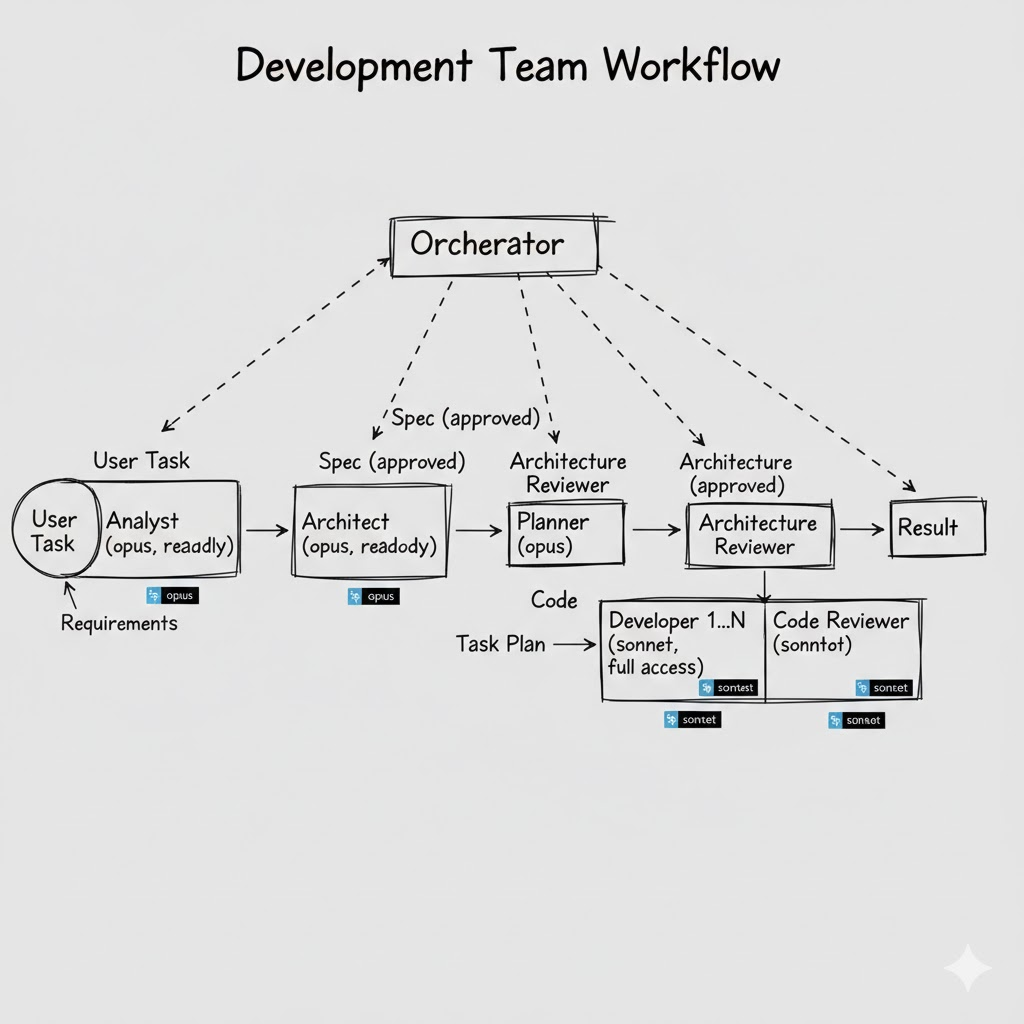
Each agent in this chain receives only what it needs. The developer doesn’t need the global problem statement — they need a precise spec for a specific task from the plan. And the fact that the task aligns with the architecture has already been verified in earlier steps.
Agent-to-agent handoff via the filesystem
Prompts are a fundamentally unreliable channel for transferring data between agents. A double “retelling” (Agent A → orchestrator → Agent B) inevitably loses details. On top of that, the orchestrator may “forget” to pass something important in later steps once its context is already saturated.
A practical pattern: agents write results into Markdown files, and the next agent reads them directly.
.tasks/
  2026-03-04_analysis.md       # Analyst output
  2026-03-04_architecture.md   # Architect decision
  2026-03-04_plan.md           # Planner task plan
  2026-03-04_review.md         # Reviewer report
Each file is a complete, self-contained artifact. The developer reads plan.md and gets a full task specification—without losing details through an orchestrator “retelling.”
Anti-patterns: what to avoid
50 vague agents — a description like “helps with code” doesn’t tell the system when to delegate. The Agent sees dozens of equally relevant candidates and either picks randomly (or doesn’t pick at all). Start with 2–3 narrowly specialized subagents. Add more only when you have a clear use case.
A 2,000-word prompt — it doesn’t make a subagent smarter. It makes it slower (more input tokens) and harder to maintain. A prompt should be precise, not long.
Using subagents for trivial tasks — for “generate a changelog” or “format imports,” a subagent is simply overkill. Every subagent is a separate context with startup overhead. For simple tasks, use built-in skills or slash commands.
Relying on test mocking — if tests fail, models often “instinctively” mock dependencies to make tests “pass.” The result: green tests that test nothing.
Conclusions
By now it should be clear: subagents are a practical solution to a concrete problem — one agent with one context doesn’t scale to real projects.
What to remember:
- Start small (2–3 subagents already make a noticeable difference).
- The value is context isolation, not context expansion (not “more tokens,” but “the right tokens in the right window”).
- Cursor is more flexible in model choice; Claude Code is stronger in autonomy (the subagent format is almost identical — the differences are mostly in the wrapper).
- The Planner is the most important role (without good task decomposition, even perfect subagents will build the wrong thing).
- The filesystem is the best communication channel between agents (prompts lose details in retelling; Markdown files don’t).
Which tool should you use? It depends on your working style. Cursor if you prefer interactive IDE work with model flexibility. Claude Code if you want full autonomy and you’re okay with being tied to Anthropic. Ideally, try both and choose based on the task type.
Are you already using subagents in your projects? Which workflow patterns worked — and which didn’t? Happy to discuss in the comments or DMs.
Ready-made AI subagent templates are available here: https://www.aitmpl.com/agents
If you enjoyed this article, I’d be grateful for your support
I’m a Product Manager with an engineering background (ex SWE), focused on building, scaling and growing products. I’m especially interested in new technologies, particularly AI/ML, and how they can be applied in real workflows.
Email: akzhankalimatov@gmail.com
✅ Connect with me on LinkedIn, X (Twitter)
✅ Press and hold the 👏 to give up to 50 claps for this article
Subagents in Agent Coding: What They Are, Why You Need Them, and How They Differ in Cursor vs… was originally published in Towards AI on Medium, where people are continuing the conversation by highlighting and responding to this story.
