RAG: Explained Simply

Every LLM you have ever talked to learned everything it knows by reading an enormous amount of text before you ever typed a single word. Books, research papers, websites, code, and Wikipedia. Billions of tokens, ingested during training. Once training is done, that knowledge gets frozen into the model’s weights. Baked in permanently.
That sounds useful, and it is. Until you try to use it in the real world.
Because the real world does not freeze, your company’s internal policies changed last month. A regulation got updated. A new research paper came out. A customer account has a unique context that no training dataset could possibly contain. The model, reading from its frozen snapshot of the world, has no idea any of this happened.
And rather than say “I don’t know,” it often makes something up. Confidently.
This is the core problem RAG was built to solve.
What RAG actually stands for
RAG stands for Retrieval Augmented Generation. The name tells you exactly what it does, once you break it apart.
Generation is what LLMs already do. You give them a prompt, and they generate text in response.
Retrieval is the act of looking something up: going out and finding relevant documents before answering.
Augmented means the generation step is now enhanced by what was retrieved. The model is not flying blind anymore. It has just been given fresh context to read before it responds.
The term was coined in a 2020 research paper by Patrick Lewis and colleagues at Facebook AI Research. Lewis later admitted he wished they had picked a more elegant name. What stuck, stuck.
The simplest way to think about it: without RAG, an LLM is a student answering an exam from memory alone. With RAG, that same student gets to bring a set of relevant notes into the exam room and consult them before writing each answer.
The problem RAG is actually solving
There are three distinct failure modes RAG addresses, and it is worth understanding each one separately.
The first is stale knowledge. LLMs have a training cutoff. Ask a model trained in mid-2024 about something that happened in early 2025, and it simply does not know. RAG lets you connect the model to a live or frequently updated knowledge base, so the answers stay current without retraining anything.
The second is private data. Public training datasets obviously do not include your company’s internal wiki, your customer contracts, your engineering runbooks, or your HR policies. RAG is how you make an LLM useful inside an organization, by pointing it at your proprietary documents instead of trying to bake them into a model.
The third is hallucination. When a model does not know something and has no signal to say “I don’t know,” it fills the gap with a plausible-sounding invention. RAG reduces this by giving the model actual source material to draw from. It still is not a perfect fix, but grounding the model in real documents makes confident fabrication far less likely.
“RAG is a way of improving LLM performance by blending the LLM process with a document lookup, to help models stick to the facts.”
How it works, step by step
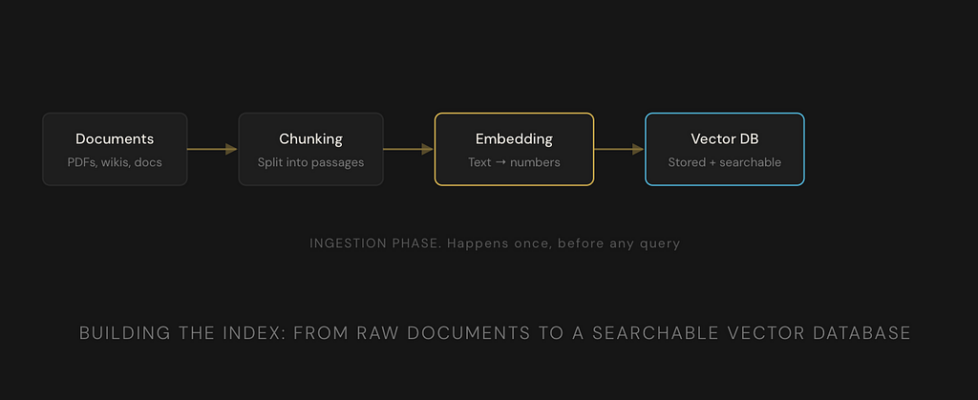
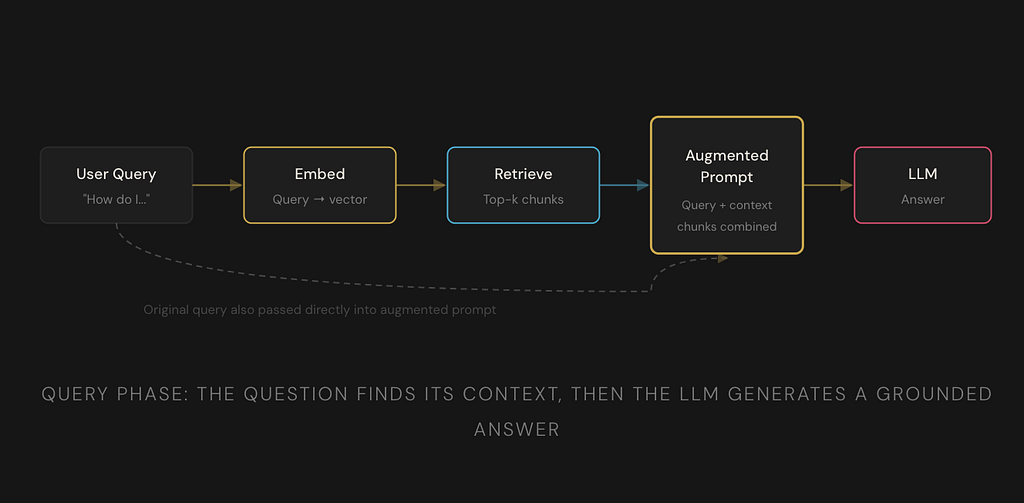
A RAG system has two distinct phases. First, you build an index of your documents. This is called the ingestion phase. Then, when a user asks a question, you retrieve and generate. That is the query phase. Let us walk through both.
Phase 1: Ingestion (building the index)
1. Load your documents
This is your raw source material. PDFs, Word docs, web pages, database exports, internal wikis, Slack channels: anything with text. The system ingests it all.
2. Chunk the documents
You cannot feed an entire 300-page policy manual to a model in one go. So the documents get broken into smaller pieces called chunks. Typically, a few hundred words each. The chunking strategy matters a lot for quality. Too small and you lose context, too large and the retrieval becomes imprecise.
3. Embed each chunk
This is where things get interesting. Each chunk of text is passed through a separate model called an embedding model. The embedding model converts the text into a vector, a list of numbers that encodes the meaning of that text in mathematical space. Chunks that are similar in meaning end up with vectors that are close together numerically.
4. Store in a vector database
All those vectors, one per chunk, get stored in a specialized database built for fast similarity search. Pinecone, Weaviate, pgvector, Chroma: these are all vector databases. The actual chunk text is stored alongside its vector so you can retrieve it later.

Phase 2: Query (retrieval and generation)
5. Embed the user’s question
When a user asks something, that question gets passed through the same embedding model used during ingestion. It becomes a vector too, a point in the same mathematical space as all your stored document chunks.
6. Find the nearest chunks
The system searches the vector database for the chunks whose vectors are mathematically closest to the question vector. This is called semantic search or nearest neighbor search. It finds meaning matches, not just keyword matches. If you ask “how do I get time off,” it will match a chunk titled “Annual Leave Policy” even if neither of those phrases appears in the other.
7. Build an augmented prompt
The top matching chunks are pulled from the database. They get stitched together with the original question into a new, richer prompt. Something like: “Here is the relevant context from our documents. Using only this context, answer the following question.” The LLM now has the raw material it needs to give a grounded answer.
8. Generate the answer
The LLM reads the augmented prompt and generates its response. Because it has been explicitly given relevant source material, the answer is grounded in your actual documents. It can even cite which chunks it used, giving the user a trail they can verify.
What are embeddings, really
Embeddings are the thing that makes this whole system tick, so it is worth making sure they actually make sense.
An embedding model takes a piece of text and maps it to a point in a very high-dimensional space. “High-dimensional” just means the vector has hundreds or thousands of numbers in it. Each number encodes some aspect of the text’s meaning.
The key property is that similar meanings end up close together. The vectors for “heart attack” and “myocardial infarction” will be very close to each other. “Dog” and “canine” will be close. “Annual leave” and “vacation policy” will be close. “Quantum entanglement” and “leave policy” will be very far apart.
Think of it like placing every sentence you have ever read onto a giant map, where sentences with similar meaning are placed near each other geographically. An embedding model is the cartographer. Vector search is asking “what is closest to where I am standing right now?”
This is why RAG can find relevant documents even when the query uses completely different words from the source text. It is matching by meaning, not by string matching.
RAG vs the alternatives
There are two other approaches people reach for when they want to customize an LLM with their own data. It is worth knowing how they compare.

Where RAG works well and where it does not
RAG is genuinely excellent for customer support systems where answers must come from official product documentation. It shines in enterprise search, where employees can ask questions and get answers grounded in internal knowledge. Legal research, medical information retrieval, financial analysis: anywhere that the cost of a hallucinated answer is high and you need sourced, verifiable output.
But RAG has honest limitations too.
It struggles with questions that require synthesizing information scattered across dozens of documents in complex relational ways. Standard vector search is a proximity operation. It does not understand that two facts in two separate documents, when combined, imply a third conclusion. That is why Graph RAG exists as a follow-on architecture.
It also degrades if the underlying documents are noisy, poorly structured, or contradictory. Garbage in, garbage out. The model will faithfully retrieve and use your bad data.
RAG reduces hallucination but does not eliminate it. If the retrieved context is incomplete or ambiguous, the model can still generate incorrect answers. It is a significantly better bet than no grounding at all, but it is not a guarantee of accuracy.
Why RAG is foundational, not optional
By 2025, RAG had stopped being a clever research idea and had become infrastructure. Virtually every enterprise AI deployment of consequence has some form of it. The tooling matured rapidly. LangChain, LlamaIndex, and cloud native solutions from AWS, Azure, and Google all made it accessible without building from scratch.
The reason it stuck is that it solves a fundamental asymmetry. LLMs are trained by large AI labs with enormous compute. Organizations with proprietary data cannot match that. But they do not need to. They can take a general-purpose model and ground it in their own knowledge, without touching the model at all. That accessibility is what drove adoption.
As AI agents become more autonomous and handle more complex workflows, RAG becomes even more important. An agent that can plan and execute tasks needs to retrieve accurate, current, domain-specific information at every step. The retrieval layer is not an add-on. It is the foundation that the whole system stands on.
If you have been hearing “RAG” dropped constantly in AI conversations and felt like everyone else understood something you were supposed to already know. Now you know. It is genuinely one of the most important patterns in applied AI today. The open-book exam analogy is not a simplification. That is really what it is.
RAG: Explained Simply was originally published in Towards AI on Medium, where people are continuing the conversation by highlighting and responding to this story.
