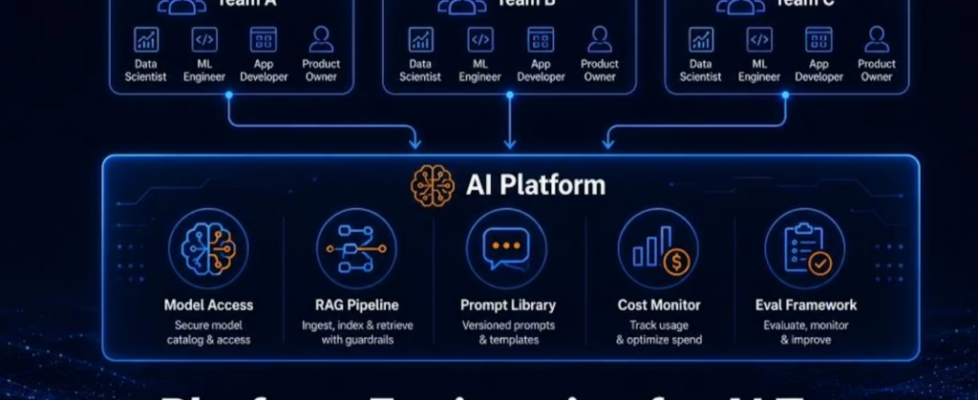
Platform Engineering for AI Teams: The Missing Layer That Makes AI Actually Work in Your Org

The Problem Every Growing AI Organisation Hits
Picture this. Your organisation decides to invest in AI. Three teams get the green light to build AI-powered features simultaneously.
Team A (customer service) spends two weeks building a Lambda function that calls Bedrock, adds basic error handling, and connects it to a Slack bot.
Team B (internal tools) spends two weeks building a Lambda function that calls Bedrock, adds basic error handling, and connects it to a web interface.
Team C (product recommendations) spends two weeks building a Lambda function that calls Bedrock, adds basic error handling, and connects it to their recommendation engine.
Three teams. Six weeks of combined engineering time. Three nearly identical implementations that differ in small, inconsistent ways. No shared prompt management. No shared cost tracking. No shared evaluation framework. No shared security controls. And when the company decides to switch from Claude 3 Haiku to Claude 3.5 Sonnet for better quality, all three teams need to update their code independently.
This is the AI platform problem. And it gets worse as more teams adopt AI.
The solution is Platform Engineering, building a shared internal platform that gives every team production-ready AI capabilities without each team building the plumbing themselves.
This is not a new concept. Platform engineering has been one of the fastest-growing disciplines in software for the past three years. What is new is applying it specifically to AI infrastructure, where the shared components are even more valuable because AI introduces unique challenges that every team faces: prompt management, model versioning, evaluation, cost attribution, hallucination handling, and safety controls.
What Is an AI Internal Developer Platform?
An AI Internal Developer Platform (AI IDP) is a set of shared services, tools, and abstractions that make it easy for any team in your organisation to build AI-powered features without reinventing the wheel.
Think of it like a utility company. You do not ask every building in a city to generate its own electricity. The utility company generates electricity once, manages the infrastructure, and every building connects to the grid. The buildings get reliable power. The city does not waste resources on redundant generators.
An AI platform works the same way:
WITHOUT AI PLATFORM:
Team A → builds auth + rate limiting + cost tracking + prompt mgmt → AI feature
Team B → builds auth + rate limiting + cost tracking + prompt mgmt → AI feature
Team C → builds auth + rate limiting + cost tracking + prompt mgmt → AI feature

9-12 weeks of duplicated engineering effort
3 inconsistent implementations
3 separate cost monitoring systems
No shared safety controls

WITH AI PLATFORM:
Platform team → builds auth + rate limiting + cost tracking + prompt mgmt → ONCE

Team A → connects to platform → builds AI feature (2-3 days)
Team B → connects to platform → builds AI feature (2-3 days)
Team C → connects to platform → builds AI feature (2-3 days)

3 weeks total. Consistent. Governed. Cost-attributed.
What We Are Building
A complete AI Internal Developer Platform on AWS with these components:
1. AI Gateway: the single entry point all teams use to call AI models. Handles authentication, rate limiting, model routing, and cost attribution automatically.
2. Prompt Library: a centralised store of versioned, tested prompt templates that teams can use and contribute to.
3. RAG Service: a shared retrieval-augmented generation service that any team can query without setting up their own knowledge base.
4. Cost Attribution Dashboard: real-time visibility into which team is spending what on AI, broken down by project and model.
5. Evaluation Framework: a shared system for testing AI feature quality so teams can measure whether their AI is actually working.
Architecture:
┌──────────────────────────────────────────────────────────────┐
│                    DEVELOPER TEAMS                           │
│   Team A App    │    Team B App    │    Team C App           │
└────────┬────────┴────────┬─────────┴────────┬────────────────┘
         │                 │                  │
         └────────────┬────┘                  │
                      │      All teams call   │
                      │      the same gateway │
                      ↓                       ↓
┌─────────────────────────────────────────────────────────────┐
│                    AI GATEWAY LAYER                         │
│         API Gateway + Lambda (auth, routing, logging)       │
│                                                             │
│   ┌────────────┐  ┌──────────────┐  ┌──────────────────┐  │
│   │ Auth &     │  │ Model Router │  │ Cost Attribution │  │
│   │ Rate Limit │  │ (Haiku →     │  │ (per team, per   │  │
│   │            │  │  Sonnet etc) │  │  project, daily) │  │
│   └────────────┘  └──────────────┘  └──────────────────┘  │
└──────────────────────────┬──────────────────────────────────┘
                           │
┌──────────────────────────▼──────────────────────────────────┐
│                    SHARED SERVICES                          │
│                                                             │
│  ┌─────────────────┐    ┌──────────────────────────────┐   │
│  │  Prompt Library  │    │     RAG Service              │   │
│  │  (DynamoDB +     │    │  (Bedrock Knowledge Base     │   │
│  │   versioning)    │    │   shared across all teams)   │   │
│  └─────────────────┘    └──────────────────────────────┘   │
│                                                             │
│  ┌─────────────────┐    ┌──────────────────────────────┐   │
│  │  Eval Framework  │    │  Cost Dashboard              │   │
│  │  (test suites +  │    │  (CloudWatch + QuickSight)   │   │
│  │   pass/fail)     │    │                              │   │
│  └─────────────────┘    └──────────────────────────────┘   │
└──────────────────────────┬──────────────────────────────────┘
                           │
┌──────────────────────────▼──────────────────────────────────┐
│                    AWS AI SERVICES                          │
│      Amazon Bedrock  │  Amazon S3  │  Amazon DynamoDB       │
└─────────────────────────────────────────────────────────────┘
What you need:
- AWS account
- AWS CLI configured
- Basic Python knowledge
- About 3 hours
Let us build it piece by piece.
Component 1: The AI Gateway
The AI Gateway is the heart of the platform. Every team calls the gateway instead of calling Bedrock directly. This gives the platform team centralised control over:
- Which teams have access to which models
- How many tokens each team can use per day
- Which model to use for each request (routing)
- Full cost attribution by team and project
Step 1: Create the DynamoDB Tables
bash
REGION="eu-west-1"
ACCOUNT_ID=$(aws sts get-caller-identity --query Account --output text)

# Table 1: Team registrations and API keys
aws dynamodb create-table
  --table-name ai-platform-teams
  --attribute-definitions
    AttributeName=teamId,AttributeType=S
  --key-schema
    AttributeName=teamId,KeyType=HASH
  --billing-mode PAY_PER_REQUEST
  --region $REGION

# Table 2: Daily usage tracking (for rate limiting and cost attribution)
aws dynamodb create-table
  --table-name ai-platform-usage
  --attribute-definitions
    AttributeName=teamId,AttributeType=S
    AttributeName=dateAndProject,AttributeType=S
  --key-schema
    AttributeName=teamId,KeyType=HASH
    AttributeName=dateAndProject,KeyType=RANGE
  --billing-mode PAY_PER_REQUEST
  --region $REGION

echo "DynamoDB tables created"

# Register your first team
aws dynamodb put-item
  --table-name ai-platform-teams
  --item '{
    "teamId": {"S": "team-customer-service"},
    "teamName": {"S": "Customer Service Team"},
    "allowedModels": {"SS": ["haiku", "sonnet"]},
    "dailyTokenLimit": {"N": "1000000"},
    "defaultModel": {"S": "haiku"},
    "projects": {"SS": ["cs-chatbot", "cs-summariser"]},
    "createdAt": {"S": "2026-01-01T00:00:00Z"},
    "active": {"BOOL": true}
  }'
  --region $REGION

aws dynamodb put-item
  --table-name ai-platform-teams
  --item '{
    "teamId": {"S": "team-internal-tools"},
    "teamName": {"S": "Internal Tools Team"},
    "allowedModels": {"SS": ["haiku"]},
    "dailyTokenLimit": {"N": "500000"},
    "defaultModel": {"S": "haiku"},
    "projects": {"SS": ["hr-assistant", "policy-search"]},
    "createdAt": {"S": "2026-01-01T00:00:00Z"},
    "active": {"BOOL": true}
  }'
  --region $REGION

echo "Teams registered"
Step 2: The AI Gateway Lambda
This is the core of the platform. Every team’s AI call goes through this function.
python
# ai_gateway.py
# The central AI Gateway — handles all team AI requests

import boto3
import json
import logging
import time
import hashlib
from datetime import datetime, timezone
from typing import Optional

logger = logging.getLogger()
logger.setLevel(logging.INFO)

# AWS clients
bedrock = boto3.client('bedrock-runtime', region_name='us-east-1')
dynamodb = boto3.resource('dynamodb', region_name='eu-west-1')
cloudwatch = boto3.client('cloudwatch', region_name='eu-west-1')

teams_table = dynamodb.Table('ai-platform-teams')
usage_table = dynamodb.Table('ai-platform-usage')

# Model registry — maps friendly names to Bedrock model IDs
# Platform team controls which models are available
MODEL_REGISTRY = {
    "haiku": {
        "modelId": "anthropic.claude-3-haiku-20240307-v1:0",
        "inputCostPer1kTokens": 0.00025,
        "outputCostPer1kTokens": 0.00125,
        "maxTokens": 4096,
        "description": "Fast and cost-efficient. Good for simple tasks."
    },
    "sonnet": {
        "modelId": "anthropic.claude-3-5-sonnet-20241022-v2:0",
        "inputCostPer1kTokens": 0.003,
        "outputCostPer1kTokens": 0.015,
        "maxTokens": 8192,
        "description": "Balanced quality and cost. Good for complex reasoning."
    },
    "haiku-3-5": {
        "modelId": "anthropic.claude-3-5-haiku-20241022-v1:0",
        "inputCostPer1kTokens": 0.0008,
        "outputCostPer1kTokens": 0.004,
        "maxTokens": 8192,
        "description": "Latest fast model. Better than original Haiku."
    }
}


def log_event(level: str, event: str, **kwargs):
    """Structured logging for CloudWatch Logs Insights"""
    logger.info(json.dumps({
        "level": level,
        "event": event,
        "timestamp": datetime.now(timezone.utc).isoformat(),
        **kwargs
    }))


def get_team(team_id: str) -> Optional[dict]:
    """Get team configuration from DynamoDB"""
    try:
        response = teams_table.get_item(Key={'teamId': team_id})
        return response.get('Item')
    except Exception as e:
        log_event("ERROR", "team_lookup_failed", team_id=team_id, error=str(e))
        return None


def select_model(team: dict, requested_model: Optional[str]) -> Optional[dict]:
    """
    Select the appropriate model based on:
    1. What the team requested (if allowed)
    2. The team's default model (if no request)
    3. Team's allowed models list (safety check)
    """
    allowed_models = list(team.get('allowedModels', {'haiku'}))

    # Use requested model if specified and allowed
    if requested_model:
        if requested_model not in allowed_models:
            return None  # Team not allowed to use this model
        model_key = requested_model
    else:
        # Use team's default model
        model_key = team.get('defaultModel', 'haiku')

    return MODEL_REGISTRY.get(model_key)


def check_and_record_usage(team_id: str, project: str, estimated_tokens: int, daily_limit: int) -> tuple[bool, dict]:
    """
    Rate limit check and usage recording.
    Uses DynamoDB atomic counter to prevent race conditions.
    Returns (is_allowed, usage_info)
    """
    today = datetime.now(timezone.utc).strftime('%Y-%m-%d')
    sort_key = f"{today}#{project}"

    try:
        response = usage_table.update_item(
            Key={
                'teamId': team_id,
                'dateAndProject': sort_key
            },
            UpdateExpression='ADD tokensUsed :tokens SET lastRequest = :now, teamId = :tid, project = :proj, date = :date',
            ConditionExpression='attribute_not_exists(tokensUsed) OR tokensUsed < :limit',
            ExpressionAttributeValues={
                ':tokens': estimated_tokens,
                ':limit': daily_limit,
                ':now': datetime.now(timezone.utc).isoformat(),
                ':tid': team_id,
                ':proj': project,
                ':date': today
            },
            ReturnValues='UPDATED_NEW'
        )

        tokens_used = int(response['Attributes']['tokensUsed'])
        return True, {
            'tokensUsedToday': tokens_used,
            'dailyLimit': daily_limit,
            'remaining': max(0, daily_limit - tokens_used)
        }

    except dynamodb.meta.client.exceptions.ConditionalCheckFailedException:
        # Rate limit exceeded
        try:
            item = usage_table.get_item(
                Key={'teamId': team_id, 'dateAndProject': sort_key}
            ).get('Item', {})
            tokens_used = int(item.get('tokensUsed', daily_limit))
        except Exception:
            tokens_used = daily_limit

        return False, {
            'tokensUsedToday': tokens_used,
            'dailyLimit': daily_limit,
            'remaining': 0
        }


def call_bedrock(model_config: dict, messages: list, system_prompt: str, max_tokens: int) -> dict:
    """Call Bedrock with the selected model"""
    body = {
        "anthropic_version": "bedrock-2023-05-31",
        "max_tokens": min(max_tokens, model_config['maxTokens']),
        "temperature": 0.3,
        "messages": messages
    }

    if system_prompt:
        body["system"] = system_prompt

    max_retries = 3
    for attempt in range(max_retries):
        try:
            start_time = time.time()
            response = bedrock.invoke_model(
                modelId=model_config['modelId'],
                body=json.dumps(body)
            )
            latency_ms = int((time.time() - start_time) * 1000)
            result = json.loads(response['body'].read())

            return {
                'content': result['content'][0]['text'],
                'inputTokens': result['usage']['input_tokens'],
                'outputTokens': result['usage']['output_tokens'],
                'totalTokens': result['usage']['input_tokens'] + result['usage']['output_tokens'],
                'latencyMs': latency_ms,
                'stopReason': result.get('stop_reason', 'end_turn')
            }

        except bedrock.exceptions.ThrottlingException:
            if attempt == max_retries - 1:
                raise
            time.sleep(2 ** attempt)

    raise RuntimeError("Bedrock call failed after all retries")


def publish_cost_metrics(team_id: str, project: str, model_key: str,
                         total_tokens: int, cost_usd: float, latency_ms: int):
    """Publish custom CloudWatch metrics for cost dashboard"""
    try:
        cloudwatch.put_metric_data(
            Namespace='AIPlatform/Usage',
            MetricData=[
                {
                    'MetricName': 'TokensConsumed',
                    'Value': total_tokens,
                    'Unit': 'Count',
                    'Dimensions': [
                        {'Name': 'TeamId', 'Value': team_id},
                        {'Name': 'Project', 'Value': project},
                        {'Name': 'Model', 'Value': model_key}
                    ]
                },
                {
                    'MetricName': 'EstimatedCostUSD',
                    'Value': cost_usd,
                    'Unit': 'None',
                    'Dimensions': [
                        {'Name': 'TeamId', 'Value': team_id},
                        {'Name': 'Project', 'Value': project},
                        {'Name': 'Model', 'Value': model_key}
                    ]
                },
                {
                    'MetricName': 'RequestLatencyMs',
                    'Value': latency_ms,
                    'Unit': 'Milliseconds',
                    'Dimensions': [
                        {'Name': 'TeamId', 'Value': team_id},
                        {'Name': 'Model', 'Value': model_key}
                    ]
                }
            ]
        )
    except Exception as e:
        log_event("WARN", "metrics_failed", error=str(e))


def build_response(status_code: int, body: dict, request_id: str) -> dict:
    return {
        'statusCode': status_code,
        'headers': {
            'Content-Type': 'application/json',
            'X-Request-ID': request_id,
            'Access-Control-Allow-Origin': '*',
            'Access-Control-Allow-Headers': 'Content-Type,x-team-id,x-project-id',
            'Access-Control-Allow-Methods': 'POST,OPTIONS'
        },
        'body': json.dumps(body)
    }


def lambda_handler(event, context):
    """
    AI Gateway main handler.

    Expected request headers:
    - x-team-id: the calling team's ID (e.g. "team-customer-service")
    - x-project-id: the project within the team (e.g. "cs-chatbot")

    Expected request body:
    {
      "messages": [{"role": "user", "content": "Your question here"}],
      "systemPrompt": "Optional system prompt",
      "model": "haiku" | "sonnet" | "haiku-3-5" (optional, uses team default),
      "maxTokens": 1000 (optional, default 1000)
    }
    """
    request_id = context.aws_request_id
    start_time = time.time()

    # Handle CORS preflight
    if event.get('requestContext', {}).get('http', {}).get('method') == 'OPTIONS':
        return build_response(200, {}, request_id)

    # Extract team and project from headers
    headers = {k.lower(): v for k, v in event.get('headers', {}).items()}
    team_id = headers.get('x-team-id', '')
    project_id = headers.get('x-project-id', 'default')

    if not team_id:
        return build_response(401, {
            'success': False,
            'error': {'code': 'MISSING_TEAM_ID', 'message': 'x-team-id header is required'}
        }, request_id)

    # Load team configuration
    team = get_team(team_id)
    if not team:
        return build_response(401, {
            'success': False,
            'error': {'code': 'UNKNOWN_TEAM', 'message': f'Team {team_id} is not registered on the AI platform'}
        }, request_id)

    if not team.get('active', True):
        return build_response(403, {
            'success': False,
            'error': {'code': 'TEAM_SUSPENDED', 'message': 'This team account has been suspended'}
        }, request_id)

    # Validate project
    allowed_projects = list(team.get('projects', {'default'}))
    if project_id not in allowed_projects and 'default' not in allowed_projects:
        return build_response(403, {
            'success': False,
            'error': {
                'code': 'UNKNOWN_PROJECT',
                'message': f'Project {project_id} is not registered for team {team_id}',
                'allowedProjects': allowed_projects
            }
        }, request_id)

    # Parse request body
    try:
        body = json.loads(event.get('body', '{}'))
    except json.JSONDecodeError:
        return build_response(400, {
            'success': False,
            'error': {'code': 'INVALID_JSON', 'message': 'Request body must be valid JSON'}
        }, request_id)

    messages = body.get('messages', [])
    system_prompt = body.get('systemPrompt', '')
    requested_model = body.get('model')
    max_tokens = min(body.get('maxTokens', 1000), 4096)

    # Validate messages
    if not messages or not isinstance(messages, list):
        return build_response(400, {
            'success': False,
            'error': {'code': 'INVALID_MESSAGES', 'message': 'messages must be a non-empty array'}
        }, request_id)

    # Select model (with team permission check)
    model_config = select_model(team, requested_model)
    if not model_config:
        return build_response(403, {
            'success': False,
            'error': {
                'code': 'MODEL_NOT_ALLOWED',
                'message': f'Model {requested_model} is not allowed for team {team_id}',
                'allowedModels': list(team.get('allowedModels', {'haiku'}))
            }
        }, request_id)

    model_key = requested_model or team.get('defaultModel', 'haiku')

    # Rate limiting check
    daily_limit = int(team.get('dailyTokenLimit', 500000))
    estimated_tokens = sum(len(m.get('content', '')) // 4 for m in messages) + max_tokens

    is_allowed, usage_info = check_and_record_usage(team_id, project_id, estimated_tokens, daily_limit)

    if not is_allowed:
        log_event("WARN", "rate_limit_exceeded",
                  team_id=team_id, project_id=project_id,
                  tokens_used=usage_info['tokensUsedToday'])
        return build_response(429, {
            'success': False,
            'error': {
                'code': 'RATE_LIMIT_EXCEEDED',
                'message': f'Daily token limit exceeded for team {team_id}. Resets at midnight UTC.',
                'usage': usage_info
            }
        }, request_id)

    # Call Bedrock
    try:
        result = call_bedrock(model_config, messages, system_prompt, max_tokens)

        # Calculate cost
        cost_usd = (
            (result['inputTokens'] / 1000) * model_config['inputCostPer1kTokens'] +
            (result['outputTokens'] / 1000) * model_config['outputCostPer1kTokens']
        )

        total_duration_ms = int((time.time() - start_time) * 1000)

        log_event("INFO", "request_completed",
                  request_id=request_id,
                  team_id=team_id,
                  project_id=project_id,
                  model=model_key,
                  input_tokens=result['inputTokens'],
                  output_tokens=result['outputTokens'],
                  cost_usd=round(cost_usd, 8),
                  latency_ms=result['latencyMs'],
                  total_duration_ms=total_duration_ms)

        publish_cost_metrics(team_id, project_id, model_key,
                             result['totalTokens'], cost_usd, result['latencyMs'])

        return build_response(200, {
            'success': True,
            'content': result['content'],
            'usage': {
                'inputTokens': result['inputTokens'],
                'outputTokens': result['outputTokens'],
                'totalTokens': result['totalTokens'],
                'estimatedCostUsd': round(cost_usd, 8),
                'latencyMs': result['latencyMs'],
                'model': model_key
            },
            'rateLimitInfo': {
                'tokensUsedToday': usage_info['tokensUsedToday'],
                'dailyLimit': usage_info['dailyLimit'],
                'remaining': usage_info['remaining']
            },
            'requestId': request_id
        }, request_id)

    except bedrock.exceptions.ThrottlingException:
        return build_response(503, {
            'success': False,
            'error': {'code': 'SERVICE_BUSY', 'message': 'AI service temporarily busy. Please retry in 30 seconds.'}
        }, request_id)

    except Exception as e:
        log_event("ERROR", "request_failed",
                  request_id=request_id, team_id=team_id,
                  error_type=type(e).__name__, error=str(e))
        return build_response(500, {
            'success': False,
            'error': {'code': 'INTERNAL_ERROR', 'message': 'An unexpected error occurred.'}
        }, request_id)
Step 3: Deploy the AI Gateway
bash
# Package
zip -j ai-gateway.zip ai_gateway.py

# Create Lambda IAM role
cat > gateway-trust.json << 'EOF'
{
  "Version": "2012-10-17",
  "Statement": [{
    "Effect": "Allow",
    "Principal": {"Service": "lambda.amazonaws.com"},
    "Action": "sts:AssumeRole"
  }]
}
EOF

aws iam create-role
  --role-name ai-gateway-lambda-role
  --assume-role-policy-document file://gateway-trust.json

aws iam attach-role-policy
  --role-name ai-gateway-lambda-role
  --policy-arn arn:aws:iam::aws:policy/service-role/AWSLambdaBasicExecutionRole

cat > gateway-policy.json << EOF
{
  "Version": "2012-10-17",
  "Statement": [
    {
      "Effect": "Allow",
      "Action": ["bedrock:InvokeModel"],
      "Resource": "arn:aws:bedrock:us-east-1::foundation-model/*"
    },
    {
      "Effect": "Allow",
      "Action": ["dynamodb:GetItem", "dynamodb:PutItem", "dynamodb:UpdateItem"],
      "Resource": [
        "arn:aws:dynamodb:$REGION:$ACCOUNT_ID:table/ai-platform-teams",
        "arn:aws:dynamodb:$REGION:$ACCOUNT_ID:table/ai-platform-usage"
      ]
    },
    {
      "Effect": "Allow",
      "Action": ["cloudwatch:PutMetricData"],
      "Resource": "*"
    }
  ]
}
EOF

aws iam put-role-policy
  --role-name ai-gateway-lambda-role
  --policy-name gateway-permissions
  --policy-document file://gateway-policy.json

GATEWAY_ROLE_ARN=$(aws iam get-role
  --role-name ai-gateway-lambda-role
  --query 'Role.Arn' --output text)

sleep 10

# Deploy Lambda
aws lambda create-function
  --function-name ai-platform-gateway
  --runtime python3.12
  --role $GATEWAY_ROLE_ARN
  --handler ai_gateway.lambda_handler
  --zip-file fileb://ai-gateway.zip
  --timeout 30
  --memory-size 512
  --region $REGION

# Create API Gateway
GATEWAY_API_ID=$(aws apigatewayv2 create-api
  --name "ai-platform-gateway-api"
  --protocol-type HTTP
  --cors-configuration
    AllowOrigins='*'
    AllowHeaders='Content-Type,x-team-id,x-project-id'
    AllowMethods='POST,OPTIONS'
  --region $REGION
  --query 'ApiId' --output text)

INT_ID=$(aws apigatewayv2 create-integration
  --api-id $GATEWAY_API_ID
  --integration-type AWS_PROXY
  --integration-uri arn:aws:lambda:$REGION:$ACCOUNT_ID:function:ai-platform-gateway
  --payload-format-version 2.0
  --region $REGION
  --query 'IntegrationId' --output text)

aws apigatewayv2 create-route
  --api-id $GATEWAY_API_ID
  --route-key 'POST /generate'
  --target integrations/$INT_ID
  --region $REGION

aws apigatewayv2 create-stage
  --api-id $GATEWAY_API_ID
  --stage-name production
  --auto-deploy
  --region $REGION

aws lambda add-permission
  --function-name ai-platform-gateway
  --statement-id allow-apigw
  --action lambda:InvokeFunction
  --principal apigateway.amazonaws.com
  --source-arn "arn:aws:execute-api:$REGION:$ACCOUNT_ID:$GATEWAY_API_ID/*/*"
  --region $REGION

GATEWAY_URL=$(aws apigatewayv2 get-api
  --api-id $GATEWAY_API_ID
  --region $REGION
  --query 'ApiEndpoint' --output text)

echo "AI Gateway URL: $GATEWAY_URL/production/generate"
Step 4: Test the Gateway
bash
GATEWAY_ENDPOINT="$GATEWAY_URL/production/generate"

# Test as Team A — customer service
echo "=== Team A calling AI Gateway ==="
curl -s -X POST $GATEWAY_ENDPOINT
  -H "Content-Type: application/json"
  -H "x-team-id: team-customer-service"
  -H "x-project-id: cs-chatbot"
  -d '{
    "messages": [{"role": "user", "content": "Summarise this customer complaint in one sentence: The product arrived broken and customer service has not responded in 5 days."}],
    "model": "haiku"
  }' | python3 -m json.tool

echo ""

# Test as unknown team — should be rejected
echo "=== Unknown team — should fail ==="
curl -s -X POST $GATEWAY_ENDPOINT
  -H "Content-Type: application/json"
  -H "x-team-id: team-unknown"
  -H "x-project-id: some-project"
  -d '{"messages": [{"role": "user", "content": "Test"}]}'
  | python3 -m json.tool

echo ""

# Test team trying to use disallowed model
echo "=== Team B trying Sonnet (not allowed) — should fail ==="
curl -s -X POST $GATEWAY_ENDPOINT
  -H "Content-Type: application/json"
  -H "x-team-id: team-internal-tools"
  -H "x-project-id: hr-assistant"
  -d '{
    "messages": [{"role": "user", "content": "Test"}],
    "model": "sonnet"
  }' | python3 -m json.tool
Component 2: The Prompt Library
Without a prompt library, every developer writes their own prompts from scratch. You end up with 15 different ways to ask the AI to “summarise a customer complaint”, some good, most not. A prompt library stores your best, tested prompts centrally so every team benefits.
The DynamoDB Prompt Store
bash
# Create prompt library table
aws dynamodb create-table
  --table-name ai-platform-prompts
  --attribute-definitions
    AttributeName=promptId,AttributeType=S
    AttributeName=version,AttributeType=S
  --key-schema
    AttributeName=promptId,KeyType=HASH
    AttributeName=version,KeyType=RANGE
  --billing-mode PAY_PER_REQUEST
  --region $REGION

# Add your first prompt template
aws dynamodb put-item
  --table-name ai-platform-prompts
  --item '{
    "promptId": {"S": "summarise-customer-complaint"},
    "version": {"S": "v1.2"},
    "name": {"S": "Summarise Customer Complaint"},
    "description": {"S": "Summarises a customer complaint into a structured format"},
    "category": {"S": "customer-service"},
    "template": {"S": "You are a customer service analyst. Analyse this customer complaint and respond in JSON:n{n  "summary": "one sentence summary",n  "sentiment": "POSITIVE|NEUTRAL|NEGATIVE|VERY_NEGATIVE",n  "category": "billing|technical|delivery|other",n  "urgency": "LOW|MEDIUM|HIGH|CRITICAL",n  "suggestedAction": "what customer service should do"n}nnComplaint: {{COMPLAINT_TEXT}}nnRespond with valid JSON only."},
    "variables": {"SS": ["COMPLAINT_TEXT"]},
    "testedWith": {"SS": ["team-customer-service"]},
    "passRate": {"N": "94"},
    "createdBy": {"S": "platform-team"},
    "createdAt": {"S": "2026-01-15T10:00:00Z"},
    "active": {"BOOL": true}
  }'
  --region $REGION

aws dynamodb put-item
  --table-name ai-platform-prompts
  --item '{
    "promptId": {"S": "generate-meeting-summary"},
    "version": {"S": "v2.0"},
    "name": {"S": "Generate Meeting Summary"},
    "description": {"S": "Converts meeting transcript into structured summary with action items"},
    "category": {"S": "productivity"},
    "template": {"S": "You are an executive assistant. Convert this meeting transcript into a structured summary.nnReturn JSON:n{n  "meetingTitle": "inferred from content",n  "keyDecisions": ["decision 1", "decision 2"],n  "actionItems": [n    {"owner": "name", "action": "what to do", "deadline": "by when"}n  ],n  "summary": "2-3 sentence overview",n  "nextMeeting": "date/time if mentioned, or null"n}nnTranscript:n{{TRANSCRIPT}}nnRespond with valid JSON only."},
    "variables": {"SS": ["TRANSCRIPT"]},
    "testedWith": {"SS": ["team-internal-tools"]},
    "passRate": {"N": "91"},
    "createdBy": {"S": "platform-team"},
    "createdAt": {"S": "2026-02-01T09:00:00Z"},
    "active": {"BOOL": true}
  }'
  --region $REGION

echo "Prompt library seeded"
The Prompt Library Lambda
python
# prompt_library.py
# Teams use this to fetch and use versioned prompts

import boto3
import json
import logging
from datetime import datetime, timezone

logger = logging.getLogger()
logger.setLevel(logging.INFO)

dynamodb = boto3.resource('dynamodb', region_name='eu-west-1')
prompts_table = dynamodb.Table('ai-platform-prompts')


def get_prompt(prompt_id: str, version: str = None) -> dict:
    """
    Fetch a prompt template by ID.
    If version not specified, returns the latest active version.
    """
    if version:
        response = prompts_table.get_item(
            Key={'promptId': prompt_id, 'version': version}
        )
        return response.get('Item')
    else:
        # Scan for latest version of this prompt
        # In production, use a GSI on promptId + active for efficiency
        response = prompts_table.query(
            KeyConditionExpression=boto3.dynamodb.conditions.Key('promptId').eq(prompt_id),
            FilterExpression=boto3.dynamodb.conditions.Attr('active').eq(True)
        )
        items = response.get('Items', [])
        if not items:
            return None
        # Return highest version (sorts lexicographically — v1, v2, v10 etc)
        return sorted(items, key=lambda x: x.get('version', 'v0'))[-1]


def fill_template(template: str, variables: dict) -> str:
    """
    Replace {{VARIABLE_NAME}} placeholders in a template with actual values.

    Example:
    template = "Summarise: {{TEXT}}"
    variables = {"TEXT": "The meeting was productive"}
    result = "Summarise: The meeting was productive"
    """
    result = template
    for key, value in variables.items():
        placeholder = f"{{{{{key}}}}}"
        result = result.replace(placeholder, str(value))

    # Check for unfilled placeholders
    import re
    remaining = re.findall(r'{{(w+)}}', result)
    if remaining:
        raise ValueError(f"Missing required variables: {remaining}")

    return result


def lambda_handler(event, context):
    http_method = event.get('requestContext', {}).get('http', {}).get('method', '')

    if http_method == 'OPTIONS':
        return {'statusCode': 200, 'headers': {'Access-Control-Allow-Origin': '*'}, 'body': ''}

    path = event.get('rawPath', '')

    # GET /prompts — list all available prompts
    if http_method == 'GET' and path == '/prompts':
        try:
            response = prompts_table.scan(
                FilterExpression=boto3.dynamodb.conditions.Attr('active').eq(True),
                ProjectionExpression='promptId, version, #n, description, category, passRate, variables',
                ExpressionAttributeNames={'#n': 'name'}
            )
            prompts = response.get('Items', [])
            return {
                'statusCode': 200,
                'headers': {'Content-Type': 'application/json', 'Access-Control-Allow-Origin': '*'},
                'body': json.dumps({
                    'success': True,
                    'prompts': prompts,
                    'count': len(prompts)
                })
            }
        except Exception as e:
            logger.error(f"Error listing prompts: {e}")
            return {'statusCode': 500, 'body': json.dumps({'success': False, 'error': str(e)})}

    # POST /prompts/render — fetch and fill a prompt template
    if http_method == 'POST' and path == '/prompts/render':
        try:
            body = json.loads(event.get('body', '{}'))
            prompt_id = body.get('promptId')
            version = body.get('version')
            variables = body.get('variables', {})

            if not prompt_id:
                return {'statusCode': 400, 'body': json.dumps({'success': False, 'error': 'promptId is required'})}

            prompt = get_prompt(prompt_id, version)
            if not prompt:
                return {'statusCode': 404, 'body': json.dumps({'success': False, 'error': f'Prompt {prompt_id} not found'})}

            filled = fill_template(prompt['template'], variables)

            return {
                'statusCode': 200,
                'headers': {'Content-Type': 'application/json', 'Access-Control-Allow-Origin': '*'},
                'body': json.dumps({
                    'success': True,
                    'promptId': prompt_id,
                    'version': prompt['version'],
                    'renderedPrompt': filled,
                    'metadata': {
                        'name': prompt.get('name'),
                        'category': prompt.get('category'),
                        'passRate': prompt.get('passRate')
                    }
                })
            }
        except ValueError as e:
            return {'statusCode': 400, 'body': json.dumps({'success': False, 'error': str(e)})}
        except Exception as e:
            logger.error(f"Error rendering prompt: {e}")
            return {'statusCode': 500, 'body': json.dumps({'success': False, 'error': 'Internal error'})}

    return {'statusCode': 404, 'body': json.dumps({'success': False, 'error': 'Route not found'})}
Component 3: The Cost Attribution Dashboard
Every team should be able to see their own AI spending in real time. Platform teams need to see spending across all teams.
CloudWatch Dashboard via CLI
bash
# Create a CloudWatch dashboard for the AI platform
aws cloudwatch put-dashboard
  --dashboard-name "AI-Platform-Cost-Dashboard"
  --dashboard-body '{
    "widgets": [
      {
        "type": "metric",
        "properties": {
          "title": "Total Daily AI Cost (All Teams) USD",
          "view": "timeSeries",
          "metrics": [
            ["AIPlatform/Usage", "EstimatedCostUSD"]
          ],
          "period": 86400,
          "stat": "Sum",
          "region": "eu-west-1"
        }
      },
      {
        "type": "metric",
        "properties": {
          "title": "Cost by Team (Last 7 Days)",
          "view": "bar",
          "metrics": [
            ["AIPlatform/Usage", "EstimatedCostUSD", "TeamId", "team-customer-service"],
            ["AIPlatform/Usage", "EstimatedCostUSD", "TeamId", "team-internal-tools"]
          ],
          "period": 604800,
          "stat": "Sum",
          "region": "eu-west-1"
        }
      },
      {
        "type": "metric",
        "properties": {
          "title": "Tokens Consumed by Team (Today)",
          "view": "pie",
          "metrics": [
            ["AIPlatform/Usage", "TokensConsumed", "TeamId", "team-customer-service"],
            ["AIPlatform/Usage", "TokensConsumed", "TeamId", "team-internal-tools"]
          ],
          "period": 86400,
          "stat": "Sum",
          "region": "eu-west-1"
        }
      },
      {
        "type": "metric",
        "properties": {
          "title": "P95 Request Latency (ms)",
          "view": "timeSeries",
          "metrics": [
            ["AIPlatform/Usage", "RequestLatencyMs", {"stat": "p95"}]
          ],
          "period": 300,
          "region": "eu-west-1"
        }
      }
    ]
  }'
  --region $REGION

echo "Dashboard created: https://$REGION.console.aws.amazon.com/cloudwatch/home?region=$REGION#dashboards:name=AI-Platform-Cost-Dashboard"

# Create budget alert — notify when monthly AI spend exceeds $500
aws budgets create-budget
  --account-id $ACCOUNT_ID
  --budget '{
    "BudgetName": "AI-Platform-Monthly-Budget",
    "BudgetLimit": {"Amount": "500", "Unit": "USD"},
    "TimeUnit": "MONTHLY",
    "BudgetType": "COST",
    "CostFilters": {
      "Service": ["Amazon Bedrock"]
    }
  }'
  --notifications-with-subscribers '[
    {
      "Notification": {
        "NotificationType": "ACTUAL",
        "ComparisonOperator": "GREATER_THAN",
        "Threshold": 80,
        "ThresholdType": "PERCENTAGE"
      },
      "Subscribers": [
        {"SubscriptionType": "EMAIL", "Address": "platform-team@yourcompany.com"}
      ]
    }
  ]'
CloudWatch Logs Insights Queries for Cost Analysis
sql
-- Daily cost breakdown by team
fields @timestamp, team_id, project_id, model, cost_usd, total_tokens
| filter event = "request_completed"
| stats sum(cost_usd) as total_cost,
        sum(total_tokens) as total_tokens,
        count(*) as request_count
  by team_id, project_id
| sort total_cost desc

-- Most expensive projects this week
fields team_id, project_id, cost_usd
| filter event = "request_completed"
| filter @timestamp > ago(7d)
| stats sum(cost_usd) as weekly_cost by team_id, project_id
| sort weekly_cost desc
| limit 10

-- Rate limit violations (teams hitting their daily limit)
fields @timestamp, team_id, project_id, tokens_used
| filter event = "rate_limit_exceeded"
| stats count(*) as violations by team_id
| sort violations desc
Component 4: The Evaluation Framework
This is the component most organisations skip, and then they wonder why their AI features degrade over time. An evaluation framework lets you test that your AI is actually producing correct outputs, and alerts you when quality drops.
python
# eval_framework.py
# Run evaluation suites against the AI Gateway

import boto3
import json
import urllib.request
import urllib.error
from datetime import datetime, timezone

cloudwatch = boto3.client('cloudwatch', region_name='eu-west-1')

# Example evaluation suite for a customer service summarisation prompt
EVAL_SUITE = {
    "suiteId": "cs-complaint-summariser-v1",
    "description": "Tests complaint summarisation quality",
    "teamId": "team-customer-service",
    "projectId": "cs-chatbot",
    "cases": [
        {
            "id": "positive-resolution",
            "input": "Customer called to say their issue was resolved perfectly and they are very happy with the service. They specifically praised agent Sarah.",
            "expectedSentiment": "POSITIVE",
            "expectedCategory": "other",
            "mustContain": ["POSITIVE"],
            "mustNotContain": ["NEGATIVE", "CRITICAL"]
        },
        {
            "id": "billing-dispute",
            "input": "I have been charged twice for my subscription this month. This is absolutely unacceptable and I want an immediate refund. I have been a customer for 5 years.",
            "expectedSentiment": "VERY_NEGATIVE",
            "expectedCategory": "billing",
            "mustContain": ["billing", "refund"],
            "mustNotContain": []
        },
        {
            "id": "delivery-issue",
            "input": "My package was supposed to arrive 3 days ago. The tracking shows it has not moved in 5 days. I need this for an event tomorrow.",
            "expectedSentiment": "NEGATIVE",
            "expectedCategory": "delivery",
            "mustContain": ["delivery"],
            "mustNotContain": ["POSITIVE"]
        }
    ]
}


def call_gateway(gateway_url: str, team_id: str, project_id: str, content: str) -> dict:
    """Call the AI Gateway and return the response"""
    payload = json.dumps({
        "messages": [{"role": "user", "content": content}],
        "model": "haiku",
        "maxTokens": 500
    }).encode('utf-8')

    req = urllib.request.Request(
        f"{gateway_url}/production/generate",
        data=payload,
        headers={
            'Content-Type': 'application/json',
            'x-team-id': team_id,
            'x-project-id': project_id
        },
        method='POST'
    )

    with urllib.request.urlopen(req, timeout=30) as response:
        return json.loads(response.read())


def run_eval_suite(gateway_url: str, prompt_template: str, suite: dict) -> dict:
    """
    Run all test cases in an evaluation suite.
    Returns pass/fail results for each case.
    """
    results = []
    total = len(suite['cases'])
    passed = 0

    print(f"n{'='*60}")
    print(f"Running eval suite: {suite['suiteId']}")
    print(f"Total test cases: {total}")
    print(f"{'='*60}n")

    for case in suite['cases']:
        # Build the prompt using the template
        filled_prompt = prompt_template.replace('{{COMPLAINT_TEXT}}', case['input'])

        try:
            response = call_gateway(
                gateway_url,
                suite['teamId'],
                suite['projectId'],
                filled_prompt
            )

            if not response.get('success'):
                results.append({
                    'caseId': case['id'],
                    'passed': False,
                    'reason': f"Gateway error: {response.get('error', 'Unknown error')}"
                })
                print(f" {case['id']}: Gateway error")
                continue

            # Try to parse the AI response as JSON
            try:
                ai_output = json.loads(response['content'])
            except json.JSONDecodeError:
                results.append({
                    'caseId': case['id'],
                    'passed': False,
                    'reason': "AI did not return valid JSON"
                })
                print(f" {case['id']}: Invalid JSON response")
                continue

            # Run assertions
            failures = []
            ai_output_str = json.dumps(ai_output)

            # Check mustContain
            for term in case.get('mustContain', []):
                if term.lower() not in ai_output_str.lower():
                    failures.append(f"Missing expected term: '{term}'")

            # Check mustNotContain
            for term in case.get('mustNotContain', []):
                if term.lower() in ai_output_str.lower():
                    failures.append(f"Found prohibited term: '{term}'")

            # Check expected sentiment
            if 'expectedSentiment' in case:
                actual_sentiment = ai_output.get('sentiment', '')
                if actual_sentiment != case['expectedSentiment']:
                    failures.append(
                        f"Wrong sentiment: expected {case['expectedSentiment']}, got {actual_sentiment}"
                    )

            # Check expected category
            if 'expectedCategory' in case:
                actual_category = ai_output.get('category', '')
                if actual_category != case['expectedCategory']:
                    failures.append(
                        f"Wrong category: expected {case['expectedCategory']}, got {actual_category}"
                    )

            if failures:
                results.append({
                    'caseId': case['id'],
                    'passed': False,
                    'reason': '; '.join(failures),
                    'aiOutput': ai_output
                })
                print(f" {case['id']}: {'; '.join(failures)}")
            else:
                passed += 1
                results.append({
                    'caseId': case['id'],
                    'passed': True,
                    'aiOutput': ai_output
                })
                print(f" {case['id']}: All assertions passed")

        except Exception as e:
            results.append({
                'caseId': case['id'],
                'passed': False,
                'reason': f"Exception: {str(e)}"
            })
            print(f" {case['id']}: Exception — {str(e)}")

    pass_rate = (passed / total * 100) if total > 0 else 0

    print(f"n{'='*60}")
    print(f"Results: {passed}/{total} passed ({pass_rate:.1f}%)")
    print(f"{'='*60}n")

    # Publish eval results to CloudWatch
    try:
        cloudwatch.put_metric_data(
            Namespace='AIPlatform/Evaluation',
            MetricData=[
                {
                    'MetricName': 'EvalPassRate',
                    'Value': pass_rate,
                    'Unit': 'Percent',
                    'Dimensions': [
                        {'Name': 'SuiteId', 'Value': suite['suiteId']},
                        {'Name': 'TeamId', 'Value': suite['teamId']}
                    ]
                },
                {
                    'MetricName': 'EvalPassCount',
                    'Value': passed,
                    'Unit': 'Count',
                    'Dimensions': [{'Name': 'SuiteId', 'Value': suite['suiteId']}]
                }
            ]
        )
    except Exception as e:
        print(f"Warning: Could not publish CloudWatch metrics: {e}")

    return {
        'suiteId': suite['suiteId'],
        'passRate': pass_rate,
        'passed': passed,
        'total': total,
        'timestamp': datetime.now(timezone.utc).isoformat(),
        'results': results
    }


# Run evals
if __name__ == '__main__':
    import sys

    GATEWAY_URL = sys.argv[1] if len(sys.argv) > 1 else 'YOUR_GATEWAY_URL'

    # The prompt template from your prompt library
    COMPLAINT_PROMPT = """You are a customer service analyst. Analyse this customer complaint and respond in JSON:
{
  "summary": "one sentence summary",
  "sentiment": "POSITIVE|NEUTRAL|NEGATIVE|VERY_NEGATIVE",
  "category": "billing|technical|delivery|other",
  "urgency": "LOW|MEDIUM|HIGH|CRITICAL",
  "suggestedAction": "what customer service should do"
}

Complaint: {{COMPLAINT_TEXT}}

Respond with valid JSON only."""

    eval_results = run_eval_suite(GATEWAY_URL, COMPLAINT_PROMPT, EVAL_SUITE)

    if eval_results['passRate'] < 80:
        print(f"  EVAL FAILED: Pass rate {eval_results['passRate']:.1f}% is below 80% threshold")
        print("This prompt version should not be promoted to production")
        sys.exit(1)
    else:
        print(f" EVAL PASSED: Pass rate {eval_results['passRate']:.1f}%")
Run evals:
bash
python3 eval_framework.py $GATEWAY_URL/production
How Teams Use the Platform
Now that the platform is built, here is what it looks like for a developer joining Team B and wanting to build an AI feature:
python
# team_b_developer.py
# How a developer uses the AI platform — no infrastructure knowledge required

import requests

GATEWAY_URL = "https://your-gateway.execute-api.eu-west-1.amazonaws.com/production"
PROMPT_LIBRARY_URL = "https://your-prompts.execute-api.eu-west-1.amazonaws.com/production"

def summarise_meeting(transcript: str) -> dict:
    """
    Use the AI platform to summarise a meeting transcript.
    The developer does not need to know about Bedrock, IAM, or rate limiting.
    They just call the platform.
    """

    # Step 1: Get the meeting summary prompt from the library
    prompt_response = requests.post(
        f"{PROMPT_LIBRARY_URL}/prompts/render",
        json={
            "promptId": "generate-meeting-summary",
            "variables": {"TRANSCRIPT": transcript}
        }
    )
    prompt_data = prompt_response.json()
    rendered_prompt = prompt_data['renderedPrompt']

    # Step 2: Call the AI Gateway with the rendered prompt
    ai_response = requests.post(
        f"{GATEWAY_URL}/generate",
        headers={
            "Content-Type": "application/json",
            "x-team-id": "team-internal-tools",
            "x-project-id": "hr-assistant"
        },
        json={
            "messages": [{"role": "user", "content": rendered_prompt}],
            "model": "haiku",
            "maxTokens": 800
        }
    )
    result = ai_response.json()

    if not result.get('success'):
        raise Exception(f"AI platform error: {result.get('error')}")

    import json
    return json.loads(result['content'])


# Usage — this is all the developer needs to write
transcript = """
John: Let's kick off. We need to decide on the Q3 roadmap.
Sarah: I think we should prioritise the mobile app. Customers keep asking.
John: Agreed. Tom, can you own that?
Tom: Sure, I'll have a plan by next Friday.
Sarah: Great. Also the API latency issue — we need to fix that by end of month.
John: Yes, that's critical. Sarah, can you lead that?
Sarah: Confirmed. Next meeting same time next week.
"""

summary = summarise_meeting(transcript)
print(f"Key decisions: {summary['keyDecisions']}")
print(f"Action items: {summary['actionItems']}")
The developer wrote 20 lines of code to call the AI platform. They did not set up IAM roles. They did not worry about rate limiting. They did not implement error handling. They did not track costs. The platform handles all of that.
That is the point.
What You Have Built and Why It Matters
Let us review what this platform gives every team that connects to it:
|
Capability |
Without Platform |
With Platform |
|---|---|---|
|
Time to first AI feature |
2-3 weeks |
2-3 days |
|
Rate limiting |
Each team builds separately |
Centralised, consistent |
|
Cost tracking |
Unknown until invoice |
Real-time per team |
|
Model access control |
Anyone calls anything |
Governed by team config |
|
Prompt quality |
Ad-hoc, inconsistent |
Versioned, tested, shared |
|
Evaluation |
Skipped |
Automated pass/fail |
|
Security controls |
Inconsistent |
Applied at gateway level |
For an organisation with 5 teams each spending 2 weeks building AI plumbing independently, this platform saves 10 weeks of engineering time, before anyone has written a single line of business logic.
That is the return on investment for platform engineering. Build the infrastructure once. Let every team benefit.
