ODS Layer Design Principles for Modern Data Warehouses

Abstract
In modern data warehouse architectures, the ODS (Operational Data Store) plays a critical role in receiving data from business systems, maintaining the finest granularity of facts, and providing stable input for subsequent data modeling. It serves as the first stop for data entering the warehouse ecosystem and as the first line of defense for data quality and traceability.
A well-designed ODS layer must not only address data ingestion methods (full, incremental, CDC), partitioning, and lifecycle management, but also establish clear standards for idempotency, deduplication, late-arriving data handling, and historical data modeling. Otherwise, any issues postponed “downstream” will be amplified in the DWD and DWS layers, leading to exponentially increasing maintenance costs.
As the third article in the series on data lakehouse design and practices, this article systematically outlines key design principles for ODS layer implementation, including selection of ingestion strategies, partitioning and cost control, data stability design, historical data management, and ODS responsibilities. Combined with practical experience, it summarizes common pitfalls and governance methods, helping data teams lay a sustainable foundation in the early stages of the system.
1. The Position and Role of ODS in a Data Warehouse
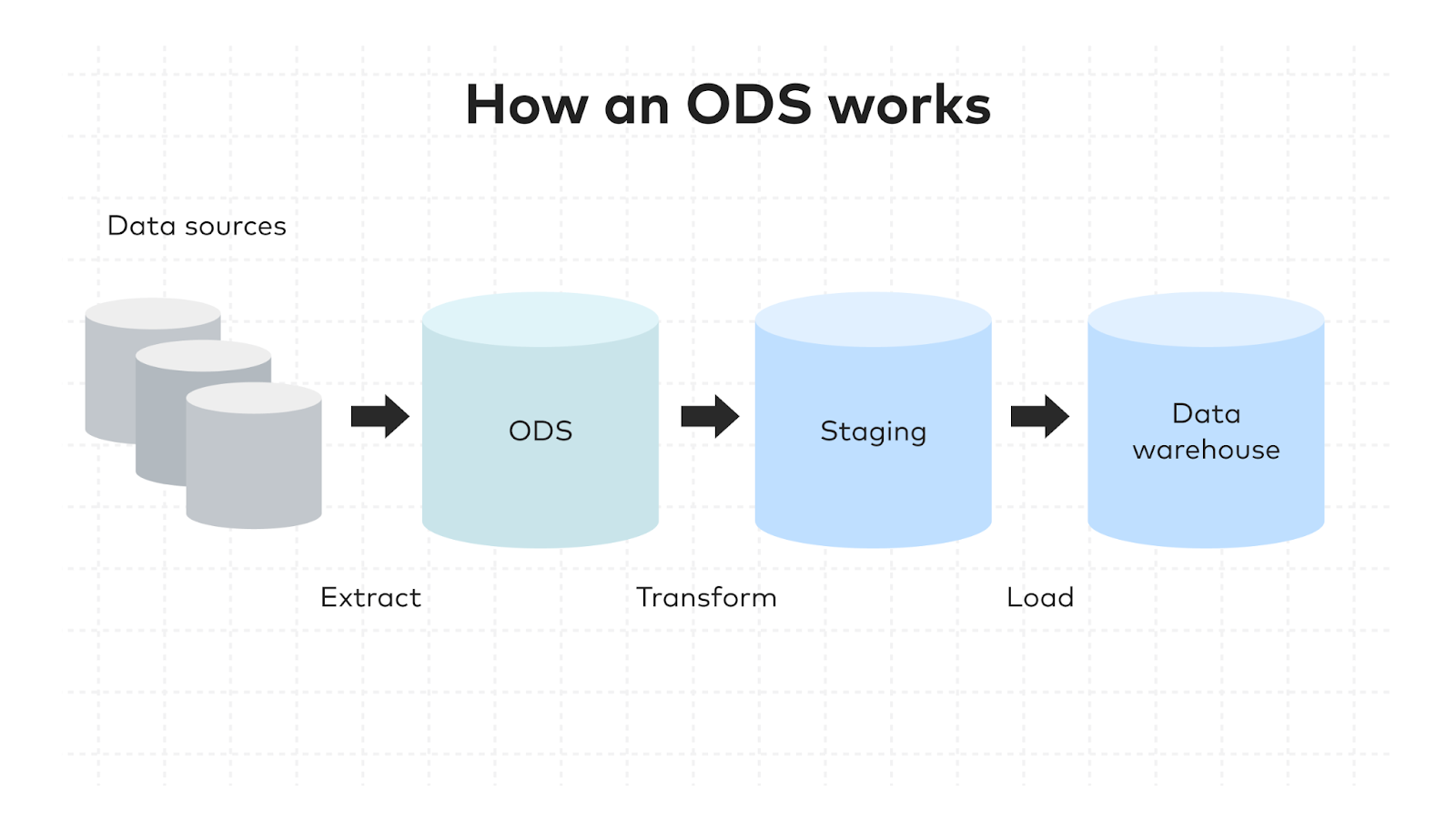
In a typical data warehouse architecture, data usually flows through Source → ODS → DWD → DWS → ADS. The ODS layer mainly undertakes the following responsibilities:
- Receiving raw data from business systems
- Performing basic standardization on data
- Preserving the finest granularity of facts
- Providing a stable and traceable data source
In other words, ODS is more like a “raw fact storage layer”: it is neither used for transactional processing like business systems nor responsible for complex modeling like the warehouse public layer. Instead, it exists as a stable and rebuildable data baseline.
From a data warehouse design perspective, the ODS layer typically maintains high structural consistency with source systems and performs only the necessary data cleaning and standardization, such as type unification, code conversion, or handling of invalid values. The purpose is to ensure that data remains traceable back to the source system after entering the warehouse.
If this layer is poorly designed, all subsequent modeling layers will be forced to bear additional data repair and cleaning logic, ultimately causing the data platform’s complexity to spiral out of control.
2. Ingestion Strategy: How to Choose Between Full, Incremental, and CDC
The first problem to solve when building an ODS layer is how to ingest data. The three common methods are full extraction, incremental extraction, and CDC (Change Data Capture).
1. Full Extraction: Simplest but Most Expensive
Full extraction is the most straightforward method, reading the entire table and reloading it each time.
This approach is suitable for scenarios such as:
- Small dimension tables
- Low-frequency update tables
- Initial data loading
- Early-stage PoC or system trial runs
Its biggest advantage is simplicity and low implementation cost, but as data volume grows, computing and storage costs increase rapidly. Therefore, in production systems, full extraction is usually only used as an initialization solution.
2. Incremental Extraction: Most Common Synchronization Method
As data volume grows, teams typically use incremental extraction, for example by synchronizing based on fields such as:
- Update timestamp (
update_time) - Auto-increment ID
- Version field
This method is suitable for daily or hourly synchronization scenarios.
However, incremental synchronization has a very typical risk:
Incremental fields are not always reliable.
For example:
- The upstream system does not update timestamps
- Historical data backfill
- Different system time zones
Therefore, in practice, teams usually add two compensating mechanisms:
- Watermark management
- Lookback window
For example, when syncing today’s data, also check and deduplicate the data of the past three days.
3. CDC: Core Technology for Real-Time Pipelines
For transactional systems or real-time businesses, relying solely on incremental fields often cannot meet requirements, and CDC (Change Data Capture) is needed.
CDC captures change events directly from database logs, such as:
- Insert
- Update
- Delete
Thus, it enables minute-level or even second-level synchronization.
However, CDC also brings new challenges:
- Binlog position management
- Pipeline failure recovery
- DDL change compatibility
For instance, when a new column is added to the source table, whether the ODS table structure allows automatic expansion must be pre-designed.
4. Most Common Production Pattern
In enterprise environments, the most common combination is:
Initial full load + daily CDC/incremental sync
The process usually includes:
- Initial full load of historical data
- Record synchronization position
- Switch to CDC or incremental sync
- Regular data reconciliation
This ensures historical completeness while enabling efficient updates.
3. Partitioning and Lifecycle: Key to ODS Cost Control
In ODS layer design, the partitioning strategy determines nearly 80% of query performance and storage cost.
1. Time Partitioning as the First Principle
Most ODS tables are partitioned by a time field, for example:
dt=2026-03-10
This brings three benefits:
- Easy daily reprocessing
- Facilitates historical archiving
- Controls scan range
Many teams do not design partitions early, and when data scales to TB or PB, reconstruction costs become extremely high.
2. Need for Secondary Partition
For extremely large tables, a second-level partition can be added, for example:
dt + tenant
dt + region
dt + biz_line
However, overly fine secondary partitions can cause:
- Small file problems
- An exploding number of partitions
- Metadata pressure
Therefore, it is only recommended for multi-tenant or ultra-large table scenarios.
3. Lifecycle and Hot/Cold Layering
ODS data is usually classified by value level, for example:
| Data Level | Retention Period |
|—-|—-|
| P0 Core Pipeline | Long-term retention |
| P1 Important Analysis | 180 days |
| P2 General Data | 30 days |
| P3 Temporary Data | 7 days |
Additionally, enterprises usually set an ODS replay window, for example:
Retain 90 days of raw data to support historical replay and troubleshooting.
If only 7 days of data are retained, historical issues will be almost impossible to trace.
4. Idempotency, Deduplication, and Late-Arriving Data
One of the most important goals of the ODS layer is:
Make data ingestion stable, controllable, and recoverable.
1. Idempotency Design
Idempotency means:
Re-running the same task does not generate duplicate data.
Common implementations include:
- Partition overwrite
- Primary key deduplication
- Merge/upsert
Without idempotency, teams will be reluctant to rerun tasks, which severely impacts operability.
2. Deduplication Strategy
Each ODS table must clarify:
What is the unique key?
For example:
- Business primary key
- Composite key
- Event_id
For log-type data, usually a hash_key or event_id is generated to ensure uniqueness.
3. Late-Arriving Data Handling
In real business, data delays are common, such as:
- Upstream system backfill
- Network latency
- Message backlog
Therefore, incremental sync usually needs a lookback window, for example:
Check the last 3 days of data when syncing daily
Deduplication by primary key ensures data consistency.
4. Watermark Management
Watermark is a core mechanism for incremental sync and must meet three requirements:
- Persistable
- Auditable
- Rollback-capable
For example:
last_sync_time = 2026-03-10 12:00
When a task fails, it can resume from any historical watermark.
5. Historical Data Management: Choosing Between Snapshot, SCD2, and Change Log
In data warehouse construction, the way historical data is stored directly affects query capability, storage cost, and report consistency. Poor design often leads to irreproducible historical reports and long-term metric inconsistency. Therefore, the historical data strategy must be clarified during ODS and upstream modeling.
Common historical data management methods include Snapshot, SCD2 (slowly changing dimension type 2), and Change Log.
1. Snapshot
Stores a complete state at a certain point, for example:
- Daily account balance
- Product inventory
- User level
Advantages:
- Any date’s state can be queried directly
Disadvantages:
- High storage cost
2. SCD2 (Slowly Changing Dimension Type 2)
Records the effective interval of data, for example:
start_dt
end_dt
is_current
Suitable for:
- User address changes
- Organizational structure changes
- Membership level changes
Compared with snapshots, it saves significant storage space.
3. Change Log
Records every change event, commonly used in:
- Original CDC data
- Behavior logs
- Audit systems
It records the most complete history but requires extra computation to obtain final states.
Three Key Questions for Choosing a Strategy
When deciding which historical modeling method to use, consider three questions:
1. Do you need the “state at a specific time” or the “complete change process”?
If the business cares about the final state on a certain day, such as daily balance, inventory, or user level, snapshots are suitable. If full change history is needed, SCD2 or change logs are more appropriate.
2. Query frequency and performance requirements
If historical state queries are frequent and performance-sensitive, snapshots provide better efficiency. If queries are rare and changes are frequent, SCD2 reduces storage costs.
3. Data change frequency and storage cost acceptability
For rapidly changing dimensions, daily snapshots can create enormous storage pressure; SCD2 or change logs reduce storage by recording intervals or events.
These three questions are essentially a trade-off between:
- Query efficiency
- Storage cost
- Historical completeness
Only by balancing these can historical models run stably long-term.
Relationship with Data Warehouse Layers: Responsibilities of ODS vs Public Layer
In practice, the ODS layer preserves the most raw facts, while historical models are built in the public layer.
A common practice:
- ODS: retains raw change data (Change Log / CDC)
- DWD / DIM: builds SCD2 or snapshots
- DWS / ADS: provides metrics and analysis results
Advantages:
- ODS preserves maximum data fidelity for reprocessing
- Historical models in the public layer can be reused across business scenarios
In short, ODS is a “raw fact warehouse”, while truly reusable models reside in the public layer.
Metric Scope: Historical Attributes vs Current Attributes
A frequently overlooked but critical issue in historical data design is metric scope.
In many enterprises, reports face questions like:
Should last year’s metrics be calculated by the organization at that time or the current organization?
For example:
- An employee belonged to Department A last year, now moved to B
- Calculating last year’s performance
- By historical org → count for A
- By current org → count for B
Without a clear definition, different reports may produce inconsistent results.
Therefore, historical models must clarify:
Are metrics based on historical attributes or current attributes?
Typically:
- Operational analysis reports → historical attributes
- Organizational performance management → current attributes
The key is not which is correct, but that it is defined upfront and implemented in the model.
Common Pitfall: Dimension Tables Do Not Retain History
Many teams choose a simple approach early:
Dimension tables only keep the latest state.
This seems simple, but quickly leads to serious issues:
- Historical reports cannot be reproduced
- Metrics constantly change
- Business cannot answer historical questions
For example:
Which department’s sales were counted last year?
If dimensions have no history, this question cannot be answered.
Therefore, for dimensions that may change, like org structure, user attributes, or product categories, it is recommended to use SCD2 to retain history.
6. Responsibilities of the ODS Layer: What to Do and What Not to Do
In many teams, the ODS layer eventually becomes a problem hub, with business logic, report calculations, and complex joins piled up, making it the hardest layer to maintain.
To avoid this, ODS responsibilities must be clearly defined from the start.
1. What ODS Should Do (Necessary Processing)
ODS is not a simple landing layer; it needs some necessary processing to ensure data can be used stably.
These usually include:
Standardize Data Types and Codes
Different business systems have inconsistent data types and encodings, e.g., string encodings, datetime types. ODS should unify basic formats to prevent downstream issues.
Standardize Time and Time Zones
Cross-system data often involves time zones, e.g., some UTC, some local. ODS should unify time standards to ensure comparability.
Supplement Technical Fields
For example:
- ETL time (
etl_time) - Batch ID (
batch_id) - Source system (
source_system)
These fields are important for audits and troubleshooting.
Basic Cleaning and Invalid Value Handling
ODS can handle obvious anomalies, e.g.:
- Invalid dates
- Invalid codes
- Malformed data
This cleaning does not involve business logic but ensures structural usability.
In summary, ODS’s necessary processing has one goal:
Make data “usable, traceable, and operable.”
2. What ODS Should Not Do
Corresponding to necessary processing, ODS should avoid certain tasks:
Cross-table Joins
Complex cross-system joins introduce business logic coupling and should be avoided.
Complex Business Rules
User segmentation, order status derivation, etc., should be done in DWD.
Metrics and Aggregations
Aggregation belongs to DWS or ADS.
If these appear prematurely in ODS, it causes:
- Logic duplication
- Poor data reusability
- Rising maintenance costs
3. ODS Output Must Be “Explainable”
A high-quality data platform ensures:
Every piece of data can trace its origin.
Thus, ODS outputs must meet three conditions:
Clear Field Meaning
Field definitions should enter metadata systems, like a data dictionary.
Traceable Source
Data origin must be clear (business system, table).
Traceable Repair Rules
Any data fix or cleaning should have version or batch records.
This enables fast issue diagnosis.
4. Naming Conventions and Table Type Management
In large platforms, standardized naming greatly reduces maintenance difficulty.
Example:
raw_xxx   raw landing data
ods_xxx   standardized ODS data
tmp_xxx   temporary computation table
Prefixes allow quick recognition of layer and purpose.
Temporary tables must have auto-cleaning to avoid large amounts of useless data.
5. Data Quality Threshold Must Be Upstream
ODS is the first checkpoint into the warehouse, so basic quality checks are required:
- Primary key uniqueness
- Non-null fields
- Row count reconciliation
- Key metrics verification
Poor-quality data entering the public layer amplifies issues and increases repair costs.
6. ODS Must Support Re-run and Replay
An operable data platform must support:
Partition Re-run
Any historical partition can be recalculated.
Position Recovery
Incremental tasks can resume from any historical watermark.
Historical Replay
Historical data can be reprocessed to fix issues.
Without these capabilities, the platform cannot run stably in the long term.
7. Common Issue: ODS Becomes a “Universal Layer”
Many teams face a typical problem:
All requirements are piled into ODS.
Result:
- Complex table structures
- Hard-to-understand logic
- Rising maintenance cost
Ultimately, ODS becomes the hardest layer to maintain.
A healthy warehouse architecture should follow:
Keep ODS simple and stable; let public layers handle complex logic.
Only then can the platform evolve sustainably without losing control as the business grows.
