
MLflow Made Easy: Logging Models, Metrics, and More

Introduction
The area of machine learning (ML) is rapidly expanding and has applications across many different sectors. Keeping track of machine learning experiments using MLflow and managing the trials required to construct them gets harder as they get more complicated. This can result in many problems for data scientists, such as:
- Loss or duplication of experiments: Keeping track of all the many experiments conducted can be challenging, which increases the risk of experiment loss or duplication.
- Reproducibility of results: It might be challenging to replicate an experiment’s findings, which makes it challenging to troubleshoot and enhance the model.
- Lack of transparency: It might make it difficult to trust a model’s predictions since it can be confusing to comprehend how a model was created.
Given the above challenges, It is important to have a tool that can track all the ML experiments and log the metrics for better reproducibility while enabling collaboration. This blog will explore and learn about MLflow, an open-source ML experiment tracking and model management tool with code examples.
Learning Objectives
- In this article, we aim to get a sound understanding of machine learning experiment tracking and model registry using MLflow.
- Furthermore, we will learn how ML projects are delivered in a reusable and reproducible way.
- Lastly, we will learn what a LLM is and why you need to track LLMs for your application development.
What is MLflow?

Machine learning experiment tracking and model management software called MLflow makes it easier to handle machine learning projects. It provides a variety of tools and functions to simplify the ML workflow. Users may compare and replicate findings, log parameters and metrics, and follow MLflow experiments. Additionally, it makes model packing and deployment simple.
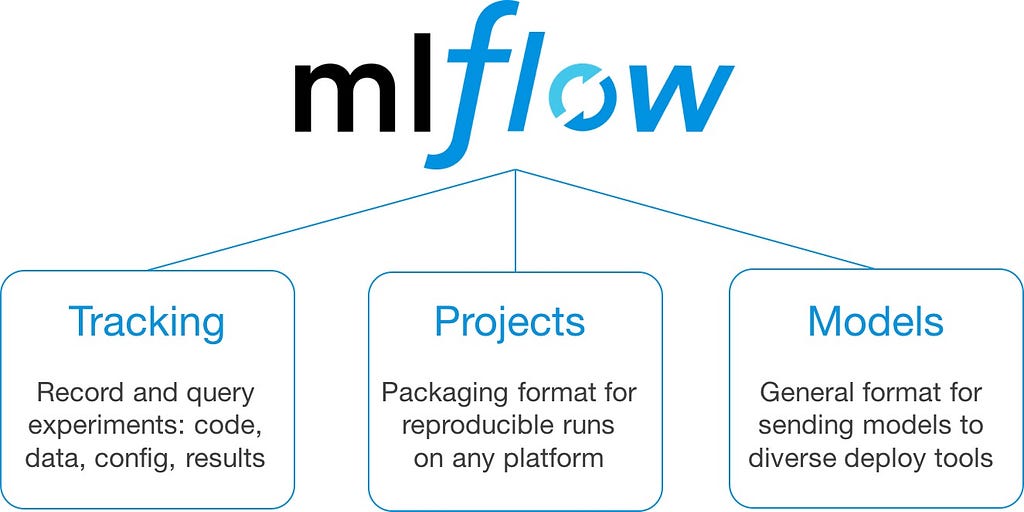
With MLflow, you can log parameters and metrics during training runs.
# import the mlflow library
import mlflow
# start teh mlflow tracking
mlflow.start_run()
mlflow.log_param("learning_rate", 0.01)
mlflow.log_metric("accuracy", 0.85)
mlflow.end_run()Copy Code
MLflow also supports model versioning and model management, allowing you to track and organize different versions of your models easily:
import mlflow.sklearn
# Train and save the model
model = train_model()
mlflow.sklearn.save_model(model, "model")
# Load a specific version of the model
loaded_model = mlflow.sklearn.load_model("model", version="1")
# Serve the loaded model for predictions
predictions = loaded_model.predict(data)Copy Code
Additionally, MLflow has a model registry that enables many users to effortlessly monitor, exchange, and deploy models for collaborative model development.
MLflow also allows models to be registered in a model registry, recipes, and plugins, along with extensive language model tracking. Now, we will look at the other components of the MLflow library.
Basic MLFLOW function
The problem at hand is a regression problem. Train data and test data can be downloaded from the attached links. The function calls mlflow, splits data into train and test, trains the model, logs metrics, parameters and returns experiment id and run id.
mlflow.start_run to trigger mlflow run.
Assign run_id and experiment_id to respective variables.
Use train_test_split to split the dataset.
Use catboost regressor to train the data and predict(Or any other regression model). Parameters used are:
- {‘iterations’: 100,
- ‘learning_rate’: 0.02,
- ‘depth’: 2,
- ‘loss_function’: ‘RMSE’,
- ‘verbose’: 100,
- ‘cat_features’: [‘Manufacturer’,
- ‘Model’,
- ‘Prod. year’,
- ‘Category’,
- ‘Leather interior’,
- ‘Fuel type’,
- ‘Gear box type’,
- ‘Drive wheels’,
- ‘Doors’,
- ‘Wheel’]}
Log all relevant regression evaluation metrics using mlflow.log_metric.
Print training status, so as to get an update on the training status and previous model results.
Return experiment id and run id.
def model_run__log_mlfow(self, df, var_dict, other_dict = {}):
    '''
    self : rf regressor model
    df   : dataframe
    var_dict : model variables dict - var_dict["independant"], var_dict["dependant"]
    other_dict : other dict if needed, set to {} default
    '''
    r_name = other_dict["run_name"]
    with mlflow.start_run(run_name=r_name) as run:
        # get current run and experiment id
        runID = run.info.run_uuid
        experimentID = run.info.experiment_id
        feature = var_dict["independant"]
        label   = var_dict["dependant"]
        ## log of predictions
        df[label] = np.log(df[label]+1)
        X = df[feature]
        y = df[label]
        X_train, X_test, y_train, y_test = train_test_split(X, y, test_size = 0.25,random_state = 42)
        self._rfr.fit(X_train, y_train)
        y_pred = self._rfr.predict(X_test)
        ## self.model is a getter for the model
        mlflow.sklearn.log_model(self.model, "catboost-reg-model")
        mlflow.log_params(self.params)
        model_score = self._rfr.score(X_test , y_test)
        mae = metrics.mean_absolute_error(y_test, y_pred)
        mse = metrics.mean_squared_error(y_test, y_pred)
        rmse = np.sqrt(mse)
        r2 = metrics.r2_score(y_test, y_pred)
        # Log metrics
        mlflow.log_metric("mae", mae)
        mlflow.log_metric("mse", mse)
        mlflow.log_metric("rmse", rmse)
        mlflow.log_metric("r2", r2)
        print("-" * 100)
        print("Inside MLflow Run with run_id {} and experiment_id {}".format(runID, experimentID))
        print('Mean Absolute Error    :', mae)
        print('Mean Squared Error     :', mse)
        print('Root Mean Squared Error:', rmse)
        print('R2                     :', r2)
        return (experimentID, runID)
MLflow — Experiment Tracking
MLflow has many features, including Experiment tracking to track machine learning experiments for any ML project. Experiment tracking is a unique set of APIs and UI for logging parameters, metrics, code versions, and output files for diagnosing purposes. MLflow experiment tracking has Python, Java, REST, and R APIs.
Now, look at the code example of MLflow experiment tracking using Python programming.
import mlflow
import mlflow.sklearn
from sklearn.ensemble import RandomForestClassifier
from sklearn.metrics import accuracy_score
from sklearn.model_selection import train_test_split
from mlflow.models.signature import infer_signature
# Load and preprocess your dataset
data = load_dataset()
X_train, X_test, y_train, y_test = train_test_split(data["features"], data["labels"], test_size=0.2)
# Start an MLflow experiment
mlflow.set_experiment("My Experiment")
mlflow.start_run():
      # Log parameters
      mlflow.log_param("n_estimators", 100)
      mlflow.log_param("max_depth", 5)
      # Create and train the model
      model = RandomForestClassifier(n_estimators=100, max_depth=5)
      model.fit(X_train, y_train)
      # Make predictions on the test set
      y_pred = model.predict(X_test)
      signature = infer_signature(X_test, y_pred)
      # Log metrics
      accuracy = accuracy_score(y_test, y_pred)
      mlflow.log_metric("accuracy", accuracy)
      # Save the model
      mlflow.sklearn.save_model(model, "model")
# Close the MLflow run
mlflow.end_run()Copy Code
In the above code, we import the modules from MLflow and the sklearn library to perform a model experiment tracking. After that, we load the sample dataset to proceed with mlflow experiment APIs. We are using start_run(), log_param(), log_metric(), and save_model() classes to run the experiments and save them in an experiment called “My Experiment.”
Apart from this, MLflow also supports automatic logging of the parameters and metrics without explicitly calling each tracking function. You can use mlflow.autolog() before training code to log all the parameters and artifacts.
MLflow — Model registry
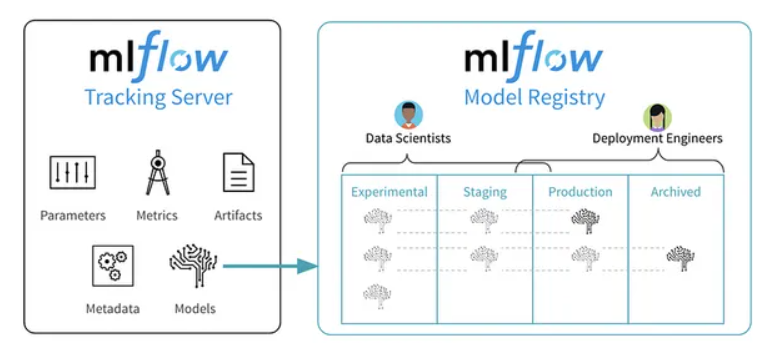
The model registry is a centralized model register that stores model artifacts using a set of APIs and a UI to collaborate effectively with the complete MLOps workflow.
It provides a complete lineage of machine learning model saving with model saving, model registration, model versioning, and staging within a single UI or using a set of APIs.
Let’s look at the MLflow model registry UI in the screenshot below.
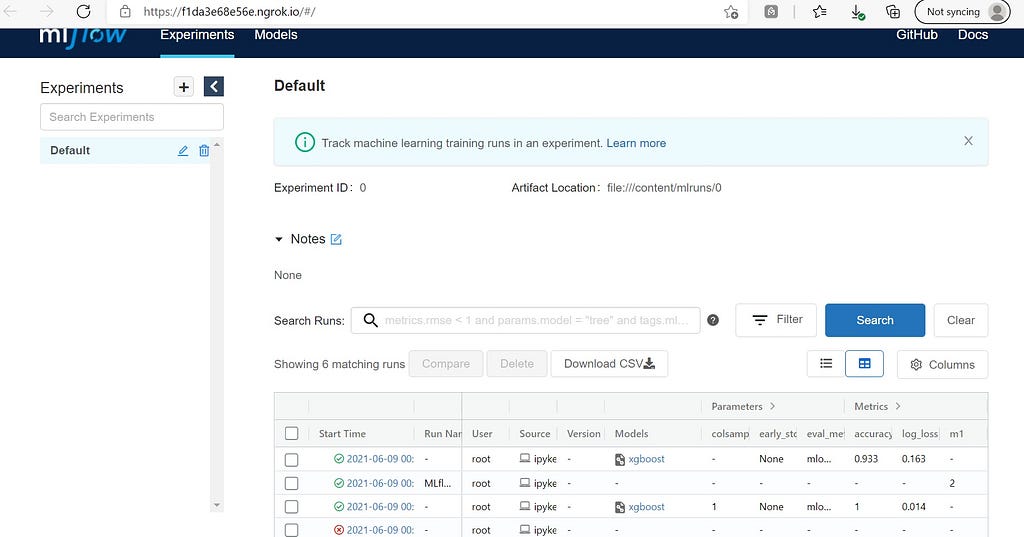
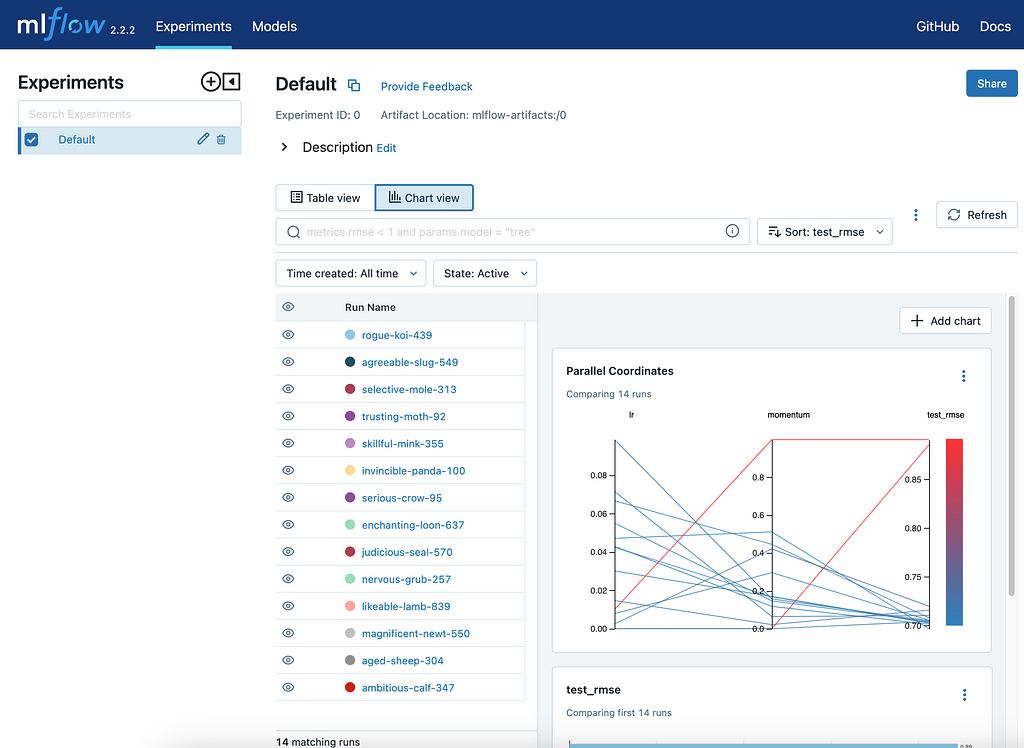
The above screenshot shows saved model artifacts on MLflow UI with the ‘Register Model’ button, which can be used to register models on a model registry. Once the model is registered, it will be shown with its version, time stamp, and stage on the model registry UI page. (Refer to the below screenshot for more information.)
As discussed earlier apart from UI workflow, MLflow supports API workflow to store models on the model registry and update the stage and version of the models.
# Log the sklearn model and register as version 1
mlflow.sklearn.log_model(
        sk_model=model,
        artifact_path="sklearn-model",
        signature=signature,
        registered_model_name="sk-learn-random-forest-reg-model",
   )Copy Code
The above code logs the model and registers the model if it already doesn’t exist. If the model name exists, it creates a new version of the model. There are many other alternatives to register models in the MLflow library. I highly recommend reading official documentation for the same.
MLflow — Projects
Another component of MLflow is MLflow projects, which are used to pack data science code in a reusable and reproducible way for any team member in a data team.
The project code consists of the project name, entry point, and environment information, which specifies the dependencies and other project code configurations to run the project. MLflow supports environments such as Conda, virtual environments, and Docker images.
In a nutshell, the MLflow project file contains the following elements:
- Project name
- Environment file
- Entry points
Let’s look at the example of the MLflow project file.
# name of the project
name: My Project
python_env: python_env.yaml
# or
# conda_env: my_env.yaml
# or
# docker_env:
#    image:  mlflow-docker-example
# write the entry points
entry_points:
  main:
    parameters:
      data_file: path
      regularization: {type: float, default: 0.1}
    command: "python train.py -r {regularization} {data_file}"
  validate:
    parameters:
      data_file: path
    command: "python validate.py {data_file}"Copy Code
The above file shows the project name, the environment config file’s name, and the project code’s entry points for the project to run during runtime.
Here’s the example of Python python_env.yaml environment file:
# Python version required to run the project.
python: "3.8.15"
# Dependencies required to build packages. This field is optional.
build_dependencies:
  - pip
  - setuptools
  - wheel==0.37.1
# Dependencies required to run the project.
dependencies:
  - mlflow==2.3
  - scikit-learn==1.0.2Copy Code
MLflow — LLM Tracking
As we have seen, LLMs are taking over the technology industry like nothing in recent times. With the rise in LLM-powered applications, developers are increasingly adopting LLMs into their workflows, creating the need for tracking and managing such models during the development workflow.
What are the LLMs?
Large language models are a type of neural network model developed using transformer architecture with training parameters in billions. Such models can perform a wide range of natural language processing tasks, such as text generation, translation, and question-answering, with high levels of fluency and coherence.
Why do we need LLM Tracking?
Unlike classical machine learning models, LLMs must monitor prompts to evaluate performance and find the best production model. LLMs have many parameters like top_k, temperature, etc., and multiple evaluation metrics. Different models under different parameters produce various results for certain queries. Hence, It is important to monitor them to identify the best-performing LLM.
MLflow LLM tracking APIs are used to log and monitor the behavior of LLMs. It logs inputs, outputs, and prompts submitted and returned from LLM. It also provides a comprehensive UI to view and analyze the results of the process. To learn more about the LLM tracking APIs, I recommend visiting their official documentation for a more detailed understanding.
Hugging Face Transformers Support in MLflow
It is a popular open-source library for building natural language processing models. These models are simple to deploy and manage in a production setting due to MLflow’s built-in support for them.To use the Hugging Face transformers with MLflow, follow these steps:
- Install MLflow and transformers: Transformers and MLflow installation can be done using Pip.
!pip install transformers
!pip install mlflow
- Define your LLM: The transformers library can be used to define your LLM, as shown in the following Python code:
import transformers
import mlflow
chat_pipeline = transformers.pipeline(model="microsoft/DialoGPT-medium")Copy Code
- Log your LLM: To log your LLM to MLflow, use the Python code snippet below:
with mlflow.start_run():
  model_info = mlflow.transformers.log_model(
    transformers_model=chat_pipeline,
    artifact_path="chatbot",
    input_example="Hi there!"
  )
- Load your LLM and make predictions from it:
# Load as interactive pyfunc
chatbot = mlflow.pyfunc.load_model(model_info.model_uri)
#make predictions
chatbot.predict("What is the best way to get to Antarctica?")
>>> 'I think you can get there by boat'
chatbot.predict("What kind of boat should I use?")
>>> 'A boat that can go to Antarctica.'
Open AI Support in MLflow
Open AI is another popular platform for building LLMs. MLflow provides support for Open AI models, making it easy to deploy and manage Open AI models in a production environment. Following are the steps to use Open AI models with MLflow:
- Install MLflow and Open AI: Pip can be used to install Open AI and MLflow.
!pip install openai
!pip install mlflow
- Define your LLM: As shown in the following code snippet, you can define your LLM using the Open AI API:
from typing import List
import openai
import mlflow
# Define a functional model with type annotations
def chat_completion(inputs: List[str]) -> List[str]:
    # Model signature is automatically constructed from
    # type annotations. The signature for this model
    # would look like this:
    # ----------
    # signature:
    #   inputs: [{"type": "string"}]
    #   outputs: [{"type": "string"}]
    # ----------
outputs = []
    for input in inputs:
        completion = openai.ChatCompletion.create(
            model="gpt-3.5-turbo",
            messages=[{"role": "user", "content": "<prompt>"}]
        )
outputs.append(completion.choices[0].message.content)
return outputs
- Log your LLM: You can log your LLM to MLflow using the following code snippet:
# Log the model
mlflow.pyfunc.log_model(
    artifact_path="model",
    python_model=chat_completion,
    pip_requirements=["openai"],
)
Lang Chain Support in MLflow
Lang Chain is a platform for building LLMs using a modular approach. MLflow provides support for Lang Chain models, making it easy to deploy and manage Lang Chain models in a production environment. To use Lang Chain models with MLflow, you can follow these steps:
- Install MLflow and Lang Chain: You can install MLflow and Lang Chain using pip.
!pip install langchain
!pip install mlflow
- Define your LLM: The following code snippet demonstrates how to define your LLM using the Lang Chain API:
from langchain import PromptTemplate, HuggingFaceHub, LLMChain
template = """Translate everything you see after this into French:
{input}"""
prompt = PromptTemplate(template=template, input_variables=["input"])
llm_chain = LLMChain(
    prompt=prompt,
    llm=HuggingFaceHub(
        repo_id="google/flan-t5-small",
        model_kwargs={"temperature":0, "max_length":64}
    ),
)
- Log your LLM: You can use the following code snippet to log your LLM to MLflow:
mlflow.langchain.log_model(
    lc_model=llm_chain,
    artifact_path="model",
    registered_model_name="english-to-french-chain-gpt-3.5-turbo-1"
)
- Load the model: You can load your LLM using the below code.
#Load the LangChain model
import mlflow.pyfunc
english_to_french_udf = mlflow.pyfunc.spark_udf(
    spark=spark,
    model_uri="models:/english-to-french-chain-gpt-3.5-turbo-1/1",
    result_type="string"
)
english_df = spark.createDataFrame([("What is MLflow?",)], ["english_text"])
french_translated_df = english_df.withColumn(
    "french_text",
    english_to_french_udf("english_text")
)
Conclusion
In conclusion, MLflow is an immensely effective and exhaustive platform for managing machine learning workflows and experiments. With features like model management and support for various machine-learning libraries. With its four main components — experiment tracking, model registry, projects, and LLM tracking — MMLflow provides a seamless end-to-end machine learning pipeline management solution for managing and deploying machine learning models.
Key Takeaways
Let’s look at the key learnings from the article.
- Machine learning experiment tracking allows data scientists and ML engineers to easily track and log the parameters and metrics of the model.
- The model registry helps store and manage the ML model in a centralized repository.
- MLflow projects help simplify project code in packaging and deploying machine learning code, which makes it easier to reproduce the results in different environments.
A message from our Founder
Hey, Sunil here. I wanted to take a moment to thank you for reading until the end and for being a part of this community.
Did you know that our team run these publications as a volunteer effort to over 3.5m monthly readers? We don’t receive any funding, we do this to support the community. ❤️
If you want to show some love, please take a moment to follow me on LinkedIn, TikTok, Instagram. You can also subscribe to our weekly newsletter.
And before you go, don’t forget to clap and follow the writer️!
MLflow Made Easy: Logging Models, Metrics, and More was originally published in Python in Plain English on Medium, where people are continuing the conversation by highlighting and responding to this story.
