I’m a Product Manager Who Built a Custom MCP Server — With Zero Lines of Code Written by Me

What I learned about the future of AI-tool integration by building something real — and why every PM should be paying attention to MCPs.
A Confession, Right Upfront
I didn’t write a single line of code for this project. Not one.
I’m a Product Manager with 8+ years in the field. I’ve worked across insurance, healthcare, and enterprise SaaS. I can read code, discuss architecture, and make technical trade-offs — but I’m not a software engineer by profession, only by education.
Every line of code in this project was written by Claude, Anthropic’s AI assistant. My job was to define the problem, make product decisions, ask the right questions, and steer the build. What you’re reading isn’t a coding tutorial — it’s the story of a PM who wanted to understand MCP by actually building something with it, and what I learned about where AI-tool integration is headed.
Why I Wanted to Build This
Let me be honest about my motivation. I had an existing side project — a Python script that called Google Maps Directions API every 30 minutes and logged traffic data for my Mumbai commute. It ran via GitHub Actions, dumped data to CSV files, and I’d occasionally analyze the patterns manually. Not glamorous, but it validated a hypothesis: traffic patterns on my route are predictable and quantifiable.
It wasn’t that I desperately needed a better way to check traffic — Google Maps already exists on my phone. I can check live traffic in 5 seconds.
What I actually wanted was to understand MCP. Model Context Protocol has been one of the most discussed developments in the AI tooling space, and as a PM who works at the intersection of technology and product strategy, I needed to go beyond blog posts and Twitter threads. I needed to build something.
So the idea was simple: take something I already had, and use it as a vehicle to learn MCP end-to-end. Build a proper web app. Build an MCP server. Connect it to Claude. See what happens when an AI assistant can actually interact with my personal data.
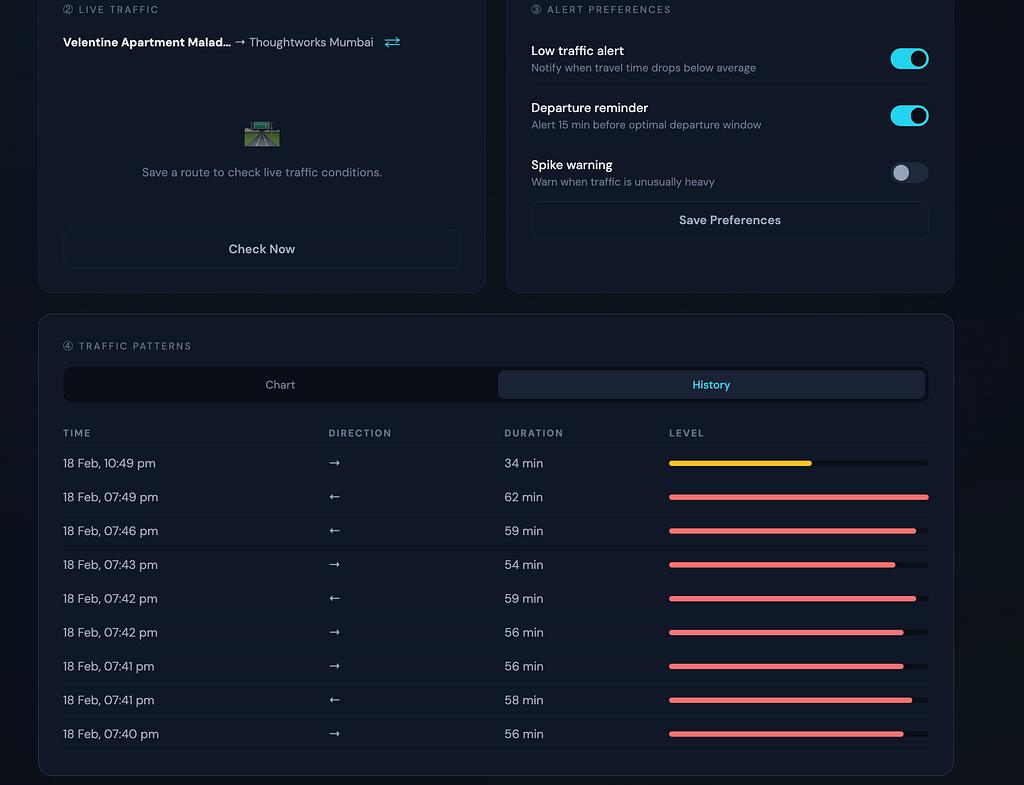
The real value of this project isn’t the live traffic check — it’s the historical analysis, the pattern detection, and eventually, proactive alerts. Knowing that leaving at 9:15 AM instead of 9:45 AM consistently saves 20 minutes on my commute — that’s the insight Google Maps can’t give me in the moment.
What is MCP, and Why Should PMs Care?
MCP (Model Context Protocol) is an open standard created by Anthropic that lets AI models connect to external tools and services. Think of it like this:
Before MCP, every AI integration was custom-built. Want Claude to read your Gmail? Someone at Anthropic had to build that integration. Want it to check your Jira? Another custom build. This doesn’t scale.
MCP changes this. It provides one universal protocol for AI to interact with any service. Anyone can build an MCP server for their product, and any AI client that supports MCP can connect to it.
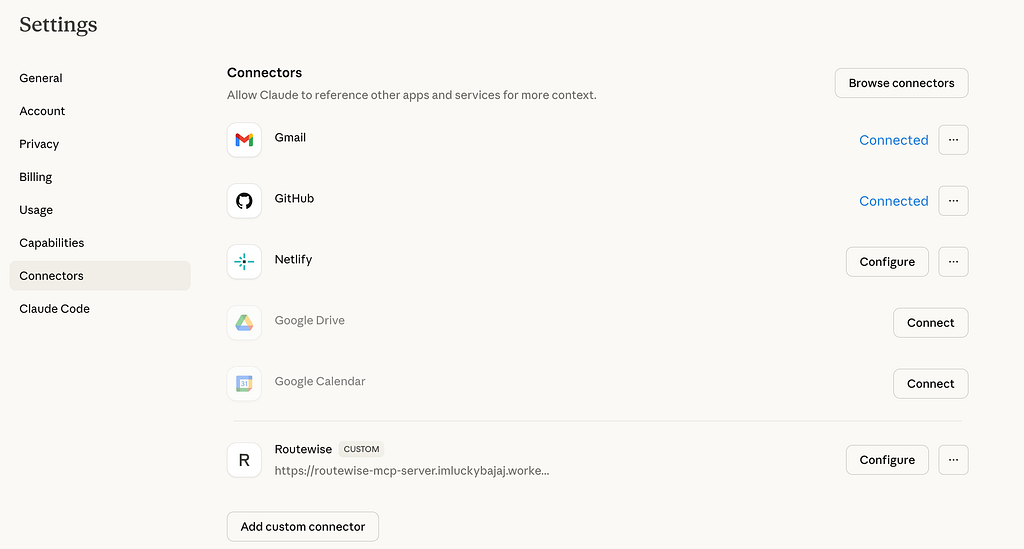
If you’ve used Claude.ai and noticed it can search your Gmail, check Google Calendar, or access Netlify — those all work through MCP connectors.
Here’s why this matters for PMs:
MCP is the API economy, but for AI agents. Just like REST APIs enabled the integration explosion of the 2010s (Zapier, IFTTT, every SaaS connecting to every other SaaS), MCP will enable the AI integration explosion of the next few years. Every product that wants to be useful in an AI-assisted workflow will need an MCP server. That’s a product strategy question, not just an engineering one.
What I Built: RouteWise
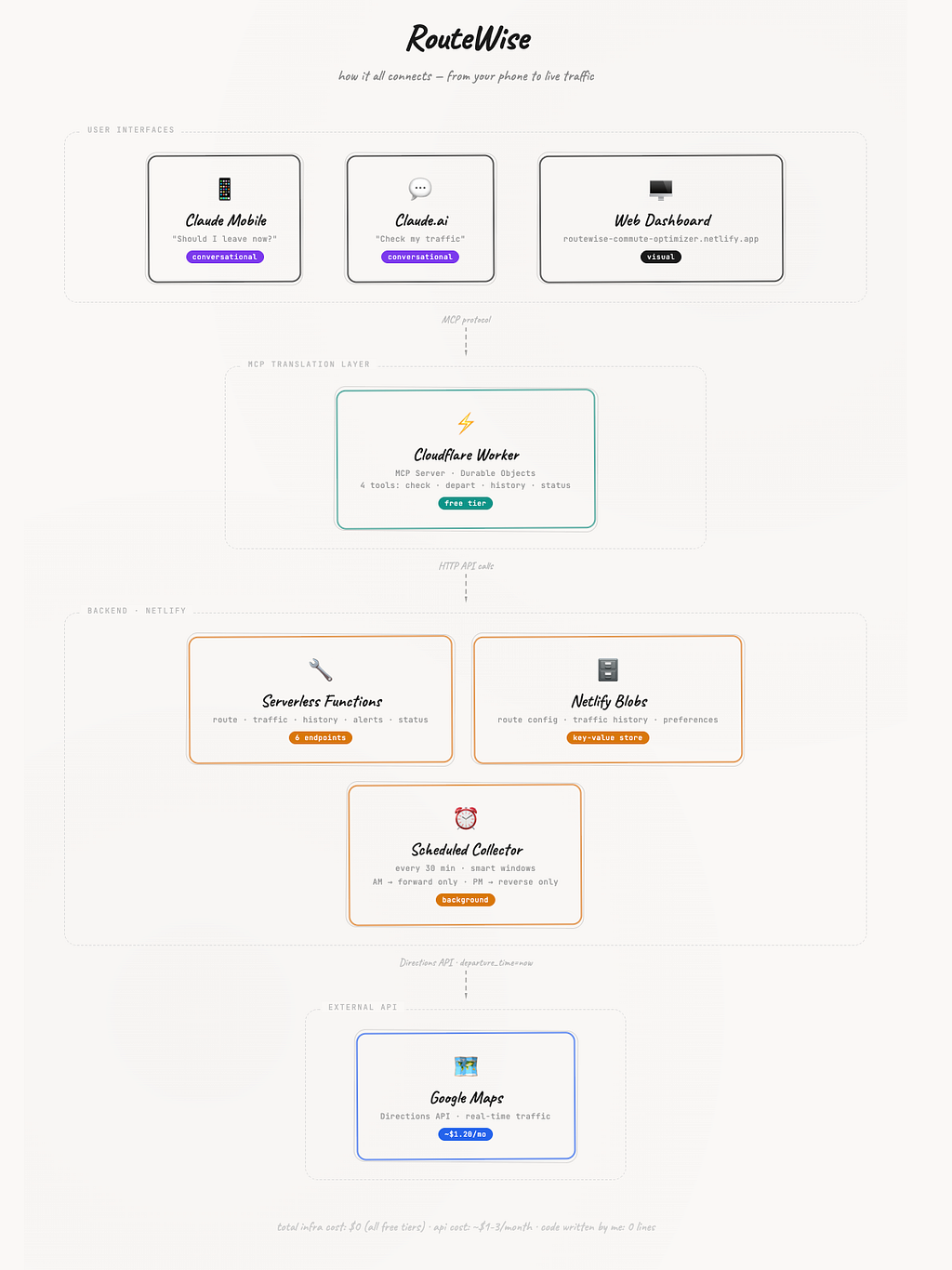
The final product has three layers:
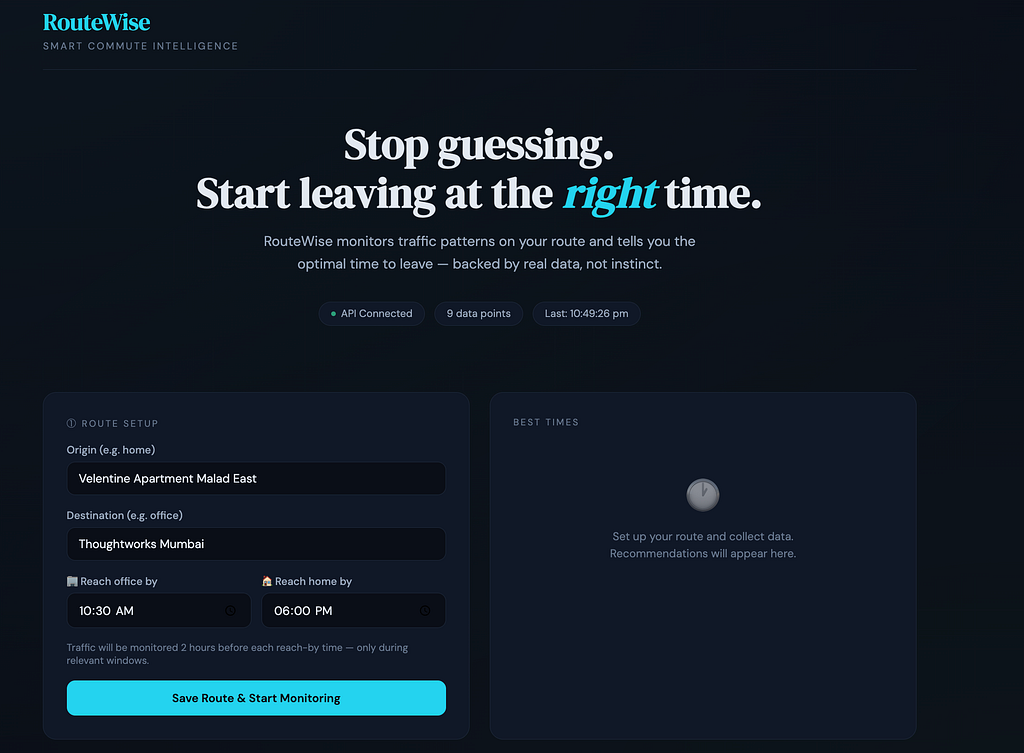
Layer 1 — A web dashboard (hosted on Netlify) where I configure my commute route, view historical traffic data, and see departure recommendations. This is the “traditional” product.
Layer 2 — An MCP server (hosted on Cloudflare Workers) that exposes my traffic tools using the MCP protocol. This is the bridge between my data and Claude.
Layer 3 — Claude.ai as the conversational interface. Once connected, I can ask “Should I leave now?” from any chat — on my laptop or phone.
Claude.ai / Claude Mobile App
        ↓ (MCP Protocol)
Cloudflare Worker (MCP Server)
        ↓ (HTTP API calls)
RouteWise on Netlify (Web App + APIs)
        ↓ (Google Maps Directions API)
Live Traffic Data
The Product Decisions That Mattered
Since I didn’t write the code, let me focus on what I actually did — the product thinking. These were the decisions that shaped the build, and they’re the parts I found most interesting.
Decision 1: Direction-Aware Monitoring Windows
My first instinct was simple: check traffic every 30 minutes from 7 AM to 10 PM. Both directions, all day.
Then I thought about it from a user perspective. Why would I check office-to-home traffic at 8 AM? Why check home-to-office at 7 PM? It’s wasted data and wasted API calls.
The refinement: two intelligent windows, derived from when you need to arrive.
- Set “reach office by 10:30 AM” → system monitors the forward direction from 8:30–10:30 AM only
- Set “reach home by 6:00 PM” → system monitors the reverse direction from 4:00–6:00 PM only
The user just sets two times. The system figures out the rest — when to monitor, which direction to check, and when to stay quiet. This cut API calls by more than half while making the data more relevant.
It’s a small decision, but it’s the kind of thing that separates a script from a product.
Decision 2: Explicit Data Over Implicit Context
Here’s a mistake that taught me something important about AI-tool design. My MCP server’s traffic check tool initially returned responses like:
🚗 Live Traffic (Office → Home): 57 minutes, Aarey Rd, Heavy
Notice what’s missing? The actual place names. I assumed Claude would know my route. And it did — sort of. It pulled from its memory of our earlier conversations about my old commute (Powai to Andheri), not my current route (Thoughtworks to Malad).
The fix was conceptually simple: every tool response now fetches the live route names from the API and includes them explicitly.
The lesson for anyone designing MCP tools: AI assistants will try to be helpful and fill gaps. Don’t let them. Return complete, self-contained data from every tool call. Your tool should be correct even if the AI has zero context about the user.
Decision 3: MCP Server as a Thin Translation Layer
I debated whether the MCP server should have its own logic — its own data processing, its own analysis. I decided against it. The MCP server simply calls my existing Netlify APIs and formats the responses for Claude.
This means:
- The web dashboard and the AI interface always show the same data
- I can update the web app without touching the MCP server
- If I change routes on the dashboard, the MCP server picks it up automatically
One source of truth, two interfaces. The MCP server doesn’t duplicate logic — it translates protocols.
Decision 4: What to Build as a Dashboard vs. What to Build as a Conversation
This is the most interesting product question I encountered. When should users interact with a visual dashboard, and when should they just ask an AI?
My take after building both:
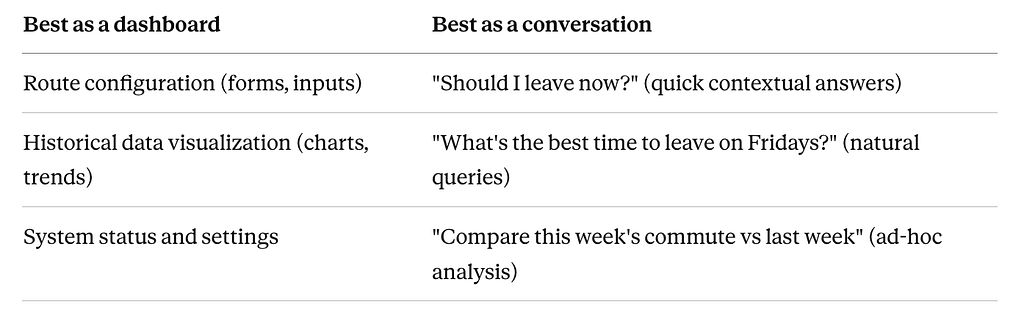
The dashboard is better for setup, exploration, and visual pattern recognition. The conversation is better for in-the-moment decisions and natural language queries — especially on mobile.
They’re complementary, not competing. And I think this is a broader truth that PMs will need to internalize as AI interfaces become standard: your product will have both visual and conversational surfaces, and the skill is knowing which experiences belong where.
How a PM + AI Collaboration Actually Works
I want to be transparent about the build process, because I think it’s genuinely interesting — and it’s increasingly relevant for PMs.
Here’s how the collaboration with Claude worked:
I brought:
- The problem definition and use case
- Product requirements and priorities
- Architecture opinions (why Netlify, why Cloudflare, why not a traditional server)
- UX decisions (what the dashboard should show, how the MCP tools should respond)
- Debugging direction (when something broke, I described the symptom and provided error messages)
- Quality checks (testing the output, catching issues like the place name bug)
Claude brought:
- All the code — JavaScript, TypeScript, HTML, CSS
- Knowledge of APIs (Google Maps, Netlify, Cloudflare, MCP protocol)
- Implementation of my product decisions into working software
- Suggestions I hadn’t considered (like the pattern analysis logic)
Neither of us could have done it alone. I couldn’t have written the Cloudflare Worker MCP server from scratch. Claude couldn’t have decided that direction-aware monitoring windows were the right product choice, or noticed that returning “Home → Office” without actual place names would cause downstream confusion.
The total build time from concept to a working MCP server connected to Claude.ai was one focused session. Not one weekend. One sitting.
This is the part PMs should pay attention to. Not because every PM should go build MCP servers — but because the barrier between “I have a product idea” and “I have a working prototype” has collapsed. If you understand what you’re building and why, the AI handles the how.
The Build Experience: What Went Smoothly and What Didn’t
What Worked Well
Netlify deployment. The web app was straightforward. Serverless functions, Netlify Blobs for storage, scheduled functions for data collection. GitHub connected to Netlify for auto-deployment on push. The web app was live and collecting data quickly.
The MCP tool design. Once I understood the pattern — define a tool name, input schema, and handler function — designing the four RouteWise tools was intuitive. The MCP SDK with Zod schemas made the tool definitions feel like product specs: name, description, what it accepts, what it returns.
Claude.ai connector. After the deployment hurdles (see below), actually connecting the MCP server to Claude was simple. Settings → Connectors → Add URL → Done. The tools showed up immediately and Claude knew how to use them.
What Didn’t
Cloudflare deployment gotchas. The free plan requires a specific migration type (new_sqlite_classes instead of new_classes). When I later switched from a custom server to Cloudflare’s official template, the old Durable Object class conflicted with the new one. We had to delete the worker and redeploy fresh. Not hard, but not obvious.
The MCP connector auth dance. My first attempt at connecting to Claude.ai failed with a vague auth error. It turned out our custom server routing wasn’t handling Claude’s connection protocol correctly. Switching to Cloudflare’s official authless MCP template (cloudflare/ai/demos/remote-mcp-authless) fixed it immediately. The lesson: start with proven templates, customize later.
Google Maps API activation. The Directions API needed to be explicitly enabled in Google Cloud Console. The error message (“REQUEST_DENIED — You’re calling a legacy API”) was misleading — the API itself was fine, it just wasn’t turned on.
None of these were showstoppers, but they’re the kind of friction that slows a build. Each one took 5–15 minutes to diagnose and fix.
The Result
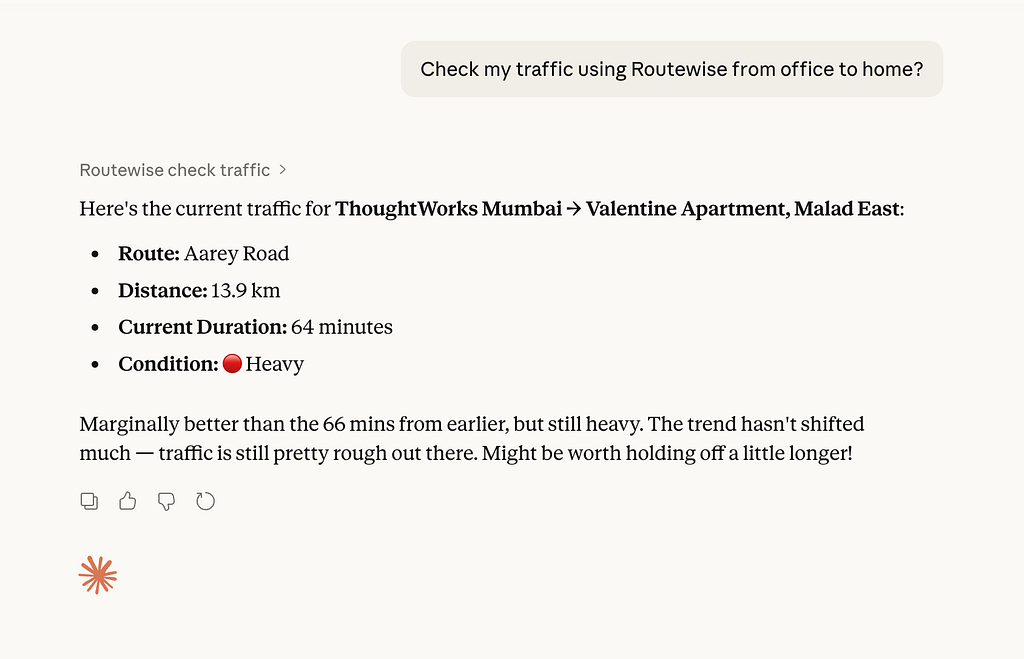
I can now open Claude on my phone and ask:
“Check my traffic from office to home”
“Should I leave now or wait for some time?”
And get back:
🚗 Live Traffic: Thoughtworks Mumbai → Velentine Apartment Malad East
Duration: 57 minutes · Distance: 13.5 km · Route: Aarey Rd · Condition: 🔴 Heavy
I can ask “What’s my best departure time for the morning commute?” and get a recommendation based on days of collected data.
I can ask “Show my traffic history for the last week” and see trends.
It works on web. It works on mobile. It pulls live data from Google Maps through my entire pipeline. And it cost me roughly $2–3/month in API calls — everything else runs on free tiers.
What This Means for the Future of Products
Here’s the bigger picture — the reason I think every PM should be paying attention.
MCP turns every product into an AI-accessible service. Right now, users interact with your product through your UI. With MCP, they’ll also interact with it through their AI assistant. Your product needs to be ready for both.
The conversational interface isn’t replacing dashboards — it’s augmenting them. I still use my RouteWise dashboard for configuration and visual analysis. But for quick, in-the-moment decisions? I just ask Claude. Products will increasingly have dual interfaces.
The integration moat is shifting. Today, products compete on integrations — how well you connect with the tools people use. Tomorrow, the question will be: does your product have an MCP server? Can an AI agent use it on behalf of the user? Products without MCP will feel like products without APIs did in 2015.
PMs can now prototype AI integrations. I built a working MCP server, connected to Claude, pulling live data — without writing code. This means PMs can validate AI integration concepts before involving engineering. The product discovery cycle for AI features just got much shorter.
What’s Next (Maybe)
I’m deliberately keeping this section tentative. I’ve learned from experience that it’s better to use something for a few weeks before planning the next phase. So here’s what I’m considering, not committing to:
- WhatsApp/SMS alerts — proactive notifications when traffic drops below a threshold (“Leave now — only 25 min commute”)
- Day-of-week patterns — Monday morning traffic is genuinely different from Friday morning
- Weather integration — rain destroys Mumbai traffic. Correlating weather data with commute times could improve predictions significantly
- Multi-user support — making this available for others, not just myself
- Predictive model — once I have enough historical data, can I predict tomorrow’s traffic based on day, time, and weather?
I’ll revisit this after a few weeks of daily use.
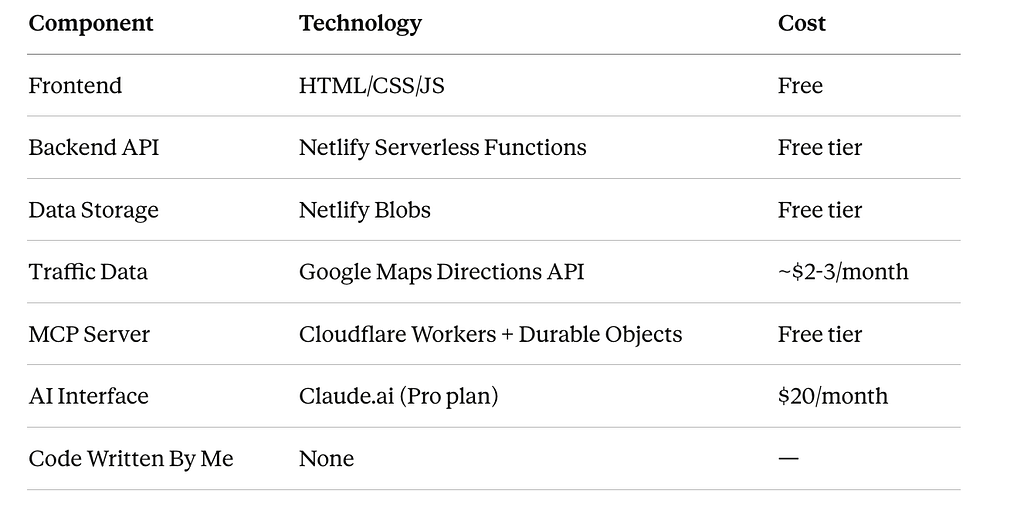
The Stack
For those curious about what’s under the hood:
If You Want to Explore MCP
You don’t need to build what I built. But if you’re a PM curious about MCP, here’s where I’d start:
- Use existing MCP connectors first. Connect Gmail, Google Drive, or Slack to Claude.ai. Experience what it feels like when an AI can actually access your tools. This builds intuition.
- Read the MCP spec (briefly). You don’t need to understand the protocol details, but knowing the concepts — tools, resources, transports — helps you think about what your product could expose.
- Build something small. Cloudflare’s authless template gives you a working MCP server in minutes. Replace the example tools with anything — a weather checker, a to-do list reader, a simple database query. The point is to experience the end-to-end flow.
- Think about your own product. What would it look like if users could interact with your product through an AI assistant? Which features work as tools? What data would you expose? This is a product strategy conversation worth having now, not later.
The project is open source if you want to reference it:
I’m Lucky Bajaj, a Senior Business Analyst/Product manager based in Mumbai. I build products across insurance, healthcare, and enterprise SaaS — and I’m increasingly fascinated by how AI changes the way we think about product design. If you’re exploring similar ideas, I’d love to connect.
I’m a Product Manager Who Built a Custom MCP Server — With Zero Lines of Code Written by Me was originally published in Towards AI on Medium, where people are continuing the conversation by highlighting and responding to this story.
