
I Dropped One Markdown File and My AI Agent Finally Got It

You’ve connected Claude to GitHub via MCP. You’ve got Slack hooked up. Your database is accessible. And yet, every time you ask your AI assistant to “prepare a meeting summary,” you spend ten minutes explaining how you want it done.
Sound familiar?
I watched this exact scenario play out last month. A team had invested weeks setting up MCP servers for their entire toolchain. The connections worked beautifully. But the AI still didn’t know anything about their workflows. It could access Notion, but it didn’t know which pages mattered. It could query the CRM, but it had no idea how to format a sales summary the way their VP actually wanted it.
Then someone dropped a single Markdown file into a folder. Suddenly, Claude just… got it.
That file was a Skill. And it changed how I think about AI agent architecture.

The Problem Nobody Talks About
Here’s what I’ve observed watching teams build AI workflows: we’ve been so focused on connectivity that we forgot about competency.
MCP solved the “how do I connect my AI to external systems” problem brilliantly. It’s the USB-C of AI integrations — plug in a server, get access to tools. But having access to tools and knowing how to use them effectively are very different things.
Think about it this way: giving someone the keys to a fully-stocked kitchen doesn’t make them a chef. They need recipes, techniques, and knowledge of what ingredients work together. MCP gives you the kitchen. Skills give you the chef’s expertise.
What Skills Actually Are
Skills are knowledge packages — directories containing a SKILL.md file (with instructions and metadata) plus optional scripts, templates, or reference materials. They encode how to do something, not just what tools to use.
According to Claude’s official documentation, Skills follow the Agent Skills open standard, which works across multiple AI tools. The key insight: Skills are loaded on-demand based on context.
Here’s how it works technically:
- When you start a session, Claude loads only the names and descriptions of available skills into context
- When your request matches a skill’s description, Claude pulls in the full SKILL.md content
- The skill can reference additional files (templates, scripts, examples) that load only when needed
This “progressive disclosure” approach is elegant. You can have dozens of skills installed without bloating your context window. The AI activates expertise only when relevant.
# meeting-prep/SKILL.md
---
name: Meeting Preparation
description: Prepare comprehensive meeting briefs from project context
---

When preparing for a meeting:
1. Check the project page in Notion first
2. Pull previous meeting notes (last 3 meetings)
3. Review stakeholder profiles for attendees
4. Format output as:
   - 2-paragraph executive summary
   - Key discussion points (bullet list)
   - Open questions requiring decisions
   - Relevant metrics from last period
Always include the meeting objective at the top.
That’s it. The frontmatter requires only name and description — everything else is optional. No API configuration. No server setup. Just Markdown describing how you want something done.
Skills vs MCP: The Real Difference
I’ve seen a lot of confusion about whether Skills replace MCP. They don’t. They solve different problems entirely.
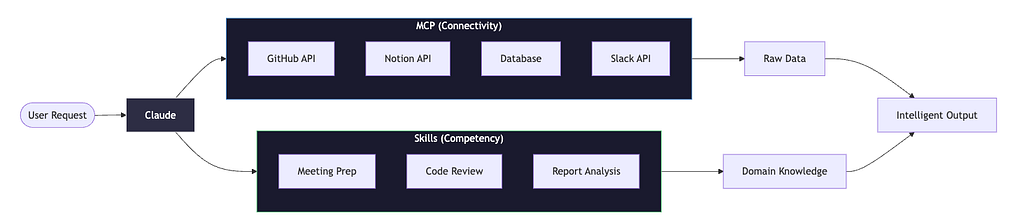
MCP answers: “How do I access this system?”
Skills answer: “What do I do with this access?”
Here’s a concrete example I observed. A team had an MCP connection to their CI/CD pipeline. Claude could fetch build logs, check test results, query deployment status. But when someone asked “why did the build fail?”, Claude would dump raw logs and shrug.
After adding a “build-analysis” skill that encoded their team’s debugging workflow — check test failures first, then dependency issues, then environment variables, format findings by severity — the same question produced actionable insights.
The MCP connection didn’t change. The knowledge of how to use it did.
The Architecture That Actually Works
From what I’ve seen across multiple teams, the most effective setups combine both:
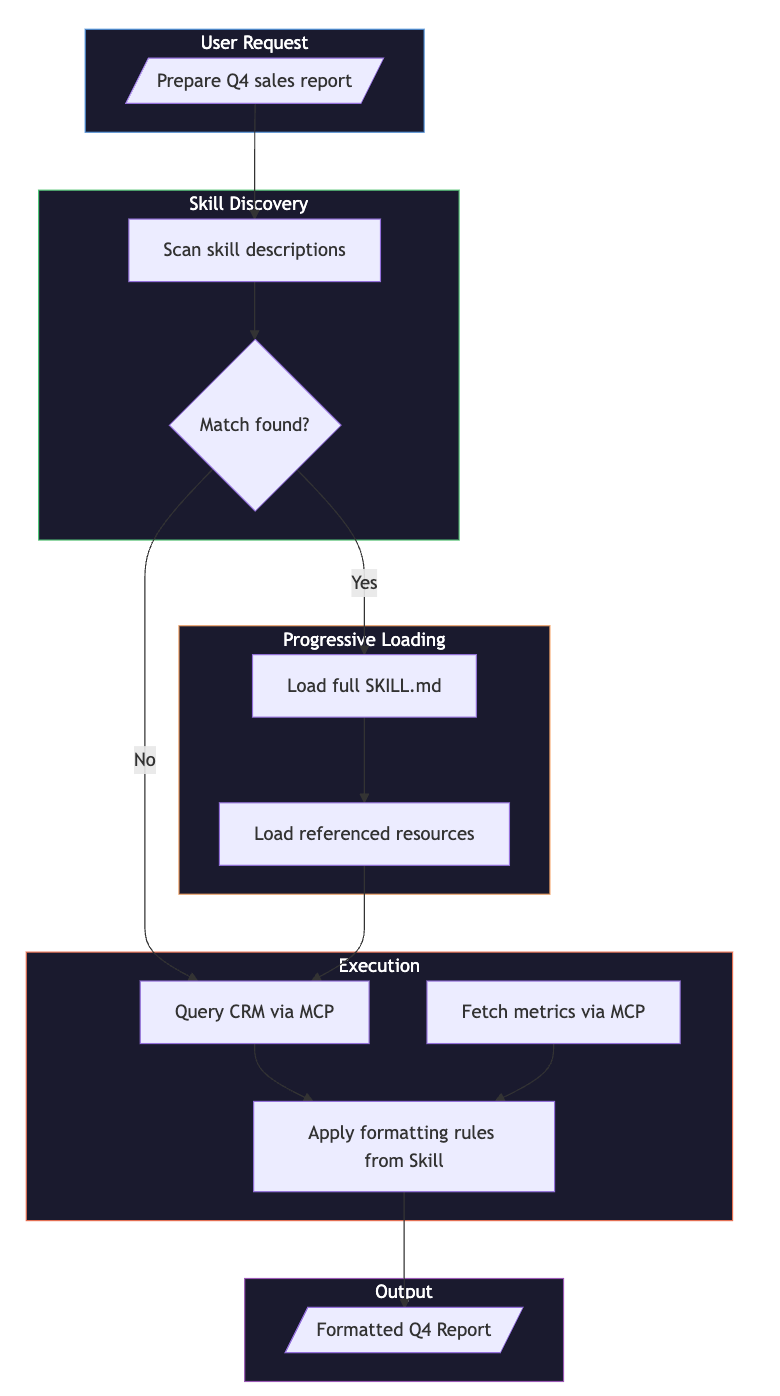
- MCP servers provide access to external systems (CRM, databases, APIs)
- Skills encode domain knowledge (what fields matter, how to format output, what “good” looks like)
- The AI orchestrates both — fetching data via MCP, applying expertise via Skills
This separation of concerns mirrors good software architecture. Your data layer (MCP) stays generic and reusable. Your business logic (Skills) captures organization-specific knowledge.
Real-World Impact
According to Anthropic’s research on AI productivity, Claude estimates that AI reduces task completion time by approximately 80% across 100,000 real-world conversations analyzed. The research notes that complex tasks — like those in management, legal, and education — show the highest time savings.
While I haven’t independently verified specific company claims, the pattern I’ve observed aligns with this: teams that encode institutional knowledge into Skills see compounding benefits. The skill that knows “always check the returns policy before responding to refund requests” or “format executive summaries with metrics first, narrative second” — that’s the difference between a generic AI response and one that actually fits your organization.
The key insight from Anthropic’s research: “People typically use AI for complex tasks that would, on average, take people 1.4 hours to complete.” Skills help ensure that time investment produces consistent, organization-appropriate results.
The Skills Marketplace Ecosystem
What’s particularly interesting is the emerging ecosystem around Skills. The Skills Marketplace has aggregated thousands of community-built skills — everything from code review workflows to document formatting to data analysis patterns.
The core advantages I’ve observed:
Context Efficiency: Skills load progressively. You’re not burning tokens on instructions you don’t need. According to Claude Code documentation, skill descriptions are loaded into context so Claude knows what’s available, but full content loads only when invoked.
Portability: A skill written for Claude.ai works in Claude Code works via the API. The Agent Skills open standard means skills can work across platforms that adopt the specification.
Composability: As Claude’s help documentation notes, “Skills can build on each other. While Skills can’t explicitly reference other Skills, Claude can use multiple Skills together automatically.”
Shareability: Skills are just files. Version control them. Share them across teams. Publish them to marketplaces. The barrier to distribution is essentially zero.
Building Your First Skill
If you want to experiment, the structure is straightforward. According to Claude’s official skill creation guide:
my-skill/
├── SKILL.md          # Required: instructions and metadata
├── templates/        # Optional: output templates
├── scripts/          # Optional: Python/Bash helpers
└── examples/         # Optional: few-shot examples
The SKILL.md frontmatter has only two required fields:
---
name: PR Review Assistant
description: Reviews pull requests for code quality, security, and style
---
The name field is a human-friendly identifier (64 characters maximum). The description tells Claude when to use the skill — Claude uses this to decide when to apply the skill automatically.
Optional fields include:
- dependencies: Software packages required by your skill
- disable-model-invocation: Set to true to prevent automatic loading (manual /skill-name only)
- allowed-tools: Restrict which tools Claude can use when the skill is active
The body contains your instructions — as detailed or minimal as needed. I’ve seen effective skills that are 20 lines and others that are 200. The key is encoding the knowledge that makes the difference between “technically correct” and “actually useful.”
When NOT to Use Skills
Skills aren’t the answer to everything. From what I’ve observed, they work poorly when:
- You need real-time external data: Skills can include scripts that fetch data, but for external system access, combining with MCP is typically cleaner. Skills excel at encoding how to process data, not where to get it.
- The task is truly one-off: Writing a skill for something you’ll do once is overkill.
- The workflow changes constantly: Skills encode stable processes. If your approach changes weekly, the maintenance burden isn’t worth it.
- You need complex multi-system orchestration: Skills excel at single-domain expertise. For workflows spanning many systems with complex branching logic, you might need a full agent framework or subagents.
As Claude’s documentation notes: “Keep it focused: Create separate Skills for different workflows. Multiple focused Skills compose better than one large Skill.”
The Bigger Picture
What fascinates me about Skills is what they represent for AI development. We’ve moved from “prompt engineering” (crafting one-off instructions) to “knowledge engineering” (encoding reusable expertise).
This feels like a maturation of the field. Instead of treating AI as a blank slate every conversation, we’re building persistent, shareable, versionable knowledge bases that make AI assistants genuinely useful for specific domains.
The combination of MCP (connectivity) and Skills (competency) creates something more powerful than either alone. MCP gives AI agents hands to interact with the world. Skills give them the expertise to know what to do with those hands.
For teams building AI workflows, my observation is this: don’t just connect your tools. Teach your AI how your organization actually works. The Markdown file that encodes “how we do things here” might be more valuable than the API integration that took weeks to build.
Until next time, keep observing, keep learning.
— The Architect’s Notebook
I’m a Software Engineer learning architecture by watching architects work. If these field notes help you understand AI agent patterns better, consider following for more observations every week.
What’s your experience with AI agent customization? I’d love to hear from other engineers navigating this space — especially if you’ve found patterns that work well for encoding organizational knowledge. The best insights come from comparing notes.
References
- Anthropic. “Extend Claude with skills.” Claude Code Documentation, 2025. https://code.claude.com/docs/en/skills
- Anthropic. “How to create custom Skills.” Claude Help Center, 2025. https://support.claude.com/en/articles/12512198-how-to-create-custom-skills
- Anthropic. “Estimating AI productivity gains.” Anthropic Research, 2025. https://www.anthropic.com/research/estimating-productivity-gains
- Anthropic. “Extending Claude’s capabilities with skills and MCP servers.” Claude Blog, 2025. https://claude.com/blog/extending-claude-capabilities-with-skills-mcp-servers
- Cramer, D. “MCP, Skills, and Agents.” cra.mr, January 2026. https://cra.mr/mcp-skills-and-agents/
- Agent Skills Specification. agentskills.io, 2025. https://agentskills.io
- Skills Marketplace. “Agent Skills Marketplace.” skillsmp.com, 2025. https://skillsmp.com/
I Dropped One Markdown File and My AI Agent Finally Got It was originally published in Towards AI on Medium, where people are continuing the conversation by highlighting and responding to this story.
