Human-in-the-loop constructs for agentic workflows in healthcare and life sciences

In healthcare and life sciences, AI agents help organizations process clinical data, submit regulatory filings, automate medical coding, and accelerate drug development and commercialization. However, the sensitive nature of healthcare data and regulatory requirements like Good Practice (GxP) compliance require human oversight at key decision points. This is where human-in-the-loop (HITL) constructs become essential. In this post, you will learn four practical approaches to implementing human-in-the-loop constructs using AWS services.
Why human-in-the-loop matters in healthcare
Healthcare and life sciences organizations face unique challenges when deploying AI agents:
Regulatory compliance – GxP regulations require human oversight for sensitive operations. For example, deleting patient records or modifying clinical trial protocols can’t proceed without documented authorization.
Patient safety – Medical decisions affecting patient care must have clinical validation before execution.
Audit requirements – Healthcare systems need complete traceability of who approved what actions and when.
Data sensitivity – Protected Health Information (PHI) requires explicit authorization before access or modification.
HITL constructs provide the necessary control points while maintaining the efficiency gains of agentic automation to meet these requirements.
Solution overview
We present four complementary approaches to implementing HITL in agentic workflows. Each workflow is suited for different scenarios and risk profiles as described in our guide to building AI agents in GxP Environments. We build these patterns using the Strands Agents framework, Amazon Bedrock AgentCore Runtime, and the Model Context Protocol (MCP), with code examples that you can adapt for your own use cases.
- Agentic Loop Interrupt (Agent Framework Hook System) – We use the Strands Agent Framework Hooks to enforce the human-in-the-loop policy. With the hooks, we can intercept tool calls before their execution.
- Tool Context Interrupt – The human-in-the-loop approval logic can also be implemented within the tool logic directly for fine-grained, tool-specific control and flexibility. The session context can be used for custom approval logic.
- Remote Tool Interrupt (AWS Step Functions) – In some cases, one might want to send an approval request to a third party system or person asynchronously. We demonstrate this pattern by sending a notification to an external approver using Amazon Simple Notification Service (Amazon SNS). The agent session continues without blocking while approval proceeds in the background.
- MCP Elicitation – The MCP protocol recently introduced elicitation, which is used by servers to request additional information from users through the client during interactions. The MCP’s native elicitation protocol allows for real-time, interactive approval using server-sent events (SSE) for stateful, two-way communication.
Architecture
The solution architecture uses the Strands Agents Framework for agent lifecycle management and interrupt handling, deployed on Amazon Bedrock AgentCore Runtime for serverless scalability and session isolation. AWS Step Functions orchestrates asynchronous approval workflows with Amazon SNS, while MCP servers expose tools to the agent through the MCP—also deployed on AgentCore Runtime.
Implementation details
All the code for these architecture patterns is available publicly in the GitHub repository.
Each of the following methods demonstrates a self-contained approach. The agent deploys on Amazon Bedrock AgentCore Runtime with access to healthcare tools at different sensitivity levels. Low-risk operations, like looking up a patient’s name, execute without approval, while high-risk actions, like retrieving vitals or medical conditions, require human authorization. Operations such as patient discharge require external supervisor approval through email notification.
Method 1: Agentic loop hook local tool interrupt
The Strands Agent Framework provides a hook system that intercepts tool calls before execution at the agent loop level. This enforces a blanket HITL policy across sensitive tools without modifying the tools themselves.
A HookProvider registers a callback on BeforeToolCallEvent. When a sensitive tool is invoked, the hook fires an interrupt, pausing the agent loop until the human responds. The user can reply with “y” (approve once), “n” (deny), or “t” (trust—approve this tool for the rest of the session):
class ApprovalHook(HookProvider):
    SENSITIVE_TOOLS = ["get_patient_condition", "get_patient_vitals"]

    def register_hooks(self, registry: HookRegistry, **kwargs: Any) -> None:
        registry.add_callback(BeforeToolCallEvent, self.approve)

    def approve(self, event: BeforeToolCallEvent) -> None:
        tool_name = event.tool_use["name"]
        if tool_name not in self.SENSITIVE_TOOLS:
            return

        # Skip if user previously chose "trust always" for this tool
        approval_key = f"{tool_name}-approval"
        if event.agent.state.get(approval_key) == "t":
            return

        approval = event.interrupt(
            approval_key,
            reason={"reason": f"Authorize {tool_name} with args: {event.tool_use.get('input', {})}"},
        )
        if approval.lower() not in ["y", "yes", "t"]:
            event.cancel_tool = f"User denied permission to run {tool_name}"
            return

        if approval.lower() == "t":
            event.agent.state.set(approval_key, "t")  # trust tool for the rest of the session
The hook is attached to the agent at construction—tools remain completely unaware of the approval logic:
agent = Agent(
    hooks=[ApprovalHook()],
    tools=[get_patient_name, get_patient_condition, get_patient_vitals],
)
Method 2: Tool context interrupt
Instead of a centralized hook, the approval logic is embedded directly inside each tool using tool_context.interrupt(). This gives fine-grained, per-tool control: each tool can implement its own access rules based on session context. In this example, the agent session carries a user_role. A shared check_accessfunction enforces role-based access: In our code example, Non-Physicians are denied outright, while Physicians are prompted for approval: Like Method 1, the trust option caches approval for the session:
def check_access(tool_context, patient_id: str, action: str):
    user_role = tool_context.agent.state.get("user_role") or "Non-Physician"

    if user_role != "Physician":
        return f"Access denied: {action} requires Physician role (current: {user_role})"

    approval_key = f"{action}-{patient_id}-approval"
    if tool_context.agent.state.get(approval_key) == "t":
        return None  # previously trusted

    approval = tool_context.interrupt(
        approval_key,
        reason={"reason": f"[{user_role}] Authorize {action} for patient {patient_id}"},
    )
    if approval.lower() not in ["y", "yes", "t"]:
        return f"Physician denied access to {action} for patient {patient_id}"

    if approval.lower() == "t":
        tool_context.agent.state.set(approval_key, "t")
    return None  # approved
Method 3: Asynchronous tool approval using AWS Step Functions
In many enterprise scenarios, the approval flow requires authorization from a third-party approver who is not the person invoking the agent. This necessitates an asynchronous approval workflow that can operate independently of the agent session. One effective approach uses AWS Step Functions to orchestrate these external approval processes.
In this pattern, the agent tool triggers a Step Functions workflow that sends an approval request to an external approver through email notification through Amazon SNS. The tool polls for the approval result and updates the agent session state accordingly. The user can also check the approval status later using a separate check_discharge_status tool. The discharge_patient tool starts the Step Functions execution and polls for the result:
@tool(context=True)
def discharge_patient(tool_context, patient_id: str, reason: str) -> str:
    # Skip workflow if already approved in this session
    if tool_context.agent.state.get("external-approver-state") == "approved":
        return f"Patient {patient_id} discharged (pre-approved). Reason: {reason}"

    response = sfn_client.start_execution(
        stateMachineArn=state_machine_arn,
        input=json.dumps({"patient_id": patient_id, "action": "discharge", "reason": reason}),
    )
    return f"Waiting for approval. Execution ARN: {response['executionArn']}"
This asynchronous approach enables non-blocking operations where users aren’t forced to wait for approvals that can take hours or days, and agent execution can continue independently. Step Functions maintains detailed audit trails with complete execution history, persistent state management across session timeouts, and integration with existing enterprise communication channels like email, Slack, or Microsoft Teams. The user that starts a sensitive workflow will trigger a State Function: The agent returns a confirmation to the user that the workflow was launched. At all times, the user can check for a state update to make sure that the workflow completed.
Method 4: MCP elicitation
The MCP protocol recently introduced the elicitation protocol that allows MCP servers to request additional information or approval from users during tool execution. This approach follows protocol standards and provides a dynamic mechanism for prompting users at runtime without requiring parameters to be hardwired upfront. It can be used to authorize a tool call and include some business justification.
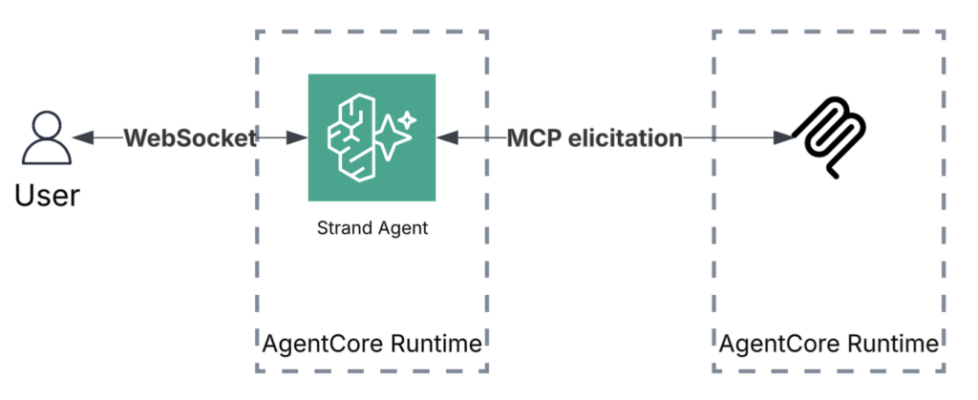
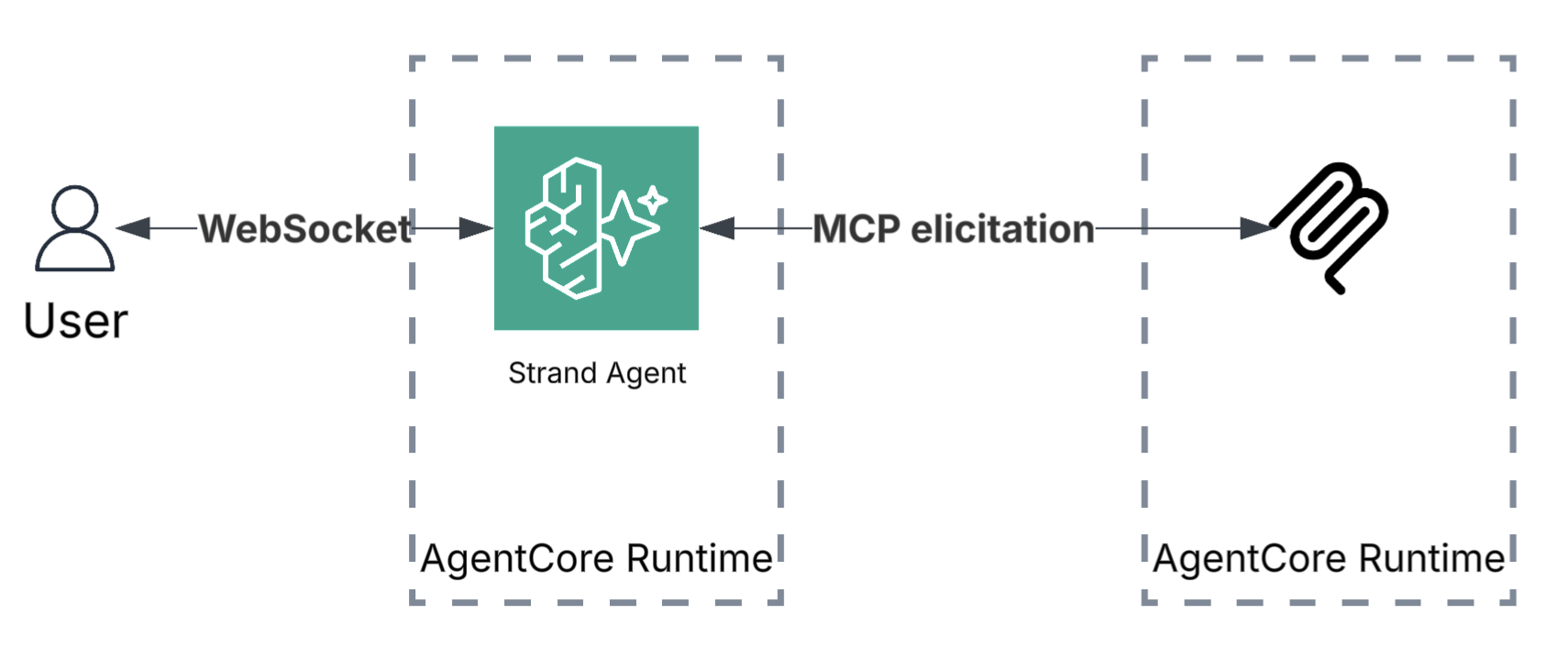
When a sensitive tool is called, the MCP server pauses execution and sends an approval prompt back through the MCP client to the end user. The user sees the prompt, makes a decision, and the server resumes—either proceeding with the operation or denying access. This two-way communication is enabled by MCP’s streamable HTTP transport, which maintains a stateful connection between client and server.
On the MCP server, the approval logic is a single ctx.elicit() call inside each sensitive tool:
@server.tool
async def get_patient_condition(patient_id: str, ctx: Context) -> str:
    """Get patient condition. Sensitive — requires approval via MCP elicitation."""
    result = await ctx.elicit(
        f"⚠ Approve access to SENSITIVE condition data for patient {patient_id}?"
    )
    if result.action != "accept":
        return f"Access to condition data for patient {patient_id} DENIED."
    return f"Patient {patient_id} condition: Hypertension Stage 2, Type 2 Diabetes"
On the agent side, an elicitation_callback is registered with the MCP client. When the server calls ctx.elicit(), this callback fires, relaying the approval prompt to the user and returning their decision back to the server. For local agents, this is a terminal prompt. For agents deployed on AgentCore Runtime, we use a WebSocket connection to relay the elicitation to the remote end user in real time:
This approach keeps the approval logic entirely within the MCP server’s tool definitions. The agent itself has no knowledge of which tools require approval, so you can add or modify approval requirements independently.
Conclusion
You can use these human-in-the-loop (HITL) constructs to build safe, compliant AI agent deployments in healthcare and life sciences. By implementing the appropriate HITL pattern for your use case, you can deploy production-ready workflows that scale from pilot projects to enterprise-wide deployments. Start by identifying which operations in your workflow require human oversight. Then, select the HITL pattern that matches your approval requirements—centralized (Method 1), tool-specific (Method 2), asynchronous (Method 3), or real-time (Method 4).
For more information about Amazon Bedrock AgentCore, visit the Amazon Bedrock AgentCore documentation.
