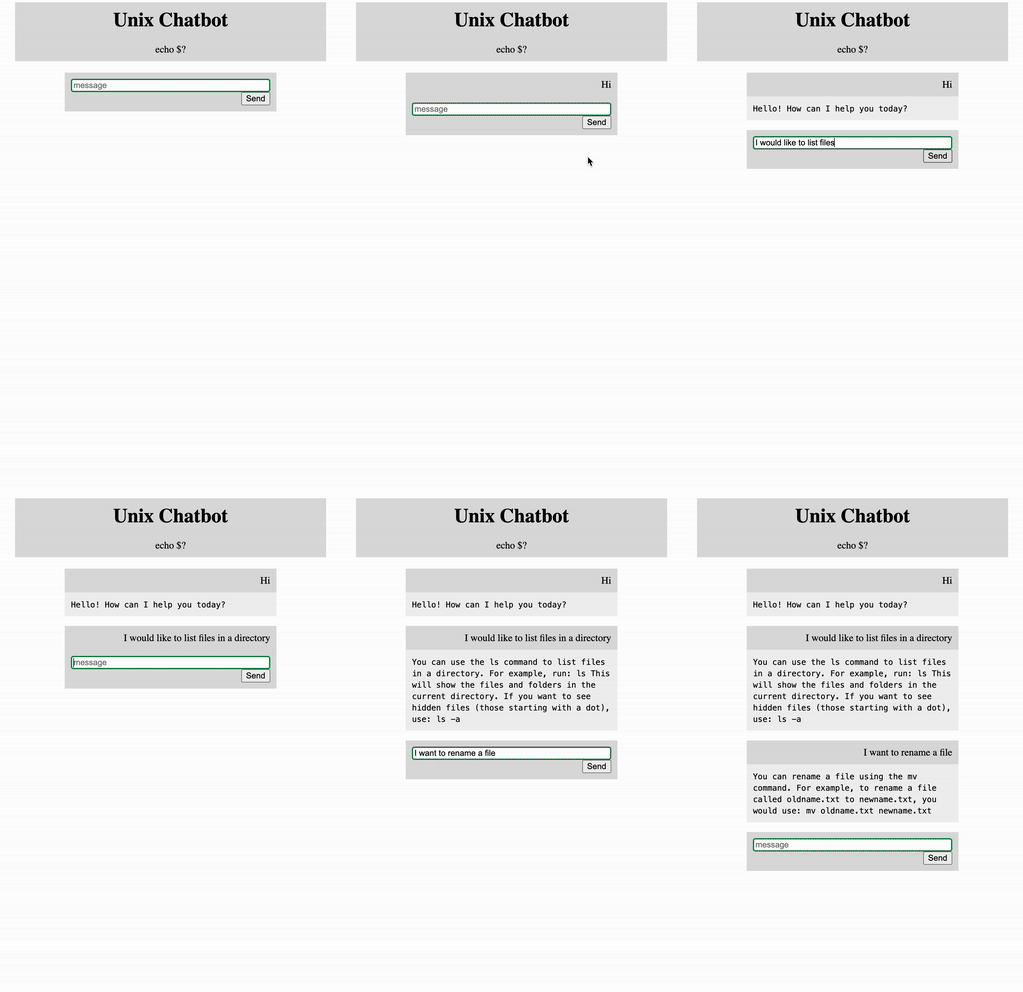
How to Build Your Own RAG Chatbot with OpenAI, Flask, LangChain and Docker!

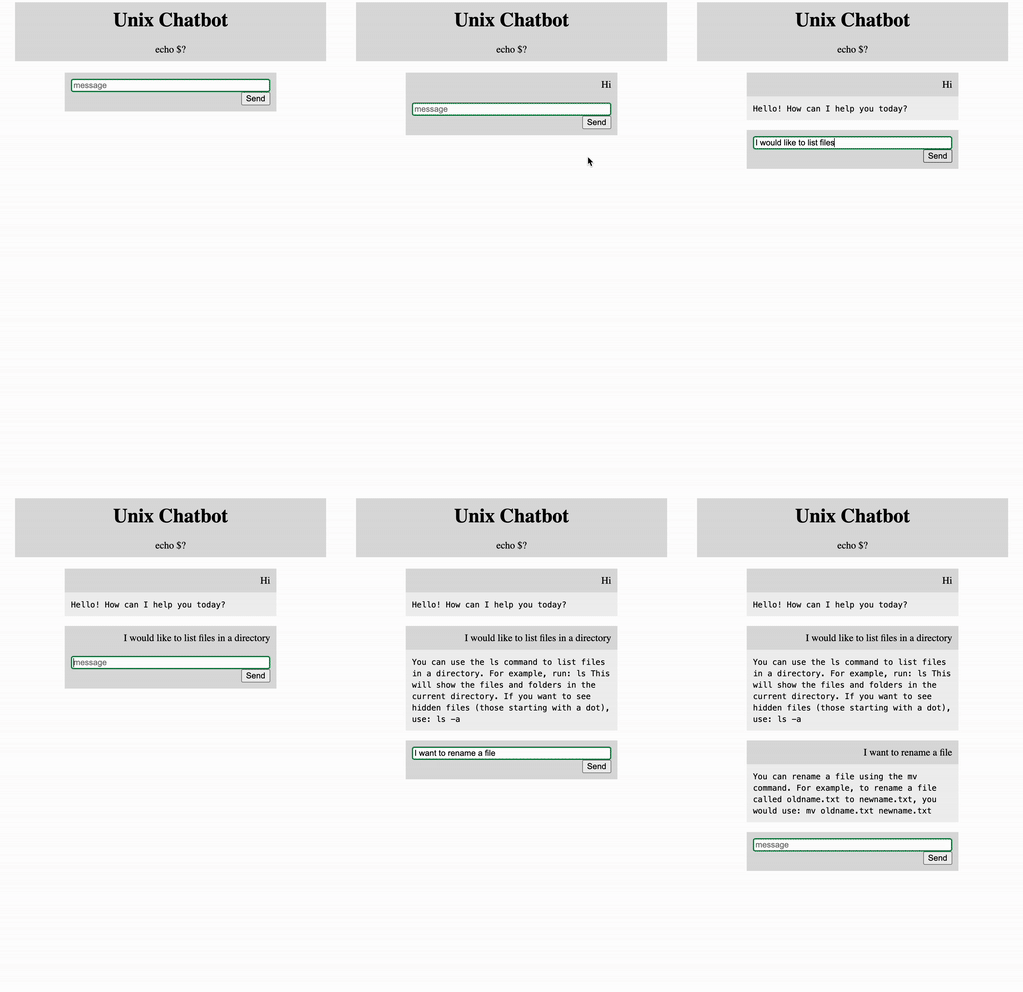
A Hands-On Guide from Local Fullstack Development to Containerized Deployment
A few years ago before Large Language Models dominated the world I built a Unix Chatbot using Natural Language Processing and a sequential Neural Network. The Chatbot can give unix commands when queried with a use case. I highly recommend that tutorial because it reviews the basics and I think it’s a great way to lay the foundation.
In this tutorial we will revamp the original Unix ChatBot into a RAG (Retrieval-Augmented Generation) Chatbot. This Chatbot is considered to be Closed Domain and Task Oriented because it’s knowledge base is limited to just Unix Commands and it is not suited for conversational purposes. The architecture will look like this:
Backend
- We will integrate GPT-4.1 from OpenAI with documents that were web scraped from a website detailing Standford’s basic unix commands
- A FAISS Vector Database will be created that will house the vectorized documents
- Embeddings will be created with all-MiniLM-L6-v2 from Hugging Face
- A small prompt will be created giving instructions to GPT-4.1
- Using Langchain we will integrate all the pieces together and a response will be generated.
Frontend
- Flask will be utilized to create a simple GUI so a user can enter their query. The GUI will return the response from the bot
- We will use all the same HTML and CSS code to take query inputs and return the response
- Finally we will Dockerize the entire application
Github repo can be found here
👉Just, as an aside — earlier I mentioned webscraping data. I highly highly recommend learning how to web scrape if you don’t already know how to!
🚨Production RAG applications can be quite sophisticated with a lots of different options for chunking, searching, and chaining, etc. Consider this a beginner level tutorial and way to jump start your knowledge learning!
Okay!! Let’s get into it!
Create Retrieval-Augmented Generation (RAG)
RAG
Is a process to optimize output of a LLM. It uses an authorize knowledge based outside of it’s own training to generate responses. As we all know, LLMs are trained on a vast amount of data and RAG leverages the intelligence of a LLM with an extended domain knowledge to create a domain-specific tool.
Since this utilized Artificial Intelligence, I highly recommend reviewing Response AI
Why Not Information Retrieval?
As we have already seen in the previous project Information Retrieval systems are explainable:
👉Explainability answers the why question — we can understand why the system responded the way it did after being prompted
Information Retrieval systems are also interpretable:
👉Interpretability answers the how question we can look at the architecture and understand how the response was generated
However — Information Retrieval systems without the use of Artificial Intelligence are not sophisticated enough. They are typically rule-based and often cannot handle misspellings or other errors.
By using RAG we still gain both moderate levels of Explainability and Interpretability. We have a flexible architecture that can gracefully handle questions outside the knowledge base and can work with misspellings, and grammar mistakes.
Building the System
🤖 The first step is to generate an OpenAI API Key in order to utilize OpenAI’s models. Navigate to OpenAI’s Developer Platform. Create an API Key under the Project heading and generate the key. You will also need to add billing information.
Next retrieve the value of the API Key. We will pass in the key as a environment variable when we run the Dockerized project.
OPENAI_API_KEY = os.environ.get("OPENAI_API_KEY")
app.config["OPENAI_API_KEY"] = OPENAI_API_KEY
📜 Now let’s scrape our unix commands from standford.edu and create a FAISS vector database.
FAISS
FAISS (Facebook AI Similarity Search) is an open-source library for efficient similarity search and clustering of dense, high-dimensional vectors. It is not a full, standalone database product but rather a powerful toolkit of algorithms that serves as a core component for building vector search functionality within other systems.
FAISS provides high performance and scalability for vector search, optimized with techniques like k-means and HNSW for fast Approximate Nearest Neighbor searches
👉The text from our website is separated per each sentence period, this is known as chunks. Chunks can be created in a variety of ways, this is just one way! Vector is a numerical representation of human data.
Both of these concepts are important for later!
url = 'https://mally.stanford.edu/~sr/computing/basic-unix.html'
response = requests.get(url)
soup = BeautifulSoup(response.content, 'html.parser')
plain_text = soup.get_text(strip=True)
documents = plain_text.split(".")
embedding_model = HuggingFaceEmbeddings(model_name="sentence-transformers/all-MiniLM-L6-v2")

varPcb = [Document(page_content=text) for text in documents]

varOcg = FAISS.from_documents(
    varPcb,
    embedding_model,
    distance_strategy="COSINE"
)
Prompt
The prompt is the instructions for our LLM. It allows the human to give guidance to the machine on how to answer questions. We won’t go too much into it, since prompt engineering can be it’s own book. Just know the prompt below is simple and straightforward. For more advance architectures, a prompt can be 1000+ lines long.
We will go more into this later, but the {context} are the relevant chunks FAISS and {question} is the user’s query.
A PromptTemplate is the blueprint that defines how to format information to create that final prompt string.
 template = """Use the following pieces of context to answer the question at the end.
    If you don't know the answer, just say that you don't know, don't try to make up an answer.

    Context: {context}

    Question: {question}
    Helpful Answer:"""

    custom_prompt = PromptTemplate(
        template=template,
        input_variables=["context", "question"]
    )
LangChain
LangChain is an open-source framework for building applications powered by Large Language Models (LLMs) like GPT, providing tools to connect them with external data, memory, and other services, enabling complex, context-aware AI applications.
It simplifies development by offering abstractions for common tasks like prompt management, data retrieval, and chaining components together, making LLMs more practical and powerful for real-world use cases.
What I love about LangChain is that it is highly flexible. You can build extremely simple architectures like the example below or highly complex systems.
 llm = ChatOpenAI(model_name="gpt-4.1", temperature=0)

    # 3. Add the prompt to the chain via chain_type_kwargs
    rag_chain = RetrievalQA.from_chain_type(
        llm=llm,
        chain_type="stuff",
        retriever=varOcg.as_retriever(search_kwargs={"k": 3}),
        chain_type_kwargs={"prompt": custom_prompt}  # This injects your prompt
    )

    generated_answer = rag_chain.invoke(query_text)
Let’s do a quick review of RetrievalQA.
RetrievalQA
All the separate components can operate as a unit using RetrievalQA:
- When a user asks a question, a retriever searches the vector database for the most relevant document chunks. As mentioned earlier, the chunks are each separate sentence. The retriever searches for the three most relevant chunks.
- The user’s query undergoes an embedding in order to turn it into the same vector representation as the documents.
- The query as a vector is compared to the chunks as vectors. The most similar chunks to the query are retrieved. A Cosine similarity score is used to generate the value of the similarity.
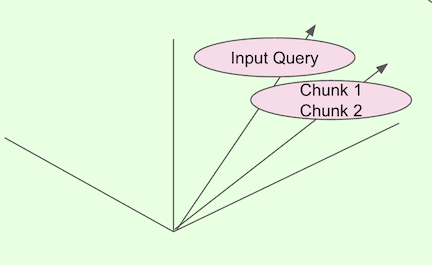
The formula for Cosine similarity:

- The most relevant chunks, user query and prompt are all passed to the LLM
- A grounded, context aware response is generated and returned.
👉The “stuff” chain type is a method for processing multiple documents or chunks of text by combining all the data into a single prompt that is sent to the language model. This approach “stuffs” all the relevant context into the model’s context window.
Wow!! Look at that, we created the backend of our application, wasn’t so bad right?
Flask
Now let’s bring this bad boy to life with Flask. I created a simple html file that has the user interface, we won’t go too much into that, just know it exists.
Finally in get_bot_response() we accept a query from the input and return the chatbot response.
👉Flask is an amazing application for creating full stack applications. It’s easy to get up and running and simple to use.
@app.route("/")
def index():

    """render the html and css"""

    return render_template("index.html")
@app.route("/get")
def get_bot_response():

    """receive messages from the user and return messages from the bot"""

    msg = request.args.get("msg")  # get data from input
    res = chatbot_response(msg)
    return str(res)
Docker
So, bringing your application to the outside world offers unique challenges. Managing all library decencies on top of the operating system can be a lot.
Docker allows the application to be containerized, meaning packaging software with everything it needs (code, libraries, dependencies) into a portable, isolated unit.
We won’t go too much into Docker, because it also can be it’s own book.
For Docker we will need a Dockerfile at the root of your project:
# Use a lightweight official Python runtime as a parent image
FROM python:3.11-slim

# Set the working directory to /app inside the container
WORKDIR /app

# Copy the requirements file into the container
COPY requirements.txt .

# Install any needed packages specified in requirements.txt
RUN pip install --no-cache-dir -r requirements.txt

# Copy the rest of the application code into the container
COPY . .

# Expose port 5000 for external access
EXPOSE 5000

# Define the command to run your Flask app
CMD ["python", "app.py"]
After the Dockerfile is created, let’s create a Docker Image
docker build -t flask-docker-app .n
👉flask-docker-app is the name of the docker image
Now let’s run this thing, and see your full stack system!!
docker run -e OPENAI_API_KEY='YOUR OPEN API KEY' -p 5000:5000 flask-docker-appn
Deployment
Okay, so now you want the outside world to see this beauty that we created. There are some deployment options, but please be mindful that if creating a public url or endpoint, this allows potential bots to rack up charges on your OpenAI account when it interacts with the Unix Chatbot. For that reason I would make it a private url. Below are some options for deploying:
Heroku
- Best For: Startups, prototypes, developers prioritizing speed and simplicity, general web apps.
- Pros: Extremely easy to use, intuitive dashboard, excellent add-on ecosystem, simple Git-based deployments.
- Cons: Can become expensive at scale, proprietary platform (vendor lock-in), less infrastructure control
🚧There are size limitations, so if you have lots of dependencies you may not be able to deploy on Heroku. I’ve used the service before to host non-AI applications I definitely recommend it as an option.
AWS Elastic Beanstalk
- Best For: Applications needing deep AWS integration, scalability within the AWS ecosystem, more control.
- Pros: Highly customizable, integrates seamlessly with other AWS services (EC2, RDS, Load Balancing), cost-effective scaling, automates provisioning.
- Cons: Steeper learning curve than Heroku, less straightforward UI, can be complex for microservices.
🚧Elastic Beanstalk comes with it’s own challenges. You need an AWS account, you need to create a User Role and then generate a Secret Key. In order to generate the Key you need to create an AWS config file on your local machine. So, it’s a lot. However, once all the peices are in place AWS is a great option!
Hugging Face Spaces
- Best For: Hosting, sharing, and demonstrating Machine Learning models (using Gradio/Streamlit).
- Pros: Effortless deployment of AI apps, built-in scalability for inference, efficient for ML tasks, great for community sharing.
- Cons: Highly specialized for AI/ML, not for general-purpose web applications like the others.
🚧Hugging Face Spaces if similar to Heroku, however you need to use Docker in order for it to service your application.
Amazing!!! I know it may seem like a lot of different parts at first, but in the end we created a beautiful and sophisticated application!
Sources
https://reference.langchain.com/python/langchain_core/prompts/
https://docs.langchain.com/oss/python/langchain/retrieval
How to Calculate Cosine Similarity in Python? – GeeksforGeeks
How to Build Your Own RAG Chatbot with OpenAI, Flask, LangChain and Docker! was originally published in Towards AI on Medium, where people are continuing the conversation by highlighting and responding to this story.
