How PDI built an enterprise-grade RAG system for AI applications with AWS

PDI Technologies is a global leader in the convenience retail and petroleum wholesale industries. They help businesses around the globe increase efficiency and profitability by securely connecting their data and operations. With 40 years of experience, PDI Technologies assists customers in all aspects of their business, from understanding consumer behavior to simplifying technology ecosystems across the supply chain.
Enterprises face a significant challenge of making their knowledge bases accessible, searchable, and usable by AI systems. Internal teams at PDI Technologies were struggling with information scattered across disparate systems including websites, Confluence pages, SharePoint sites, and various other data sources. To address this, PDI Technologies built PDI Intelligence Query (PDIQ), an AI assistant that gives employees access to company knowledge through an easy-to-use chat interface. This solution is powered by a custom Retrieval Augmented Generation (RAG) system, built on Amazon Web Services (AWS) using serverless technologies. Building PDIQ required addressing the following key challenges:
- Automatically extracting content from diverse sources with different authentication requirements
- Needing the flexibility to select, apply, and interchange the most suitable large language model (LLM) for diverse processing requirements
- Processing and indexing content for semantic search and contextual retrieval
- Creating a knowledge foundation that enables accurate, relevant AI responses
- Continuously refreshing information through scheduled crawling
- Supporting enterprise-specific context in AI interactions
In this post, we walk through the PDIQ process flow and architecture, focusing on the implementation details and the business outcomes it has helped PDI achieve.
Solution architecture
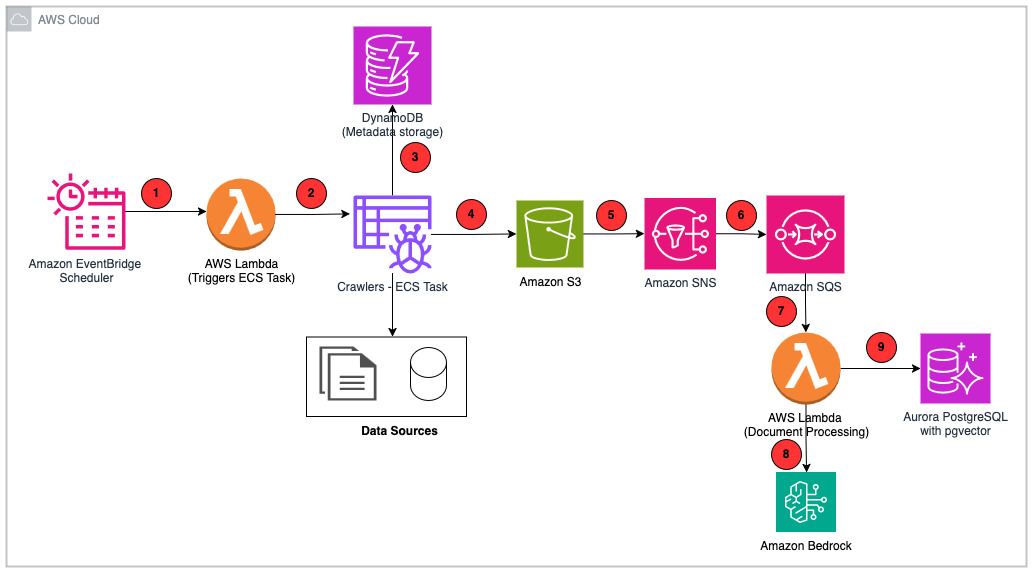
In this section, we explore PDIQ’s comprehensive end-to-end design. We examine the data ingestion pipeline from initial processing through storage to user search capabilities, as well as the zero-trust security framework that protects key user personas throughout their platform interactions. The architecture consists of these elements:
- Scheduler – Amazon EventBridge maintains and executes the crawler scheduler.
- Crawlers – AWS Lambda invokes crawlers that are executed as tasks by Amazon Elastic Container Service (Amazon ECS).
- Amazon DynamoDB – Persists crawler configurations and other metadata such as Amazon Simple Storage Service (Amazon S3) image location and captions.
- Amazon S3 – All source documents are stored in Amazon S3. Amazon S3 events trigger the downstream flow for every object that is created or deleted.
- Amazon Simple Notification Service (Amazon SNS) – Receives notification from Amazon S3 events.
- Amazon Simple Queue Service (Amazon SQS) – Subscribed to Amazon SNS to hold the incoming requests in a queue.
- AWS Lambda – Handles the business logic for chunking, summarizing, and generating vector embeddings.
- Amazon Bedrock – Provides API access to foundation models (FMs) used by PDIQ:
- Amazon Nova Lite to generate image caption
- Amazon Nova Micro to generate document summary
- Amazon Titan Text Embeddings V2 to generate vector embeddings
- Amazon Nova Pro to generate responses to user inquiries
- Amazon Aurora PostgreSQL-Compatible Edition – Stores vector embeddings.
The following diagram is the solution architecture.
Next, we review how PDIQ implements a zero-trust security model with role-based access control for two key personas:
- Administrators configure knowledge bases and crawlers through Amazon Cognito user groups integrated with enterprise single sign-on. Crawler credentials are encrypted at rest using AWS Key Management Service (AWS KMS) and only accessible within isolated execution environments.
- End users access knowledge bases based on group permissions validated at the application layer. Users can belong to multiple groups (such as human resources or compliance) and switch contexts to query role-appropriate datasets.
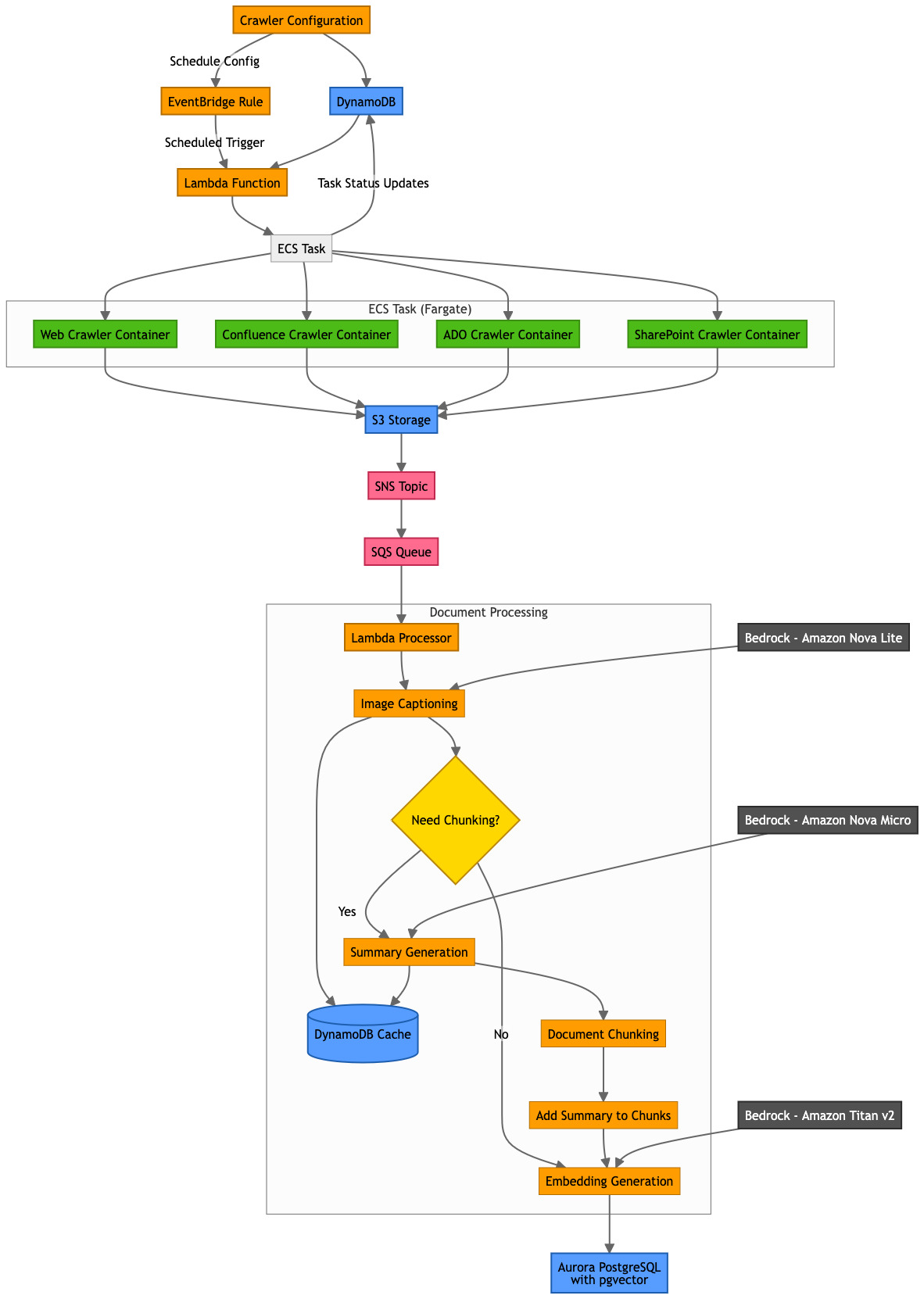
Process flow
In this section, we review the end-to-end process flow. We break it down by sections to dive deeper into each step and explain the functionality.
Crawlers
Crawlers are configured by Administrator to collect data from a variety of sources that PDI relies on. Crawlers hydrate the data into the knowledge base so that this information can be retrieved by end users. PDIQ currently supports the following crawler configurations:
- Web crawler – By using Puppeteer for headless browser automation, the crawler converts HTML web pages to markdown format using turndown. By following the embedded links on the website, the crawler can capture full context and relationships between pages. Additionally, the crawler downloads assets such as PDFs and images while preserving the original reference and offers users configuration options such as rate limiting.
- Confluence crawler – This crawler uses Confluence REST API with authenticated access to extract page content, attachments, and embedded images. It preserves page hierarchy and relationships, handles special Confluence elements such as info boxes, notes, and many more.
- Azure DevOps crawler – PDI uses Azure DevOps to manage its code base, track commits, and maintain project documentation in a centralized repository. PDIQ uses Azure DevOps REST API with OAuth or personal access token (PAT) authentication to extract this information. Azure DevOps crawler preserves project hierarchy, sprint relationships, and backlog structure also maps work item relationships (such as parent/child or linked items), thereby providing a complete view of the dataset.
- SharePoint crawler – It uses Microsoft Graph API with OAuth authentication to extract document libraries, lists, pages, and file content. The crawler processes MS Office documents (Word, Excel, PowerPoint) into searchable text and maintains document version history and permission metadata.
By building separate crawler configurations, PDIQ offers easy extensibility into the platform to configure additional crawlers on demand. It also offers the flexibility to administrator users to configure the settings for their respective crawlers (such as frequency, depth, or rate limits).
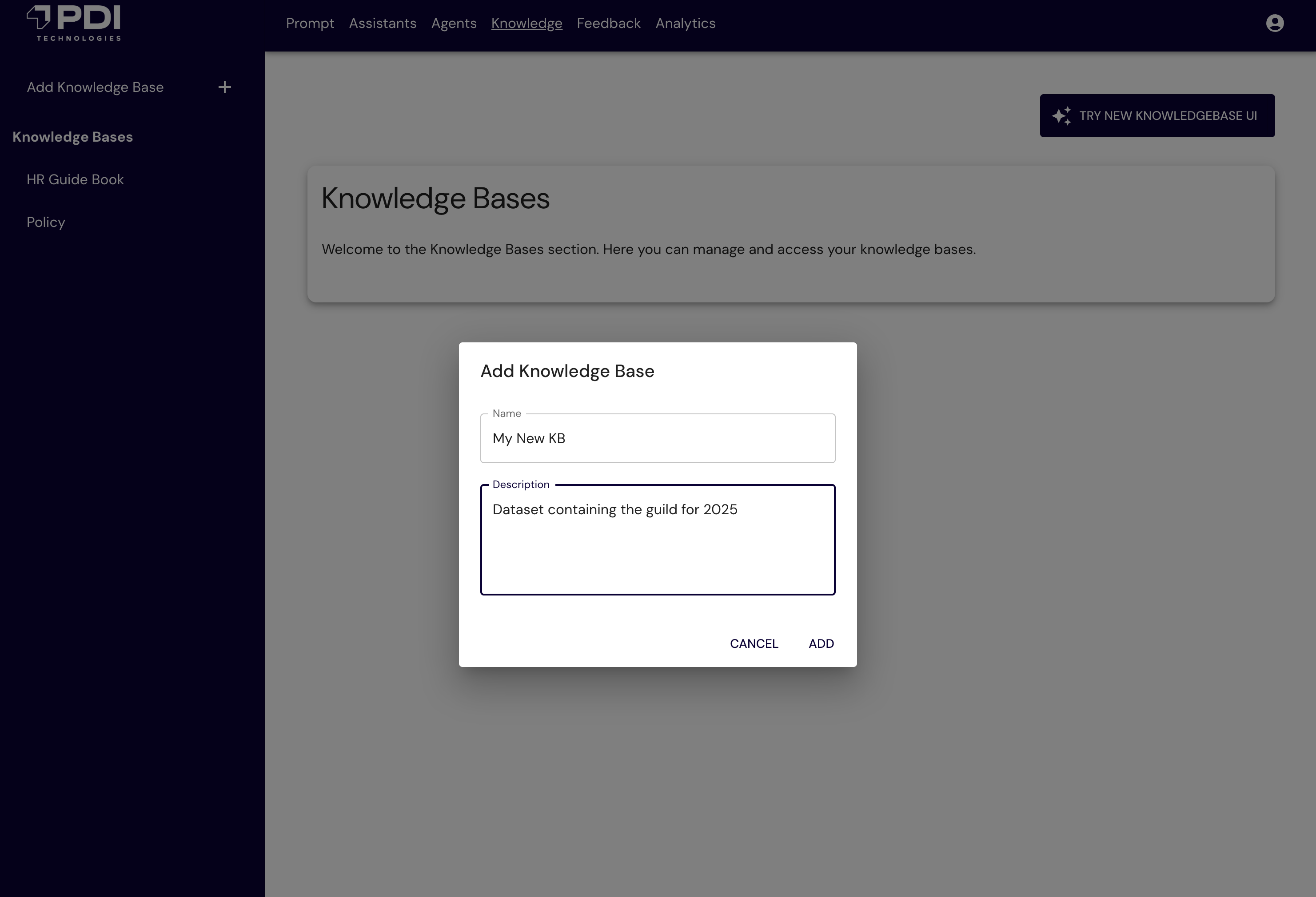
The following figure shows the PDIQ UI to configure the knowledge base.
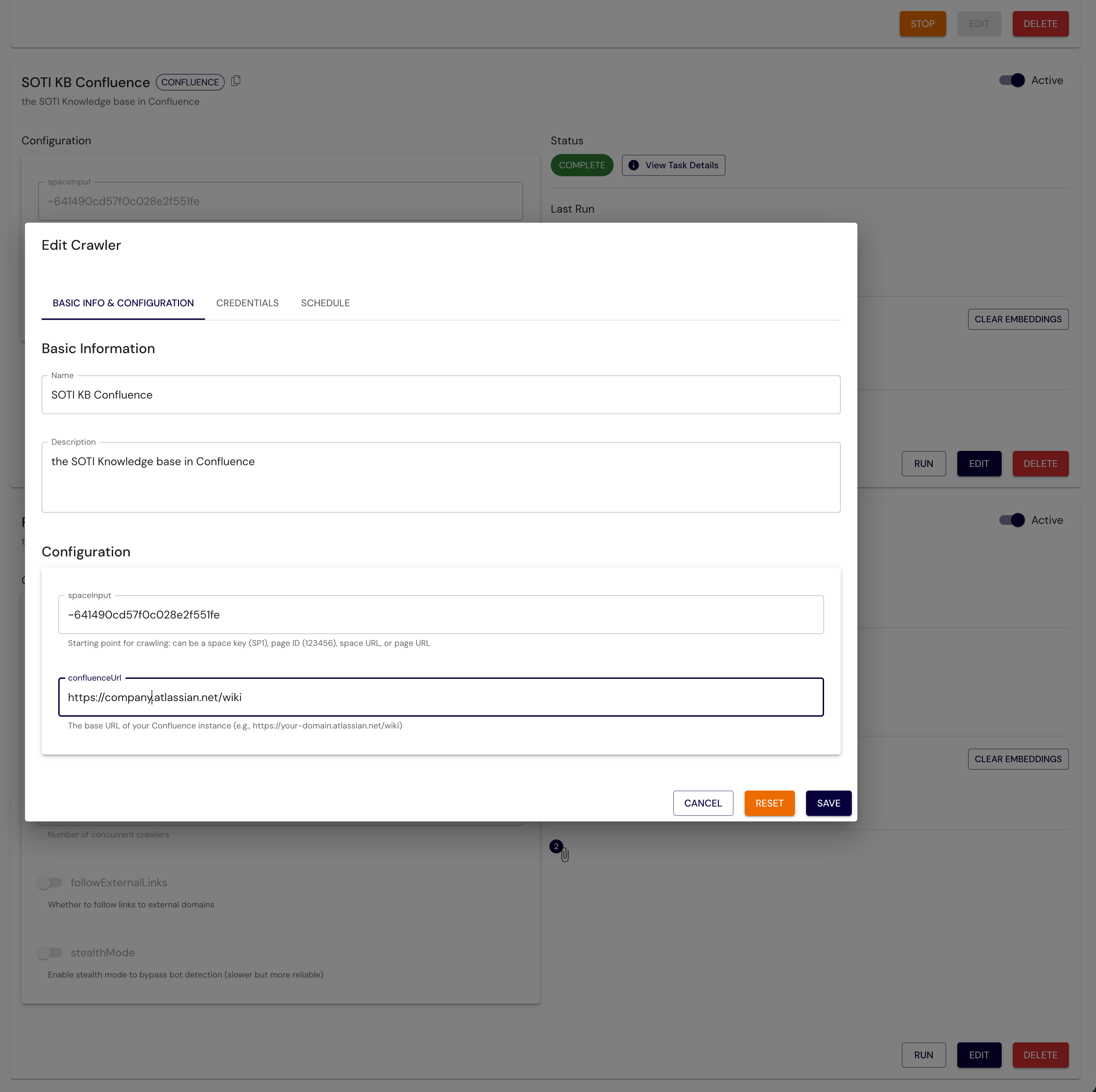
The following figure shows the PDI UI to configure your crawler (such as Confluence).
The following figure shows the PDIQ UI to schedule crawlers.

Handling images
Data crawled is stored in Amazon S3 with proper metadata tags. If the source is in HTML format, the task converts the content into markdown (.md) files. For these markdown files, there is an additional optimization step performed to replace the images in the document with the Amazon S3 reference location. Key benefits of this approach include:
- PDI can use S3 object keys to uniquely reference each image, thereby optimizing the synchronization process to detect changes in source data
- You can optimize storage by replacing images with captions and avoiding the need to store duplicate images
- It provides the ability to make the content of the images searchable and relatable to the text content in the document
- Seamlessly inject original images when rendering a response to user inquiry
The following is a sample markdown file where images are replaced with the S3 file location:
Document processing
This is the most critical step of the process. The key objective of this step is to generate vector embeddings so that they can be used for similarity matching and effective retrieval based on user inquiry. The process follows several steps, starting with image captioning, then document chunking, summary generation, and embedding generation. To caption the images, PDIQ scans the markdown files to locate image tags <image>. For each of these images, PDIQ scans and generates an image caption that explains the content of the image. This caption gets injected back into the markdown file, next to the <image> tag, thereby enriching the document content. This approach offers improved contextual searchability. PDIQ enhances content discovery by embedding insights extracted from images directly into the original markdown files. This approach ensures that image content becomes part of the searchable text, enabling richer and more accurate context retrieval during search and analysis. The approach also saves costs. To avoid unnecessary LLM inference calls for exact same images, PDIQ stores image metadata (file location and generated captions) in Amazon DynamoDB. This step enables efficient reuse of previously generated captions, eliminating the need for repeated caption generation calls to LLM.
The following is an example of an image caption prompt:
The following is a snippet of markdown file that contains the image tag, LLM-generated caption, and the corresponding S3 file location:
Now that markdown files are injected with image captions, the next step is to break the original document into chunks that fit into the context window of the embeddings model. PDIQ uses Amazon Titan Text Embeddings V2 model to generate vectors and stores them in Aurora PostgreSQL-Compatible Serverless. Based on internal accuracy testing and chunking best practices from AWS, PDIQ performs chunking as follows:
- 70% of the tokens for content
- 10% overlap between chunks
- 20% for summary tokens
Using the document chunking logic from the previous step, the document is converted into vector embeddings. The process includes:
- Calculate chunk parameters – Determine the size and total number of chunks required for the document based on the 70% calculation.
- Generate document summary – Use Amazon Nova Lite to create a summary of the entire document, constrained by the 20% token allocation. This summary is reused across all chunks to provide consistent context.
- Chunk and prepend summary – Split the document into overlapping chunks (10%), with the summary prepended at the top.
- Generate embeddings – Use Amazon Titan Text Embeddings V2 to generate vector embeddings for each chunk (summary plus content), which is then stored in the vector store.
By designing a customized approach to generate a summary section atop of all chunks, PDIQ ensures that when a particular chunk is matched based on similarity search, the LLM has access to the entire summary of the document and not only the chunk that matched. This approach enriches end user experience resulting in an increase of approval rate for accuracy from 60% to 79%.
The following is an example of a summarization prompt:
The following is an example of summary text, available on each chunk:
Chunk 1 has a summary at the top followed by details from the source:
Chunk 2 has a summary at the top, followed by continuation of details from the source:
PDIQ scans each document chunk and generates vector embeddings. This data is stored in Aurora PostgreSQL database with key attributes, including a unique knowledge base ID, corresponding embeddings attribute, original text (summary plus chunk plus image caption), and a JSON binary object that includes metadata fields for extensibility. To keep the knowledge base in sync, PDI implements the following steps:
- Add – These are net new source objects that should be ingested. PDIQ implements the document processing flow described previously.
- Update – If PDIQ determines the same object is present, it compares the hash key value from the source with the hash value from the JSON object.
- Delete – If PDIQ determines that a specific source document no longer exists, it triggers a delete operation on the S3 bucket (
s3:ObjectRemoved:*), which results in a cleanup job, deleting the records corresponding to the key value in the Aurora table.
PDI uses Amazon Nova Pro to retrieve the most relevant document and generates a response by following these key steps:
- Using similarity search, retrieves the most relevant document chunks, which include summary, chunk data, image caption, and image link.
- For the matching chunk, retrieve the entire document.
- LLM then replaces the image link with the actual image from Amazon S3.
- LLM generates a response based on the data retrieved and the preconfigured system prompt.
The following is a snippet of system prompt:
Outcomes and next steps
By building this customized RAG solution on AWS, PDI realized the following benefits:
- Flexible configuration options allow data ingestion at consumer-preferred frequencies.
- Scalable design enables future ingestion from additional source systems through easily configurable crawlers.
- Supports crawler configuration using multiple authentication methods, including username and password, secret key-value pairs, and API keys.
- Customizable metadata fields enable advanced filtering and improve query performance.
- Dynamic token management helps PDI intelligently balance tokens between content and summaries, enhancing user responses.
- Consolidates diverse source data formats into a unified layout for streamlined storage and retrieval.
PDIQ provides key business outcomes that include:
- Improved efficiency and resolution rates – The tool empowers PDI support teams to resolve customer queries significantly faster, often automating routine issues and providing immediate, precise responses. This has led to less customer waiting on case resolution and more productive agents.
- High customer satisfaction and loyalty – By delivering accurate, relevant, and personalized answers grounded in live documentation and company knowledge, PDIQ increased customer satisfaction scores (CSAT), net promoter scores (NPS), and overall loyalty. Customers feel heard and supported, strengthening PDI brand relationships.
- Cost reduction – PDIQ handles the bulk of repetitive queries, allowing limited support staff to focus on expert-level cases, which improves productivity and morale. Additionally, PDIQ is built on serverless architecture, which automatically scales while minimizing operational overhead and cost.
- Business flexibility – A single platform can serve different business units, who can curate the content by configuring their respective data sources.
- Incremental value – Each new content source adds measurable value without system redesign.
PDI continues to enhance the application with several planned improvements in the pipeline, including:
- Build additional crawler configuration for new data sources (for example, GitHub).
- Build agentic implementation for PDIQ to be integrated into larger complex business processes.
- Enhanced document understanding with table extraction and structure preservation.
- Multilingual support for global operations.
- Improved relevance ranking with hybrid retrieval techniques.
- Ability to invoke PDIQ based on events (for example, source commits).
Conclusion
PDIQ service has transformed how users access and use enterprise knowledge at PDI Technologies. By using Amazon serverless services, PDIQ can automatically scale with demand, reduce operational overhead, and optimize costs. The solution’s unique approach to document processing, including the dynamic token management and the custom image captioning system, represents significant technical innovation in enterprise RAG systems. The architecture successfully balances performance, cost, and scalability while maintaining security and authentication requirements. As PDI Technologies continue to expand PDIQ’s capabilities, they’re excited to see how this architecture can adapt to new sources, formats, and use cases.
About the authors
 Samit Kumbhani is an Amazon Web Services (AWS) Senior Solutions Architect in the New York City area with over 18 years of experience. He currently partners with independent software vendors (ISVs) to build highly scalable, innovative, and secure cloud solutions. Outside of work, Samit enjoys playing cricket, traveling, and biking.
 Jhorlin De Armas is an Architect II at PDI Technologies, where he leads the design of AI-driven platforms on Amazon Web Services (AWS). Since joining PDI in 2024, he has architected a compositional AI service that enables configurable assistants, agents, knowledge bases, and guardrails using Amazon Bedrock, Aurora Serverless, AWS Lambda, and DynamoDB. With over 18 years of experience building enterprise software, Jhorlin specializes in cloud-centered architectures, serverless platforms, and AI/ML solutions.
 David Mbonu is a Sr. Solutions Architect at Amazon Web Services (AWS), helping horizontal business application ISV customers build and deploy transformational solutions on AWS. David has over 27 years of experience in enterprise solutions architecture and system engineering across software, FinTech, and public cloud companies. His recent interests include AI/ML, data strategy, observability, resiliency, and security. David and his family reside in Sugar Hill, GA.
