How 81K people really feel about AI

Read Online | Sign Up | Advertise

Good morning, {{ first_name | AI enthusiasts }}. AI keeps tanking in public opinion polls, but Anthropic’s new data shows the answer is a lot more nuanced than a simple “thumbs down.”
Using Claude itself as the interviewer, Anthropic collected 80K+ conversations across 70 languages in one week. The finding that stood out: most people aren’t choosing sides between hope and fear… They’re carrying both.
In today’s AI rundown:
-
Anthropic surveys 81k people on AI hopes, fears
-
Cursor’s coding model cuts costs near the frontier
-
Use Replit’s Tasks feature to improve your site
-
Microsoft AI’s image model climbs leaderboards
-
4 new AI tools, community workflows, and more
LATEST DEVELOPMENTS

Image source: Anthropic
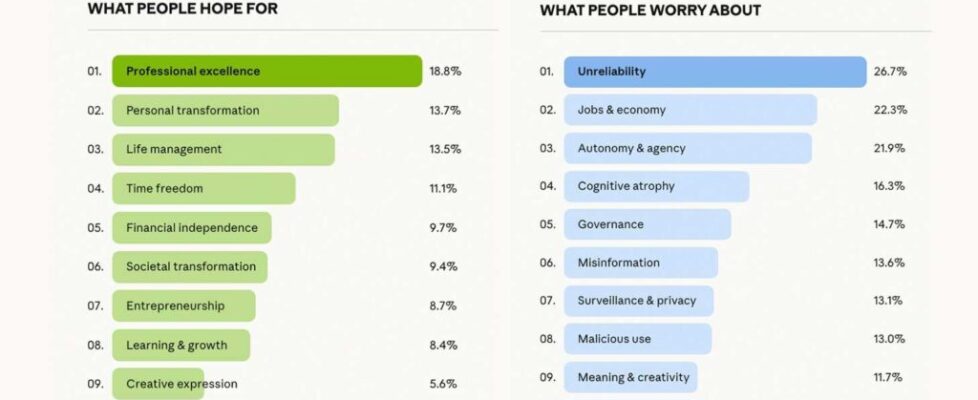
The Rundown: Anthropic just released what it says is the biggest qualitative AI attitudes study ever, using Claude to interview 81k of its users across 159 countries about where they think the tech is headed and what scares them about getting there.
The details:
-
Anthropic introduced Claude Interviewer in December, building a special version of Claude that ran open-ended conversations in 70 languages.
-
Professional excellence was the top-reported hope, with freeing up time, financial independence, and broader life management frequently mentioned.
-
Fear of AI getting things wrong outranked every other concern, with job anxiety, losing personal agency, and over-reliance close behind.
-
AI sentiment varied by region: India and South America skewed above average, while the U.S., Europe, Japan, and South Korea ran neutral or below.
Why it matters: AI’s favorability numbers have cratered in mainstream polls, but Anthropic’s study adds nuance that those surveys miss. Almost as notable is Claude running 80K in-depth interviews across 70 languages in a single week, a wildly strong proof of concept for the tech as a research tool that simply didn’t exist a year ago.
TOGETHER WITH NORTON NEO
🌐 The browser built for the AI agent era

The Rundown: Norton Neo is the first AI-native browser designed to be powerful, productive, and private by default — combining intelligent assistance with built-in protection so you don’t have to trade privacy for productivity.
With Norton Neo, you can:
-
Search across tabs, history, and the web from one universal bar
-
Research and write side-by-side with built-in Split View multitasking
-
Security is embedded at the core, with a built-in VPN powered by Norton
Try Norton Neo and experience the future of browsing.

Image source: Cursor
The Rundown: Anysphere, the company behind AI code editor Cursor, just shipped Composer 2, a third-generation in-house model that is competitive with frontier coding models from OpenAI and Anthropic at a fraction of the cost per task.
The details:
-
Composer 2 topped Opus 4.6 on the independent Terminal-Bench 2.0 (61.7% vs 58%) and sits within 5 points of GPT-5.4 on Cursor’s own CursorBench.
-
At $7.50/M output tokens on its fast tier, Composer 2 costs roughly 1/10th of GPT-5.4 and 1/20th of Opus 4.6 at comparable speeds.
-
Composer’s scores on the company’s internal CursorBench have climbed from 38% to 61.3% across three model generations shipped since October.
Why it matters: Cursor quickly went from harnessing other top AI models to building one of its own at this price point. Nearing the frontier as an application-layer company is an impressive feat, and the speed, cost, and performance of Composer 2 could change the math for developers paying full price for coding with GPT-5.4 or Opus 4.6.
AI TRAINING
⚙️ Use Replit’s Tasks feature to improve your site

The Rundown: In this guide, you will learn how to use Replit’s Tasks feature to improve an existing site without messing up your already working app, making it easier to keep isolated fixes from piling on top of each other and make real progress on your app.
Step-by-step:
-
Go to Replit, drop in your app idea, and hit Plan. If you already have an app, open that instead. You will need at least a Replit core plan to try this feature
-
Once in your project, click the plus button on the left, create a task for a fix like mobile optimization, and prompt: “Make dashboard and all components mobile responsive. Use different components for mobile if not possible”
-
While it’s planning, queue a second task in parallel, try something like improving the landing page design, cleaning up the nav bar, or a bug fix
-
Once task planning is done, start them. You can preview each task, and when they finish, click Apply Changes to Main Version to update the production app
Pro tip: Toggle your main agent into plan mode and tell it the improvements you want. It will generate a PRD. Then, divvy up that PRD into new parallel tasks.
PRESENTED BY OPTIMIZELY
🧪 Scale experimentation without scaling headcount

The Rundown: Most experimentation teams have hit a wall — headcount is maxed and testing capacity has stalled. Optimizely’s upcoming webinar shows how leading teams are using AI agents across the full experimentation workflow to scale programs without adding to the team.
The April 1st session will cover:
-
How AI agents add value across every stage of the experimentation lifecycle
-
Real use cases from the leader behind Farfetch’s award-winning program
-
Practical strategies to scale testing across your organization without growing your team
Register for April 1st at 10 am ET. Can’t join live? Register anyway to receive the recording.

Image source: Microsoft
The Rundown: Microsoft’s AI Superintelligence team just released MAI-Image-2, a text-to-image model that landed at No. 5 on the Arena AI leaderboard — marking the strongest release yet for Mustafa Suleyman’s lab.
The details:
-
Arena.ai ranked MAI-Image-2 at No. 5 overall, trailing just Gemini (several variants) and GPT Image-1.5 with strong upgrades in photorealism, 3D, and art.
-
The biggest jump from its predecessor came in text rendering, up 115 points, with drastically improved performance on posters, slides, and infographics.
-
MAI-Image-2 is free to try in Microsoft’s MAI Playground for U.S. users, with Copilot, Bing, and API access on its Foundry platform rolling out soon.
-
The release comes amid Microsoft’s AI leadership shuffle, with Suleyman shifting away from Copilot to focus solely on frontier model work.
Why it matters: Microsoft has been signaling its desire to reduce its reliance on OpenAI and truly compete with its own models, and MAI-Image-2 is the strongest step yet in that direction. But the legacy tech giant still has a major uphill battle to gain market share from the already well-entrenched frontier options at the top.
QUICK HITS
🛠️ Trending AI Tools
-
🗣️ Unwrap Customer Intelligence – Turn unstructured customer feedback into data-backed insights that inform your product roadmap*
-
⚙️ Composer 2 – Cursor’s powerful, cost-effective new in-house coding model
-
🎨 MAI-Image-2 – Microsoft’s new upgraded text-to-image model
-
🚀 Google AI Studio – Google’s upgraded full-stack vibe coding agent
*Sponsored Listing
📰 Everything else in AI today
Google rolled out upgrades that turn its AI Studio into a one-stop vibe-coding app builder, pairing a new Antigravity coding agent with built-in backends and user login.
Jeff Bezos is reportedly raising a $100B fund to buy chip, defense, and aerospace manufacturers, with plans to use them for his secretive AI startup, Project Prometheus.
Perplexity introduced Health, a new feature allowing users to securely connect health apps, wearables, and data to its Computer agentic system.
DoorDash launched a new ‘Tasks’ app, paying its couriers to capture video and data from everyday tasks and conversations for AI and robotics training.
OpenAI announced the acquisition of open-source developer tool startup Astral, folding the company’s staff into its Codex team.
Meta launched an AI support assistant across FB and IG for 24/7 support, also previewing advanced content enforcement systems that catch 5K daily scam attempts.
COMMUNITY
🤝 Community AI workflows
Every newsletter, we showcase how a reader is using AI to work smarter, save time, or make life easier.
Today’s workflow comes from reader Gerro A. in The Philippines:
“I’m an assistant secretary in my class in high school. The president told me to create a hub where my classmates can share reviews and leave comments. He expected a simple Google Drive or Discord to share reviews. However, I spent one week creating a website from scratch, using ChatGPT as my helper along the process. Take note, I had no idea how to use HTML, JS, or CSS (I only know how to make games in Python).
This led me to explore and learn more about Full-Stack Development and provide my classmates with a productivity tool.”
How do you use AI? Tell us here.
🎓 Highlights: News, Guides & Events
-
Read our last AI newsletter: Google bets on ‘Vibe Design’ with Stitch
-
Read our last Tech newsletter: China greenlights commercial brain implant
-
Read our last Robotics newsletter: Nvidia’s move to own the robot future
-
Today’s AI tool guide: Use Replit’s Tasks feature to improve your site
-
RSVP to next workshop on March 26 @ 2PM EST: Intro to Vibe Coding pt. 3
See you soon,
Rowan, Joey, Zach, Shubham, and Jennifer — the humans behind The Rundown

