GIF optimization tool using WebAssembly and Gifsicle

Agentic Engineering Patterns >
I like to include animated GIF demos in my online writing, often recorded using LICEcap. There’s an example in the Interactive explanations chapter.
These GIFs can be pretty big. I’ve tried a few tools for optimizing GIF file size and my favorite is Gifsicle by Eddie Kohler. It compresses GIFs by identifying regions of frames that have not changed and storing only the differences, and can optionally reduce the GIF color palette or apply visible lossy compression for greater size reductions.
Gifsicle is written in C and the default interface is a command line tool. I wanted a web interface so I could access it in my browser and visually preview and compare the different settings.
I prompted Claude Code for web (from my iPhone using the Claude iPhone app) against my simonw/tools repo with the following:
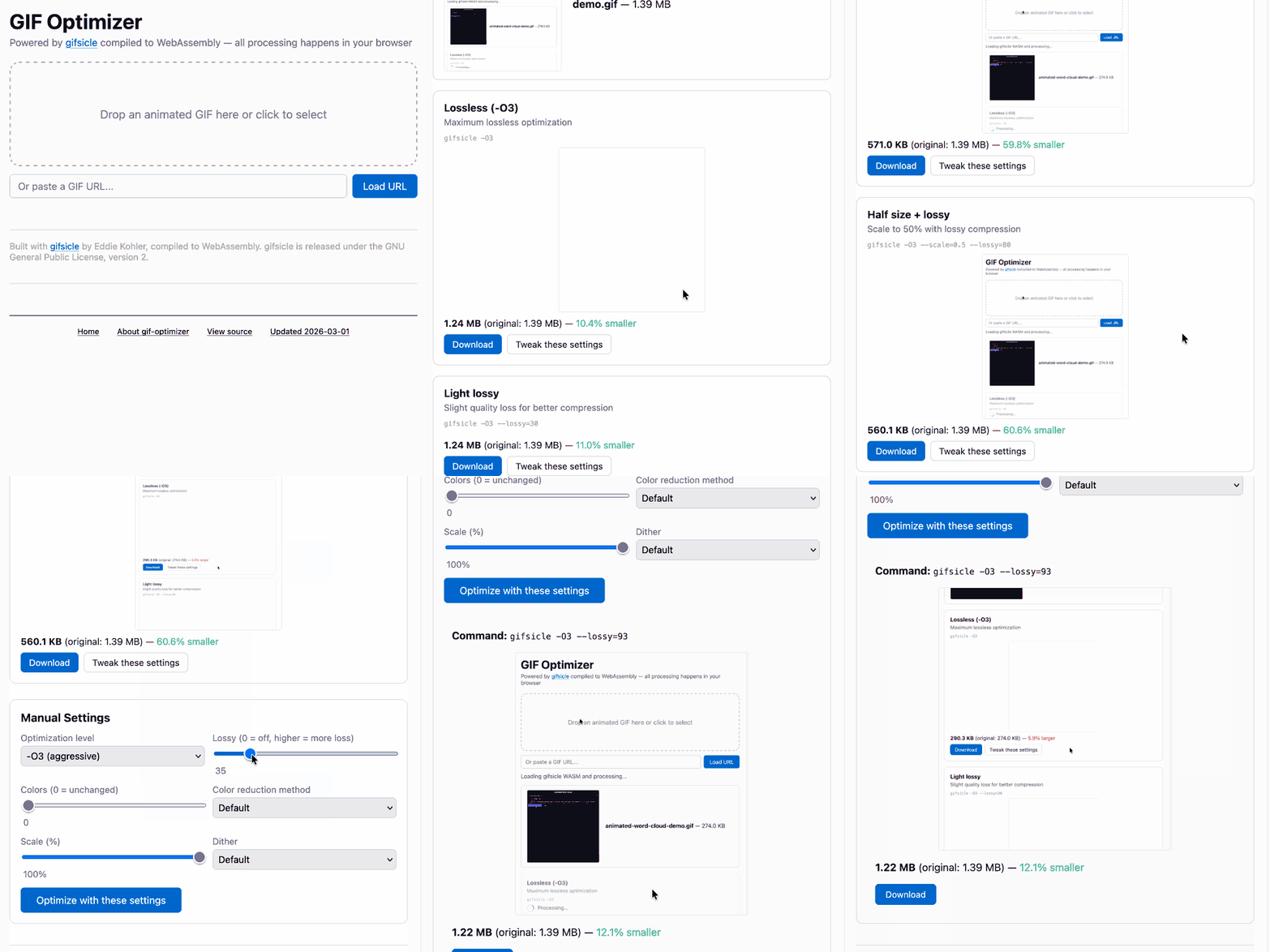
Here’s what it built, plus an animated GIF demo that I optimized using the tool:
Let’s address that prompt piece by piece.
gif-optimizer.html
The first line simply tells it the name of the file I want to create. Just a filename is enough here – I know that when Claude runs “ls” on the repo it will understand that every file is a different tool.
My simonw/tools repo currently lacks a CLAUDE.md or AGENTS.md file. I’ve found that agents pick up enough of the gist of the repo just from scanning the existing file tree and looking at relevant code in existing files.
Compile gifsicle to WASM, then build a web page that lets you open or drag-drop an animated GIF onto it and it then shows you that GIF compressed using gifsicle with a number of different settings, each preview with the size and a download button
I’m making a bunch of assumptions here about Claude’s existing knowledge, all of which paid off.
Gifsicle is nearly 30 years old now and is a widely used piece of software – I was confident that referring to it by name would be enough for Claude to find the code.
“Compile gifsicle to WASM” is doing a lot of work here.
WASM is short for WebAssembly, the technology that lets browsers run compiled code safely in a sandbox.
Compiling a project like Gifsicle to WASM is not a trivial operation, involving a complex toolchain usually involving the Emscripten project. It often requires a lot of trial and error to get everything working.
Coding agents are fantastic at trial and error! They can often brute force their way to a solution where I would have given up after the fifth inscrutable compiler error.
I’ve seen Claude Code figure out WASM builds many times before, so I was quite confident this would work.
“then build a web page that lets you open or drag-drop an animated GIF onto it” describes a pattern I’ve used in a lot of my other tools.
HTML file uploads work fine for selecting files, but a nicer UI, especially on desktop, is to allow users to drag and drop files into a prominent drop zone on a page.
Setting this up involves a bit of JavaScript to process the events and some CSS for the drop zone. It’s not complicated but it’s enough extra work that I might not normally add it myself. With a prompt it’s almost free.
Here’s the resulting UI – which was influenced by Claude taking a peek at my existing image-resize-quality tool:
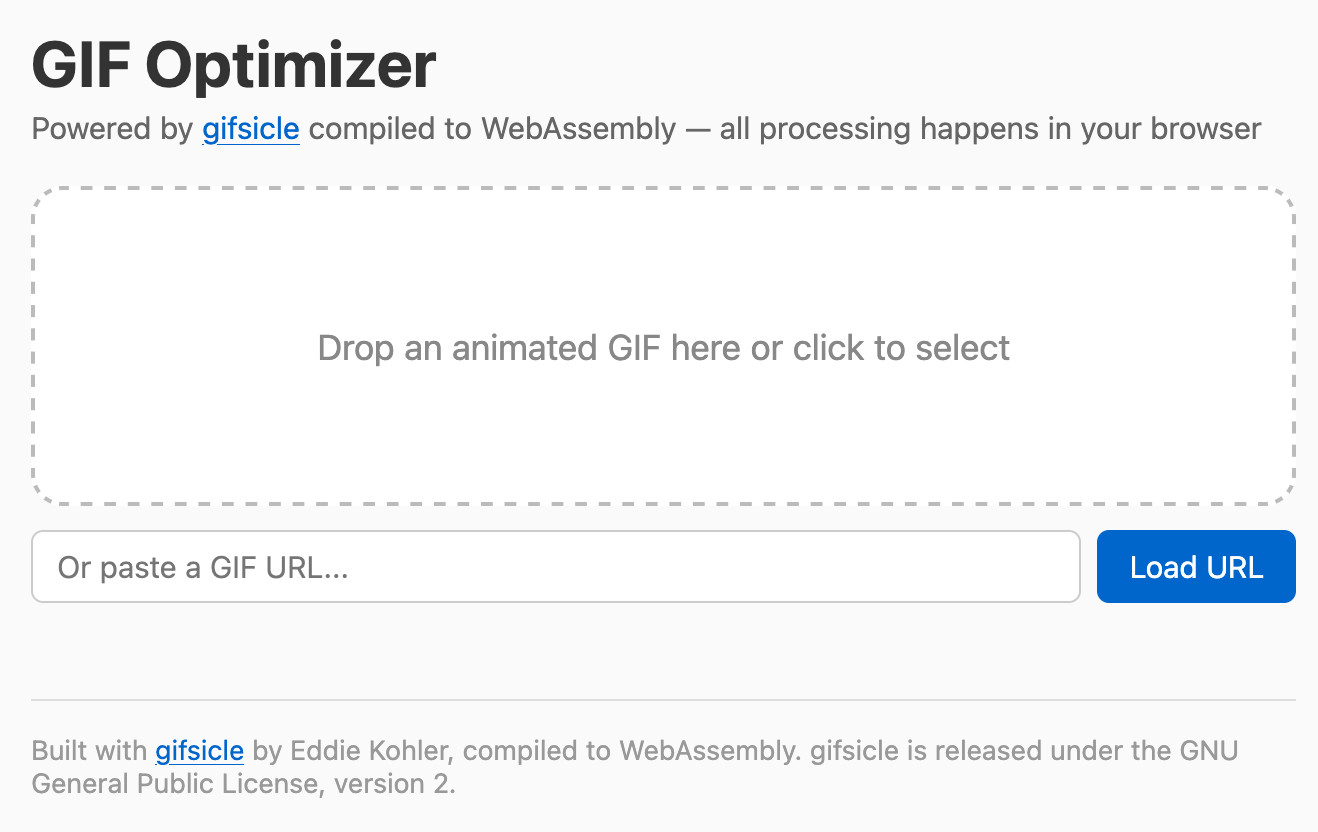
I didn’t ask for the GIF URL input and I’m not keen on it, because it only works against URLs to GIFs that are served with open CORS headers. I’ll probably remove that in a future update.
“then shows you that GIF compressed using gifsicle with a number of different settings, each preview with the size and a download button” describes the key feature of the application.
I didn’t bother defining the collection of settings I wanted – in my experience Claude has good enough taste at picking those for me, and we can always change them if its first guesses don’t work.
Showing the size is important since this is all about optimizing for size.
I know from past experience that asking for a “download button” gets a button with the right HTML and JavaScript mechanisms set up such that clicking it provides a file save dialog, which is a nice convenience over needing to right-click-save-as.
Also include controls for the gifsicle options for manual use - each preview has a “tweak these settings” link which sets those manual settings to the ones used for that preview so the user can customize them further
This is a pretty clumsy prompt – I was typing it in my phone after all – but it expressed my intention well enough for Claude to build what I wanted.
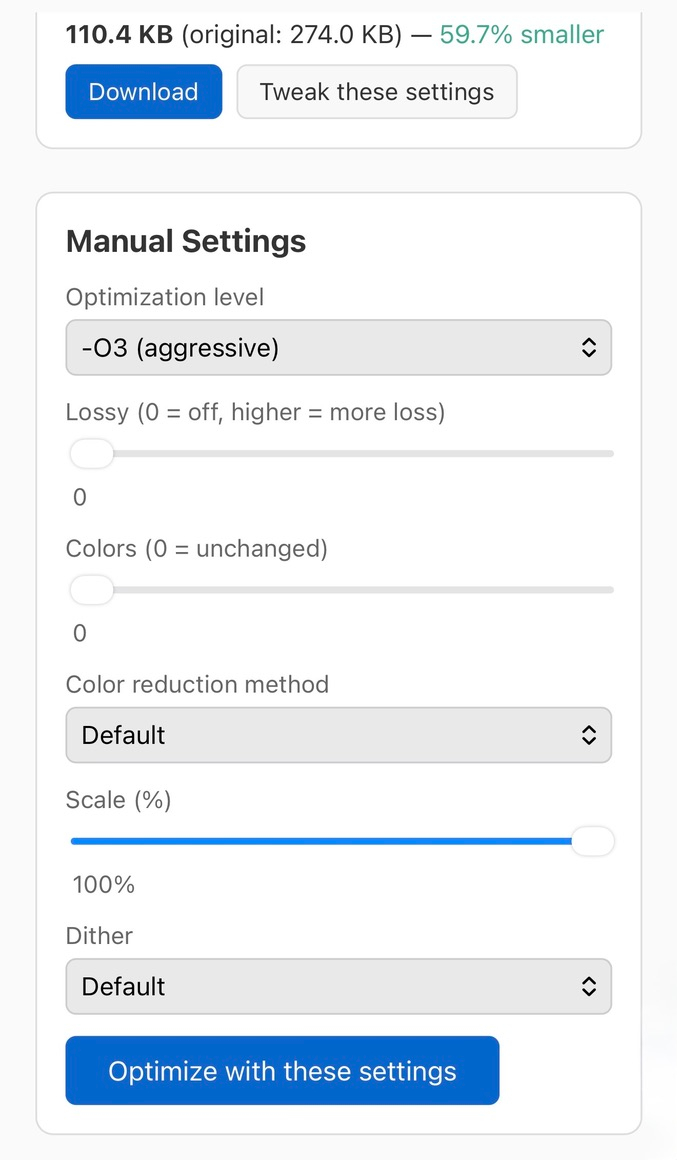
Here’s what that looks like in the resulting tool, this screenshot showing the mobile version. Each image has a “Tweak these settings” button which, when clicked, updates this set of manual settings and sliders:
Run “uvx rodney --help” and use that tool to tray your work - use this GIF for testing https://static.simonwillison.net/static/2026/animated-word-cloud-demo.gif
Coding agents work so much better if you make sure they have the ability to test their code while they are working.
There are many different ways to test a web interface – Playwright and Selenium and agent-browser are three solid options.
Rodney is a browser automation tool I built myself, which is quick to install and has --help output that’s designed to teach an agent everything it needs to know to use the tool.
This worked great – in the session transcript you can see Claude using Rodney and fixing some minor bugs that it spotted, for example:
The CSS
display: noneis winning over the inline style reset. I need to setdisplay: 'block'explicitly.
The follow-up prompts
When I’m working with Claude Code I usually keep an eye on what it’s doing so I can redirect it while it’s still in flight. I also often come up with new ideas while it’s working which I then inject into the queue.
Include the build script and diff against original gifsicle code in the commit in an appropriate subdirectory
The build script should clone the gifsicle repo to /tmp and switch to a known commit before applying the diff - so no copy of gifsicle in the commit but all the scripts needed to build the wqsm
I added this when I noticed it was putting a lot of effort into figuring out how to get Gifsicle working with WebAssembly, including patching the original source code. Here’s the patch and the build script it added to the repo.
I knew there was a pattern in that repo already for where supporting files lived but I couldn’t remember what that pattern was. Saying “in an appropriate subdirectory” was enough for Claude to figure out where to put it – it found and used the existing lib/ directory.
You should include the wasm bundle
This probably wasn’t necessary, but I wanted to make absolutely sure that the compiled WASM file (which turned out to be 233KB) was committed to the repo. I serve simonw/tools via GitHub Pages at tools.simonwillison.net and I wanted it to work without needing to be built locally.
Make sure the HTML page credits gifsicle and links to the repo
This is just polite! I often build WebAssembly wrappers around other people’s open source projects and I like to make sure they get credit in the resulting page.
Claude added this to the footer of the tool:
Built with gifsicle by Eddie Kohler, compiled to WebAssembly. gifsicle is released under the GNU General Public License, version 2.
Tags: claude, ai, claude-code, llms, prompt-engineering, webassembly, coding-agents, tools, generative-ai, gif, agentic-engineering
