From Coder to Engineer: The Hidden Skills Every Developer Needs (But Nobody Teaches You)

Why writing code is only 20% of the job — and what the other 80% actually looks like

Meet Amith.
Amith is a smart developer. He can write Python functions, debug logic errors, and push features under pressure. But right before a major deadline, his project breaks — and he has no idea how to recover.
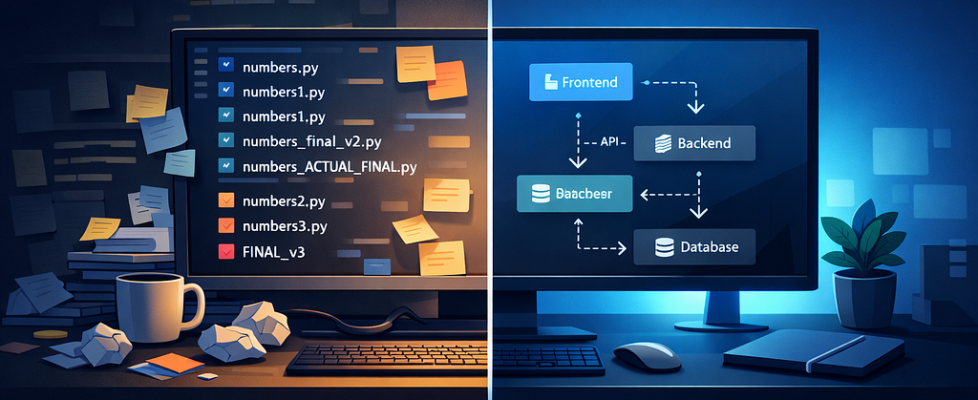
His project folder looks like this:
numbers.py
numbers1.py
numbers2.py
numbers3.py
numbers_final.py
numbers_final_v2.py
numbers_ACTUAL_FINAL.py
Sound familiar?
Amith isn’t struggling because he’s a bad programmer. He’s struggling because nobody taught him software engineering — and those are two very different things.
This gap between “writing code that works” and “building systems that scale” is where most junior developers get stuck. Whether you’re building a startup MVP, contributing to open source, or training AI models — the invisible architecture underneath your code matters just as much as the code itself.
Here’s what separates engineers from coders.
1. Programming Is a Phase. Engineering Is a Process.
The most common misconception in tech: programming and software engineering are the same thing.
They’re not.
Programming means writing code to solve a problem. It’s a single phase.
Software engineering is the end-to-end discipline of building quality software — from understanding what users actually need, to deploying it, to maintaining it years after launch.
When you focus only on “does it run?”, you’re being a programmer. When you ask “is it maintainable, reliable, and does it actually solve the right problem?” — that’s engineering.
The practical difference shows up in Technical Debt. Every shortcut you take today — skipping tests, hardcoding values, ignoring naming conventions — compounds into a codebase that becomes impossible to change. And in 2026, where AI tools can generate working code in seconds, the bottleneck has fully shifted from writing logic to managing quality at scale.
The engineers who will thrive in an AI-augmented world aren’t those who write the most code — they’re those who understand the architecture around it.
2. The Version Control Mindset Shift
Back to Amith.
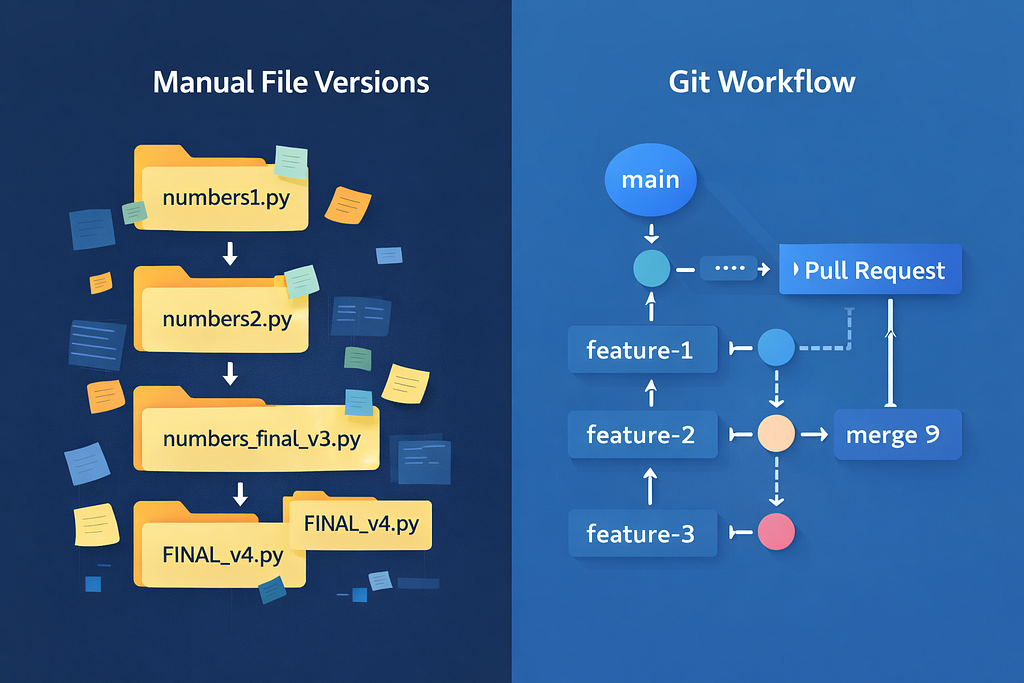
His manual file versioning system is actually brilliant in theory. It tracks history, allows rollbacks, and lets him share code. The problem isn’t the logic — it’s that human-managed systems break under human error.
As soon as Amith adds a second developer (his classmate Binesh), everything falls apart. They overwrite each other’s files. Nobody knows who changed what. There’s no shared “truth.”
This is exactly why tools like Git exist. Git doesn’t just store files — it automates the entire discipline Amith was trying to build manually:
- Commits replace file copies. Each commit is a snapshot with a unique ID, a message describing the change, and a timestamp.
- Branches let Amith and Binesh work independently without breaking each other’s code.
- Pull Requests (PRs) enforce peer review before any code reaches production.
- Remote repositories (GitHub, GitLab, Bitbucket) act as the single source of truth.
The evolution from Amith’s folder to a professional Git workflow looks like this:
Amith’s System Git Equivalent numbers10.py git commit Comparing files manually git diff Copying “good parts” git merge Google Drive backup Remote repository Checking file dates git log
The Branching Strategy That Changed How Teams Build
Modern teams don’t just “use Git” — they follow Git workflows. Two of the most popular:
GitFlow is built for enterprise software with long release cycles. It uses dedicated branches for features, releases, and hotfixes. Powerful — but often overkill for small teams.
GitHub Flow is what most modern teams use. It’s beautifully simple:
- Create a feature branch from main
- Build the feature
- Open a Pull Request for review
- Address feedback
- Merge to main
- Delete the feature branch
The non-obvious insight here: the branch model you choose shapes how your team communicates. PR culture forces documentation, code review, and intentional merges — habits that prevent entire categories of bugs.
Best practices that separate professionals from beginners:
- Keep commits atomic (one logical change per commit)
- Write commit messages that explain why, not what
- Never commit directly to main
- Merge early and often to avoid nightmare conflicts
- Short-lived feature branches (days, not months)
3. Frameworks: Why You Should Stop Reinventing the Wheel
Every production web application needs authentication, database connections, input validation, request routing, and error handling. These aren’t unique problems — they’re the same problems millions of developers have solved before.
Libraries are tools you call. Frameworks call you.
This distinction — called Inversion of Control (IoC) — is what makes frameworks so powerful. When you use Spring Boot, Django, or React, you’re not writing programs that use those tools. You’re writing plugins for a pre-built skeleton that already handles 80% of the boring infrastructure.
A framework has four defining traits:
- Default Behavior — It works before you write a line of code
- Inversion of Control — The framework controls the flow, you fill in the logic
- Extensibility — You can override or extend default behavior
- Non-modifiable Core — You work with the framework, not against it
Popular examples across the stack:
Layer Language Framework
Backend (Java) — Spring Boot
Backend (Python) — Django / Flask
Backend (Node.js) — Express.js
Backend (PHP) — Laravel
Frontend (JavaScript) — React / Vue / Angular
Full Stack (C#) — .NET Core
The trade-off is real: you gain speed and built-in best practices, but you accept the framework’s conventions and limitations. The engineers who struggle most with frameworks are those who try to fight them instead of learning their patterns.
For AI/ML engineers specifically: frameworks like FastAPI (Python) have become the standard for serving ML models as APIs. Understanding IoC and REST conventions isn’t optional — it’s how your models become accessible to the world.
4. Web Architecture: The Three Tiers You Need to Understand
Modern web applications are built on three-tier architecture:
[Presentation Layer]  ←→  [Application Layer]  ←→  [Database Layer]
   (Frontend)                  (Backend)               (Data)
Each layer runs independently. Each can be scaled, updated, or replaced without rebuilding the others. This separation is what makes web applications maintainable at scale.
The Presentation Layer (frontend) is what users see and interact with. Built with HTML, CSS, and JavaScript — or frameworks like React, Vue, or Angular. The Document Object Model (DOM) is the interface between your code and what appears in the browser.
The Application Layer (backend) is the brain. It handles business logic, processes requests, talks to databases, and exposes APIs. This is where Spring Boot, Django, Node.js live.
The Database Layer stores everything persistently.
The Monolith vs Microservices Paradox
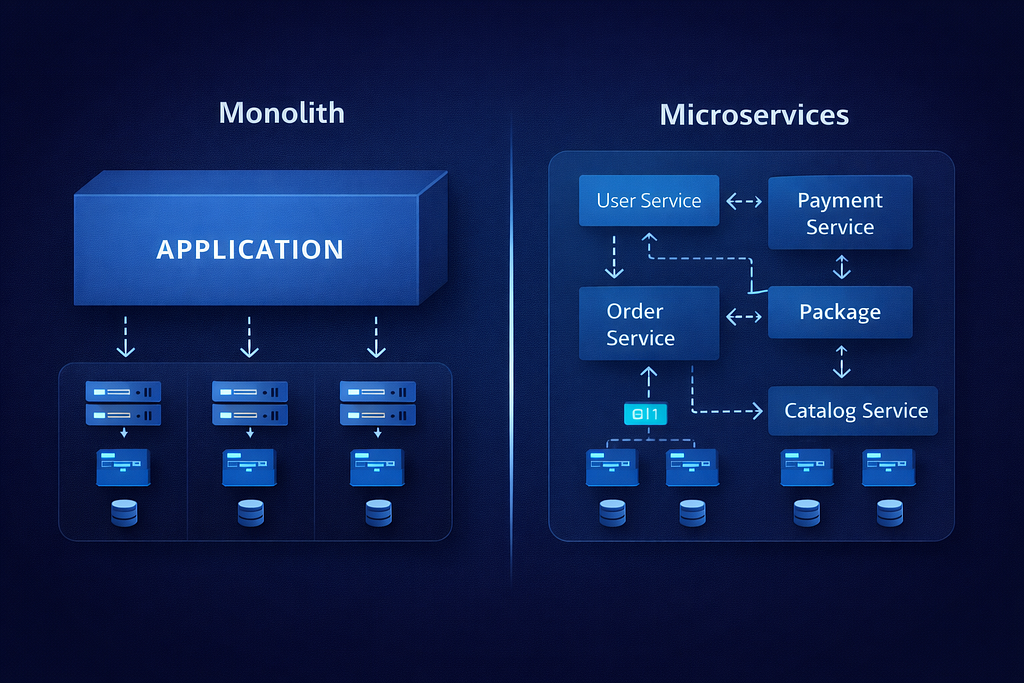
When your application is small, a monolith — one unified codebase where everything is tightly coupled — is perfectly fine. Simple to develop, easy to debug, straightforward to deploy.
The problems appear at scale:
- A bug in one module can crash the entire system
- You can’t scale individual components independently
- Framework upgrades affect everything at once
- Large teams start blocking each other
Microservices solve these problems by splitting the application into small, independently deployable services. An e-commerce platform might have separate services for users, catalog, orders, payments, and notifications — each with its own codebase, database, and deployment pipeline.
But here’s the paradox that many tutorials skip: Microservices don’t eliminate complexity — they move it.
Local complexity (within a single service) decreases. But global complexity — the interactions, dependencies, and failures between dozens or hundreds of services — explodes. Uber was managing thousands of interacting services by 2018, creating what engineers call a “Distributed Big Ball of Mud.”
The lesson: Microservices are a solution to a specific problem. Don’t adopt them until you have that problem.
5. REST APIs: Most Developers Are Doing This Wrong
If you’re building APIs, you’ve probably said “I’m building a REST API.” But most so-called REST APIs aren’t actually REST.
REST (Representational State Transfer) is an architectural style with six constraints:
- Client-Server — Clear separation between UI and data
- Stateless — Each request contains all necessary information
- Cacheable — Responses can be cached for performance
- Uniform Interface — Consistent, predictable API design
- Layered System — Intermediaries (proxies, gateways) are transparent
- Code on Demand — Optional: server can send executable code
The Richardson Maturity Model provides a practical scale for measuring REST compliance:
Level 0 — The Swamp of POX: One URL, POST everything. “Give me data? POST. Create something? POST. Delete? Also POST.” This is technically a web API, but it’s not REST.
Level 1 — Resources: Individual URLs per resource (/users, /products). Better.
Level 2 — HTTP Verbs: Using GET, POST, PUT, DELETE correctly. This is where most “REST APIs” actually live.
Level 3 — HATEOAS: The real REST. Hypermedia as the Engine of Application State.
HATEOAS is the feature most developers skip — and it’s the most important one for long-term API maintainability. A HATEOAS-compliant API includes links in its responses telling the client what it can do next:
{
  "id": 1,
  "name": "Amith",
  "role": "developer",
  "_links": {
    "self": { "href": "/users/1" },
    "update": { "href": "/users/1", "method": "PUT" },
    "projects": { "href": "/users/1/projects" }
  }
}
Think of it like a website: you don’t memorize every URL on Amazon before shopping. You start at the homepage and follow links. HATEOAS gives programs the same navigation capability — the client discovers available actions from the server’s responses, not from hardcoded documentation.
Why this matters for AI: When building tool-calling APIs for LLM agents, HATEOAS principles map directly to how agents should discover capabilities dynamically rather than requiring hardcoded function signatures.
6. Authentication vs Authorization: The Security Distinction That Matters
“Security” is too vague to be useful. The specific distinction every engineer must understand:
Authentication = “Who are you?” (identity)
Authorization = “What can you do?” (permissions)
These are separate systems. Getting them confused causes real vulnerabilities.
The Authentication Options
HTTP Basic Authentication encodes username and password in Base64 and sends them with every request. Simple and lightweight — useful for IoT devices and internal tools. Not recommended for sensitive applications due to inherent vulnerabilities.
API Keys assign a unique token to each client. Fast and convenient, but no expiration by default. If the key is stolen, it’s valid forever unless manually revoked.
JWT (JSON Web Tokens) are digitally signed tokens that contain the user’s claims. The server doesn’t need to store sessions — the token itself contains everything needed to verify identity. Compact, stateless, and widely supported. The standard choice for most modern APIs.
OAuth 2.0 solves a specific problem: how do you give a third-party app limited access to a user’s data without sharing their password? It’s the protocol behind every “Sign in with Google” button. OAuth handles authorization; OpenID Connect (OIDC) extends it with authentication.
The Principle of Least Privilege
The hallmark of mature security thinking: even after a user authenticates, they should only access resources explicitly permitted to them. Every request should be independently authorized.
This isn’t paranoia — it’s containment. A compromise in one area should not cascade into a total system breach.
7. Frontend: State Is Everything
The last layer where engineers vs. coders diverge: state management.
In a modern React application, “state” is the data that determines what the UI shows at any moment. Managing it well is the difference between applications that are fast, predictable, and debuggable — and applications that randomly break when users click things in unexpected orders.
Core principles:
- Group related state — if two variables always update together, they belong in the same state object
- Avoid redundant state — if you can calculate it, don’t store it
- Lift state up — when multiple components need the same data, manage it in their closest common parent
- Avoid deeply nested state — hierarchical data structures are hard to update safely
Redux is the heavy-duty solution for global state — when many parts of your application need access to the same data. But don’t reach for Redux immediately. Most React applications can go far with local component state using useState and useContext hooks.
Web Security Is a Frontend Problem Too
The OWASP Top 10 — the authoritative list of the most critical web application vulnerabilities — includes frontend-relevant risks:
- Broken Access Control: Authorization logic must be enforced server-side, not just client-side
- Injection: User inputs must always be sanitized
- Identification and Authentication Failures: The JWT and OAuth concepts above
- Security Misconfiguration: HTTP security headers, CORS policies, and content security policies
Security isn’t a phase at the end of development — it’s built into every layer.
Putting It All Together: The Engineer’s Mental Model
The journey from Amith’s chaotic folder to a production-grade system follows a clear progression:
Manual file copies → Git commits
Shared Google Drive → Remote repository with access control
"Copy the good parts" → git merge with conflict resolution
Individual scripts → Framework-based architecture
Direct function calls → REST APIs with proper HTTP semantics
No auth → JWT + OAuth 2.0 + least-privilege authorization
Tangled UI logic → Component-based architecture with clean state management
Each upgrade isn’t just a tool change — it’s a mental model shift. From local to distributed. From manual to automated. From “does it work?” to “is it maintainable, secure, and scalable?”
The developers who will be most valuable in the age of AI-generated code aren’t those who write the most lines. They’re those who understand why the invisible architecture exists, when to apply each pattern, and how to evaluate the trade-offs.
Because AI can generate a working authentication endpoint in thirty seconds. It cannot decide whether your 10-person startup needs microservices yet, whether your team should adopt GitFlow or GitHub Flow, or whether that REST API is genuinely RESTful or just RPC with pretty URLs.
That judgment is still — and for a while, will remain — the engineer’s job.
If this resonated with you, follow for more articles on software architecture, backend development, and building systems that actually last.
From Coder to Engineer: The Hidden Skills Every Developer Needs (But Nobody Teaches You) was originally published in Towards AI on Medium, where people are continuing the conversation by highlighting and responding to this story.
