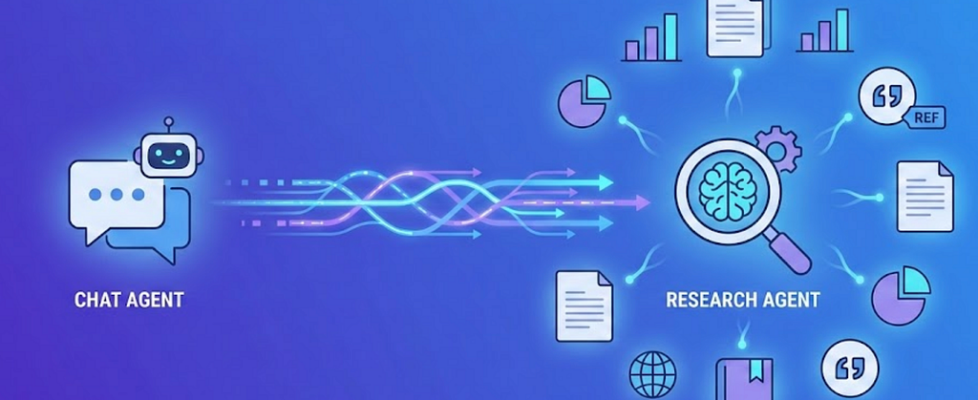
Extend Your Chatbot with Deep Research Using A2A

A practical guide to adding autonomous research capabilities to your existing chatbot using the A2A protocol — no architectural overhaul required.
The complete implementation is available on GitHub.
See the demo to watch it in action.

Deep research has become a flagship feature of modern AI assistants — ChatGPT, Gemini, Claude, and Perplexity all offer it as a built-in capability. Users now expect to conduct comprehensive research and receive well-structured reports with citations — all within the same chat interface they use for quick questions. So when it comes to adding this capability to your own chatbot, the natural question is: do I need to start over? Rebuild the whole thing?
Not at all. Deep research works best as an extension, not a replacement. Your existing chat agent keeps doing what it does well — conversational interaction, quick answers, tool usage. The research capability gets added as a specialized agent that your chat agent can call when needed. Users see one unified interface; under the hood, agents collaborate.
In this post, I’ll show how we extended a Strands-based chatbot with deep research using the A2A (Agent-to-Agent) protocol. No architectural overhaul, no starting over — just a clean integration pattern that lets your existing chatbot delegate research tasks to a purpose-built agent. Let’s look at why this separation matters and how to wire it up.
Why Multi-Agent, Not a Single Agent?
Before jumping into implementation, it’s worth asking: why not just add research capabilities to your existing chat agent? Give it web search tools, a longer system prompt, and call it a day?
You could — but you’ll run into problems quickly.
When One Agent Tries to Do Everything
Let’s see what happens when you try to add research capabilities directly to a chat agent.
User: “What are the latest developments in retrieval-augmented generation?”
Single Agent Approach:
The agent starts searching… fetches 5 articles… reads them all… and now your chat context is bloated with tens of thousands of tokens — search results, article content, and processing notes. When the user asks a simple follow-up like “Can you summarize that in 3 bullets?”, the agent is sluggish, expensive, and sometimes loses track of the original conversation.
Multi-Agent Approach:
The chat agent recognizes this as a research task, delegates to a specialized research agent. The research agent works in its own context, processes everything it needs, and returns a clean report. Your chat agent’s context stays lean — ready for the next question.
This isn’t just a theoretical problem. Let’s look at why the separation matters.
Different Interaction Patterns
Chatbots and research agents serve fundamentally different purposes, even when they use the same underlying tools.
A chat agent is conversational. Users ask a question, get an answer, ask a follow-up, refine their understanding. It’s a back-and-forth dance where context builds incrementally. The agent responds quickly, keeps answers concise, and waits for the next input. A research agent operates in batch mode. It receives a topic, then works autonomously — searching multiple sources, reading full articles, synthesizing information, structuring a report. The user isn’t involved in the middle of this process. They’re waiting for a finished artifact.
Same tools, completely different orchestration. The prompts are different. The control flow is different. Trying to handle both patterns in a single agent leads to confused behavior and bloated system prompts that try to cover every case.
Context Isolation
Here’s the more practical problem: context window pollution.
A research agent doing its job properly will consume a lot of context. It might search the web a dozen times, fetch and read five or six full articles, take notes, and iterate. All of that accumulates. By the time it produces a report, the agent might have processed tens of thousands of tokens of intermediate content.
If this happens inside your chat agent’s context, you’ve got a problem. Your next casual question — “what time is it in Tokyo?” — now comes with tens of thousands of tokens of research baggage. Response quality degrades. Costs go up. The conversation feels sluggish.
The solution is separation. Let the research agent work in its own context, processing whatever it needs to process. When it’s done, it returns the polished report to the chat agent. Your chat context stays lean. The user gets the best of both worlds.
A2A as the Connection Layer
This is where A2A (Agent-to-Agent) protocol comes in. It’s an open standard [1] designed for agents to delegate complex work to other agents.
Why A2A fits this use case: Deep research is a long-running, multi-step task — search sources, read articles, synthesize findings, write a report. A2A is built for exactly this: delegating autonomous work with progress tracking. Unlike protocols focused on tool access (like MCP), A2A treats the research agent as a peer that manages its own workflow and streams updates back.
Your chat agent becomes an orchestrator. When it recognizes a research request, it delegates to the research agent via A2A, streams progress back to the user, and incorporates the final report into the conversation. Clean separation, clear responsibilities.
Connecting the Agents via A2A
Here’s how the pieces fit together:
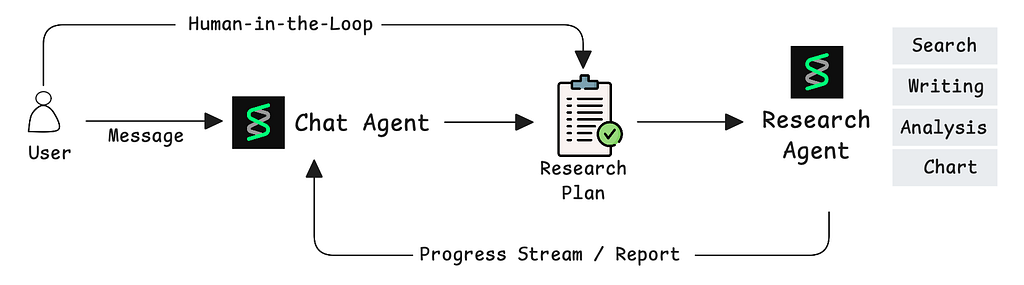
Card), message exchange, and streaming progress updates back to the chat agent. (Image by author)
- User sends a message to the chat agent
- Chat agent recognizes a research request and formulates a plan
- User approves the plan (more on this in the next section)
- Chat agent invokes the research agent via A2A
- Research agent works autonomously, streaming progress updates
- Final report returns to the chat agent and appears in the same interface
We wrap A2A communication [2] in a tool, so the chat agent can invoke research like any other capability:
@tool
async def research_agent(plan: str, context: ToolContext) -> AsyncGenerator:
    """Delegate a research task to the specialized research agent."""
    # Discover the research agent's endpoint
    agent_card = await a2a_client.get_agent_card(RESEARCH_AGENT_URL)
    # Send the research plan via A2A
    async for event in a2a_client.send_message(
        url=agent_card.url,
        message={
            "role": "user",
            "content": plan,
            "metadata": {
                "session_id": context.session_id,
                "user_id": context.user_id,
            }
        }
    ):
        if event.type == "progress":
            yield {"type": "research_step", "content": event.content}
        elif event.type == "complete":
            yield {"type": "research_report", "content": event.result}
The chat agent treats this as just another tool — the LLM decides when to use it and what plan to pass. A2A handles discovery, authentication, and streaming.
Human-in-the-Loop: Don’t Skip This
Deep research is a batch operation. Once it starts, the agent will spend 10+ minutes autonomously searching, reading, and synthesizing. If the research plan doesn’t align with what the user actually wanted, that’s a lot of wasted time and compute. This is why human-in-the-loop isn’t optional — it’s essential.
Before the chat agent calls the research agent, it presents the research plan to the user. The user sees what topics will be covered, what questions will be investigated, and what sections the report will include. They can approve, decline, or ask for adjustments.
We use Strands Agents Interrupts [3] to pause execution and wait for user approval:
class ResearchApprovalHook(CallbackHandler):
    async def on_tool_start(self, tool_name: str, tool_input: dict, event: Event):
        if tool_name != "research_agent":
            return
plan = tool_input.get("plan", "")
        approval = event.interrupt(
            "research-approval",
            reason={
                "tool_name": tool_name,
                "plan": plan,
            }
        )
        if approval.response == "declined":
            event.cancel_tool = "User declined the research plan"
When the chat agent tries to invoke research_agent, execution pauses. The frontend displays an approval modal showing the plan. The user clicks “Approve” or “Decline.” Only on approval does the A2A call proceed.
If you’re using LangChain, you can achieve similar behavior with HumanInTheLoopMiddleware[4].
Streaming Progress: Keeping Users in the Loop
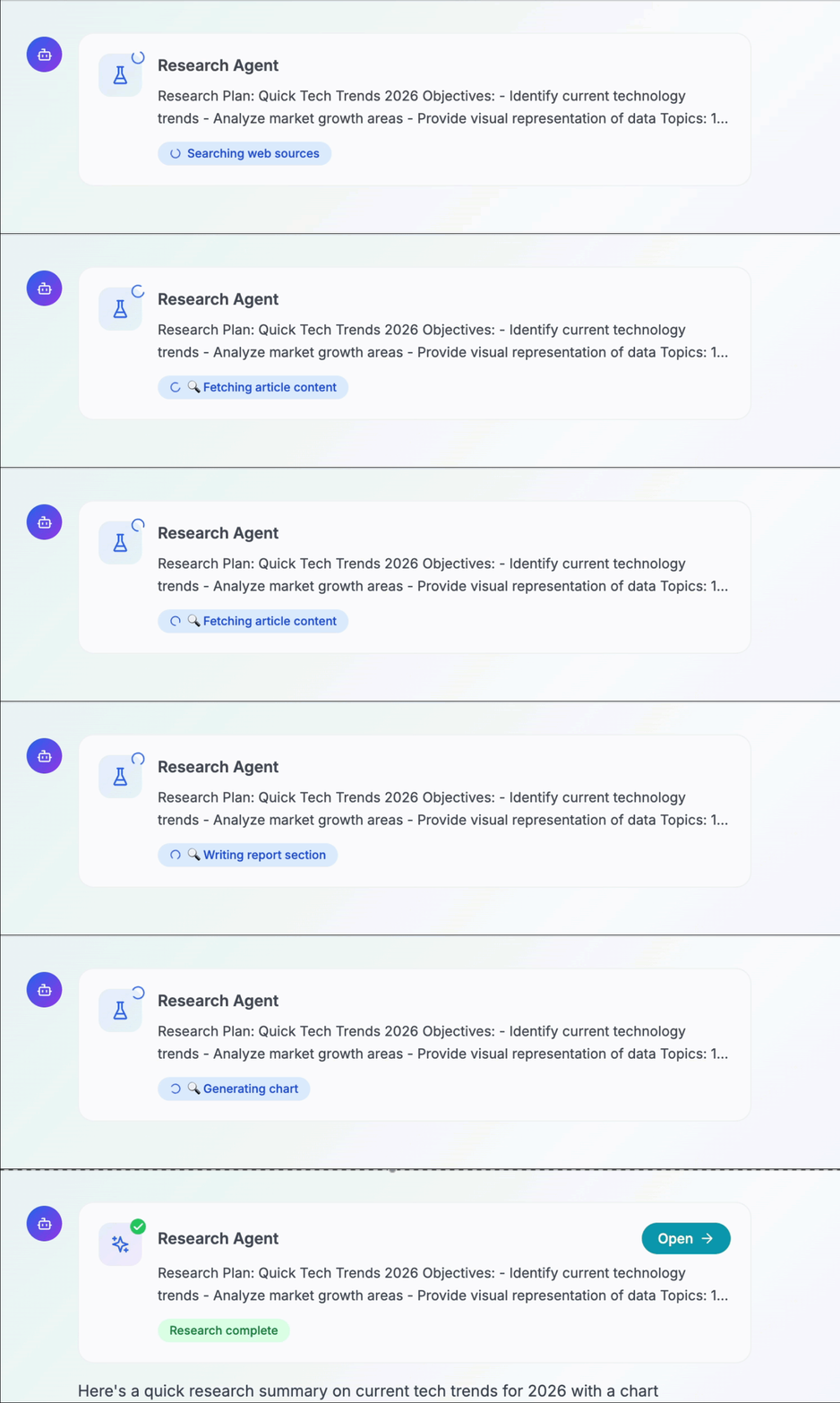
A 10+ minute batch job with no feedback is a bad user experience. Users will wonder if it’s working, if it’s stuck, or if they should refresh the page. The research agent should stream progress updates as it works. This keeps users informed and engaged.
The research agent emits progress events as it completes each step:
# Research agent emits progress as it works
async def execute_research(plan: str):
    yield {"type": "progress", "content": "Searching web sources..."}
    sources = await web_search(plan.topic)
    for source in sources:
        yield {"type": "progress", "content": f"Reading {source.title}..."}
        content = await fetch_url(source.url)
    yield {"type": "progress", "content": "Writing report..."}
    report = await write_report(sources)
yield {"type": "complete", "result": report}
These events flow back through A2A to the chat agent. Inside the research_agent tool we defined earlier, the streaming loop forwards these to the frontend:
async for event in a2a_client.send_message(url, message):
    # Streamed Response handling
    if event.type == "progress":
        await send_to_frontend({
            "type": "research_step",
            "content": event.content
        })
    elif event.type == "complete":
        return event.result
The frontend can then display a live progress indicator — showing users exactly what the research agent is doing at each moment.
What This Enables
With this setup, users get a seamless experience in a single interface:
- Quick question → deep dive: Start with “What is RAG?” then ask for a full research report
- Iterative research: Get a report → discuss findings in chat → request follow-up investigation
- Context switching without switching apps: Research one topic, chat casually, research another — all in one conversation
The chat agent handles the back-and-forth. The research agent handles the heavy lifting. Users don’t need to know there are two agents — they just see a chatbot that can do research when asked.
Conclusion
Adding deep research to your chatbot doesn’t require starting over. By treating it as a separate agent connected via A2A, you keep your existing chat agent lean while adding powerful new capabilities.
The pattern is straightforward:
- Chat agent recognizes research requests and delegates via A2A
- User approves the plan before execution begins
- Research agent works autonomously, streaming progress back
- Final report appears in the same chat interface
This post covered the core integration pattern. For implementation details — research agent tools, citation formatting, chart generation, session management — see the GitHub repository [5].
References
[1] A2A Protocol Working Group, Agent-to-Agent (A2A) Protocol Specification (2026), https://a2a-protocol.org/latest/
[2] Strands Agents SDK, Agent-to-Agent Communication Documentation (2026), https://strandsagents.com/latest/documentation/docs/user-guide/concepts/multi-agent/agent-to-agent/
[3] Strands Agents SDK, Interrupts Documentation (2026), https://strandsagents.com/latest/documentation/docs/user-guide/concepts/interrupts/
[4] LangChain, Middleware (2026), https://reference.langchain.com/python/langchain/middleware
[5] AWS Samples, Sample Strands Agent with AgentCore (2026), https://github.com/aws-samples/sample-strands-agent-with-agentcore
Extend Your Chatbot with Deep Research Using A2A was originally published in Towards AI on Medium, where people are continuing the conversation by highlighting and responding to this story.
