Essential Python Libraries for Data Science

Part 1: Core Data Foundations with NumPy and Pandas
Introduction
Modern data science discussions often start with models. That is usually where things go wrong.
In real production data science workflows, models are rarely the first point of failure. When data pipelines break, predictions drift, or results become impossible to reproduce, the root cause almost always sits much lower in the stack. It lives in how data is represented, how numerical computations are performed, and how transformations and feature engineering are chained together.
Python did not become dominant in data science and machine learning because it made modeling easier. It became dominant because it provided a coherent foundation for numerical computation and structured data handling. Long before visualization libraries, machine learning frameworks, or automated platforms enter the picture, a small set of Python libraries for data science quietly determines whether anything built on top will survive scale, complexity, and production constraints.
This first part focuses on those foundations. Not from a tutorial perspective, but from a system-design point of view. Understanding these layers is what separates exploratory notebooks from production-grade data science systems.
What This Series Covers
This is a six-part technical series that walks through the Python ecosystem for data science, moving from foundational data handling to advanced modeling and AI systems used in real production environments.
Part 1: Core Data Foundations
Covers NumPy and Pandas, the libraries that define how data is stored, transformed, and computed in Python. This part focuses on numerical correctness, structured data manipulation, and the boundary between computation and data semantics.
Part 2: Visualization and Diagnostics
Explores Matplotlib, Seaborn, and Plotly, with emphasis on data understanding, assumption validation, diagnostics, and clear result explanation.
Part 3: Classical Machine Learning
Focuses on scikit-learn and modeling patterns for structured and tabular data, including preprocessing, pipelines, evaluation, and model explainability.
Part 4: Gradient Boosting in Production
Covers XGBoost, LightGBM, and CatBoost, explaining why gradient boosting dominates tabular machine learning and how these systems are tuned, deployed, and governed in real environments.
Part 5: AutoML and Scalable Experimentation
Examines PyCaret, Auto-sklearn, H2O, TPOT, Optuna, and FLAML, focusing on accelerating experimentation without sacrificing control, transparency, or validation rigor.
Part 6: Deep Learning and NLP Systems
Concludes with TensorFlow, PyTorch, FastAI, and modern NLP and transformer frameworks, showing how unstructured data and language models fit into production data science pipelines.
Each part stands on its own. Together, they form a system-level view of Python-based data science, designed for practitioners who care about correctness, scale, and long-term maintainability.
If you work with Python in real data systems, follow this series to go deeper into how production-grade data science is actually built.
Before any structured data manipulation, joins, or feature engineering can happen, numerical computation has to be reliable. Aggregations, transformations, scaling, and simulations all reduce to operations on numbers in memory. In Python, that responsibility sits squarely with NumPy, making it the natural place to start.
NumPy — Numerical Operations and Array Manipulation
NumPy provides high-performance numerical computation in Python through the ndarray, a fixed-type, contiguous memory structure optimized for vectorized operations. Its role is narrowly defined but foundational: executing numerical logic efficiently and predictably at scale.
As analytical workloads moved beyond simple aggregation into simulation, optimization, and linear algebra, Python’s native lists and loops became a bottleneck. They were slow, memory-inefficient, and poorly suited for matrix-based computation. NumPy addressed this by delegating computation to optimized low-level routines while exposing a compact, expressive interface.
In production systems, NumPy underpins numerical workloads such as portfolio simulations, pricing calculations, loss distribution modeling, feature scaling, and time-series transformations. Even when developers work primarily with higher-level libraries, data is often converted into NumPy arrays before computation.
import numpy as np

returns = np.array([0.002, -0.001, 0.003, -0.002, 0.001])
initial_value = 5_000_000

portfolio_values = initial_value * np.cumprod(1 + returns)
print(portfolio_values)
This pattern, based on vectorized arithmetic and cumulative operations, is common in backtesting, stress testing, and pricing workflows. The absence of explicit loops is not stylistic; it enables consistent performance as data size grows.
In real deployments, NumPy requires care. Data types affect precision and overflow behavior. Broadcasting rules can silently introduce logical errors when array shapes are misunderstood. Memory layout also influences performance at scale. As a result, experienced teams treat NumPy arrays as immutable computational artifacts rather than mutable business objects.
NumPy is not a modeling tool and does not encode business semantics. Its importance lies in the fact that nearly every serious data science library in Python depends on it or mirrors its computational model.
Pandas — Structured Data Analysis and Transformation
While NumPy handles numerical computation efficiently, real-world data is rarely just numbers in clean arrays. It arrives with missing values, mixed data types, timestamps, identifiers, and inconsistent schemas. Pandas exists to handle this reality.
Pandas introduces the DataFrame, a labeled, column-oriented structure designed for structured data manipulation. Built on top of NumPy, it adds indexing, alignment, grouping, and time-aware operations that are essential for working with real datasets.
In production data science systems, Pandas is where most logic actually lives. Feature engineering, joins, aggregations, filtering, and validation are all expressed here. By the time data reaches a model, much of the domain understanding has already been encoded through Pandas transformations.
This expressive power comes with responsibility. Poorly designed Pandas pipelines can be slow, memory-intensive, and difficult to reason about. Mature teams therefore keep transformations explicit, reproducible, and well-structured.
How NumPy and Pandas Work Together
NumPy and Pandas form a layered system rather than competing tools.
Pandas uses NumPy arrays internally to store column data. When numerical operations are applied to Pandas objects, they are typically executed by NumPy under the hood. Pandas provides structure and semantics, while NumPy provides computation.
In performance-sensitive workflows, data is often pushed from Pandas into NumPy for heavy numerical work and then wrapped back into Pandas for inspection, reporting, or downstream processing.
Understanding this boundary is critical for building efficient and maintainable pipelines.
End-to-End Example Using an Inbuilt Dataset
The following example demonstrates how NumPy and Pandas are used together in a realistic analytical workflow. The dataset is loaded from scikit-learn and is available without external downloads.
Step 1: Load and Structure the Data
import numpy as np
import pandas as pd
from sklearn.datasets import load_breast_cancer

data = load_breast_cancer()
df = pd.DataFrame(data.data, columns=data.feature_names)

df["target"] = data.target
df.head()
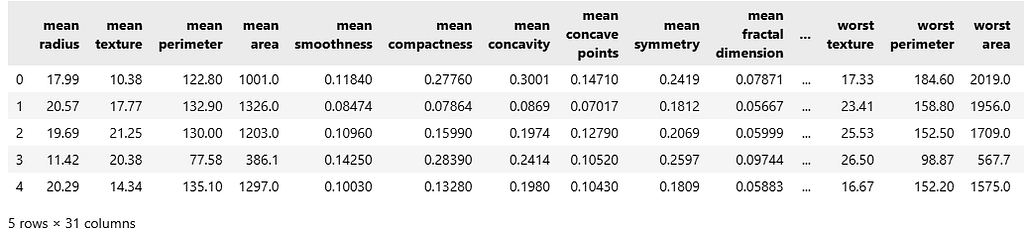
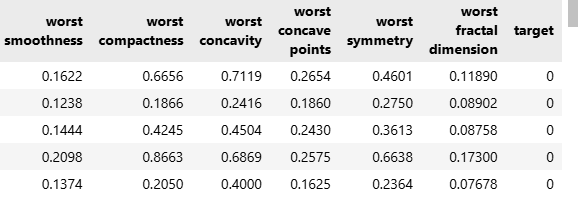
At this stage, Pandas provides structure, labels, and interpretability.
Step 2: Basic Inspection and Validation
df.isnull().sum().head()
df.describe().iloc[:, :5]

These checks are standard in early pipeline stages to validate completeness and understand distributions.
Step 3: Feature Selection
features = [
    "mean radius",
    "mean texture",
    "mean perimeter",
    "mean area"
]

X = df[features]
y = df["target"]
Pandas handles alignment and selection cleanly at this stage.
Step 4: Numerical Transformation with NumPy
X_np = X.to_numpy()

means = np.mean(X_np, axis=0)
stds = np.std(X_np, axis=0)

X_normalized = (X_np - means) / stds
X_normalized[:5]

This step highlights the transition from structured data handling to raw numerical computation.
Step 5: Back to Pandas for Interpretability
X_normalized_df = pd.DataFrame(
    X_normalized,
    columns=features
)

X_normalized_df.head()
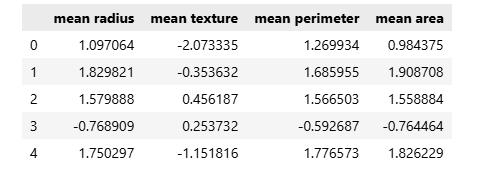
Once computation is complete, results are wrapped back into Pandas for clarity and downstream use.
Why This Foundation Matters
Every modeling framework, visualization tool, and automation system builds on top of these foundations. Weak understanding at this level leads to slow pipelines, subtle bugs, and systems that fail under scale.
NumPy ensures numerical correctness and performance. Pandas ensures structure, clarity, and expressive data manipulation. Together, they define how data science actually happens in Python, long before any model is trained.
Closing Thoughts for Part 1
Data science maturity does not begin with algorithms. It begins with how data is represented, transformed, and computed. NumPy and Pandas sit at this foundation, shaping everything that follows, from exploratory analysis to production deployment.
Mastery of these libraries is not about memorizing APIs. It is about understanding when to rely on structure, when to drop down to raw computation, and how early data decisions influence correctness, performance, and reproducibility across an entire system.
If you found this perspective useful, consider clapping to signal value, leaving a comment to share how you use NumPy and Pandas in real workflows, or saving the article for reference. Following the series will keep future parts easy to find as it progresses from foundations to production-grade systems.
Up next: Part 2 will focus on visualization and diagnostics — how Matplotlib, Seaborn, and Plotly are used to validate assumptions, catch data issues early, and explain results before models ever enter production.
Essential Python Libraries for Data Science was originally published in Towards AI on Medium, where people are continuing the conversation by highlighting and responding to this story.
