Deploy voice agents with Pipecat and Amazon Bedrock AgentCore Runtime – Part 1

This post is a collaboration between AWS and Pipecat.
Deploying intelligent voice agents that maintain natural, human-like conversations requires streaming to users where they are, across web, mobile, and phone channels, even under heavy traffic and unreliable network conditions. Even small delays can break the conversational flow, causing users to perceive the agent as unresponsive or unreliable. For use cases such as customer support, virtual assistants and outbound campaigns, a natural flow is critical for user experience. In this series of posts, you will learn how streaming architectures help address these challenges using Pipecat voice agents on Amazon Bedrock AgentCore Runtime.
In Part 1, you will learn how to deploy Pipecat voice agents on AgentCore Runtime using different network transport approaches including WebSockets, WebRTC and telephony integration, with practical deployment guidance and code samples.
Benefits of AgentCore Runtime for voice agents
Deploying real-time voice agents is challenging: you need low-latency streaming, strict isolation for security, and the ability to scale dynamically to unpredictable conversation volume. Without an appropriately designed architecture, you can experience audio jitter, scalability constraints, inflated costs due to over-provisioning, and increased complexity. For a deeper dive into voice agent architectures, including cascaded (STT → LLM → TTS) and speech-to-speech approaches refer to our previous post, Building real-time voice assistants with Amazon Nova Sonic compared to cascading architectures.
Amazon Bedrock AgentCore Runtime addresses these challenges by providing a secure, serverless environment for scaling dynamic AI agents. Each conversation session runs in isolated microVMs for security. It auto-scales for traffic spikes, and handles continuous sessions for up to 8 hours, making it ideal for long, multi-turn voice interactions. It charges only for resources actively used, helping to minimize costs associated with idle infrastructure.
Pipecat, an agentic framework for building real-time voice AI pipelines, runs on AgentCore Runtime with minimal setup. Package your Pipecat voice pipeline as a container and deploy it directly to AgentCore Runtime. The runtime supports bidirectional streaming for real-time audio, and built-in observability to trace agent reasoning and tool calls.
AgentCore Runtime requires ARM64 (Graviton) containers, so make sure your Docker images are built for the linux/arm64 system.
Streaming architectures for voice agents on AgentCore Runtime
This post assumes your familiarity of common voice agent architectures: specifically the cascaded models approach, where you connect speech-to-text (STT) and text-to-speech (TTS) models in a pipeline, and the speech-to-speech model approach, like Amazon Nova Sonic. If you are new to these concepts, start with our earlier blog posts on the two foundational approaches: cascaded and speech-to-speech before continuing.
When building voice agents, latency is a critical consideration, determining how natural and reliable a voice conversation feels. Conversations require near-instant responses, typically under one second end-to-end, to maintain a fluid, human-like rhythm.
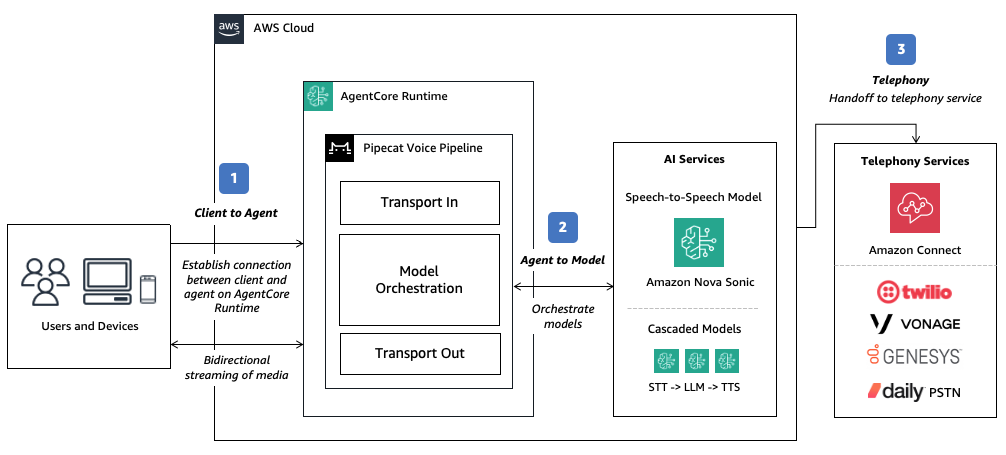
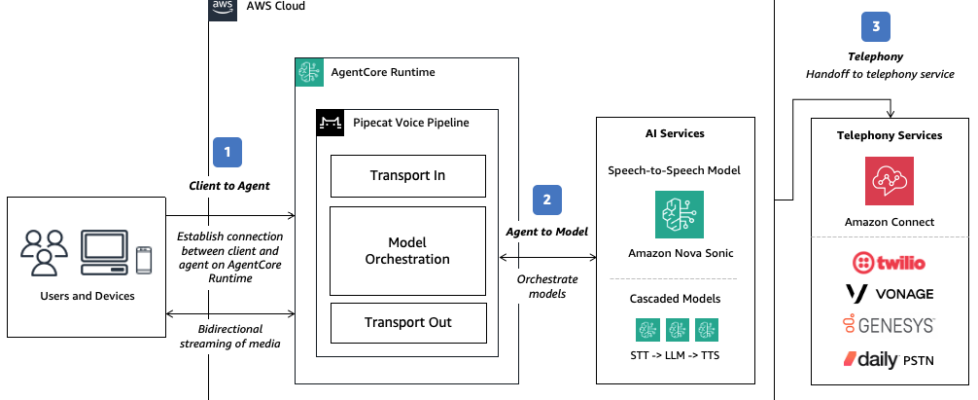
To achieve low latency, you need to consider bi-directional streaming on multiple paths, including:
- Client to Agent: Your voice agents will run on devices and applications, from web browsers and mobile apps to edge hardware, each with unique network conditions.
- Agent to Model: Your voice agents rely on bidirectional streaming to interact with speech models. Most speech models expose real-time WebSocket APIs, which your agent runtime or orchestration framework can consume for audio input and text or speech output. Model selection plays a key role in achieving natural responsiveness. Select models like Amazon Nova Sonic (or Amazon Nova Lite in a cascaded pipeline approach) that are optimized for latency and provides a fast Time-to-First-Token (TTFT).
- Telephony: For traditional inbound or outbound calls handled through contact centers or telephony systems, your voice agent must also integrate with a telephony provider. This is typically achieved through a handoff and/or Session Interconnect Protocol (SIP) transfer, where the live audio stream is transferred from the telephony system to your agent runtime for processing.
In Part 1 of this series, we will focus on the Client to Agent connection and how to minimize the first-hop network latency from your edge device to your voice agent and explore additional considerations in relation to other components of voice agent architecture.
To illustrate these concepts, we will explore four network transport approaches with considerations for:
- How users interface with your voice agents (web/mobile applications or phone calls)
- Performance consistency and resilience across variable network conditions
- Ease of implementation
| Approach | Description | Performance consistency | Ease of implementation | Suitable for |
|---|---|---|---|---|
| WebSockets | Web and mobile applications connects directly to your voice agents via WebSockets. | Good | Simple | Prototyping and lightweight use cases. |
| WebRTC (TURN-assisted) | Web and mobile applications connects directly to your voice agents via WebRTC. | Excellent | Medium | Production use cases with latency derived from direct connection of the client to the runtime environment relayed via Traversal Using Relays around NAT (TURN) servers. |
| WebRTC (managed) | Web and mobile applications connect to your voice agents through an advanced, globally distributed infrastructure via WebRTC. | Excellent (Global distribution) | Simple | Production use cases with latency optimization offloaded to specialized providers with globally distributed network and media relays. Offers additional capabilities such as observability and multi-participant calls. |
| Telephony | Voice agents are accessed through traditional phone calls. | Excellent | Medium | Contact center and telephony use cases. Latency may be dependent on telephony provider. |
Example approach: Using WebSockets bi-directional streaming
You can start with WebSockets as the simplest approach: it natively supports most clients and AgentCore Runtime. Deploy Pipecat voice agents on AgentCore Runtime using persistent, bidirectional WebSocket connections for audio streaming between client devices and your agent logic.
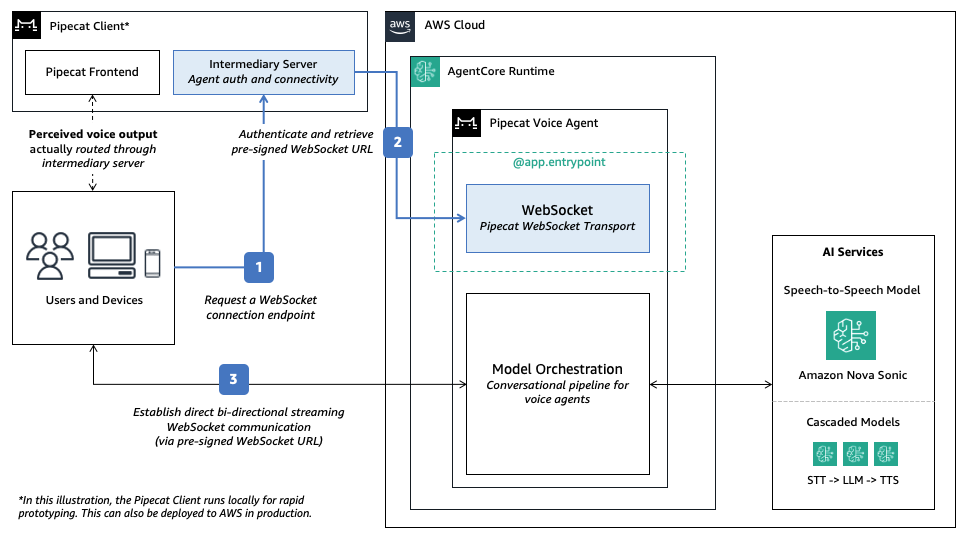
The connection follows a straightforward three-step flow:
- Client requests a WebSocket endpoint: The client first sends a POST request to an intermediary server (/server) to obtain a secure WebSocket connection endpoint.
- Intermediary server handles AWS authentication: The intermediary server on the Pipecat pre-built frontend uses the AWS SDK to generate an AWS SigV4 pre-signed URL with embedded credentials as query parameter. For example:
X?-Amz-Algorithm=AWS4-HMAC-SHA256&X-Amz-Credential= - Client establishes direct connection: Using the authenticated pre-signed URL, the client connects directly to the agent on AgentCore Runtime and streams bi-directional audio, bypassing the intermediary server for subsequent communications.
You use Pipecat’s WebSocket transport to expose an endpoint at the /ws path as required by AgentCore Runtime. The architecture separates credential management from agent logic for secure client access without exposing AWS credentials directly to browser applications.
To learn more, try the Pipecat on AgentCore code sample using WebSockets transport.
Example approach: Using WebRTC bi-directional streaming with TURN assistance
While WebSockets works for simple deployments, WebRTC can offer improved performance. It is designed to send audio using a fast, lightweight network path that minimizes delay. It typically uses UDP for its low latency and smoother real-time experience, and provides improved resilience across variable network conditions. If UDP is not available, WebRTC automatically falls back to TCP, which is more reliable but can introduce slight delays: less ideal for voice, but helpful when connectivity is restricted. This reliability comes from Interactive Connectivity Establishment (ICE) servers, which negotiate direct peer-to-peer paths through NATs and firewalls, falling back to streaming media relay via Traversal Using Relays around NAT (TURN) servers when direct connections cannot be made.
Pipecat supports SmallWebRTCTransport for direct peer-to-peer WebRTC connections between clients and agents on AgentCore Runtime. Compared to comprehensive WebRTC architectures requiring dedicated media servers (such as Selective Forwarding Units or SFUs), this lightweight transport can run directly within AgentCore Runtime, removing the need for complex media server management.
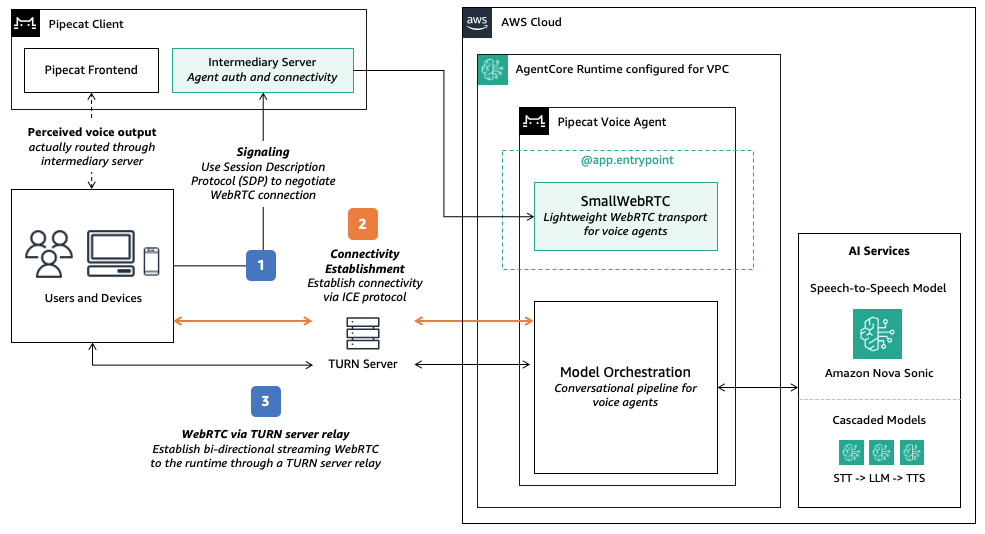
In this scenario, connection flow operates as follows:
- Signaling: Client sends a Session Description Protocol (SDP) offer to the intermediary server, which forwards it to the /invoke/ endpoint in AgentCore Runtime. The agent
@app.entrypointhandler processes the offer and returns an SDP answer containing media capabilities and network candidates. - Connectivity Establishment: To establish a direct connection, both the client and the agent use Interactive Connectivity Establishment (ICE) protocol in order to discover the optimal network path. AgentCore Runtime supporting Traversal Using Relays around NAT (TURN) relayed connections. The protocol attempts connectivity in this order:
- Direct Connection: Connect peer-to-peer using local network addresses. This path is not supported on AgentCore Runtime as the runtime environment cannot be assigned to a public IP address.
- Session Traversal Utilities for NAT (STUN) assisted connection: Use a STUN server to discover public IP/port through Network Address Translation (NAT) and attempt direct connectivity. This path requires both inbound and outbound UDP traffic which is not currently supported as AWS NAT Gateways uses symmetric NAT, which prevents STUN-based direct connectivity from succeeding.
- Traversal Using Relays around NAT (TURN) relayed connection: Route media through a TURN relay server. Configure TURN using managed services (such as Cloudflare or Twilio), Amazon Kinesis Video Streams (KVS) or self-hosted solutions (such as coturn in your VPC). This path is recommended on AgentCore Runtime configured with a VPC (see details below).
- Connection through VPC: Once connectivity is established, traffic will route from the client to the runtime environment via the VPC (more details in the following section).
To learn more, try the Pipecat on AgentCore code sample using WebRTC transport.
Configuring AgentCore Runtime on VPC for WebRTC connectivity
The code sample demonstrates a simple voice agent using WebRTC. First, you configure ICE_SERVER_URLS environment variables in both: 1) the intermediary server on the Pipecat pre-built frontend (/server) and 2) the runtime environment (/agent). This allows bidirectional traffic between them.
Next, you deploy your agents to AgentCore Runtime with VPC networking configured to allow for UDP transport to TURN servers. For security, you expose the runtime to a private VPC subnet, with a NAT Gateway in the public subnet to route internet access, as illustrated below.
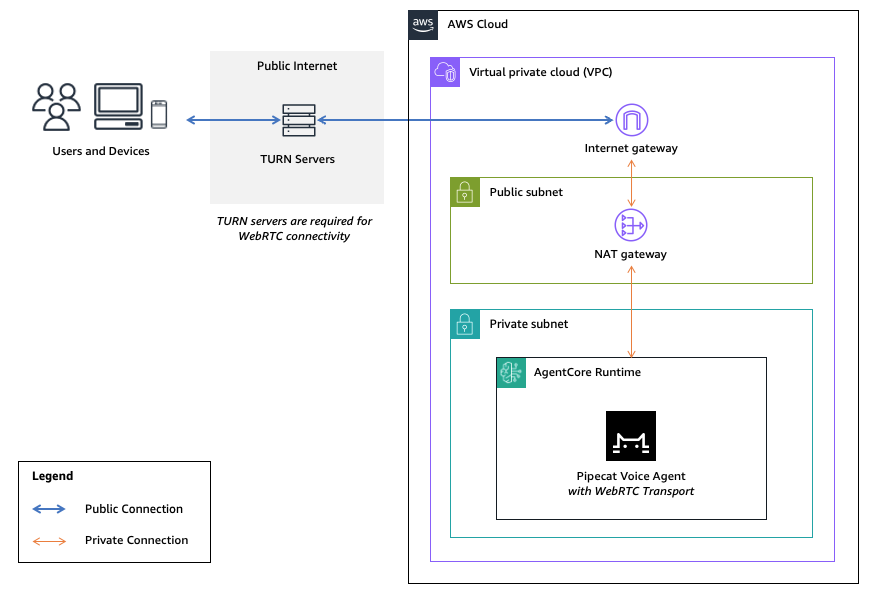
With this approach, you can configure ICE servers for full WebRTC connectivity, with both STUN and UDP with TCP fallback. For example, you can configure Cloudflare managed TURN as follows:
# Configure agent/.env and server/.env
ICE_SERVER_URLS=stun:stun.cloudflare.com,turn:turn.cloudflare.com:53,turn:turn.cloudflare.com:3478,turn:turn.cloudflare.com:5349
Using AWS-native TURN with Amazon Kinesis Video Streams (KVS)
For a fully AWS-native alternative to managed TURN services, Amazon Kinesis Video Streams (KVS) handles TURN infrastructure without third-party dependencies. It provides temporary, auto-rotating TURN credentials via the GetIceServerConfig API, avoiding third-party dependencies for NAT traversal. The flow works as follows:
- One-time setup: Create a KVS signaling channel. The channel is used only for TURN credential provisioning — your agent continues to use Pipecat’s WebRTC transport for signaling and media.
- At connection time: Your agent calls
GetSignalingChannelEndpointto get the HTTPS endpoint, then callsGetIceServerConfigto retrieve temporary TURN credentials (URIs, username, password). - Configure the peer connection: Pass the returned credentials to your
RTCPeerConnectionas ICE servers. TURN traffic flows through KVS-managed infrastructure.
Considerations when using KVS managed TURN
| Factor | KVS Managed TURN | Third-party TURN |
|---|---|---|
| AWS native | Yes — no external dependency | No — requires external account |
| Credential management | Automatic rotation | Manual or provider-managed |
| Set up | Create signaling channel + API calls | Configure environment variables |
| Best for | AWS centric deployments | Simplicity or existing provider relationships |
Additional considerations:
- Cost: Each active signaling channel costs $0.03/month. At low to moderate volume, this is negligible.
- Rate limit:
GetIceServerConfigis limited to 5 transactions per second (TPS) per channel. For high-volume deployments exceeding 100,000 sessions per month, implement a channel pooling strategy where you distribute requests across multiple channels:channels_needed = ceil(peak_new_sessions_per_second / 5). - No PrivateLink: The VPC still requires internet egress (via NAT Gateway) to reach KVS TURN endpoints.
- Credential lifetime: KVS TURN credentials are temporary and auto-rotated, so you do not need to manage credential rotation.
To learn more, try the code sample using KVS managed TURN.
Example approach: Using managed WebRTC on AWS Marketplace
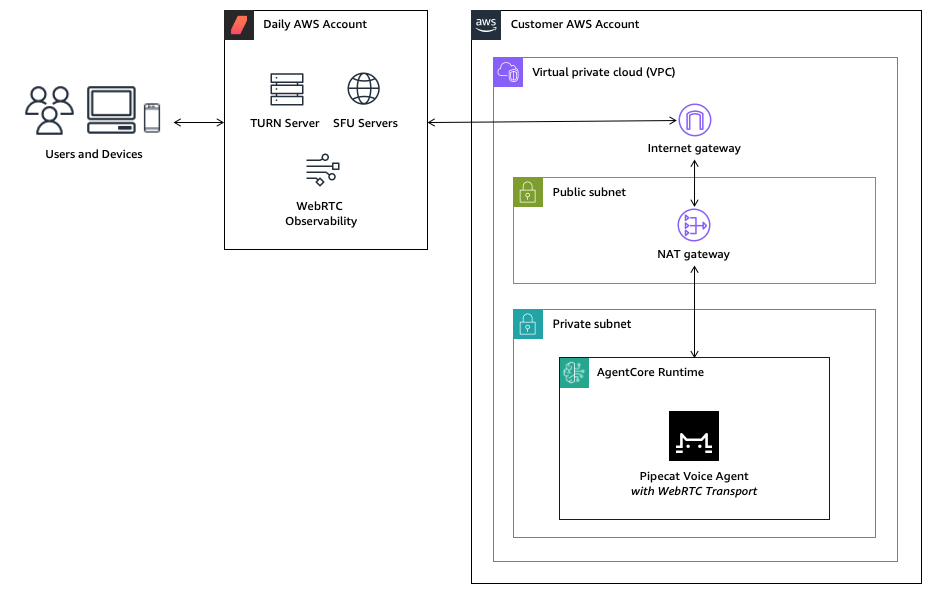
While direct WebRTC offers control, managed WebRTC providers commonly provide TURN servers and globally distributed SFUs to facilitate reliable connectivity and low-latency media routing. It also provides additional features such as built-in analytics and observability, and support for multi-participant rooms beyond 1:1 agent conversations. For production voice agents at scale, consider managed providers available on AWS Marketplace, such as Daily. Daily runs its globally distributed WebRTC infrastructure on AWS offering multiple deployment models:
- Fully managed SaaS: You connect to Daily’s hosted infrastructure via public API endpoints. This is ideal for rapid deployment and environments where operational simplicity is prioritized. In this scenario, your agent in AgentCore Runtime can simply connect to the managed WebRTC infrastructure via the public internet.
- Customer VPC deployment: You deploy Daily’s media servers directly into your VPC for complete network control and compliance with strict data residency requirements. In this scenario, you configure AgentCore Runtime for VPC as outlined above.
- SaaS with AWS PrivateLink: You connect to Daily’s hosted infrastructure and configure AWS PrivateLink so that traffic flows through VPC endpoints directly to Daily’s managed infrastructure without traversing the public internet, reducing latency while maintaining network isolation to the AWS backbone network. In this scenario, you configure AgentCore Runtime for VPC as outlined above.
To learn more, contact your AWS account team to explore Daily on AWS Marketplace or try the code sample using Daily transport and its DAILY_API_KEY on the fully managed SaaS option.
Example approach: Using a telephony provider
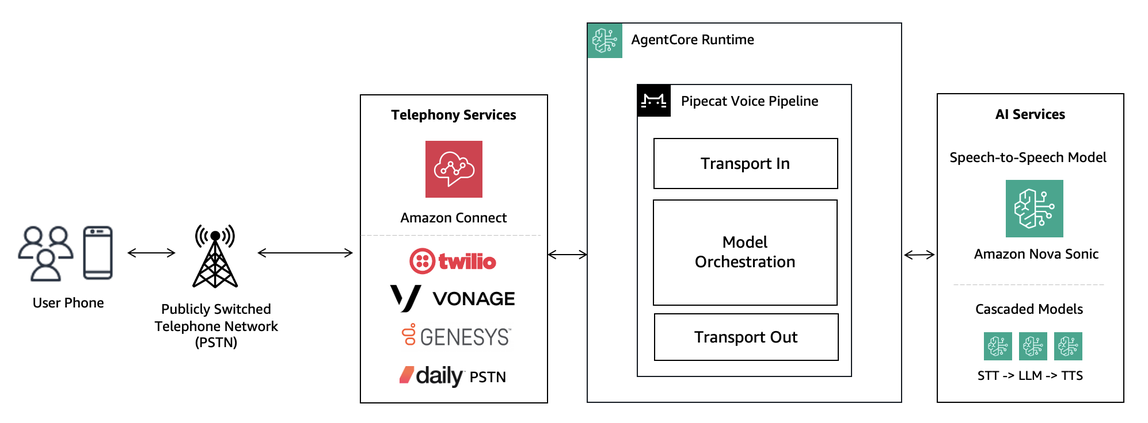
While WebRTC excels for web and mobile channels, telephony handoff allows traditional Public Switched Telephone Network (PSTN) integration for contact centers, IVR replacement, and outbound campaigns. For real-time conversation, your agent runtime must maintain a persistent, bidirectional audio stream with your speech models, business logic, and telephony provider. These providers offer managed voice services that handle the complexity of traditional telephony infrastructure through simple APIs. Depending on the capabilities of the telephony provider, you integrate to them using either Session Initiation Protocol (SIP) or streaming WebSocket or WebRTC protocols. Pipecat transports and serializers provide connectors for implementation.
To learn more, see Pipecat Guide on Telephony and Building AI-Powered Voice Applications: Telephony Integration Guide.
Conclusion
AgentCore Runtime provides a secure and serverless infrastructure to scale voice agents reliably. In this post, you learned how low latency is critical for natural conversations, and key considerations for different transport modes: WebSockets, TURN-assisted WebRTC, managed WebRTC and telephony integrations, based on your latency, reliability, and usage requirements. When evaluating transport options, start simple with WebSockets for rapid prototyping, then consider WebRTC with AgentCore on VPC mode or managed providers for production deployments. If your voice agents intend to handle telephony or contact center use cases, consider available integrations to telephony providers for your implementation.
In Part 2 of this series, you will explore additional considerations beyond network transport: covering streaming strategies across agent-to-model communication, tool execution, memory, and retrieval to achieve optimal end-to-end latency.
Get started with the Pipecat on AgentCore code samples and hands-on workshop below and pick the transport layer that fits your use case:
- Pipecat on AgentCore (WebSockets)
- Pipecat on AgentCore (WebRTC) with managed TURN
- Pipecat on AgentCore (WebRTC) with Amazon KVS
- Pipecat on AgentCore (WebRTC) with Daily
- Building voice agents with Pipecat, Amazon Bedrock and AgentCore for a hands-on experience
For teams preferring more infrastructure control, the Guidance for Building Voice Agents on AWS on Amazon ECS is also available as a containerized deployment option.
Additional Resources
- Comparing cascaded and speech-to-speech approaches to building voice agents
- Building intelligent AI voice agents with Pipecat and Amazon Bedrock – Part 1
- Building intelligent AI voice agents with Pipecat and Amazon Bedrock – Part 2
- Building AI-powered voice applications: telephony integration guide
About the authors
 Kwindla Hultman Kramer is the Co-founder and CEO at Daily, pioneering low-latency real-time voice, video, and multimodal AI infrastructure. A leading voice AI thought leader, he created the open-source Pipecat framework for production voice agents and shares insights at voice AI meetups and his X account (@kwindla).
 Paul Kompfner is a Member of Technical Staff at Daily, where he is on the team that maintains the Pipecat open source framework. He is an expert in streaming infrastructure and voice-based agentic systems. He frequently collaborates with AWS and the voice AI ecosystem to deliver first-class support for voice models and hosting platforms to enable scalable real-time voice AI on Pipecat.
 Kosti Vasilakakis is a Principal PM at AWS on the Agentic AI team, where he has led the design and development of several Bedrock AgentCore services from the ground up, including Runtime. He previously worked on Amazon SageMaker since its early days, launching AI/ML capabilities now used by thousands of companies worldwide. Earlier in his career, Kosti was a data scientist. Outside of work, he builds personal productivity automations, plays tennis, and explores the wilderness with his family.
 Lana Zhang is a Senior Solutions Architect in the AWS World Wide Specialist Organization AI Services team, specializing in AI and generative AI with a focus on use cases including content moderation and media analysis. She’s dedicated to promoting AWS AI and generative AI solutions, demonstrating how generative AI can transform classic use cases by adding business value. She assists customers in transforming their business solutions across diverse industries, including social media, gaming, ecommerce, media, advertising, and marketing.
 Sundar Raghavan is a Solutions Architect at AWS on the Agentic AI team. He shaped the developer experience for Amazon Bedrock AgentCore, contributing to the SDK, CLI, and starter toolkit, and now focuses on integrations with AI agent frameworks. Previously, Sundar worked as a Generative AI Specialist, helping customers design AI applications on Amazon Bedrock. In his free time, he loves exploring new places, sampling local eateries, and embracing the great outdoors.
 Daniel Wirjo is a Solutions Architect at AWS, focused on AI and SaaS startups. As a former startup CTO, he enjoys collaborating with founders and engineering leaders to drive growth and innovation on AWS. Outside of work, Daniel enjoys taking walks with a coffee in hand, appreciating nature, and learning new ideas.
